UX Design UI Design The Definitive Guide to User-Centered Products
Explore UX design UI design with our complete guide. Learn the core principles, processes, and tools to create digital products that users truly love.
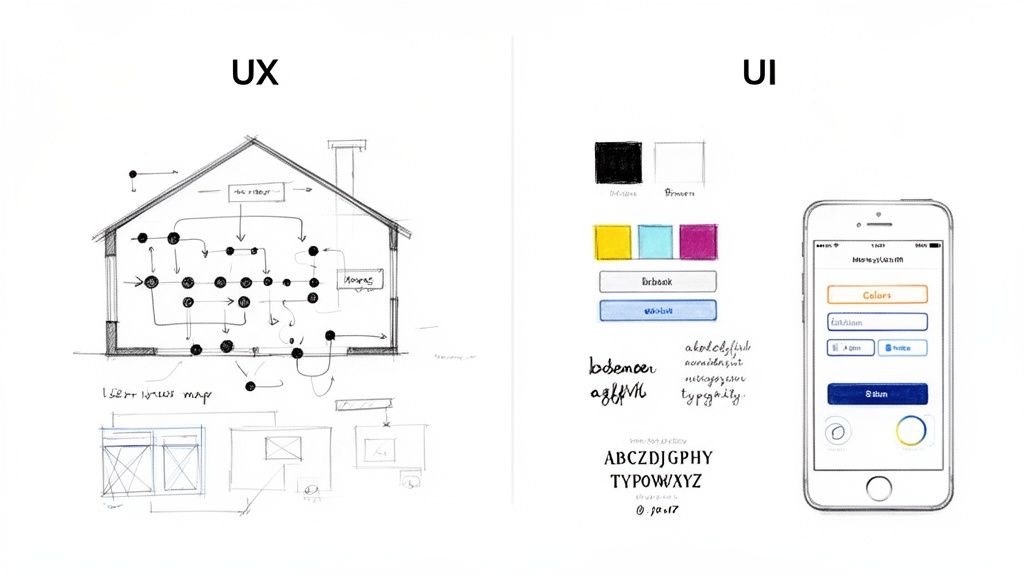
When people talk about UX vs. UI design, the simplest way to get your head around it is with a classic analogy.
Think of building a house. User Experience (UX) design is the architectural blueprint. It’s all about the fundamental structure—how you move from the kitchen to the living room, where the light switches are, and whether the layout feels natural and easy to live in. It’s the feeling of the house.
User Interface (UI) design, on the other hand, is the interior decoration. It's the paint colours, the style of the furniture, the doorknobs, and the light fixtures. It’s what brings that blueprint to life and gives the house its specific aesthetic and personality.
Demystifying UX and UI Design
While the terms are often lumped together, UX and UI are two very different disciplines. They're two sides of the same coin, and you can't have one without the other if you want to build a successful digital product. A beautiful app that’s confusing to navigate is just as doomed as a logical app that looks like it was designed in 1999.
The real difference comes down to their primary focus. UX design is a human-first process obsessed with the entire journey a person takes with a product. It’s constantly asking, "How does this feel to use?"
The Foundation of User Experience
To figure that out, UX designers dive deep into the underlying logic and structure of a digital product. It all starts with a thorough audience analysis to genuinely understand who the users are and what they actually need. It’s a research-heavy field that involves:
User Research: Conducting interviews, running surveys, and observing people to uncover their behaviours, frustrations, and goals. Practical Recommendation: Use platforms like Uxia to create user personas based on your research findings; this helps keep the entire team aligned on who they are building for.
Wireframing and Prototyping: Sketching out low-fidelity "skeletons" of the product. This helps map out user flows and test functionality long before any visual design work begins.
Information Architecture: Organising and structuring all the content so it’s intuitive and easy for people to find what they're looking for.
The Art of the User Interface
UI design, then, is what brings that UX strategy to life visually. It’s all about the look and feel—the specific buttons, menus, and screens a user actually touches and sees. It answers the question, "What does this look like?" UI designers are the ones responsible for translating a brand's identity into a tangible, interactive interface.
This shift toward putting the user at the centre of everything isn't just a trend; it's a massive market driver. Here in Spain, for instance, the UI/UX design market is set to explode with a projected CAGR of 32.7% from 2025 to 2032. That's a clear signal of just how much business value it creates.
To dig deeper into this, check out our guide on the fundamental differences between UX and UI. https://www.uxia.app/blog/ux-vs-ui
Defining the Core Responsibilities of Each Role
While the architect and interior designer analogy is a great starting point, the real clarity comes from looking at the day-to-day tasks. That's where the distinction between UX design and UI design truly comes to life. Their responsibilities are complementary, sure, but they demand completely different skills and mindsets.
At their heart, a UX designer is the user's advocate. Their entire job is grounded in research, analysis, and strategy, all focused on a single question: "How do we make this product easy, intuitive, and enjoyable to use?" It’s about stepping into the user’s shoes long before a single pixel gets a colour.
The World of the UX Designer
The UX design process is deeply analytical and human-centred. Think of a UX designer as a problem-solver who maps out the product's entire logic and flow purely from the user's point of view. Their goal is simple: find and eliminate friction to create a seamless journey.
This involves tasks like:
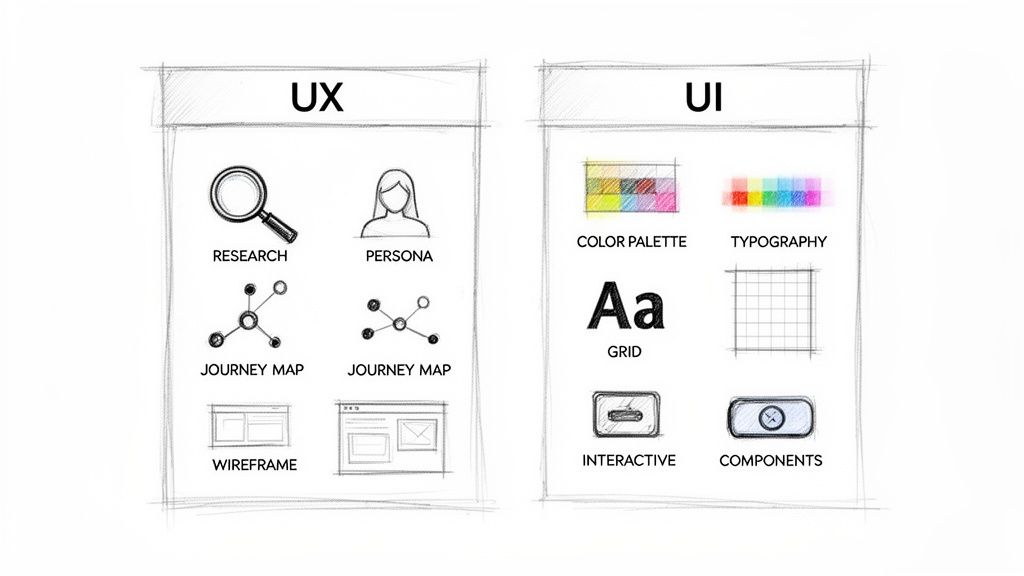
User Research: They’re out in the wild, running interviews, surveys, and usability studies to understand what users actually need and where they struggle. This work is the foundation for everything else.
Creating Personas: They build detailed profiles of target users. These aren't just generic descriptions; they're fictional characters that help the whole team remember who they're building for.
Mapping User Journeys: This means visualising the entire step-by-step path a user takes to get something done. It's a powerful way to spot roadblocks and find moments to make the experience better.
Building Wireframes: They create low-fidelity, structural blueprints of the product. These are like skeletons—they focus only on layout, information structure, and function, completely ignoring any visual flair.
Practical Recommendation: Validate your wireframes early and often. Using a platform like Uxia, you can run those low-fidelity designs through synthetic user testing. You'll catch logical flaws and navigation problems in minutes, saving the team countless hours before a UI designer even gets involved.
The Craft of the UI Designer
So, if the UX designer builds the skeleton, the UI designer adds the skin, the clothes, and the personality. A UI designer’s world is all about the visual and the interactive. They’re tasked with translating the product's structure and brand into an interface that not only looks good but feels good to use.
Their work ensures that every interaction a user has with the device is clear, efficient, and even a little bit delightful. They are masters of visual communication, creating a consistent and engaging look and feel.
This includes focusing on things like:
Visual Identity: They take the branding guidelines—logos, colour palettes, imagery—and apply them consistently to create a cohesive product appearance.
Typography and Colour Theory: They choose fonts and colours that don’t just look nice, but actively improve readability, evoke the right feelings, and guide the user's eye.
Interactive Design Systems: They build a library of reusable components like buttons, icons, and forms. This is huge for keeping things visually consistent and helps developers work much faster.
High-Fidelity Mockups: This is where it all comes together. They create detailed, pixel-perfect visuals of the final product, showing exactly how every screen will look and feel.
To make these different-but-connected roles even clearer, let's break down their main responsibilities side-by-side.
UX Designer vs UI Designer Key Responsibilities
This table gives a straightforward comparison of what each designer focuses on during the product development lifecycle. Think of it as a cheat sheet for telling the two roles apart.
Responsibility | UX Designer (The Architect) | UI Designer (The Interior Designer) |
|---|---|---|
Primary Goal | To make the user's journey logical, intuitive, and frictionless. | To create a visually compelling, emotionally engaging, and interactive interface. |
Focus Area | The overall feel of the experience; problem-solving and user flow. | The specific look and feel of the product; aesthetics and interaction. |
Key Questions | "Does the user flow make sense?" "Can users easily find what they need?" | "Are the buttons clear and easy to tap?" "Is the colour scheme accessible?" |
Main Deliverables | User personas, journey maps, wireframes, and low-fidelity prototypes. | Style guides, design systems, high-fidelity mockups, and interactive prototypes. |
Core Skills | Research, analysis, information architecture, empathy, and strategic thinking. | Visual design, typography, colour theory, interaction design, and attention to detail. |
When it comes down to it, a great product needs both roles working in perfect harmony. The UX designer lays a solid foundation based on what real users need, and the UI designer builds a beautiful, functional, and engaging structure right on top of it.
How UX and UI Design Work Together
Great products are never built in a vacuum. The magic of exceptional UX and UI design isn't about their separate duties, but how they collaborate. Think of it as a relay race where the baton is passed back and forth, with each designer's work informing and improving the other's.
This partnership is a structured dance, not a chaotic mess. It all starts with the UX designer laying the strategic groundwork. After digging into user research, they sketch out the low-fidelity wireframes—that architectural blueprint we talked about earlier. This blueprint is pure function, mapping out user journeys and where elements go, long before any visual flair is added.
This first step is non-negotiable. It provides the logical foundation for the UI designer. Without it, a UI designer is basically decorating a room without knowing where the doors or windows are.
The Handoff from Blueprint to Visual Design
Once the UX wireframes have been tweaked and validated, the first big handoff happens. The UI designer takes this structural skeleton and starts to layer on the visual skin. This is the moment a product begins to get its personality.
Let’s use a real-world example: designing a new food delivery app. The UX designer's research shows that users are often in a rush and just want to reorder their favourite meal quickly. Based on that insight, their wireframe includes a big "Reorder Last Meal" button right on the home screen.
The UI designer then takes that structural decision and starts asking questions:
What colour should this button be? It needs to match the brand palette but also have enough contrast to grab your attention.
What font should it use? The text has to be clear and easy to read, conveying a sense of speed and convenience.
What should it do when you tap it? It needs to give instant feedback—a subtle shadow or a quick colour change—to confirm the action.
This seamless transition ensures every visual choice the UI designer makes is directly connected to a user need the UX designer uncovered.
Fostering a Continuous Feedback Loop
The collaboration doesn’t just end after that first handoff. It morphs into a continuous feedback loop, which is what separates good products from great ones. Modern design tools like Figma are built for exactly this, letting both designers work in the same file, drop comments, and iterate in real-time.
As the UI designer builds out the high-fidelity mockups, they might spot an issue. Maybe the UX designer’s layout feels cramped once real images and text are added. That "Reorder" button might now clash with a new promotional banner. They can flag it, and together, they can adjust the layout to balance both business goals and user needs.
Practical Recommendation: This back-and-forth is where the real magic happens. For teams wanting to speed this up, integrating early validation is a game-changer. A practical tip is to use a platform like Uxia to test both low-fidelity wireframes and high-fidelity mockups. Getting instant feedback from synthetic users at each stage makes sure the UX logic and the UI aesthetics are actually working for the target audience, which saves you from costly fixes down the line.
From Static Mockups to Interactive Prototypes
The final stage of the collaboration is bringing all those static designs to life. The UI designer links the high-fidelity mockups together to create an interactive prototype. This lets the whole team click through the app just like a real user would, feeling the flow and interactions firsthand.
This prototype is the ultimate test of their combined work. Does the user journey feel as effortless as the UX designer planned? And does the visual interface guide the user as effectively as the UI designer crafted it to?
By working in tandem, UX and UI designers ensure the final product is more than just the sum of its parts. It becomes a unified experience where logic and beauty are so tightly woven together that the user doesn’t even notice them—they just know it works perfectly.
The Design Process from Idea to Prototype
Turning a great idea into a tangible product is a structured journey, not just a flash of inspiration. This process gives both UX and UI design teams a clear roadmap, guiding them from a vague concept all the way to a functional prototype.
Let's walk through this journey with a real-world example: a new fitness tracking app. We'll see how each stage builds on the last.
The entire workflow is a deliberate cycle of understanding, creating, and validating. It begins with empathy for the user and ends with a testable product, making sure every design choice is backed by user needs and business goals. Throughout this process, strong project management collaboration is the glue that keeps creative teams aligned and the project on track.
Stage 1: Empathise and Define
The first step isn’t about pixels or colours; it's about people. Before a single screen is designed for our fitness app, the UX designer’s job is to deeply understand the potential users. This means conducting interviews, sending out surveys, and digging into competitor apps to find user pain points and motivations.
From this research, two critical documents emerge: user personas and a problem statement. A persona might be "Busy Beatrice," a 35-year-old professional who needs quick, efficient workouts. The problem statement could be, "Busy Beatrice needs a way to fit effective exercise into her unpredictable schedule because she lacks time for the gym."
This clarity becomes the foundation for everything that follows. If you need a hand building robust user profiles, it's worth checking out a solid user persona template to guide your process.
Stage 2: Ideate and Structure
With a clear problem to solve, the team can finally start brainstorming solutions. In this ideation phase, UX designers might map out a user journey to visualise Beatrice's entire interaction with the app, from the moment she downloads it to when she completes her first workout. This map helps pinpoint potential moments of friction or delight.
Next up, the UX designer creates wireframes. Think of these as the basic architectural blueprints of the app—no colour, no style, just pure structure. They are simple sketches that focus on layout, information hierarchy, and functionality. The only goal here is to create a logical and intuitive user flow.
Practical Recommendation: Test your wireframes before they ever reach a UI designer. Using a platform like Uxia, you can upload these simple sketches and run synthetic user tests. This lets you validate the core logic and navigation of your app in minutes, catching fundamental flaws when they are easiest and cheapest to fix.
Stage 3: Design and Prototype
Once the wireframes are validated, the UI designer takes the baton. This is where the app's skeleton gets its skin. The UI designer translates the brand's style guide—colours, typography, and logos—into a cohesive and attractive interface.
They create high-fidelity mockups, which are pixel-perfect static images of exactly what each screen will look like. This is a critical handoff point in the process.
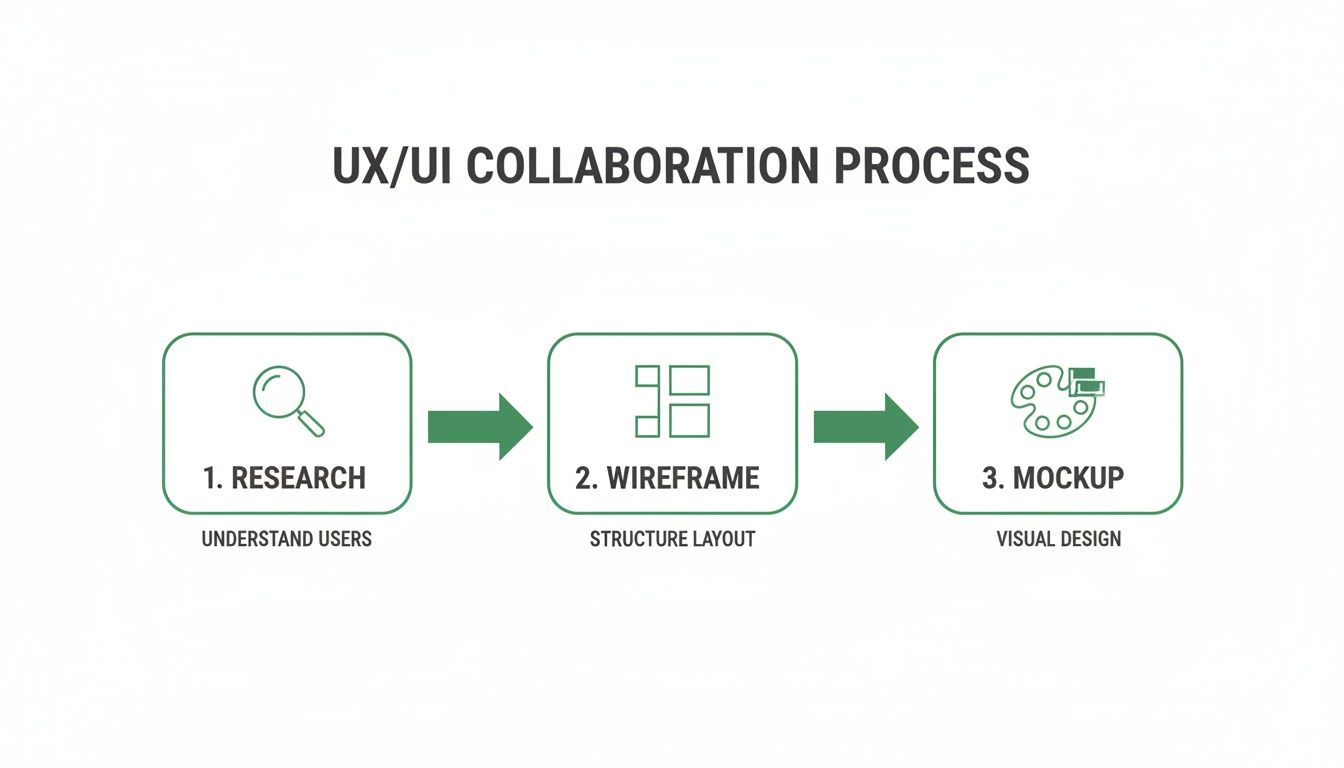
The flowchart above shows how research informs the wireframes, which then guide the creation of polished mockups. Each stage is an essential input for the next, ensuring a smooth transition from strategy to execution.
Finally, these static mockups are linked together to create an interactive prototype. It's not a fully coded app, but a clickable model that simulates the user experience. This allows stakeholders and testers to navigate the app, tap buttons, and get a genuine feel for the final product's flow.
Stage 4: Test and Iterate
The final stage is all about validation. The interactive prototype is put in front of users (or synthetic testers) to see if the design actually works in the real world. Can users like Beatrice easily find and start a workout? Is the interface clear and motivating?
The feedback gathered here is gold. It will almost certainly reveal issues that were impossible to predict, from confusing icons to awkward navigation flows. This feedback doesn't signal failure; it's an opportunity to improve.
The design team takes these insights and iterates on the prototype, refining the UX and UI until the product is intuitive, effective, and ready for development. This cycle of building, testing, and learning is the true heartbeat of successful product design.
Validating Your Designs with User Testing
A beautiful design that no one can figure out how to use is a failure. Simple as that. This is where user testing comes in—it’s the non-negotiable step that ensures your carefully crafted UX and UI actually work for real people. It’s how you stop guessing and start knowing.
Without testing, you're essentially flying blind, just hoping your design instincts line up with your users' reality. The whole point of validation is to get both qualitative and quantitative feedback to find and fix those friction points before they cost you users and, ultimately, revenue.
The process is pretty straightforward: you watch real people interact with your product. You see where they succeed and, more importantly, where they get stuck. It’s about measuring how well your design actually meets their expectations.
Choosing Your Validation Method
There are plenty of ways to validate a design, and each one gives you a different kind of insight. Traditional methods, like moderated usability studies, involve a researcher guiding someone through tasks. This is fantastic for getting deep, qualitative feedback because you can ask follow-up questions and understand the "why" behind their actions.
On the other hand, you have unmoderated studies. These let users complete tasks on their own, which often gives you a glimpse into more natural behaviour. These tests are faster, can reach more people, and deliver hard quantitative data like completion rates and time on task. The trick is picking the method that fits your project's stage, budget, and timeline.
Here are a few common approaches:
A/B Testing: This is a head-to-head comparison. You pit two versions of a design (A and B) against each other to see which one performs better on a specific metric, like conversion rate. It's highly quantitative and great for making decisive calls on specific elements.
Surveys and Questionnaires: Perfect for when you need to gather feedback from a lot of people at once. They're ideal for collecting quantitative data and subjective opinions on things like user satisfaction.
Heatmaps and Click Tracking: These tools create a visual map of where users click, move their mouse, and scroll. It’s a fantastic way to see which parts of your interface are getting attention and which are being ignored or causing confusion.
Accelerating Validation with Modern Solutions
Traditional user testing is invaluable, but let’s be honest—it has its problems. Finding the right participants can be painfully slow and expensive. Just scheduling the sessions can throw a wrench in a fast-moving design sprint. This friction is a big reason why so many teams end up skipping testing, which is a massive risk.
Practical Recommendation: Modern solutions are changing this game entirely. A practical recommendation is to integrate AI-driven analysis into your workflow. Platforms like Uxia use synthetic testers to give you instant, unbiased feedback on your designs, completely cutting out the time and cost of recruiting humans.
This approach lets you validate your work constantly. You can upload a design, define a task for a specific user profile, and get actionable insights back in minutes, not weeks. It makes it totally feasible to test every single iteration, from rough wireframes to polished prototypes, ensuring both the UX foundation and the final UI are solid. You can learn more about how to approach this in our guide to user interface design testing.
The Business Case for Consistent Testing
Investing in user testing isn't just a design "nice-to-have"; it's a smart business move. When you catch usability problems early, you save yourself from expensive development rework down the line. And the focus on user experience is only growing—with a major economic impact.
For instance, Spain's UX market is forecasted to hit USD 153.78 million with a strong 14.6% CAGR. This shows just how seriously teams in the ES region are taking user experience, mirroring Europe's wider 15.5% UX growth from a 2024 base of USD 6251.2 million. You can dig into this trend and read the full research on the European UX market.
By embracing modern validation methods, your team can move faster, cut down on the bias you sometimes get from professional testers, and build products with the confidence that they’re not just beautiful, but genuinely usable. This proactive approach ensures your final product actually meets user needs and stands out in a crowded market.
Wrapping It Up: Building Products People Actually Love
When it comes down to it, the whole UX vs. UI debate pretty much disappears. It melts into a single, powerful partnership. You simply can't have an amazing digital product with just one of them. The best apps and websites are born from that perfect blend of understanding what people need (that’s UX) and giving them a beautiful, intuitive way to get it (that’s UI).
Think about it. A perfectly logical user journey with a clunky, confusing interface is a dead end. So is a gorgeous design that’s built on a shaky, illogical foundation. One just can't work without the other. They have to be in sync.
This collaborative spirit needs to be the beating heart of your product team. The journey from a scribbled wireframe to a pixel-perfect mockup isn’t a relay race with clumsy handoffs. It's a constant conversation. Building this culture of tight-knit collaboration and non-stop, user-focused checks is what really separates the winners from everyone else.
So, Where Do You Go From Here?
To build something people genuinely love, your team needs to weave these two disciplines together and make validation a reflex, not an afterthought. This means you have to stop guessing and start embedding real user feedback into every single step.
Practical Recommendation: The most successful teams don't wait until the finish line to see if their ideas work. They test constantly. They make sure every decision is backed by what users actually think and do. This is exactly what platforms like Uxia were built for, letting teams get instant feedback from synthetic users. It takes all the friction out of testing, so you can move faster and be a whole lot more confident in your choices.
By bringing together the strategic brain of UX with the artistic hand of UI—and then backing it all up with relentless validation—you set your team up not just to compete, but to create things that truly click with people. This is how you build products that don't just work well, but feel like they were made just for your users.
Frequently Asked Questions
When you're trying to wrap your head around UX and UI design, a lot of questions come up. Let's tackle some of the most common ones with clear, practical answers to help you see how these critical roles really work.
Can One Person Do Both UX and UI Design?
Yes, absolutely. You’ll often see this hybrid role called a "Product Designer" or just "UX/UI Designer". This is especially true in smaller companies or startups where people need to wear multiple hats to get a product moving.
It's important to remember, though, that the mindsets are different. UX is analytical, focusing on research and user psychology. UI is creative, all about visual craft and aesthetics. While one person can definitely handle both, bigger teams usually bring in specialists. That way, you have deep expertise making sure both the product's logic and its look are world-class.
What Are the Most Important Tools for UX and UI Designers?
Designers have a whole toolkit to bring ideas to life, and the specific tools they use often depend on what stage of the process they’re in.
For UX Designers: You'll see them using tools like Miro for mapping out ideas collaboratively, Balsamiq for creating quick, low-fidelity wireframes, and various platforms for user research.
For UI Designers: The industry standards are Figma, Sketch, and Adobe XD. These are the powerhouses for creating pixel-perfect mockups, interactive prototypes, and entire design systems.
For Design Validation: This is where things are getting really interesting. A great example is a tool like Uxia, which lets teams test their designs with AI-powered synthetic users. This massively speeds up the feedback loop, which is a game-changer for both UX and UI.
How Do I Start a Career in UX or UI Design?
Breaking into either field comes down to a mix of learning, practice, and showing your work. A great starting point is mastering the fundamentals through online courses from solid sources like Coursera or the Interaction Design Foundation.
Then, you need to apply what you’ve learned. Start by redesigning an app you use every day or creating a personal project from scratch. The real goal is to build a strong portfolio that doesn’t just show pretty final screens. It needs to tell the story of your process—from research and problem-solving all the way to the final mockups. Don't forget to network on professional platforms and get involved in industry events; it’s a huge part of finding opportunities.
How Is AI Impacting UX and UI Design?
AI isn't here to replace designers. Think of it more like a powerful assistant. It can automate tedious tasks, spark creative ideas for layouts and colour palettes, and even analyse huge amounts of user data to spot patterns we might miss.
Practical Recommendation: But the biggest shift is how AI is changing design validation. User testing used to be a huge bottleneck—slow, expensive, and a logistical headache. Now, it’s being supercharged. Platforms like Uxia use AI to simulate realistic user behaviour, giving you instant, scalable feedback on your designs. This means teams can iterate with much more confidence and build user-centred products way faster than ever before.
Ready to validate your designs with the speed and scale of AI? With Uxia, you can get actionable feedback from synthetic users in minutes, not weeks. Discover how Uxia can transform your design workflow and help you build products your users will love.