UX vs UI: A Practical Guide to Design Roles and Processes
Struggling with UX vs UI? This guide clarifies the key differences, roles, skills, and tools with real-world examples and shows how they work together.
Let's be clear about one thing from the start: User Experience (UX) is the entire journey a person takes with a product, while User Interface (UI) is what they see and touch along the way.
UX is all about the feeling—the logic, the flow, and whether the experience makes sense. UI is about the look—the buttons, the colours, and the typography that bring that experience to life. They aren't the same thing, but they absolutely depend on each other. A practical recommendation for any team is to ensure both disciplines communicate from day one to avoid costly rework later.
Defining the Foundation: UX vs UI
Confusing User Experience (UX) and User Interface (UI) is a common mistake, but it's one that can tank a product before it even gets off the ground. They are two separate crafts that have to be perfectly in sync.
Think of it like building a house. UX is the architect's blueprint. It defines the foundation, the layout of the rooms, and how you move from the kitchen to the living room without bumping into walls. It’s the logic that makes a house liveable.
UI, on the other hand, is the interior designer. They choose the paint colours, the furniture, the light fittings, and the textures. It's all the aesthetic and tangible elements that make the house feel like a home.
A product with a solid UX but a terrible UI might work, but it will feel dated, clunky, and just plain unappealing. The reverse is even worse. A stunningly beautiful UI built on a confusing UX will only lead to pure frustration. It’s a beautiful house with no doors—looks great, but you can't actually use it.
A Clear Analogy
If the house analogy doesn't click, try thinking about a restaurant:
UX Design: This is the entire experience. How easy was it to book a table? Did you find parking nearby? Was the host welcoming? Did the menu make sense? Was the service attentive? It's the complete journey from start to finish and how it all felt.
UI Design: This is the tangible presentation. It’s the graphic design of the menu, the style of the plates and cutlery, the ambient lighting, and the decor on the walls. It’s everything you physically see and interact with.
A great restaurant needs a well-managed kitchen and a welcoming dining room. Likewise, a great digital product needs both thoughtful UX and a polished UI. Nailing this synergy is what separates good products from great ones. This is where tools like our own platform, Uxia, come in, helping teams quickly validate both the user flow (UX) and the visual design (UI) with AI-powered synthetic testers before a single line of code is written.
A User Interface is like a joke. If you have to explain it, it’s not that good.
UX vs UI At a Glance
Still a bit fuzzy? This table breaks it down to the fundamentals. It’s a quick cheat sheet for understanding their different goals, processes, and core questions.
Aspect | User Experience (UX) | User Interface (UI) |
|---|---|---|
Primary Focus | The overall feeling and journey a user has with a product. | The visual look, feel, and interactivity of a product. |
Core Goal | To make the product useful, usable, and enjoyable. | To make the product aesthetically pleasing and intuitive. |
Key Question | "Why are users interacting with this?" | "What will users interact with?" |
Process Nature | Strategic, analytical, and human-centred. | Creative, visual, and detail-oriented. |
Ultimately, UX makes a product functional and logical, while UI makes it beautiful and delightful. You need both to win.
Comparing the Roles and Daily Responsibilities
The clearest way to grasp the difference between UX and UI is to look at what each designer actually does all day. Their job titles sound similar, but their daily routines, core objectives, and the problems they solve are worlds apart.
A UX designer’s day is built on strategy and analysis. A UI designer’s day is all about creativity and execution.
This concept map breaks it down visually, showing the strategic focus of UX versus the aesthetic focus of UI.
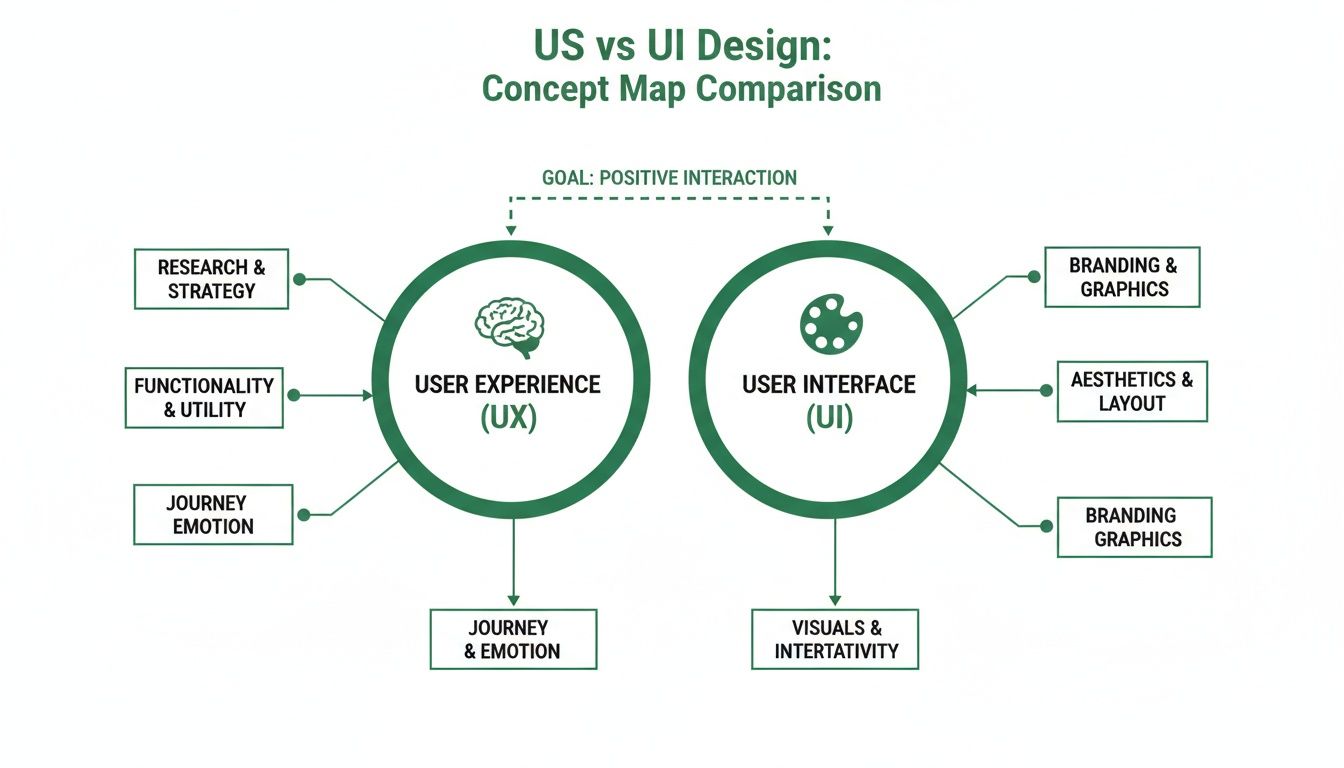
As you can see, both paths lead to a successful product. But UX is concerned with the invisible structure and the user's journey, while UI focuses on the tangible, interactive surface they see and touch.
A Day in the Life of a UX Designer
Think of the UX designer as a problem-solver and a fierce user advocate. Their entire mission is to make a product logical, efficient, and genuinely enjoyable to use. Their tasks are deeply analytical, all geared towards understanding human behaviour to shape the product's architecture.
A typical day for a UX designer is a mix of these responsibilities:
Conducting User Research: They spend a huge chunk of their time understanding the target audience. This means running interviews, sending out surveys, and observing users to pinpoint their needs and frustrations.
Developing User Personas: All that research gets funnelled into creating detailed profiles of fictional users. These personas represent key audience segments and ensure every design decision is user-centred.
Mapping Information Architecture (IA): This is all about organising and structuring content logically. The goal is to make it effortless for users to find what they need and navigate the product without thinking.
Creating Wireframes and Prototypes: They build low-fidelity, skeletal outlines of the product—the wireframes. These map out the user flow and basic layout long before any visual design comes into play. A practical recommendation is to test these early wireframes using a tool like Uxia to catch navigational flaws before any visual design work begins.
"The UX designer is the architect of the user's journey. Their job isn't to make things pretty; it's to make things make sense. A beautiful button that leads nowhere is a failure in user experience."
At the end of the day, their work is about removing friction. They are constantly asking, "How can we make this easier for the user?" This strategic groundwork is the foundation everything else is built on.
A Day in the Life of a UI Designer
If the UX designer builds the skeleton, the UI designer adds the skin and gives it a personality. A UI designer’s job is to bring the product’s visual identity to life, making sure it’s not only beautiful but also intuitive and true to the brand.
Their daily responsibilities centre on the product's look and feel:
Building Visual Design Systems: They create and manage a complete library of reusable components—from buttons and icons to colour palettes and typography rules. This ensures the entire product feels cohesive.
Crafting Pixel-Perfect Screen Layouts: They take the simple wireframes from the UX team and transform them into high-fidelity mockups, obsessing over visual hierarchy, spacing, and alignment.
Selecting Typography and Colour Palettes: These choices are critical. They establish the brand’s identity, forge emotional connections, and guarantee everything is readable and accessible.
Designing Interactive Elements: They define how elements like buttons, sliders, and menus behave when a user interacts with them. This often involves creating tiny animations that provide feedback and delight.
The Critical Connection
While the roles are distinct, their success is completely intertwined. The UI designer depends on the UX designer’s research and wireframes to make informed visual decisions. Likewise, the UX designer needs the UI designer to turn their strategic blueprints into a real, usable interface.
Constant communication is non-negotiable. Our practical recommendation is to schedule joint design critiques weekly. A UI designer can flag potential visual roadblocks in early wireframes, while a UX designer can offer crucial feedback on how a new UI component might affect usability.
This is where tools like our platform Uxia create a bridge. They allow both designers to test prototypes together, getting instant, actionable feedback on both the flow (UX) and the visual appeal (UI) from AI synthetic testers. This shared data closes the gap between their roles, ensuring the final product is both brilliantly engineered and beautifully crafted.
Mapping the UX and UI Design Workflow
To really get the difference between UX and UI, you just need to look at how a typical project unfolds. It’s not a chaotic jumble of tasks. Instead, it’s a structured, sequential process where UX lays the groundwork, and then UI brings that blueprint to life. This order of operations is what separates products that feel logical and lovable from those that don’t.
The journey always kicks off with the UX phase, which is all about strategy and research. This first stage is dedicated to understanding the user’s core problems and figuring out how they align with business goals. Think of it as the architectural phase, where the product's entire foundation is planned out before anyone even thinks about colours or fonts.
The Foundational UX Phase
A UX designer's work is heavily front-loaded. It’s all about abstract thinking and structural planning with one primary goal: create a seamless, logical path for the user. To do this right, you have to start with a solid grasp of essential user research methods, as this is what fuels all the foundational work.
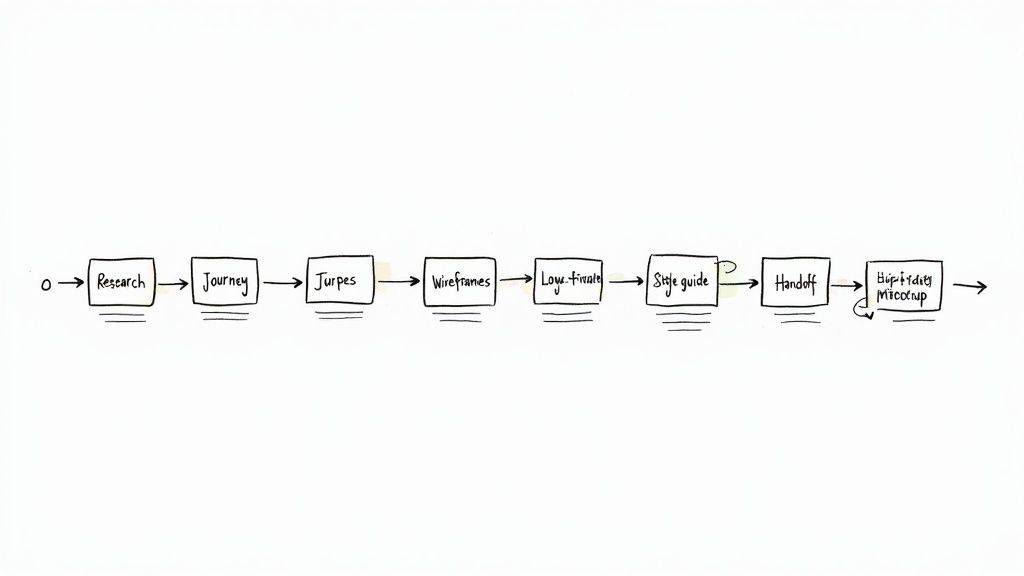
Key outputs from this phase look something like this:
User Personas and Journey Maps: These documents are critical for capturing who the users are and visualising their entire experience from their point of view, flagging pain points and opportunities along the way. Getting the voice of the customer right here is non-negotiable.
Information Architecture (IA): This is the blueprint for how content is organised. A good IA ensures users can find what they need intuitively without having to think too hard about it.
Wireframes: These are the bare-bones skeletal outlines of the product. They’re low-fidelity, black-and-white schematics that focus purely on layout and element placement, stripping away all distracting visual design.
Low-Fidelity Prototypes: From those wireframes, UX designers often build basic, clickable prototypes to test the core user flow and navigation. It’s all about validating the logic early.
This is where a tool like our platform Uxia becomes a game-changer. Instead of waiting days or weeks for human testers, a UX designer can upload their wireframes and get instant feedback on the user flow from AI synthetic users. The core structure can be validated in minutes.
The Visual UI Phase
Once the UX foundation is solid, approved, and validated, the baton gets passed to the UI designer. Their job is to take those structural blueprints—the wireframes and low-fi prototypes—and dress them in a visually engaging interface that aligns with the brand. This is where the abstract logic becomes a tangible, interactive product.
"Effective UI cannot fix a broken UX. A beautiful button that leads to a dead end is still a dead end."
The UI phase is where the product’s personality starts to shine through. The UI designer builds directly on the UX groundwork, focusing on aesthetics, interaction, and brand consistency. By this point, their deliverables are polished and ready for the development team.
Here’s what a UI designer typically produces:
High-Fidelity Mockups: These are pixel-perfect, static images of what the final product will look like. They include all the colours, typography, and imagery.
Comprehensive Style Guides: This is a document or, more commonly, a design system that outlines every visual element—colour palettes, font styles, button states, icon sets—to keep the look and feel consistent everywhere.
Interactive Prototypes: UI designers create high-fidelity prototypes that look and feel just like the final product. This allows stakeholders to experience animations, transitions, and all the little micro-interactions.
This sequential process—from UX strategy to UI execution—is designed to prevent headaches and costly rework down the line. A practical recommendation is to never skip the UX validation step. By solving the big structural problems first using a tool like Uxia, teams ensure the final polished design is built on a solid, user-centred foundation. The end result is a product that’s not just beautiful, but one that actually works.
Essential Skills and Tools for Modern Designers
Knowing the theory behind UX and UI is a good start, but a successful career is built on mastering the specific skills and tools that bring those theories to life. While creativity and problem-solving are common ground, the day-to-day competencies for each role are surprisingly distinct.
UX professionals live in the world of strategy and human psychology. Their toolkit is all about analysis and empathy, not visual polish. UI professionals, on the other hand, are masters of visual craft and aesthetic execution. Their success hinges on a sharp eye for detail and fluency in creative software.
Core Competencies for a UX Designer
A UX designer is, first and foremost, the user's advocate. This role demands a special blend of soft skills and analytical thinking to translate messy human needs into a logical product structure. Empathy isn't just a buzzword here—it's the core skill that unlocks a true understanding of user motivations and pain points.
Beyond empathy, their key skills include:
Strategic Thinking: They have to connect what users need with what the business wants to achieve, making sure the final product is both usable and viable.
User Research and Analysis: This means running interviews, surveys, and usability tests, then digging through the data to pull out actionable insights.
Information Architecture: A critical skill for organising complex information in a way that feels simple and intuitive for the user to navigate.
Wireframing and Prototyping: They need to be good at creating low-fidelity blueprints to map out user flows and test foundational concepts early on.
This analytical mindset is what builds a solid product foundation. You can explore how top-tier research from organisations like Nielsen Norman Group can lead to 98% usability issue detection, which really drives home the value of a data-backed process.
Essential Skills for a UI Designer
If the UX designer architects the journey, the UI designer crafts the vehicle. Their skills are all about creating an interface that's visually compelling, intuitive to use, and perfectly aligned with the brand. This role requires a deep understanding of aesthetics and how visual cues can guide interaction and spark emotion.
Their core competencies are rooted in classic visual design principles:
Visual Hierarchy and Layout: Using size, colour, and placement to deliberately guide the user’s eye to the most important parts of the screen.
Colour Theory: Applying colour not just for branding, but to signal actions, communicate meaning, and ensure the design is accessible to everyone.
Typography: Choosing and pairing fonts to create a reading experience that is legible, beautiful, and on-brand.
Interaction Design: Defining how elements react to user input, often through small animations and transitions that make the interface feel responsive and alive.
A UI designer's success is measured by how invisible their work feels. When an interface is intuitive and effortless, it’s because every visual decision was made with purpose.
The Modern Designer's Toolkit
The choice of software usually tells you a lot about the role's main focus. The market for these tools is growing fast—in fact, the UI/UX design tools market in Europe is expanding at 10-14% annually. By 2025, Europe's slice of the pie is expected to be around USD 0.8-1.2 billion, with prototyping tools leading the charge in the enterprise space.
This growth fuels a healthy competition among powerful software platforms. Tools like our platform Uxia sit alongside these core design tools, offering a rapid validation layer. A practical recommendation for any design team is to integrate a validation tool like Uxia into their workflow to get instant feedback on their work from AI synthetic users, cutting down on lengthy review cycles.
The table below breaks down the common skills and go-to tools for each discipline.
Core Competencies: UX Designer vs. UI Designer
This table offers a snapshot of the essential skills and common software tools that define the UX and UI design roles. It highlights how their responsibilities translate into different areas of expertise and day-to-day software choices.
Competency Area | UX Designer | UI Designer |
|---|---|---|
Primary Skills | Empathy, Research, Analysis, Strategy | Visual Design, Colour Theory, Typography, Creativity |
Core Deliverables | User Personas, Journey Maps, Wireframes, User Flows | Mockups, Style Guides, Design Systems, Prototypes |
Popular Tools | ||
Validation Focus | "Is the flow logical and easy to navigate?" | "Is the interface visually appealing and intuitive?" |
Ultimately, understanding this distinction helps aspiring designers choose a path that aligns with their strengths and passions, while also helping teams build more effective and well-rounded product groups.
How UX and UI Work Together for Product Success
The whole "UX vs UI" debate sets the two up as rivals. In reality, they're partners. A product's success depends entirely on how well they collaborate.
The most brilliant UX strategy is useless if it's delivered through a clumsy, untrustworthy interface. On the flip side, a beautiful UI built on a confusing user journey just makes users frustrated faster.
Exceptional products are born from synergy, not silos. Think of a high-performance sports car. The UX designer is the engineer, obsessing over aerodynamics, weight distribution, and handling—how the car feels to drive. The UI designer is the artist, choosing the sleek body lines, the premium interior materials, and the intuitive dashboard layout—what the driver sees and touches. Neither gets very far without the other.
This partnership is what merges analytical insight with creative execution. It ensures the final product is not just usable but actually desirable. A smooth handoff from wireframe to mockup is the bare minimum. True collaboration means constant conversation and shared validation from start to finish.
Bridging the Gap with Data-Driven Tools
Historically, the validation process was a major point of friction between UX and UI teams. UX would run lengthy user studies to check flows, while UI relied on subjective feedback or separate A/B tests to validate aesthetics. This created silos and dragged projects to a crawl.
Modern tools are changing this by creating a shared source of truth. This is where platforms like our own, Uxia, become so valuable. Uxia’s AI-driven synthetic user testing gives both UX and UI designers rapid, data-backed feedback on their work, often at the same time.
For example, a UX designer can upload a wireframe to test if the navigation is clear. A UI designer can upload a high-fidelity mockup to check visual appeal and trust signals. Both get qualitative insights in minutes, which fuels a much more integrated and efficient process.
The best design teams don't have a "handoff" from UX to UI. They have a continuous conversation, where structural logic and visual language evolve together, guided by constant user feedback.
This collaborative approach is more critical than ever. In Europe, the User Experience (UX) market was valued at USD 1,875.36 million in 2024 and is projected to grow at a compound annual growth rate (CAGR) of 15.5% through 2031. This intense focus shows the region's commitment to digital quality, making efficient collaboration a massive competitive advantage.
Building a Collaborative Culture
Tools are one thing, but you also need to build a culture of collaboration. This means intentionally breaking down departmental walls and encouraging everyone to feel ownership over the entire user experience.
Here are a few practical recommendations to improve synergy:
Integrated Kick-Off Meetings: Get both UX and UI designers in the room from day one. This helps UI designers understand the strategic 'why' behind UX decisions right from the start.
Shared Design Critiques: Hold regular critique sessions where both disciplines present work and give feedback. A UI designer might spot an aesthetic issue in a wireframe that could cause problems later, while a UX designer can offer usability context for a specific UI choice.
Joint Testing Sessions: Use a tool like our platform, Uxia, to run tests together. Reviewing AI-generated feedback on a prototype as a team gives everyone a unified understanding of what works and what doesn't, for both the flow and the interface.
Create a Unified Design System: A solid design system is a shared language. When UX logic and UI components are documented in one place, it guarantees consistency and keeps everyone aligned.
To stay competitive, modern designers also need to be aware of the key UX/UI innovations shaping the future of web design.
By putting these strategies into practice, teams can shift from a clunky, handoff-based workflow to a truly parallel and collaborative one. This doesn't just make for a happier team; it leads to products that feel cohesive, intuitive, and genuinely great to use.
Accelerating Design Validation with AI
Let's be honest: traditional design validation can be a serious drag on a project. You wait for user recruitment, schedule the tests, and then manually sift through hours of feedback. All that waiting stalls momentum and creates a huge gap between a design idea and a data-backed decision.
This is exactly where modern AI tools are changing the game for both UX and UI designers.
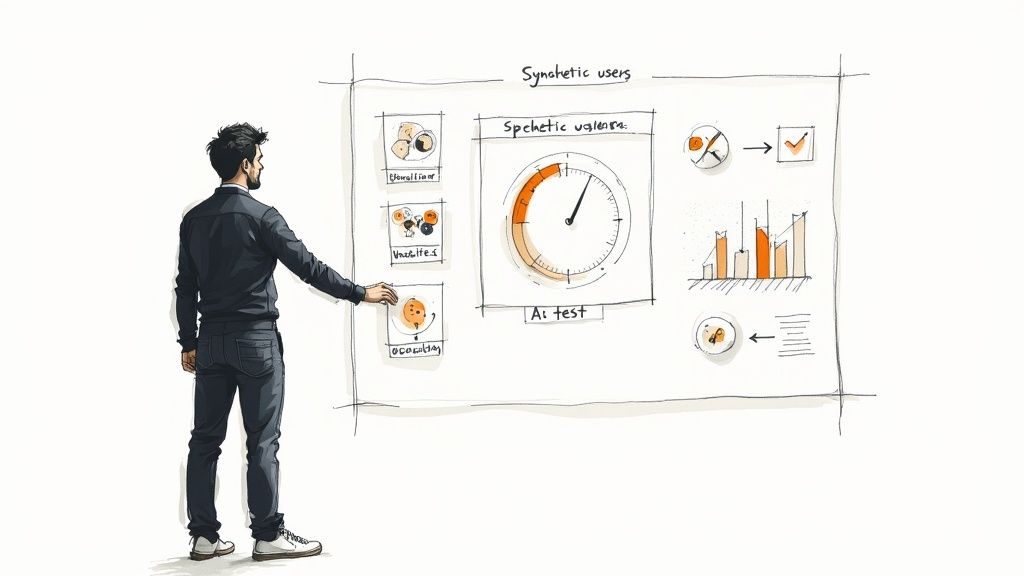
Platforms like our own Uxia swap out slow human studies for instant AI-powered testing. This gives designers—both UX and UI—the answers they need in hours, not weeks. Validation stops being a final gatekeeping step and becomes an iterative part of the daily design grind.
How AI Empowers UX Designers
For a UX designer, the mission is all about validating function and flow. Does the information architecture make sense? Can users get from A to B on a wireframe without hitting a wall? This is where Uxia’s synthetic users deliver a massive advantage.
A UX designer can upload a rough, low-fidelity prototype and get immediate answers on things like:
Navigation Clarity: Is it obvious where users need to go to get things done?
Information Scent: Can people easily sniff out the content they're looking for?
Task Completion Rates: Are there hidden roadblocks stopping users from reaching their goals?
Instead of waiting weeks to know if a core concept holds water, a UX designer gets solid, actionable insights almost instantly. This ensures the foundational structure is sound before a single pixel of visual design is even considered.
How AI Supports UI Designers
For UI designers, the focus shifts to visual effectiveness and intuition. They need to know which colours, components, and layouts resonate most with their target audience. Our platform Uxia makes it incredibly simple to run rapid A/B tests on different visual treatments.
By testing multiple design variations at the same time with AI, UI designers can get past subjective debates. A practical recommendation is to always test at least two visual directions to gather objective data, allowing you to make choices based on which design actually performs best for specific user personas.
This data-driven mindset is non-negotiable in a competitive market. Europe's UX services market is on track to hit USD 1.63 billion in 2025, with the UK leading the charge at USD 0.35 billion. This isn't just a trend; it's a signal that rapid, data-backed validation gives teams a real strategic edge.
A Practical Example of Collaborative AI Testing
The real magic happens when UX and UI goals are tested together. Imagine a fintech app team using our platform Uxia to test three different dashboard layouts.
The test quickly revealed that while one layout was visually preferred by the synthetic users (a clear win for UI), another layout had a 30% faster task completion rate (a huge win for UX).
Armed with this data, the team didn't have to pick one or the other. They combined the visual appeal of the first design with the functional efficiency of the second, creating a hybrid solution that was better than any of the originals. It’s a perfect example of how AI serves as a strategic asset for collaborative, data-driven design.
Frequently Asked Questions About UX and UI
Even after you get the theory down, a few practical questions always pop up. Let's tackle the common ones to help you navigate your career, hiring, or team structure.
Can One Person Do Both UX and UI?
Yes, absolutely. You'll often see this in startups or smaller companies where a "UX/UI Designer" is expected to handle the entire spectrum. It’s a common way to start.
But as designers get more senior, they almost always specialise. A practical recommendation for career growth is to eventually focus on one area. Excelling at the deep, analytical thinking of UX while also mastering the pixel-perfect visual craft of UI is incredibly rare. While someone can do both, they are two very different mindsets.
Which Career Path Pays More on Average?
Both UX and UI design roles offer competitive salaries that depend heavily on your location, experience, and the company you work for. But if we're looking at averages, UX design roles have historically paid slightly more.
The reason comes down to business impact. UX is directly tied to core business strategy, user retention, and conversion rates. A sharp UX designer can prove how their work improved usability and satisfaction, which directly affects the bottom line—and that value often justifies a higher salary.
What Is the First Step to Learning UX or UI Design?
For anyone wanting to break into the field, the best first step is to pick the path that plays to your natural strengths.
For UX Design: If you're drawn to psychology, research, and solving complex problems, start there. A practical recommendation is to master user research methods and information architecture first, then get comfortable making simple wireframes. It's about structure and understanding people.
For UI Design: If you have an eye for aesthetics, start with visual principles. Our practical advice is to dive into the fundamentals of graphic design—things like colour theory, typography, and layout. Fire up a tool like Figma and start recreating interfaces you admire.
No matter which path you choose, the single most important step is building a portfolio. Whether you use real or speculative projects, this is what gets you hired. And this is where platforms like our own, Uxia, can give you a serious edge. You can test your early design concepts and show employers you know how to validate your work with data. You can learn more by comparing synthetic user testing vs human user testing and see how modern tools are speeding this process up.
Ready to accelerate your design validation and build products with confidence? With our platform, Uxia, you can get actionable feedback from AI synthetic testers in minutes, not weeks. Start testing your designs today.