A Complete Guide to Modern User Testing
Discover how user testing transforms product design. This guide covers methods, tools, and best practices to create products your users will actually love.
Ever watched a chef test a new recipe? They don't just ask if you like it. They watch your every move. The slight hesitation before the first bite, the flicker of confusion in your eyes—that's where the real feedback lies.
That’s the essence of user testing. It’s about putting your product in front of real people and simply observing them as they try to accomplish a goal. With a modern platform like Uxia, you can get these deep insights in minutes, not weeks.
What Is User Testing and Why Does It Matter?
User testing isn't about giving your product a grade. It’s about uncovering the why behind what people do.
Analytics might tell you that 70% of users abandon their shopping carts. That’s a worrying number, but it doesn't tell you what to fix. User testing, on the other hand, shows you why they're leaving. You might see five different people struggle to find the "apply discount code" button before giving up in frustration. Suddenly, the problem isn't a mysterious drop-off; it's a clear design flaw with a straightforward solution.
This is where you move past guesswork and start making decisions based on solid evidence.
The Core Benefits of Observing Users
When you make observing users a regular part of your process, you start seeing some major wins across the board.
Reduce Development Waste: Finding a problem in the design phase is a simple fix. Finding it after the code is shipped? That’s a costly, time-consuming nightmare. User testing catches these issues early, saving you countless hours and resources. A practical recommendation is to run a quick test on Uxia with your wireframes before a single line of code is written.
Increase Conversion Rates: When you smooth out the friction in your signup form or checkout process, you make it easier for people to give you their business. It’s a direct line between a better user experience and better business results.
Build User-Centric Products: It’s easy to get caught up in internal debates and personal opinions. User testing cuts through the noise and forces you to focus on what your actual customers need and want.
User testing transforms subjective arguments into objective, evidence-based conversations. Instead of debating which button colour "looks better," you can see which one people actually click and understand why.
Of course, traditional user testing can be slow. Recruiting participants and scheduling sessions can take weeks. Modern platforms like Uxia are changing the game by using AI-powered synthetic users to give you that same deep feedback, but in minutes instead of weeks. It lets you get your product perfectly seasoned for the market without slowing everything down.
If you want a deeper look at the nuts and bolts, this guide on how to conduct usability testing is a great place to start.
Choosing The Right User Testing Method
User testing isn’t a one-size-fits-all deal. It’s more like a toolkit, and picking the right tool for the job is the first step to getting insights that actually matter. The best method for you hinges on where you are in your project, what you’re trying to learn, and the resources you have on hand.
A good way to start is by asking yourself a simple question: are you trying to understand why a problem is happening, or are you trying to figure out how many people it's affecting? Answering that one question is the key to unlocking the difference between qualitative and quantitative testing.
Qualitative vs Quantitative Testing
Qualitative user testing is all about the "why." You're not looking for big numbers here; instead, you're observing a small group of people in-depth to really get inside their heads. The goal is to collect the rich, detailed stories that reveal the human experience behind the clicks and taps. Think motivations, frustrations, and that all-important "aha!" moment.
On the flip side, quantitative user testing is obsessed with the "how many." This is where you bring in the larger sample sizes to gather hard, measurable data—things like task success rates or how long it takes someone to complete a task. It’s perfect for validating a hypothesis you already have or spotting trends at scale, giving you the statistical confidence to make big decisions.
Moderated vs Unmoderated Testing
Another crucial fork in the road is deciding whether your test needs a guide.
Moderated testing is like having a personal tour guide. A facilitator is right there with the participant—either in the same room or remotely—ready to ask follow-up questions, dig deeper into offhand comments, and gently steer them through the tasks. This real-time conversation is gold when you're exploring complex prototypes or diving into early, fuzzy concepts.
In contrast, unmoderated testing is like handing someone a map and letting them find their own way. Participants work through the tasks on their own time, usually while their screen and voice are being recorded. This approach gives you a much more natural, unfiltered view of user behaviour. It’s also way faster and easier to scale, making it a fantastic choice for validating specific user flows or getting quick feedback on straightforward usability questions.
This simple flowchart can help you decide when it's time to start testing your product idea.
The flowchart makes it clear: once you have a product idea, the next move is to test it, not just keep brainstorming in a bubble.
The real challenge has always been the trade-off. Do you choose the deep insights of a moderated study, which can take weeks to arrange, or the speed of an unmoderated test, which might lack context?
This is precisely the gap that platforms like Uxia are built to bridge. By using AI-powered synthetic users, Uxia gives you the speed and scale of unmoderated testing but with the rich, contextual insights you'd typically only get from a live, moderated session. If you want to dive deeper into this modern approach, check out our article comparing synthetic users vs human users.
Choosing Your User Testing Method
To make the decision a bit easier, here’s a quick comparison of the primary methods and where they shine. A practical recommendation is to use this table to match the right approach to your team's current needs.
Method | Best For | Primary Output | Uxia's Advantage |
|---|---|---|---|
Moderated Qualitative | Deeply understanding user motivations and complex workflows. | Rich, detailed feedback, direct quotes, and behavioural observations. | Provides deep qualitative insights without the time and cost of human moderation. |
Unmoderated Qualitative | Observing natural user behaviour in their own environment. | Video recordings of users "thinking aloud" as they complete tasks. | Instantly generates think-aloud transcripts and flags usability issues automatically. |
Unmoderated Quantitative | Benchmarking usability and measuring performance at scale. | Success rates, time on task, satisfaction scores, and click paths. | Delivers quantitative metrics and heatmaps from hundreds of tests in minutes. |
Ultimately, the right method isn't about what's trendy; it's about what will get you the clearest answers to your most pressing questions. Whether you're after deep stories or hard numbers, platforms like Uxia provide a testing approach that fits.
How to Weave User Testing into Your Workflow
Let's get one thing straight: user testing isn't a final exam you cram for just before a big launch. If you treat it like a single checkbox item, you're setting yourself up to discover painful, expensive problems way too late in the game.
The best product teams don’t just do user testing; they live and breathe it. They weave it into the very fabric of their development process, turning it into a continuous habit instead of a final hurdle.
This requires a mental shift—from "testing to validate" to "testing to learn." The goal isn't a simple pass or fail. It's about creating a constant stream of feedback that guides every decision, from the first napkin sketch to the hundredth post-launch tweak. By making testing a regular, lightweight activity, you build momentum and slash the risk of building something nobody wants or can use.
A Test for Every Season: Matching Method to Moment
Integrating testing doesn’t mean tacking weeks onto your timeline. It’s about being smart and applying the right kind of test at the right time to get the answers you need, fast.
Early Days (Concept & Discovery): Got a few wireframes? A simple sketch? Test it. The goal here isn’t to nitpick the visual design. It’s to check the fundamentals. Do people even get the core idea? Does the basic flow make sense? Catching a major conceptual flaw at this stage can save you hundreds of hours of coding down the line. A practical recommendation is to upload your sketches to a platform like Uxia for instant feedback.
The Messy Middle (Prototyping & Development): As your interactive prototypes come to life, your testing needs to get more specific. Now you’re zeroing in on usability and key user flows. Can someone actually sign up, create a project, or complete a purchase? This is where you smooth out all the rough edges in the experience.
After Launch (Optimisation & Iteration): Just because your product is live doesn't mean the testing stops. In fact, this is where it gets really powerful. You can test ideas for new features before you commit to building them, or watch how people interact with an existing part of your product that you want to improve.
This continuous loop of building, testing, and learning is what keeps you agile. In fast-moving markets, speed is everything.
Look at South America, for instance. The market for usability testing services there is set to explode, with a projected compound annual growth rate (CAGR) of 13.9% from 2024. That signals a massive shift toward user-centric design in a really dynamic part of the world. But here's the catch: traditional testing methods, with all the hassle of recruiting real people, often create logistical nightmares. Product teams who can't afford to wait weeks for insights get left behind. You can find out more about the booming South American usability testing market in this report.
Building a Culture of Non-Stop Feedback
Making this kind of workflow stick takes more than just a new process on a flowchart. It demands a genuine cultural shift, supported by the right tools.
The real challenge is making feedback so fast and accessible that there's no excuse not to test. When insights arrive in minutes instead of weeks, testing becomes an enabler of speed, not a bottleneck.
This is exactly where modern platforms like Uxia come in. For teams moving at top speed, Uxia cuts out all the friction of old-school testing. Forget spending days or weeks recruiting and scheduling sessions. You can get on-demand feedback from AI-powered synthetic users in a matter of minutes.
This makes it truly practical to run tests at every single stage, turning the ideal of a "continuous feedback loop" into your team's everyday reality.
Writing Test Scenarios That Reveal Real Insights
The quality of your user testing insights hinges entirely on the quality of your questions. If you ask vague, leading questions, you'll get vague, misleading answers. It’s that simple.
The secret to uncovering how people really behave is to frame your tests around realistic scenarios, not a checklist of instructions.
Think about it. Asking, "Can you find the search bar?" is a dead-end question. It’s a yes/no test of basic recognition, not a window into their thought process.
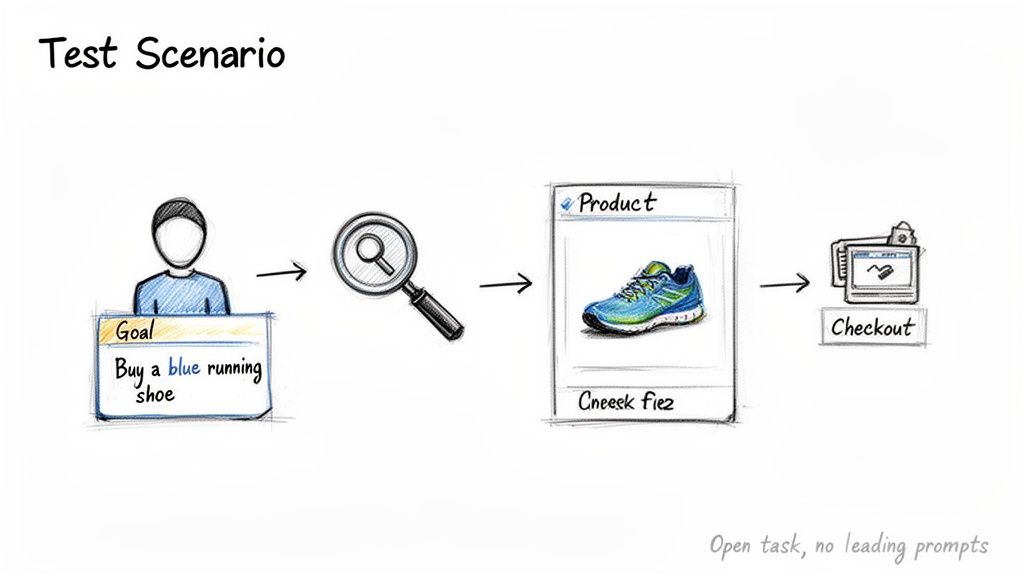
A much better approach is to create a scenario: "You’re looking for a pair of blue running shoes. Show me how you would find them." This tiny shift changes everything. Suddenly, you see their natural workflow, the exact words they type into the search bar, and the path they instinctively try to take.
This goal-oriented approach is the bedrock of good user testing. It shifts the focus from simply clicking on UI elements to understanding the entire, messy, human journey.
Crafting Scenarios That Work
A strong test scenario does three things: it sets a scene, provides a motivation, and defines a clear goal—all without giving the game away. You give the user just enough context to act naturally. The key is to resist the urge to prescribe the exact steps they should take.
Here are a few examples that show the difference between weak and strong tasks:
Weak Task: "Click on the 'Sign Up' button."
Strong Scenario: "You've decided you want to create an account to save your progress. How would you do that?"
Weak Task: "Go to the pricing page and select the Pro plan."
Strong Scenario: "Imagine your team has grown, and you need access to more advanced features. Find a plan that would suit your new needs."
A practical recommendation is to write your scenarios in a simple text document first, focusing on clarity before inputting them into your testing tool like Uxia. This way, you’re testing how intuitive your design is, not just how well someone can follow a to-do list.
The Anatomy of a Great Test Mission
Every scenario you build should have three core ingredients. Structuring your tasks this way gives the user total clarity and ensures you get actionable feedback on the specific workflow you’re trying to evaluate.
Context: Briefly describe the user's situation. (e.g., "You just received a new credit card in the mail and need to update your payment information.")
Motivation: Explain why they need to do it. (e.g., "...so your monthly subscription isn't interrupted.")
Goal: State the desired outcome. (e.g., "Show me how you would add your new card details and set it as your main payment method.")
By framing tasks as mini-stories, you encourage participants to think and act as they would in the real world. This transforms the test from a sterile lab experiment into a rich source of authentic behavioural insights.
This very principle is what platforms like Uxia are built on. Instead of just writing a list of steps, you create missions for AI-powered synthetic users. You can set a clear end goal, like completing a checkout or finishing an onboarding flow, and Uxia’s testers will navigate the path on their own.
It’s an automated way to gather that same authentic, goal-driven feedback, ensuring your insights are always tied to what users are actually trying to achieve.
Finding the Right Participants for Your Tests
Let’s be honest: the quality of your user testing is only as good as the quality of your participants. It’s the single most critical factor. If you're building a slick fintech app, testing it with people who aren't tech-savvy will give you feedback, but it won't uncover the nuanced friction your actual customers will hit.
For years, finding the right people has been the biggest bottleneck in user research. It's slow, painfully expensive, and a logistical nightmare.
The first step is always figuring out who you’re actually looking for. A practical recommendation is to define your target audience using specific behavioural and psychographic traits, not just demographics. Are you building for busy project managers who live and die by efficiency, or for casual users just dipping their toes into a new hobby? A crystal-clear audience profile ensures the feedback you get is relevant and genuinely actionable. Our guide to creating a user persona template is a great place to start structuring these profiles.
How Many Users Do You Really Need?
It’s the classic question: "How many people should I test with?" You’ve probably heard the famous rule of thumb that testing with just five users can uncover roughly 85% of usability problems. And for qualitative studies, that's a fantastic starting point. But the real answer depends on your goals. If you need hard quantitative data, you'll need a much bigger sample to get anything statistically significant.
The problem is, finding even five qualified participants can feel like a monumental task. The old-school process is a grind: post ads, screen endless applicants, schedule sessions, manage incentives, and then cross your fingers hoping people actually show up. This can easily burn through weeks of your time.
This recruitment headache is particularly acute in diverse markets. Take Europe, for example, which makes up about 30% of the global user testing software market. In a country like Spain, where digital adoption is booming, product managers are under huge pressure to validate user flows yesterday. But recruiting just 10-20 local participants can take two to four weeks and cost over €5,000—all while risking you end up with professional "testers" who don't represent your genuine users. You can read more about the European user research market share and its specific hurdles.
The real problem with traditional recruitment isn't just the time and cost; it's the opportunity cost. While you wait for participants, development stalls, and competitors move faster.
This is where a modern approach completely flips the script. Instead of wrestling with recruitment, platforms like Uxia get rid of the problem entirely. You can instantly generate AI-powered synthetic users that match your exact demographic and behavioural criteria. Need feedback from Spanish-speaking users in Madrid or tech-savvy millennials in Berlin? You can kick off your user testing in minutes, not weeks, saving an incredible amount of time and budget.
Turning User Feedback into Actionable Next Steps
Collecting feedback is just the start. Let's be honest, raw data—whether it's hours of video or a spreadsheet of metrics—isn't a plan. It’s just potential. The real magic happens when you turn all those observations into a clear, prioritised roadmap for what to fix next.
The whole point is to get from a mountain of messy data to a handful of crystal-clear insights. Without a solid process for analysis, it's far too easy to get bogged down in one-off comments and completely miss the big picture.
From Raw Notes to Recurring Themes
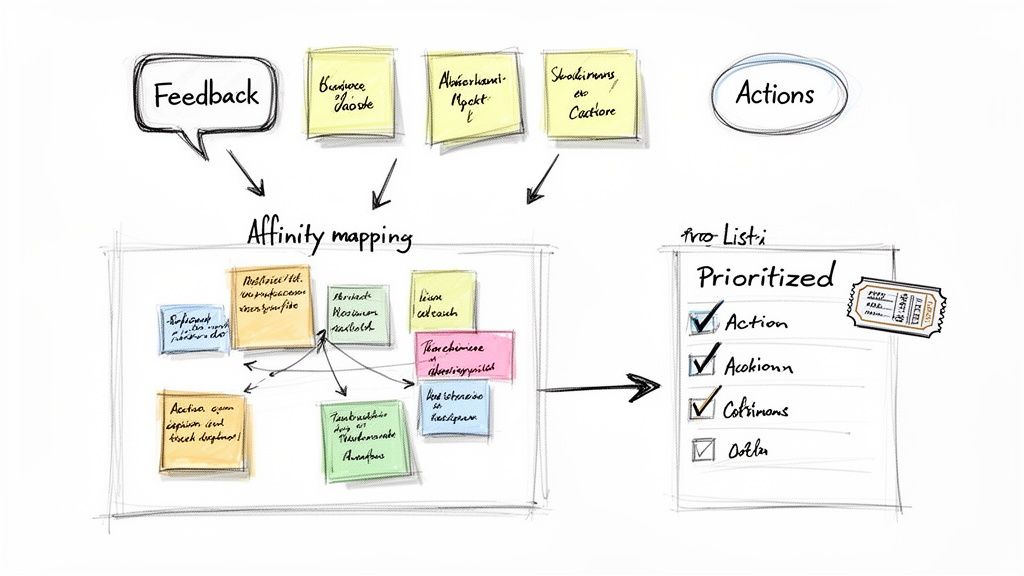
One of the most powerful ways to make sense of all that qualitative feedback is affinity mapping. Picture a wall covered in sticky notes. You go through your notes from every test session, pulling out key observations, pain points, and memorable quotes. Then, you start grouping similar notes together.
This simple act of organising reveals the patterns hiding in plain sight. An issue that seemed minor in one session might suddenly stand out as a major roadblock when you see it repeated five times. These recurring patterns are the gold you’re looking for—they're the problems hitting your users the hardest and most often.
The objective isn't to document every single thing a user said. It’s to identify the core usability themes and prioritise them based on how severely they impact the user’s ability to achieve their goals.
Automating the Heavy Lifting
Manually sifting through hours of video footage is a soul-crushing, time-consuming task. A practical recommendation is to use tools that can automatically transcribe your sessions. Getting that video feedback into a text format makes everything a thousand times easier. You can learn to transcribe video to text online like a pro to really speed things up.
This is where modern platforms like Uxia are a complete game-changer, automating the entire analysis workflow.
Instant Transcription: Your session recordings are automatically transcribed, making them searchable. Now you can instantly find every time a user mentioned "confusing" or "checkout."
AI-Powered Summaries: The platform pulls out the most critical usability issues and generates a concise summary of the key findings. No more manual report writing.
Visual Data: Heatmaps and click maps are generated for you, giving you an immediate visual of exactly where users are struggling or getting stuck.
This level of automation means your team can go from a completed test to a ticketed fix in record time. Instead of spending days drowning in data, you get a clear, shareable dashboard that even the busiest stakeholder can understand and act on instantly. By truly hearing the voice of the customer through this kind of streamlined analysis, you’re set up to make smarter, faster decisions.
Got a few lingering questions about user testing? It's completely normal. Even seasoned teams run into these, so let's clear up some of the most common ones.
How Many Users Do I Really Need to Test With?
Ah, the million-dollar question. For the kind of qualitative testing where you're hunting for usability problems, the classic answer is five users. It's not a random number; research shows this small group will uncover about 85% of the usability issues in your design.
Now, if you're trying to prove something with numbers—like running a quantitative test to get statistically significant data—you'll need a much larger crowd. The right number always, always comes back to what you're trying to learn. A practical recommendation is to start with five for qualitative insights and scale up on a platform like Uxia for quantitative validation.
Is User Testing Just for Finished Products?
Not a chance. This is probably the biggest and most costly myth out there. Think of testing less like a final exam and more like a continuous conversation with your users.
The smartest teams test at every single stage—from napkin sketches and rough wireframes to polished prototypes and the live product. Catching a show-stopping flaw when it's just a few lines on a screen saves an incredible amount of time and money compared to fixing it after you've shipped.
What's the Difference Between Usability and User Testing?
People often use these terms interchangeably, and while they're related, there's a subtle but important difference.
Think of it this way: Usability testing is a specific type of user testing. Its job is to answer the question, "Is this easy to use?" It’s all about efficiency, clarity, and task completion.
User testing is the bigger umbrella. It can tackle broader questions like, "Does this product even solve a real problem?" or "Is our value proposition hitting home with the right audience?"
This is where a platform like Uxia really shines. It lets you get answers to both the big-picture questions and the nitty-gritty usability details, often in the same test. You can validate a specific flow one minute and get feedback on a brand-new feature concept the next, all without the logistical nightmare of traditional research.
Ready to stop guessing and start getting real answers in minutes? With Uxia, you can run powerful user tests with AI-powered synthetic users, getting the feedback you need without the headaches. Start testing for free today and build products your users will actually love.