User Acceptance Testing Software: Boost Validation with Powerful UAT Tools
Explore how user acceptance testing software streamlines validation, highlights essential features, and helps you choose the best UAT solution for your team.

Think of User Acceptance Testing (UAT) as the final, crucial taste test before a new dish goes on the menu. After all the kitchen prep and internal tasting (development and QA), this is the moment you hand it over to your actual customers to see if they love it. The real question isn't just "does it work?" but "does it solve the problem we designed it to fix?"
It's less about finding tiny technical bugs and more about getting a gut-check on the business value.
What Is User Acceptance Testing Software

Imagine trying to get that final feedback from customers without a proper system. You'd be chasing down opinions in emails, deciphering scribbled notes on napkins, and trying to make sense of a chaotic spreadsheet. It’s a recipe for disaster.
This is exactly where user acceptance testing software comes in. It acts as the head chef, orchestrating the entire feedback process so nothing gets missed.
Turning Chaos into a Flawless Launch
Without a dedicated tool, UAT quickly spirals into a mess of disconnected spreadsheets, endless email chains, and lost feedback. It becomes almost impossible to track who tested what, which issues are deal-breakers, and if the software is genuinely ready for launch.
UAT software brings order to that chaos, creating a central hub for the entire testing cycle. In many ways, it's a specialised type of process documentation software built specifically to capture and manage user feedback and test results. It helps teams:
Organise Testers: Manage your group of real users, assign them specific test cases, and see their progress in real-time.
Track Feedback: Capture bug reports, feature requests, and general comments in a structured way, often with helpful screenshots or screen recordings attached.
Validate Business Goals: Ensure the final product delivers on its promises and aligns perfectly with what users actually need.
Practical Recommendation: Treat UAT not as a final checkbox, but as a business validation gate. The goal isn't just to find bugs; it's to confirm the software delivers real, tangible value to the people who will use it every day. A platform like Uxia can help automate this validation.
Modern platforms are pushing this even further. Tools like Uxia, for instance, use an AI-powered approach with synthetic users who match your precise customer profiles. This completely sidesteps the logistical nightmare of recruiting, scheduling, and managing human testers, letting you get validation in minutes, not weeks.
By transforming UAT from a frustrating bottleneck into a smooth, integrated part of your development process, these tools ensure what you ship is something people genuinely want—and love—to use.
What to Look For in Modern UAT Software
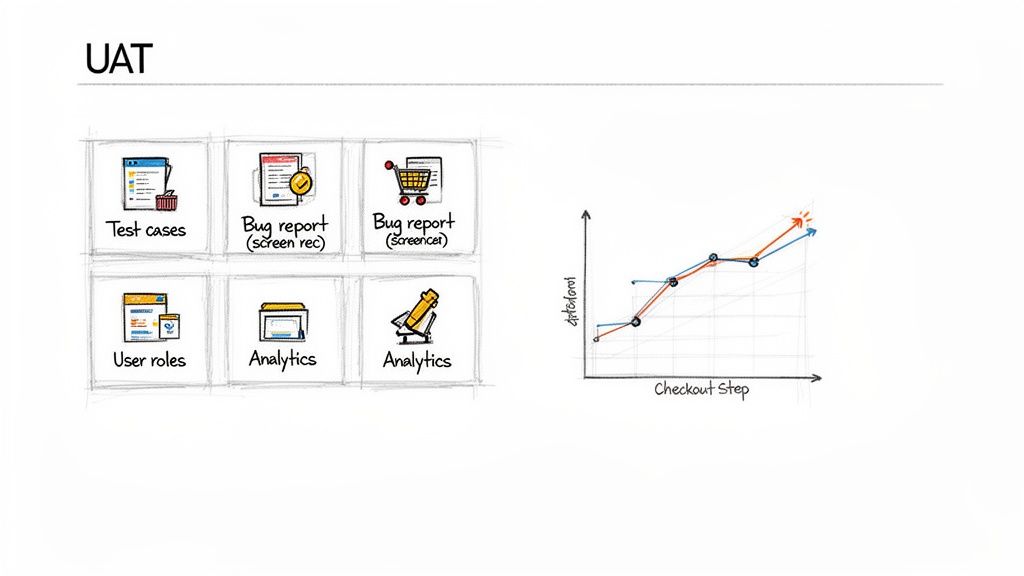
Good user acceptance testing software is much more than a glorified bug tracker. Think of it as the command centre for validating your entire user experience. To finally ditch those chaotic spreadsheets, you need a modern platform with a few core components that work together to bring clarity, speed, and real, actionable insights.
Each feature is designed to solve a specific, painful part of the UAT process, turning what was once a logistical nightmare into a genuine strategic advantage. Let's dig into the capabilities that give your team the confidence to ship.
Test Case Management and Organisation
The entire foundation of a solid UAT cycle is clarity. Your testers need to know exactly what to do, what a successful outcome looks like, and how to follow a path that mirrors a real user's journey. This is where test case management comes in.
Instead of throwing vague instructions into an email, a proper tool lets you create, assign, and track structured test scenarios right inside the software. This is how you make sure every critical workflow—from signing up to checking out—is properly put through its paces against your business goals.
Practical Recommendation: Organise your test cases by user persona or key journey. For example, you could create a "New Customer Onboarding" suite of tests and a completely separate "Power User Feature Adoption" suite. It helps focus your testers and makes their feedback far more relevant. Platforms like Uxia allow you to easily manage and reuse these test suites.
Real-Time Bug Tracking with Visual Proof
When a tester spots a problem, the classic "it's not working" report is completely useless. Developers need context to figure out what's wrong and fix it fast. This is where modern bug-tracking features really shine, especially when they include visual evidence.
The best UAT platforms allow testers to record their screens, add notes to screenshots, and automatically capture technical data like console logs the second a bug appears. This kills the frustrating back-and-forth and gives developers undeniable proof of the problem.
Practical Recommendation: A bug report with a screen recording isn't just a ticket; it's a complete story. It shows developers not only what broke but the exact user actions that caused it, slashing the time it takes to resolve the issue. Encourage testers to "show, not just tell" when they find an issue.
This is a make-or-break function for any user acceptance testing software, as it bridges the communication gap between non-technical testers and the dev team. If you’re looking for tools to make this part of your process smoother, our guide on choosing a great user testing tool can give you more to think about.
Advanced Reporting and Analytics Dashboards
How do you actually know if your UAT is on track? Without data, you're just guessing. Reporting and analytics are probably the most powerful features in modern UAT software, turning a flood of raw feedback into a simple, high-level view of your product's readiness.
These dashboards give you a real-time pulse on key metrics, answering critical questions at a glance:
Completion Rates: What percentage of test cases have we actually run?
Pass/Fail Ratios: How many tests are succeeding versus failing?
Issue Severity: Are we finding minor cosmetic glitches or show-stopping bugs?
Tester Progress: Who’s actively participating, and who might need a friendly nudge?
Imagine a dashboard instantly showing you that 75% of testers are bailing on the new checkout process right at the payment step. That's not just a bug; it's a critical, revenue-blocking insight you can spot and act on in minutes, not days. This is where platforms like Uxia really stand out, using AI to analyse synthetic user behaviour and automatically pinpoint these friction points. That analytical power is what separates a basic tool from a true validation platform.
Traditional UAT vs. Modern AI-Powered Solutions
For decades, User Acceptance Testing was a necessary evil. It was that final, painful step before launch—a logistical nightmare of sprawling spreadsheets, endless email chains, and the Herculean task of coordinating real people with real lives. This old-school approach turned UAT into a bottleneck, squeezed in right at the end of the development cycle.
It’s an entirely reactive process. Teams would burn weeks just finding, recruiting, and scheduling a handful of end-users. Feedback would then trickle in slowly, often missing the context developers desperately needed to fix bugs efficiently. The whole ordeal was slow, expensive, and completely out of sync with the pace of modern software development.
The Old Way: A Logistical Nightmare
The traditional UAT process is bogged down by manual labour and painful delays at every turn. Just recruiting testers who fit your target demographic can take weeks. Then comes the puzzle of actually getting them all scheduled.
This friction is a huge problem. In the European software testing world, UAT has become more common with the rise of agile and remote work—34% of teams now run UAT weekly. But the old methods can't keep up. A staggering 75% of teams involve fewer than 10 end-users manually because recruitment is such a drag. That small sample size is a recipe for biased or incomplete feedback, which defeats the entire purpose of testing. You can dig into these UAT adoption trends on Archive Market Research.
The reliance on manual tools only makes things worse:
Spreadsheet Chaos: Trying to track tester progress, bugs, and comments in spreadsheets is a fast track to human error. It becomes unmanageable almost instantly.
Delayed Insights: When you have to wait for every single tester to finish, critical feedback often lands far too late in the sprint to be useful.
High Coordination Costs: The sheer amount of time spent chasing people for feedback, managing schedules, and organising everything is a massive drain on project resources.
This model just can't hang with the demands of continuous delivery. It treats UAT as a final gatekeeper instead of what it should be: an ongoing validation engine.
The New Way: AI as a Game-Changer
The modern approach, driven by user acceptance testing software supercharged with AI, completely flips the script. Instead of being a slow, manual chore, UAT becomes an instant, on-demand, and intelligent part of the development lifecycle. This is where AI-powered platforms like Uxia are making a real difference.
The core innovation here is the use of AI-driven synthetic users. These aren’t just dumb bots; they are sophisticated AI agents built to mimic the exact demographic and behavioural profiles of your target audience.
Practical Recommendation: Instead of waiting weeks to find and schedule human testers, you can deploy a perfectly matched panel of synthetic users in minutes with a tool like Uxia. This transforms UAT from a sluggish bottleneck into a continuous validation engine.
This fundamentally changes how teams work. You’re no longer limited by the availability of real people. Need to test a new checkout flow with users aged 25-34 in a specific region who have a certain technical skill level? With a platform like Uxia, you can configure that test and launch it instantly. If you want to dive deeper, you might be interested in our article comparing synthetic users vs human users.
Traditional UAT vs. AI-Powered UAT Platforms
The difference between the old way and the new way is stark. It’s not just a minor improvement; it’s a fundamental shift in how teams validate their work. Here’s a quick breakdown:
Aspect | Traditional UAT Process | AI-Powered UAT (e.g., Uxia) |
|---|---|---|
Speed | Weeks (recruiting, scheduling, testing) | Minutes (configure and run instantly) |
Tester Source | Manual recruitment of human users | On-demand AI-driven synthetic users |
Scalability | Limited to small groups (5-10 users) | Virtually unlimited; test with 100s |
Cost | High (incentives, admin time, tools) | Low, predictable subscription fee |
Feedback Quality | Inconsistent, often biased or incomplete | Consistent, unbiased, and data-rich |
Integration | Disconnected from the development workflow | Integrated directly into the CI/CD pipeline |
Timing | A final bottleneck before release | Continuous validation from day one |
This modern approach doesn't just make UAT faster—it makes it smarter and more scalable. By weaving AI-powered testing into the entire development process, teams can get rich, unbiased feedback at any stage. You can validate designs and prototypes long before writing a single line of code, cutting sprint loops from weeks to minutes and making sure you’re building something people actually want.
How to Choose the Right UAT Software
Picking the right user acceptance testing software can feel like a massive decision, but it doesn't need to be complicated. The secret is to look inwards first. Before you get dazzled by vendor feature lists, take a hard look at your current UAT workflow and find the single biggest point of friction.
Is it the chaotic, spreadsheet-driven bug reports? Or maybe it's the sheer impossibility of finding, scheduling, and managing real users for every test cycle? Your number one bottleneck is your North Star—it should guide every decision you make from here on out.
Assess Your Core Needs and Workflow
Start by asking your team some blunt questions. Where does our process break down most often? Are our non-technical stakeholders struggling to give clear, actionable feedback? Are developers wasting hours trying to reproduce vague bug reports?
The answers will help you build a prioritised list of must-have features. For example, if feedback quality is the problem, a tool with built-in screen recording and automated technical data capture becomes non-negotiable. If coordination is the headache, then strong user management and communication features should be at the top of your list.
Practical Recommendation: A classic mistake is choosing a tool based on a long list of features you might use someday. Instead, focus on finding a solution that solves the most painful problem you have right now. Everything else is secondary.
For many teams, that biggest pain point is tester recruitment. If you find your sprints are constantly delayed while you hunt for willing end-users, an AI-driven solution should jump to the front of the line. Platforms like Uxia completely eliminate this bottleneck by providing instant synthetic testers, letting you get feedback in minutes, not weeks. This shifts the entire evaluation from "which tool manages testers best?" to "which tool removes the need for manual recruitment altogether?"
Prioritise Seamless Integrations
Your UAT software can't live on an island. To be truly effective, it has to plug right into the tools your team already uses every single day. A lack of integration creates friction, forcing people into manual data entry and context-switching that just slows everything down.
Key integrations to look for include:
Project Management Tools: A solid connection with platforms like Jira, Asana, or Trello is a must. This lets you turn feedback and bug reports into development tickets with a single click, ensuring nothing ever gets lost in translation.
Communication Hubs: Linking up with Slack or Microsoft Teams keeps everyone in the loop. Automated pings about test progress, new bugs, or required actions make sure UAT stays visible and collaborative.
This diagram shows the conceptual leap from old-school, isolated UAT to modern, integrated, and AI-powered workflows.
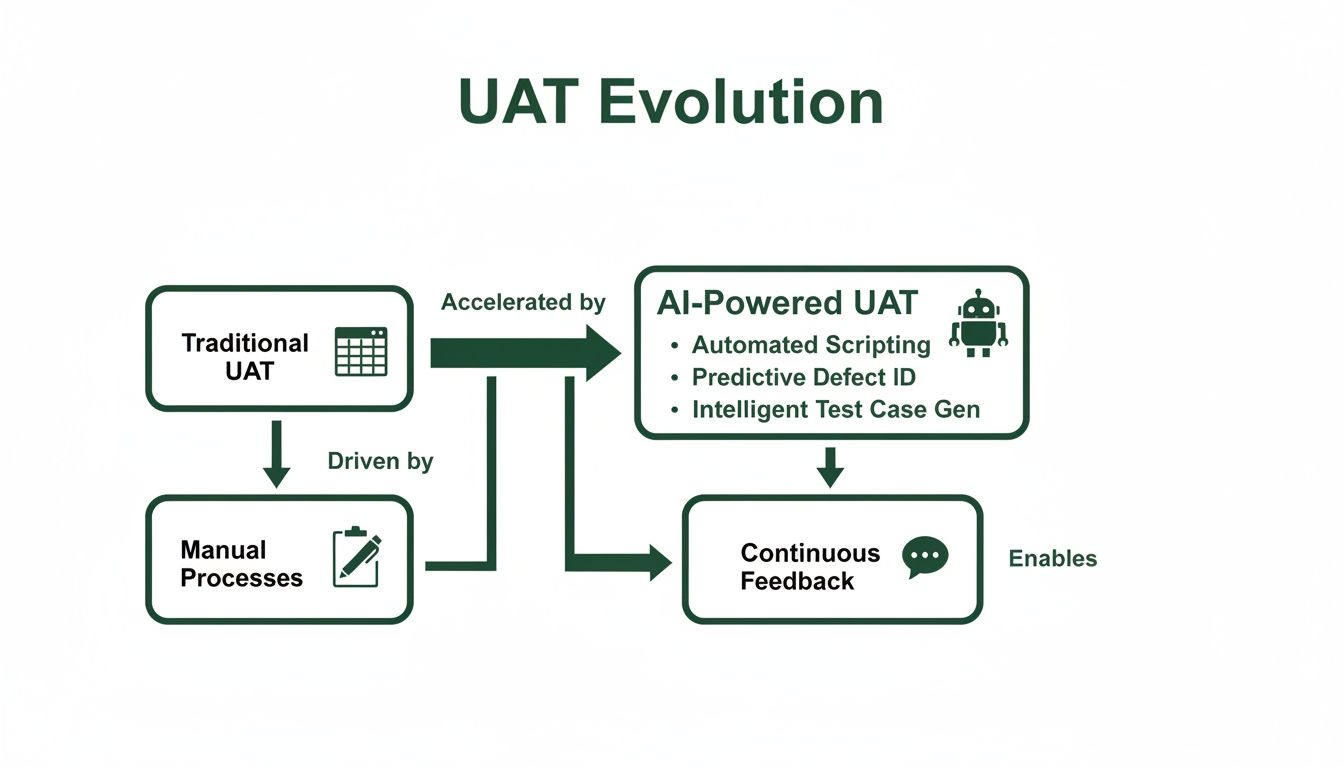
What this really highlights is that the evolution of UAT isn't just about better tools—it's about a fundamental shift in speed, efficiency, and how deeply testing is embedded in the development lifecycle.
Ask Vendors the Right Questions
Once you have a shortlist, it’s time to take control of the conversation. Don't let vendors run you through a generic demo. Come prepared with specific, scenario-based questions that hit your pain points directly.
Here’s a practical checklist of questions to get you started:
Ease of Use: "Show me the exact workflow for a non-technical business user to submit a bug report. How many clicks does it take?"
Onboarding and Support: "What does your onboarding look like for a team our size? What kind of ongoing support is included in our plan?"
Scalability: "We plan to double our team in the next year. How does your pricing and platform handle that kind of growth?"
Reporting: "How can I build a dashboard that gives me a real-time pass/fail rate for our most critical user journey?"
For AI-powered tools like Uxia: "How do you ensure your synthetic users accurately represent our specific target audience? Can we customise their behavioural profiles?"
By asking targeted questions, you cut through the marketing noise and get a real feel for how the user acceptance testing software will operate in your team's world. This is how you choose a partner that doesn't just sell you software, but actually solves your most frustrating problems.
Weaving UAT Software into Your Workflow
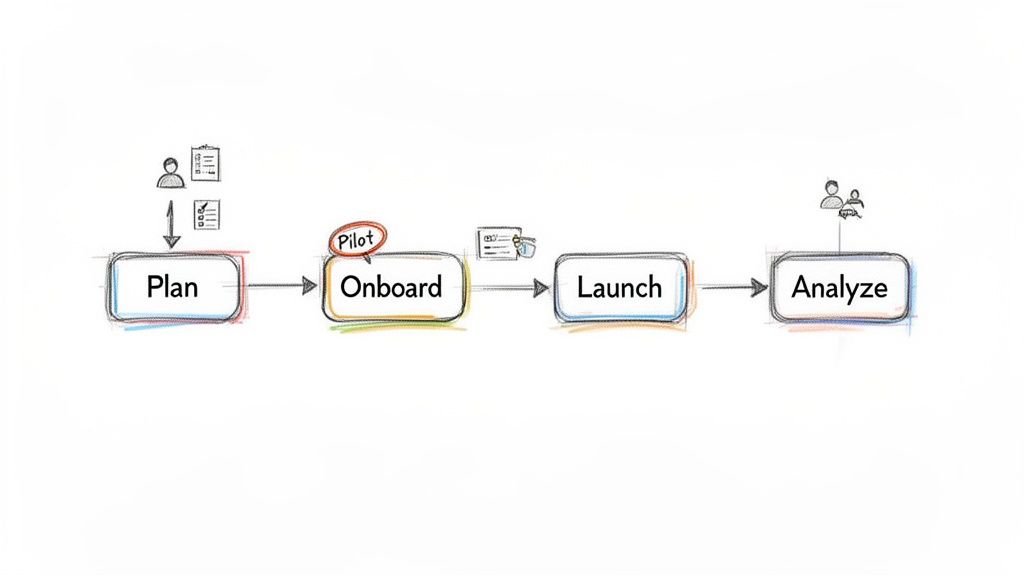
Adopting user acceptance testing software isn’t about just dropping another tool into your tech stack. It's a chance to completely overhaul your validation process. For it to stick, you need a smart plan to weave the software into your team’s daily rhythm until it feels less like a new tool and more like an extension of how you already work.
The best way to do this is to break the journey down into clear, manageable phases. If you treat the integration like its own mini-project, you'll ensure a smooth rollout that delivers value right away.
Strategic Planning and Defining What Success Looks Like
Before you even think about sending a single test invitation, you need to agree on what a "win" actually looks like for your team. This means setting clear success metrics that go way beyond a simple pass or fail.
What are you aiming for? Maybe it's reducing post-launch bugs by 30%, or perhaps it's about shaving hours off the feedback-to-fix cycle. You might even be targeting a specific user satisfaction score. Setting these goals upfront gives everyone a clear target and helps you measure the tool’s real-world impact.
Onboarding the Team with a Pilot Project
Practical Recommendation: Start small with a pilot project. Don't try to boil the ocean. Pick a low-risk feature or a small, self-contained part of your application. This gives you a safe space to get your new process dialled in without the pressure of a major release breathing down your neck.
Use this pilot to run some engaging training sessions for everyone involved, from product managers to business stakeholders. This is your chance to:
Create Reusable Templates: Build out your first test cases and feedback forms that you can simply duplicate for future projects.
Establish Bug Protocols: Agree on a clear system for categorising bug severity—like critical, major, or minor—so everyone is speaking the same language.
Refine the Workflow: Smooth out any kinks in the process. How are testers invited? How is feedback reviewed? How does it get passed over to the development team?
This pilot phase isn't just about learning the software. It's about building the muscle memory for a faster, more efficient way of working.
Launching and Analysing Your First Full Cycle
Once you’ve got the learnings from your pilot, you’re ready to roll out a full-scale test cycle. This is where your new user acceptance testing software really starts to pay off. As you launch, focus on building crystal-clear test cases that guide testers through realistic user journeys.
After the feedback starts pouring in, the last step is to turn all that raw data into a prioritised list of development tasks. This is where a modern platform's analytical horsepower becomes a game-changer. For example, with an AI-driven tool like Uxia, you don't just get a list of comments; you get automatically synthesised reports that flag the most critical friction points found by synthetic users. For more on this, you can learn how to optimise your product in our guide on user interface design testing.
Practical Recommendation: The goal of analysis isn't just to create a laundry list of bugs. It’s to spot the patterns in user feedback that point to deeper usability problems, turning subjective opinions into objective, actionable development priorities.
By moving methodically from planning to a pilot and then to a full launch, you ensure the software becomes a powerful and permanent part of your quality culture.
Best Practices for Effective User Acceptance Testing
Buying a piece of user acceptance testing software is a great first step, but it’s how you use it that really counts. Good UAT isn’t just another bug hunt. It’s a strategic process to confirm your product actually delivers value in the real world. By adopting a few proven practices, you can turn your testing from a simple quality check into a core part of your product culture.
These strategies shift the focus from testing isolated features to validating complete, realistic user journeys. The goal? To ship products that people genuinely love using.
Write Crystal-Clear Test Cases
The entire UAT cycle rests on one thing: clarity. Vague instructions lead to inconsistent testing and feedback that's frankly useless. Your test cases need to be so clear they leave no room for interpretation, guiding testers through the exact scenarios a real customer would face.
Don't just write "Test the login feature." A much better test case looks like this: "As a returning customer, log in with your registered email and password. Then, check that you land on your personal dashboard and that your name appears correctly in the top-right corner." That level of detail kills ambiguity and makes sure every critical step gets validated.
Practical Recommendation: A great test case tells a story from the user's perspective. It should have a clear beginning, middle, and end, defining not just the actions to take but also the expected outcome that signals success. Tools like Uxia can help you structure and save these test cases for repeated use.
Get the Right Testers on Board
The quality of your feedback is a direct reflection of the quality of your testers. A classic mistake is grabbing random employees from another department who don't match your customer profile. Their feedback might be well-intentioned, but it won’t capture the true user experience.
Getting the persona right is non-negotiable. You need testers who line up with your target audience’s demographics, tech-savviness, and motivations.
This is where modern tools completely change the game. Instead of burning weeks on manual recruitment, platforms like Uxia let you deploy precisely configured synthetic users in minutes. These AI testers can perfectly match your ideal customer profile, giving you fast, unbiased, and highly relevant feedback without all the logistical drama.
Define Firm Entry and Exit Criteria
To keep your UAT phase from turning into a never-ending story, you need to set firm rules for when it starts and when it’s done. We call these entry and exit criteria.
Entry Criteria: These are the boxes you have to tick before UAT can even begin. Usually, this means all previous testing (like system and integration tests) is complete and there are no outstanding critical bugs.
Exit Criteria: These are the signals that tell you it’s time to wrap up. This could be hitting a specific pass rate (like 95% of test cases), having no open critical or major defects, and getting the official sign-off from key business stakeholders.
Laying these rules out upfront brings structure, manages everyone's expectations, and stops "scope creep" from wrecking your launch schedule.
Foster a Transparent Feedback Loop
Testers are a lot more engaged when they know their feedback actually matters. A transparent feedback loop is essential for building a strong testing culture. It's not just about collecting feedback; it's about communicating back to testers to show them how their findings are being used. To run effective UAT, understanding how to collect customer feedback that works is key to gathering truly actionable insights.
Use your user acceptance testing software as a central hub where testers can ask questions and track the status of bugs they’ve reported. When people see their input directly leading to a better product, they become true partners in your quality process. That’s how you consistently build products that your audience will thank you for.
Common Questions About UAT Software
If you're new to the world of user acceptance testing software, you probably have a few questions. Let's break down some of the most common ones with clear, straightforward answers.
What's the Real Difference Between UAT and Quality Assurance?
This is a classic one. Think of it this way:
Quality Assurance (QA) asks, “Did we build the thing right?” QA is all about technical correctness. It’s an internal check to see if the software meets its technical specifications and is free of bugs.
User Acceptance Testing (UAT), however, asks a much more important question: “Did we build the right thing?” This isn’t a technical check; it’s a business one. Real end-users (or their AI-powered stand-ins) get their hands on the product to confirm it actually solves their problem and meets the business need.
So, QA is about function, while UAT is all about value.
How Do AI Tools Like Uxia Actually Improve UAT?
Simple: AI tools like Uxia solve the biggest bottleneck in the entire UAT process—finding, scheduling, and managing human testers. Instead of burning weeks trying to recruit people who match your target audience, you can deploy AI synthetic users in minutes.
Practical Recommendation: This completely changes the game. UAT goes from a slow, painful gate at the end of a project to a continuous, on-demand process. You get rapid, unbiased feedback at any stage, without ever having to worry about scheduling conflicts or no-shows. It just scales.
Can Small Teams and Startups Really Benefit From UAT Software?
Absolutely. In fact, you could argue it's even more critical for smaller teams. When you're running lean, you can't afford for critical feedback to get lost in Slack threads or email chains. Dedicated UAT software creates a single source of truth.
Modern platforms are no longer just for big enterprises. They offer flexible pricing that works for startups, making professional-grade testing accessible from day one. It’s about levelling the playing field so you can launch with the confidence that you’ve built something people truly want. A platform like Uxia is designed to scale with you, providing value from your first test to your thousandth.
Ready to turn your testing process from a bottleneck into your biggest competitive advantage? See how Uxia uses AI-powered synthetic users to deliver actionable feedback in minutes, not weeks. Get started with Uxia today.