A Practical Guide to Flawless QR Code Testing
Master QR code testing with our practical guide. Learn how to validate functionality, user experience, and scannability for seamless digital interactions.

A broken QR code isn't just a tech hiccup. It's a dead end in your customer's journey, and it’s a direct hit to your revenue and the trust you’ve built. Getting QR code testing right means that the bridge between your physical marketing and your digital experience is solid, reliable, and actually drives conversions. It stops you from losing valuable engagement at the very first interaction.
Why Flawless QR Code Testing Is Essential
In a world where physical and digital experiences are constantly merging, QR codes are the connectors. We see them everywhere—from restaurant menus and product packaging to event tickets and marketing posters. The problem is, many teams treat them like an afterthought. They just generate a code, slap it on something, and assume it works.
That’s a costly mistake.
A failed scan is much more than a minor inconvenience. It’s a complete breakdown of a user journey you've probably spent a lot of time and money designing. Think about the investment: the creative for the print material, the cost of distribution, the strategy behind the campaign—it all leads to that one moment of interaction. When the scan fails, that entire investment goes down the drain.
The True Cost of a Broken Code
Beyond the immediate financial loss, a non-functional QR code chips away at your brand’s credibility. When a user tries to scan a code for a special offer only to get an error or a page that won’t load, they feel frustrated. That negative experience gets attached directly to your brand, making you look careless or technically inept.
It really boils down to four key failures:
Lost Revenue: A customer can't get to your promotional landing page or buy a product. Simple as that.
Damaged Trust: Users start to see your brand as unreliable.
Wasted Marketing Spend: The entire budget for that physical flyer, poster, or package just produced a zero return.
Inaccurate Data: Even if the code sort of works but the tracking fails, you lose vital campaign insights.
This infographic breaks down the ideal journey, from the moment the code is created to the final conversion.
As you can see, a seamless flow is everything if you want to hit your business goals with QR codes.
A Holistic Approach to Verification
This is why effective QR code testing has to be holistic. It’s not enough to just confirm a scan works. You have to validate the entire experience that follows.
This is where platforms like Uxia become so valuable. By simulating real user interactions, Uxia can test the complete flow—from the initial scan on a prototype to navigating the landing page—and find friction points that a simple "does it scan?" check would completely miss. This mirrors the broader principle that the importance of user testing extends to all digital touchpoints.
Practical Recommendation: Before you even think about printing, upload a mock-up of your QR code's placement to a platform like Uxia. This allows you to test the entire user journey digitally, ensuring that once the code is in the real world, the experience is already flawless.
For a deeper dive on why this kind of thorough verification is so critical, it’s worth understanding the importance of Quality Assurance in digital analytics—a principle that applies directly to tracking QR code performance. A robust testing strategy ensures every single scan leads to a positive and profitable outcome.
Get the Print and Sizing Fundamentals Right
Before a customer ever points their phone at your QR code, you need to nail the physical basics. It’s a simple truth I’ve seen trip up countless campaigns: a small mistake in printing or sizing can make your code completely useless. What should have been a smooth customer interaction becomes a frustrating dead end.
This is where foundational testing comes in, focusing on the stuff that actually determines if a code will scan in the wild.
The very first choice you'll make is between a static and dynamic QR code. A static code hard-codes the destination URL right into the pattern. Once it's printed, it’s permanent. A dynamic code, on the other hand, uses a short redirect URL. This is a game-changer because you can update the final link anytime—a total lifesaver if you spot a typo after 10,000 flyers have been printed.
Practical Recommendation: For any serious marketing effort, dynamic codes are the only way to go. They provide the flexibility to fix errors and give you all the juicy scan analytics you need to see if your campaign is actually working.
Size, Distance, and the All-Important Quiet Zone
One of the most common reasons a QR code fails is simply that it’s too small. A tiny code on a business card is fine, but that same size on a billboard viewed from across the street? Forget it. The phone's camera just won't be able to focus and get a clean read.
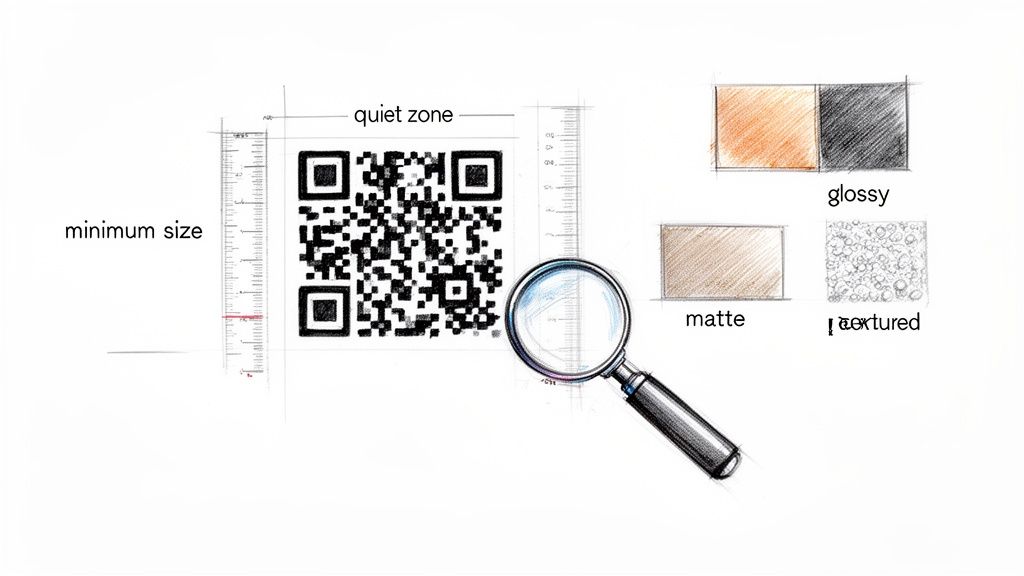
Just as critical is the quiet zone—that blank margin of empty space around the code itself. Think of it as personal space for your QR code. Scanning apps need this border to distinguish the code from other design elements. Cramming logos or text right up against the edge is a surefire way to cause scan failures.
Practical Recommendation: A good rule of thumb is to make the quiet zone at least four times the width of one of the tiny black squares (modules) in your code. Don't compromise on this.
Test on Real Materials, Not Just Your Screen
A QR code that scans instantly on your monitor can become a nightmare once it's on paper or plastic. The material and print quality have a massive impact on scannability. High-gloss surfaces can throw off a nasty glare under bright lights, while textured materials like rough cardboard can distort the pattern enough to make it unreadable.
Practical Recommendation: Always get a printed proof on the exact material you plan to use for the final run. Test that physical proof in dim indoor lighting and under bright, direct sunlight. This is how you find problems before you’ve spent a fortune on printing.
You can even get a head start on this with a platform like Uxia. Just upload photos or video mock-ups of your QR code on different packaging or print materials. Uxia’s synthetic testers can give you quick feedback on whether the code looks clear and scannable, helping you flag potential issues with contrast or glare early on.
QR Code Minimum Size and Scanning Distance Guidelines
This table provides a practical baseline for ensuring your QR code is large enough to be scanned reliably from various common distances.
Scanning Distance | Minimum QR Code Size (Edge to Edge) | Print Resolution (DPI) |
|---|---|---|
Close Range (e.g., Business Card) | 2 cm x 2 cm | 300 DPI |
Mid-Range (e.g., A4 Flyer) | 5 cm x 5 cm | 300 DPI |
Long-Range (e.g., Poster) | 30 cm x 30 cm | 72-150 DPI |
Remember, these are minimums. Going slightly larger is almost always a safe bet and rarely hurts.
Finally, don't get too clever with colours. The classic black-on-white QR code has the highest success rate for a reason: maximum contrast. While using brand colours is tempting, you have to ensure there’s a massive difference between the foreground and background. A dark navy blue code on a black t-shirt, for example, is going to be invisible to most phone cameras. When in doubt, stick to what works.
Validating The Post-Scan User Journey
A successful scan is just the first domino to fall.
The real test of your QR code's effectiveness begins after the camera app closes and the browser opens. This post-scan experience is where you either win or lose a customer, and it demands rigorous testing that goes way beyond a simple link check.
The entire journey hinges on a seamless transition from the physical world to the digital one. A user who makes the effort to scan your code has shown clear intent. Your job is to reward that intent with a fast, intuitive, and valuable experience. This means every single aspect of the destination needs to be scrutinised.
This process is a core part of comprehensive QR code testing, focusing on what happens next.
Beyond Broken Links: Performance and Analytics
Your first checks are the most straightforward, but don't skip them. Is the destination URL correct? Are there any broken redirects in the chain that lead to a dreaded 404 error? These are basic but absolutely critical validation points.
However, the user journey is far more complex than that. You need to think bigger and consider these crucial validation steps:
Mobile Optimisation: Does the landing page render perfectly on various mobile screen sizes? Text should be readable without pinching to zoom, and buttons must be easily tappable.
Page Load Speed: Mobile users are impatient. A page that takes more than a few seconds to load will see a massive drop-off rate. Test this on a typical mobile network connection, not just your speedy office Wi-Fi.
Tracking Parameter Integrity: This is where so many campaigns fail silently. You have to confirm that analytics tags, like UTM parameters, are firing correctly. Without this, your marketing team gets junk data, making it impossible to measure ROI.
Practical Recommendation: Map out every step a user should take after scanning the code. Use a user flow diagram to visualize this path. This makes it easier to spot potential drop-off points and define clear success criteria for your tests.
Simulating The Entire Flow With AI
So, how can you test this entire journey efficiently and without bias? This is where platforms like Uxia give you a serious edge. Instead of just checking if a link works, you can simulate the complete human experience from start to finish.
With Uxia, you can upload a prototype featuring your QR code. AI-driven synthetic testers will then perform the entire flow: they'll "see" and scan the code, navigate to the landing page, and complete whatever mission you've defined for them.
Throughout the process, they provide 'think-aloud' feedback, articulating any confusion or friction they encounter. This uncovers subtle usability issues that simple automated checks would miss every single time.
A simple link checker tells you if a URL works. A simulated user journey with Uxia tells you if the experience works. This distinction is the key to creating QR code campaigns that don't just function, but actually convert.
This level of testing is particularly vital in markets with high QR code adoption. For instance, QR code usage in Spain skyrocketed by over 65% between late 2020 and mid-2023, driven by a demand for contactless interactions. For product teams, this means codes must be flawless, as over 91% of the population owns a smartphone and expects instant digital connectivity. Discover more insights about QR code trends in Spain. Validating the post-scan journey ensures you meet these incredibly high user expectations.
Testing For Real-World Performance
A QR code that scans perfectly in the office can be a spectacular failure out in the wild. I've seen it happen countless times. This gap between testing in a controlled lab setting and how people actually use your code is the number one reason for customer frustration and busted campaigns.
To do this right, you have to get your QR code testing out from behind your desk and into the messy, unpredictable world your audience lives in. It's about thinking ahead and simulating real conditions to catch problems before they ever reach a customer. You're dealing with so many variables that you just can't replicate by pointing your own phone at your monitor.
Device and OS Compatibility Checks
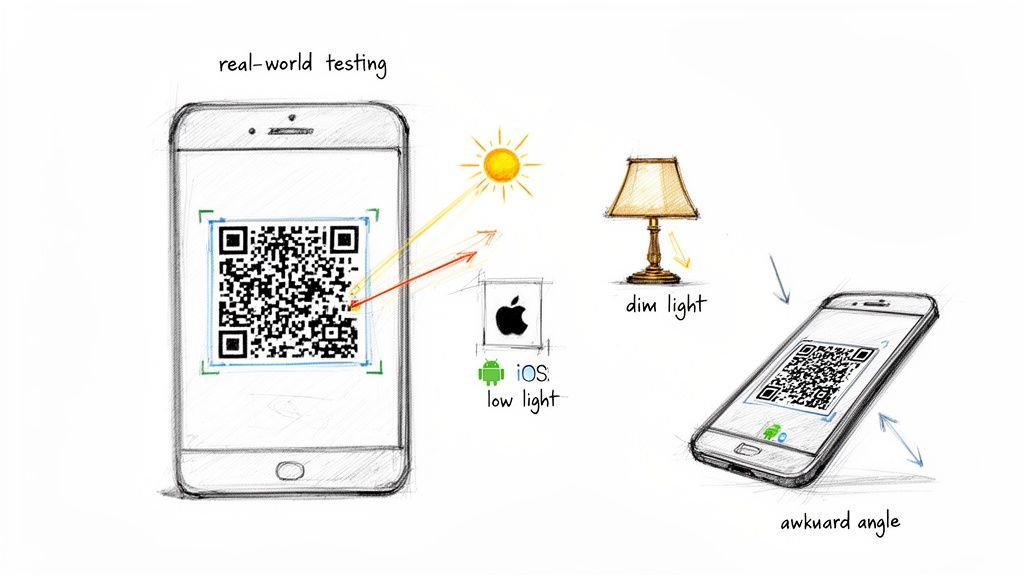
The first real-world hurdle is the staggering variety of devices out there. You absolutely cannot assume a code that works on a brand-new iPhone will behave the same on a three-year-old, mid-range Android. Phones have wildly different camera qualities, processing speeds, and built-in scanning software.
A solid testing plan needs to cover a few bases:
Diverse Devices: Get your hands on a mix of popular models—high-end, mid-range, and even some older ones from both the iOS and Android camps.
Operating System Versions: Make sure the code works across recent major OS versions. Software updates can, and do, change how camera apps work.
Native vs. Third-Party Apps: Most new phones have QR scanning built right into the camera app, but plenty of people still use third-party scanners. It's smart to test with a couple of the most popular ones just to be safe.
Practical Recommendation: Focus your manual testing on the top 3-5 devices used by your target audience (check your website analytics). This 80/20 approach ensures you cover the majority of your users without needing an expensive device lab.
Trying to manage a physical device lab for all this is a huge pain and often just isn't practical. This is where platforms like Uxia can be a game-changer. They simulate user interactions across different profiles, which covers a wide range of device and software setups without you needing the actual hardware. The same logic from our guide on how to properly test a website on mobile devices applies directly here.
Simulating Environmental Challenges
Okay, so you've sorted out the devices. But what about the environment? This is where things get really interesting. A QR code on a poster in a brightly lit office is a totally different beast from one on a menu in a dim restaurant or on a glossy flyer under the harsh afternoon sun.
You need to get hands-on and test for these factors:
Lighting Conditions: Print out your proof and try scanning it in low light, in direct sunlight (watch out for glare!), and under weird mixed indoor lighting.
Scanning Distance and Angle: Nobody scans a code perfectly head-on every time. Ask your testers to try scanning from a few feet away and from awkward angles. Find out where it breaks.
Movement and Instability: Think about it: a customer might be walking while trying to scan your code, or maybe the code is on the side of a bus. Try to simulate this by having someone scan while they're moving.
And if your QR codes are going to be displayed on a digital sign LED, that’s a whole other ball game. You have to think about pixel density, screen brightness, and refresh rates to make sure the scan is smooth and reliable.
Practical Recommendation: Create a physical 'real-world testing kit.' It sounds simple, but it works. It should have your printed proofs on the final material, a list of your target devices, and a checklist of all the environmental scenarios you need to run through. It makes your whole QA process consistent, repeatable, and way more effective.
Scaling Your Testing With AI-Powered Insights
Manual testing is vital, but let's be realistic—it's slow, expensive, and almost impossible to scale properly. You can't physically test every device, OS, and real-world scenario by hand. This is where modern, AI-powered solutions like Uxia completely change the game for your QR code testing workflow.
Instead of spending weeks finding and scheduling human testers, synthetic user testing platforms like Uxia give you a much faster route to solid feedback. The process is simple: upload a design, image, or video prototype showing your QR code, define what you want the user to achieve, and get actionable insights back in minutes, not days. This lets you test early and often, catching problems long before they turn into costly mistakes.
Simulating The Complete User Interaction
What makes this so effective is its ability to simulate the entire user journey, not just a single scan. When you run a test on Uxia, its AI testers are aligned with specific audience profiles that you get to choose. These AI participants don't just "check if a link works"—they simulate the full human interaction.
This simulation covers several critical moments:
Visual Recognition: The AI first has to spot and correctly identify the QR code within your design, just like a person would.
Scanning Simulation: It then mimics the act of scanning the code, taking into account variables that could cause it to fail.
Journey Navigation: After the "scan," the AI moves on to the destination page and tries to complete the task you've set, like filling out a form or finding a piece of information.
This approach gives you a complete picture of the user experience, from the initial physical interaction all the way to the final digital conversion.
Leveraging AI-Driven Feedback And Analytics
The real power here comes from the rich, unbiased data these AI testers generate. Because they aren't human, they have no preconceived ideas about your brand or design. They just report on the experience, delivering feedback that is consistently objective. You can dig deeper into the differences in our guide comparing synthetic users vs human users.
With a platform like Uxia, you unlock powerful insights that are incredibly difficult to get from manual testing alone. These include:
AI 'Think-Aloud' Transcripts: Get a running commentary of the AI's "thought process" as it engages with your QR code and landing page, pointing out areas of confusion or friction.
Heatmaps and Click Maps: See exactly where the AI focused its attention and where it tried to interact, telling you if your call-to-action is actually working.
Instant, Unbiased Feedback: Test dozens of user flows in a single afternoon and get consistent, data-driven reports on what’s working and what isn’t.
Practical Recommendation: By using synthetic testers from a platform like Uxia, you move beyond just asking "does the code scan?" and start answering the much more important question: "does the entire experience lead to a successful outcome for the user?" This shift in focus is what lets you perfect your QR code campaigns before they ever go live.
Even with the best playbook, you're bound to hit a few snags. It's just part of the process. Getting straight answers to common problems can save you hours of frustration and help you build a much stronger testing habit.
Let's dive into some of the most frequent questions I hear from teams working with QR codes.

What's The Most Common Reason A QR Code Fails To Scan?
Nine times out of ten, it’s a physical design flaw. I see this constantly. These issues almost always fall into one of three buckets: terrible contrast, being too small for the scanning distance, or a non-existent quiet zone—that critical empty space around the code.
For example, a dark blue code on a black background is practically invisible to a phone's camera. The same goes for a tiny code on a massive poster. If logos or text creep into its borders, scanners just can't lock on. Always, always test your final printed design in different real-world lighting conditions to be sure it works.
How Can I Test A QR Code Before Printing It?
You absolutely have to, and it's a two-part job. First, test the digital version right from your screen. Grab a few different phones—both iOS and Android—and give it a scan. This is your basic sanity check to confirm the link works and the code itself isn't broken.
But don't stop there. The most critical step is to test a proof printed on the exact material you plan to use in the real world. A code's performance can change dramatically depending on:
Material Texture: A rough, uncoated cardboard can warp the pattern.
Surface Finish: A super glossy magazine page might create glare that blinds the scanner.
Print Quality: Low-resolution printing can make the code's little black squares blurry and unreadable.
Practical Recommendation: Only a physical test run will tell you how the code will actually perform when it's out in the wild. Before committing to a large print run, order a small batch of 5-10 samples to distribute to your team for this final real-world check.
Can I Test The User Journey Without Manual Testers?
Yes, and this is where you can seriously accelerate your entire workflow. Manual checks have their place, but simulating the full journey after the scan is far more efficient with the right tools.
Platforms like Uxia let you upload a design or prototype that includes your QR code. From there, AI-powered synthetic testers can run through the entire flow. They'll simulate identifying the code, "scanning" it, hitting the destination page, and then trying to complete whatever task you've set. This approach finds usability problems in the journey itself—not just the scan—and gives you 'think-aloud' feedback without the hassle and delays of recruiting human testers.
Remember, a successful scan is only half the battle. The user's experience after the scan is what drives conversions. Using a platform like Uxia to test this entire flow is non-negotiable for a successful campaign.
Ready to eliminate guesswork and scale your QR code testing? With Uxia, you can get instant, unbiased feedback on your entire QR user journey from AI-powered synthetic testers. Upload a design and get actionable insights in minutes, ensuring every scan leads to a flawless experience. Discover how Uxia can perfect your QR code campaigns.