A Guide to Moderated User Testing for Deeper Insights
Discover the power of moderated user testing. Learn how to run effective sessions, analyze feedback, and uncover the 'why' behind user actions.
Moderated user testing is a live, one-on-one research session where a facilitator guides a real person through your product. Unlike an automated test that just records clicks, its whole purpose is to get at the why behind their actions. It's about turning cold data into a warm conversation.
This is how you get the kind of deep, qualitative insights that analytics dashboards can never give you.
Unlocking the "Why" Behind User Actions
Think of yourself as a tour guide in a city you built. You wouldn't just hand someone a map and say, "Good luck." You’d walk alongside them, point things out, and ask them what they're thinking and feeling.
That's moderated user testing in a nutshell—it’s a personal, guided tour of your digital product.

The method goes way beyond just seeing if someone can complete a task. It lets you dig into a user’s thought process at the exact moment it’s happening. When you see someone pause before clicking a button, a good moderator can jump in and ask, "What’s going through your mind right now?"
That simple question can uncover usability nightmares, confusing text, or design assumptions that your quantitative data would miss completely.
The Power of a Guided Conversation
Moderated testing flips a stiff evaluation into a rich, flowing conversation. This direct interaction is priceless, especially for complex products or early-stage prototypes where the user journeys aren't polished yet. It's hands-down the best way to understand the emotional and cognitive rollercoaster your users are on.
A few key benefits really stand out:
Immediate Clarification: You can ask follow-up questions right away to understand why someone did something unexpected.
Deeper Empathy: Hearing users voice their frustrations and joys in their own words creates a powerful connection for your product team. It makes the problems real.
Flexibility: A skilled moderator can pivot the test on the fly, exploring new avenues if a user stumbles onto something you never even considered.
Practical Recommendation: To make the most of this flexibility, don't stick to your script like glue. If a user goes off-piste and uncovers an interesting problem, follow that thread. The most valuable insights often come from these unplanned detours.
Integrating Moderated and AI-Powered Testing
While moderated user testing gives you incredible depth, it's also slow and expensive. This is where modern tools like Uxia come in to create a powerful hybrid workflow. You can use Uxia’s AI-driven unmoderated tests to quickly find friction points across hundreds or thousands of user sessions at scale.
For example, Uxia's AI might flag that 75% of synthetic users get stuck at a specific step in your checkout flow. That data gives you a laser-focused target.
You can then run just a few moderated sessions focused only on that problem step, using the live conversation to get to the root cause of the confusion. This approach combines the speed and scale of AI with the irreplaceable depth of human insight. If you want to dive deeper, you can explore various behaviour research methods that blend these two powerful approaches.
Choosing Between Moderated and Unmoderated Testing
Deciding between a moderated or an unmoderated test isn't about which one is "better." It’s about picking the right tool for the job. Think of it like choosing between a deep, one-on-one workshop and a widespread survey. One gives you incredible depth, the other gives you scale.
Your project's goals will tell you which path to take. Get it right, and you’ll get the exact insights you need without wasting time or money. Get it wrong, and you might end up with shallow data on a complex problem or spend a fortune on live sessions just to validate something simple.
When to Use Moderated Testing
Moderated user testing really shines when your goal is to understand the “why” behind what users are doing. It's the perfect choice for exploring complexity, nuance, and emotional responses that automated tests just can't touch.
You'll want a moderated session in these scenarios:
Complex Prototypes: When you’re testing intricate workflows or very early-stage wireframes, a moderator can guide users, clarify instructions, and probe into confusing spots as they happen.
Sensitive Topics: If your research touches on personal subjects like finances or health, a human facilitator builds trust and creates a safe space for people to share honest, detailed feedback.
Exploring User Motivations: When you need to get inside a user’s head to understand their feelings, expectations, or mental model, only a live conversation lets you ask those spontaneous follow-up questions that uncover deep insights.
This method is all about a rich, qualitative deep dive. You’re trading the speed and volume of unmoderated testing for direct, unfiltered access to your user's thought process.
When Unmoderated Testing Is the Best Fit
On the flip side, unmoderated testing is your go-to for speed, scale, and quantitative validation. It’s brilliant when you have clear, specific tasks and want to observe behaviour from a large, diverse audience without the logistical headache of scheduling live interviews.
Opt for unmoderated testing when you need to:
Validate Simple Flows: Want to confirm that users can easily complete a straightforward task, like a sign-up process? An unmoderated test gives you quick, data-backed answers.
Gather Quantitative Data: This approach is perfect for collecting metrics like task completion rates, time on task, or click patterns from hundreds of users efficiently.
Compare Design Variations: Running A/B tests on different design options is much faster and more affordable with an unmoderated setup, giving you clear performance data.
Practical Recommendation: For simple A/B tests on UI elements, an unmoderated approach is almost always the right choice. Platforms like Uxia allow you to test variations with AI-powered synthetic users in minutes, giving you clear performance data without the cost and time of recruiting human testers.
Moderated vs Unmoderated Testing Key Differences
To help you decide, here’s a side-by-side look at how these two classic methods—and the newer AI-powered approach—stack up. This table breaks down the key trade-offs to help you match the right testing method to your project's needs, budget, and timeline.
Factor | Moderated Testing | Unmoderated Testing | AI-Powered Testing (Uxia) |
|---|---|---|---|
Insight Type | Qualitative (The "Why") | Quantitative (The "What") | Both (The "What" and "Why") |
Speed | Slow (Days to weeks) | Fast (Hours) | Instant (Minutes) |
Cost | High (Recruitment, incentives) | Low to Medium | Very Low (Subscription-based) |
Scalability | Low (Limited by moderator time) | High (Hundreds of users) | Unlimited (No human limits) |
Best For | Complex flows, sensitive topics | Simple tasks, A/B testing | Rapid iteration, continuous testing |
Interactivity | Real-time follow-up questions | None (Post-test surveys only) | Simulated "think-aloud" feedback |
Ultimately, your choice depends on balancing the need for deep, qualitative feedback against the practical constraints of speed and cost.
Bridging the Gap with AI
That clear divide is starting to blur. Platforms like Uxia are introducing a powerful middle ground by using AI to bring some of the depth of moderated research into the unmoderated format. Uxia’s synthetic users can "think aloud" as they navigate a prototype, verbalising their confusion or thought process without a human moderator.
This gives you the speed and scale of unmoderated testing while capturing those crucial qualitative nuances. To really get how AI is changing the game, check out our guide on synthetic users vs human users.
Practical Recommendation: The real challenge with moderated testing often lies in logistics. The time and cost associated with finding and scheduling qualified participants can significantly slow down a project.
For example, traditional recruitment for moderated user testing can be a huge bottleneck. In Spain, this is especially true, with 40-43% of researchers reporting that it takes one to two weeks just to find participants for one-on-one interviews. That delay is made even worse by strict regulations like GDPR.
You can read the full 2023 State of User Research Report to see more on these challenges. This is where rapid, on-demand platforms like Uxia provide a critical advantage, letting you test ideas in minutes, not weeks.
How to Run Effective Moderated User Testing Sessions
Pulling off a great moderated user testing session isn’t about following a rigid checklist. It's more like mastering a structured conversation—one that turns a simple chat into a goldmine of insights. Once you get the hang of the process, you can run sessions with confidence and pull out feedback that actually drives decisions.
It all starts with a clear plan. From setting sharp research goals to writing the perfect script, every step builds on the last. Nailing this flow is how you uncover the deep, "aha!" moments that lead to real product improvements.
Before you even start planning, you need to decide if moderated testing is the right call. This little flowchart breaks down the first few questions you should ask yourself, focusing on your prototype's fidelity, what kind of data you need, and your budget.
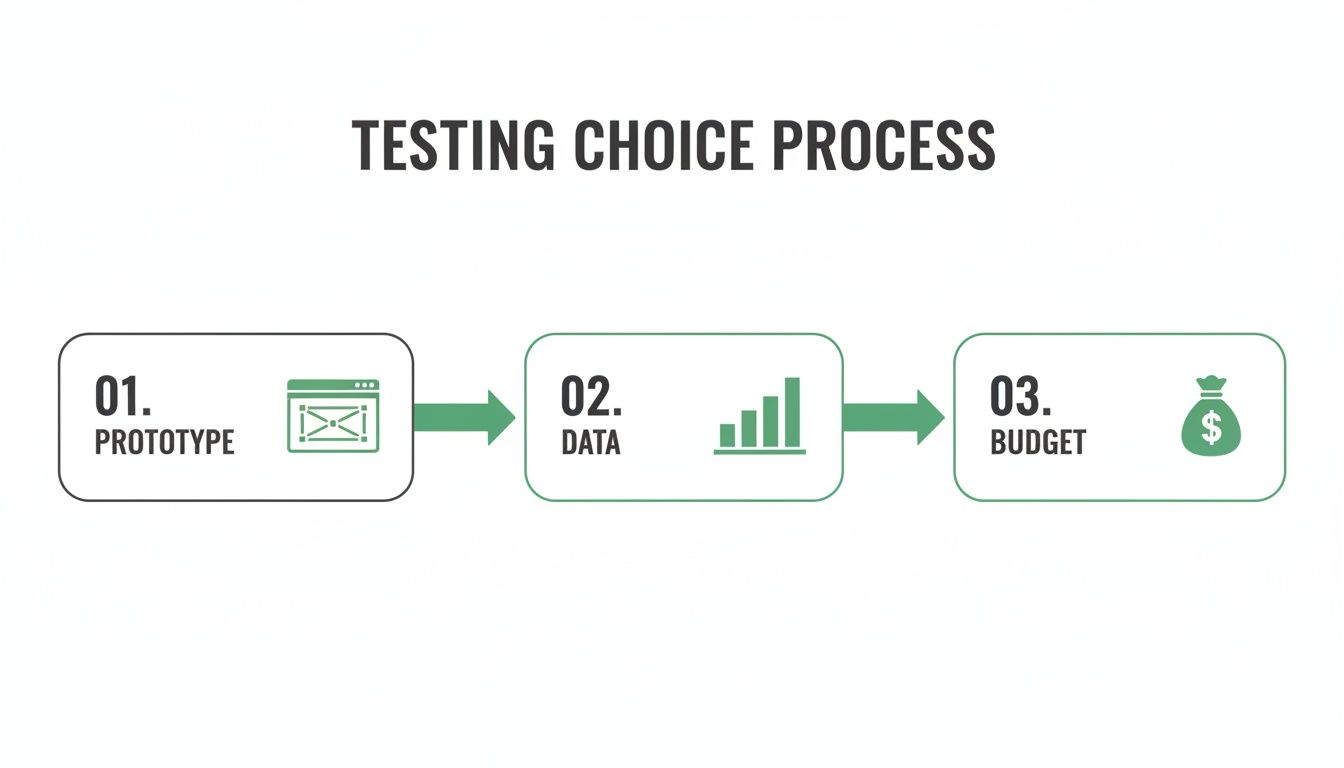
As you can see, the state of your product, your research questions, and the resources you have are the first filters in choosing your testing method.
Define Sharp Research Goals
Before you write a single task, you have to know what you’re trying to learn. A vague goal like "see if users like the new design" will only get you vague, useless feedback. You need to frame your objectives as specific, answerable questions.
Good research goals are:
Specific: Zero in on a single feature, user flow, or problem. Think, "Can users successfully add an item to their cart and apply a discount code without help?"
Actionable: The answers should point directly to a decision. If the answer is "no," you know exactly which part of the UI needs fixing.
Realistic: Make sure you can reasonably answer your questions in a single 60-minute session. Don't try to test your entire app at once.
Clear goals are your North Star. They guide every decision you make, from who you recruit to the questions you ask.
Recruit the Ideal Participants
Your insights are only as good as your participants. Testing with the wrong audience is like asking a professional chef to give feedback on accounting software—sure, they’ll have opinions, but they won’t be the ones that matter.
The aim is to find people who are a genuine reflection of your target users. A short screener survey is your best friend here. Use it to filter candidates based on key demographics, behaviours, and how tech-savvy they are. Be specific about what matters for your study.
Craft a Compelling Test Script
A well-structured script is your session roadmap. It’s there to keep things consistent across participants but flexible enough to allow for unexpected detours. Think of it less as a rigid screenplay and more as a guide to keep the conversation on track.
Practical Recommendation: A great script balances structure with flexibility. It ensures you cover your core research questions while allowing the conversation to flow naturally where the user takes it.
Your script should have a few key parts:
The Introduction: Welcome the participant, explain what you’re doing, and make it crystal clear there are no right or wrong answers. You’re testing the product, not them.
Warm-Up Questions: Start with a few easy, open-ended questions to build rapport and get them comfortable talking.
The Tasks: This is the heart of your test. Write clear, scenario-based tasks that prompt users to interact with the product naturally. Just be careful not to give the answer away in your description.
Probing Questions: Have a few follow-up questions ready to dig deeper. "What did you expect to happen there?" or "Can you tell me more about that?" are classics for a reason.
The Wrap-Up: Thank them for their time and ask if they have any final thoughts. Let them know what to expect next regarding their incentive.
Master the Art of Facilitation
As the moderator, your job is to guide, not lead. You're there to listen and observe. Stick to open-ended questions that start with "what," "how," and "why" to encourage people to elaborate.
One of the most powerful tools you have is silence. It feels awkward, but after a participant finishes a task, just pause for a few seconds. More often than not, they’ll fill the quiet by verbalising their thoughts, giving you priceless, unprompted feedback.
Whatever you do, avoid asking leading questions like, "That was easy, wasn't it?" It completely biases their response. A simple switch to a neutral question like, "How did that process feel to you?" empowers them to share their honest opinion. While you focus on being a great facilitator, remember that a strong interface is the foundation of a good user experience. Our guide on user interface design testing can help you make sure your designs are solid before they even get to this stage.
Capture and Record Everything
Let's face it, our memories aren't perfect. You need a reliable record of what actually happened in the session. If you’re running remote sessions, knowing how to record your moderated user testing sessions using Zoom is essential for analysis later.
Always, always get the participant's consent before you hit record.
While video is great for capturing visual cues and tone of voice, it's also a smart move to have a dedicated notetaker. This frees up the moderator to focus entirely on guiding the conversation, while the notetaker can capture key quotes, observations, and pain points in real-time. This tag-team approach ensures no critical insights fall through the cracks.
Avoiding Common Pitfalls in Moderated Research
You can plan the perfect moderated study, write a flawless script, and still end up with junk data. It happens all the time. Subtle mistakes can derail a session, corrupt your insights, and send your team building in the completely wrong direction.
The whole point of moderated testing is to see what people actually do, but it’s shockingly easy for a facilitator to get in the way. The way you phrase a question or even a slight nod of encouragement can completely alter a user's behaviour.
Leading the Witness
This is probably the most common and damaging mistake: leading the witness. It’s when your question accidentally gives away the answer you’re hoping to hear. You’re essentially nudging the participant to agree with you.
Don't do this: "This checkout process is really straightforward, isn't it?"
Do this instead: "How did you find the experience of checking out?"
The first version is a trap. It makes it socially awkward for the person to disagree. The second version is open and neutral, giving them space to share their real thoughts, good or bad.
Letting Confirmation Bias Take Over
We all do it. Confirmation bias is our natural reflex to seek out information that confirms what we already believe. In a user test, this means you might latch onto the one positive comment about a new design and tune out the five negative ones.
Practical Recommendation: A facilitator’s job is to be an impartial investigator, not a defender of the design. You’re there to uncover the truth about the user experience, even if it’s a truth your team doesn’t want to hear.
To fight this, actively hunt for the negatives. When a user gets stuck or frustrated, don't just move on. Dig deeper with questions like, “Tell me more about what you were expecting to happen there.” This forces you to confront the uncomfortable feedback—which is usually where the most valuable insights are hiding.
Failing to Build Rapport
A moderated session is an artificial setup, and a nervous participant won't give you honest feedback. If you just jump straight into the tasks, the whole thing feels less like a conversation and more like an interrogation.
Always spend the first few minutes on casual, non-test-related chat. Make it crystal clear that you're testing the product, not them, and that there are no right or wrong answers. It’s a simple step, but it helps the person relax and become a genuine partner in the research.
The Hidden Risk of "Professional Testers"
Here’s a sneaky one: unknowingly recruiting "professional testers." These are people who do user tests so often that their feedback is rehearsed and totally unrepresentative of a real user. They know the lingo, they know what you want to hear, and they fly through tasks that would trip up a genuine first-timer.
This is where a blended approach becomes incredibly powerful. While moderated tests give you depth, platforms like Uxia let you validate those findings against a completely unbiased baseline using synthetic users. These AI-powered testers are free from the baggage of professional testers and the social pressure to please a moderator.
You can run the exact same tasks with Uxia’s AI participants and see if the results line up. If your human testers breezed through a flow that Uxia’s synthetic users consistently failed, that's a huge red flag. It could mean your recruitment was skewed, helping you catch the issue before you act on bad data.
Turning Observations into Actionable Insights
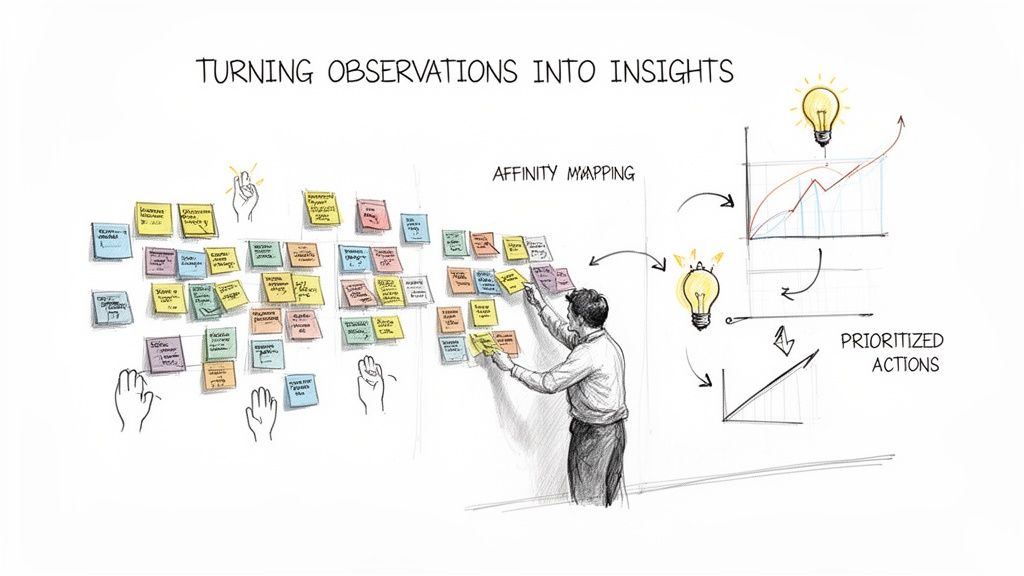
You’ve run the sessions, you’ve gathered the feedback, and now you have a mountain of notes and recordings. Great. But that’s only half the job. A folder full of raw data isn’t going to convince anyone to make a change. The real magic happens when you turn all those individual observations into a powerful story for your team.
This is where you move from "one user said this" to "this is a recurring pattern that's costing us." It's about connecting the dots, finding the themes, and building an evidence-backed case that's impossible to ignore.
From Notes to Patterns with Affinity Mapping
One of the best, most practical ways to make sense of all this qualitative feedback is affinity mapping. Don't let the fancy name fool you; it's basically a structured way to organise chaos. Think of it as sorting a massive pile of LEGO bricks by colour and shape so you can actually build something with them. It’s a visual, collaborative exercise that helps everyone see the big picture emerge from the noise.
Here’s how it works:
Extract Observations: Comb through your notes, transcripts, and recordings. Every important quote, frustrated sigh, or confusing moment gets written on its own sticky note.
Group Similar Items: Stick them all on a wall or a digital whiteboard. Now, without overthinking it, start moving notes that feel similar next to each other. You'll naturally see little clusters forming—maybe a bunch of notes mention confusion about the search bar.
Create Thematic Clusters: Once you have some solid groups, give each one a name that captures the core idea, like "Navigation Confusion" or "Unclear Pricing."
This process forces you to look past one-off comments and spot the real, recurring pain points. To make sure you capture every detail for this analysis, reliable session recording is a must. You can look into various meeting recording software solutions to ensure no critical moments are missed.
Blending Qualitative and Quantitative Data
Affinity mapping is brilliant for uncovering the "why" behind user behaviour, but to build a truly convincing argument, you need to show the "how much." This is where you pair your qualitative insights with cold, hard numbers.
Practical Recommendation: The strongest case for change always weaves a story connecting real user frustrations (the qualitative) with their impact on business goals (the quantitative).
Let's say your affinity map has a big cluster called "Checkout Friction." That's your "why." Now, you back it up with metrics from your sessions:
Task Success Rate: What percentage of users actually managed to check out without your help? If only 40% made it through, that’s a stat that gets people’s attention.
Time on Task: How long did it take them, on average, compared to your benchmark? "Users are taking 3 minutes longer than expected to pay us."
Error Rate: How many people tripped up and entered their card details wrong?
This combination answers both "What's the problem?" and "How big is the problem?" For a much deeper look at this approach, check out our guide to data-driven design.
Accelerating Analysis with Uxia
Let's be honest: manually transcribing, watching, and tagging hours of video recordings is a soul-crushing task. It’s slow, tedious, and often where research momentum dies. This is exactly where a platform like Uxia comes in, completely changing the pace of your workflow.
Uxia’s AI can chew through your session recordings, spitting out accurate transcripts and summaries that pinpoint the most critical user friction points. It does the heavy lifting for you.
Instead of spending days sifting through data, you get an AI-generated report highlighting key themes and usability problems in minutes. This frees your team up to do what they do best: solve problems and strategise, not get bogged down in manual analysis. Think of Uxia as your AI research assistant, closing the gap between observation and action.
This kind of efficiency is becoming critical. In Spain and across Europe, regulations like GDPR and the Digital Services Act are driving a huge content moderation market, showing just how much emphasis is placed on understanding digital interactions. In the same vein, UX teams are doubling down on direct user feedback—88% of researchers use 1:1 interviews and 80% use usability tests to find these crucial insights.
Your Moderated Testing Questions, Answered
Even with the best plan in the world, a few practical questions always come up when you’re about to jump into moderated testing. Let's get them sorted so you can move forward with confidence.
How Many People Do I Actually Need to Talk To?
For most qualitative studies, five participants per user group is the magic number. This isn't just a number we pulled out of thin air; research has shown that five people are enough to flag around 85% of the usability problems in a design.
Once you hit that fifth person, you'll start hearing the same feedback over and over. That's your cue that you've found the biggest issues. However, if you're testing very different user groups—say, first-time users versus seasoned pros—you'll want to recruit three to five people from each segment to capture their unique viewpoints.
What’s the Ideal Length for a Session?
Aim for 45 to 60 minutes. That's the sweet spot. It gives you enough time to build a bit of rapport, watch them tackle the key tasks you've prepared, and ask good follow-up questions without anyone feeling rushed.
Anything shorter, and you'll only scratch the surface. But if you push past 90 minutes, you risk participant fatigue. When people get tired, the quality of their feedback plummets. Pro tip: always schedule a 15-minute buffer between sessions to jot down notes and reset for the next one.
How Much Should I Pay Participants?
Fair compensation isn't just about being nice; it's about respecting someone's time and getting high-quality feedback in return. When you pay fairly, you attract people who are genuinely engaged.
For general consumers here in Spain, a 60-minute remote session usually commands an incentive between €40 and €70.
Practical Recommendation: If you're recruiting highly specialised professionals—think doctors, financial analysts, or enterprise software engineers—that number needs to be much higher. We're often talking €150 per hour or more. The incentive should always match the participant's professional value.
Be transparent about the payment from the start and make sure you pay them right after the session ends. Gift cards, bank transfers, or PayPal are all standard ways to handle it.
Can AI Help with the Analysis?
Absolutely. While the sessions themselves need that human touch, AI is a game-changer for the analysis that comes after. Manually transcribing and sifting through hours of video recordings is a massive time-sink, and honestly, it's where most research projects slow to a crawl.
This is exactly where a platform like Uxia comes in. You can simply upload your session recordings, and its AI will generate accurate transcripts and actionable summaries in minutes. Uxia is brilliant at spotting recurring themes and flagging critical friction points, turning what used to be hours of painstaking work into a quick, automated task. It frees you up to focus on what really matters: solving the problems you've uncovered.
Ready to combine the depth of moderated research with the speed of AI? Uxia can help you validate designs and get unbiased feedback in minutes, not weeks. Discover how Uxia can transform your testing workflow.