Product Design Workflow: A Practical Guide for Modern Teams
Streamline your product design workflow with this practical playbook. Discover actionable steps to improve collaboration and efficiency in 2026.

Most advice about product design workflow gets the order wrong. It treats research as the slow, sacred part and execution as the fast part, when the bottleneck is usually validation. Teams don't stall because they lack ideas, they stall because their process can't prove which ideas are worth shipping.
That's why a strong product design workflow is an operating system, not a mood. In a U.S. business design survey, only 16.1% of companies said they used design as a structured, creative process in 2021, and just 11.4% kept a dedicated design budget, even though 40.3% of design-active companies allocated resources explicitly to design (study reference). Formal design intent is common. Formal design discipline is not.
Why Most Product Design Workflows Fail Before They Start
The biggest myth in product design workflow is that talent carries the process. Talent matters, but it cannot fix a team with no clear owner, no budget, and no repeatable validation loop. When design is treated as a chain of isolated creative bursts, teams produce plenty of artifacts and still miss the point, because uncertainty never gets reduced.
That weakness shows up in broader product work too. Analysts at Study Red reported that only 9.4% of companies saw product innovation between 2019 and 2021, which is a blunt reminder that ad hoc design rarely turns into product momentum (Study Red report, 2021). If design is left out of planning, prioritization, and decision-making, it ends up sitting beside the workflow instead of inside it.
Structure beats heroics
A mature workflow does not mean more process for its own sake. It means every stage has a clear output, a decision owner, and a way to test whether the work should continue. In practice, design stops acting like a standalone function and starts working as a cross-functional system that keeps product, engineering, and research aligned.
Practical rule: If a team cannot say who owns the next decision, the workflow is not ready for sprint work yet.
Structured workflows beat ad hoc ones because they reduce rework and interpretive gaps. They also keep decisions consistent across products and markets. The goal is not to slow teams down with ceremony. The goal is to stop spending time on work that should have been invalidated earlier.
Speed comes from validation, not skipping steps
The fastest teams I've worked with do not cut design rigor. They compress uncertainty early. They test small, learn quickly, and widen the scope only when the decision needs it. AI-powered synthetic testing fits here well, and Uxia is useful because it lets teams pressure-test prototype logic in minutes instead of waiting on a traditional research cycle.
That timing matters at every phase. In discovery, synthetic testers can surface obvious mismatches before the team writes a long brief. In ideation and prototyping, they help compare concepts before engineers commit time. In handoff, they catch weak assumptions before the work moves downstream.
A workflow built for speed has to be honest about its constraints. If ownership is fuzzy, budget is sporadic, and testing happens only at the end, the process is already broken. The fix is simple, if not easy, make design repeatable, fund it properly, and validate earlier.
The Seven Phases of a Modern Product Design Workflow
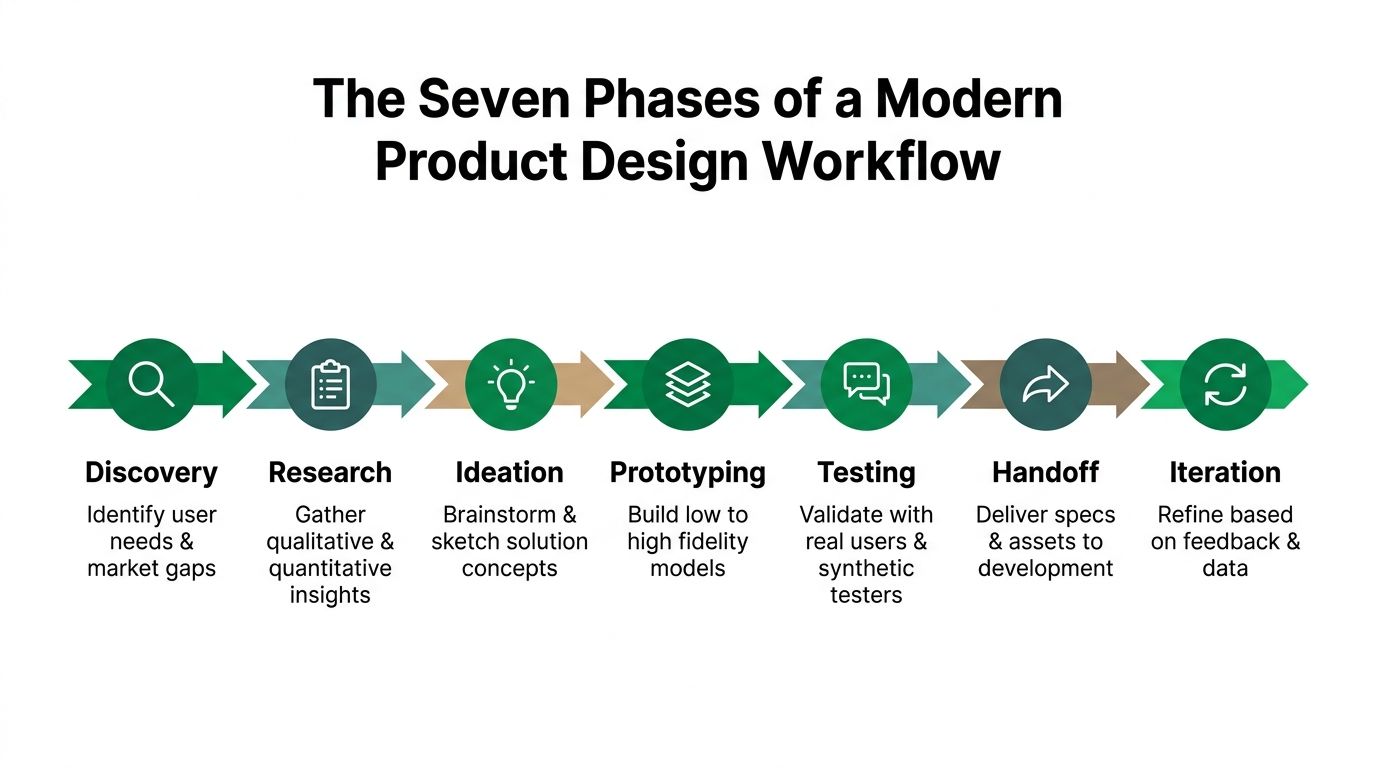
A usable workflow moves through seven phases, but the phases only work when each one produces a decision-ready artifact. If a phase ends with “more discussion,” it didn't really end. The output should be concrete enough for the next person to act on without a hallway meeting to decode intent.
Discovery and research
Discovery should answer a simple question, what problem are we solving? The artifact here is usually a short problem framing doc, a user journey map, or a set of open questions tied to the product goal. Research then gives those questions evidence, either through interviews, observation, or a focused review of existing behavior.
The key is not to overbuild discovery. A lean discovery pass is enough to clarify the problem space, identify edge cases, and prevent the team from ideating on the wrong thing. For more structured framing before coding, clarity before coding explained is a useful companion read.
Ideation and prototyping
Ideation works best when it stays close to constraints. Good concepts are not just novel, they're scannable by engineering and product. I want rough flows, screen lists, and interaction notes before anyone spends time on high-fidelity polish. That keeps the team from treating a pretty mockup like a finished decision.
Once one or two concepts survive review, prototyping should begin immediately. The prototype spec should state what the prototype is meant to prove, what it intentionally leaves out, and what the team needs to learn from it. That keeps prototyping from becoming a gallery of partial ideas.
Testing, handoff, and iteration
Testing should validate a specific flow, not an entire product universe. Handoff should include the approved interaction states, component references, edge cases, and implementation notes. Iteration then closes the loop by folding findings back into the design system, backlog, or next sprint brief.
Teams often try to make one artifact do too many jobs. A journey map shouldn't replace a test brief. A prototype shouldn't replace a specification. And a handoff deck shouldn't replace a decision log. Each phase has one job, and the handoff between phases is where a lot of workflow failure starts.
A clean workflow is less about elegance than it is about removing ambiguity before it multiplies.
Integrating Continuous UX Testing with Synthetic Testers
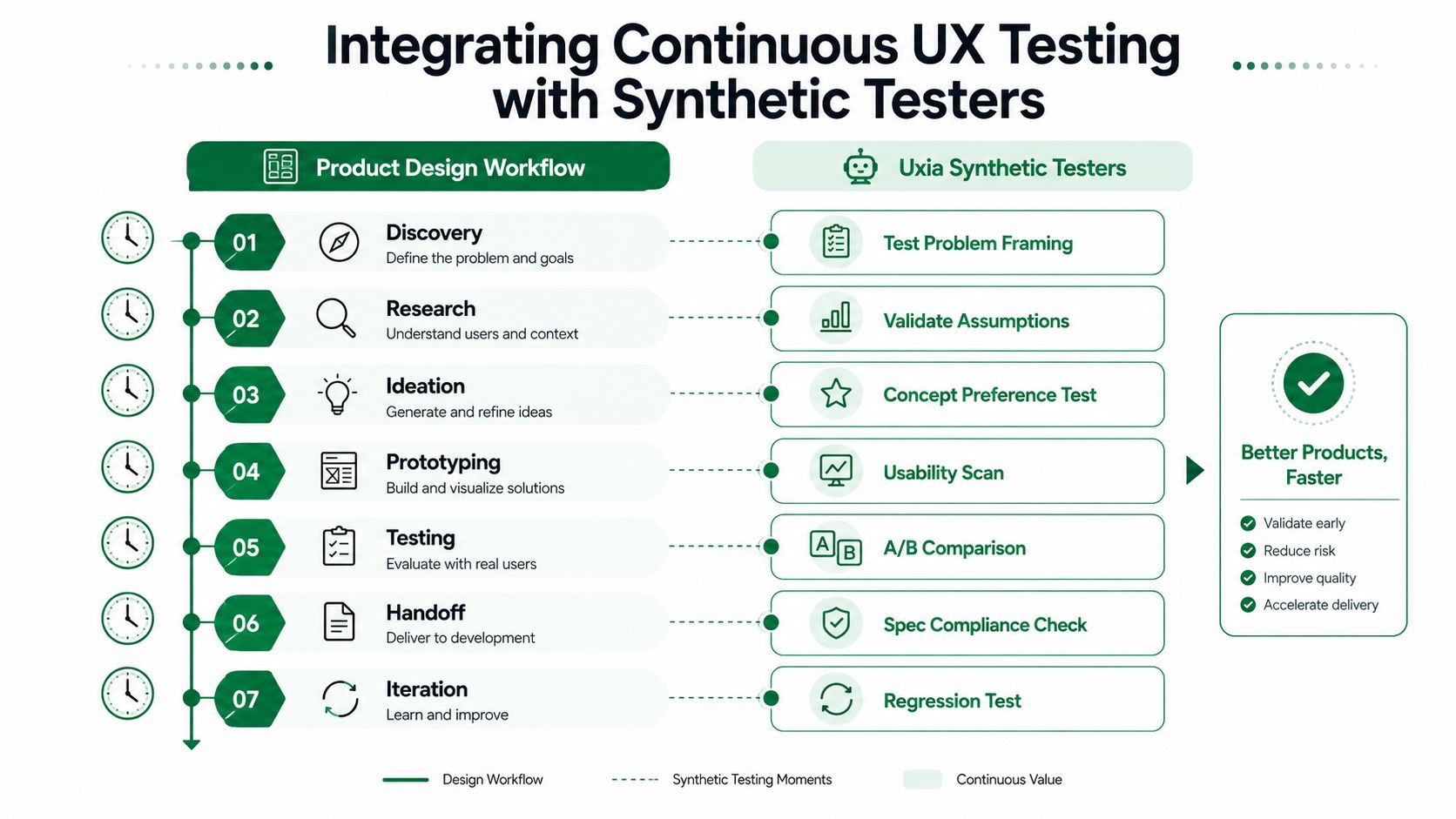
The bottleneck in most product design workflow systems is research latency. Manual studies are valuable, but they often arrive too late to influence sprint decisions. A 2026 state-of-user-research report said 81% of respondents ran a mix of discovery and evaluative work, 44% ran continuous research, and the process still remained largely manual and hands-on under tight timelines and limited resources (report reference). That's exactly where AI-powered synthetic testing changes the pace.
Uxia fits best when the team already has a prototype, a flow, or a sharp decision to make. It uploads images or video prototypes, assigns a mission and audience, and uses synthetic participants to run unmoderated tests, surface friction, and produce transcripts and reports. In practice, that means validation can happen in minutes instead of waiting for recruiting, scheduling, and note synthesis.
Where synthetic testing belongs in the workflow
Use synthetic testing after discovery to sanity-check problem framing. Use it after research to pressure-test assumptions. Use it during ideation for concept preference. Use it during prototyping for a usability scan. Use it again after handoff for a spec compliance check, and after iteration for regression testing. That parallel rhythm keeps testing from being a one-time event and turns it into a lightweight control layer.
This is also where the trade-off matters. Synthetic testing is ideal for fast flow validation, copy clarity, information architecture, and first impressions. It's not a replacement for production-system verification or live-user studies when you need to inspect real data behavior, live performance, or security-sensitive interactions. For a grounded comparison of when each approach shines, compare RUM and synthetic testing is a useful reference point.
Keep each test tight
The strongest workflow rule I've seen is to test one flow at a time. Checkout, onboarding, account creation, upgrades, and search each need separate studies. Uxia's own 2026 UX research playbook recommends plain user language, narrow audience splits before launch, and a consistency check before claiming confidence, which is exactly the discipline most sprint teams need (Uxia playbook).
Practical rule: If a test asks users to judge three unrelated journeys, the findings will be harder to trust and harder to action.
That's why Uxia works best during prototype and pre-launch validation, then again after launch for recurring checks. Userlytics' guidance on research methods lines up with that cadence, early discovery uses interviews and contextual inquiry, pre-launch uses prototype testing and moderated usability studies, and post-launch uses unmoderated testing, surveys, and benchmarking (method guide). In other words, synthetic testing shouldn't replace the whole research stack, it should collapse the slowest part of it.
For teams comparing tooling choices, the workflow question is simple. If the decision is about flow comprehension, interaction friction, or preferred direction, synthetic testers can surface enough signal to keep moving. If the decision depends on production behavior, you still need live validation later in the pipeline. Uxia helps by making the early loop continuous instead of episodic, and that changes how fast design can move.
Design Handoff Checklists and Collaboration Frameworks
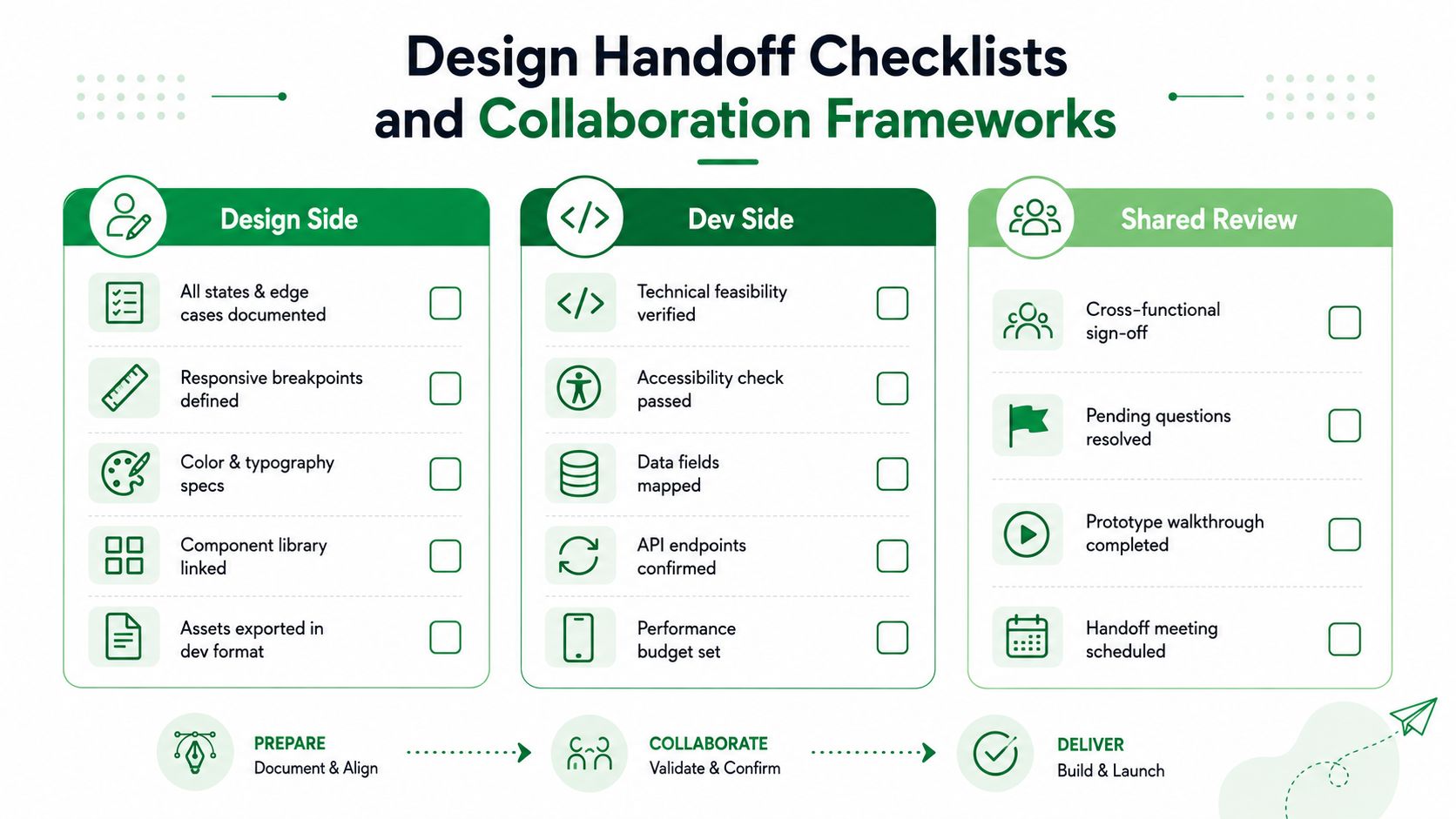
Handoff usually fails for a boring reason, context gets scattered. The designer remembers why a state exists, the developer remembers a spec screenshot, and nobody has the same version of the truth. The fix is a handoff pack that answers what to build, what to ignore, and what to ask about before code starts moving.
What the design side should include
The design file needs more than polished screens. Include every state and edge case that affects behavior, responsive breakpoints, color and typography specs, the linked component library, and exports in dev-friendly formats. If the design system has a reusable pattern, link to it instead of restating it in a slide deck.
The same logic applies to interaction notes. If a modal closes by clicking outside, say so. If the empty state contains a CTA, document the target. If a control changes meaning by device width, mark it clearly so the developer doesn't guess.
What the dev side should confirm
Development should verify technical feasibility, accessibility, data field mapping, API endpoints, and any performance budget that the product depends on. That list doesn't need to be huge, it needs to be explicit. A narrow checklist forces both sides to surface questions while there's still time to adjust the design, not after implementation starts.
How the shared review should work
Shared review should stay short and structured. A walkthrough, a list of pending questions, and a sign-off point are usually enough. UXArmy's 2026 guide recommends keeping research output to two or three clear decisions rather than a long report, and that same standard works for handoff too (workflow guide).
The best collaboration framework I've seen is async first, live second. Designers post the handoff pack, developers annotate questions in the file or ticket, and the live meeting is only for unresolved issues. That respects everyone's time and keeps the meeting focused on decisions instead of status.
For teams standardizing their stack, an internal reference like best product design tools master your 2026 workflow can help align tooling choices with the handoff process. The point isn't to collect more tools. It's to make sure each one produces clearer specifications and fewer surprises.
Common Workflow Pitfalls and How to Avoid Them
A lot of workflow failure comes from overconfidence in small samples. Quantitative testing is for estimating metrics like task success rates, averages, and confidence intervals, not for treating a tiny round as a permanent benchmark. NN/g's guidance recommends calculating confidence intervals for all metrics rather than leaning on small-sample summary statistics alone, and it also notes that 20 participants is often a reasonable target for tighter quantitative confidence intervals (testing guidance).
Don't generalize from the wrong test size
The early-stage myth is that five users are enough for everything. They're not. A widely cited usability benchmark suggests about 5 users can surface roughly 85% of usability problems in a single iteration when issues are discoverable at around a 31% per-user probability, but that same guidance warns teams to recruit at least five participants per distinct user group when expertise or task patterns differ (participant benchmark). One sample size does not fit every workflow stage.
That's why the right move is usually small qualitative rounds first, then broader validation later. Early testing finds the sharpest friction. Larger validation rounds tell you whether a fix is sufficient to ship with confidence. If you skip that sequence, the team ends up polishing the wrong thing.
Scope each study to one decision
Mixing unrelated journeys in one test produces muddy results. Checkout, onboarding, upgrades, and search each create different cognitive loads, so they need separate studies if the team wants actionable feedback. The same applies to prototype reviews, if the test tries to answer usability, visual preference, copy clarity, and pricing comprehension all at once, the output will be noisy.
Practical rule: One study, one decision. If the team needs three decisions, run three smaller studies.
Early defect detection is also cheaper than fixing issues during development, which is another reason to front-load validation instead of front-loading opinion gathering. If the team spends too long in “research mode” without testable prototypes, the workflow gets sluggish in the wrong place. A strong product design workflow alternates between discovery and verification, not just between meetings and mockups.
For teams that want structure, a project management extension can help keep validation tasks visible alongside product work. The useful part is not the board itself, it's making sure tests, fixes, and follow-up checks stay attached to the sprint rather than slipping into a separate backlog.
Measuring Workflow Success and Building Iteration Rhythms
The healthiest product design workflow is measurable. Not in a vanity sense, but in a way that tells you whether the team is getting faster at learning and cleaner at handing work over. The most useful signals are time from concept to validated prototype, number of testing cycles per sprint, handoff rework, and how quickly the team detects regression after launch.
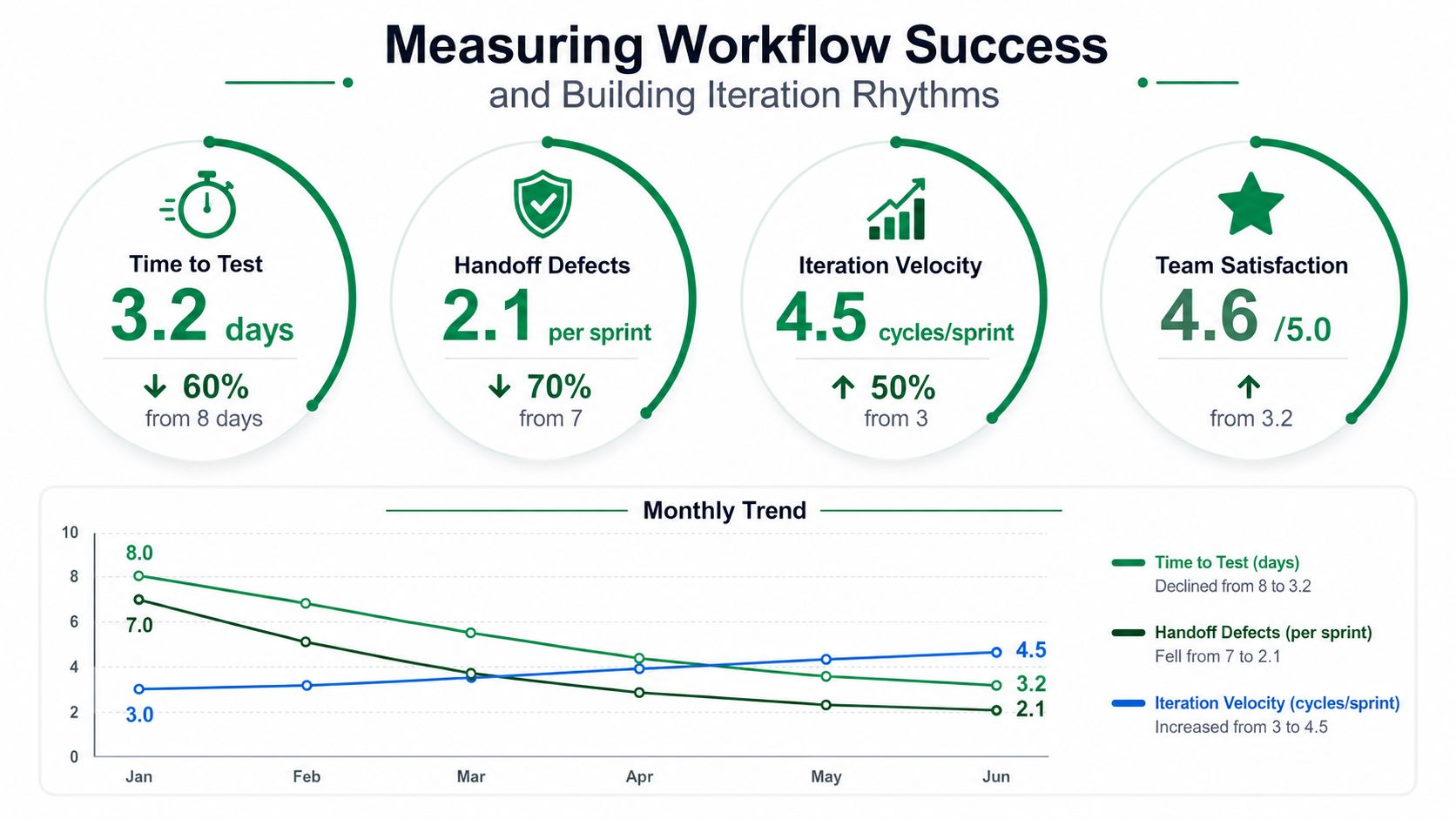
Track the workflow, not just the output
If a team ships a nice interface but spent three extra days reconciling handoff questions, the workflow is still leaking time. If testing happens once a quarter, the team is flying blind between releases. If every sprint includes a small validation loop, the process stays honest and the product improves with less drama.
That's why I prefer retrospectives that focus on the workflow itself. Ask where validation lagged, where the handoff broke, and where an artifact failed to answer the next person's question. Those are design ops questions, not just project questions. They tell you whether the system is getting healthier.
Keep iteration rhythms realistic
Not every team needs the same cadence. A simple product with a stable design system can move faster than a complex product with multiple audiences and fragile integrations. The rhythm should fit the product, not the other way around. Uxia's data-driven design guide is useful here because it pushes teams to anchor decisions in evidence rather than taste (data-driven guide).
The pattern I trust is small test, fix, retest, then hand off. That cycle keeps momentum without sacrificing quality. It also creates a repeatable operating rhythm that product, design, and engineering can all understand. When the team knows how long a validation loop usually takes, planning gets better and fewer decisions get made on speculation.
The long-term goal isn't to make design faster in isolation. It's to make the whole product system faster at converging on the right answer. Teams that measure that well can scale their workflow without drowning in process.
If you want a faster way to validate prototypes, reduce handoff friction, and keep design decisions moving inside the sprint, try Uxia on your next prototype. Upload a flow, run focused synthetic tests, and use the findings to decide what gets refined before engineering starts building.