User Research Methodology: A Guide to Faster Insights
Master user research methodology. Compare qualitative vs. quantitative methods and learn how to choose the right approach for fast, actionable insights with AI.
Most advice about user research methodology still assumes you have the luxury of time. Recruit participants, schedule sessions, run interviews, synthesize notes, circulate findings, then maybe ship a change next sprint. In many product teams, that cadence no longer matches how work moves.
If research takes weeks, it often answers yesterday’s question.
That doesn’t mean teams should abandon rigor. It means they need a methodology that matches modern delivery speed without collapsing into opinion, anecdote, or shallow analytics. The practical shift is not from “research” to “no research.” It’s from isolated studies to a tighter loop that combines exploratory learning, evaluative testing, and faster validation.
The strongest teams already work this way. They use qualitative methods to understand motivations, quantitative methods to measure prevalence, and increasingly, AI-supported workflows to reduce the lag between question and evidence. That’s the useful frame for modern user research methodology: not a menu of methods, but a system for choosing the right evidence at the right moment.
Your Guide to Modern User Research Methodology
A sound user research methodology starts with one uncomfortable truth. The problem isn't a lack of methods. It's a mismatch. Interviews are run when behavioral evidence is needed. Surveys are launched before knowing what to ask. Usability testing is treated as a late-stage QA exercise instead of an ongoing decision tool.
That’s why research often feels slow and expensive. The issue usually isn’t the existence of research. It’s poor alignment between the question, the method, the sample, and the delivery cadence.
Modern practice has moved toward mixed methods because no single approach gives enough confidence on its own. Contemporary UX research combines qualitative and quantitative evidence through triangulation, which means comparing findings from different methods to improve validity. That combination gives teams both broad user trends and deeper behavioral insight, while analytics shows what users do at scale and qualitative work explains why they do it (Ethos App on mixed-methods UX research).
Practical rule: Choose your method by the decision you need to make, not by the method your team already knows how to run.
AI changes the shape of the workflow. It doesn’t remove the need for research design. It raises the value of good design because faster execution exposes weak questions immediately. If your mission is vague, your audience definition is broad, or your analysis criteria are unclear, speed only helps you fail faster.
A better operating model is straightforward:
Start with exploratory work when the team is still defining the problem.
Switch to evaluative testing when designs or flows exist.
Layer quantitative evidence when you need to understand prevalence or prioritize.
Shorten the cycle with tools that reduce recruiting and scheduling overhead.
That’s the version of user research methodology that keeps up with product work. It’s less about ceremony and more about disciplined evidence.
Understanding Core Research Methodologies
Most research confusion disappears when you classify methods on two axes. First, are you studying what people do or what people say? Second, are you trying to understand why something happens or measure how much it happens?
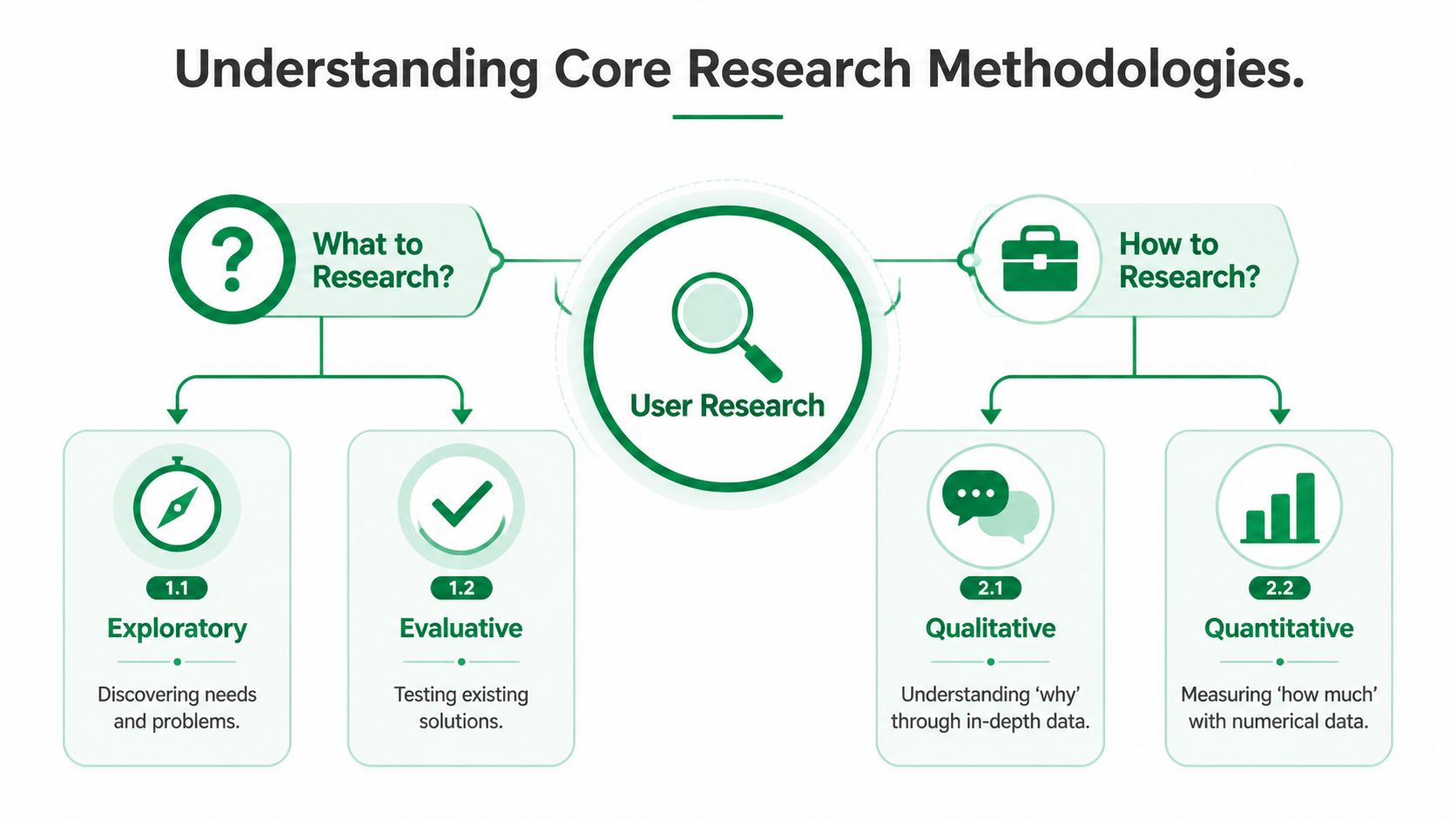
Two axes that matter in practice
The first axis separates behavioral and attitudinal research.
Behavioral methods observe actions. Usability testing, analytics review, first-click testing, and task completion studies belong here. They’re useful when a team needs evidence about navigation, comprehension, friction, or task flow.
Attitudinal methods capture self-reported input. Interviews, surveys, and diary prompts sit here. They’re useful when the team needs language, expectations, motivations, or stated preferences.
The second axis separates qualitative and quantitative research.
Qualitative methods explain the “why.” Quantitative methods help answer “what,” “how many,” and “how often.” That distinction matters because it changes both study design and what conclusions you can defend. If you need a clean explanation for why users hesitate during onboarding, qualitative work is usually the first move. If you need to know whether that hesitation affects a large share of users, you need quantitative evidence.
Generative and evaluative work are different jobs
A practical user research methodology also distinguishes between generative and evaluative research.
Generative research asks, Are we building the right thing? It helps teams understand user needs, unmet expectations, mental models, and context before a solution is finalized.
Evaluative research asks, Are we building the thing right? It tests whether a design, prototype, or live flow works.
Here’s a simple map:
Research goal | Typical methods | Best used when |
|---|---|---|
Generative | Interviews, exploratory questioning, audience-based insight gathering | Problem discovery, concept shaping |
Evaluative | Usability testing, first-click studies, task-based validation | Prototype review, flow refinement, launch decisions |
Quantitative validation | Surveys, analytics, behavioral data analysis | Prioritization, prevalence, trend measurement |
For a concise breakdown of how these evidence types differ, Uxia’s guide to qualitative and quantitative research is a useful reference.
Mixed methods usually produce better product decisions because they reduce a common failure mode: overcommitting to a vivid anecdote or to a context-free metric.
Why mixed methods became the default
The strongest research programs rarely stop at one method. A mixed-methods approach integrates qualitative and quantitative evidence so teams can triangulate findings and improve validity. In practice, that means qualitative work uncovers the reasoning behind behavior, while quantitative analysis tests how broadly the issue appears across the user base.
That combination is now foundational because product teams need both explanation and confidence. An interview can reveal why onboarding copy creates distrust. Analytics can show where drop-off concentrates. A survey can test whether the confusion is widespread enough to reshape the roadmap. Each method answers a different part of the same decision.
A Decision Framework for Choosing Your Method
Method choice should follow product stage, decision type, and operating constraints. If you skip that sequence, you usually end up with impressive-looking research that doesn’t change anything.

Match the method to the product moment
Early discovery requires different evidence than post-launch optimization.
If the team is still framing the problem, the best methods are usually exploratory. You want interviews, open-ended questioning, and structured audience-based probing. The goal is to surface needs, language, expectations, and constraints before interface details lock in.
If the team has a prototype or live flow, shift to evaluative methods. Task-based usability testing becomes more useful because users can react to something concrete. In this phase, the research question is rarely “What do users need?” It’s more often “Can users complete the task, and where do they struggle?”
After launch, combine behavioral analytics with targeted follow-up. Analytics can reveal where users stall or abandon. Focused surveys or validation studies then help explain those patterns.
Use sample size to narrow the right method
Sample guidance should shape planning, not just recruiting. For moderated usability testing and interviews, 5 to 8 participants per distinct user segment is typically sufficient. Quantitative methods such as surveys generally need 50 to 200 participants to produce statistically meaningful results, which has direct implications for cost, speed, and the type of question you can answer reliably (Userlytics on UX research methods and sample sizes).
That distinction leads to a useful decision rule:
Need depth fast? Use qualitative methods.
Need prevalence or statistical confidence? Use quantitative methods.
Need both? Sequence them rather than forcing one method to do both jobs.
A practical selection model
You can choose a method by asking three questions in order.
What decision is blocked?
If the blocker is strategic, use generative methods. If the blocker is executional, use evaluative methods.What evidence would change the roadmap?
If one strong session could reveal the issue, qualitative work may be enough. If prioritization depends on scope or prevalence, add quantitative validation.What can the team realistically support this sprint?
A method that fits the schedule is often more valuable than an ideal method that arrives too late.
A short walkthrough helps:
Scenario | Better method choice | Why |
|---|---|---|
New product area, weak understanding of user needs | Exploratory interviews or audience-based directional research | The team needs problem understanding before solution testing |
Checkout prototype has visible friction | Task-based usability testing | Behavioral evidence will show where the task fails |
Multiple issues found, roadmap is crowded | Survey or scaled quantitative validation | The team needs prevalence data to prioritize |
Post-launch drop-off appears in analytics | Behavioral review plus contextual follow-up | Analytics identifies the point of failure, follow-up explains it |
A quick visual summary can help teams align before they commit to a study:
The main mistake to avoid is false precision. Don’t run a survey to compensate for unclear thinking. Don’t run interviews when the actual question is whether an observed issue is widespread. A mature user research methodology treats method selection as a decision about evidence quality, not a preference for a familiar format.
Planning a High-Impact User Research Study
Most weak studies don’t fail in analysis. They fail in planning. The team asks a broad question, recruits a vague audience, improvises the mission, then wonders why the findings are hard to act on.
A high-impact study usually has four parts that were defined before the first participant response arrived.
Start with one decision, not a topic
“Improve onboarding” is not a research question. It’s a project label.
A better starting point is a decision the team has to make. For example: Which onboarding step creates the largest trust break for first-time users? Or: Does the invoice explanation create enough uncertainty to block completion?
Write the question so the answer can change a design choice, a content change, or a roadmap priority. Then write a working hypothesis. It doesn’t need to be correct. It needs to be specific enough to test.
If a study could end with “It depends,” the question is still too broad.
Build the audience with intent
Recruitment quality shapes finding quality. That’s true whether you’re working with human participants or synthetic profiles.
For niche products, generic audiences create generic feedback. Teams need to define the audience in layers: core demographics, behavioral or contextual segmentation, and enrichment based on prior research when the domain is specialized. This is especially important in financial, healthcare, or role-specific workflows where domain context changes how people interpret flows, copy, and risk.
A practical planning sequence looks like this:
Define the segment first by role, context, or user maturity, not just age or geography.
Use prior research to enrich the profile when the audience has specialized knowledge.
Keep audience definitions stable across rounds so changes in findings reflect design changes, not audience drift.
For teams refining interview design before synthesis begins, this guide to conducting user interviews is a useful companion.
Write a mission that produces evidence
A mission should sound like a user goal, not a QA checklist. “Find and pay for a monthly transit pass using the app” is stronger than “Click through the payment journey and share thoughts.”
The mission needs enough context to make the task believable, but not so much that it teaches the answer. If you overspecify the route, you stop observing real decision-making.
Include prompts that reveal both action and interpretation:
Action prompt such as completing a task or choosing between options
Comprehension prompt that checks what the user thinks just happened
Confidence prompt that exposes uncertainty, hesitation, or false understanding
Decide how you’ll analyze before you collect
Teams often say they want “open discovery” when what they really mean is “we haven’t defined the analysis plan.” That usually produces messy synthesis.
A stronger approach is to decide in advance which signals matter. Behavioral analytics paired with targeted contextual surveys can reduce speculative design iterations, and mature programs using that combination report up to 30 to 40 percent faster cycle times from insight to implementation because the evidence structure is clearer (Formbricks on combining analytics and contextual surveys).
In practice, that means predefining categories such as:
Signal type | Example |
|---|---|
Task friction | User stalls, retries, or abandons |
Interpretation gap | User misreads copy or system status |
Trust break | User hesitates around payment, privacy, or confirmation |
Severity pattern | Repeated blocker versus isolated annoyance |
That discipline matters more as testing gets faster. A well-planned study doesn’t just produce insights. It produces findings the team can act on without an additional round of debate.
Integrating AI for Faster, Deeper Insights
The most useful question about AI in user research methodology isn’t whether it replaces human research. It doesn’t. The better question is where it improves coverage, speed, and consistency enough to change the operating model.
One strong answer is evaluative testing.
Synthetic participants can run task-based studies against prototypes or live experiences without the usual recruiting and scheduling overhead. That makes them especially useful when teams need frequent feedback on flows, copy, trust signals, navigation, and accessibility patterns. In practice, I’ve found the strongest setup combines moderated-style usability logic with careful audience definition and enrichment. The mission stays concrete. The audience is built deliberately. The output is reviewed for repeated patterns, not isolated comments.
What the Amsterdam comparison makes clear
A side-by-side comparison on an Amsterdam public transport app is a useful example because it goes beyond generic claims. In that study, AI testers surfaced 17 issues, compared with 4 found through the human-panel workflow, plus 5 prototype-specific observations. Every issue flagged by human testers had already been identified by the AI testers, and the human panel did not produce unique issues beyond those already surfaced.
The issues were not abstract. They included small tap targets, ambiguous onboarding copy, uncertainty around invoice behavior, and prototype artefacts such as a missing confirmation screen after payment.
Metric | Uxia (AI Testers) | Human Panel |
|---|---|---|
Issues surfaced | 17 | 4 |
Prototype-specific observations | 5 | Not specified |
Human-identified issues also found by AI | Yes | Not applicable |
Unique insights exclusive to human panel | None reported | Not applicable |
That doesn’t mean human research is obsolete. It means teams should stop assuming the human panel is automatically the richer source of evaluative insight in every context.
Validity comes from audience design
The main criticism of synthetic testing is usually validity. That concern is reasonable. Generic synthetic testers will generate generic findings.
Validity improves when the audience setup is treated as real research work. The useful model is layered: demographic filters first, then segmentation, then enrichment using prior research when the audience is niche or domain-heavy. That mirrors how experienced researchers already think about participant recruitment. The difference is that the setup becomes reusable across repeated validation cycles.
AI-powered synthetic testers also address a known bias problem in traditional testing. Professional participants can become overly familiar with testing formats, which can skew results. Emerging research summarized by NN/g notes that AI-powered synthetic testers help reduce this bias, and internal benchmarks show platforms such as Uxia can flag issues with up to 95 percent parity to human-led studies. The same source also points to AI clustering of qualitative comments achieving high accuracy with small samples, which challenges the assumption that every useful pattern requires large-scale quantitative work (NN/g on quantitative methods and AI-supported research).
For a deeper look at this workflow, Uxia’s overview of AI user research is relevant.
Synthetic testing is most valuable when you need repeated evaluative evidence on a defined audience, not when you need broad human context without a clear task.
AI changes execution, not research fundamentals
The fundamentals stay the same. You still need a sharp question, a believable mission, a valid audience, and a clear analysis frame.
What changes is the practical ceiling on how often you can test. That matters because many product teams already know what good research looks like. Their real constraint is execution friction. If you’re designing the systems behind these faster workflows, this guide to agentic AI architecture is useful context for how multi-step AI processes can be structured reliably.
The strategic implication is simple. AI doesn’t just speed up an existing research process. It makes continuous evaluative research operationally realistic.
Adopting a Continuous Validation Mindset
Fast feedback creates a new problem. Once a team can run a study quickly, the bottleneck becomes discipline.
That’s where many teams drift. They start launching tests because they can, not because the question is ready. The result is a pile of comments, weak prioritization, and noisy iteration.

Standardize the loop
The fix is to standardize a lightweight validation loop.
Each round should begin with a narrow mission, a specific decision, and a clearly defined audience. After the test, review repeated patterns rather than reacting to memorable single comments. Then separate genuine UX friction from prototype artefacts before making changes.
That last step matters more than teams expect. In prototype studies, some issues belong to the design, while others come from incomplete states, missing screens, or rough transitions. If researchers don’t mark that distinction, teams can overcorrect the wrong thing.
Speed changes the cadence of evidence
A continuous loop only works when the cadence is short enough to influence active work. In one comparison, the process took 25 minutes with Uxia versus 748 minutes for a traditional human-testing workflow. That difference is large enough to change not just speed, but planning behavior. Teams can validate within the same working rhythm as design and product decisions rather than treating research as a separate track.
The methodological shift is not “test more.” It’s “ask tighter questions more often.”
A useful operating pattern is simple:
Before each round define one decision and one success criterion.
During analysis look for recurring evidence, not isolated novelty.
After review label findings as usability issues, trust issues, content issues, or prototype artefacts.
On the next round keep the audience stable and test the changed element, not the whole product again.
Continuous validation doesn’t lower the bar for research. It raises the bar for precision. Teams that adopt it well stop debating opinions in meetings because they’ve built a habit of answering smaller questions with faster evidence.
The Future of User Research is Fast and Focused
There isn’t a single best user research methodology. There’s a better way to combine methods so each one does the job it’s suited for.
Interviews are useful when the team needs context and language. Usability testing is useful when the team needs behavioral evidence on a flow. Surveys and analytics matter when prioritization depends on prevalence. Mixed methods matter because product decisions usually require both explanation and confidence.
What’s changed is execution. Faster AI-supported testing makes it practical to validate more often, with tighter questions and clearer audience definitions. That doesn’t remove the need for sound methodology. It makes methodology more important because weak study design becomes obvious much faster.
The teams that get the most value from modern research won’t be the ones with the largest research backlog. They’ll be the ones that treat research as an operating system for product decisions. Focused question. Right method. Clear audience. Repeat.
Slow research used to be an accepted constraint. It doesn’t need to be anymore.
If you want to build a faster validation loop into your product process, Uxia offers a practical way to run AI-supported UX testing with defined audiences, task-based missions, transcripts, issue detection, and report outputs that fit ongoing design iteration.