
Accelerate Product Validation with AI User Research
Discover how AI user research transforms product validation. Get actionable feedback from synthetic users in minutes and make data-driven decisions faster.

Stuck between slow, expensive user testing and the need for lightning-fast validation in your agile workflow?
AI user research is the answer. It uses artificial intelligence to automate testing, giving you actionable feedback on designs in minutes, not weeks, by deploying synthetic users instead of recruiting human participants.
The End of Slow Feedback Loops with AI User Research
The traditional product development cycle is notoriously slow, and user research is often the biggest bottleneck. You have to recruit the right people, schedule sessions, conduct the tests, and then manually sift through hours of data. The whole process can take weeks, completely derailing agile sprints and holding up critical decisions.
This is exactly the problem AI user research was built to solve.
This modern approach completely changes how teams validate ideas. Imagine getting detailed feedback on a new prototype before you even head home for the day. Instead of waiting for human testers, you can use a platform like Uxia to generate AI-driven synthetic users that perfectly match your target personas.
These aren't just simple bots. They are sophisticated agents designed to interact with your product, pinpoint usability issues, and even "think aloud" to provide the qualitative context you need.
A New Pace for Product Validation
The most obvious benefit is speed, but without cutting corners on quality. This method simply automates the most time-consuming parts of traditional research.
No More Recruiting: Instantly access AI participants tailored to your exact demographic and behavioural needs. Practical Recommendation: Before running a test in Uxia, document your key user personas. Having clear profiles (e.g., "Tech-savvy Sarah, 28" vs. "Cautious David, 55") ready will make persona creation in the tool instantaneous.
On-Demand Testing: Run tests whenever you want, day or night, without the headache of coordinating schedules across different time zones. Practical Recommendation: Integrate AI testing into your daily stand-ups. When a new design is ready, a product manager or designer can launch a test on Uxia and have results ready to discuss the next morning.
Automated Synthesis: Get prioritised insights, heatmaps, and clear reports generated for you automatically. Platforms like Uxia handle all the heavy lifting of data analysis.
This move toward automation is already happening everywhere. In Spain, for example, 9.2% of enterprises were using AI solutions in 2023—a rate that's already ahead of the EU average. It’s a clear signal that businesses are integrating smarter, faster technologies into their core workflows.
The goal isn’t just to be faster. It’s to enable continuous validation. With AI user research, your team can test an idea, iterate on the feedback, and re-test the improved version all in a single afternoon.
Traditional vs AI User Research at a Glance
To put the difference in perspective, let's break down how the two approaches stack up side-by-side. The old way is familiar, but the new way offers advantages that are impossible to ignore.
Aspect | Traditional User Research | AI User Research (with Uxia) |
|---|---|---|
Speed | Weeks (recruiting, scheduling, analysis) | Minutes (on-demand testing & automated reports) |
Cost | High (incentives, recruiter fees, platform costs) | Low (fixed subscription, no per-test fees) |
Scale | Limited by budget and time | Virtually unlimited; run tests anytime |
Recruiting | Manual, time-consuming, and often difficult | Instant access to synthetic users matching any persona |
Analysis | Manual and subjective (watching videos, synthesis) | Automated, objective, and instantly available |
Consistency | Varies widely based on participant mood/focus | 100% consistent and repeatable for reliable data |
As you can see, AI-driven testing doesn't just speed things up; it fundamentally changes the economics and reliability of gathering user feedback.
Redefining the Research Process
By automating the repetitive grunt work, AI frees up researchers and designers to focus on what they do best: strategy, problem-solving, and innovation. AI accelerates every step, from designing the study to analysing the results, and puts an end to slow, tedious processes like transcription in qualitative research.
Ultimately, AI user research gives product teams the confidence to build better products, faster. It provides a reliable, on-demand method for gathering user feedback, ensuring every design decision is backed by solid user experience data. With a tool like Uxia, you can finally align your research practice with the rapid pace of modern product development.
How Synthetic Users Deliver Realistic Insights
The real power of AI user research is its ability to generate surprisingly realistic insights without human participants. We're not talking about simple chatbots here. This is about deploying sophisticated AI agents—what we call synthetic users—to run entire usability tests on your behalf.
At Uxia, we’ve honed this process, turning a deeply complex technology into a straightforward, powerful tool that any product team can use.
It all begins with your design. You provide a link to a Figma prototype or even just a screenshot of a new feature. Then, you give the AI a simple mission, like "sign up for a free trial" or "find and purchase a specific product."
Crafting the Perfect AI Persona
Next, you tell the AI who it should be. Uxia lets you build synthetic users from detailed demographic and behavioural profiles. You can define specific traits like age, technical skill, and even the psychological drivers behind why they'd use your product in the first place.
This step is critical. The AI isn't just a single, monolithic entity. It's a whole cohort of distinct personas, each engineered to represent a slice of your actual user base.
Need to see how a "tech-savvy millennial" tackles your new onboarding flow compared to a "less confident boomer"? You can generate both, instantly.
One of the biggest wins here is consistency. Unlike human testers who might be tired, distracted, or influenced by previous tests, synthetic users deliver unbiased, repeatable feedback every single time. This completely gets rid of the "professional tester" problem, where participants get so used to testing that their feedback stops resembling a real first-time user's experience.
This streamlined process is a world away from the slow, manual steps of traditional research.
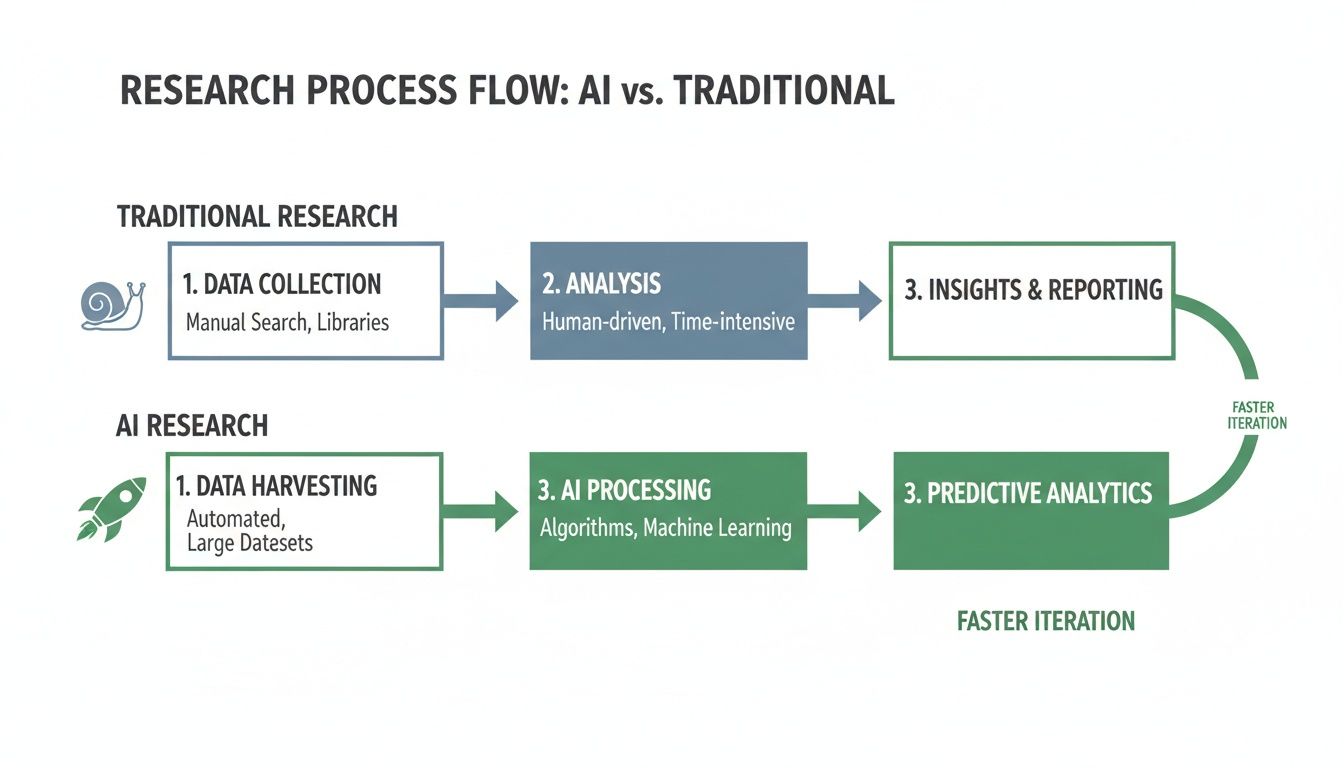
As you can see, AI automates the most time-consuming parts of the work—recruitment and analysis—shrinking a process that often takes weeks down to mere minutes.
The Automated Testing Pipeline
Once you hit "run," Uxia’s automated pipeline kicks in. Here’s a quick look at what happens behind the scenes:
Navigation and Interaction: The synthetic users get to work, navigating your design by clicking buttons, filling out forms, and trying to complete the mission you set for them.
Cognitive Modelling: As they move through the interface, the AI agents "think aloud," generating a live transcript of their thought process. They'll articulate confusion, hesitation, or moments of clarity, giving you rich qualitative context for their actions.
Friction Detection: The system automatically pinpoints moments of struggle, what we call "usability friction." It flags exactly where users get stuck, which bits of copy are unclear, and which design elements are causing trouble.
This whole process captures a massive volume of both quantitative and qualitative data. To really dig into the differences and advantages, you can see a direct comparison in our guide on how synthetic users compare to human testers.
The entire system is built to mirror how real people explore a new digital product. The synthetic users don't just follow a script; they actively probe the experience with a clear goal in mind. They tell you exactly where the design fails to meet their expectations, giving you the precise insights you need to build with confidence.
This is where AI user research stops being a concept and becomes your team’s secret weapon. Forget about research being a separate, long-winded phase. It’s something you can weave directly into your product sprints, getting feedback right when you need it.
Imagine your team is in a two-week sprint, trying to improve the user onboarding flow. With a platform like Uxia, you don’t have to wait until the end to know if you're on the right track. You can get solid insights in hours, not weeks.
And this isn't just a nice-to-have anymore. The investment pouring into AI is making these tools more accessible than ever. The Spanish AI market, for example, is projected to hit €2.57 billion in revenue in 2024, growing at a staggering 35.95%. That kind of financial momentum means product teams finally have the budget to adopt tools that give them a real edge.
A/B Testing Without Needing Live Traffic
One of the most common headaches for a product manager is choosing between two design variations. Say you have two different calls-to-action (CTAs). The traditional way involves building both, shipping them to a slice of your user base, and then waiting days or weeks for enough data to trickle in.
AI research completely flips that script. With Uxia, you can run a clean comparison before a single line of code is written.
Practical Recommendation:
You set up two distinct tests in Uxia, one for each of your CTA variations.
You assign the exact same synthetic user persona to both—for instance, "price-sensitive small business owners."
Then, you give them an identical mission, like "sign up for a premium plan."
In minutes, Uxia gives you a direct comparison, showing which message led to less friction and a higher success rate. You get a clear, data-backed winner before development even starts. Think of the engineering hours that saves.
Validate Your Value Proposition Instantly
Another huge win is testing your core value proposition. Does your messaging actually connect with your target audience? Is it crystal clear what problem you solve for them? Guessing here is expensive.
With AI user research, you get an immediate gut check on your copy. Practical Recommendation: Upload a screenshot of your landing page to Uxia and define a synthetic persona that matches your ideal customer. Then give it a simple task: "Explain what this company does and who it's for."
The AI's "think-aloud" transcript shows you exactly how a first-time visitor interprets your site. It flags confusing jargon, points out what's compelling, and tells you if your main value is coming across—all from the perspective of your target user.
De-Risk New Features Before You Build Them
Let's say a designer has just mocked up a complex new feature. Before you sink development resources into building it, you need to know: is the flow actually intuitive?
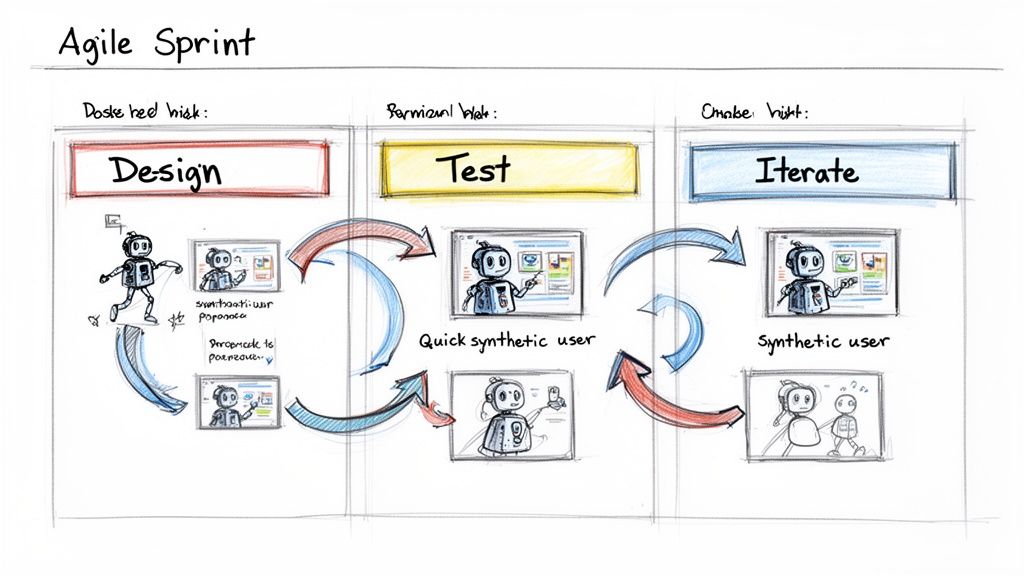
In Uxia, the designer can upload their Figma prototype and run it past a group of synthetic "novice users." The AI will try to complete the key tasks, and the platform automatically spits out heatmaps, click paths, and a report flagging every single point of confusion. This lets the team iterate on the design multiple times in a single afternoon.
Practical Recommendation: To make sure those insights don't get lost in a sea of Slack messages, you can use platforms like Researchcollab AI to help organise and share findings across the whole team. Alternatively, many teams create a dedicated "Uxia Insights" channel where automated reports are shared, ensuring visibility.
When you integrate these workflows, AI user research becomes a daily habit, not a formal event. It ensures every decision you make is grounded in solid, user-centric data.
Turning AI-Generated Data into Actionable Decisions
The real power of AI user research isn’t just its speed—it’s the clarity of the output. Raw data is useless without interpretation, and this is where platforms like Uxia really shine. They turn a flood of information into a clear path forward for your product.
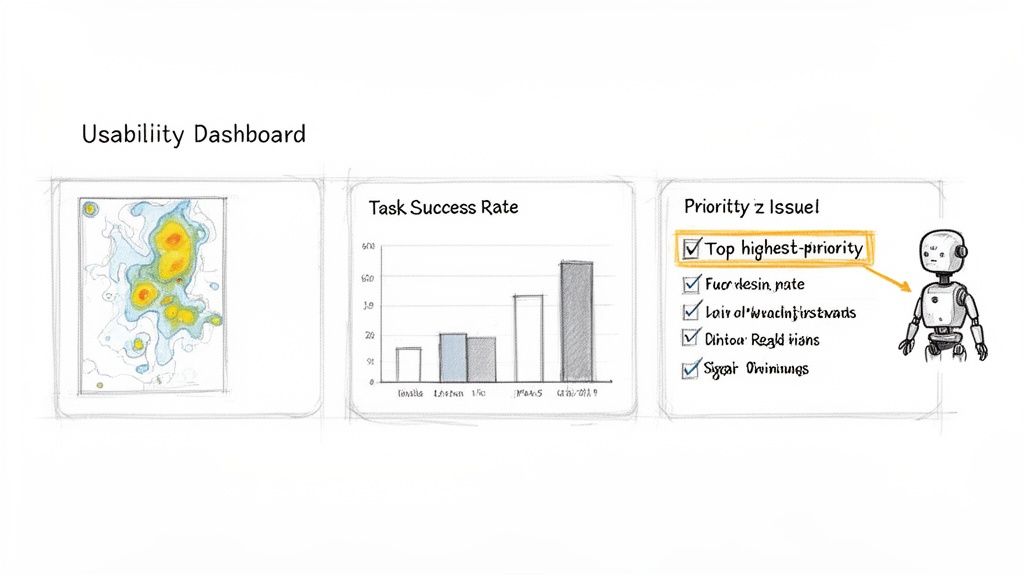
It all starts with blending hard quantitative metrics with rich qualitative feedback. You get the numbers you need to convince stakeholders, plus the human-like context that explains why those numbers are what they are.
Merging Quantitative Data with Qualitative Insights
On the quantitative side, AI platforms deliver the kind of straightforward metrics that teams love. These are instantly understandable and dead simple to share.
Task Success Rates: A clean percentage showing how many synthetic users actually completed the mission you set for them.
Time on Task: The average time it took to finish a flow, immediately flagging where users hesitated or got stuck.
User Flow Diagrams: Visual maps that trace the exact paths users took, revealing every wrong turn and deviation from the happy path.
Heatmaps: These visuals instantly show where users focused their attention and clicks. You can see which elements draw the eye and which ones get completely ignored.
But numbers only tell you what happened. The qualitative feedback is where you discover why. Uxia, for instance, gives you a full, transcribed 'think-aloud' commentary from each AI tester. This is a running monologue where the synthetic user articulates its entire thought process—from confusion over an unclear button to delight at an intuitive feature.
The real magic happens when you combine both. A low task success rate is a red flag, but when combined with a heatmap showing users clicking the wrong button and a transcript saying, "I thought this would take me to the checkout page," you have a precise, actionable problem to solve.
From Raw Data to Prioritised Actions
Sifting through this mountain of data manually would take hours, completely defeating the purpose of rapid testing. That’s why a good AI tool synthesises everything for you automatically. Uxia doesn’t just give you a data dump; it organises the findings into a prioritised list of actionable recommendations.
The system analyses all the inputs—clicks, flows, transcripts, and more—to flag critical issues tied to:
Navigation: Identifying dead ends or confusing pathways.
Copy Clarity: Pinpointing jargon, vague CTAs, or misleading labels.
User Trust: Flagging design elements that feel unprofessional or untrustworthy.
Accessibility: Spotting potential barriers for different types of users.
Practical Recommendation: Use the prioritized issue list generated by Uxia to create tickets directly in your project management tool (like Jira or Trello). This closes the loop between insight and action, ensuring that usability friction points are addressed in the next sprint.
This automatic synthesis is what makes the whole process work. It means your team can move directly from testing to fixing things without getting bogged down in analysis. The goal is to get a clear, confident next step, making sure your design decisions are always moving the product in the right direction.
For teams looking to master this workflow, learning how to implement a data-driven design process is an excellent place to start.
How to Implement AI Research from Pilot to Scale
Bringing AI user research into your organisation doesn't need to be a massive, top-down mandate. Forget about trying to overhaul everything at once. The smart way to do it is to start small, prove the value fast, and then expand.
This approach builds real momentum and gets people genuinely excited about what’s possible.
Choosing Your Pilot Project
Your first move? A pilot project. Pick one specific, high-impact area to put AI to the test. Don't try to solve all your problems at once. Focus on a single, contained user flow where getting quick feedback would make a huge difference.
Practical Recommendation: A great place to start is validating a critical journey. Think about the checkout process on your e-commerce site or the sign-up flow for a new service. These are perfect because they have a clear goal, and success is dead simple to measure.
With a platform like Uxia, you can literally set this up in minutes. Just upload your prototype, give the AI a mission like "complete a purchase," and choose a synthetic user persona that mirrors your target customer. You’ll have actionable results almost right away—a powerful, real-world demo of how fast this is.
This is especially true in markets with high AI literacy. Spain, for example, is a leader in generative AI adoption, where enterprises are expected to hit 20.3% adoption by 2026. This signals a growing appetite for sophisticated AI solutions among professionals. You can find more data on the European AI market at IMARC Group.
Building Internal Buy-In
That pilot project is your secret weapon for getting internal support. It’s one thing to talk about AI; it's another to walk into a meeting with a heatmap from Uxia showing exactly where users got stuck, a transcript of the AI’s thought process, and a clear list of fixes—all generated in less than an hour.
That gets people’s attention.
The goal is to show, not just tell. Present the quick, tangible win from your pilot. Frame it as augmenting your existing UX efforts: AI handles the repetitive validation tasks, freeing up your human researchers to focus on more complex, strategic work.
This approach tackles the common worries head-on. It proves that AI research is here to complement human expertise, not replace it. It also shows how platforms like Uxia deliver more reliable data by sidestepping the biases you often get with professional human testers.
Scaling AI Research Across Your Organisation
Once you’ve got a successful pilot in the bag, scaling is much simpler. The next step is to weave AI testing into your team's regular sprint cycles. It stops being a special, one-off event and becomes a routine part of how you design and build.
Here are a few practical ways to scale this up:
Pre-Development Validation: Make it standard practice for all new features to get an AI test run in Uxia before a single line of code is written.
Sprint-Based Testing: Carve out a small part of each sprint to run tests on whatever you’re currently working on. A designer can test a wireframe on Monday and have feedback by Tuesday's stand-up.
Democratise Research: Train designers and product managers to run their own tests with Uxia. This empowers them to get answers on demand, without waiting for the research team.
By embedding AI research into your daily workflows, you start building a culture of continuous validation. This shift means every decision is backed by user feedback, which dramatically cuts down risk and helps you move faster. To get a better handle on the platforms that make this happen, check out our guide on tools for working with synthetic users.
Whenever teams start looking into AI user research, the same few questions always pop up. It makes sense. This is a new way of working, so getting straight answers is the only way to build trust and see a clear path forward.
Let's tackle the most common ones I hear.
Are Synthetic Users as Reliable as Real People?
For validating usability and interaction flows, the answer is a resounding yes. They are incredibly reliable.
The synthetic users you get in a platform like Uxia aren't just basic scripts. They are sophisticated AI agents built from the specific personas you define. This means you get consistent, unbiased feedback on your designs, completely free from the “professional tester” bias that can muddy results from human panels.
While you'll still want deep ethnographic studies to uncover brand-new user problems, synthetic users are perfect for validating solutions quickly and accurately. That’s exactly what you need for the fast, iterative cycles of modern product development.
Practical Recommendation: Use Uxia for directional validation early and often. If you have two design directions, run both through Uxia to see which one has less friction. This gives you strong evidence to support your final choice, saving human-participant studies for more nuanced, exploratory questions.
How Does This Fit into Our Agile Process?
It fits like a glove. In fact, you could say AI user research was made for agile workflows.
Traditional research is a known bottleneck. It can take weeks, pushing research activities completely outside the sprint. With Uxia, you can take a new wireframe, run a test, get feedback, tweak the design, and test it again—all within a single sprint. And this is all happening long before a single line of code is written.
This makes continuous validation—a core promise of agile that's often hard to live up to—a reality. Research stops being a slow, formal gate and becomes a quick, routine check.
Will AI Replace Our Human UX Researchers?
No. It empowers them to do their best work.
AI takes on the repetitive, time-draining parts of usability testing, like running sessions and pulling out key findings. This frees up your human UX experts to focus on the high-value strategic work they were hired for: deep problem discovery, complex journey mapping, and getting stakeholder buy-in.
Think of Uxia as a force multiplier for your research team. It allows a small team to scale its impact across the entire company, delivering more insights to more teams without causing burnout.
Ready to see how Uxia can accelerate your team's validation process? Get started today and run your first AI user test in minutes.