Usability Test Plan Template That Actually Works
Download our usability test plan template and learn how to customize it for moderated, unmoderated, and AI-powered synthetic user testing with Uxia.

A product team can spend days preparing a usability study, run every session on schedule, and still end up with findings nobody can use. The research question is too broad, success means something different to every stakeholder, and the plan never says what result would justify shipping, fixing, or testing again.
A practical usability test plan template should prevent that failure before recruitment begins. It should connect a research question to observable behavior, define effectiveness, efficiency, and satisfaction, document threats to validity, and state the decision rule in advance. Uxia can add a fast synthetic testing layer for iteration, but the plan still needs to say when simulated evidence is sufficient and when human participants must make the final call.
Why Most Test Plans Fail Before the First Session
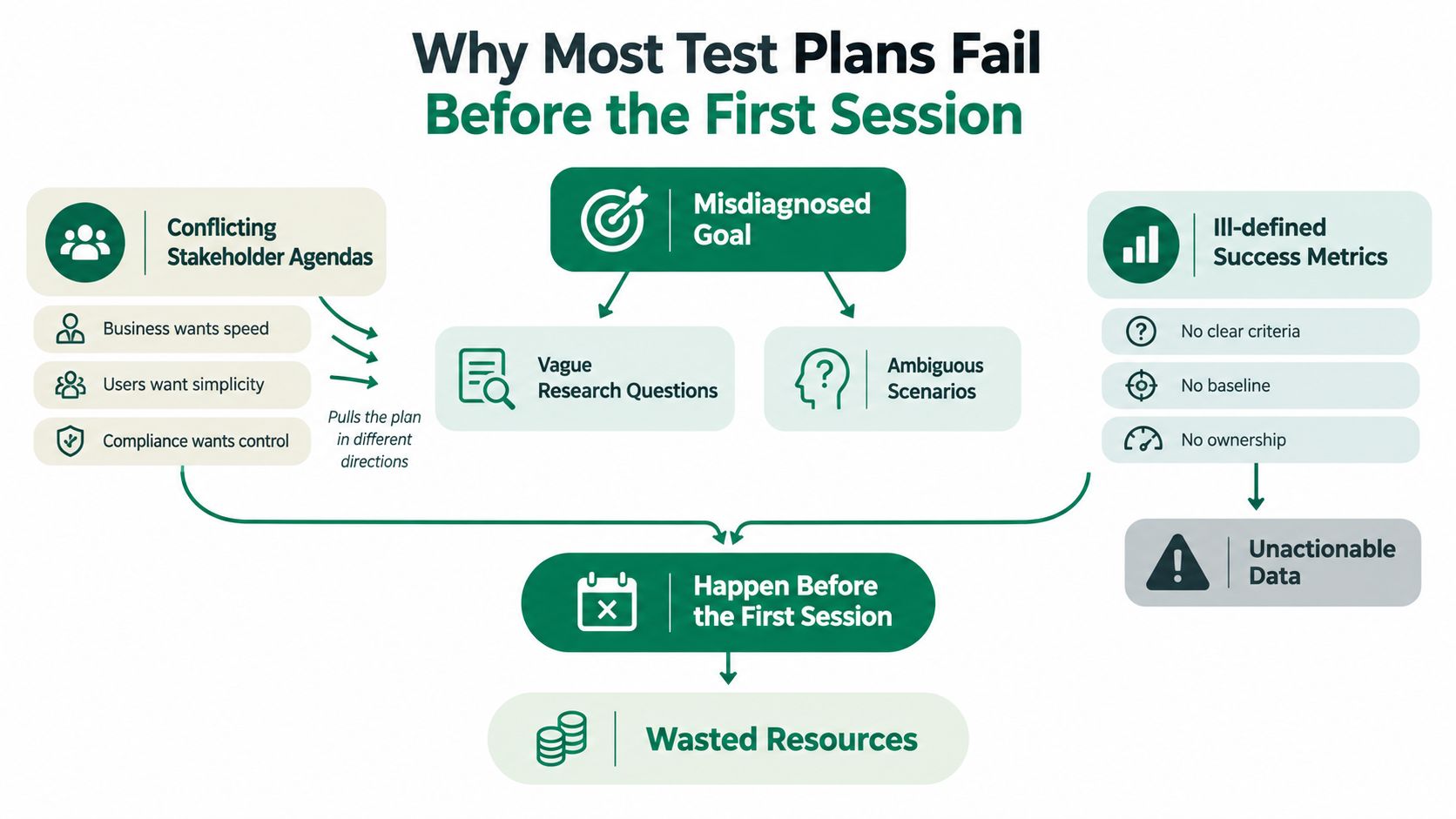
The most common failure is a plan that describes an activity instead of a decision. “Evaluate the new onboarding experience” sounds reasonable, but it doesn't identify what the team needs to learn, which users matter, or what evidence would change the release plan. By the time the sessions finish, stakeholders can select whichever observation supports their existing preference.
Three failures appear repeatedly:
The research question is vague. “Is the experience intuitive?” bundles navigation, comprehension, trust, accessibility, and emotional response into one untestable prompt. A stronger question asks whether a specified user group can complete a particular flow in a defined context, and where the experience breaks down.
Success criteria are ambiguous. One stakeholder may treat task completion as success, while another focuses on hesitation, confidence, or error recovery. Without separate measures, a participant can finish quickly by guessing and still leave with low trust.
No decision rule exists. Teams collect completion rates, time-on-task, comments, and recordings, then debate what they mean after the fact. That creates goalpost-moving, not evidence-based product development.
Build the plan around three pillars
First, sharpen the research question. Name the user, goal, context, and uncertainty. “Can first-time account administrators invite a teammate and understand the permission choice?” is testable. “Is the settings page good?” isn't.
Second, tie measurement to behavior. The international framework formalized in ISO 9241 usability guidance defines usability through effectiveness, efficiency, and satisfaction. Your plan should therefore record what users accomplish, what resources they use, and how they experience the task, rather than relying on general impressions.
Third, predeclare the decision rule. Write the condition for shipping, the condition for fixing first, and the condition for rerunning the study. This turns the plan into a shipping document. The team should leave the final session knowing not only what happened, but also what happens next.
Practical rule: If the team can't finish the sentence “If we observe X, we will do Y,” the plan isn't ready.
The Seven Fields Every Usability Test Plan Template Must Include
A useful template is short enough to complete and rigorous enough to constrain interpretation. The following seven fields cover the minimum chain from question to action. The examples are concrete, but each team should replace them with product-specific entries.
Field | Purpose | Sample Entry |
|---|---|---|
Research question | Defines the uncertainty the study must resolve | Can new workspace administrators identify the correct permission level and invite a teammate without assistance? |
Study objectives | Breaks the question into observable learning goals | Identify where administrators hesitate, what permission language they misunderstand, and whether they can recover from an incorrect selection. |
Participant profile and recruitment screener | Ensures the people tested resemble the intended users | Recruit people who administer at least one collaborative digital product, excluding current employees and anyone who designed the flow. |
Task scenarios with success criteria | Translates the research question into realistic behavior | “Invite Jordan to the workspace and give Jordan access to project reports.” Success means the participant sends the invitation with the intended permission and explains the choice. |
Test environment and materials | Controls the conditions that can affect behavior | Use the current clickable prototype on a laptop, with the same entry point, account state, copy, and navigation available to every participant. |
Metrics and measurement plan | Specifies how evidence will be captured and analyzed | Record task completion, critical errors, time-on-task, assistance requests, and a post-task ease rating, then code observed causes by severity. |
Decision rule and reporting cadence | Converts findings into a release action and assigns ownership | Ship if all critical tasks meet the predefined success condition and no high-severity issue remains unresolved. Review findings with design and product after analysis, then rerun after a material change. |
The first field should be written as a question that could receive a meaningful answer. The second should explain what evidence would answer it. Avoid objectives such as “validate the design” unless you add the behavior that would count as validation.
The participant field needs more than demographics. Include relevant experience, product familiarity, role, accessibility needs where applicable, and exclusions that could bias the result. The task field should use a believable scenario rather than interface instructions. "Click the blue button" tests compliance with the script. "You need to give a new colleague access to monthly reports before a meeting" tests whether the interface supports the actual goal.
A research plan example for students can help newer teams see how questions, methods, participants, and outputs fit into one document. For task wording, keep the scenario separate from the action you want to observe, and use a dedicated usability testing scenario template when the team needs a repeatable format.
Make the fields interlock
The metrics field shouldn't be an inventory of every number a platform can collect. Select measures that answer the research question. A behavioral measure such as task success becomes more useful when paired with a self-report measure that reveals confidence or perceived effort.
The final field is where most templates become ceremonial. State who reviews the result, when they review it, what evidence is considered decisive, and what triggers another round. The research question drives the metrics, the metrics support the decision rule, and the decision rule gives the document operational value.
Adapting the Template for Moderated, Unmoderated, and AI Synthetic Tests
The core plan shouldn't be rewritten every time the collection method changes. Keep the research question, task scenarios, success criteria, metrics, and decision rule stable. Change the data collection layer around them.
Moderated sessions
A moderated plan adds the human logistics that shape the session. Include the moderator script, opening explanation, consent and recording process, probe questions, observer roles, and a protocol for handling technical problems. The moderator can ask why a participant expected a control to work, but shouldn't rescue the participant before the behavior is captured.
Use thinking aloud carefully. A prompt such as “Please describe what you're looking for” can expose expectations, while repeated demands for narration can make the task unnatural. Record probes separately from spontaneous behavior so the analysis distinguishes what participants did from what they said after prompting.
Unmoderated human tests
Unmoderated tasks need stronger instructions because no researcher is available to clarify ambiguity. Define the starting state, the scenario, the stopping condition, the success criteria, the time limit, the recording method, and any attention check. A task that depends on a moderator's explanation isn't ready for asynchronous testing.
Keep the metric definitions unchanged. Whether a researcher observes a session live or reviews an asynchronous recording, “task success” should mean the same thing. This makes results comparable across iterations.
Uxia synthetic testers
For an AI synthetic run, keep the research question, tasks, metrics, and release rule intact, then document the persona configuration, audience assumptions, test scope, sample size, and confidence threshold. Synthetic participants can help explore interface logic, navigation, copy, friction, and edge cases before the team commits to recruiting people.
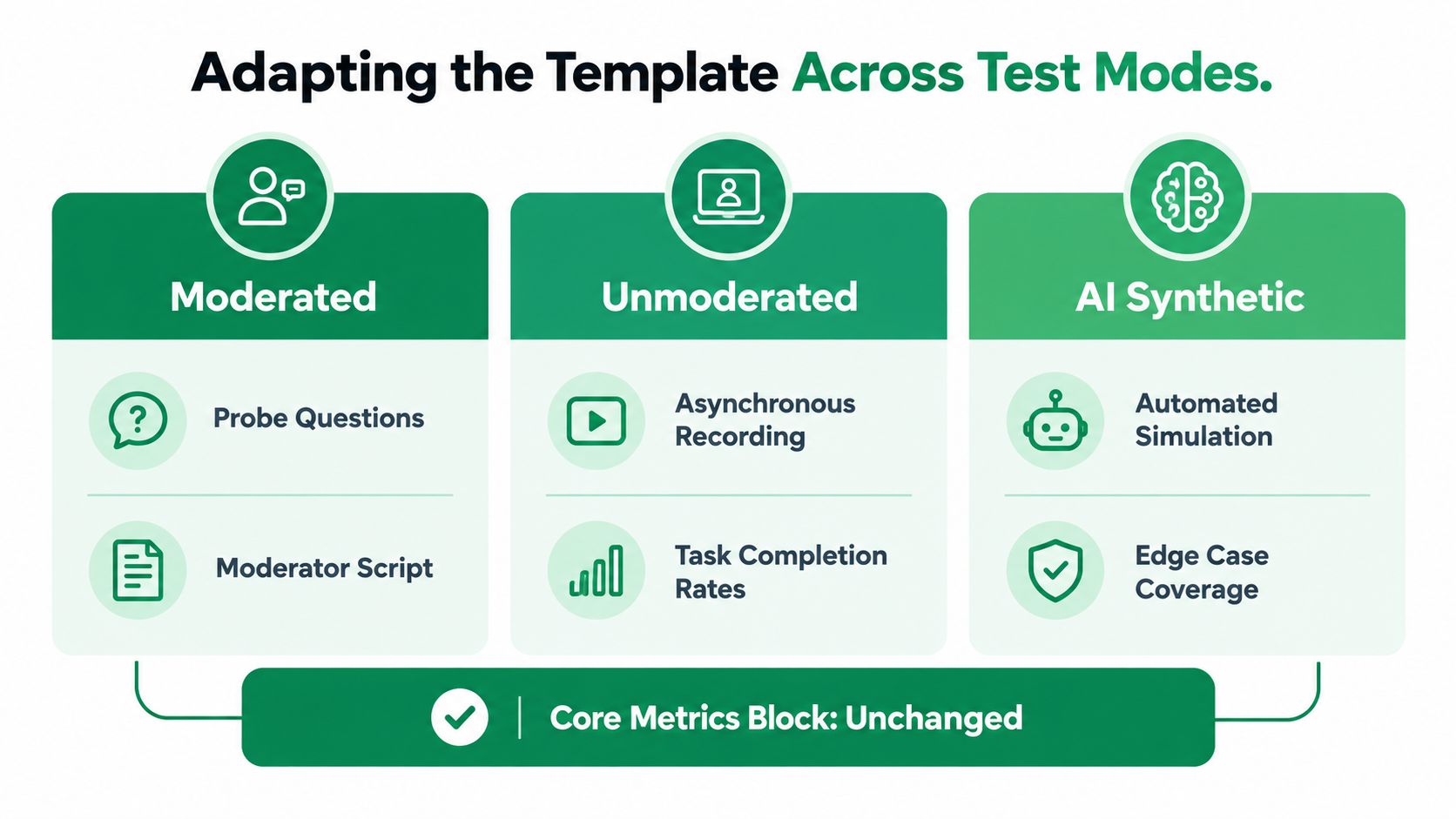
The important distinction is that Uxia changes the participant source, not the definition of success. Its synthetic testers move through the supplied experience, surface friction, and generate transcripts and issue patterns. The plan must still record what the system can and cannot establish, especially for emotional, cultural, accessibility, or safety-sensitive questions.
For a direct comparison of simulated and human evidence, use the synthetic users versus human users comparison as a planning aid rather than assuming one method replaces the other.
The three modes therefore share one metrics block:
Effectiveness: Did the specified user achieve the goal accurately and completely?
Efficiency: What effort, time, or assistance did the task require?
Satisfaction: How did the participant describe confidence, ease, or discomfort?
The mode determines how evidence enters the plan. It shouldn't determine what the evidence means.
From Metrics to Decisions With Predeclared Rules
A measurement framework becomes useful when every metric has a consequence. A compact plan might track task success rate, time-on-task, error count, SUS, and qualitative severity, but the team should define the interpretation before seeing the results. The usability testing metrics guide can support metric selection, but no metric should enter the plan without a decision purpose.
Use thresholds that reflect the product risk. For example, a critical task may require complete, unaided success, while a low-risk discovery task may tolerate a recoverable error. If a team wants a numerical benchmark, it should set that benchmark during planning and justify it through product risk, prior performance, or an agreed baseline. Don't invent a convenient threshold after the sessions.
Scenario | Quantitative Signal | Qualitative Signal | Decision | Next Action |
|---|---|---|---|---|
Clean pass | Every predefined metric meets its planned condition | No unresolved high-severity issue affects a critical flow | Ship the iteration | Record the evidence and monitor the flow after release |
Contradictory pass | Completion and speed meet the planned conditions | Severity-three issues cluster on a revenue path, with confusion or trust concerns | Hold the release | Patch the affected path, then rerun the relevant task |
Inconclusive | One measure narrowly misses its condition or results vary by segment | Evidence is plausible but doesn't explain the behavior confidently | Run another round | Improve instrumentation, test the uncertain path with Uxia, and commit only after the rule is satisfied |
The contradictory result is the one that exposes weak plans. Fast completion can hide guessing. High completion can coexist with low confidence. A positive average can conceal a failure for a particular audience. Your evidence table should retain the affected segment, observed behavior, supporting metric, uncertainty, severity, and recommended validation step.
Weight severity against frequency
A frequent minor annoyance may deserve a backlog item. A rare failure that blocks a safety-critical action may deserve an immediate release hold. The plan should state how severity is assigned, whether frequency changes priority, and what qualifies as a critical failure.
A useful decision rule might say that a critical task cannot ship with a serious use error, even when overall satisfaction is positive. That approach is consistent with FDA human-factors guidance, which says validation testing should cover all critical tasks and describes 15 participants per distinct user population as a practical minimum when sample-size parameters can't be estimated reliably in advance.
Writing this rule early prevents stakeholders from moving the goalposts. It also gives researchers permission to report an uncomfortable result without turning the readout into a negotiation.
The Risk and Validity Section Most Templates Skip
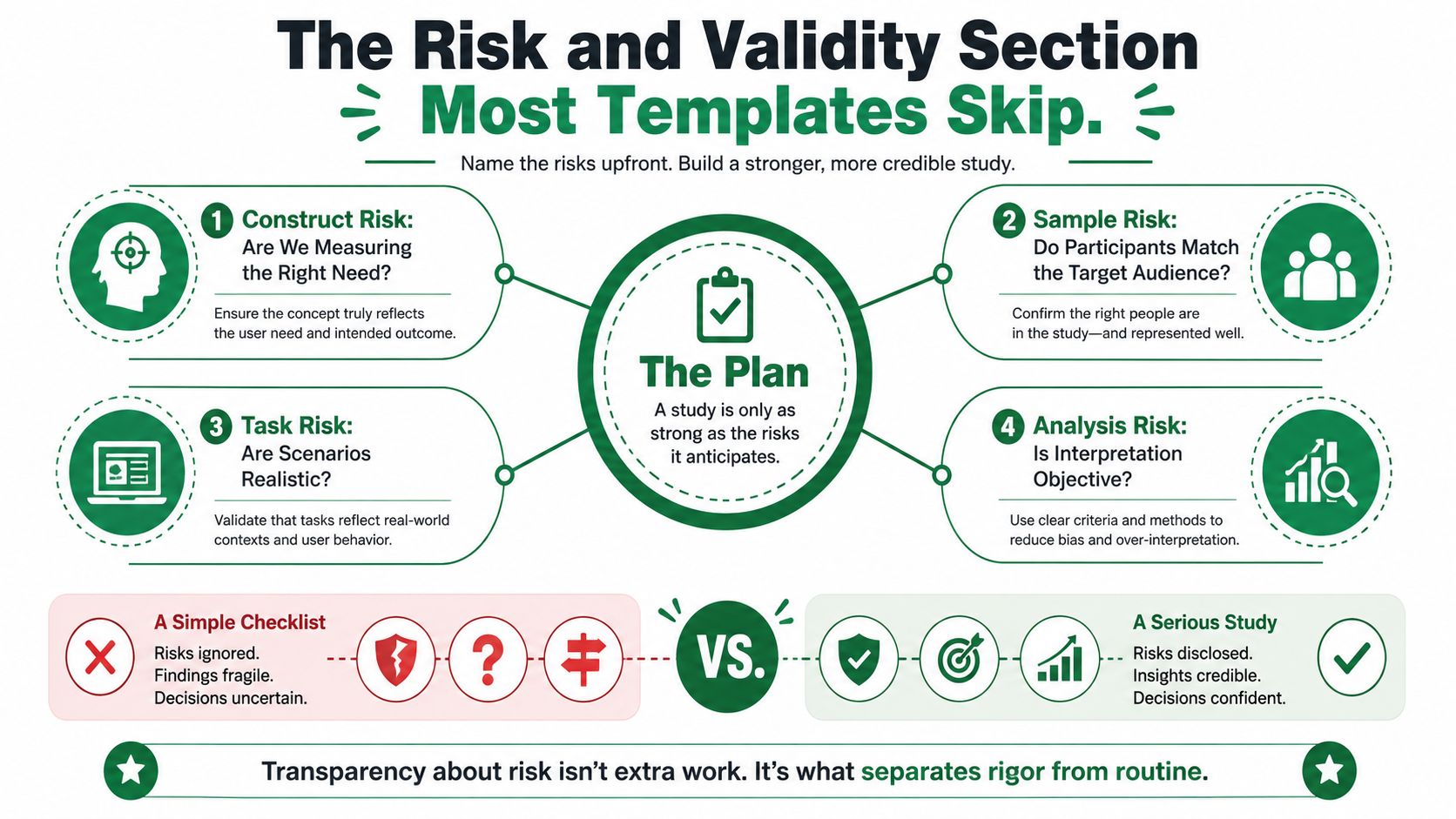
A checklist can tell you whether the team wrote tasks. A serious plan tells you whether the resulting evidence is strong enough for the decision. Add a risk-and-validity block before recruitment, not as a disclaimer after the findings.
Four risks deserve explicit treatment:
Construct risk: Are we measuring the behavior that matters? Mitigate it by linking every task to a product decision and separating observable behavior from opinion. Redesign the study if the task measures interface familiarity instead of the target need.
Population risk: Does the sample represent the launch audience? Mitigate it with a screener that reflects role, experience, context, and relevant accessibility needs. Redesign if a launch-critical group is excluded or represented only by assumption.
Ecological risk: Does the task resemble real use? Mitigate it with a realistic scenario, starting state, device, and environmental constraint. Redesign if participants must perform an artificial sequence they wouldn't recognize outside the study.
Decision risk: Will the result change the release call? Mitigate it with a predeclared threshold and named decision owner. Redesign if stakeholders can accept any outcome without changing scope, timing, or product behavior.
Where synthetic evidence earns its place
Synthetic testers from Uxia are useful for construct, ecological, and decision-risk probes during iteration. A team can test whether the task exposes the intended interface problem, whether a scenario produces observable friction, and whether the planned metric can distinguish a pass from a failure. This is valuable before a moderated study, after a design change, and during regression checks.
The boundary is population risk. Review evidence on synthetic participant limitations before using simulated findings to gate a launch involving accessibility, regulated flows, safety, privacy, culturally specific behavior, or high-stakes first impressions. Synthetic participants can reduce variance, flatten ratings, and miss emotional or cultural nuance. They can broaden exploration, but critical decisions still need human feedback.
Write one compact paragraph into the template:
This study may underrepresent [population] and may not reproduce [context]. Synthetic findings will support iteration on [decision], but won't establish [excluded claim]. Human validation is required before shipping if [risk trigger] occurs. The release owner will approve the decision using [evidence and rule].
That paragraph keeps the plan honest without turning it into a compliance document.
Choosing the Right Test Mode for Each Question
No test mode wins every trade-off. Moderated human sessions provide the richest opportunity to probe meaning, but they require recruitment, scheduling, facilitation, and analysis. Unmoderated human tests provide direct participant behavior at a distance, while Uxia synthetic runs offer an immediately available way to explore defined flows and repeat checks.
Criterion | Moderated Human | Unmoderated Human | Uxia Synthetic | Best Fit |
|---|---|---|---|---|
Recruitment effort | High, because participants must be sourced and scheduled | Medium, because the study can run asynchronously | Low, because synthetic testers are available through the platform | Early iteration favors Uxia |
Speed to result | Slower, with live sessions and analysis | Faster once recruitment and setup are complete | Fast for repeated exploratory runs | Regression and rapid comparison favor Uxia |
Depth of qualitative signal | Highest for probing emotion, trust, and unexpected meaning | Moderate, depending on recording and prompts | Useful for structured friction and interface patterns, weaker for lived context | Exploratory questions favor moderated research |
Fit for shipping decisions | Strong when the sample matches the launch audience and risk | Strong for behavioral validation with appropriate participants | Strong for iteration and evidence generation, limited for high-stakes population claims | Match the mode to decision risk |
A hybrid default works better than a blanket preference. Run Uxia against core tasks during the build, use an unmoderated human test at the end of a sprint to catch surprises, and reserve moderated sessions for exploratory, emotional, accessibility, regulated, or otherwise high-stakes questions.
Route the question, not the team preference
If the question is whether a flow is broken, start with Uxia. The team needs fast evidence about navigation, logic, copy, and friction.
If the question is why users abandon, schedule moderated sessions. Abandonment may involve trust, context, competing priorities, or an emotion that a synthetic run can't establish reliably.
If the question is whether a redesign beats the baseline, run both methods where the decision matters. Compare the same tasks and measures, then investigate meaningful disagreements.
If the question concerns a regulated or safety-critical action, include the required user populations and critical tasks in human validation. The FDA guidance cited above provides a specific benchmark for medical-device contexts, but the broader principle applies: risk determines evidence.
Teams that need more qualitative method ideas can consult Captapi's data collection methods, then select only the method that answers the question. More data isn't automatically better data. The defensible choice is the one that matches the uncertainty, population, and consequence of being wrong.
Rollout Checklist and Continuous Validation With Uxia
Treat the plan as an operating rhythm, not a document filed before a single study. A practical rollout starts with one flow, establishes a baseline, triages what matters, and then adds human depth where the evidence requires it.
Scope a single flow. Choose one journey with a clear user goal and a release decision.
Ship a Uxia synthetic baseline. Run the current experience against the intended audience and core scenario.
Triage findings. Separate blocking failures, recurring friction, unclear evidence, and acceptable imperfections.
Run one moderated deep dive. Investigate the most consequential uncertainty instead of moderating every minor issue.
Lock decision rules. Write the thresholds, severity conditions, owner, and rerun trigger before the next iteration.
Schedule a weekly Uxia rerun. Use the same core tasks to detect regressions while design and engineering continue.

Paste this checklist into Notion, Linear, or the workspace where the product decision lives:
Research question: Written as a question with a clear user, goal, and context.
Metrics: Defined before testing, with behavioral and satisfaction measures where appropriate.
Decision rule: States what result means ship, fix first, or rerun.
Risk register: Covers construct, population, ecological, and decision validity.
Test mode: Selected because it fits the question and risk, not because it is familiar.
Session budget: Documented for the study type and user populations. For formative problem discovery, practical guidance commonly uses approximately 10 to 12 participants, while comparative or statistically valid studies may require 30 or more, as summarized in the ACM usability-testing plan template.
Script: Reviewed for neutrality, clarity, realistic scenarios, and non-leading prompts.
Uxia baseline: Scheduled against the same tasks and audience assumptions.
Stop date: Set so the study doesn't continue indefinitely without a decision.
Continuous synthetic validation catches regressions that a one-off human study can miss between research cycles. Human participants still catch meaning, context, vulnerability, and lived experience that synthetic runs can't reliably reproduce. Use both deliberately, with the plan making the boundary visible.
Download the template, run a 5-session Uxia baseline this week, and log every finding against a predeclared decision rule before expanding the study. Uxia lets product teams define an audience and mission, test digital experiences with synthetic participants, and review structured usability findings quickly, so visit Uxia to turn your next usability test plan into a repeatable validation loop.