Usability Issue Severity Rating: A Practical Guide
Learn how the usability issue severity rating helps UX teams prioritize fixes by impact, saving time and improving user satisfaction.

A product team can lose an entire triage meeting to one question: is this bug annoying, serious, or dangerous enough to delay release? Without a shared definition, the answer often depends on who speaks first. Designers focus on confusion, engineers on implementation effort, and product managers on launch risk.
A usability issue severity rating gives the team a common language for judging how strongly a problem affects a real user task. The rating becomes much more useful when the record also captures frequency, persistence, and the user's ability to recover. Together, these fields turn a list of opinions into a release-oriented backlog.
When Two Teams Disagree About a Bug
At 10 a.m., the product team starts triage. Marketing wants to show the new signup flow in a customer demo. Engineering has found a tooltip bug that prevents some users from confirming their email address. A product manager calls it minor because the tooltip itself is small, while a designer argues that the whole flow is critical because users can't finish registration.
Neither person is necessarily wrong. They're judging different parts of the experience. The designer sees the blocked task, the engineer sees the defect, and the product manager sees the visible interface element. The disagreement exists because the team hasn't agreed on what the rating measures.
Practical rule: Rate the consequence for the user's task, not the visual size of the defect or the effort required to fix it.
A usability issue severity rating is the team's agreed score for how strongly an issue interferes with a real user goal. A small confirmation message can therefore deserve a higher rating than a large visual inconsistency if the message prevents account creation. Conversely, a prominent layout flaw may remain low severity when users can complete the task without confusion or delay.
Record three supporting fields beside the score:
Frequency: How often do users encounter the issue?
Persistence: Does it recur throughout the flow or across repeated use?
Recovery: Can users complete the task through a clear, reliable workaround?
This structure gives marketing a clearer ship-risk conversation, gives engineering reproducible evidence, and gives product a defensible way to order the backlog. A structured approach to evidence can also help teams move beyond subjective debate, much like the decision-focused reporting described in the Agree analytics success story.
For a practical foundation on why observing user behavior matters, see this guide to the importance of user testing. The rest of the rubric builds from that principle: rate what users experience, then connect the rating to a decision the team can act on.
The 0 to 4 Severity Scale Explained
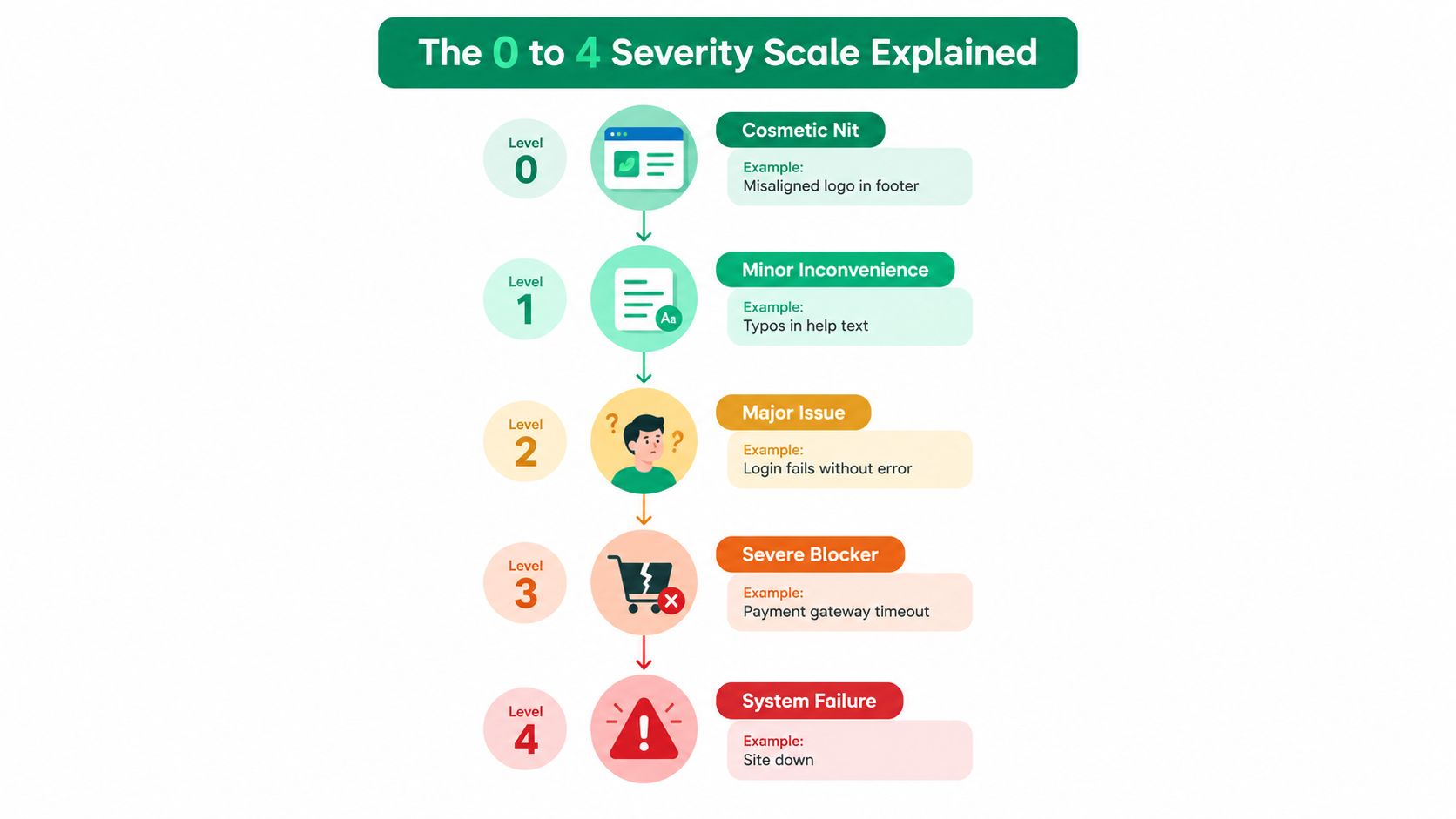
Jakob Nielsen's standardized 0 to 4 ordinal scale translates qualitative usability impact into a prioritization signal. It doesn't measure irritation alone. It considers how often people encounter a problem, how difficult it is to overcome, whether it persists, and how seriously it affects product use or adoption. The Nielsen severity framework defines the levels as follows.
Start with the user consequence
Level 0, no problem: The evaluator doesn't consider the observation a usability problem. For example, a team may notice a harmless implementation detail that doesn't confuse users, slow them down, or affect task completion. Log it only if it helps explain why no action is needed.
Level 1, cosmetic: A weak visual detail, such as an inconsistent settings label or a minor alignment issue, can usually wait. Users still understand the interface and complete their goal without a meaningful workaround.
Level 2, minor: A confusing onboarding instruction may make users pause, reread, or choose the wrong control once. If users recover easily, the issue belongs in low-priority repair rather than release-blocking work.
Level 3, major: A broken checkout field that prevents a substantial audience from completing payment is a high-priority problem. The team should treat it as material user and business risk, even when another route exists.
Level 4, catastrophic: A crash that prevents login, an unrecoverable checkout error, or a failure that creates serious user harm should normally block release. Nielsen describes this level as a usability catastrophe that must be fixed before release.
Frequency and persistence refine the judgment. A problem that appears once but permanently loses user data may be more urgent than a frequent inconvenience with a reliable recovery path. Research by Jeff Sauro found average inter-rater reliability of r = 0.52 across nine usability studies, with individual study correlations ranging from r = 0.02 to r = 0.84 (Sauro's analysis). Use independent ratings and preserve the evidence behind the average.
A single number is necessary for triage, but it isn't sufficient for prioritization. The supporting fields explain why the score deserves its place in the backlog. For further context on usability measurement, compare the System Usability Scale and its alternatives.
Comparing Common Severity Scales Side by Side
Teams often mix several labels and assume they describe the same thing. They don't. A usability score, an engineering priority, and an accessibility conformance level answer different questions.
Scale | Range | Primary dimension | Typical owner | Main weakness |
|---|---|---|---|---|
Nielsen usability severity | 0 to 4 | User impact on task completion | UX research or design | Ordinal judgments can vary between evaluators |
Severity-by-frequency matrix | Impact combined with encounter frequency | Exposure and consequence | UX and product | Can over-prioritize common, recoverable friction |
Engineering priority labels | P0 to P3 | Release urgency and operational attention | Engineering or product | A priority label may reflect timing, dependencies, or effort rather than user harm |
WCAG conformance | A, AA, AAA | Accessibility requirements satisfied | Accessibility, design, or compliance | A conformance level isn't an intrinsic user-impact score |
The 0 to 4 usability scale works best when the team needs to describe the user consequence. A severity-by-frequency matrix adds exposure, which helps distinguish a rare but dangerous failure from a common annoyance. Neither system should replace the other. Keep impact and exposure as separate fields when the distinction matters.
P labels are useful for coordinating engineering work. A P0 can communicate an immediate operational concern, while a lower label can represent work that belongs in a later planning cycle. But the label alone won't tell a researcher whether a user is blocked, confused, or merely slowed down. Use it as a release or operational signal, not as a substitute for behavioral evidence.
WCAG's A, AA, and AAA levels describe conformance requirements. Level A is the minimum conformance level, Level AA includes Level A and AA criteria, and Level AAA includes all three levels, according to W3C's WCAG conformance guidance. Keep that status separate from the usability score.
A practical combination is simple: use 0 to 4 for user impact, a P label for release urgency, and A, AA, or AAA for accessibility conformance. That prevents one scale from carrying meaning it was never designed to carry.
What Really Drives a Rating
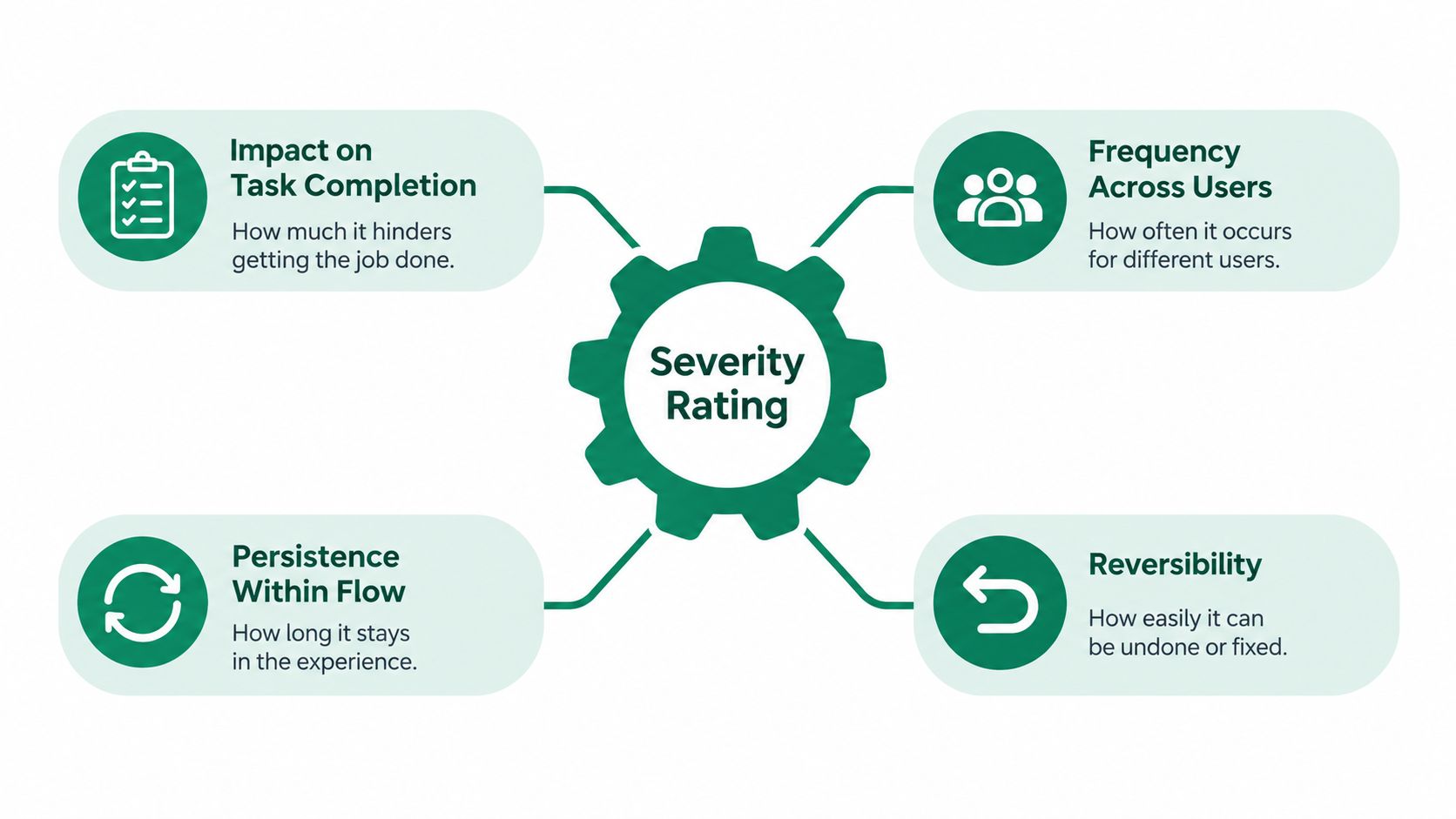
A rating becomes defensible when another evaluator can follow the path from observation to consequence. Four dimensions provide that path: impact, frequency, persistence, and reversibility.
Impact on task completion
Start by asking what the user can no longer do. A healthcare portal that briefly displays the wrong-dose warning may create high potential impact, even if only a small audience encounters it. A checkout flow that drops a promotional code without notice may create medium impact because users can still pay, but it can damage trust and require repeated correction.
Impact should describe the user's outcome, not the interface component. “The tooltip is broken” is a defect description. “The user can't confirm an email address” is a severity description.
Frequency and persistence
Frequency records how often users encounter the issue across participants, sessions, or relevant journeys. Persistence records whether the problem appears once, returns at every step, or remains present across repeated visits. A checkout problem that drops the code on every order has high persistence, even if users can technically continue.
A practical Uxia testing record can include the proportion of synthetic participants who encountered the issue, the affected task, whether a workaround existed, and the interaction trace that supports the finding. Keep those fields visible instead of presenting an unexplained score.
Reversibility
Reversibility asks whether users can recover without confusion, meaningful delay, data loss, or outside help. A clear back button may make an issue less urgent. An error that resets a completed form or leaves users unsure whether payment succeeded should move upward in priority.
The usability evaluation framework supports retaining frequency, impact, and persistence as separate considerations rather than hiding everything inside one label. A rare failure can be catastrophic, while a frequent issue can remain minor when recovery is dependable.
Turning Ratings Into Release Decisions
A rating earns its place when it changes what the team does next. Define the action before the next triage meeting so people don't renegotiate the meaning of every score.
Severity | Release Action | Uxia Output |
|---|---|---|
0 | No corrective work. Record the observation and close it. | Finding summary with rationale for no action |
1 | Log for opportunistic refinement or routine cleanup. | Issue title, screen reference, and supporting trace |
2 | Batch into the next iteration and assign a product or design owner. | Reproduction path, affected task, and suggested refinement |
3 | Require a named owner, target date, and review before release. | Ticket-ready title, evidence summary, and verification checklist |
4 | Block release, assign an immediate owner, and retest the critical flow before approval. | Release-blocker record, reproduction steps, and retest criteria |
Treat the table as a decision rule, not an automatic truth machine. Increase urgency when frequency, consequence, or persistence is high. Downgrade only when users can reliably recover without confusion or meaningful delay. Don't lower a rating just because the affected audience is small if the task involves payment, medication selection, privacy, accessibility, or irreversible data.
Write acceptance criteria in observable language. “Improve the form” isn't verifiable. “A user can enter the email, receive the confirmation state, and continue without repeating the step” gives engineering and research the same finish line.
The testing platform can connect each finding to its screen, audience profile, task outcome, transcript, and interaction trace. Use that record to generate a ticket title, reproduction steps, owner, and retest checklist. After remediation, run the same flow again and compare the encounter pattern and task outcome with the original evidence. The rating should change because user behavior changed, not because the team wants a cleaner backlog.
A Redesign Story That Ratings Made Me Measurable
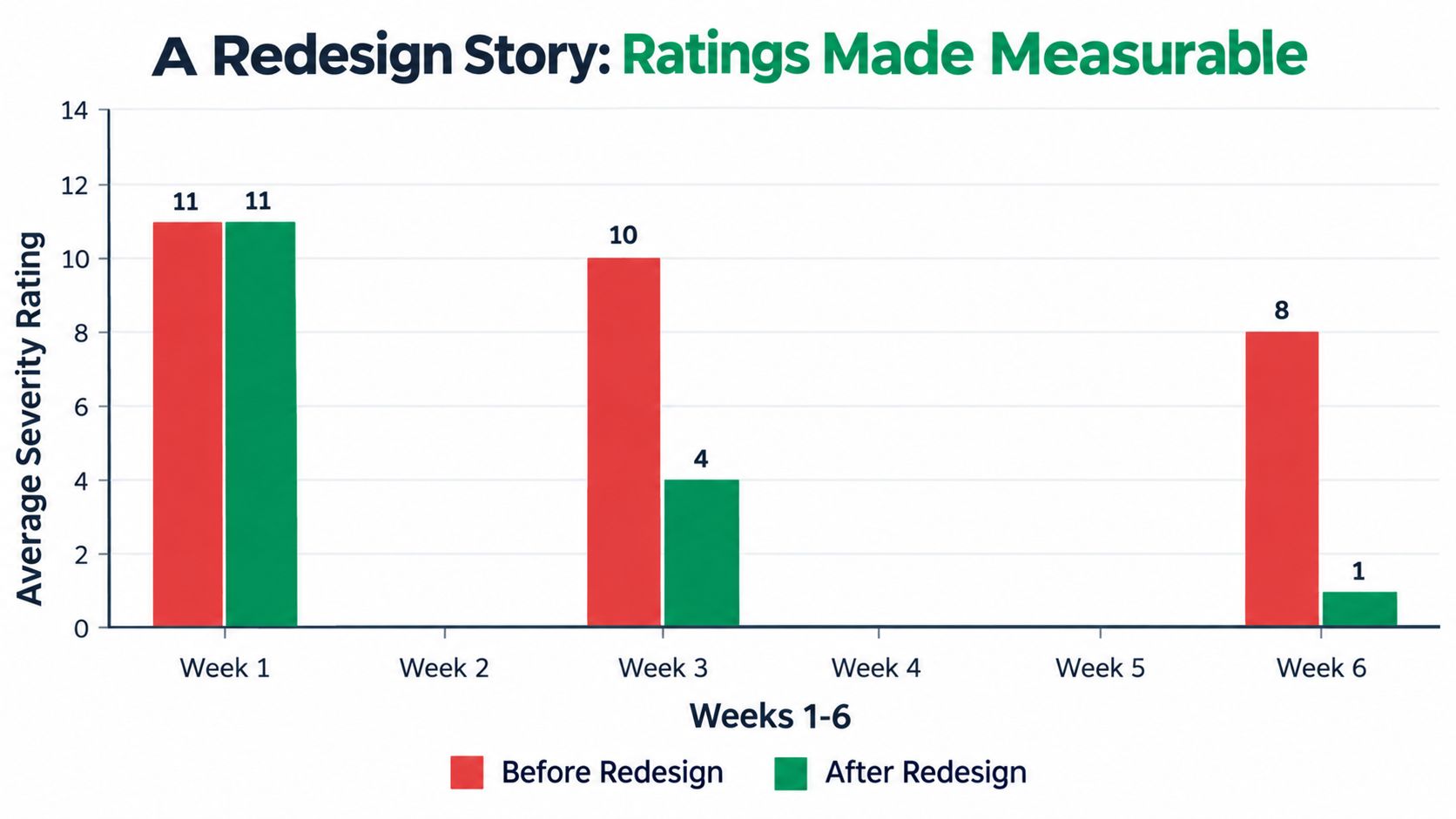
A checkout redesign becomes easier to judge when the team records the same user task before and after the change. The rubric turns “the new flow feels better” into observable questions: Can users complete payment, do they still need a workaround, and does the same failure remain?
Before the redesign, reviewers examine a checkout prototype. A payment field rejects valid input without explaining why. A delivery option is difficult to locate. A confirmation state leaves users unsure whether the order was completed. Each finding receives a 0 to 4 severity score, an evidence statement, frequency, persistence, and a recovery note. The score describes the consequence for the task. Frequency shows how often the issue appears, while persistence shows whether it survives repeated attempts or sessions.
After the redesign, the team runs the same missions. The payment field explains the required format, the delivery choice appears where users expect it, and the confirmation state makes the outcome clear. A Uxia-assisted re-test can replay the task, collect the new interaction evidence, and place it beside the original record. The comparison is between user behavior, not the number of interface changes.
Measure the change, not the story
A before-and-after review checks:
Task outcome: Can users complete checkout?
Observed friction: Do errors or abandonment still occur?
Recovery: Does the interface guide users without a workaround?
Severity distribution: Did higher scores move down or disappear?
Evidence quality: Can the team reproduce the original behavior?
Use the score with its context when choosing a release action. A 0 or 1 may be monitored or scheduled. A 2 needs a defined fix and verification. A 3 should remain a release condition until retesting shows recovery. A 4 blocks approval until the critical task works. The important comparison is the change in observable behavior under the same task conditions, measured against the original severity record.
Accessibility Failures Are Not Severity Scores
WCAG conformance and usability severity should appear together, but they shouldn't be merged. A failed criterion tells you that an accessibility requirement hasn't been met. It doesn't, by itself, tell you how severely the barrier affects a particular user journey. W3C explicitly cautions that the practical seriousness of a failure depends on its frequency and the content or functionality affected.
Consider missing alternative text. On a decorative image, the failure may have little effect on the task. On an image that functions as a checkout payment control, the same type of barrier may prevent a screen-reader user from completing payment. The conformance status stays tied to the applicable WCAG criterion, while the usability score reflects the task consequence.
WCAG Failure | Affected User Goal | WCAG Level | Usability Severity (0-4) |
|---|---|---|---|
Missing text alternative on decorative content | Understand essential content | A criterion may apply depending on the content | 0 to 1 when the content is genuinely decorative |
Insufficient color contrast on primary instructions | Read and follow the task | AA criterion may apply | 2 or 3, depending on whether users can recover |
Missing visible keyboard focus | Move through controls | AA criterion may apply | 2 to 4, depending on whether the journey becomes inaccessible |
Form field without an associated label | Understand and complete the form | A or AA criterion may apply depending on the failure | 2 to 4, depending on assistive technology and task impact |
Keyboard focus trapped in authentication | Complete sign-in | A criterion may apply depending on the mechanism | 3 or 4 when the core task is blocked |
A missing label, poor focus order, or low-contrast control may affect many users and recur on every visit. Record the criterion, affected journey, assistive-technology context when known, encounter rate, and recovery path. This is the dual-track rule: accessibility status describes conformance, while usability severity describes user impact.
For a testing process that treats accessibility as part of the wider product experience, use accessibility testing guidance alongside the severity record. A conformance pass in one area doesn't offset a failure in another, so each finding needs its own status and action.
Your One-Page Severity Playbook
A team can fit the rubric on one page if every issue record answers the same five questions. Keep the template close to the backlog, design review, and release checklist.
The five required fields
Severity, 0 to 4: State the user-impact rating and explain the task consequence.
Frequency: Record how many tested participants, sessions, or relevant journeys exposed the issue.
Persistence: Note whether it occurs once, repeatedly within the flow, or across return visits.
Reversibility: Describe the workaround, recovery effort, and any risk of data loss or harm.
Evidence: Attach the screen or flow, audience profile, task, transcript, interaction trace, and reproducible steps.
Then add three operational fields: owner, target release window, and verification method. A severity-3 finding needs a named owner and review date. A severity-4 finding needs release-blocking treatment and a retest of the critical workflow. A severity-2 finding can enter the next iteration, while severity-1 work can wait for routine refinement. A severity-0 observation needs a rationale and closure state.
Use this quick reference when the team needs a fast decision:
Blocked primary task: Usually 4 when users can't complete a critical workflow or recover safely.
Workaround-required task: Usually 3 when users can continue only through a difficult or unreliable alternative.
Slow or confusing flow: Usually 2 when users struggle but recover without material consequence.
Minor friction point: Usually 1 when the task remains clear and successful.
Cosmetic note: Usually 0 when there is no meaningful usability problem.
Synthetic testing can populate the record with affected tasks, recurring interaction patterns, transcripts, and prioritized findings. The product team still needs to review uncertainty, especially when a test doesn't measure real-world safety, long-term abandonment, or assistive-technology compatibility.
The loop is short: rate, fix, retest, compare. Run the changed flow with the same mission and audience conditions, retain the original evidence, and update the score only when the observed consequence changes. That gives a PM a page to pin, a designer a consistent review language, and an engineer a ticket that can be verified.
Uxia helps product teams test image and video prototypes with synthetic participants, capture interaction evidence and transcripts, and organize usability and accessibility findings for prioritization. Use the same severity, frequency, persistence, reversibility, and evidence fields in your next retest, then visit Uxia to validate the flow before release.