Onboarding Usability Testing: Find Where New Users Get Stuck
Master onboarding usability testing with a step-by-step guide to planning, running, and analyzing tests. Use Uxia synthetic testers to find friction and speed

Roughly 4 out of 5 users don't finish a defined onboarding flow, because the benchmark completion rate is just 19.2%. Effective onboarding usability testing finds the exact moments behind that loss and checks whether users reach real product value, not merely whether they click through the setup.
That distinction matters. A user can complete every screen, dismiss every tooltip, and still fail to understand what the product is for or how to use it again tomorrow. The work, therefore, isn't to make onboarding look effortless in a moderated session. It's to expose confusion early, connect it to activation, and retest the flow before friction becomes a retention problem.
Why Onboarding Usability Testing Matters More Than Ever
The 19.2% onboarding completion benchmark reframes the first-run experience as a business funnel, not a welcome tour. The same benchmark reports a 24.5% product or feature adoption rate, 14% churn, 46.9% one-month retention, 8% median free-to-paid conversion in B2B software, and 78% CSAT during onboarding. These measures belong in the same conversation because onboarding decisions influence whether users activate, adopt a core feature, convert, and return. (Intellum's customer onboarding metrics provides the benchmark context.)

A low completion rate doesn't tell you which screen failed. It does tell you that assuming users will “figure it out” is a risky product decision. One unclear primary action, an unexplained import requirement, a form that rejects valid input, or a workspace that opens without a clear next step can stop a user before the product demonstrates its value.
Completion isn't the same as activation
Modern onboarding evaluation has moved beyond static checks such as “did the user see the tutorial?” Product teams now combine task success, step completion, drop-off, retention, and time to value in instrumented funnels. One 2026 example reported a 42-minute average session length and 91% task success rate, demonstrating why effort and outcome need to be measured together rather than replaced by subjective impressions. (Guideflow's onboarding analytics metrics guide discusses this methodological shift.)
A completed task can still be a failed onboarding experience if the user needed repeated assistance or never reached the first meaningful action. The strongest studies ask whether users understood the next step, completed it without intervention, and later adopted the workflow the product was designed to support.
Practical rule: Treat every onboarding screen as a point in the activation funnel. Test the decision it asks users to make, not just the interface it displays.
Planning and Running Onboarding Usability Tests with Synthetic Testers
Start with one outcome-shaped mission. “Explore the dashboard” produces wandering behavior and weak evidence. “Set up a workspace and complete the first action needed to receive value” gives participants a clear finish line while preserving room for confusion, hesitation, and incorrect assumptions.

A reliable plan has five parts:
Define the activation event. Choose the action that signals meaningful value, such as importing usable data, creating a first project, publishing an output, or inviting the person who completes the workflow. Don't substitute passive activity, such as viewing a tour, for value realization.
Begin at the actual entry point. Test the signup page, invitation link, empty state, or first authenticated screen users encounter. Starting inside a polished dashboard hides the friction that causes people to abandon the journey earlier.
Recruit for unfamiliarity. Participants who know the product compensate for unclear labels and remember intended paths. New users reveal first-run confusion. Vary role, confidence, technical context, and accessibility needs, but keep the mission consistent enough to compare behavior.
Write a quiet test script. Ask the participant to complete the task and think aloud. The moderator should observe rather than explain the interface. Record task success, time on task, errors, assists, the Single Ease Question, and System Usability Scale responses. (Kompassify's usability testing guide outlines this approach.)
Inspect patterns, not anecdotes. One participant's unusual mistake may be interesting, but repeated hesitation at the same decision point deserves priority. Funnel data can identify the step, transcripts can explain the confusion, and recordings or heatmaps can show what users examined before they stalled.
Synthetic testers are useful when the team needs rapid validation across several onboarding variants or audience profiles. In Uxia, teams can upload prototypes and define a mission and audience, then generate synthetic testers aligned with chosen demographic and behavioral characteristics. Those testers move through the flow in unmoderated sessions and produce think-aloud transcripts that expose unclear copy, weak hierarchy, trust concerns, navigation failures, and accessibility friction.
This doesn't remove the need for judgment. It changes the sequence of work. A product team can screen several hypotheses quickly, identify the most consequential failure points, and reserve slower human research for questions that require lived context or emotional nuance. The complete guide to synthetic user testing offers additional guidance on structuring those studies.
Use a script that captures both immediate behavior and the user's interpretation:
Before the task: Ask what the user expects the product to help them accomplish.
During setup: Note where they pause, backtrack, misread a label, or search for help.
At the first success event: Ask what they believe happened and what they would do next.
After the session: Ask what remains unclear and whether they would know how to repeat the workflow without guidance.
The video below provides a visual companion for planning an onboarding testing workflow.
Synthetic vs. Human Testing for Onboarding Flows
Synthetic and human testing answer overlapping questions, but they have different operating strengths. Synthetic testers are built for speed, repeatability, and coverage. Human participants remain essential when the study depends on personal history, organizational politics, emotional stakes, or an environment that a prototype can't represent.
Traditional recruiting creates unavoidable scheduling and availability constraints. It also introduces a practical trade-off. A small human sample can reveal serious usability problems, but it shouldn't be treated as a precise estimate of how many users will fail. A 50% task-success result, for example, could mean everyone struggled moderately or that half succeeded while the other half failed completely. (MeasuringU's discussion of usability error statistics explains why averages can conceal different experiences.)
Choose the method for the decision
Research need | Synthetic testers | Human participants |
|---|---|---|
Rapid comparison of onboarding variants | Strong fit | Slower to schedule |
Coverage across roles and behavioral profiles | Scalable | Limited by recruitment |
Natural emotional response | Directional signal | Stronger evidence |
Complex workplace context | Limited | Strong fit |
Repeated checks during design iteration | Efficient | Resource intensive |
Accessibility validation with lived experience | Initial screening | Necessary for confirmation |
Synthetic testers work particularly well at the start of an iteration cycle. A team can test whether the primary action is discoverable, whether the import decision is understandable, and whether a checklist leads users toward the activation event. Human sessions then deepen the diagnosis when the result depends on trust, domain expertise, language nuance, assistive technology, or organizational constraints.
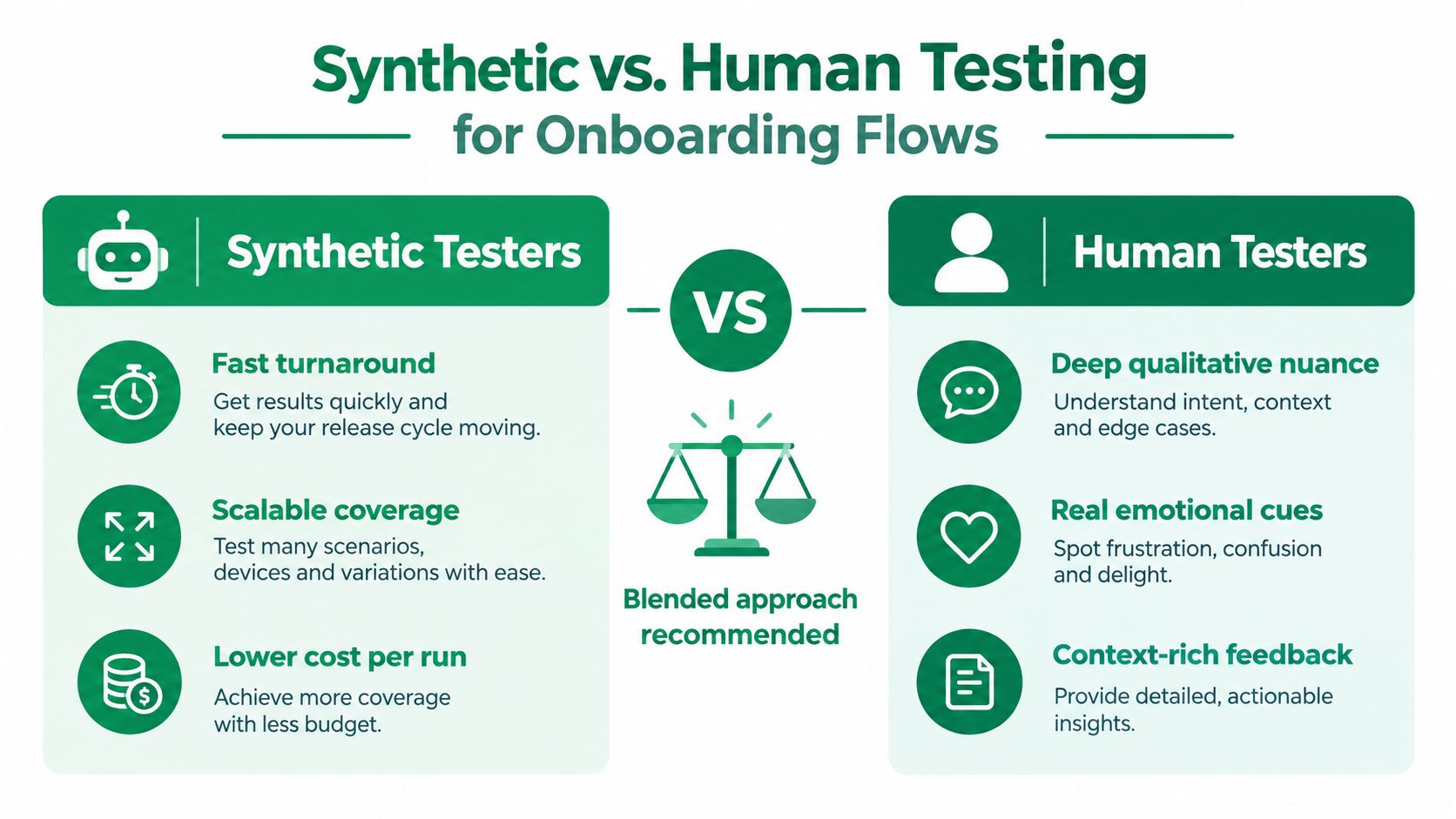
The practical answer usually isn't synthetic or human. Use synthetic testing to reduce the number of weak ideas that reach recruitment, then use human testing to validate the few decisions where real-world context changes the result. Uxia's comparison of synthetic and human users describes this blended approach in more detail.
Don't overstate what either method proves. Synthetic sessions can surface patterns quickly, but they're not a substitute for observing actual customers in their environment. Human research produces richer context, but a small panel can miss less common paths and doesn't justify false precision. The right choice depends on whether the immediate decision is “which flow has obvious friction?” or “why does this customer segment distrust the setup requirement?”
Key Metrics and Benchmarks for Onboarding Success
A useful onboarding scorecard is deliberately small. Track completion rate, step-level drop-off, activation rate, time to value, and feature adoption during onboarding. These measures connect interface behavior to the outcome the product team actually needs.
Completion rate tells you whether users finish the defined flow. Drop-off rate shows where momentum disappears. Activation rate tests whether users reached the behavior that signals value. Time to value measures how long that journey takes. Feature adoption reveals whether onboarding introduced a capability users can incorporate into their workflow.
Read the funnel one step at a time
Step-level drop-off is the percentage of users who start a step but don't complete it. One practical benchmark places typical onboarding screen drop-off at 20% to 35%, considers under 20% strong, and treats over 50% as a serious friction signal. (UXCam's guide to onboarding drop-off rates provides that benchmark.)
The number alone isn't a diagnosis. A high drop-off at data import may indicate unclear requirements, weak trust, unsupported formats, or a technical failure. A stall at workspace setup may mean users don't know whether to configure the workspace, invite teammates, or start creating something. Your research task is to connect the metric to the observed decision.
A funnel tells you where users leave. A transcript and session recording help you understand what they believed at that moment.
Uxia can map onboarding metrics to transcripts and heatmaps, which lets teams compare the numerical failure point with what testers looked at, said, and attempted. That combination is more actionable than a completion dashboard because it turns “step three is weak” into a testable design hypothesis, such as “users don't understand why importing data is required.”
Measure durable value, not a polished session
The hidden gap in onboarding research appears after apparent success. A participant may complete the setup task and still fail to reach the first “aha moment” later, misunderstand the core workflow, or never return. Funnel analysis and session recordings should therefore sit beside qualitative testing rather than after it. (CleverX's comparison of SaaS onboarding research methods makes this distinction explicit.)
Keep the interpretation focused. If activation rises while later usage remains weak, the flow may be pushing users through steps without creating comprehension. If time to value falls because the team removed setup, check whether users can complete the first meaningful task without hidden support.
For more detail on choosing and interpreting the measurement set, use this guide to usability testing metrics.
Common Pitfalls and How to Avoid Them in Onboarding Tests
The most common mistake is declaring victory when users reach the final screen. Completion is useful, but it doesn't prove that users understand the product, can repeat the workflow, or will adopt the feature that creates value. A good onboarding study treats completion as one signal inside a larger chain: understanding, successful action, activation, and continued use.
Pitfall one, testing the tour instead of the journey
A scripted walkthrough can produce impressive task success while hiding the decisions users make before and after it. Test from the actual entry point and give users one outcome-shaped mission. Remove moderator rescue, because an explanation that feels harmless during research may be the very support missing in production.
Don't ask only “was this easy?” Ask what the user expected, why they chose an action, what they think the product did, and what they would do next without help. Those answers expose false confidence, especially when a user reaches the end by guessing.
Pitfall two, ignoring accessibility friction
Accessibility failures often occur in ordinary onboarding mechanics, including forms, focus order, keyboard navigation, validation, and error recovery. In one accessible onboarding case study, 43% of sessions involved at least one validation retry, while 35% of keyboard-only participants required assistance. (Wally AX's accessible onboarding case study documents those findings.)
Include keyboard-only scenarios and accessibility-focused tasks in the test plan. Record them as separate issue categories so teams don't bury a blocking form problem inside a general usability score.
Pitfall three, asking broad questions and missing decisions
“Was setup easy?” is too broad to guide a fix. Ask about the decisions that determine progress:
Primary action: What did you think you were supposed to do first?
Data import: Did you believe importing data was required, optional, or premature?
Workspace setup: What would you configure before taking the first valuable action?
Progress visibility: Could you tell how much remained?
Recovery: What would you do if the next step failed?
Independent onboarding reporting has identified unclear primary action, uncertainty about data import requirements, and missing progress indicators in 75%, 63%, and 50% of participants respectively. (Formbricks' UX survey question guide presents these patterns.)
Prioritize issues by consequence, not by how dramatic the transcript sounds. A mildly confusing tooltip matters less than a blocked activation event. Fix the highest-impact decision, rerun the same mission, and check whether the change improved both behavior and understanding.
Putting It All Together - Your Onboarding Testing Action Plan
A strong onboarding testing cycle can fit into a product team's normal design rhythm:
Name the value event. Define what activated means for each important user type.
Map the journey. Include signup, account creation, workspace setup, imports, invitations, and the first repeatable action.
Instrument the steps. Track completion, drop-off, activation, time to value, and feature adoption.
Run rapid discovery. Use synthetic testers to compare flows, audiences, copy, and decision points before investing in recruitment.
Diagnose the reason. Pair funnel results with transcripts, recordings, heatmaps, and direct questions.
Validate edge cases. Bring in human participants when context, accessibility, trust, or emotional response could change the decision.
Retest after the fix. Keep the mission stable so the new result remains comparable.
The discipline is simple: don't optimize the screen that looks busiest. Optimize the point where users fail to understand what happens next, then verify that the fix leads to real activation rather than a prettier completion rate. Continuous testing makes onboarding a living product behavior, not a one-time launch artifact.
Uxia lets product teams test onboarding prototypes and flows with synthetic testers, capturing navigation behavior, think-aloud transcripts, friction categories, heatmaps, and prioritized reports. Visit Uxia to run a rapid validation cycle on your next onboarding change and find where new users get stuck before the issue reaches production.