Mastering Moderated Interviews: UX Insights & AI Scale
Mastering Moderated Interviews: UX Insights & AI Scale

You're probably looking at a dashboard right now that tells you something went wrong, but not why. Users abandon a flow. A form stalls. A new onboarding step gets completed inconsistently. The analytics are real, but the explanation is missing.
That gap is where moderated interviews still earn their keep. When you need to hear what users expected, what confused them, what they distrusted, or what they nearly said but didn't, direct conversation gives you evidence that clickstream data can't. The challenge is that classic interviews are slow to run at scale, while newer AI-moderated approaches can expand coverage without giving you a full replacement for researcher judgment. Used well, the two methods work together.
Why Your Quantitative Data Isnt Enough
Analytics are strong at telling you what happened. They're weak at revealing intent.
A dashboard can show that users leave a page, hesitate before submitting, or loop between screens. It can't tell you whether they were looking for reassurance, misread the hierarchy, doubted the copy, or thought the system had stopped responding. Those are different problems, and each leads to a different design decision.
What numbers miss in product decisions
A product team often sees the same pattern. One metric moves in the wrong direction, and people start filling the explanation gap with opinions.
Marketing says the message is off. Design says the layout is fine. Product says the flow is too long. Engineering says nothing is broken. Everyone can point to the same chart and tell a different story.
That's why qualitative research belongs next to analytics, not behind it. A useful primer on qualitative research and quantitative research makes the distinction clear. Quantitative data helps you locate friction. Moderated interviews help you understand the reason behind it.
Practical rule: If the next decision depends on motivation, trust, confidence, or expectation, you need direct user language, not just event data.
What moderated interviews reveal
In moderated interviews, people explain what they noticed, what they assumed, and what they were trying to do. That gives you access to the part of the experience that analytics flatten.
You hear statements like:
Expectation gaps: “I thought clicking that would show the next step.”
Trust concerns: “I paused because I wasn't sure where my data was going.”
Confidence problems: “I could do it, but I didn't feel sure I was doing the right thing.”
Language mismatches: “I didn't understand what that label meant.”
Those comments are often the difference between a cosmetic redesign and a meaningful fix.
When to choose this method
Moderated interviews are most valuable when the team needs depth, not just volume. They're especially effective when you're diagnosing unclear behavior, validating a new flow, or trying to understand why users hesitate even when they eventually complete the task.
You don't run them because they feel insightful. You run them because the product decision requires context.
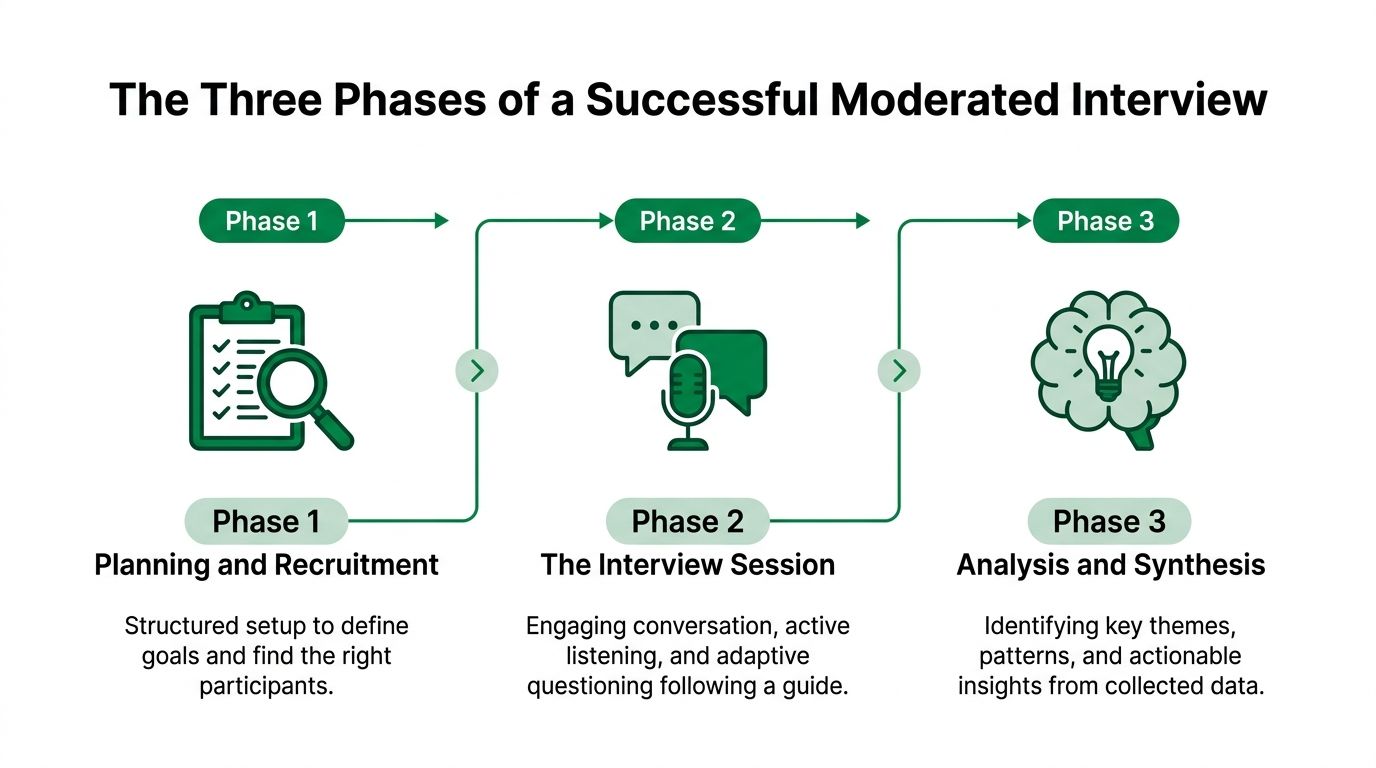
The Three Phases of a Successful Moderated Interview
Strong moderated interviews don't happen because someone wrote a decent discussion guide. They work because the team is disciplined before, during, and after the session.
Define the decision before the questions
The first phase is defining the research objective. That means identifying the exact decision the interview should inform, not writing a broad goal that sounds strategic but doesn't help anyone decide what to change.
A good objective sounds like this: learn why users abandon the verification process in a new onboarding flow.
A weak objective sounds like this: understand the full product experience.
That distinction matters. When the research question is vague, the interview becomes a tour of interesting comments. When the question is sharp, the interview produces evidence you can act on.
For AI-moderated interviews, the same principle applies. Uxia's guidance recommends defining the exact decision the interview informs and aligning 3 to 15 core open-ended questions to that goal, such as isolating why users abandon a verification step rather than trying to understand the whole experience at once, as described in Uxia's UX interview techniques guide.
Conduct the session like a conversation with intent
The second phase is the interview itself. Whether the moderator is a researcher or an AI agent, the sequence matters.
Start broad. Learn the participant's context, habits, and expectations. Then narrow into the product moment you care about. If you jump straight into tasks, you lose the setup that makes later answers intelligible.
A practical flow usually looks like this:
Open with background: Ask about the participant's prior experience, current workflow, or recent behavior.
Move into the target scenario: Put the task or flow in context.
Encourage think-aloud behavior: Ask people to explain what they're noticing and why they're making choices.
Probe decision points: Don't stop at what they did. Ask what they expected to happen.
Stay flexible: If something surprising appears, follow it.
The best sessions don't feel like questionnaires. They feel like guided conversations with a clear purpose.
This is also where many teams fail. They observe actions but don't investigate reasoning. A participant clicks the right button, so the team assumes the design is clear. In reality, the user may have guessed.
Analyze patterns, not performances
The third phase is analysis. In this phase, scattered observations become usable insight.
A single interview can be memorable and still be misleading. What matters is whether a theme recurs across participants. The job is to group patterns, separate isolated comments from repeated friction, and connect those themes back to the original decision.
A simple review table helps:
What to review | What to look for |
|---|---|
Repeated comments | Similar wording or concerns across participants |
Hesitation points | Places where people pause, reread, or seek reassurance |
Misinterpretations | Screens or labels users understand differently than intended |
Confidence signals | Moments where users complete a task but sound unsure |
That pattern-based review is what turns interviews into product guidance instead of storytelling.
Mastering the Art of the Interview Conversation
The strongest moderated interviews often hinge on one small moment. Not a polished answer. Not a perfect task walkthrough. A throwaway remark.
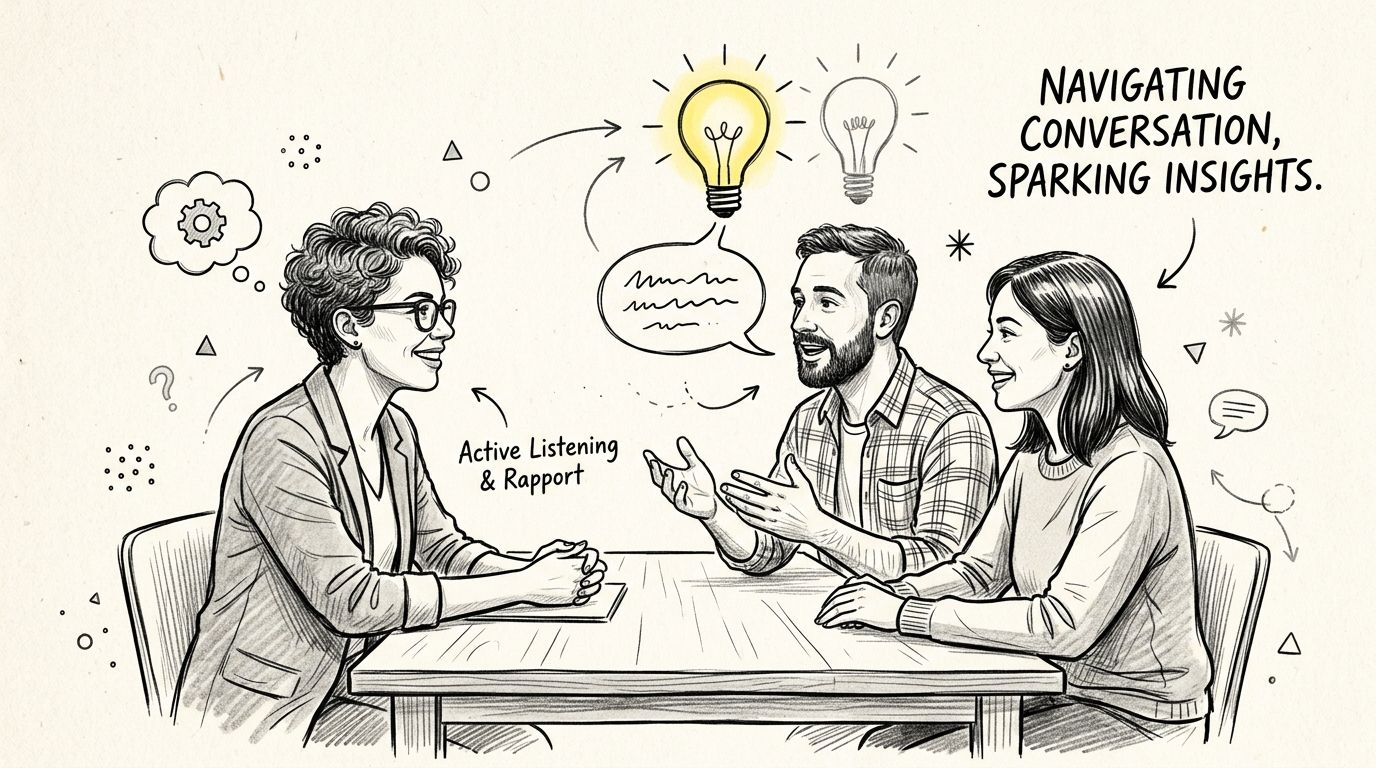
One participant once said, almost casually, “I'm waiting for the page to tell me what to do next.” On the surface, nothing looked broken. The interface contained the right information. Other users had completed the task. It would have been easy to dismiss the remark as personal preference.
It wasn't.
That comment exposed a missing visual hierarchy and a weak next step. After reviewing more transcripts, the same hesitation showed up repeatedly, even when participants didn't phrase it that clearly. The page was redesigned to make the primary action more prominent and to simplify supporting copy. The original analytics would never have explained that problem on their own.
Rapport creates better data
People don't give useful answers because the discussion guide is clever. They give useful answers when the conversation feels safe, clear, and neutral.
That starts with simple habits:
Begin with easy context questions: Ask about recent behavior or familiar routines before moving into product critique.
Use open prompts: Questions like “Can you tell me more about that?” keep the participant expanding instead of choosing from implied options.
Stay neutral: Don't praise correct behavior or sound disappointed when users struggle.
Leave room for silence: People often continue speaking after a short pause, and the second thought is usually richer than the first.
Ask for reasoning: “What were you expecting to happen?” often reveals more than “Was that confusing?”
A practical walkthrough of this style appears in how to conduct user interviews.
Talk less than you think you should
One of the most reliable disciplines in moderated interviews is controlling your airtime. In expertly moderated sessions, the moderator should talk no more than 30% of the time, maintaining a 70/30 conversational split so the participant does most of the speaking, as outlined in Koji's guide to moderating user interviews.
That rule sounds simple. In practice, it changes everything.
Researchers who talk too much explain the interface, patch awkward moments, and rescue users from uncertainty. That makes the session feel smoother, but it destroys the evidence. If you remove the friction in the interview, you can't study the friction in the product.
Ask one good question, then wait longer than feels comfortable.
What works and what backfires
There's a noticeable difference between prompts that open people up and prompts that shut them down.
Better prompt | Why it works | Weaker prompt | Why it fails |
|---|---|---|---|
“What were you expecting here?” | Surfaces mental models | “Did that make sense?” | Invites a short, polite answer |
“Can you tell me more about that?” | Extends participant thinking | “So you were confused?” | Leads the witness |
“What made you choose that?” | Reveals decision criteria | “Why didn't you click the other option?” | Sounds corrective |
Silence after an answer | Encourages depth | Immediate follow-up | Interrupts reflection |
The art is restraint. Good moderation doesn't perform expertise. It creates the conditions for participants to show you what the product is really doing to them.
From Anecdotes to Actionable Insights with Structured Metrics
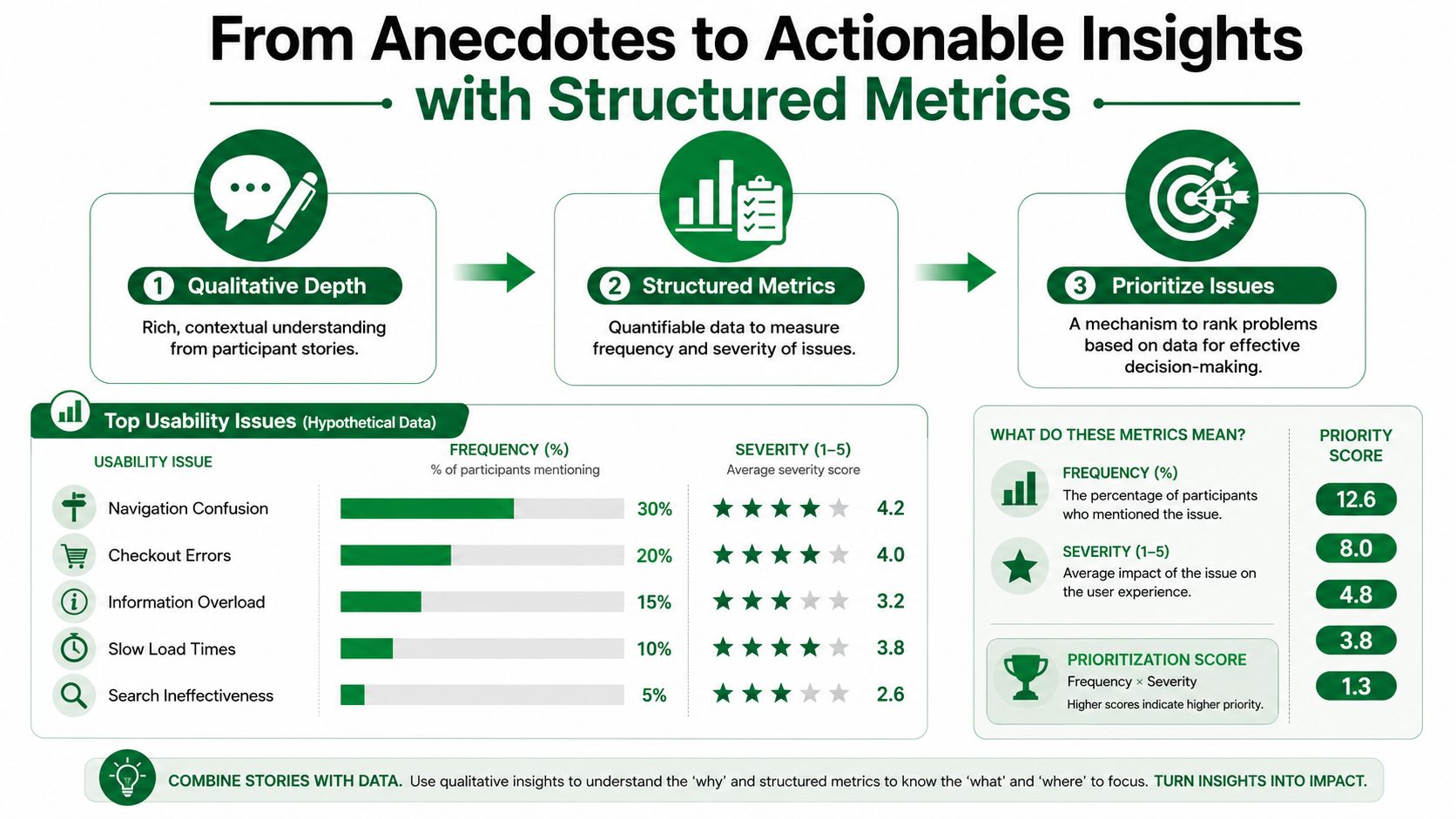
Moderated interviews are qualitative, but they shouldn't stay vague. If you want stakeholders to act on findings, you need a way to show that an issue is recurring, not just memorable.
What to track across sessions
A useful interview program doesn't only collect transcripts. It also tracks structured signals that help the team compare sessions and identify patterns.
Useful examples include:
Average interview duration: Session length can reveal whether the guide is too broad or whether one topic is absorbing unusual attention. For classic moderated sessions, a typical duration is 30 to 60 minutes, which balances depth and participant engagement according to PlaybookUX's moderated research guidance.
Follow-up frequency: Repeated probing around one step often indicates unclear language or low confidence.
Recurring topics: If the same concern keeps surfacing, it deserves stronger prioritization.
Shared pain points: Distinguish one participant's preference from a broader usability issue.
Confidence signals: Notice when people finish a task but sound uncertain.
Moments of hesitation: Pauses, rereading, or verbal uncertainty often point to friction before outright failure appears.
A better way to prioritize
One onboarding study made this clear. Participants consistently spent longer discussing one particular screen than any other part of the experience. At first glance, that might suggest the interface was confusing.
The transcripts showed something more specific. Users generally understood what the screen was asking for. What they lacked was confidence about what would happen after they submitted their information.
That distinction matters. If the problem had been interface comprehension, the fix would have centered on layout or controls. Since the underlying issue was uncertainty about the next step, the better response was clearer messaging and better expectation-setting.
Structured metrics don't replace judgment. They stop teams from mistaking the loudest anecdote for the most important issue.
How to make qualitative data easier to operationalize
If your team wants to connect interview data to downstream systems, it helps to think in terms of consistent formatting and reusable categories. Work on data transformation for ML & RAG is useful here because the same principle applies to research operations. Clean, structured inputs make synthesis, retrieval, and comparison much easier.
A lightweight operating model works well:
Tag each transcript consistently: Use shared labels for themes like trust, copy clarity, navigation, or uncertainty.
Log severity alongside frequency: A theme that appears often isn't always the one causing the biggest decision risk.
Pair quotes with coded evidence: Stakeholders need both the human story and the pattern behind it.
That's how moderated interviews stop being a set of isolated stories and become a practical prioritization tool.
Scaling Moderated Interviews with AI and Uxia
Traditional moderated interviews are powerful, but the operating model is hard to scale. You recruit participants, coordinate calendars, manage time zones, reschedule no-shows, run sessions one by one, and then synthesize the results manually.
A major operational constraint is attendance. The average no-show rate for moderated studies is approximately 8%, based on empirical analysis of over 14,000 moderated studies, with real-world no-show rates fluctuating between 5% and 10% according to MeasuringU's analysis of moderated study no-show rates. That number isn't just a recruiting footnote. It affects staffing, incentives, scheduling overhead, and how confidently teams can plan research.
Where AI moderation helps
AI-moderated interviews become particularly useful. Instead of relying on a researcher to conduct every session live, an AI agent can ask a prepared set of open-ended questions, follow up dynamically, and capture responses in a consistent format.
That changes the operating model in several ways:
Coverage across markets: Teams can gather feedback from different regions without needing local moderators for every session.
Language flexibility: Research doesn't stop because the internal team doesn't speak the participant's language.
Less scheduling pressure: Async participation removes much of the calendar friction that slows traditional studies.
More consistency: Every participant receives the same interview logic, reducing moderator drift.
If you're evaluating how AI agents fit into operational workflows more broadly, Trackingplan's guide to AI agents is a helpful reference point.
What good AI-moderated interviews look like
The strongest AI-moderated studies still need researcher discipline. They are not magic prompts attached to a chatbot.
Expert guidance describes a standardized five-phase protocol for AI-moderated interviews: Welcome, Context, Core, Adaptive Follow-ups, Wrap-up, with sessions calibrated between 8 and 12 minutes for depth and completion, as detailed in CleverX's guide for research teams. That same guidance also notes that researchers should audit the first 10 transcripts to calibrate probing tone and aggression.
This is a major practical point. AI can scale collection, but it still needs supervision early in the study. You should review whether the follow-ups are too shallow, too repetitive, or too aggressive for the topic.
For teams exploring this category, AI user research methods offers a useful framing for where these workflows fit.
A quick product walkthrough helps make the workflow concrete:
Where AI still needs a human researcher
AI moderation is best treated as a complement, not a blanket replacement.
Nielsen Norman Group's analysis of AI interviewers makes the boundary clear. AI-moderated interviews can support structured input at scale, but they are not yet suited for semi-structured, in-depth discovery in messy or high-stakes problem spaces, as discussed in NNGroup's article on AI interviewers.
That means:
Use AI moderation for | Keep human moderation for |
|---|---|
Repeated feedback collection | Messy exploratory discovery |
Post-launch feedback | Sensitive or high-stakes topics |
Recruitment screening | Areas needing deep domain judgment |
Multi-market input gathering | Sessions where live interpretation is critical |
The practical answer isn't choosing one camp. It's using human-led moderated interviews for ambiguity and judgment, then using AI moderation when coverage and speed become the constraint.
Your Action Plan for Better User Insights
If your team wants better product decisions, the first step is simple. Stop asking analytics to answer questions they can't answer.
Use moderated interviews when the core issue involves trust, comprehension, motivation, or confidence. Anchor each study to a concrete decision. Start the conversation broadly, then narrow into the behavior you need to understand. Listen harder than you speak. Review patterns across sessions instead of falling in love with one dramatic quote.
A practical operating rhythm
A workable rhythm looks like this:
Start with one decision: Pick a single product question, such as why users hesitate at one onboarding step.
Run focused interviews: Keep the scope tight enough that every question earns its place.
Track structured signals: Note recurring topics, uncertainty, follow-up-heavy moments, and confidence gaps.
Separate pattern from noise: Prioritize what repeats, not what surprises.
Choose the right moderation model: Use human-led sessions for ambiguity and depth, and AI-moderated sessions when you need broader coverage.
Better research usually comes from sharper scope, not more questions.
What good teams do differently
The teams that get the most from moderated interviews don't treat them as occasional validation theater. They use them as a decision tool.
They know when a live human moderator is necessary. They also know when scale matters more than performance skill in the room. That's the practical bridge between classic qualitative craft and newer AI-powered workflows. You don't have to choose between depth and reach every time. You can design for both.
If you want to put that approach into practice, Uxia gives product teams a faster way to collect user feedback across markets and languages. You can use it to run AI-moderated interviews, enrich synthetic testers with interview data, and keep research moving without forcing your team to schedule every session manually.