AI for UX Research: Essential Tools & Workflows in 2026
Discover how AI for UX research accelerates testing, analysis, and insights. Learn practical workflows, tools like Uxia, and best practices for modern product
By 2026, 73% of UX teams had made AI customer research their default discovery method, and median time-to-insight had dropped from 26 days in panel-based work to 3.2 days in AI conversation workflows, according to the Perspective survey cited in the brief. That's not a tooling tweak. It's a structural shift in how product teams find problems, validate ideas, and decide what to build next. For anyone doing ai for UX research now, the key question isn't whether AI belongs in the workflow. It's where it saves time, where it distorts judgment, and where human researchers still need to stay firmly in charge.
How AI Became Central to UX Research
The adoption curve is easier to trust than the hype around the category. In 2023, a User Interviews report found that 20% of researchers were already using artificial intelligence for research, while 38% were still planning to adopt it, which showed a field moving quickly from curiosity to implementation (User Interviews report on AI in UX research). By 2026, that had become mainstream operating behavior, with AI customer research serving as the default discovery method in the Perspective survey cited in the brief.
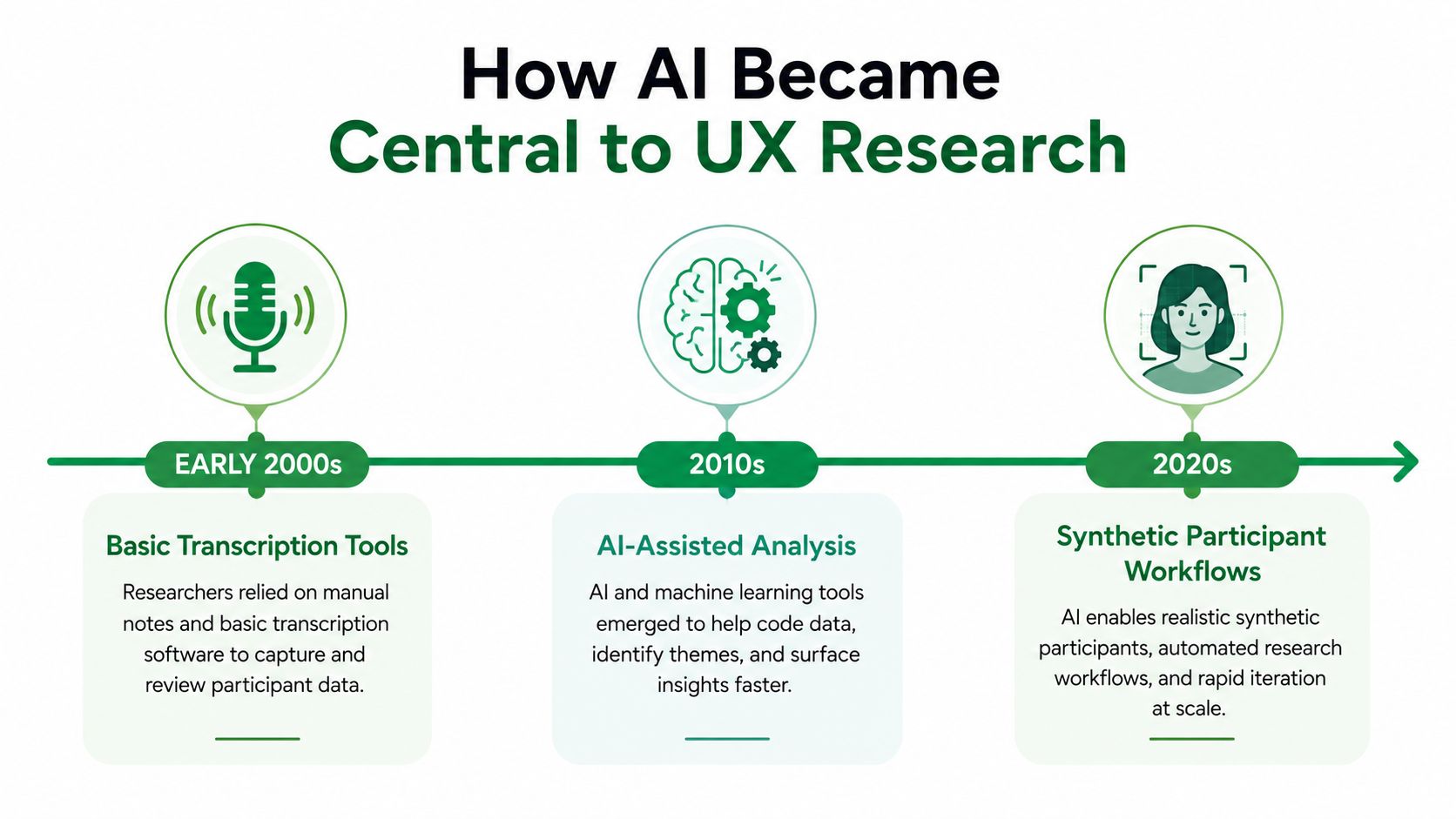
The first change was workload. The same 2023 report found that 47.8% of respondents used AI for transcription, 45.5% used it to help write reports, and 34.5% used it for document signature collection. That pattern matters because it shows where teams felt the most friction. AI entered research through the slowest operational steps, not through flashy prediction or autonomous insight generation.
The practical shift in the research stack
Once transcription, report drafting, and admin cleanup moved into AI-assisted workflows, the rest of the stack changed around them. Qualitative work became more searchable, synthesis moved faster, and the gap between raw interviews and stakeholder-ready output got smaller. Teams now talk less about “using AI” and more about designing a workflow where AI handles repeatable overhead while researchers focus on framing, interpretation, and decision quality.
Practical rule: If a research task is repetitive, text-heavy, and low-risk, AI probably belongs there first. If it involves interpretation, ambiguity, or direct observation of behavior, humans still need to own the final call.
The historical arc is clear. In 2023, AI was a helper in the background. By 2026, it had become part of the discovery engine itself, especially for teams that need to move from questions to tested answers quickly. Researchers who want a close look at that shift can also use the Isolate Audio AI research guide for a practical view of how AI fits into day-to-day research work. The next step is separating augmentation from replacement, because the same tools that save hours in note-taking can also simulate early feedback and automated UI analysis, which requires tighter judgment about where to stop.
Five Core Use Cases for AI in UX Research
The most useful way to think about AI in research is by workflow stage, not by tool category. AI earns its keep when it removes latency from the parts of the process that consume the most time, especially transcription, tagging, synthesis, reporting, and early analysis. That matters most when researchers need to keep a study moving without spending half the week on cleanup, while still deciding which outputs deserve human review.
1. Automated transcription and tagging
A typical workflow starts with recorded interviews or usability sessions. AI transcribes the conversation, then tags moments by topic, sentiment, or task step so the researcher can jump straight to the most relevant passages. That is the fastest way to make a repository usable without spending hours scrubbing audio.
2. AI-assisted synthesis and theme clustering
Once transcripts exist, AI can group repeated pain points, cluster open-ended answers, and draft an initial synthesis. The value is speed, though overconfidence is a real risk. The draft should be treated as a working hypothesis, not a final finding. For a practical walkthrough of this phase, the Isolate Audio AI research guide is a useful resource because it focuses on researcher workflows rather than hype.
3. Synthetic testers for early feedback
Synthetic users are useful when the goal is to catch obvious defects, weak copy, or early concept confusion before you spend time recruiting. They do not replace user behavior, but they can act as a fast first-pass filter. For teams with frequent prototype changes, that can keep obvious issues from reaching stakeholder review.
4. Automated UI analysis and friction detection
Some platforms now watch interaction patterns and flag signs of trouble, such as dead clicks or rage clicks, alongside text analytics from sessions and surveys. That is especially useful in live products where you want to spot friction without manually combing through every session replay. The UXmatters on AI-powered UX research tools and methods piece is a useful reference for the broader shift toward AI-assisted research operations, including how these tools fit into existing methods.
5. AI-moderated interviews for discovery
Discovery has become the biggest change point. AI-moderated interviews can scale the “why” behind behavior far beyond a handful of sessions, especially when teams need to move quickly from questions to tested directions. If you want a stage-based breakdown of how teams sequence these tools, the internal overview on generative UX research insights is a useful companion.
The pattern across all five use cases is the same. AI is strongest where work is repetitive and text-rich, and weakest where the researcher needs live judgment, contextual probing, or empathy in the moment. That is why the best teams start with the lowest-risk tasks, then expand into higher-stakes analysis only after they have a clear review process.
A second practical resource worth keeping close is the Isolate Audio AI research guide, which is helpful when you need to decide which parts of the workflow AI should handle and which parts still need human oversight. Use it as a decision aid, not as a replacement for methodology.
Synthetic Testers vs Traditional Human Panels
The decision is less about which method is newer and more about what kind of evidence the team needs. Synthetic testers are useful when you need a fast, controlled read on a flow, a screen, or a piece of copy. Human panels are better when the research question depends on hesitation, context, emotion, or the logic people use to explain what they are doing.
Metric | Uxia Synthetic Testers | Traditional Human Panel |
|---|---|---|
Setup time | Quick once the mission and audience profile are defined | Slower because recruiting and scheduling are required |
Test completion time | Minutes after launch because the test runs unmoderated | Longer because sessions depend on participant availability |
Analysis time | Shorter because transcripts, heatmaps, and summaries are auto-generated | Longer because researchers review recordings and notes manually |
Failure mode | Can miss context or overgeneralize from the simulated profile | Can be delayed by recruitment gaps and moderator capacity |
That table is the practical starting point. It shows why synthetic testing works well as a simulation layer, not as a stand-in for every type of research. If a team is deciding whether a prototype is clear enough to move forward, whether a flow has obvious friction, or whether copy creates confusion, synthetic testers can take that first pass quickly. If the decision depends on why people hesitate, how they interpret risk, or what they say when a task breaks down, a human panel still carries more weight.
How to draw the line
The line is set by the decision, not by the tool. Use synthetic testers when you need repeatable feedback on known questions and the main goal is to reduce obvious interaction problems before a broader review. That is where AI can save hours, because it handles structured review work that would otherwise soak up analyst time.
Human panels belong on the problems that need live judgment. When the question is about trust, motivation, accessibility, or a workflow with many edge cases, simulation can only go so far. It may flag a confusing step, but it cannot fully replace the back-and-forth that reveals why the step matters or how a participant adapts around it. For a practical comparison of the trade-offs, the team guide on synthetic users vs human users is a useful reference.
A decision framework for teams
A strong research workflow treats synthetic testers as the first filter and human panels as the check on meaning. That sequence keeps the team from overcommitting to a flawed design, while still preserving the insight that comes from moderated sessions. In practice, I use synthetic testing to sort out whether a design is coherent enough to deserve live research, then I move to human sessions when the answer affects roadmap decisions or customer trust.
Uxia fits into that workflow as an operational layer. It can run AI user tests on prototypes, static designs, live websites, and product flows, then surface transcripts and issue summaries in a branded workspace. That makes the process faster to manage, but it does not remove the need for a researcher to decide which findings are strong enough to act on.
Limitations and Safeguards for AI-Assisted Research
AI can summarize, cluster, and draft, but it can also hallucinate, skip inconvenient cases, or produce confident language that sounds more certain than the evidence deserves (UX Folio on AI UX research workflows). Strong teams treat that output as a starting point, then verify it against source material before it shapes a decision.
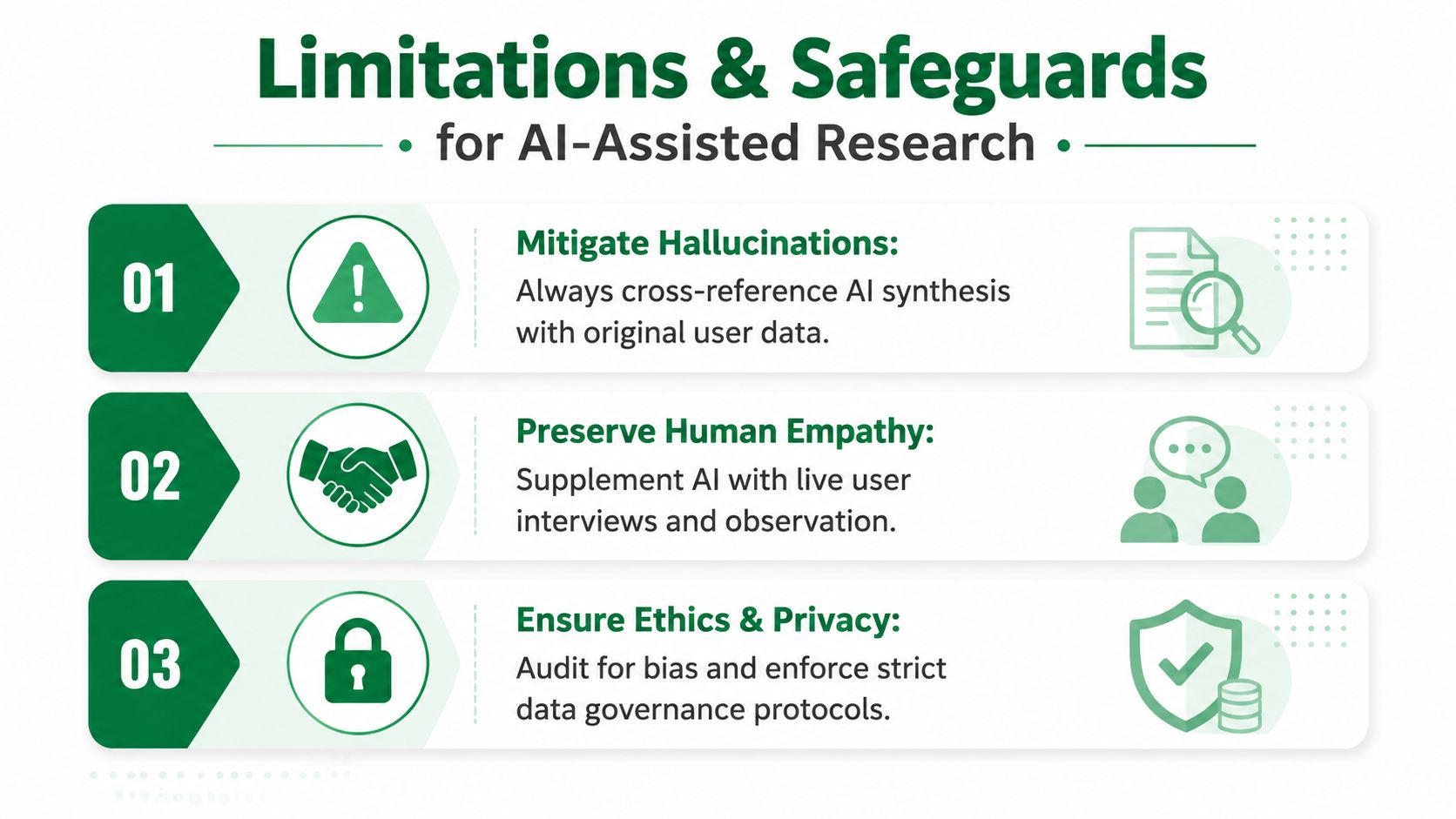
NN/g is blunt about the boundary. Current AI is useful for note-taking, interview support, and some structured analysis, but it should not be treated as a replacement for moderating usability tests or for claiming to observe behavior directly. Automated tools can miss what users are doing in the moment, then produce misleading conclusions if the team accepts them as a full substitute for human judgment (NN/g on research with AI).
The empathy problem
A 2024 literature review points to a trade-off that productivity posts often skip. When researchers spend too much time inside compressed outputs, they lose some of the empathy-building work that comes from sitting with participants, hearing hesitation, and watching a task unfold in real time. That loss matters because research is not only about extracting answers, it also shapes how a team judges ambiguity, edge cases, and user intent.
Three safeguards that keep the work trustworthy
DesignRush recommends three practical safeguards. First, evidence traceability, every claim should point back to a transcript or data point. Second, structured prompting, break analysis into named steps instead of asking one vague question. Third, human interpretation, researchers should validate and contextualize the output before it enters product decisions (DesignRush on using AI for user experience research).
Use this filter: If you can't point to the exact participant moment behind an insight, don't ship the insight yet.
That safeguard set matters most once AI moves from note-taking into a simulation layer. Synthetic testers and automated UI analysis can surface friction quickly, but only when the team keeps a hard line between augmentation and replacement. A useful operational rule is to let AI flag patterns, draft summaries, and compare flows, then keep a researcher in charge of deciding whether the evidence is strong enough to influence the roadmap. For teams that want a structured way to run that kind of workflow, Uxia's AI user research workflow is built around that handoff.
Implementing AI for UX Research with Uxia
A practical rollout starts with the workflow, not the product pitch. In a live research program, the fastest gains usually come from one slow step, such as a prototype test, a design review, or a recurring validation pass. Uxia fits that gap as a synthetic user testing layer for prototypes, static designs, live websites, and product flows, with AI participants shaped around demographic and behavioral profiles.
A clean first run
Start by uploading the design or Figma link, then describe the mission in plain language. The mission should explain what the participant is trying to do, not what the team hopes to prove. After that, define the audience profile with care, because synthetic feedback is only useful when the simulated participant matches the behavior the team needs to study.
The next decision is what the team needs back. For simple flow validation, focus on friction points, navigation issues, and comprehension blockers. For comparison work, use the same mission across both versions so the output stays comparable.
How to keep the output usable
The practical safeguard is a validation checkpoint. Compare the AI findings with the original prototype moments or source evidence before they go into a design review. That keeps the process aligned with evidence traceability and human interpretation, instead of treating the output as final on its own.
For teams adding AI research into an existing process, branded workspaces help keep output organized across designers, researchers, and product managers. Uxia's reporting format, which includes transcripts, heatmaps, and prioritized insights, is useful when the team needs one place to review what happened and decide what to do next. For teams that want a structured starting point, Uxia's AI user research workflow shows how the handoff can work in practice.
A simple operating model
Use synthetic users for fast repetition: Run them on early drafts, copy variants, and obvious flow checks.
Use source evidence for sign-off: Keep the transcript or interaction moment attached to each issue.
Use human studies for interpretation: Bring in moderated sessions when the decision depends on deeper context or motivation.
The operational line is clear. Let AI handle the repetitive part, then keep a researcher responsible for judging whether the evidence is strong enough for a product decision. That is where AI saves hours. It also stays in the right lane when the question is about behavior, intent, or trade-offs that synthetic feedback cannot fully resolve.
Do not ask AI to replace the whole research function on day one. Put it where the team feels the most drag, then expand only after the validation step is working. That keeps the workflow fast without making the output sloppy.
Measuring Success with AI-Powered Research
Speed is the easiest thing to celebrate, and the easiest thing to measure badly. If a team only counts how many studies they run, they can end up with more research activity but worse decisions. The better scorecard connects time-to-insight, issue detection, cadence, and downstream product outcomes.
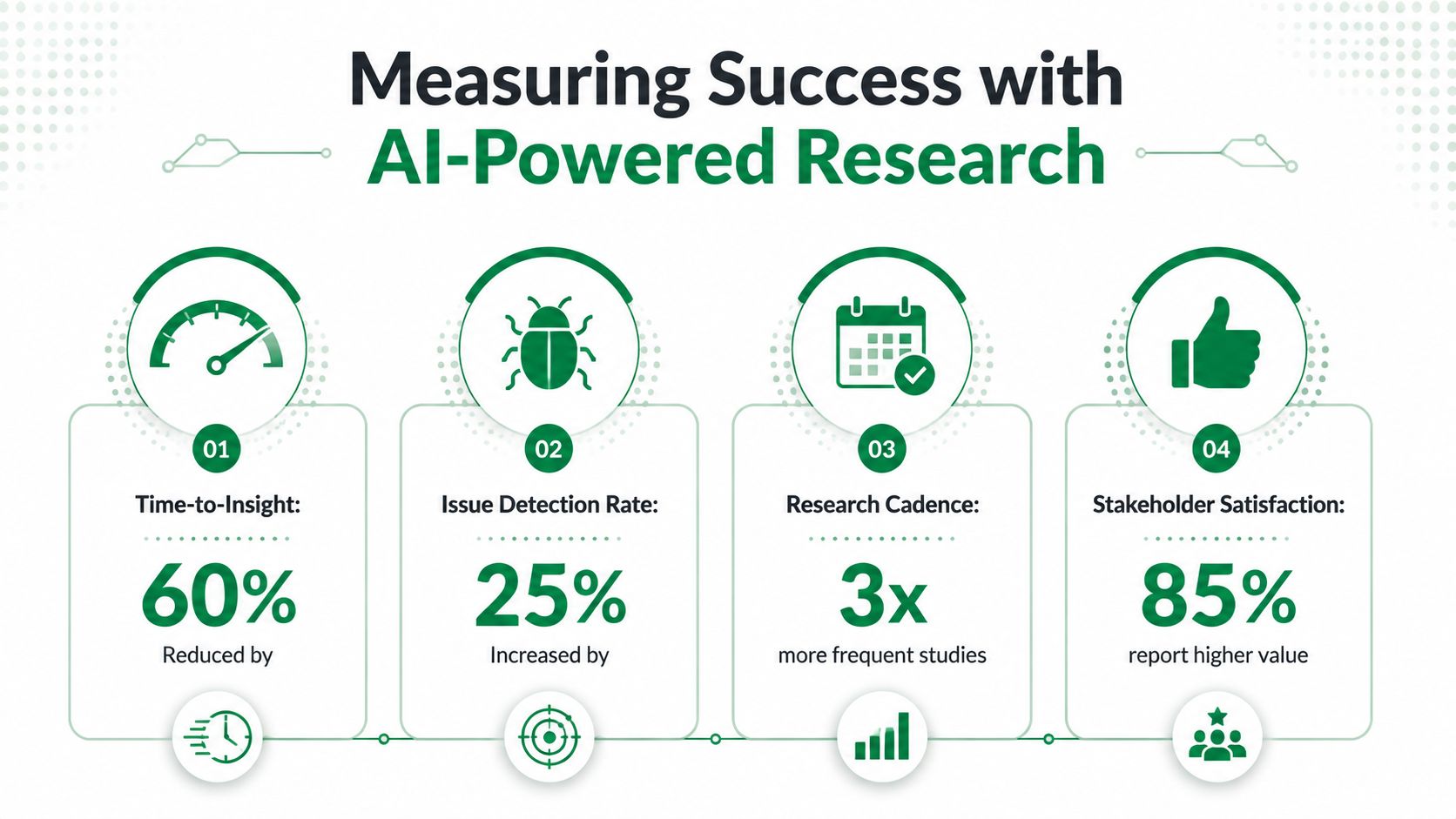
The first metric is time-to-insight. That's the span between when a test ends and when the team has a decision-ready summary. The second is issue detection, which tells you whether AI helped surface more friction sooner. The third is research cadence, or how often the team can test without waiting for a quarterly cycle. The fourth is whether product outcomes improve after the workflow changes.
What to baseline first
Before adopting AI-assisted research, document your current manual process. Track how long transcription, synthesis, and reporting take now. Then compare the same steps after AI is added, but only if the validation step still exists. Faster output without trustworthy interpretation doesn't count as improvement.
What not to overvalue
Raw volume is a weak success signal. A team can produce more insights and still miss the right one. The better question is whether the team is changing design decisions faster, with more confidence, and with fewer rounds of ambiguity in review.
Measurement rule: If the insight doesn't change a decision, it's probably not the right unit of success.
That's where tools like Uxia become easier to justify. They're not just about generating feedback faster. They're about compressing the loop between design, test, and revision so product teams can act while the issue is still relevant. If the workflow doesn't improve that loop, the tool is probably just adding another dashboard.
Future Directions and Next Steps for Your Team
The next shift is already visible in how teams are working. AI-moderated discovery has moved from occasional experiment to continuous cadence, and the brief's Perspective data shows teams running discovery weekly or continuously rather than quarterly. Synthetic users, digital twins, and automated UI analysis point to a future where research becomes more continuous, more instrumented, and more embedded in product operations.
The teams that will benefit most are the ones building a research system AI can query. That means cleaner repositories, clearer tagging, stronger governance, and habits that make evidence easy to trace back to source moments. It also means protecting the human skills that still matter most, especially critical thinking, empathy, and strategic interpretation.
A practical 30-day plan
Audit the workflow. Find the most repetitive step in your current research process.
Run one pilot. Use synthetic testers on a prototype or flow that needs quick validation.
Add validation. Require source evidence for every insight that reaches a review meeting.
Share the result. Bring the team a before-and-after comparison of speed, confidence, and decision quality.
That's enough to get started without overbuilding the system. AI for UX research is moving quickly, but the teams that do it well still think like researchers. They test, verify, and keep their judgment visible.
If you're ready to put AI into a real research workflow, start with Uxia and see how synthetic testers can help you validate prototypes, flows, and ideas without slowing the team down. Visit Uxia to explore how AI participant testing, transcripts, heatmaps, and prioritized insights can fit into your product process.