
Generative UX Research: AI Insights 17x Faster
Generative UX research, powered by AI, delivers actionable insights 17x faster for product teams. Explore methods, tools (Uxia), & best practices for 2026.

Product teams still treat discovery research like a calendar problem. It isn't. It's a workflow problem.
The counterintuitive shift is this: the biggest gain from generative UX research often isn't better questions first. It's removing the waiting. In a public comparison, the full research cycle on Uxia was completed in 21 minutes versus 362 minutes for traditional user testing, making the process 17× faster according to the Uxia vs. Traditional Testing Benchmark. That changes what teams can realistically test inside a sprint.
Speed alone doesn't make research good. But when discovery can happen early enough to shape product direction, teams stop shipping assumptions and calling them strategy.
The New Pace of Product Discovery
Product discovery now runs on sprint time, not research time. Teams that cannot generate directional insight inside the window of active product decisions usually end up validating choices that are already locked.
Traditional discovery slows down in predictable places. Recruiting takes time. Scheduling introduces dead space. Analysis often gets deferred until after design and delivery have already advanced. The result is familiar to any product lead. the team has questions early, but usable evidence arrives late.
That delay changes behavior. Product managers rely more on stakeholder input. Designers fill gaps with prior patterns. Researchers get pulled toward high-stakes studies because lightweight discovery feels too expensive to run repeatedly.
A disciplined discovery process still matters. If your team needs a practical planning model for shaping the problem space before testing, Bulby's product discovery guide is a useful reference. It ties discovery activities to product decisions, which is the part many teams miss.
What changes with AI is the operating model.
Instead of treating generative research as a standalone project, teams can run it as an earlier pass in a hybrid workflow. Use synthetic participants to surface likely themes, identify weak assumptions, and compare concept directions quickly. Then put human researchers on the parts AI handles poorly: emotional nuance, sensitive contexts, edge-case behaviors, and anything that needs high-confidence interpretation.
That trade-off offers a key advantage. Speed improves, but only if teams stay clear on what the fast pass is for. It is good for narrowing questions and exposing obvious gaps. It is not a substitute for speaking with real users when the decision depends on trust, motivation, or lived context.
I have seen this work best when the team sets a simple rule. AI generates early signal. Humans make the final call.
For teams building that kind of workflow, this guide to synthetic user testing with AI-driven workflows shows how fast-cycle feedback can fit into product discovery without turning research into a checkbox exercise.
Understanding Generative vs Evaluative Research
Generative UX research is not about checking whether an interface works. It's about learning what problem is worth solving in the first place. Alida defines it as foundational qualitative “discovery” or “exploratory” research used to uncover deep user needs, behaviors, and motivations that inform entirely new products and services rather than testing existing ones, typically through methods like interviews, field studies, and focus groups in order to build personas and journey maps grounded in human insight, as outlined in Alida's generative UX research guide.
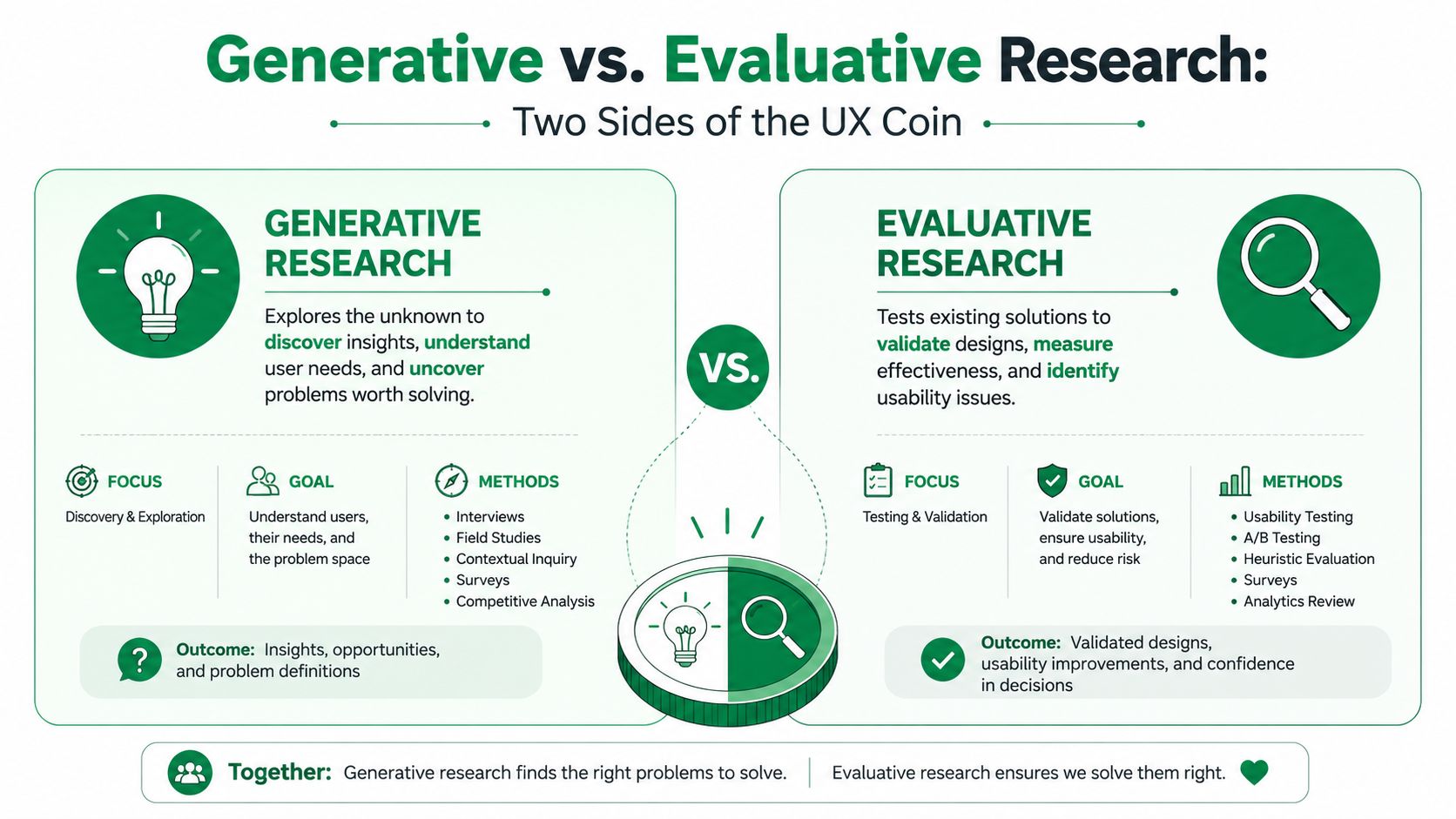
What generative research is actually for
Generative work answers questions like:
What need is still unresolved: You're trying to understand pain points, workarounds, motivations, and unmet expectations.
Why users behave the way they do: The emphasis is causal and contextual, not just behavioral description.
Where opportunity exists: The output often becomes problem framing, personas, journey maps, and concept directions.
This is why one-on-one interviews, field studies, and open-ended discovery conversations remain central. You're trying to get underneath visible behavior.
What evaluative research does instead
Evaluative research starts later. It assumes there is already something to test.
That “something” might be a wireframe, a live flow, a prototype, or a content pattern. The goal is narrower. Can people use it? Do they understand it? Where do they hesitate? What breaks trust or clarity?
A simple distinction helps:
Research type | Core question | Typical timing | Common output |
|---|---|---|---|
Generative | What should we build and why | Early discovery | Needs, motivations, opportunity areas |
Evaluative | How well does this solution work | Design and iteration | Usability issues, comprehension gaps, task friction |
Where AI changes the picture
AI doesn't erase the difference between these two categories. It changes the operating speed.
In practice, synthetic participants and AI-supported analysis make it easier to run exploratory studies without waiting for every traditional dependency. That matters because teams often skip generative work first, then overinvest in evaluative testing on ideas that were weak from the start.
The useful shift is this: teams can now do early discovery more often, then reserve human research for the moments where nuance, emotional depth, or decision risk demand it.
How AI-Powered Generative Research Works
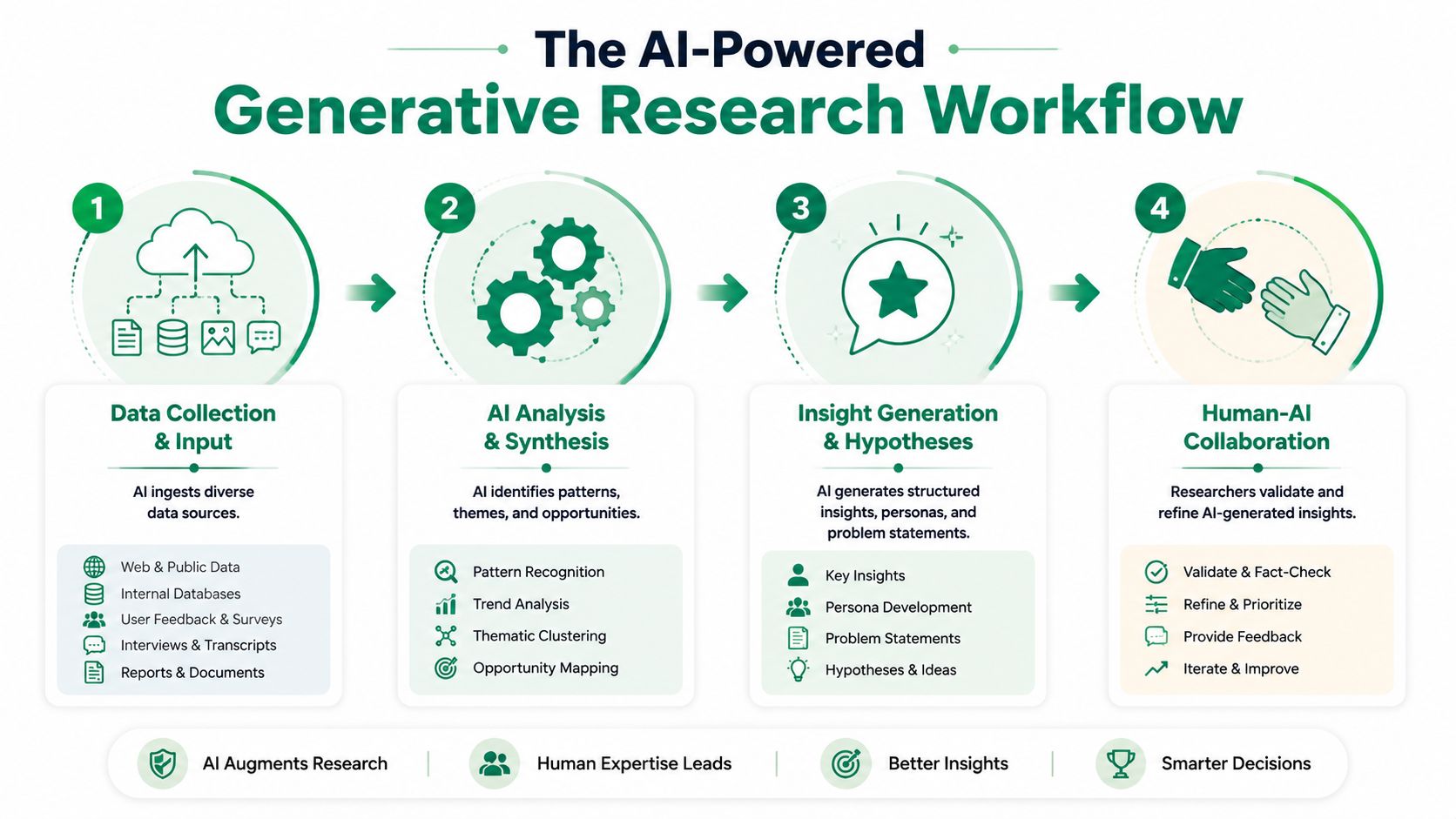
AI-powered generative research is only useful if the workflow is disciplined. The teams that get value from it do three things well: model a narrow audience, give that audience a realistic scenario, and review the output against real evidence before making product decisions.
This visual captures the broader operating model.
Start with audience quality
Synthetic research fails for the same reason human research fails. The audience is too broad, too generic, or based on assumptions nobody checked.
Define participants using the signals that shape behavior: experience level, goals, constraints, purchase context, domain knowledge, and prior product exposure. If the study is grounded in first-party inputs such as interviews, support tickets, CRM notes, or jobs-to-be-done work, the output is usually more credible. If it is grounded in a vague persona deck, the output drifts fast.
I have seen this break in a predictable way. A team labels everyone as "new users," even though some are switching from a competitor and others are trying the category for the first time. Those are different mental models, different expectations, and often different objections. Put them in one synthetic segment and the findings flatten into advice that sounds plausible but does not help a design team choose.
Ground the test in a real mission
Good prompts produce useful research. Weak prompts produce polished noise.
Synthetic participants need a task with context, stakes, and intent. Asking them to "review this interface" gets surface commentary. Asking them to complete a realistic job reveals what they notice, what they assume, and where the product creates uncertainty.
That is also why prompt sequencing matters. Teams working with transcript-heavy discovery inputs can see a close parallel in Typist's conversation intelligence insights, which show how meaning changes with context and question order.
A stronger mission usually includes:
Specific goal: Sign up and start your first session
Clear context: You are trying this tool for the first time during a busy workday
Decision pressure: You are unsure what happens after submission and want to avoid making a mistake
That level of setup gives the model something closer to real user intent.
Some teams review these runs in tools such as Uxia's AI user research platform, where they can set missions, compare outputs across audience segments, and inspect reasoning side by side.
Here's a product walkthrough of the broader model:
Read for reasoning, not just failure points
The best output is not a list of friction points. It is an explanation of why the friction happened.
In practice, that means looking past "users got confused" and examining what they expected to happen, what cue shaped that expectation, and what the interface failed to clarify. That is the layer product teams can design against. It is also the layer where AI can be surprisingly fast, because synthetic participants often produce step-by-step reasoning that would otherwise take much longer to gather and synthesize.
Human review still matters here. AI is good at pattern generation and fast comparison across scenarios. It is weaker at detecting emotional nuance, social sensitivity, and the difference between a plausible explanation and a true one. For high-risk decisions, I treat synthetic findings as a draft. Then I validate the important patterns with human participants, behavioral data, or both.
A practical hybrid workflow
The most reliable model is hybrid. Use AI first to explore hypotheses, stress-test concepts, and expose likely expectation gaps. Then use human research to verify the patterns that carry the most product, brand, or revenue risk.
A simple operating standard works well:
Define one audience segment at a time
Start narrow. Broad simulations create broad findings.Write prompts as real situations
Add context, constraints, and intent so the model has something concrete to respond to.Review explanations, not just outcomes
Look for expectation gaps, decision points, and trust breaks.Calibrate against human evidence
Check the output against interviews, support trends, analytics, sales calls, or follow-up usability sessions.
That is how product teams make generative AI research useful in practice. It speeds up early discovery, but the strongest workflow still pairs AI breadth with human judgment.
Why Teams Are Adopting Generative AI Research
Generative AI research is already changing how product teams run discovery. The shift is simple. Teams can move from a research question to a usable direction fast enough to affect the current sprint, not the next planning cycle.
Adoption is rising because the workflow fits real product constraints. Researchers and designers are using AI most often in analysis, transcription, and study drafting, and broader investment in UX research tools keeps growing, as noted earlier. That pattern matters more than the headline numbers. It shows where teams are finding practical value first: reducing setup and synthesis time around early-stage questions.
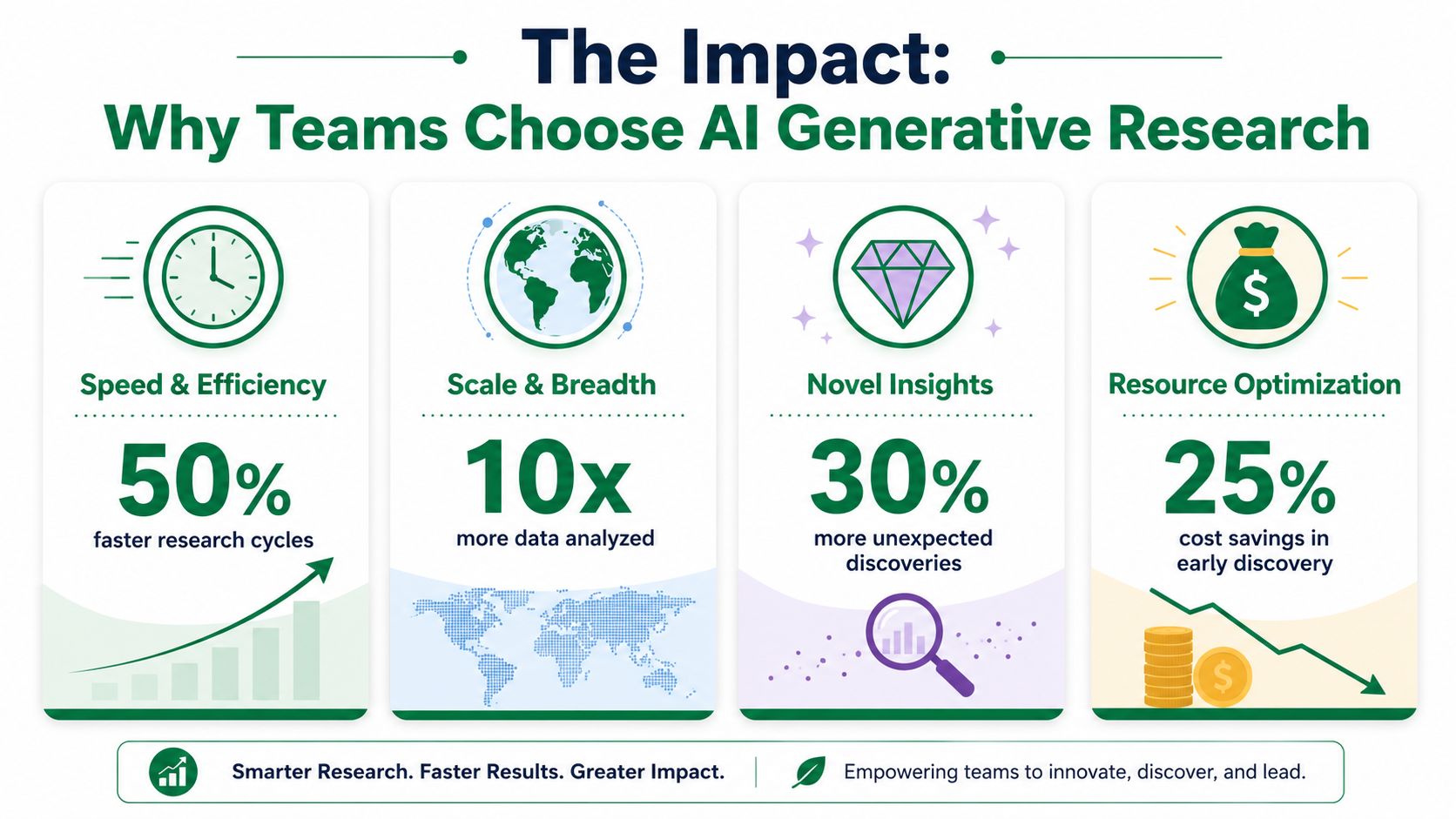
Teams adopt it to remove specific bottlenecks
The strongest case for generative AI research is operational.
Product teams rarely struggle because they lack ideas. They struggle because recruiting, scheduling, moderation, transcription, and synthesis take longer than the decision window allows. AI helps compress that overhead. In practice, that means a designer can test a framing question on Monday, review patterns the same day, and decide whether a concept deserves human validation before engineering picks it up.
A few gains show up consistently:
Faster concept screening: Teams can compare multiple directions early, before they commit design and engineering time to one interpretation of the problem.
Lower cost for small questions: Researchers do not need to package every uncertainty into a formal study. They can investigate one assumption at a time.
Clearer explanations: Synthetic participants often produce reasoning traces that help teams spot expectation gaps, trust breaks, and confusing language.
More repeatable early discovery: Output is less affected by no-shows, inconsistent moderation, or small sample timing issues.
Tools such as Uxia are part of that shift. The practical benefit is not that a single session runs faster. It is that teams can cut several steps that usually slow down discovery work across a sprint.
The real payoff is better decision timing
Speed matters because timing matters.
If a team can pressure-test a concept before it becomes roadmap scope, it has more room to change course. That is the point of generative work. The savings are not only in research hours. They show up in fewer weak bets reaching design QA, content review, or engineering handoff.
I have seen the pattern repeatedly. Teams get the most value from AI research when they use it upstream, where uncertainty is high and the cost of asking another question is low. They get less value when they expect it to settle emotionally sensitive questions, high-risk trust issues, or decisions that need direct human evidence.
That trade-off is why the hybrid model works best. AI expands coverage and speeds up early exploration. Human research confirms which patterns are real enough to act on.
A Real-World Research Comparison
Generative UX research changes product decisions only when it changes the operating model.
The useful comparison is not AI versus humans in the abstract. It is a hybrid workflow versus a fully manual one. Product teams need to know which questions can be answered in hours, which still need live participants, and how those two tracks fit together without creating rework.
What the workflow looks like in practice
A practical hybrid model usually runs in three passes.
First, an AI system such as Uxia is used to stress-test early concepts, flows, prompts, or information architecture. That pass is good at producing fast directional feedback, surfacing confusing language, and clustering patterns across many scenarios.
Second, the team reviews the output instead of treating it as final evidence. Researchers remove weak signals, compare findings against analytics or prior interviews, and identify the few questions that still carry material risk.
Third, they run human research where nuance matters most. That includes emotionally sensitive journeys, trust-heavy decisions, and any concept likely to shape pricing, adoption, or brand perception.
That sequence is what shortens the cycle.
Traditional generative work still carries heavy operational overhead. Recruitment, scheduling, moderation, transcription, and synthesis often take longer than the sessions themselves. Ethnio's breakdown of generative versus evaluative research methods is a useful reminder of that baseline. Generative studies are rich, but they are rarely fast when done end to end with only human participants.
Where each method fits
Research need | AI-assisted generative research | Human generative research |
|---|---|---|
Early concept exploration | Strong fit | Strong fit |
Message and wording checks | Strong fit | Useful for higher-stakes decisions |
IA and expectation mapping | Strong fit | Useful for validation |
Emotional reactions | Limited | Strong fit |
Trust and credibility questions | Limited | Strong fit |
Strategic sign-off | Input only | Better final evidence |
This is the comparison that matters for delivery teams. AI covers more early-stage ground with less waiting. Human research gives the depth and confidence needed before the team commits to consequential decisions.
I have seen teams get the best results when they formalize that handoff. AI handles breadth first. Researchers then convert the output into a short decision-ready brief, often using a UX research report template for AI-generated insights, and take only the unresolved questions into live research.
That approach improves speed without pretending synthetic feedback can replace human evidence. It also keeps this section grounded in what product teams require. A repeatable workflow, clear decision points, and less time wasted studying low-risk questions by hand.
Ensuring Trustworthy AI-Generated Feedback
The biggest mistake is treating generative AI research as universal. It isn't.
It works well for rapid exploration, identifying usability issues, comparing concepts, and exposing reasoning patterns. It is not the right standalone method for every question. Highly emotional experiences, brand perception work, and high-risk decisions still need real participants.
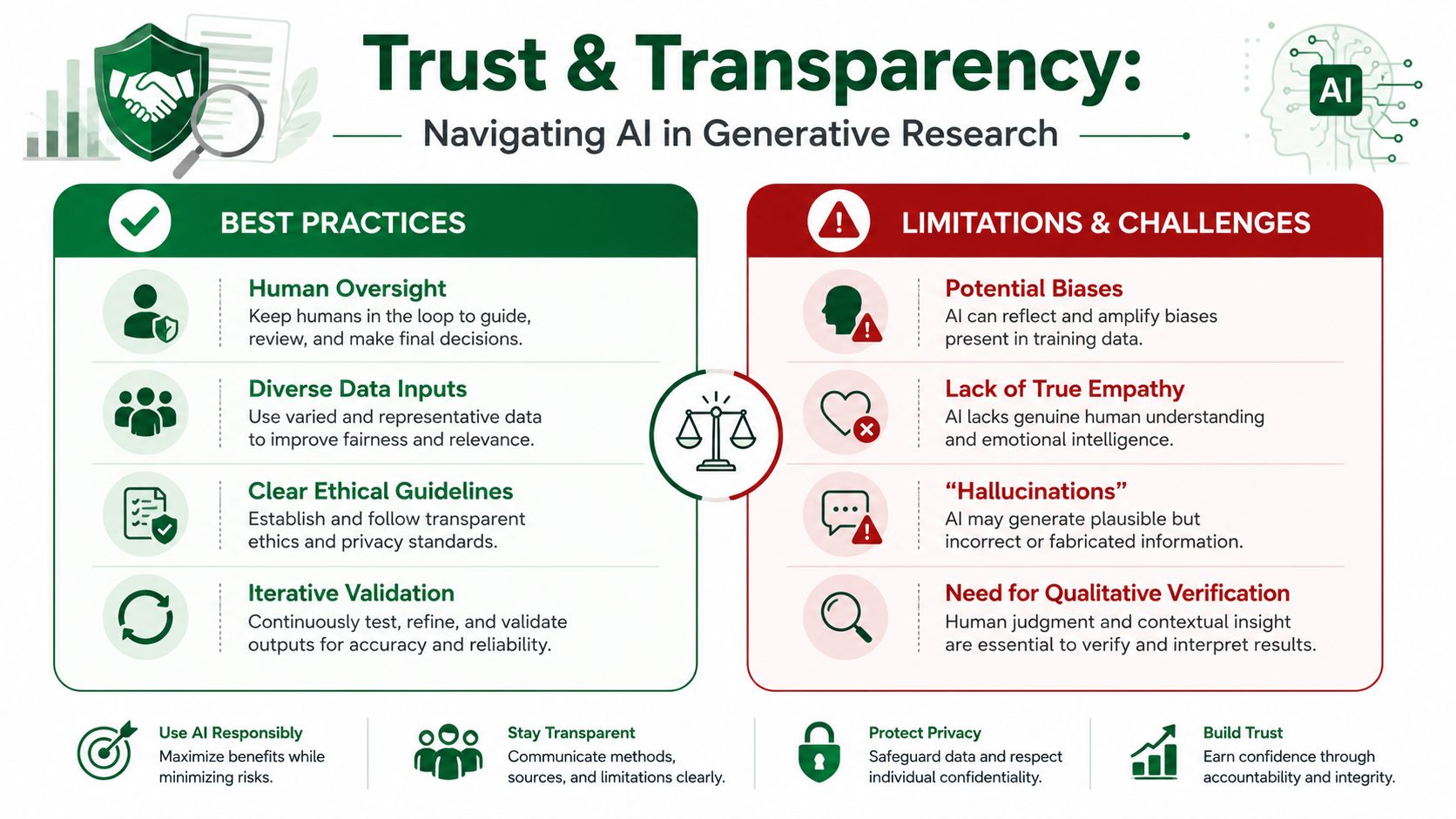
What makes synthetic feedback credible
A trustworthy workflow usually includes three controls:
Representative audiences: Synthetic participants should reflect real target users in behavior, experience level, and context.
Scenario realism: Tasks need concrete goals and real-world framing.
Validation against evidence: Findings should be checked against prior interviews, behavioral data, and later-stage human studies.
That third point matters most. AI can accelerate pattern detection, but people still need to interpret nuance and decide what is strategically important.
Dscout frames generative research as the method that gets at the “why” behind user behavior, while also stressing that human oversight remains necessary so rich behavioral insight isn't flattened by automation, as described in its generative research perspective.pdf).
The hybrid model is the practical standard
The most reliable setup is hybrid.
Teams can use synthetic testers to rapidly identify issues, iterate on designs, and answer many UX questions in minutes. Then, once the design matures or the decision carries more risk, they can run the same study with human participants and compare outputs side by side. That preserves AI speed without pretending synthetic feedback captures every emotional or social variable that matters.
If you're building stakeholder-ready outputs from these workflows, this guide to a modern UX research report template for AI insights is useful because reporting quality often determines whether the work influences product decisions.
Human validation is not a fallback for failed AI research. It's the safeguard that makes fast AI research trustworthy.
Where teams still go wrong
Most failures come from one of three patterns:
Overgeneralizing from synthetic feedback
Teams treat early directional insight as final validation.Using vague audience definitions
Broad inputs produce bland outputs.Skipping calibration
No comparison against real-user evidence means no real basis for trust.
A hybrid model fixes all three. It gives teams a way to move quickly without confusing speed for certainty.
Getting Started with Generative AI Research
Teams typically shouldn't start with a major strategic initiative. Start with a contained question that already causes delay.
A good first project is usually a new-user flow, a pricing explanation, a dashboard first-run experience, or an onboarding step where the team suspects expectation mismatch but doesn't yet know why. Those are ideal because they're meaningful, but not so risky that every finding requires a long approval cycle.
A practical rollout path
Pick one low-risk flow
Choose something narrow enough to evaluate quickly. New-user onboarding is a strong candidate because teams can usually observe clear expectation gaps.Write one focused research question
Don't ask whether the whole product is good. Ask what users expect at a specific moment, what confuses them, or what blocks task completion.Run a pilot in your existing sprint cadence
The point of the pilot is operational proof. Show that the team can gather insight early enough to change work in flight.Validate selectively with humans
Reserve participant studies for mature designs, emotional journeys, or decisions with broader business risk.
What helps teams adopt this well
Documentation discipline matters more than people expect. If your team is building an internal habit around prompt structures, notes, and synthesis patterns, Obsidian AI plugin documentation is a useful model for thinking about how AI-assisted workflows can stay organized instead of becoming a pile of disconnected experiments.
The other thing that helps is choosing a tool that fits the actual question. Don't force every research task into one system. Use synthetic workflows for rapid exploration. Use human methods when context and emotional truth matter more than speed.
A practical starting point for teams evaluating this approach is Uxia's AI user research overview, especially if the immediate need is testing concepts and flows without waiting on recruitment.
The teams that get value from generative UX research don't treat it as magic. They treat it as a faster way to learn which questions deserve deeper investment.
If you want a practical way to test generative UX research in your own workflow, Uxia is one option for running synthetic user studies on prototypes, setting audience and mission context, and comparing rapid AI feedback with later human validation when the decision calls for it.