What Is a Field Study? a UX Guide for 2026
What is a field study in UX? Learn how observing users in their natural environment uncovers insights lab tests miss and when to use this powerful method.

A field study is a research method where you observe people using a product in their natural environment, like their office, home, or warehouse, to understand how real-world context, distractions, and habits influence their behavior. In practice, it's the method you use when task completion alone isn't enough and you need to see what happens around the task.
You've probably seen the pattern. A flow looks clean in Figma, performs well in a lab session, and even gets decent feedback in unmoderated testing. Then it launches, and the behavior shifts. People pause halfway through, bounce between tools, ask coworkers for help, or create workarounds your team never anticipated.
That gap usually isn't about interface polish. It's about context.
A field study exists to capture that missing layer. It looks at the product, the physical environment, the social setting, the interruptions, and the habits users bring with them. Classic definitions describe field research as a systematic investigation carried out in situ, meaning in place, often over an extended period, using methods like direct observation, interviews, and participant observation to build a close understanding of real behavior in the wild. You don't get that from a controlled room, a scripted task, or a single clickstream.
Field studies are powerful. They're also slower, messier, and more expensive than many teams expect. That's why the right question usually isn't “Should we do field research or not?” It's “Which parts of this problem require field research?”
Beyond the Lab What a Field Study Reveals
A team tests an internal workflow in a calm session. The participant completes the task, explains their choices clearly, and says the design feels straightforward. A week after launch, adoption drifts. Support tickets mention partial completion, postponed approvals, and inconsistent data entry.
Nothing about that outcome is unusual.
The lab showed whether users could complete the task. It didn't show what happened when Slack pings appeared, a manager asked for an update, email piled up, or the user needed to switch between a browser, a spreadsheet, and a notebook. Those details often decide whether a design fits real work.
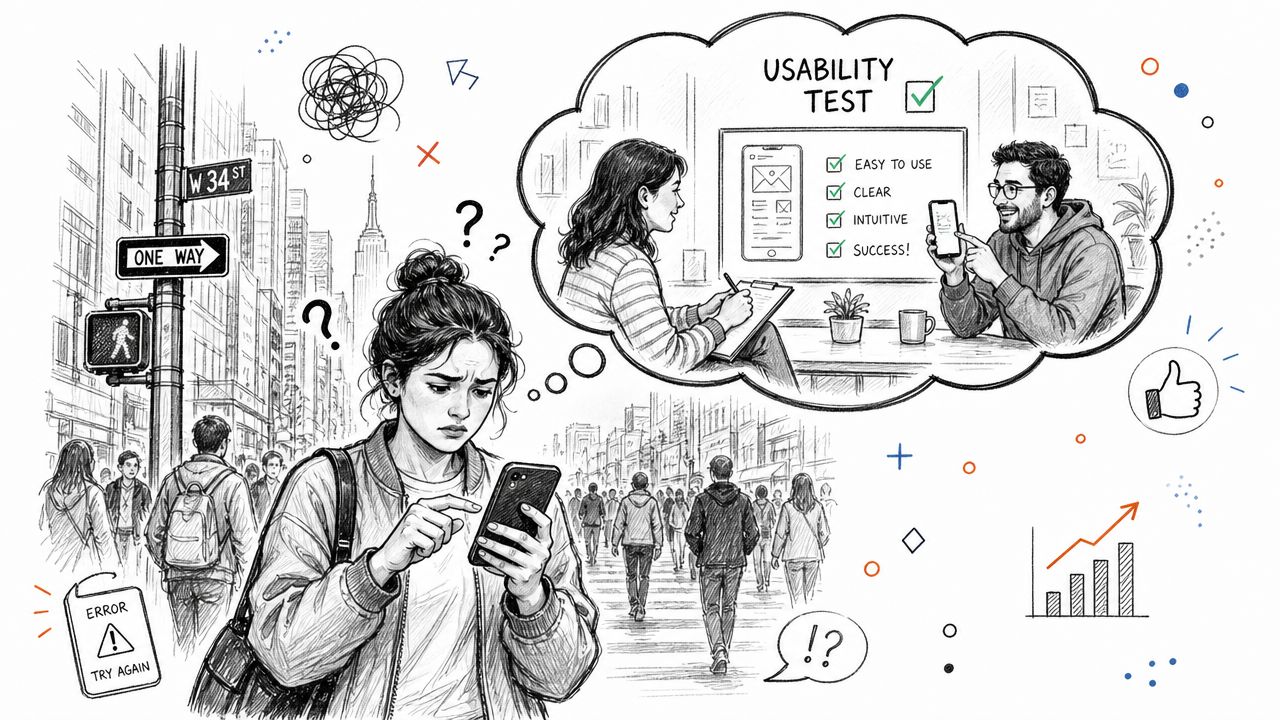
Context changes behavior
Nielsen Norman Group defines a field study as a method conducted in the user's natural environment to capture how distractions, noise, and social dynamics influence behavior, which are the details traditional lab tests often miss, as explained in their guide to field studies in UX.
That single distinction changes the kind of insight you get. In a field study, you're not asking users to behave efficiently. You're watching how they behave when the environment pushes back.
A few things field research regularly surfaces:
Interrupted workflows: Users stop mid-process, then return later with less context.
Shadow systems: People rely on handwritten notes, spreadsheets, screenshots, or memory to compensate for product friction.
Social dependencies: A coworker, supervisor, or customer affects the decision path.
Environmental constraints: Lighting, noise, device position, mobility, and time pressure all shape what's realistic.
Field studies matter when the product doesn't live alone. It lives inside a workday, a household, or a physical setting.
Why teams miss this without fieldwork
Controlled methods strip away noise on purpose. That's useful when you need signal on a specific UI question. But products rarely operate in a vacuum. A warehouse scanner, a clinical interface, a retail dashboard, or even a back-office admin tool gets used amid competing priorities.
That's why field research often uncovers not just usability issues, but mismatches between intended design and actual use. The strongest product teams treat that as strategic input, not anecdotal texture.
Field Study vs Lab Testing vs Synthetic Testing
The clearest way to explain the difference is this. A lab usability test is like a driving simulator. A field study is the actual road test in traffic, weather, and noise. Synthetic testing is more like running many structured simulations fast to identify likely failure points before you ever go on the road.
Each method answers a different question. Confusion starts when teams expect one method to do the job of all three.
The core difference
Lab testing is best when you need to isolate an interaction. You control the task, reduce outside variables, and observe whether users understand the flow.
Field studies are different. They prioritize contextual understanding over pure task completion. That means looking at the user, the environment, the tools around them, and the social setting that shapes behavior.
Synthetic testing sits in another lane. It helps teams validate flows, compare alternatives, and surface friction rapidly without the logistics of recruiting, scheduling, and moderating. If you're comparing how synthetic users vs human users contribute to research, the practical answer is that they solve different layers of the problem.
Research Method Comparison
Attribute | Field Study | Lab Usability Test | Uxia Synthetic Testing |
|---|---|---|---|
Primary goal | Understand behavior in real context | Evaluate interaction with a defined task | Rapidly identify likely friction and compare flows |
Environment | Natural setting | Controlled setting | Simulated, structured testing environment |
Best for | Context, interruptions, workarounds, environmental constraints | Navigation, comprehension, task success, flow issues | Early validation, broad scenario coverage, fast iteration |
Researcher role | Observe, sometimes ask brief in-the-moment questions | Moderate the session or review outputs | Configure missions, audiences, and scenarios |
Typical strength | Reveals hidden needs and real-world constraints | Clean read on interface-level problems | Speed, repeatability, and scale |
Typical weakness | Slower, messier, harder to generalize | Misses environmental factors | Can't replace direct observation when context is the main variable |
Good questions | What shapes behavior around the product? | Can users complete this flow? | Which concepts, variants, or messages should we prioritize? |
What works and what doesn't
A field study works when the environment is part of the product experience. It doesn't work well as a default choice for every redesign.
A lab test works when you need clarity, not realism. It's a mistake when stakeholders expect it to reveal operational complexity.
Synthetic testing works when you need speed and breadth. It's a mistake when teams use it as a substitute for observing actual workplace behavior that depends on physical surroundings, interruptions, or group dynamics.
Practical rule: Match the method to the decision. Don't pick the method your team is most comfortable running.
When to Choose a Field Study and When to Use Uxia
The right choice depends on what could invalidate your findings. If environmental context can change the outcome, a field study becomes much more important. If the main question is whether a flow is understandable, faster methods usually get you there sooner.
Field studies are especially useful when teams need contextual understanding rather than isolated task feedback. Philip Burgess describes this well in his write-up on the impact of field study in UX research techniques, noting that field studies can uncover hidden needs such as whether people use a product in a car, at a kiosk, or while distracted by other tasks.

Choose a field study when context can break the experience
Some research questions can't be answered well from a desk.
Use field research when you need to observe:
Physical device use: Scanners, tablets on the move, kiosks, point-of-sale systems, medical devices.
Workplace interactions: Handoffs, approvals, interruptions, compliance checks, coworker influence.
Offline behavior: Notes on paper, memory-based steps, verbal coordination, temporary workarounds.
Environmental pressure: Noise, mobility, gloves, lighting, queues, time pressure, split attention.
Warehouse operations, healthcare settings, retail floors, and field service workflows often need direct observation. The product is only one part of the system.
Use Uxia when speed and coverage matter most
Uxia is the stronger first move when you need to validate a design quickly, compare alternative flows, identify usability issues early, test multiple audiences or scenarios, and iterate without waiting on recruitment.
That makes it useful for:
Early concept validation
Flow comparison
Copy and navigation checks
Broad scenario exploration
Frequent sprint-based iteration
If the team is still narrowing the problem, fieldwork can be too expensive a starting point. You end up paying for context before you've clarified where the likely friction is.
The hybrid model is usually the smartest one
The most practical approach isn't choosing one camp. It's sequencing methods well.
Start broad with synthetic or unmoderated testing to surface likely friction, weak assumptions, and competing hypotheses. Then use a smaller, targeted field study to validate the findings that depend on real-world context.
That hybrid model does three things well:
It narrows the fieldwork scope. You don't enter the field trying to discover everything.
It sharpens observation. Researchers know which moments, steps, or workarounds deserve attention.
It controls cost. You reserve the heaviest method for the questions that require it.
If you already know the environment shapes behavior, go to the field. If you're still trying to prioritize likely usability issues, start narrower and faster.
Common Types of Field Studies in UX
Not every field study looks the same. Teams often use the term loosely, but the method you choose should match the question you need answered.
Field research has long been defined as a systematic investigation in the user's natural environment, often over an extended period, using methods such as participant observation, interviews, and direct observation to build familiarity with people and their practices. EBSCO's overview of field research in the social sciences captures that broader tradition well.
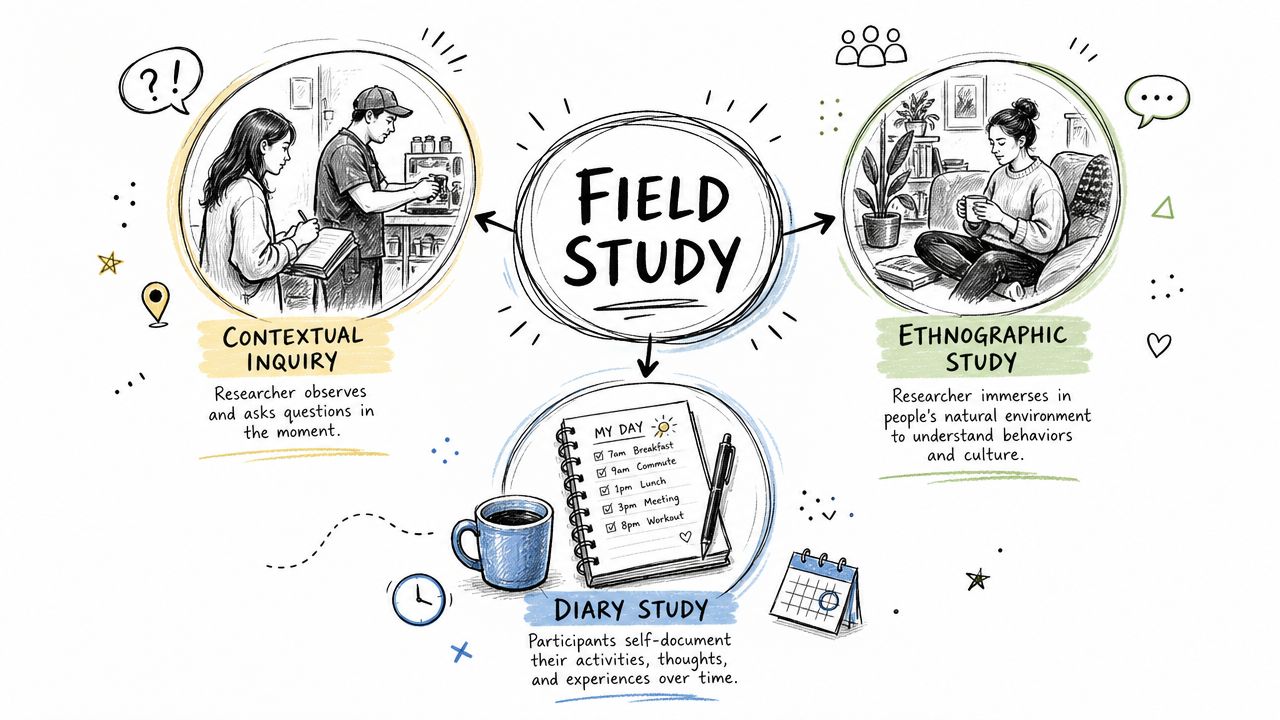
Contextual inquiry
This is the most practical field method for many product teams.
You observe people while they perform real tasks, then ask short questions in the moment to clarify intent, confusion, or decision-making. It's excellent when you need both behavior and explanation without turning the session into a full interview.
Use it for:
Workflow analysis: Understanding how users move between systems and steps
Tool ecosystem mapping: Seeing what sits beside your product in actual use
Decision breakdowns: Learning why a user paused, skipped, or switched tactics
Typical fit: service operations, admin software, internal tools, B2B platforms.
Ethnographic research
This is deeper and slower. Ethnographic work focuses on patterns, norms, language, and culture over a longer period.
It's useful when your product sits inside complex social behavior and you don't yet understand the environment well enough to frame narrow usability questions. Consumer finance, healthcare routines, education, and community-centered services often benefit from this kind of immersion.
What it's best at:
uncovering unspoken rules
identifying role-based behavior
revealing how people adapt tools to existing routines
Diary studies
Diary studies are often grouped with field methods because they track behavior in context over time, even when the researcher isn't physically present.
Participants record experiences, actions, frustrations, or decisions as they occur. That makes diary work useful for products with recurring use, delayed outcomes, or changing emotional states.
Good fits include:
Multi-day journeys: onboarding, travel, care coordination
Habit formation: wellness, learning, productivity
Intermittent pain points: issues that don't appear in a single session
A simple way to choose
Method | Best question |
|---|---|
Contextual inquiry | What are users doing, and why are they doing it that way? |
Ethnographic research | How do environment, culture, and routines shape behavior over time? |
Diary study | How does behavior change across days, moments, or recurring situations? |
If you're asking “what is a field study” in UX terms, the practical answer is that it's an umbrella. The right subtype depends on whether you need immediate task context, deeper immersion, or longitudinal behavior.
How to Plan and Execute a Field Study
A field study goes off course before anyone enters the site. It happens in the planning meeting, when the team says they want to “see users in context” but cannot name the product decision that observation should inform.
Good fieldwork starts narrower than that. Define the decision, then choose the lightest field approach that can answer it. In practice, I often use analytics, stakeholder interviews, support logs, and synthetic testing in Uxia first. That pre-work helps teams spot likely friction patterns at scale, form better hypotheses, and reserve in-person research for the questions that need real-world context.
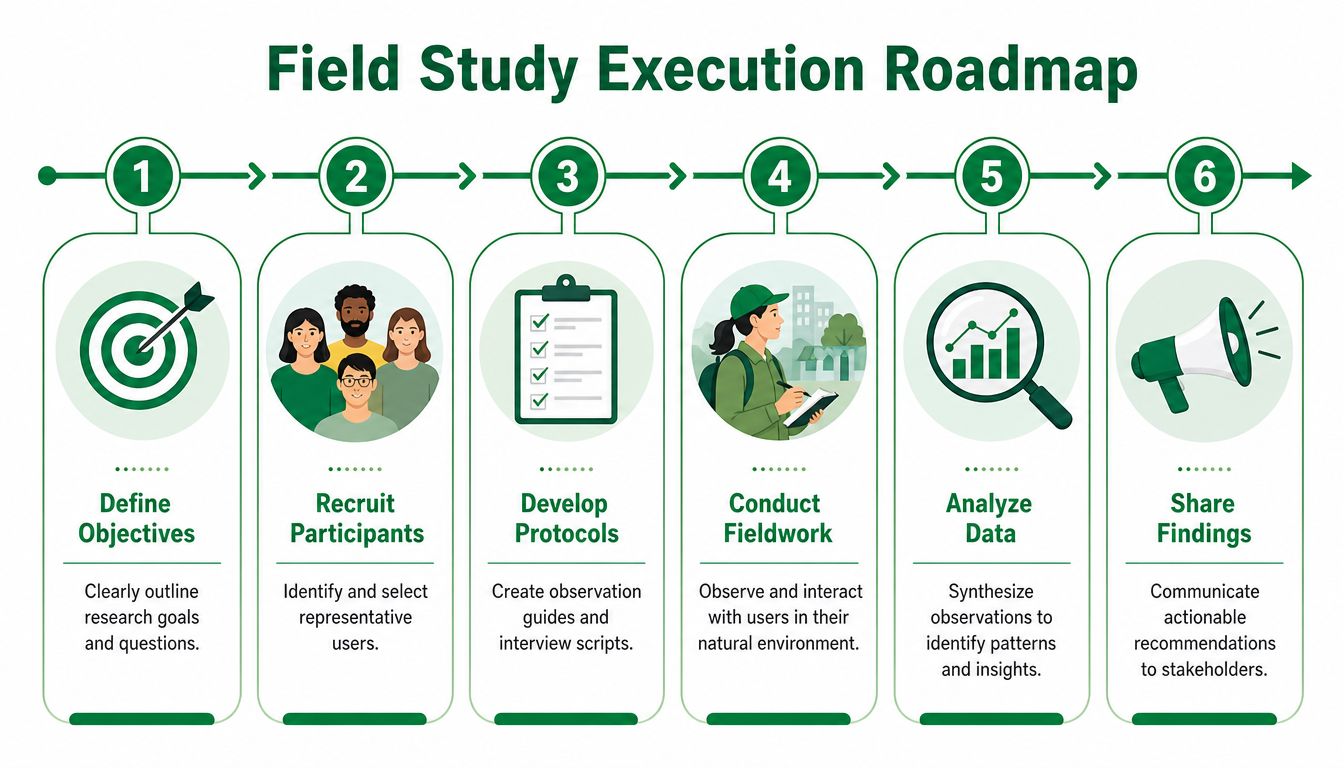
Phase 1 Define the observation target
Start with a question that can change a product or service decision.
Useful examples:
Workflow question: Where does the process break under routine interruptions?
Context question: Which environmental conditions change usage behavior?
Tool question: What other systems, documents, or people shape the task?
Behavior question: What do users do in practice that they omit in interviews?
If the team cannot answer those questions yet, fieldwork is probably premature. Run lighter discovery first. Uxia is useful here because it can surface broad usability signals quickly, which makes the field study smaller, more targeted, and easier to justify.
Phase 2 Recruit for the actual setting
Recruiting by persona or job title alone is one of the fastest ways to waste a field visit. Context is part of the sample.
Recruit for:
Actual environment: office, clinic, warehouse, home, retail floor
Relevant task ownership: the people who perform the work
Typical operating conditions: peak periods, shift changes, interruptions, handoffs
Access realities: consent, privacy rules, safety requirements, site permissions
If a stakeholder offers a substitute participant in a cleaner or easier setting, treat that as a different study. It may still be useful, but it will not answer the same question.
The site is part of the participant criteria.
Phase 3 Build a light protocol
A field protocol should keep the team aligned without forcing a scripted session. The goal is consistency across visits, not rigid control.
Your field kit should usually include:
Observation guide: moments, transitions, and breakdowns to watch for
Prompt list: short neutral questions for natural pauses
Note structure: separate behavior, quote, context, and interpretation
Debrief template: a fast way to capture decisions and open questions after each visit
Teams that are weak on interviewing often contaminate observation with leading questions. This guide on how to conduct user interviews is a useful refresher before mixing interviews with field observation.
A short walkthrough can help teams visualize the process before they run it:
Phase 4 Observe first, ask second
Talking too much is a common failure mode. Researchers step in early, participants start explaining instead of working, and the session turns into an interview conducted in the wrong location.
A better pattern is simple. Watch the task unfold. Wait for a pause. Ask a short clarifying question. Parallel's article on what field study means in UX practice describes this balance well in contextual inquiry.
Useful prompts:
What are you checking right now?
What caused that pause?
Is this the usual way you handle it?
What happens if this step is skipped?
Prompts to avoid:
Wouldn't it be easier if the system did X?
Are you confused by this screen?
So this is the main problem, right?
Phase 5 Synthesize quickly and turn evidence into decisions
Field notes lose value fast when they sit for days. Debrief after every session while details are still fresh.
Look for patterns across:
repeated interruptions
consistent workarounds
environmental blockers
dependencies on people or physical artifacts
emotional signals tied to stress, hesitation, or uncertainty
Then convert those patterns into decisions. “Users want simplicity” is too vague to matter. “Staff delay approvals because they need data from a separate system, so the flow needs a save state and a clear return path” gives design and product teams something they can act on.
The hybrid model offers a distinct advantage. Uxia can help generate and pressure-test hypotheses early. Field research can then confirm which issues are caused by real environments, workarounds, and operational constraints. That combination is usually more efficient than sending researchers into the field with broad, unfocused questions.
Common Pitfalls in Field Research and How to Avoid Them
Field studies sound simple until you run one. Then challenges quickly become evident. Most of them are predictable.
Your presence changes behavior
People often become more deliberate when they know they're being observed. That doesn't make the study invalid, but it does mean you should reduce disruption.
A practical response:
Arrive early: let participants settle around your presence
Stand back: don't hover over the device unless visibility requires it
Ask less: save interpretation questions for natural pauses
Watch routines repeat: the second or third cycle is often more natural than the first
One industry gap is that teams still lack clear benchmarks for how much probing disrupts authentic workflows. A UXtweak discussion of field study gaps notes that guidance rarely defines where researcher involvement starts altering behavior in a meaningful way. That's exactly why restraint matters.
You collect rich data but weak conclusions
Field notes can become a pile of observations with no decision value. This usually happens when teams confuse interesting detail with actionable evidence.
Fix it by tagging every note with one of these labels:
Observed behavior
User explanation
Environmental condition
Design implication
That simple separation makes synthesis far cleaner.
You ask leading questions without noticing
Field research invites improvisation. Improvisation invites bias.
A useful discipline is to replace explanation-seeking questions with description-seeking ones. Ask what happened, what the user noticed, what they expected, or what they did next. Avoid questions that smuggle in your theory of the problem.
Stay curious longer than feels comfortable. Premature interpretation is one of the fastest ways to flatten field insight.
You don't plan for chaos
Real settings are messy. People get interrupted. Permissions change. Devices fail. The participant who matters most might only be available for fragments of time.
Plan for shorter windows, backup note-taking methods, and immediate post-session debriefs. In field research, flexibility isn't optional. It's part of the method.
Conclusion The Future of Field Research Is Hybrid
A team watches clean lab sessions, ships the redesign, and still sees drop-off in actual usage. The missing piece is often context. Interruptions, shared devices, time pressure, weak connectivity, workplace rules, and social dynamics change behavior in ways controlled studies rarely capture.
That is why field studies still matter.
But fieldwork is expensive, slow to schedule, and easy to overuse. I would not send a team into the field to answer questions that can be screened earlier through faster methods. Smart research programs treat field studies as a precision tool. They use them when context is the deciding factor, not as the starting point for every product decision.
The better model is hybrid. Teams generate early hypotheses at scale, pressure-test flows and concepts quickly, then take only the highest-risk questions into the field. That sequence improves the quality of fieldwork because researchers arrive with sharper questions, fewer blind spots, and a clearer sense of what they need to observe. A closer look at hybrid UX research shows how that approach cuts waste without flattening the human reality behind the data.
The operating model matters too. Research speed alone does not help if the team cannot turn findings into repeatable decisions. This guide on implementing AI-native operations is useful because it frames AI adoption as a workflow choice, with human judgment and real-world validation built in.
So, what is a field study? It is still one of the best ways to understand behavior in context. The difference now is how disciplined teams use it. They start broad, narrow fast, and go into the field only when real environments are likely to change the answer.
If your team wants faster signal before committing to expensive human studies, Uxia is a practical place to start. You can validate flows, compare concepts, surface likely friction, and sharpen hypotheses quickly, then use targeted field research only where real-world context will affect the decision.