User Testing for Agencies: Scale & Profit in 2026
Build a scalable, profitable user testing for agencies service. Our 2026 guide covers everything from client kickoff to AI-powered testing with Uxia.

Launching without user testing is often framed as a speed move. In practice, it's usually a margin leak. User testing identifies up to 85% of usability problems in digital products, and agencies that integrate it into their design sprints reduce post-launch friction issues by an average of 60% according to VWO's usability testing statistics roundup. That changes the economics of agency delivery.
The agencies that win with testing don't treat it as a one-off research add-on. They package it as a repeatable service line that protects project outcomes, strengthens retainers, and gives clients evidence for design decisions before code is committed. That's the shift. User testing for agencies works best when it moves from artisan work to an operating system.
The Strategic Imperative of User Testing for Agencies
Most agencies still sell design and build. Fewer sell decision confidence.
That gap matters because clients don't just buy deliverables. They buy reduced risk. If your team can identify hidden friction before launch, you protect the project, the budget, and your own reputation when adoption stalls for reasons the client never saw coming.
Why testing changes your commercial position
When an agency brings real user evidence into design reviews, the relationship changes. You're no longer defending layouts based on opinion, internal preference, or the loudest stakeholder in the room. You're showing where users hesitate, what they misunderstand, and which parts of a flow create uncertainty.
That makes it easier to justify higher-value engagements and longer retainers. It also improves the quality of post-launch conversations. Instead of reacting to complaints after release, the team can say which risks were validated, which were fixed, and which still need follow-up.
Practical rule: Sell testing as protection against avoidable rework, not as a research luxury.
Where agencies usually underperform
The common failure mode is simple. Testing gets pushed to the end, budget disappears, and everyone relies on internal reviews. Internal reviews help, but they rarely expose the gap between what a team meant and what a customer understands.
A stronger approach is to combine design validation with feedback collection from real usage touchpoints. For agencies working on live sites, tools that support in-context feedback can complement formal studies. PinDrop's overview of the benefits of direct web comments is useful if you want another way to capture friction close to the page itself.
What this means operationally
A mature agency should treat user testing as part of delivery governance. That means:
Including validation in the scope: Add test rounds to project plans before procurement pressure removes them.
Using evidence in stakeholder reviews: Show patterns, not isolated opinions.
Linking findings to business risk: Translate confusion, hesitation, and task failure into conversion, support, trust, or adoption consequences.
Building repeatable packaging: Productized testing is easier to sell than custom research every time.
Agencies that do this consistently stop competing on screens produced. They compete on decisions de-risked.
A Five-Step Framework for Repeatable Client Tests
The fastest way to make user testing for agencies scalable is to stop reinventing the process for every client. The workflow needs enough structure that a strategist, designer, or researcher can run it without turning every kickoff into a custom methodology exercise.

Step 1 defines the decision
Start with the decision, not the deliverable. The client may say they want to “test the prototype,” but that isn't specific enough to produce useful findings.
A better kickoff question is: what decision must this test help the team make? Common answers include validating a prototype, comparing concepts, improving a live flow, checking comprehension, or resolving a disputed design choice.
If the team can't name the decision, the test will drift.
Step 2 configures the test
Many studies fail without a strong foundation. A solid setup includes the mission, the scenario, the follow-up questions, and the intended audience.
For niche audiences, use an Audience Enrichment step. Bring in existing personas, interview notes, CRM patterns, behavioral data, support themes, and prior research so the audience model reflects the client's market reality instead of a generic user profile.
A practical configuration checklist:
Mission wording: Write one clear task with a realistic end goal.
Scenario framing: Give enough context for natural behavior without coaching the answer.
Follow-up prompts: Ask why users hesitated, what they expected, and what felt risky.
Audience rules: Define who this test is for and who should be excluded.
If your team needs a refresher on research fundamentals, Bulby's guide to mastering user insights is a useful companion resource.
Step 3 launches quickly
Once the setup is locked, import the Figma prototype, static screens, or live URL and run the test. In an AI-first workflow, results are typically available within 10–15 minutes based on the operating process described by the Uxia team.
That speed matters because it changes behavior inside the agency. Teams stop waiting for the “right moment” to test and start validating earlier.
Step 4 looks for patterns, not comments
Review transcripts, journeys, misclicks, drop-offs, and repeated friction points. One dramatic quote can be interesting, but recurring behavior is what should drive decisions.
The strongest client reports are built on repeated signals across testers, not the most memorable line in a transcript.
Step 5 prioritizes and iterates
Every report should end with ranked actions. Not observations. Actions.
Use a simple priority lens:
Issue type | What to do |
|---|---|
Blocks completion | Fix before launch |
Reduces trust | Rewrite, redesign, or clarify immediately |
Creates hesitation | Test an alternative in the next round |
Minor friction | Add to backlog if impact is limited |
This framework works because it's operational. It keeps quality high, but it also makes testing easier to scope, delegate, and repeat.
Designing High-Impact Test Sessions and Scenarios
A mediocre test tells you whether users got through a flow. A strong test tells you why they slowed down, what they expected instead, and which details changed their confidence.
That difference usually comes from scenario design.
Write missions that trigger real behavior
The mission should sound like something a user would try to do. “Explore the interface and share your thoughts” produces soft feedback and vague observations. “Buy a ticket for your next trip and complete checkout” produces behavior.
Good missions are concrete, narrow, and outcome-based. They tell the participant what they're trying to achieve, but they don't reveal where to click or what the product team hopes to hear.
Use this structure:
Context: Why the user is here
Goal: What they need to accomplish
Constraint: Any realistic condition that shapes behavior
Build scenarios with enough realism
A realistic scenario gives users a reason to care. Without that, they skim, improvise, and comment like reviewers instead of acting like customers.
One example that changed a project came from testing the Amsterdam public transport app's ticket purchase flow. The team believed the journey was largely optimized. The test surfaced a recurring hesitation right before payment. Synthetic testers consistently paused at the word “invoice” and questioned whether they were requesting proof of payment or a formal business invoice.
That insight shifted the work from visual optimization to trust and clarity in checkout. The issue wasn't decorative. It affected confidence at the exact moment users had to commit.
Small wording choices can damage trust faster than a layout problem.
Ask follow-up questions that expose decision logic
The best follow-ups don't ask whether users “liked” something. They ask what users thought was happening.
Effective prompts include:
Expectation checks: What did you expect to happen here?
Trust checks: Did anything make you unsure before continuing?
Meaning checks: What does this label or message mean to you?
Decision checks: Why did you choose that option?
If your team wants a stronger prompt structure, this usability testing scenario template guide is a practical starting point.
What doesn't work
Avoid three habits:
Leading setup: Don't hint at the problem you want validated.
Overloaded missions: Don't combine multiple goals in one task.
Opinion-first questions: Don't ask for preference before behavior has happened.
The point of session design isn't to gather nicer quotes. It's to create the conditions where users reveal real uncertainty.
Modernizing Recruitment From Human Panels to AI Testers
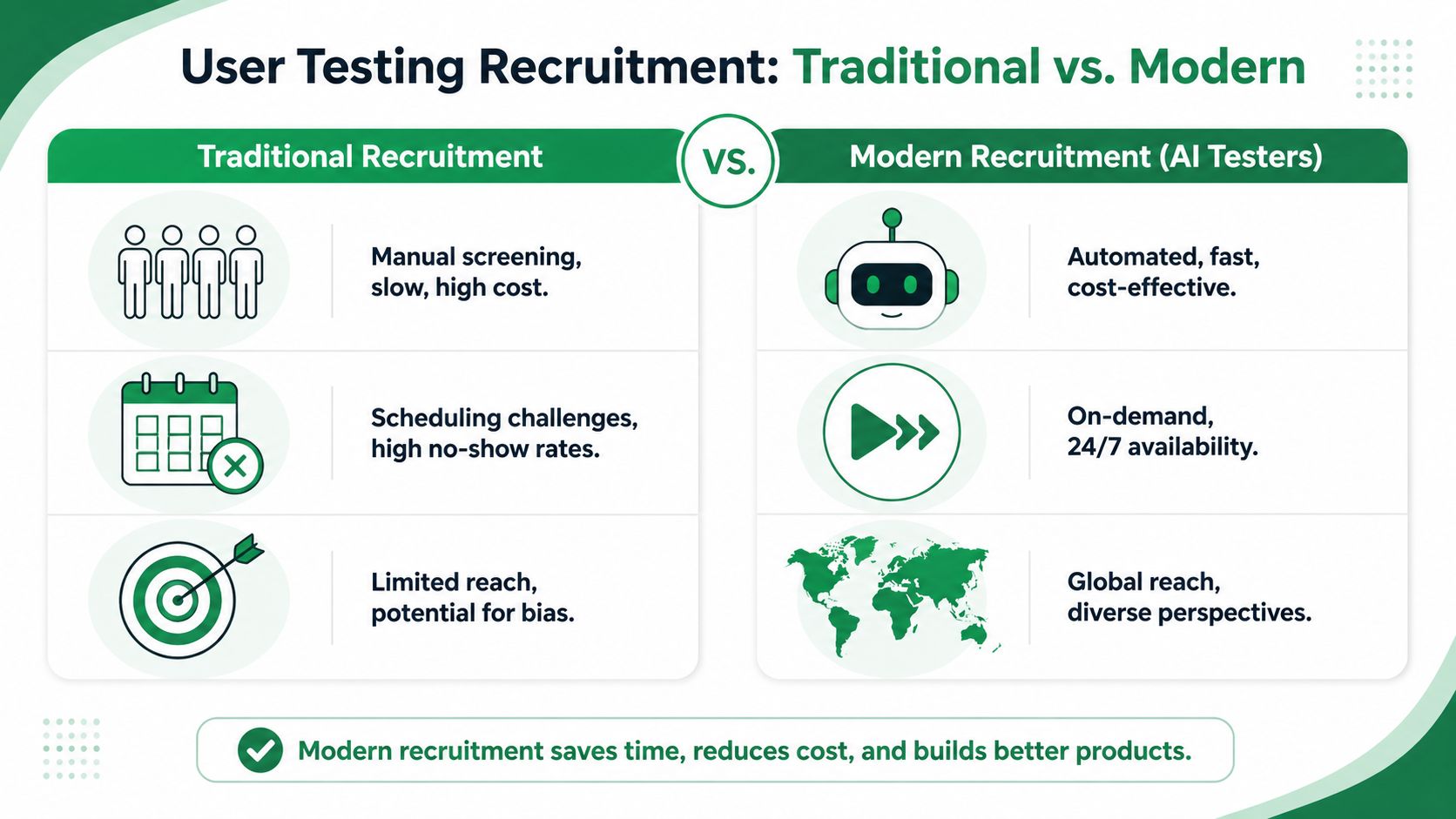
Recruitment is where many agency testing programs lose money. The test itself may be sharp. The audience fit may be good. But if sourcing participants takes too long, costs too much, or introduces panel bias, the whole service becomes hard to scale.
The baseline for efficient sample planning
For qualitative work, the standard isn't “recruit as many people as possible.” It's recruit enough people to expose the main issues without bloating time and cost. According to the Nielsen Norman Group, testing with just five participants per user segment uncovers 85% of usability issues, as cited in Testmu's summary of UX testing guidance.
That's useful because it disciplines scope. It also makes audience segmentation the main challenge. If you have two or three distinct user groups, you don't need a giant study. You need the right participants in each segment.
Comparing the three main recruitment models
Model | Strength | Limitation | Best fit |
|---|---|---|---|
Traditional panels | Access to screened humans | Slower, costlier, more scheduling overhead | High-stakes human validation |
Bring your own users | Strong product relevance | Hard to coordinate, can bias toward current customers | Existing customer feedback loops |
Synthetic testers | Instant access, no scheduling, easy iteration | Best used with clear audience definitions and selective human follow-up | Early validation, rapid cycles, repeated testing |
Traditional recruiting still has a place. It's often necessary when the project demands direct lived experience, regulated workflows, or accessibility validation with assistive technology use. But many agency engagements don't need recruitment as the first move. They need fast directional insight before the team spends another week polishing the wrong thing.
Where AI-first testing fits
Uxia changes the economics of user testing for agencies. Agencies can upload a prototype or live flow, define the mission and audience, and generate synthetic testers without waiting on panel sourcing. That removes a major delivery bottleneck and makes continuous validation feasible inside normal sprint timelines.
For niche or messy audience definitions, Audience Enrichment is the practical bridge. Instead of relying on a generic synthetic persona, the team enriches the test with existing research, customer interviews, pain points, jobs to be done, and behavioral context. That makes synthetic testing more representative and far more useful for agency work that depends on domain nuance.
A useful comparison of methods is this article on synthetic users vs human users.
What works in real delivery
The strongest model is not ideological. It's staged.
Use synthetic testers first to pressure-test flows, labels, IA, and trust points.
Use human sessions selectively where accessibility, vulnerability, or domain expertise requires direct validation.
Use audience enrichment whenever the client serves a specialized market.
That mix gives agencies speed without pretending all research questions are the same.
Building Your Agency's Reusable Testing Toolkit
A scalable service line needs templates. Without them, each project starts from zero, setup quality varies by team member, and margins disappear into avoidable prep work.
The toolkit should live in a shared workspace and cover the study types your agency runs most often.
The core templates worth building first
Start with the tests that show up repeatedly in client work:
Prototype usability validation: For early-stage Figma concepts when the team needs directional feedback before development.
Live website usability testing: For active journeys where navigation, comprehension, or conversion friction already exists.
Checkout and conversion flow validation: For pricing pages, carts, forms, and payment steps.
Onboarding experience evaluation: For activation paths, first-use guidance, and account setup.
Mobile app navigation tests: For information architecture, discoverability, and task flow on smaller screens.
Accessibility reviews aligned to WCAG 2.2: For interaction, content clarity, and potential barriers that need deeper follow-up.
AI user research interview guides: For structured exploratory questions when you need richer qualitative framing.
Audience Enrichment templates: For collecting personas, interview inputs, pain points, jobs to be done, and customer knowledge.
What each template should include
Don't just save a blank questionnaire. Save operating logic.
Each template should contain:
Template component | What it should standardize |
|---|---|
Mission wording | The task language most likely to produce natural behavior |
Scenario prompt | The minimum context needed without leading users |
Follow-up set | Reusable questions for expectation, trust, and comprehension |
Audience definition | Who belongs in the test and who doesn't |
Reporting tags | Consistent labels for issue type, severity, and recommendation area |
How templates improve profit, not just speed
The benefit isn't only faster setup. Templates reduce variance.
A junior strategist can run a stronger test if the agency has already captured good mission patterns, clear scenario writing, and proven follow-up prompts. That also improves reporting consistency, which matters when several people contribute to the same client account over time.
A reusable template turns testing from craft-only work into a trainable service.
The mistake is making templates too rigid. Leave room for customization around audience nuance, business context, and product maturity. Standardize the bones. Tailor the scenario.
From Raw Data to Actionable Client Reports
A report fails when the client finishes reading it and still asks, “So what should we change first?” Raw data isn't insight. Insight is a reasoned pattern connected to action.
For agencies, that distinction matters because reporting is where the commercial value of user testing becomes visible.
What to review before writing the report
Start with behavior, then move to interpretation. Review the task journeys, transcripts, misclicks, hesitation points, and drop-offs together rather than in isolation.
Agencies often move too quickly from “users mentioned X” to “we should redesign Y.” A better sequence is:
Find repeated behavior
Identify the likely cause
Assess the consequence
Recommend the smallest useful fix
That keeps the report grounded.
Why hybrid reporting matters
Synthetic testing is fast, but speed alone doesn't make a report persuasive. Digital.gov noted that 68% of public-sector agencies still rely on moderated, human-led sessions for accessibility validation, which highlights the continued need for a hybrid model that combines fast synthetic insight with curated human interpretation in accessibility-sensitive contexts, as discussed in this Digital.gov article on impactful user research.
That's the right lesson for agencies. Don't present synthetic output as self-explanatory. Curate it. Interpret it. Frame where it is sufficient and where human follow-up is still required.
A client report structure that works
Use a report format clients can act on quickly:
Executive summary
State the decision context, the major friction themes, and the top actions. Keep this short.
Key findings by behavioral pattern
Group issues by pattern rather than by screen. Examples include confusion about terminology, low trust at payment, navigation uncertainty, or hesitation during form completion.
Prioritized recommendations
Rank issues by impact and implementation effort. Clients need order.
Evidence appendix
Include transcripts, journey notes, notable misclicks, and screen-level observations for traceability.
If you want a practical format for AI-assisted synthesis, this modern UX research report template for AI insights is useful.
Reporting standard: Every finding should answer three questions. What happened, why it matters, and what to change next.
What to avoid in final deliverables
Avoid these reporting mistakes:
Screenshot dumps: Lots of evidence, no decision support.
Quote-led findings: Memorable, but often not representative.
Unranked issue lists: Clients can't tell what is urgent.
No next-step plan: The report becomes archival, not operational.
A good report gives the client momentum. It should make the next design decision easier by the time the meeting ends.
Structuring Profitable User Testing Service Fees
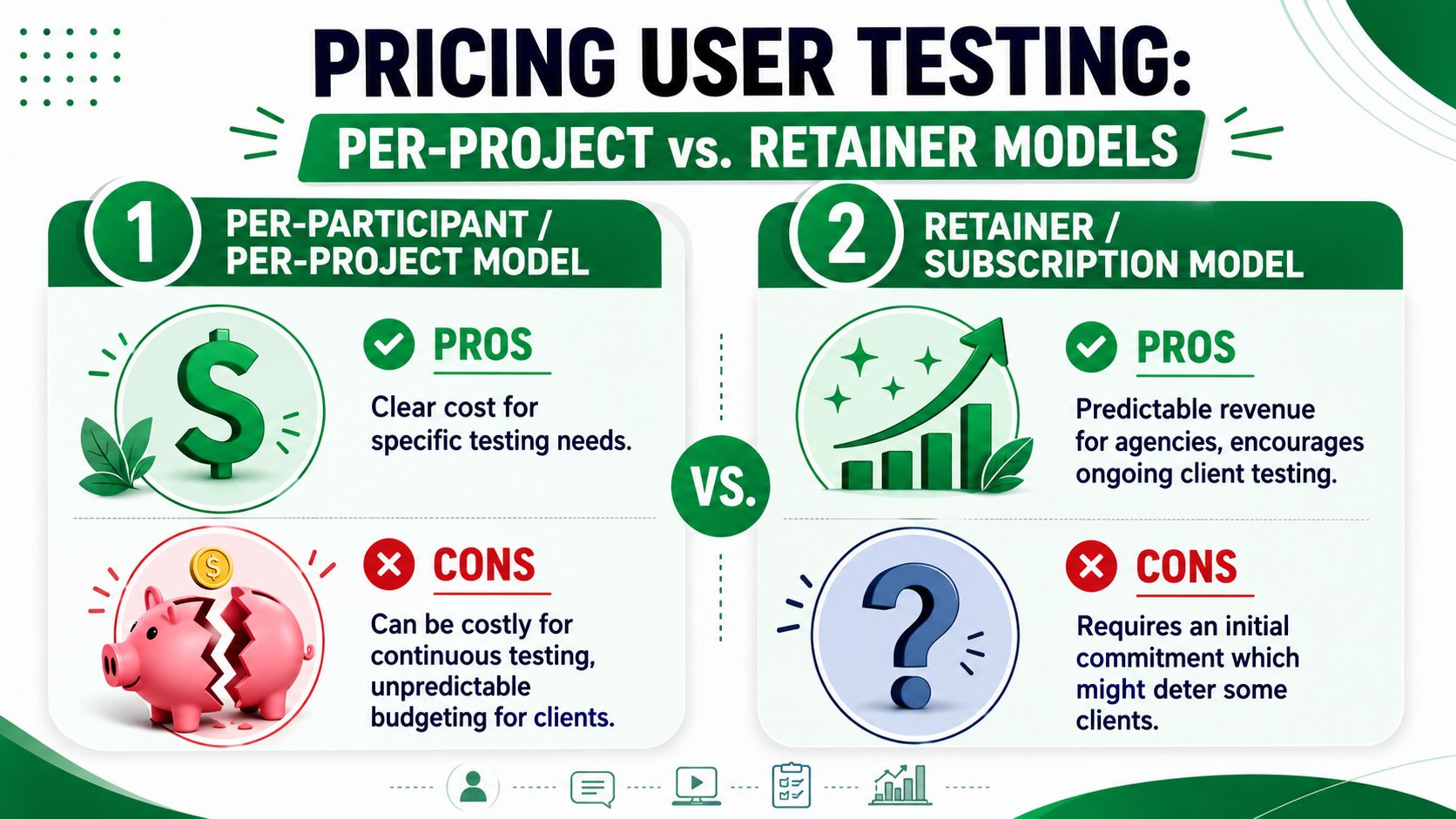
Pricing is where many agencies accidentally train clients to treat testing as optional. If the service is sold as a bespoke research event with a large one-time fee, buyers delay it until late in the project or cut it entirely when budgets tighten.
That hurts the client and the agency.
A better model treats testing as ongoing validation capacity.
Why project pricing creates friction
Traditional usability testing work is expensive enough that clients often ration it. Agencies specializing in usability testing typically charge between $5,000 and $25,000 per project, depending on complexity, according to UX Studio's overview of usability testing agencies. That cost structure makes every study feel like a special purchase.
When that happens, teams postpone validation until late-stage reviews, when design debt is already expensive.
A short explainer on pricing trade-offs can help frame this conversation:
The retainer and credit model is easier to scale
A subscription and credit model solves a different problem than project pricing. It removes the need to renegotiate every single test.
That changes client behavior in useful ways:
Testing becomes continuous: Teams validate concepts, flows, copy, and revisions throughout delivery.
Budgeting becomes simpler: Clients know capacity is available.
Agency revenue becomes steadier: The service behaves more like a productized retainer than ad hoc research.
Teams learn faster: Smaller, more frequent tests beat one large reveal at the end.
A practical packaging model
A profitable structure usually includes three layers:
Package layer | What it includes |
|---|---|
Core plan | A set amount of testing capacity each month or quarter |
Strategy layer | Test design, analysis, prioritization, and stakeholder readouts |
Human validation add-on | Optional moderated sessions for accessibility or specialized audiences |
The key is to separate platform capacity from strategic interpretation. Clients shouldn't pay the same rate for automated execution and senior synthesis.
What to say when clients ask for per-participant pricing
Explain that per-participant pricing makes sense when recruitment is the scarce resource. In an AI-first model, the scarce resource is no longer access to testers. It's the quality of the decision-making wrapped around the test.
That's why subscriptions work. They pay for velocity, repeatability, and a standing validation process rather than a one-time study.
The Ideal Team and Tool Stack for Your Testing Service
A good testing service doesn't require a new department. It requires clear ownership and a lean stack.
The minimum viable team
Most agencies can run this with existing roles:
UX strategist: Owns objective definition, study design, synthesis, and recommendation quality.
Designer: Prepares prototypes, interprets UX issues, and turns findings into revised flows.
Project manager or account lead: Handles scope, approvals, timing, and client communication.
On larger accounts, a researcher can deepen the work. On smaller accounts, the strategist usually covers that function.
The practical tool stack
Keep the stack boring and dependable:
Need | Tool type |
|---|---|
Design source | Figma or equivalent prototype tool |
Testing execution | AI testing platform or moderated testing setup |
Insight tracking | Project management tool with issue tagging |
Reporting | Slide deck, doc template, or research repository |
The main requirement is interoperability. Designers should be able to move from prototype to test without format friction. Strategists should be able to export findings into client-ready artifacts without rebuilding the evidence manually.
Where agencies overcomplicate things
They add too many tools too early. Start with one design source, one testing workflow, one prioritization method, and one reporting template. Complexity should come from the client problem, not from your internal stack.
If the team can define the objective, run a test quickly, and turn findings into ranked actions, the service is operational.
Frequently Asked Questions for Agency Leaders
Agency leaders usually don't struggle with whether testing is useful. They struggle with how to sell it, scope it, and explain where AI fits without sounding careless.
How do you sell testing to clients focused on budget and timeline
Tie testing to avoided waste. Don't pitch it as “extra research.” Pitch it as the cheapest point in the process to catch confusing labels, broken assumptions, and conversion friction before build effort compounds the problem.
Also keep the entry offer narrow. A focused validation round on one critical flow is easier to approve than a broad research package.
What do you do when the client serves a niche B2B audience
Use the audience inputs the client already has. Sales notes, onboarding calls, customer interviews, CRM categories, support themes, and jobs to be done are often enough to shape a more realistic audience model.
That's where Audience Enrichment matters. It lets the agency test against a profile grounded in customer knowledge rather than a generic “business user.”
How should agencies talk about synthetic testing versus human testing
Don't frame them as enemies. Frame them as tools for different jobs.
Synthetic testing is excellent for rapid validation, repeated iteration, copy clarity, flow logic, and early identification of friction. Human testing remains important when you need lived experience, accessibility verification with assistive technology, or direct engagement with vulnerable or underrepresented groups.
That last point matters. Emerging data from 2025 indicates that 42% of community-focused design projects fail to include voices from underserved groups due to recruitment barriers, according to UX Tigers' discussion of user testing challenges. Agencies should treat AI-driven audience modeling as a way to reduce some recruitment barriers, not as permission to skip ethical human validation where it's needed.
If the design decision affects trust, inclusion, or accessibility in a sensitive context, add human validation.
What should be in the final reporting workflow
Keep the process simple: test setup, behavioral review, issue clustering, priority ranking, client readout. For teams that need help organizing transcripts and notes, this guide to finding the right qualitative transcription solution is worth reviewing.
How do you keep this service profitable
Standardize setup, limit custom methodology work, reuse templates, and reserve senior time for framing and synthesis. Profit usually disappears in bespoke prep and overproduced reports, not in the test itself.
What's the biggest mistake agencies make
They wait too long to operationalize. If testing depends on one senior specialist doing everything manually, it never becomes a true service line. It stays a heroic effort.
If you want to turn user testing into a faster, more repeatable service inside your agency, take a look at Uxia. It supports AI-powered testing workflows with synthetic users, audience configuration, transcripts, journey analysis, and reporting inputs that fit continuous validation rather than one-off studies.