Listen Labs Alternatives and AI Interview Guides
Compare top Listen Labs alternatives for UX research and learn how to build effective AI-focused user interview discussion guides with Uxia.

You've got a prototype, a tight sprint deadline, and a research backlog that's growing faster than your participant pool. The obvious question is which Listen Labs alternative can produce useful evidence quickly. The harder question comes next: can your discussion guide work with AI-moderated sessions and synthetic testers without turning a research study into a polished source of false confidence?
That distinction matters. AI research platforms can accelerate recruitment, moderation, and synthesis, but they don't all solve the same problem. Some are built for broad enterprise governance and human participant access. Others focus on fast, structured validation, adaptive interviews, or synthetic-user testing. The right choice depends less on the longest feature list and more on the decisions you need to support.
Mapping the Listen Labs Alternatives Landscape
The market around user research and user testing software is expanding, although analysts classify the category differently. One independent market report values global user research and user testing software at USD 0.91 billion in 2025, with a projection of USD 1.9 billion by 2035 and a 7.66% CAGR for 2026 to 2035. Another report measures global user research software at USD 276.63 million in 2025 and forecasts USD 811.36 million by 2034, implying a 12.7% CAGR from 2026 to 2034. A separate estimate places usability-testing tools at USD 1.6 billion in 2025. These differing scopes show why buyers encounter such varied Listen Labs alternatives, from full research suites to focused testing products. (Market sizing for user research and user testing software)
Independent comparison sites place Listen Labs beside both human-recruitment platforms, such as UserTesting and Respondent, and AI-led tools, such as Outset and Strella. G2's alternatives listing also includes Qualtrics Market Research, User Interviews, Hotjar by Contentsquare, Userback, and Forsta, which reflects two purchase paths rather than one direct product category. (G2's Listen Labs alternatives comparison)
Category | Examples | Best For |
|---|---|---|
Enterprise research suites | Qualtrics, Forsta | Governance, broad research programs, and cross-functional reporting |
Human recruitment platforms | UserTesting, Respondent, User Interviews | Studies that require real participants with defined screening criteria |
AI-moderated research | Listen Labs, Outset, Strella | Conversational studies with automated moderation and synthesis |
Structured usability testing | Hotjar by Contentsquare, Userback | Product feedback tied to usability, behavior, or support workflows |
Synthetic and unmoderated validation | Uxia and comparable AI testing workflows | Rapid prototype comparison and early hypothesis screening |
The practical divide is fidelity versus iteration speed. Enterprise suites help when procurement, governance, panel access, and longitudinal reporting matter. Human recruitment tools are the safer choice when the research question depends on lived experience, emotional nuance, or a narrowly defined population. AI-moderated platforms reduce moderator workload, but their value depends on how well the script probes and how transparently the system reports evidence.
A synthetic testing workflow serves a different job. In Uxia, teams can upload prototype images or videos, define a mission and audience, and generate synthetic testers aligned to behavioral and demographic profiles. The testers move through flows, think aloud, and return transcripts and prioritized feedback without scheduling a panel. That makes it suitable for rapid design validation, not automatic replacement of human research. Teams comparing tools should also review the practical differences among user testing alternatives, then run one representative project rather than judging products from a feature grid alone.
Defining Goals and Ethics for AI User Research
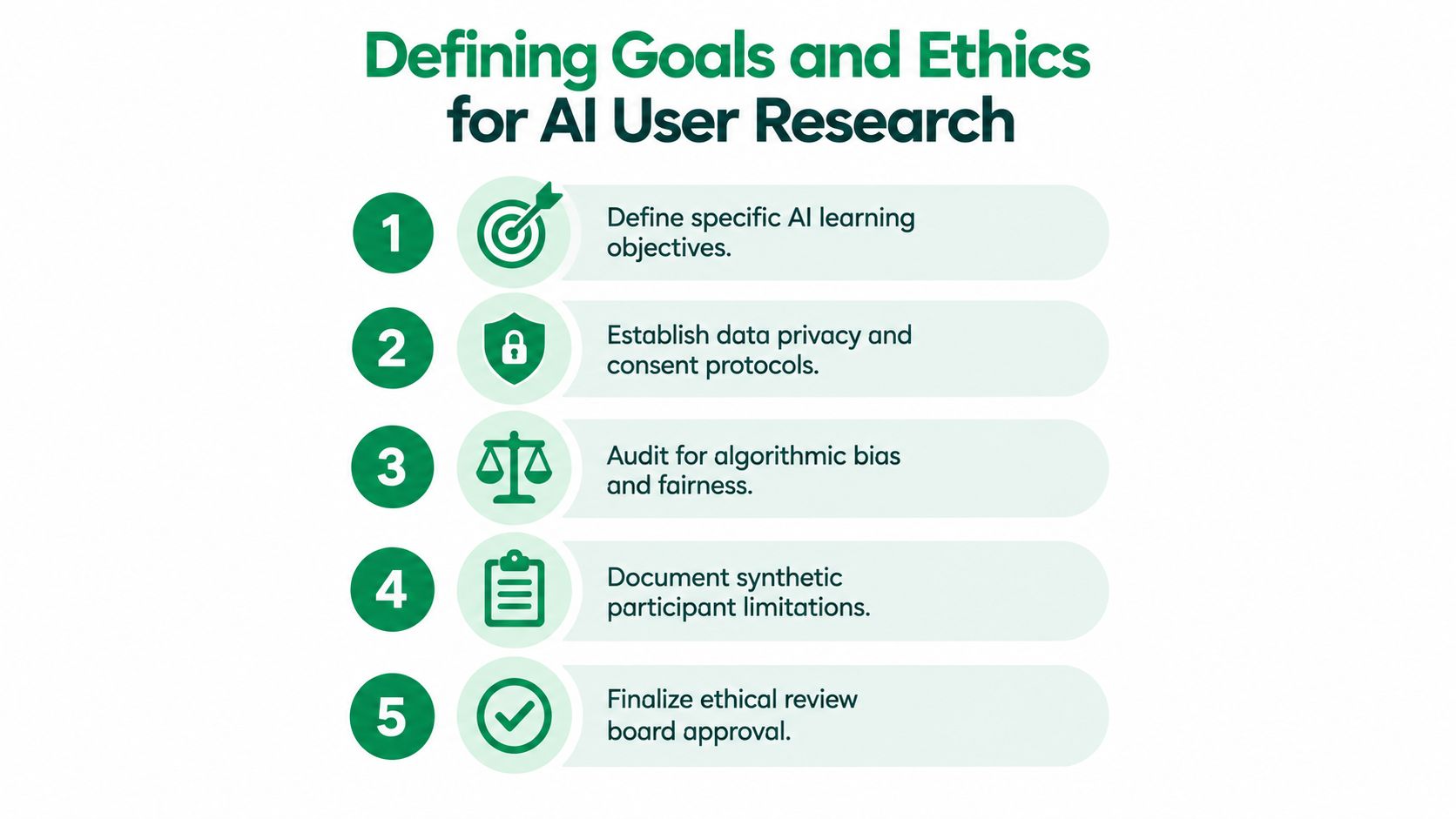
A synthetic participant isn't a recruited person with a personal history. It's a modeled representation of an audience, so the research objective must state exactly what the model is being asked to simulate and what evidence it cannot provide.
Start with a decision, not a topic. “Improve onboarding” is too broad. “Identify which step prevents a first-time visitor from completing account setup” gives the test a behavioral target. Then define the audience in terms that affect the task, such as familiarity with the product category, confidence with the workflow, accessibility needs, or likely objections. Avoid adding demographic attributes just because a platform makes them available. Include them only when they change how the experience should be interpreted.
Synthetic-user research is most commonly used for survey design at 46%, usability testing at 34%, and early-stage research at 32%, according to the State of Synthetic Users report. The same source recommends a formal risk assessment and positions synthetic users as a complement to human studies.
Use a risk-based research boundary
Before launching, classify the decision you're testing:
Low-risk exploration: wording, hierarchy, navigation labels, and early prototype paths are usually suitable for synthetic screening.
Moderate-risk validation: onboarding, account recovery, and core task flows can use synthetic testing for comparison, followed by targeted human checks.
High-risk evidence: pricing, accessibility commitments, trust claims, healthcare, financial decisions, and regulated workflows require direct human validation.
This boundary protects stakeholders from treating modeled behavior as population evidence. It also creates a clear handoff rule. If a synthetic test identifies confusion in a payment explanation, use that signal to improve the design and recruit real participants to assess comprehension and trust.
Document limitations before sharing results
Label findings as synthetic, unmoderated, or human-validated in every report. Preserve the tested prototype version, mission, audience definition, prompt, and raw transcript. Stakeholders should be able to distinguish observed behavior from the platform's interpretation.
Privacy still matters even when no human participant joins the study. Don't upload confidential customer data or sensitive personal information unless your organization has approved the data handling terms. Establish who can access transcripts, how long exports remain available, and whether the synthetic audience reflects groups your team might systematically overlook.
Practical rule: Use synthetic users to decide what deserves human attention, not to claim that you've measured the experiences of real customers.
Building a Modular AI Interview Discussion Guide
AI moderators perform best when the guide separates tasks, probes, and interpretation rules. A single long prompt encourages the system to jump ahead, fill in missing details, or ask generic follow-ups. Modular guides make the session easier to test and the transcript easier to compare.

Start with a fixed session spine
Use four modules:
Introduction: State the scenario, the participant profile, the task objective, and the expectation to think aloud. Tell the tester to describe what it notices rather than inventing an answer.
Warmup: Ask about the user's prior familiarity with the category. Keep this short and relevant to the task.
Core tasks: Present one action at a time. Ask the tester to attempt the task before asking for an evaluation.
Close: Ask what felt unclear, what the tester expected to happen, and what would increase confidence.
The task wording should describe an outcome, not a path. “Find the plan that fits your needs” is more informative than “Click the pricing tab and select the annual option.” The latter tests instruction following. The former tests whether the interface supports discovery.
Add focused probe modules
AI-specific products need questions that expose reasoning and uncertainty. Ready-to-use prompts include:
Explainability
“What do you think caused this recommendation?”
“Which information would you need before acting on it?”
“What part of the explanation feels missing or difficult to verify?”
Trust
“How confident would you feel using this output?”
“What would make you question the result?”
“Would you want to review or change anything before continuing?”
Error handling
“The system has returned an unexpected result. What do you think happened?”
“What recovery option would you look for next?”
“Does the interface explain how to fix the problem?”
Recommendation accuracy
“How well does this suggestion match the goal in the scenario?”
“What would a better recommendation include?”
“Would you accept this result, compare alternatives, or start over?”
Give each probe a trigger. Ask a follow-up when the tester hesitates, chooses an unexpected path, expresses uncertainty, or fails to complete the task. Don't trigger every probe after every answer, or the transcript will become repetitive and the underlying signal will weaken.
Keep observation separate from judgment
Require the moderator to capture three layers:
Observed action: what the tester selected or attempted.
Stated interpretation: what the tester says the interface means.
Design implication: the likely issue, such as unclear copy, weak hierarchy, or missing feedback.
That separation helps teams review the evidence instead of accepting an automatically generated conclusion. For a broader operating model, use this guide to running AI interviews at scale as a complement to the script structure above.
A pilot should test the guide itself. Run the same prototype with different audience definitions, inspect whether the moderator repeats probes, and remove questions that produce broad opinions without a decision attached.
The video below offers another perspective on designing AI-supported research workflows.
Probing Techniques and Metrics for Synthetic Testers
A useful synthetic test doesn't ask the participant to explain everything. It watches for a meaningful event, then asks one precise question about that event.
Set triggers around hesitation, backtracking, repeated selections, task abandonment, and unexpected interpretation. For example, if a tester opens a menu, closes it, and chooses a different route, ask: “What did you expect to find in the first menu?” If the tester completes a task but describes uncertainty, ask: “What made you continue despite that uncertainty?” These probes reveal the difference between a successful path and a comprehensible path.
Build a friction taxonomy
Use a compact tagging system that maps directly to design decisions:
Navigation: The tester can't locate the next step or uses an unintended route.
Comprehension: Labels, instructions, or value propositions are unclear.
Interaction: Controls behave differently from the tester's expectation.
Trust: The tester questions a recommendation, claim, or system action.
Accessibility: The flow depends on visual, motor, cognitive, or sensory assumptions.
Recovery: The tester encounters an error without a clear way forward.
Apply tags at the transcript moment where the issue appears. Add a severity field based on impact, not how dramatic the wording sounds. A minor copy ambiguity and a blocked checkout path shouldn't receive the same priority because both generated negative comments.
Interpret completion metrics carefully
Unmoderated usability testing shows a high correlation of r = .70 for completion rates compared with moderated testing, while the mean absolute difference is 15%. The moderated versus unmoderated testing analysis therefore supports using completion numbers for direction and comparison, not as exact replicas of live sessions.
That distinction changes how teams compare prototypes. If one version produces fewer recoveries, less backtracking, and clearer explanations, it may deserve another round. Don't claim that its completion rate is the same result you'd obtain from a moderated human study.
Measure the pattern, then verify the consequence.
In Uxia, configure issue categories before running the test, rather than inventing tags after reading the transcripts. Export examples for each recurring theme, compare the same mission across design iterations, and require a researcher to review any automated priority label before it reaches stakeholders. A practical overview of synthetic tester reliability and workflow design can help teams decide where this evidence belongs in their broader validation process.
Analyzing Results and Integrating AI into Your Workflow
Synthetic research produces its most useful output when teams treat it as a funnel, not a finish line. Start with broad prototype screening, identify the flows that generate repeated friction, revise the design, and then recruit humans for decisions where personal context or precision matters.
Read the raw evidence before accepting the summary. Automated synthesis can cluster similar observations, but it may merge distinct causes or miss a minority issue. Review each important theme against the transcript, the tested screen, and the task condition. A finding such as “users don't trust the recommendation” is incomplete until you know whether the problem comes from missing explanation, unfamiliar terminology, poor visual hierarchy, or a mismatch with the stated goal.

Use a decision matrix for evidence
Decision type | First pass | Validation step |
|---|---|---|
Early layout or copy choice | Synthetic or unmoderated comparison | Human check if the issue persists |
Prototype navigation | Synthetic task testing with friction tags | Moderated sessions for ambiguous or critical paths |
Onboarding improvements | Synthetic screening across alternative flows | Real users who match the activation context |
Pricing or willingness to pay | Qualitative hypothesis generation | Direct human research with appropriate context |
Accessibility or regulated workflows | Expert review and synthetic stress testing | Real participants and specialist validation |
Trust-sensitive AI behavior | Synthetic probe design and failure exploration | Human interviews and task-based confirmation |
Experiments with synthetic users can provide directional signals when synthetic and human outputs correlate, but estimates are often imprecise and inconsistent. The review of experiments with synthetic users supports using them for rapid hypothesis screening, followed by real-participant validation for high-risk flows.
Make the workflow repeatable
Store the mission, audience profile, guide version, prototype version, transcript tags, and design decision in one research record. Compare changes across iterations rather than treating each test as an isolated report. Heatmaps and visual summaries help stakeholders locate problem areas, but transcript excerpts should remain available so the team can verify the interpretation.
Remote human research can still be economical when the decision warrants it. Nielsen Norman Group's cost breakdown lists recruiting fees at $0 per participant for moderated and unmoderated remote studies, and gives a low-end example of a moderated study with 5 participants costing around $415 plus 32 researcher hours. (Nielsen Norman Group cost breakdown) Recruiting guidance also estimates participant compensation from $25 to $300 per participant, with harder-to-reach audiences sometimes involving agency fees and higher compensation. (UX research recruiting guidance)
Reserve that human budget for the moments where it buys evidence you can't model reliably. Use synthetic testing to reduce wasted sessions, sharpen the discussion guide, and arrive at those conversations with better questions.
Uxia lets product and UX teams upload prototypes, define an audience and mission, and receive synthetic tester feedback with transcripts, friction tags, metrics, heatmaps, and prioritized reports. Visit Uxia to test an AI-first workflow for rapid design validation, then reserve human research for the decisions that need direct participant evidence.