Future of Design and AI: A Guide to UX Testing
Explore the future of design and AI. This guide explains AI-driven UX testing with synthetic users, how it works, and how to integrate it into your workflow.

AI has shifted from optional tooling to standard product infrastructure. Product teams no longer ask whether it belongs in the design process. They ask where it improves decision quality, shortens feedback loops, and reduces the cost of being wrong.
The first wave of adoption focused on creation. AI can generate layouts, rewrite copy, suggest components, and speed up handoff. Useful, yes. But the more important change is happening in validation. AI is turning product testing from a scheduled research activity into a continuous operating practice.
That matters because the old research loop was built for a slower release cadence. Teams designed a flow, recruited participants, scheduled sessions, moderated interviews, synthesized findings, and revised weeks later. The method was sound, but the timing was expensive. By the time insights arrived, the roadmap had often moved on.
AI-driven UX testing changes the economics of that process. Teams can evaluate concepts earlier, test more variants before code is committed, and spot friction while decisions are still cheap to change. Human research still matters, especially for nuance, motivation, and high-risk decisions. But for ongoing product validation, synthetic testers give teams a faster and more scalable way to pressure-test assumptions.
This is the practical shift behind the future of design and AI. The advantage will not come from generating more screens. It will come from building a workflow where validation happens continuously, and where platforms like Uxia help product teams test, learn, and iterate at the speed modern delivery requires.
The Unstoppable Rise of AI in Product Design
AI is no longer a side experiment for design teams. It is becoming part of the operating model because the commercial upside is too large to ignore. As noted earlier, major industry forecasts put AI's economic impact in the trillions, and that pressure is showing up inside product teams as a simple mandate: use AI where it improves decisions, speed, and output quality.
So far, many teams have applied AI to production work. They use it to generate screens, draft copy, suggest variations, and speed up execution. That helps. But the bigger shift in product design is happening one step later, in validation.
Teams do not win by producing more concepts. They win by finding weak concepts earlier, before design debt becomes engineering work and before launch data turns a preventable issue into a roadmap problem.
Validation will shape the next phase of AI adoption
The strongest AI use case in product design is continuous evaluation. Product teams need faster ways to check whether a flow is understandable, whether a decision screen creates hesitation, and whether a new path introduces confusion that analytics will only reveal after release.
That changes the economics of design work in a few practical ways:
Concepts can be tested earlier: Teams can pressure-test direction before high-fidelity design or front-end build.
More options become realistic: Instead of arguing over one preferred solution, teams can compare several paths in the same review cycle.
Research capacity stretches further: Human researchers can focus on motivations, edge cases, and sensitive decisions instead of spending all their time on repetitive usability checks.
Validation becomes continuous: Feedback can happen inside the delivery cadence, not around a separate research calendar.
AI matters most when it lowers the cost of a bad decision.
UX research is where the shift becomes visible
This is why UX research is changing so quickly. Traditional research still produces high-quality insight, but it is constrained by recruiting, scheduling, moderation, and synthesis. That model made sense when release cycles were slower and teams had more time between major decisions.
Modern product teams rarely have that luxury. They ship weekly, sometimes daily. In that environment, validation has to keep up with delivery. Synthetic testing helps close that gap by giving teams a fast way to examine likely points of friction before they commit code or expose a flawed experience to a larger audience.
The practical value is straightforward. Teams can ask better questions earlier. Where will users hesitate? Which label gets misread? At what step does trust drop? Those are design questions, but they are also business questions because every avoidable failure in a core flow raises acquisition costs, support volume, and churn risk.
That is why platforms built for synthetic testing, including Uxia, are becoming part of the modern product stack. They move AI into the part of design work that has historically been too slow, too expensive, and too inconsistent to run continuously.
Understanding AI-Driven UX Testing
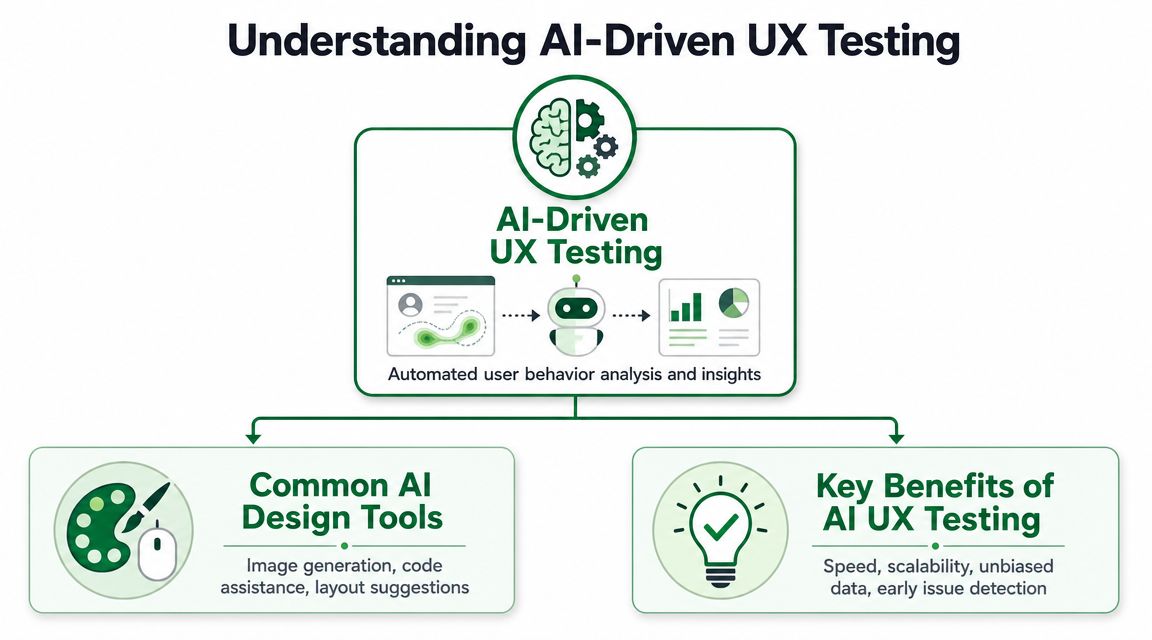
AI-driven UX testing is a distinct category. It isn't the same as AI image generation, AI coding assistants, or tools that suggest a better layout. Those tools help make things. AI UX testing helps evaluate whether what you made works.
A simple way to think about it is this: AI can act as a critic, not just a creator.
What the category actually does
In practical terms, AI-driven UX testing uses synthetic testers to interact with a product, prototype, or flow in ways that approximate real user behavior. The goal isn't to make a fake survey respondent. The goal is to create a test environment where teams can observe likely friction before exposing the experience to real users at scale.
These systems can evaluate tasks such as:
Navigation clarity: Can a user find the next step without confusion?
Copy comprehension: Do labels, prompts, and calls to action make sense?
Trust signals: Does the experience feel credible at sensitive moments like signup or checkout?
Flow continuity: Where does the experience feel broken, unclear, or unnecessarily long?
That makes synthetic testing closer to a digital focus group that's always available, except with stronger consistency and far less operational drag.
Why this changes the design process
In product design, generative AI is shifting work from linear iteration toward exploring a wider solution space and evaluating variants against competing objectives. That idea matters beyond industrial design and engineering. In UX, the same shift means teams no longer have to move through one concept at a time with a long delay between creation and feedback.
Instead, they can work more like this:
Draft several concepts.
Run synthetic tests against key tasks.
Spot recurring friction.
Refine only the options that survive scrutiny.
That's a better loop than polishing one concept too early.
Practical rule: If a team can generate options quickly but can't validate them just as quickly, AI creates more noise than value.
What AI UX testing is not
It's not a replacement for all human research. It won't capture every emotional nuance, social dynamic, or contextual behavior that appears in live conversations or field studies. It also shouldn't be treated like a magical truth engine.
What it does well is operationalize fast validation. It helps teams answer product questions that are too frequent, too tactical, or too early-stage to justify a full human research cycle every time.
Used well, this becomes a standing layer inside product development. That's where systems like Uxia fit. They focus on AI-powered validation, using synthetic users to run unmoderated tests against prototypes and flows so teams can identify friction, trust issues, usability problems, and weak copy before launch.
How AI-Generated Synthetic Testers Work
Synthetic testers are more advanced than scripted bots and far more useful than a generic chatbot asked to “pretend to be a user.” What makes them valuable is the combination of language understanding, behavior simulation, and audience modeling.
That combination reflects a broader shift in AI itself. According to Adobe's digital trends report, researchers expect public training data for large AI models could run out by 2026, pushing the field toward synthetic data generation and simulation-based approaches. UX testing fits naturally into that movement. Teams aren't only generating outputs anymore. They're generating realistic testing conditions.
The core components
A mature synthetic testing system usually brings together several layers.
Language models for reasoning and feedback
Large language models make think-aloud testing possible. They can interpret instructions, react to interface language, and produce qualitative feedback that resembles a user verbalizing confusion, confidence, hesitation, or intent.
Significantly, many usability issues show up first in language:
A button sounds riskier than intended.
A form field label feels vague.
A pricing message creates uncertainty.
A support path looks more hidden than the team assumed.
Behavioral models for navigation
A useful tester doesn't just comment. It moves through the flow, responds to UI choices, and surfaces where the interface makes the next step ambiguous.
That's the difference between a synthetic tester and a text-only assistant. The system has to engage with the structure of the product, not just discuss it abstractly.
Persona modeling for audience realism
Good UX testing depends on the right lens. A first-time buyer doesn't behave like an expert admin. A cautious user doesn't move like a highly motivated repeat customer.
Synthetic testers become more useful when they can be aligned to audience attributes such as:
Experience level: new, returning, expert
Motivation: urgent, exploratory, skeptical
Behavior style: fast-scanning, detail-oriented, risk-sensitive
Context: onboarding, comparison, purchase, support
Why this isn't just prompt engineering
A lot of teams underestimate the problem and assume they can get the same outcome by pasting a prototype into a general-purpose model with a rough instruction. That approach can be helpful for quick critique, but it isn't the same as synthetic testing.
A proper testing workflow needs:
Component | Simple AI prompt | Synthetic tester system |
|---|---|---|
Task execution | Mostly descriptive | Simulated interaction with mission context |
Audience definition | Generic role-play | Structured persona alignment |
Output | One-off opinion | Repeatable observations across runs |
Reporting | Manual interpretation | Consolidated friction patterns and findings |
For a concrete breakdown of that distinction, Uxia's explanation of AI-generated testers is useful because it treats synthetic users as a testing system, not a novelty interface.
What a mature pipeline looks like
The strongest systems don't rely on a single model pass. They chain tasks. One layer interprets the mission. Another simulates user movement. Another captures observations. Another consolidates patterns into usable findings.
That matters because product teams don't need raw AI output. They need decisions. The output has to help a designer revise a screen, help a PM decide whether a flow is ready, or help a researcher decide where a human follow-up study is worth the effort.
Synthetic testing works when the system is opinionated about tasks, audiences, and reporting. It fails when it's treated like open-ended brainstorming.
AI Testing vs Traditional User Research
Traditional user research is still valuable. It's often the right choice when a team needs emotional depth, domain nuance, or a conversation that can follow surprising signals. But for routine validation inside a product cycle, AI testing is often the better operational tool.
The biggest difference is not philosophy. It's throughput.

Where the methods diverge
Human research introduces coordination overhead at every stage. Teams need recruitment, scheduling, moderation, note-taking, and synthesis. That overhead is acceptable when the question is important enough and deep enough. It becomes a bottleneck when the team needs to know whether a checkout step is confusing or whether onboarding copy creates mistrust.
AI testing removes most of that setup. It gives teams a way to test repeatedly without organizing a study from scratch every time.
Comparison table
Attribute | AI Synthetic Testing (e.g., Uxia) | Traditional Human Testing |
|---|---|---|
Speed | Fast feedback during active design work | Slower due to recruiting, scheduling, moderation, and synthesis |
Scalability | Easy to repeat across variants and personas | Limited by time and logistics |
Cost structure | Better suited to frequent testing cycles | Better reserved for fewer, deeper studies |
Consistency | Stable task framing across repeated runs | Participant and moderator variation can be high |
Depth | Strong on directional friction and flow issues | Strong on emotions, motivations, and contextual nuance |
Best use | Continuous validation before launch | Strategic research and deep qualitative inquiry |
What works better with AI testing
AI testing is especially strong for recurring product questions:
Screen-level clarity checks
Checkout and onboarding reviews
Navigation validation across variants
Pre-development concept filtering
Copy and trust signal review
For these jobs, the key advantage is repeatability. A team can test, revise, and retest within the same working cycle.
A useful comparison is in Uxia's article on synthetic users vs human users, which frames the distinction around task fit rather than replacement rhetoric. That's the right way to evaluate the methods.
Where traditional research still wins
Human research still matters when a team needs to understand:
Why a behavior reflects a broader mental model
How emotion shapes trust or resistance
What context outside the interface is driving the decision
How a complex workflow fits into a person's real environment
Those aren't edge cases. They're core research questions. But they don't invalidate AI testing. They narrow the lane where human work creates the most value.
Use AI testing for breadth and cadence. Use human research for depth and interpretation.
The teams that get this right don't pick one camp. They reserve human time for the questions only humans can answer, and they let AI handle the validation load that otherwise slows the product loop.
A Practical Workflow for AI UX Testing
A common reason for failure in AI testing is simple. Teams treat it like a feature demo instead of a research workflow. The tool matters less than the discipline around objective, audience, task, and interpretation.

Start with a narrow question
Bad AI tests begin with broad prompts like “review this design” or “tell me what's wrong.” Those usually produce generic output. Strong tests start with a decision the team needs to make.
Examples of better objectives:
Can a first-time visitor complete signup without uncertainty?
Does the pricing page support comparison or create hesitation?
Can a returning customer reorder quickly from mobile?
If the objective is vague, the output will be vague.
Build the test around task, audience, and artifact
A practical setup usually follows five steps.
Upload the artifact
Use the asset closest to the decision point. That might be a static screen, a clickable prototype, a video walkthrough, or a live URL.Define the audience
Pick the user profile that matches the risk you want to test. A skeptical buyer, a rushed user, and a novice admin will expose different failures.Set the mission
Write a clear task in plain language. The task should describe intent, not the path. You want to know whether the interface reveals the path.Run the test
Let the synthetic testers interact with the design and record reactions, confusion points, and behavioral patterns.Review the output
Look for repeated friction, not isolated commentary. The useful outputs are usually transcripts, issue summaries, flow bottlenecks, and visualized patterns such as heatmaps.
A good reference for this style of process is Uxia's guide to synthetic user testing with AI-driven workflows.
A sample test plan
Here's a practical example for an e-commerce checkout review.
Objective
Evaluate whether a first-time shopper can complete checkout confidently.
Audience
Profile: first-time online buyer in a cautious mindset
Behavior: price-aware, trust-sensitive, not highly technical
Mission
“Buy the product you came for, review shipping options, and complete the purchase only if the process feels clear and trustworthy.”
What to look for
Confusion around delivery costs
Hesitation at account creation or guest checkout
Mistrust around payment entry
Unclear progression between steps
Copy that sounds risky or incomplete
This product walkthrough gives a feel for how AI testing can fit inside an actual team workflow:
What teams should do after the first run
Don't stop at the first report. The value comes from iteration.
Use a short cycle:
Fix one class of issue at a time: navigation, trust, copy, or visual hierarchy.
Retest the same mission: keep the task stable so you can compare changes.
Change the persona selectively: test whether the fix works for a different audience profile.
Escalate only when needed: move to human interviews when the issue is meaningful but still ambiguous.
What good output looks like
The best findings are concrete enough to act on. “This flow feels off” is weak. “Users hesitate at the shipping step because pricing appears too late” is useful. “CTA language suggests commitment before enough reassurance is provided” is useful. “Several testers fail to distinguish primary from secondary actions” is useful.
That's why AI UX testing works best as part of product execution, not as a detached research experiment. It should shorten the path from question to revision.
Best Practices and Common Pitfalls to Avoid
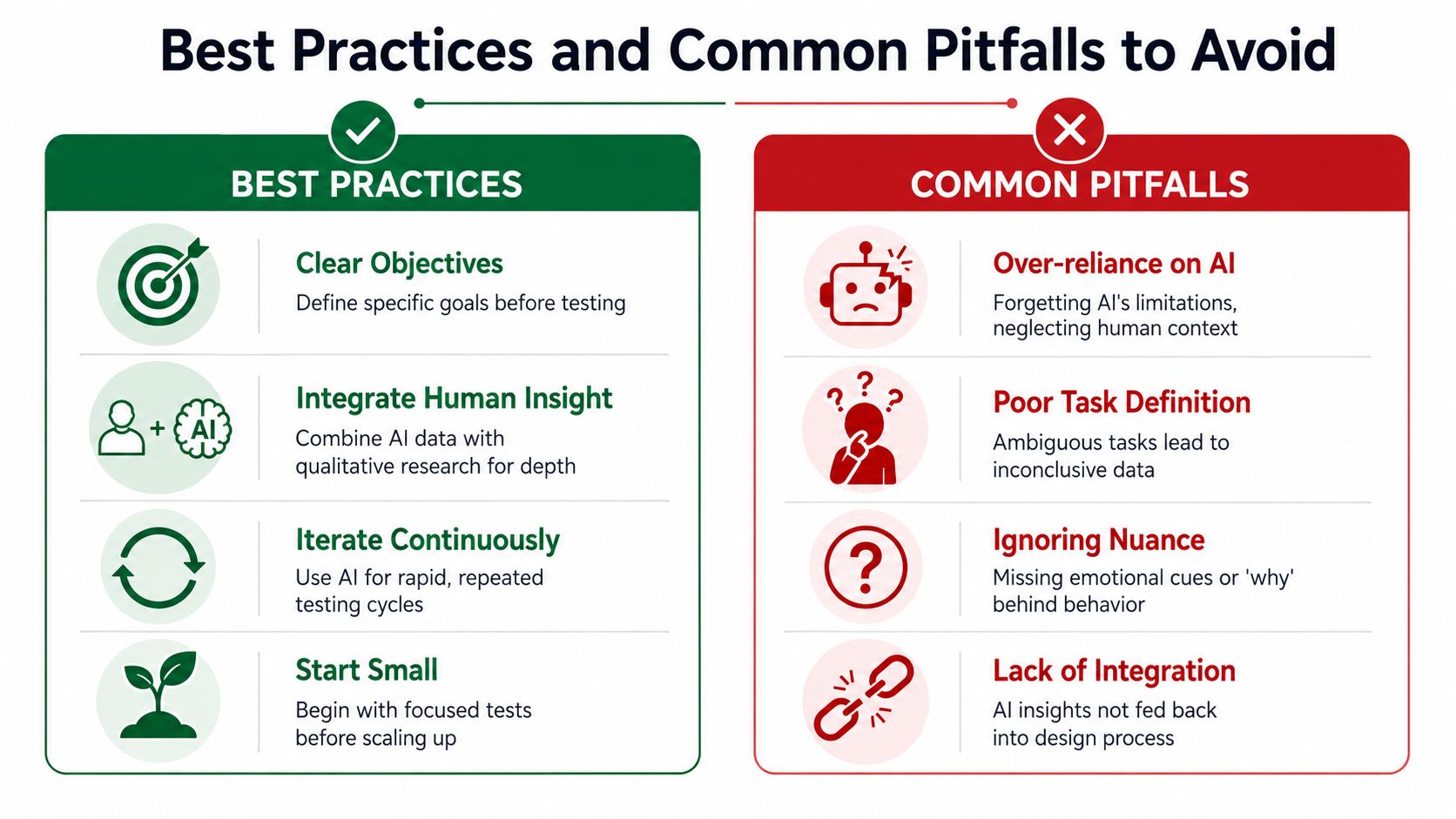
AI testing gets overrated when teams treat it as a substitute for judgment. It gets underrated when teams use it lazily, get generic output, and decide the category doesn't work. Most failures come from poor setup, weak interpretation, or unrealistic expectations.
Best practices that actually improve results
Write tasks like a product manager, not like a prompt engineer
The best task statements describe user intent and stakes. They don't prescribe exact clicks. If you script the path too tightly, you won't learn whether the interface is discoverable.
Use language like:
Goal-based: “Find a plan that fits a small team and start setup.”
Decision-based: “Choose whether to continue based on what you understand from this screen.”
Trust-based: “Complete payment only if the flow feels safe.”
Match personas to the risk in the flow
Many teams default to broad personas. That's fine for early passes, but it weakens the signal on high-risk moments. Sensitive flows need the right audience lens.
Examples:
Onboarding: novice or low-confidence users
Pricing: comparison-oriented and skeptical users
Checkout: trust-sensitive and interruption-prone users
Settings or admin tools: experienced users with low patience
Use AI for recurrence, not ceremony
The strongest teams run smaller tests more often. They don't wait until the quarter-end redesign review. They insert validation into design handoff, sprint QA, pre-launch checks, and post-change review.
Fast testing only helps when the team is willing to retest after every meaningful revision.
Common pitfalls that weaken the signal
A major risk in the future of design and AI is governance. Nielsen Norman Group warns that AI can flood teams with low-value features and cannot explain tradeoffs on its own, so human judgment remains necessary for accessibility, bias, and trust decisions. That's exactly the right warning for AI UX testing.
Treating AI output as final truth
Synthetic feedback is decision support. It is not a verdict. If a result changes a major product decision, the team should ask whether the issue also appears in analytics, support tickets, live sessions, or human research.
Running tests without a real decision in mind
If the team doesn't know what choice it's trying to inform, the report becomes a pile of observations with no prioritization. Good testing starts with a product decision, not a curiosity exercise.
Ignoring accessibility and bias review
A flow can look clear to a general synthetic profile and still fail users with different needs, reading patterns, or trust thresholds. AI testing should trigger accessibility review, not replace it.
Confusing fluency with reliability
Some AI feedback sounds persuasive even when it isn't actionable. Teams should prefer repeated friction patterns over polished commentary. The smoother the language, the more disciplined the interpretation needs to be.
A practical operating model
Use this checklist before accepting any AI-generated finding:
Question | Why it matters |
|---|---|
Is the task specific? | Ambiguous missions create broad, low-value output |
Is the persona relevant? | Wrong audience means wrong friction |
Did the issue repeat? | One-off comments are weaker than patterns |
Can the team act on it? | Findings should connect to a design change |
Does it need human follow-up? | High-stakes issues deserve deeper validation |
The future of design and AI will reward teams that know where automation ends. The workflow gets faster, but accountability still belongs to people.
Integrating AI Testing into Your Product Team
The structural shift is already visible. Industry discussion about design in an AI-powered world points to less emphasis on static UI execution and more emphasis on adaptive experiences, problem framing, verification, and testing. That's the practical future of design and AI. Designers won't spend less time thinking. They'll spend less time producing first drafts that haven't yet earned confidence.
How roles change in practice
For designers, AI testing becomes a daily check on whether an interaction is understandable before they over-invest in polish.
For product managers, it becomes a hypothesis filter. Instead of arguing from instinct, they can test whether a change creates clearer movement through the flow or introduces uncertainty.
For UX researchers, the opportunity is even bigger. AI handles a larger share of recurring validation, which frees researchers to focus on market context, behavior interpretation, mixed-method studies, and the high-value questions that require live human inquiry.
How to operationalize it inside a team
The teams that adopt this well usually make a few workflow changes.
Add validation checkpoints to design reviews: Don't review only aesthetics and requirements. Review tested friction.
Test before engineering handoff: Catch weak assumptions while the change is still cheap.
Retest after revisions: Make validation part of iteration, not a one-time gate.
Route high-stakes ambiguity to human research: Let AI narrow the problem, then use people where nuance matters.
Give PMs and designers direct access: Research shouldn't become a bottleneck for every tactical question.
The infrastructure around AI testing matters too
As synthetic testing becomes normal, teams also need stronger delivery infrastructure. Design validation, experiment tooling, reporting, and product instrumentation all depend on dependable engineering support. If a company is building custom research workflows, internal tools, or AI-assisted analysis pipelines, it often helps to hire python developers who can connect design operations with data and automation systems in a maintainable way.
What the future looks like
The future of design and AI is not a world where designers disappear and synthetic users replace customers. It's a world where validation happens continuously, before launch and throughout iteration.
That's a healthier model than the one many teams still use. Instead of releasing first and learning later, teams can learn while the work is still fluid. Instead of waiting for a formal study to validate every design question, they can run repeated checks and escalate only when the problem requires deeper human inquiry.
Used that way, AI changes UX research from a scarce event into an operational layer. That's the core opportunity. Not more output for its own sake. Better decisions, made earlier, with less guesswork.
If your team wants to build that kind of continuous validation loop, Uxia offers a practical way to test prototypes and product flows with synthetic users, review friction through transcripts and visual reports, and bring faster UX feedback into everyday product work.