Ai Generated Testers: Accelerate UX Insights with ai generated testers
Discover faster, scalable UX insights with ai generated testers. Learn workflows, benefits, and best practices for AI-powered UX research.

Imagine running a complete user study in just a few minutes, all without recruiting a single person. This isn't science fiction anymore; it's the new reality made possible by AI generated testers, which you might also hear called synthetic users.
But these aren't just simple bots mindlessly following a script. Think of them as sophisticated digital actors, each one designed to give you fast, scalable, and unbiased feedback on your product.
What Are AI Generated Testers?
AI generated testers are advanced digital personas built to simulate how a real human would behave while testing a website, app, or prototype. Don't picture a mindless automaton—picture a digital actor who’s been given a detailed character, a backstory, and a job to do.
Each AI tester is created with a specific background, a set of goals, and even unique cognitive patterns.
So, instead of just clicking through a pre-defined path, they navigate your product visually, make decisions, and even verbalise their thought process out loud. For example, using a platform like Uxia, you could create an AI persona of a "budget-conscious student looking for a new laptop." You'd then get to watch it browse an e-commerce site, comparing prices and features exactly like a real student would.
This approach cuts right through some of the biggest headaches in traditional user research: the time and money it takes to recruit, schedule, and pay human participants.
How AI Testers Are Created and Run
Putting an AI generated tester to work is a layered process, combining several advanced technologies. On platforms like Uxia, we build these synthetic users by taking the power of large language models (LLMs) and fusing it with the specific details you provide about your customers.
Here’s a look at how it generally works:
Persona Definition: First, you define a detailed user persona. This includes the basics like age, location, and occupation, but more importantly, it covers psychographic details—their goals, what motivates them, and how comfortable they are with technology.
Data Integration: The platform’s AI models then synthesise all this data, creating a unique digital identity that guides the tester's behaviour and every decision it makes.
Task Assignment: Finally, you give it a clear mission. This could be anything from "sign up for a free trial" to "find and purchase this specific product."
Once it's deployed, the AI tester uses computer vision to literally "see" and interpret the user interface, just as our eyes do. It processes all the visual information—buttons, text, images—to understand the layout and figure out what it can do. As it moves through your product, natural language processing (NLP) allows it to generate a "think-aloud" commentary, giving you a stream of qualitative insights into its experience.
The whole idea is to create a digital stand-in for your target user that can interact with your product all on its own. This lets you test ideas and spot usability problems at a speed and scale that’s just not possible with traditional methods.
The Technology Behind the Feedback
The real magic of AI generated testers is their ability to deliver feedback you can actually use. They don't just tell you if a task was completed; they explain why it was easy or difficult. This solves a major pain point in user experience research—getting data-driven insights, fast. To see how AI can accelerate this, look at how an AI-powered survey tool similarly automates data collection and analysis.
For product teams, this means you can get answers to critical questions in minutes. For instance, right inside Uxia, an AI tester can point out if a button is poorly labelled, if the checkout flow is confusing, or if the main message on a landing page isn't clear.
The technology automatically captures every interaction, pulls together all the qualitative feedback, and generates reports with visual heatmaps and a prioritised list of issues. If this is a new concept for you, learn more about the mechanics in our complete guide to synthetic user testing.
Ultimately, these AI-driven insights empower teams to build better products. User feedback stops being a sporadic, time-consuming event and becomes a continuous, integrated part of how you build.
How AI Testers See and Interact With Your Designs
To really get what AI-generated testers are all about, you need to peek behind the curtain. It's not about running a simple script; think of it more like directing a very skilled digital actor. The whole process, from your first idea to the final report, is built to be fast, intuitive, and surprisingly insightful.
On a platform like Uxia, the journey starts with you. You provide the raw materials for the test: a prototype. This could be anything from a static design image to a fully interactive link. This is the stage the AI will perform on.
Next, you give your tester a clear mission. This isn't a vague suggestion—it's a specific, goal-oriented task. For example, you might tell it, "Find a pair of red running shoes in a size 9 and add them to the shopping cart." This gives the AI a clear objective to work towards.
Crafting the Digital Persona
With the task set, it’s time to cast your actor. You select a detailed user persona that mirrors your target audience. This is a critical step because the persona's traits directly shape how the AI-generated testers behave and make decisions.
A persona is so much more than basic demographics. It digs into psychographic details that guide the AI's thought process.
For instance, you could choose a persona like this one:
Persona Profile: "A price-conscious millennial who values brand reputation and always reads reviews before making a purchase."
This level of detail means the AI doesn't just blindly complete the task. It does it in a way that reflects a real user's habits. A price-conscious user might immediately sort products by price, while someone focused on brand reputation will actively look for logos and testimonials first.
The AI Pipeline in Action
Once you've set the stage, the AI pipeline kicks in. This is where a few key technologies team up to simulate a genuinely human-like interaction with your design.
The process boils down to defining a persona, feeding it the necessary inputs, and then letting the synthetic user run the test.
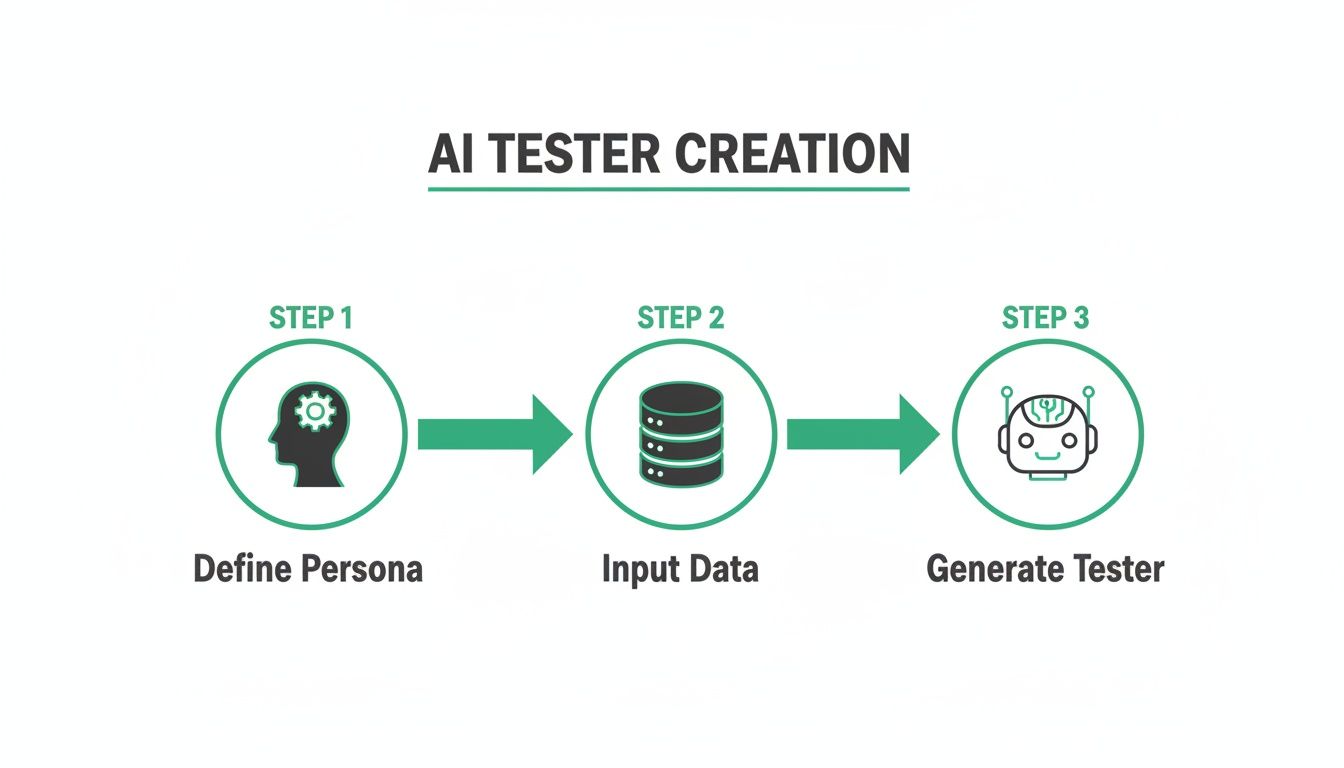
This flow shows how your structured inputs are turned into dynamic, interactive testing agents ready to perform some pretty complex analysis.
The first piece of the puzzle is computer vision. This is what allows the AI to "see" and interpret your design visually, much like a person would. It analyses the layout, identifies interactive elements like buttons and links, and understands the page's visual hierarchy. It isn't just scanning code; it's genuinely perceiving the interface.
The AI is basically asking itself, "What am I looking at, and what can I do here?" It spots a search bar, recognises a "buy now" button, and can tell the difference between product images and banner ads, all based on visual cues.
As the AI navigates your design to complete its mission, Natural Language Processing (NLP) kicks in to power its inner monologue. This technology is behind the "think-aloud" protocol, where the AI verbalises its thought process, its intentions, and any points of friction or confusion. You'll get feedback like, "I'm looking for the search bar, but it's not where I expected," or "This button's label is unclear, but I'll click it to see what happens."
This qualitative feedback is an absolute goldmine for UX teams. It provides the "why" behind the AI's actions, delivering insights that go way beyond simple click data. The ability to generate this kind of feedback automatically is what makes AI-generated testers so powerful for uncovering usability problems. If you want to go deeper, check out our article on using research to achieve high usability issue detection with AI testers.
Finally, the platform captures every single interaction. It automatically generates visual heatmaps to show where the AI focused its attention and synthesises all that qualitative feedback into a prioritised report. What once took hours of manual analysis now becomes an instant, actionable summary.
The Strategic Benefits of Integrating AI Testers
Bringing AI-generated testers into your workflow isn’t just a technical tweak. It’s a strategic shift that fundamentally changes how you build successful products. The biggest wins come from making your design and development cycles faster, cheaper, and more dependable.
So, why should your team consider making the switch? It boils down to four key advantages that reshape how you validate ideas. These benefits work together, fostering a more agile and data-driven culture in your organisation.
Achieve Unprecedented Speed
The most immediate and powerful benefit is raw speed. With traditional user research, the whole process of recruiting participants, scheduling sessions, and running tests can easily stretch out over weeks. That timeline just doesn't work with modern agile sprints, where you need to make decisions in days, not months.
AI-generated testers flip that equation on its head. Using a platform like Uxia, you can get actionable insights in a matter of minutes. Just imagine finalising a design mockup in the morning and having a complete usability report on your desk before you even break for lunch.
Practical Recommendation: Start by running a 5-minute test on your homepage with a single AI persona. This simple action can instantly reveal low-hanging fruit and demonstrate the speed of AI-driven insights to your team, building momentum for wider adoption.
Drastically Reduce Operational Costs
Let's be honest, user testing comes with some hefty hidden costs. It's not just the subscription for a testing platform. You also have to budget for recruitment fees to find the right people, incentives to pay them for their time, and the countless hours your team spends moderating sessions and sifting through feedback.
Platforms like Uxia wipe these expenses off the board entirely.
No Recruitment Fees: You get instant access to a library of pre-built or custom AI personas.
No Participant Incentives: Synthetic users don't need to be paid, saving a huge chunk of your research budget.
No Moderation Time: Tests run on their own, freeing up your researchers and designers to focus on high-impact work instead of admin tasks.
This cost-efficiency makes serious, in-depth testing a reality for projects of any size, from early-stage startups to massive enterprise initiatives.
Scale Your Testing Efforts Effortlessly
Scalability is another game-changer. With human testers, running studies across multiple user segments is a logistical nightmare. You have to recruit, schedule, and manage each group separately, which eats up time and money.
AI testers completely remove those limits. Need to see how a new feature performs with five different user personas on three different devices? With Uxia, you can run all of those tests at the same time with just a few clicks. This ability to run tests in parallel means you can gather broad, comprehensive feedback without slowing anything down.
The Uxia platform makes it simple to set up and run multiple tests in parallel.
This screenshot of the Uxia dashboard shows just how easy it is to define a test mission and select multiple AI personas. You can set up diverse and simultaneous studies in moments, ensuring you cover all your key user segments without disrupting your development timeline.
Minimise Human Bias for Objective Feedback
Even with the best training, human-led research is susceptible to bias. Participants might try to please the moderator (we call this social desirability bias), or researchers might accidentally steer them toward a certain answer.
AI-generated testers give you consistently objective feedback. They operate purely based on their programmed persona and the task you give them. There are no emotions or social pressures clouding their judgment. An AI persona doesn't care about hurting your feelings; it will simply flag friction wherever it finds it.
The feedback is rooted in a defined cognitive model, giving you a level of consistency that’s incredibly hard to replicate with human participants. You can dig deeper into how AI is reshaping the future of UX testing and helping designers validate ideas faster in our related article. This objectivity leads to more reliable data and, ultimately, much better product decisions.
Putting AI-Generated Testers to Work: Practical Workflows
Knowing the benefits of AI-generated testers is one thing, but actually putting them into practice is where you see the real magic happen. The trick is to weave synthetic testing into your existing development routines. Turn it from a rare event into a daily or weekly habit. This makes data-driven decisions the standard, not the exception.
By adopting a simple "Problem > Test > Insight" framework, your team can get quick answers to its most pressing design questions. Let's walk through some high-impact workflows where this approach, powered by a platform like Uxia, can make a huge difference.
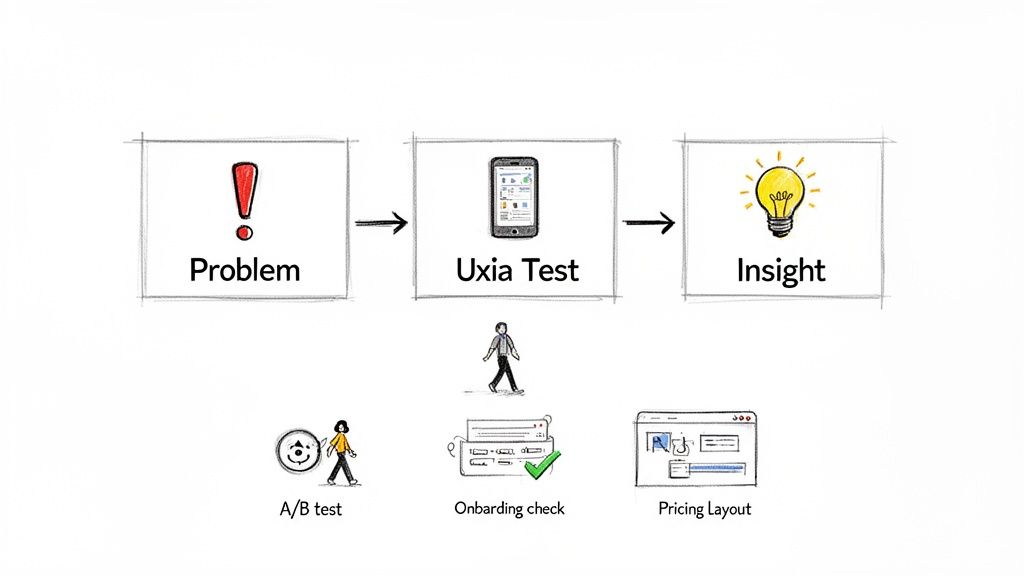
Rapidly A/B Testing Checkout Pages
Optimising high-stakes user flows is one of the most valuable things you can do with AI testers. A confusing checkout process directly kills your revenue, making it a perfect spot for fast, iterative testing.
Problem: Your analytics show a 35% drop-off rate on the final checkout page, but you’re not sure why. You have a hunch the layout is causing friction.
Uxia Test: You mock up two design variations. Version A is the current layout. Version B uses a single-column design with much clearer form field labels. You run two quick tests in Uxia, assigning an AI persona of a "time-pressed professional making a quick purchase" to each version.
Insight: The results are in. The AI reports for Version B show a 40% faster task completion time with zero navigation errors. Even better, the AI's think-aloud feedback for Version A repeatedly flags confusion over the "billing address same as shipping" checkbox—a detail that never even came up in Version B. Now you have solid evidence to confidently ship the new design.
Validating New User Onboarding Flows
First impressions are everything. A clunky onboarding experience can make new users give up on your app before they even see its value. With AI-generated testers, you can check how clear your onboarding is before writing a single line of code.
Practical Recommendation: Test static design mockups or simple prototypes in Uxia to identify major usability issues at the earliest, cheapest stage of development. This prevents costly rework later on.
Workflow Example: SaaS Onboarding Validation
Imagine a SaaS startup wants to be sure its new feature tour is intuitive for first-time users who aren't necessarily tech-savvy.
Problem: Is our three-step guided tour clear enough for a non-technical user to get the product's core value?
Uxia Test: The team uploads static images of the tour’s three screens to Uxia. They select an AI persona of a "small business owner with limited software experience" and give it a simple mission: "Understand how this product helps you manage invoices."
Insight: The AI tester's report shows that steps one and two are fine, but step three is full of confusing industry jargon. The AI’s verbal feedback even says, "I'm not sure what 'asynchronous processing' means for me." This is direct, actionable feedback the design team can use to rewrite the copy for clarity before development even starts.
Optimising Product Discovery for E-commerce
For any e-commerce business, helping customers find what they want is the whole game. If finding a product is clumsy, they'll just go somewhere else. AI testers can simulate how different kinds of shoppers navigate your site to find things.
Workflow Example: E-commerce Path Optimisation
Problem: An online fashion retailer notices that hardly anyone is engaging with its "New Arrivals" category.
Uxia Test: They run a test with two different AI personas: a "trend-focused shopper looking for the latest styles" and a "bargain hunter searching for deals." The mission for both is simple: "Find a new summer dress."
Insight: The "trend-focused" AI completely misses the "New Arrivals" link because it’s buried too low on the homepage. On the other hand, the "bargain hunter" AI immediately spots the "Sale" section and easily completes its task. This simple insight gives the team a clear directive: redesign the navigation to make "New Arrivals" more prominent for the audience that cares about it most.
Best Practices for Maximising Your AI Testing Results
To really get the most out of AI-generated testers, there's one simple truth you need to embrace: the quality of your output is directly tied to the quality of your input. It's a bit like giving someone directions—if you're vague about the starting point, you can't be surprised when they get lost.
This section is all about practical advice for getting high-quality, genuinely actionable insights from your AI testing.
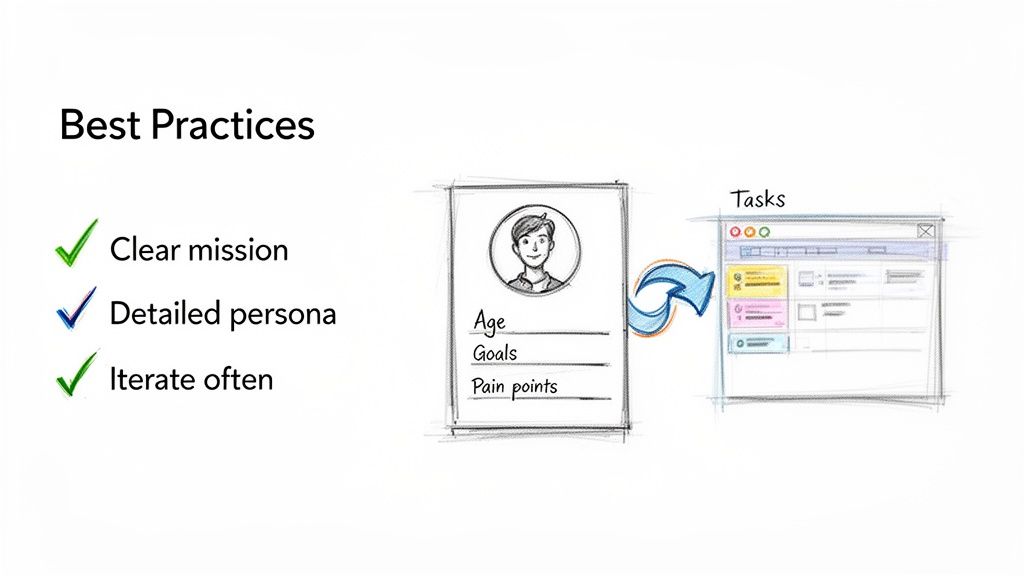
Follow these practices, and you'll shift from just running tests to strategically extracting real value. It’s the difference between simply spotting bugs and truly understanding why users behave the way they do.
Craft Clear and Concise Test Missions
Ambiguity is the absolute enemy of effective testing. If you give an AI tester a fuzzy, poorly defined task, you’re going to get fuzzy, unhelpful results back. Your test missions need to be specific, goal-oriented, and crystal clear.
Don't just say, "test the new feature." That's an invitation for a rambling, unfocused report.
Practical Recommendation: A great mission follows this template: "As a [Persona Type], [Action to take] in order to [achieve a goal]." For example: "As a new user, find the 'Create New Project' button and successfully set up a project named 'Q4 Marketing Campaign'." That level of detail removes all guesswork and focuses the AI on the exact user journey you need to validate.
Build Rich and Realistic User Personas
The real magic of AI-generated testers on a platform like Uxia is their ability to simulate specific user mindsets. The more detailed and realistic you make your user personas, the more targeted and insightful the feedback will be.
Don’t just stop at basic demographics. You need to dive into the persona's psychographics—the stuff that actually drives their behaviour.
Goals: What is this user actually trying to do? (e.g., "quickly find and book a hotel for a business trip")
Motivations: Why do they make certain choices? (e.g., "they are motivated by loyalty points and user reviews")
Pain Points: What drives them crazy about technology? (e.g., "hates filling out long forms on mobile")
When you build this rich context directly into Uxia, you're telling the AI to navigate your product not as a generic robot, but as a specific individual with unique needs, biases, and frustrations.
Test Continuously and Iteratively
One of the biggest mistakes teams make is treating AI testing like a final exam—a one-off validation step right before launch. To get the real benefits, you should be using it as a continuous, iterative tool throughout the entire design and development process.
Practical Recommendation: Treat AI testing like a continuous conversation with your users. Instead of a single, high-stakes interview, it becomes a series of quick check-ins that guide your product's evolution. Run a quick test on a static design in Uxia, test again on a low-fidelity prototype, and keep testing as you build out the real feature.
This iterative approach means you catch usability problems early, when they are cheapest and easiest to fix.
Interpret Results by Focusing on Patterns
An AI-generated report from Uxia can be dense with information—heatmaps, click paths, and even think-aloud transcripts. The trick is to look for patterns and recurring themes instead of getting bogged down by every single data point.
You're looking for the answers to questions like:
Where did multiple AI personas hesitate? This is a huge signal of universal confusion.
What language or labels were consistently misinterpreted? This points directly to unclear copy.
Are there common drop-off points in the user journey? This highlights critical friction you need to remove.
Identifying these patterns helps you prioritise the most impactful fixes. It elevates your analysis from "this one user had a problem" to "we have a systemic issue affecting this entire user segment."
Close the Loop with Integrated Actions
Finally, insights are completely useless if they don't lead to action. The best practice here is to create a seamless workflow that connects feedback directly to your development backlog. When Uxia flags a critical usability issue, don't just add it to a forgotten spreadsheet.
Practical Recommendation: Integrate your findings directly into your project management tools. A simple, powerful step is to create a Jira ticket or an Asana task straight from the insight itself, complete with a link to the Uxia test report, a summary of the problem, and the AI's "think-aloud" quote.
This closes the loop between insight and action, making sure that valuable feedback actually gets addressed quickly.
Understanding the Limitations of AI Testers
While the speed and scale of AI-generated testers are impressive, it’s vital to see them for what they are: a specialised tool. They’re a powerful new ally in your research toolkit, but they aren't a silver bullet. Knowing exactly where they shine—and where they don’t—is the key to using them effectively.
The core strength of AI testers is their ability to expertly simulate the cognitive and behavioural patterns tied to usability. They can tell you with incredible accuracy if a button is hard to find, if a user flow is confusing, or if your copy just isn’t clear. But they operate within the logical world of their programming and data.
The Human Element AI Cannot Replicate
There are fundamental human qualities that today’s AI simply cannot truly replicate. Understanding these distinctions helps you decide when to deploy AI and when you absolutely need genuine human interaction.
Genuine Emotion: An AI can simulate frustration based on a difficult task, but it can’t feel the genuine relief of finally solving a problem or the delight of a beautiful animation. These emotional responses are what drive brand loyalty and deep user satisfaction.
Deep Cultural Context: An AI persona can be given demographic data, but it lacks the rich, nuanced understanding that comes from lived cultural experience. It won't pick up on subtle cultural references, slang, or social norms that could completely change how a design is perceived.
Unpredictable Creativity: Humans are wonderfully unpredictable. A real user might try to use your product in a way your test mission never accounted for, uncovering a brilliant new use case or a critical flaw you never imagined. AI testers, by contrast, stick to their defined goals.
Practical Recommendation: Use AI-generated testers as a powerful complement to traditional research, not a wholesale replacement. They excel at automating the repetitive, task-based parts of usability testing, freeing up your human researchers for deep ethnographic studies and strategic problem-solving.
An Augmentation Tool, Not a Replacement
Ethical transparency is also a key part of the equation. Platforms like Uxia are intentionally designed to augment UX professionals, not make them obsolete. The goal is to put a powerful tool in your hands that automates the most time-consuming parts of your job. This gives you more time back to focus on what humans do best: strategic thinking, empathy, and complex problem-solving.
The market for AI-driven testing tools is growing, though specific adoption rates for synthetic user solutions are still emerging compared to broader AI trends. Getting a clear picture of market size requires a deep dive into spending on QA automation and new testing paradigms. To understand the context of this shift, you can explore some of the wider trends in AI adoption.
Ultimately, the most effective teams will use a hybrid approach. Use Uxia to rapidly test every single iteration of your design for usability issues. Then, bring in human participants for deeper qualitative studies that explore the emotional and cultural dimensions of the user experience. This combined strategy gives you the best of both worlds: the speed of AI and the irreplaceable insight of human connection.
Got questions? You’re not alone. Let’s tackle some of the most common ones that come up when teams first hear about AI-generated testers.
Are AI Testers Just Advanced Bots?
Not at all. There's a fundamental difference.
Simple bots are like puppets following a rigid script. They can click button A then button B, but if anything changes, they break. They have no awareness.
AI-generated testers, like those from a platform like Uxia, operate on a completely different level. They use computer vision to see and understand designs, much like a human does. Then, they use large language models to simulate cognitive processes—thinking, deciding, and even getting confused.
This means they can navigate complex user flows dynamically, make choices based on their unique persona, and provide "think-aloud" feedback explaining their reasoning. That’s worlds away from what basic automation can do.
Will AI Testers Replace Human Researchers?
The goal is to empower researchers, not replace them. Think of AI testers as a powerful new tool in the UX toolkit.
AI testers are brilliant at handling the repetitive, task-based work that often bogs down research teams. This frees up your human experts from hours of tedious manual work.
Instead of running the same five-user test over and over, UX professionals can focus on what they do best: deep strategic work that requires human empathy. Things like ethnographic studies, journey mapping, and solving thorny, complex problems that AI can't touch. It’s a shift from manual execution to high-level strategy and insight.
Practical Recommendation: Use a platform like Uxia to handle the 'what' and 'where' of usability problems at speed, so human experts can dedicate their time to understanding the 'why' behind user behaviour.
How Reliable Is AI Tester Feedback?
For identifying usability and functional issues, the feedback is incredibly consistent and objective.
Human testers can be influenced by all sorts of biases—they might want to please the moderator, or they might be having a bad day. AI testers operate purely on data-driven personas without any of that human noise. This makes their feedback on task completion and friction points extremely reliable.
While they don't have feelings or emotions, they are excellent at spotting the practical roadblocks in a user journey. Platforms like Uxia give you a solid, data-backed foundation for finding and prioritising what needs fixing in your product.
Ready to see how Uxia can accelerate your design validation process? Experience the power of AI-generated testers today.