Designers Using AI: Transforming Product Development
Discover how designers using AI transform product development. Explore AI usability testing, synthetic users, & new workflows to build better products faster.

You've probably felt this recently. You finish a checkout redesign, hand it off for review, and then the sprint slows down while everyone waits for usability feedback. Recruiting takes time. Scheduling takes time. Moderated sessions take time. By the time findings arrive, the team has already moved on to the next priority.
That delay changes how designers work. It pushes people to rely on instinct where they'd rather rely on evidence. It also makes small UX questions feel too expensive to test, so rough edges stay in the product longer than they should.
That's why designers using AI aren't just adopting another productivity tool. They're changing the operating model of product design itself. Instead of waiting days or weeks to validate a flow, teams can now generate first drafts faster, explore more options, and pressure-test user journeys much earlier.
The shift is bigger than mockup generation. It affects research, prototyping, validation, and the job description of the product designer. If you work in product, the question isn't whether AI belongs in design. It's where human judgment matters most once AI starts handling more of the first-pass work.
The New Reality for Designers Using AI
A product team reviews a new onboarding flow on Tuesday morning. By lunch, AI has generated alternative layouts, surfaced likely friction in the sign-up path, and given the designer enough signal to revise the flow before engineering starts implementation. That pace is becoming normal.
The old cadence still works for foundational research and high-risk decisions. It breaks down for the constant stream of smaller UX calls that shape product quality every week. Teams still need answers on hierarchy, microcopy, trust cues, empty states, and form behavior, but they can no longer afford to wait for a full research cycle every time.
That change matters because AI is not only speeding up production. It is changing what good design work looks like. The designer is less defined by how many assets they can produce manually and more by how well they can frame a problem, review machine-generated options, and choose what deserves real user validation.
Uxia is a clear example of that shift in practice. Instead of treating testing as a late-stage checkpoint, teams can use AI-powered usability testing earlier, while flows are still easy to change. That moves design closer to continuous evaluation and away from long gaps between idea, prototype, and evidence.
Speed changes the operating model
Once feedback becomes easier to get, teams stop reserving validation for major launches. They start checking decisions during the work, not after it. Designers spend less time polishing a single direction too early and more time comparing paths, spotting weak assumptions, and tightening the user experience before handoff.
This pattern shows up outside product design too. The TranslateBot blog on AI translation efficacy describes a similar shift in language workflows. Fast output has value only when a human can judge accuracy, context, and fitness for use. Design now follows the same logic.
AI reduces first-pass production work. It raises the value of judgment.
The practical implication is straightforward. Teams that use AI well do not treat generated screens, copy, or test feedback as answers. They treat them as inputs. The designer's role becomes more strategic because someone still has to set constraints, decide what quality means for the product, and separate useful signal from plausible-looking noise.
That is the new reality. AI is compressing the time between idea and feedback, and designers who adapt to that shift become more influential, not less.
The Evolving Role of the Product Designer
A product designer opens a new project and gets ten plausible interface directions in minutes. None of them are ready to ship. All of them are good enough to distract a team into debating surface details. The job has changed because the hard part is no longer producing options. The hard part is choosing the right one, improving it with evidence, and proving it will work for the user and the business.

From maker to curator
Product design used to reward output volume. Teams valued the designer who could turn loose requirements into polished screens quickly, explore multiple variants, and absorb rounds of stakeholder feedback without losing momentum. AI has reduced the cost of that first pass.
That does not make the designer less important. It shifts the center of gravity of the role.
The strongest designers now spend less time generating artifacts from scratch and more time curating AI-generated options under real constraints. They decide which directions deserve attention, which should be killed early, and which need more evidence before the team commits engineering time. In practice, that means the designer is acting more like an editor and strategist than a production engine.
The work usually looks like this:
Defining the brief with precision: AI output improves when the problem is tightly scoped. Clear tasks, user context, edge cases, and success criteria matter more than clever prompting.
Creating option sets on purpose: Generating several directions is easy. Generating meaningfully different directions that test different assumptions is the useful skill.
Filtering for product fit: A promising screen still has to match the business model, design system, accessibility standards, and technical constraints.
Explaining trade-offs: Teams still need a designer who can say why one flow increases clarity but adds friction, or why one layout looks cleaner but hides key actions.
Judgment becomes the scarce skill
AI is very good at producing plausible work. That is different from producing the right work.
A generated onboarding flow may look polished while introducing the wrong mental model. A checkout redesign may remove clutter while weakening trust. A dashboard may surface more information while making prioritization harder for the user. These are design failures, but they are strategic failures first.
This is why product designers need stronger evaluation habits than they needed in a purely manual workflow. The standard is no longer "Can I make the screen?" It is "Can I judge whether this screen solves the problem for this user in this context?"
Three capabilities matter more now.
Constraint writing
Prompting is a small part of the job. Specifying constraints is the essential work. Good designers know how to define audience, task, risk, tone, environment, and failure conditions so the system produces options worth reviewing.
Critical review
AI often produces outputs that are coherent on the surface and weak underneath. Designers need to catch generic hierarchy, inaccessible interactions, missing states, shallow explanations, and flows that assume more motivation or product knowledge than users have.
Evidence interpretation
As AI-generated design options multiply, testing and interpretation become a bigger part of the role. Designers need to read signals, compare alternatives, and connect findings to product decisions. That is one reason teams are pairing generation tools with AI user research workflows instead of treating output quality as obvious from the mockup alone.
What this looks like in practice
At Uxia, this shift is operational, not theoretical. A designer can bring several candidate flows into testing early, define target user scenarios, and review where synthetic users succeed, hesitate, or fail. That changes the designer's job from polishing a preferred concept to managing a portfolio of hypotheses.
The advantage is not just speed. It is decision quality.
Instead of asking, "Which screen do we like most?", the better question is, "Which option creates the clearest path for the user, and what evidence supports that?" Designers who can run that process well become more influential because they shape product direction, not just interface output.
That is the role now. The designer still crafts the experience, but the higher-value work is selecting, testing, refining, and defending the direction that deserves to ship.
What Is AI-Powered Usability Testing
A designer has three onboarding concepts on the table by Tuesday afternoon. In a traditional process, the team would pick one, polish it, and wait for user sessions next week. With AI-powered usability testing, the designer can run all three against defined tasks the same day, see where users get stuck, and decide which direction deserves another cycle.
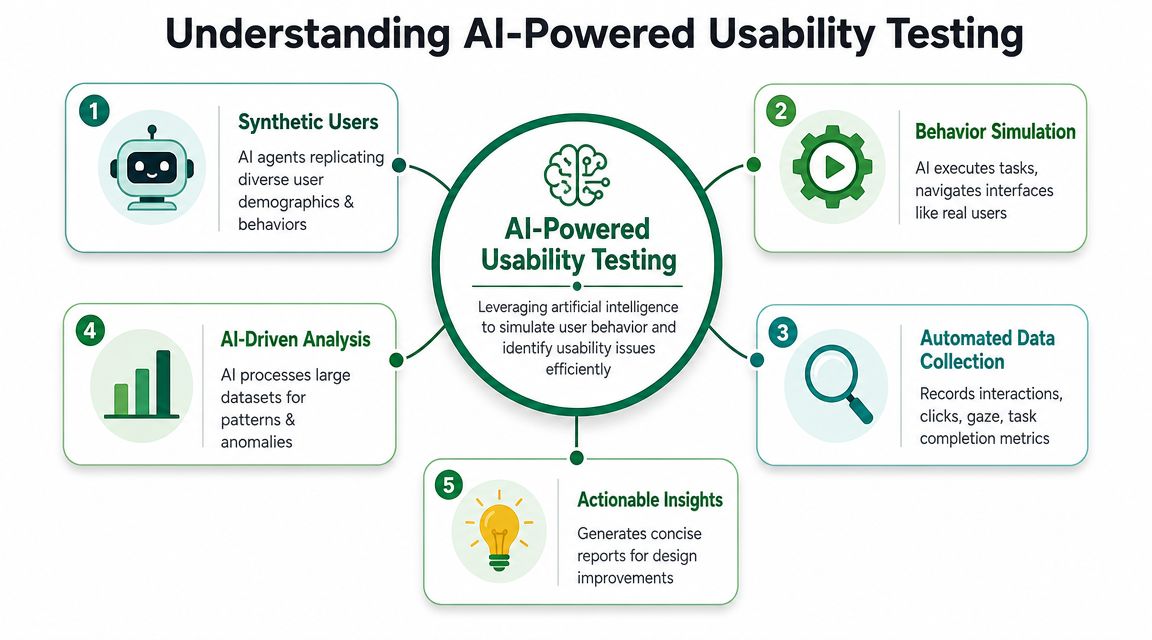
That is the practical shift. AI-powered usability testing uses AI agents to simulate how specific user types attempt specific tasks in a prototype or product flow. The value is not that AI replaces human participants. The value is that teams can test structured flows earlier, more often, and across more variations than a manual research cadence usually allows.
These agents are often called synthetic users. In practice, that means the system is configured with a scenario, a user profile, and a goal. A first-time buyer trying to understand pricing behaves differently from an operations manager trying to complete a recurring task under time pressure. Good testing systems reflect that difference.
How the test works in practice
AI-powered usability testing combines a few capabilities that matter to designers.
Interface perception
The system has to identify what is on the screen. It reads layout, labels, buttons, forms, navigation, and visual hierarchy well enough to interpret the interface from a user's point of view. If the call to action is hard to distinguish or a key step is visually buried, that usually shows up quickly.
Task execution
The agent then attempts a defined job. It tries to complete checkout, update a setting, find a report, or recover from an error state. Usability problems rarely stem from isolated screens; they typically emerge from the gap between what the interface offers and what the user is trying to do.
Explanation and reporting
Useful systems return more than click logs. They highlight hesitation points, failed paths, confusing copy, and places where the flow creates unnecessary effort. That makes the output usable in design critique, product review, and sprint planning.
Uxia is a clear example of this model in operation. Teams can run scenario-based tests against prototypes, compare variants, and review where synthetic users complete the task, loop, or drop. For designers, that changes testing from a periodic checkpoint into part of the design loop. Teams using AI user research workflows are building that habit earlier in the process, while decisions are still cheap to change.
Where the method is strongest
AI-powered usability testing works best when the team has a clear flow, a clear task, and a clear question.
It is especially useful for:
Task-based validation: Can someone complete sign-up, checkout, onboarding, or account changes without getting lost?
Variant comparison: Which version creates fewer errors, less hesitation, or a clearer next step?
Early screening: Which concepts show obvious friction before the team invests more design and engineering time?
Regression checks: Did a small UI change introduce confusion somewhere else in the flow?
This is why the method fits the designer's role shift so well. When AI tools generate more options, the bottleneck moves from production to selection. Testing helps designers act as curators and decision-makers, not just makers of screens.
Where you still need humans
AI testing is strong at structured evaluation. It is weaker at understanding why a person feels distrust, how a purchase decision fits into real life, or what social and cultural context shapes behavior.
Use it for repeatable usability questions. Use human research for motivation, emotion, trust, and ambiguity.
Teams get the best results when they treat AI testing as an operating layer inside product development. It catches obvious path failures early, gives designers evidence before debates harden into opinions, and leaves human research focused on the questions only real people can answer.
Comparing AI-Powered and Traditional Usability Testing
The useful comparison isn't “which one wins.” The useful comparison is “which one answers this question better right now.” Teams get into trouble when they use traditional methods for questions that need fast iteration, or use AI methods for questions that need deep human context.
AI vs. Human Usability Testing at a Glance
Attribute | AI Testing (e.g., Uxia) | Traditional Human Testing |
|---|---|---|
Best use case | Structured flows, repeatable tasks, early validation | Exploratory research, deep interviews, emotional context |
Setup effort | Low once the prototype and mission are defined | Higher because recruitment, scheduling, and moderation are involved |
Feedback timing | Fast enough to fit active product iteration | Slower, but often richer in nuance |
Scale | Broad coverage across many scenarios and variants | Narrower sample per round, usually with more observation depth |
Consistency | Same mission can be run repeatedly across design changes | Session quality can vary by participant and moderator dynamics |
Type of insight | Friction detection, path issues, copy confusion, usability signals | Motivations, feelings, trust formation, mental models |
Best role in process | Continuous validation inside the sprint | Decision-shaping research at key moments |
What AI testing changes operationally
The biggest change is cadence. AI testing fits into the weekly rhythm of shipping product. That matters because many usability problems aren't strategic mysteries. They're execution issues. A button label is unclear. A trust signal is too weak. A form sequence creates avoidable hesitation.
Those are exactly the kinds of questions that often get skipped because traditional studies feel too heavy for the decision at hand.
What traditional research still does better
Human sessions remain stronger when the team needs to understand why people feel uncertain, what past experiences shape behavior, or how different audiences interpret the same interface in different ways. If you're exploring a new market, redefining a product category, or studying accessibility needs in depth, real human research remains indispensable.
Use AI to test defined behavior. Use humans to understand lived reality.
For teams deciding how to split those responsibilities, this comparison of synthetic users versus human users is a practical reference.
The smart operating model
The most effective setup is usually hybrid. Use AI testing continuously for rapid checks across live design work. Use traditional human research selectively where nuance, empathy, and open-ended exploration matter most.
That approach gives product designers something they rarely had before: a realistic way to validate routine UX decisions without turning every sprint into a research scheduling exercise.
Implementing AI-Assisted Design Workflows
A common Tuesday pattern looks like this. A designer updates onboarding at 10 a.m., critique happens at 2 p.m., and someone asks the question that always comes late: do people understand the new flow? The team does not need a research project at that point. It needs a fast way to test one decision before the sprint moves on.
That is the practical entry point for AI-assisted design. Start with one existing flow in Figma or any prototyping tool, then add a repeatable validation step before handoff or release.
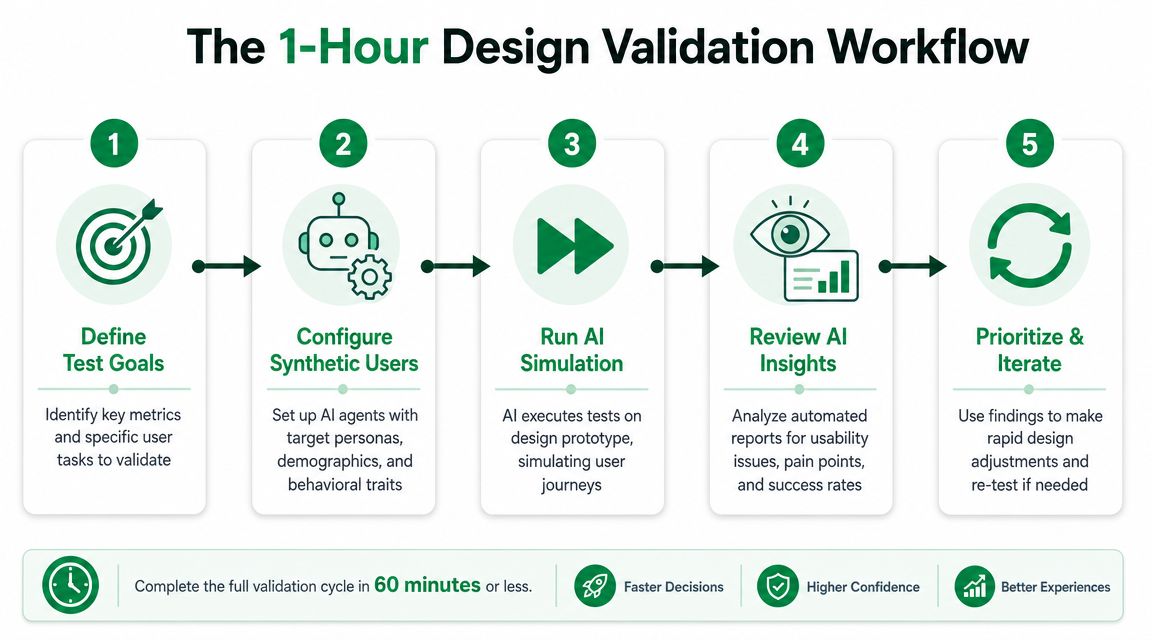
The 1-hour design validation
Use this workflow when the team needs directional signal today. It fits product design work that is already in motion, especially when the question is narrow and the cost of shipping the wrong interaction is higher than the cost of running one more check.
Step 1
Upload the prototype you want to test. Keep the scope narrow. One onboarding path, pricing interaction, or checkout step is enough.
Step 2
Write the mission in plain language. “Find the annual pricing plan and start a trial” produces better feedback than “explore the app” because the AI has a specific job to complete.
Step 3
Set the audience assumptions before running anything. The quality of the result depends on how clearly you define who the user is, what they are trying to do, and what context they bring. In tools such as Uxia, teams can test prototypes with synthetic users by defining a mission and audience to get rapid feedback on friction and usability.
Step 4
Review patterns, not isolated comments. If several runs fail at the same point, hesitate on the same screen, or misread the same label, that usually signals a design problem worth fixing. One odd result usually does not.
Teams that want a more detailed example can use this guide to rapid UX insights with synthetic user testing.
Building AI checks into the sprint
The bigger shift is operational. Product designers are no longer judged only by how many polished assets they can produce. The job increasingly includes choosing which AI-generated options deserve attention, which findings are noise, and which UX risks need human follow-up.
That changes the workflow in a useful way. Instead of waiting for a formal research window, teams can add lightweight validation checkpoints to the parts of the product that carry the most risk.
A practical pattern looks like this:
Designers define test points: Pick the flows that should be checked whenever they change, such as sign-up, payment, account recovery, or first-run setup.
Product managers rank by consequence: A confusing checkout screen deserves more frequent testing than a minor visual refresh.
Design ops or engineers keep inputs current: Updated prototypes, clickable mocks, or recorded flows need to be ready for quick testing.
The team reviews findings in existing rituals: Bring AI test results into critique, sprint review, or release QA instead of creating a separate process.
What works in practice
Teams get better results when they ask bounded questions. “Why are users hesitating before submitting this form?” is specific enough to test. “Tell us everything wrong with the experience” usually creates a messy report and weak decisions.
Retesting matters just as much as the first run. The value comes from shortening the loop between design change, validation, and revision.
Use the output to prioritize. If a finding affects activation, trust, or conversion, fix it. If it is cosmetic and does not change behavior, log it and move on.
AI-assisted workflows help teams ship with more evidence. Designers still make the call.
Best Practices for Using AI in Design
A designer opens an AI tool, generates five cleaner layouts in minutes, and gets an automated critique that sounds decisive. The speed is useful. The risk starts when the team treats that output as a decision instead of evidence.
Good teams set a higher bar. AI should widen the option set, expose friction faster, and reduce repetitive work. The designer's job is still to choose what matters, frame the trade-offs, and connect interface decisions to user behavior and product goals. In practice, that means the role shifts from producing every asset by hand to curating machine-generated options and judging which ones are credible enough to test or ship.
That shift changes the operating model.
The strongest pattern is simple. Use AI for generation, triage, and first-pass evaluation. Keep prioritization, interpretation, and release decisions with accountable people. Tools like Uxia fit that model well because they help teams test flows quickly and surface likely usability issues, but the product designer, researcher, or PM still has to decide whether a finding reflects a real user problem, a weak prompt, or a low-impact edge case.
Set review rules before you need them
AI governance usually breaks down in ordinary workflow moments, not in formal policy meetings. A variant gets approved in critique because the output looks polished. A test summary gets pasted into a ticket without anyone checking the setup. Weeks later, nobody remembers why the team trusted it.
Prevent that with a lightweight review rule: if AI-generated output changes the product, record who reviewed it and why they accepted it.
A discussion on AI design accountability makes the same point about auditability and human sign-off in product decisions, especially around governance and traceability, in this video discussion on AI design accountability.
Use AI on bounded design questions
AI is strongest when the task has clear edges. Give it a specific flow, a defined user goal, and a question the team can act on.
Useful cases include:
Screen and flow variation: Generate alternatives for onboarding, checkout, account recovery, or plan selection
Usability risk detection: Check for hesitation points, unclear hierarchy, weak labels, or trust breaks
Early comparison: Narrow a large set of concepts before design review or user testing
Structured testing support: Run repeatable checks in platforms like Uxia against known scenarios and expected user paths
Weak cases are broad product questions with unclear success criteria. A model can help summarize inputs, but it cannot replace customer interviews, field research, or product strategy work when the team is deciding what to build or which segment to serve.
Keep a decision trail
Teams do not need heavy process. They need enough traceability to revisit a call later and understand whether the evidence was solid.
Decision element | What to record |
|---|---|
Task tested | The exact flow, screen, or scenario reviewed |
User assumption | Who the team believed this experience was for |
AI output used | The recommendation, pattern, or issue surfaced |
Human reviewer | Who evaluated it and made the call |
Decision taken | What changed, what stayed, and why |
This matters more as designers become curators of options instead of sole producers of screens. Once AI can generate many plausible answers, the hard part is no longer volume. The hard part is selecting the right answer with enough evidence and judgment behind it.
Treat confident language with suspicion
AI outputs often sound settled before the team has done enough verification. That tone can distort design reviews. It can also push junior designers to defend the model's recommendation instead of examining it.
A better standard is to check important findings against other signals. Look at analytics, support tickets, prior research, session recordings, or live user feedback. If Uxia flags friction in a high-value flow and the same issue appears in drop-off data or support complaints, confidence goes up. If the signals conflict, investigate before changing the experience.
AI helps teams work faster. Designers still own the product judgment.
Action Checklist for Product and Design Teams
If your team wants to move from curiosity to practice, start small. Don't begin with a redesign program or a company-wide AI policy. Start with one live UX question that already matters.
A practical first sprint
Pick one low-risk flow: Use a sign-up form, onboarding step, pricing page, or checkout screen.
Define one testable question: Keep it narrow. For example, focus on where users may hesitate, misread, or abandon.
Choose one AI workflow to trial: Don't evaluate ten tools at once. Run one process cleanly.
Review results as a team: Designer, PM, and researcher should look at the same evidence and decide what's actionable.
Compare against your current process: Did the team get useful signal sooner than it normally would?
What to put in place next
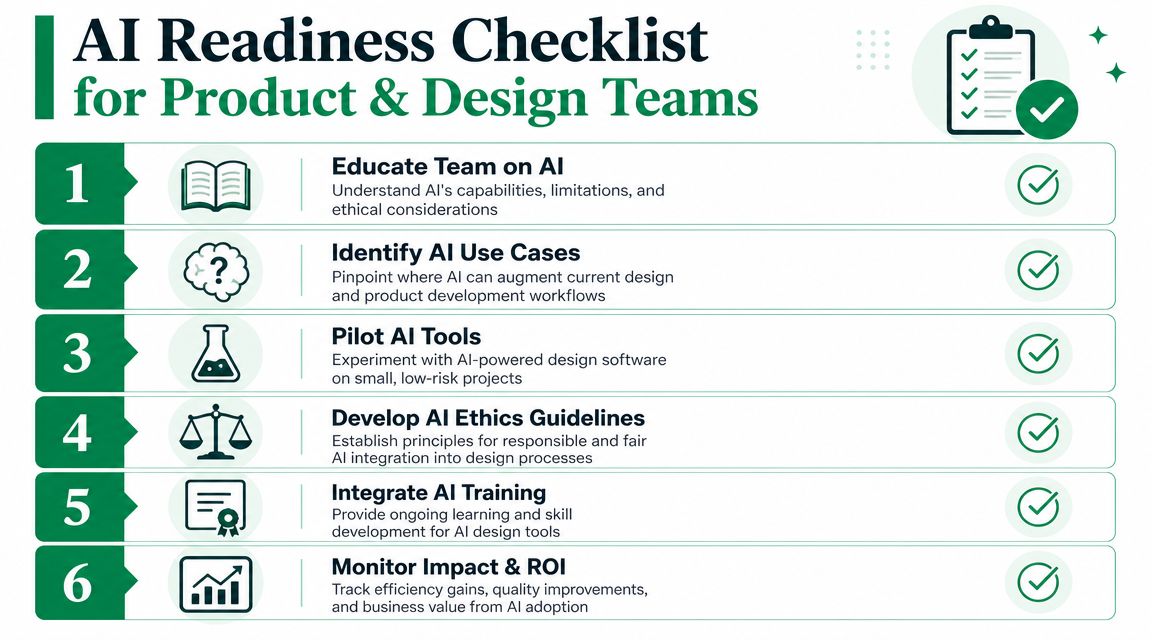
Once the first pilot works, formalize just enough process to make it repeatable.
Create a small testing brief template so every AI validation run has a clear mission, target audience, and decision owner.
Define review rules so AI findings are always checked by a designer or researcher before influencing shipped work.
Identify repeatable checkpoints for your highest-risk user journeys.
Train designers on evidence reading so reports become decision tools, not decorative attachments in slides.
Track where AI helps most in your workflow, whether that's earlier validation, faster iteration, or better prioritization.
The job shift to accept
The product designer's role is already evolving. Less time will go to manually producing every asset from scratch. More time will go to directing systems, interpreting findings, protecting quality, and making trade-offs visible to the team.
That's good news for designers who want more strategic influence. The opportunity isn't to compete with AI on output volume. It's to become the person who knows what should be built, what shouldn't, and why.
If your team wants a practical way to test that workflow, Uxia offers AI-powered UX/UI testing with synthetic users that can evaluate prototypes, surface friction, and generate structured findings without the usual recruiting and scheduling overhead.