A Practical Guide to User Centred Design
Discover the core principles of user centred design. Our guide explains the UCD process with real-world examples to help you build products users love.
User-centred design isn't just a buzzword; it's a philosophy that puts real people at the very heart of every single decision you make. Instead of guessing what your users want or need, you start by actually understanding their world—their goals, their daily struggles, and their frustrations.
This simple shift ensures you build products they find genuinely useful, not just another piece of software they have to tolerate.
What Is User Centred Design and Why Does It Matter?
Imagine you’ve been tasked with designing a new public library. You wouldn't kick things off by picking out shelves or deciding on a cataloguing system. No, you’d start by watching people. How do they look for books? What kind of spaces do they gravitate towards for quiet reading versus collaborative research? What gets in their way?
User-Centred Design (UCD) is that exact same mindset applied to digital products, whether it's a simple mobile app or a complex enterprise platform. It’s an entire approach built on empathy, not assumptions.
At its core, UCD is an iterative process. Design isn’t a one-and-done event; it’s a continuous cycle of understanding, building, and testing. Teams actively chase down user feedback at every single stage, using those raw insights to refine and improve their solutions. This constant validation loop is what truly separates it from older, more rigid ways of building things.
The Problem with Building Features First
So many teams fall into the "feature-led" development trap. They build what they think is important, what a competitor just launched, or what a senior manager requested in a meeting. They end up with a long laundry list of functionalities.
This almost always leads to bloated, confusing products that completely fail to solve a core user problem. The result? A whole lot of wasted time, money, and engineering effort poured into features nobody actually uses.
A user-centred approach fundamentally shifts the conversation from "What can we build?" to "What should we build?" It forces you to prioritise solving real problems for real people, which is the most direct path to creating a product that people will pay for and love.
This focus on the user isn’t just about creating a "good user experience." It delivers tangible business results that you can take to the bank.
Products designed with users in mind see:
Higher Customer Loyalty: When a product just works the way people expect it to, they stick around. They become your biggest fans.
Increased Conversion Rates: A clear, frustration-free journey makes it dead simple for users to do what you want them to do, like making a purchase or signing up.
Reduced Development Waste: By validating your ideas early and often, you stop yourself from spending months building the wrong thing.
Lower Support Costs: An intuitive product means fewer confused users, which means fewer support tickets. Simple as that.
User Centred Design vs Feature-Led Development
The difference in philosophy between these two approaches couldn't be starker. One starts with a problem, the other starts with a solution. Here's a quick breakdown of how they compare.
Aspect | User Centred Design (UCD) | Feature-Led Development |
|---|---|---|
Starting Point | Understanding user needs and pain points. | A list of features or technical capabilities. |
Core Question | "What problem are we solving for our user?" | "What features can we build?" |
Process | Iterative cycles of research, design, and testing. | Linear build-and-ship based on a roadmap. |
Source of Truth | Direct user feedback and behavioural data. | Internal assumptions, competitor analysis, stakeholder opinions. |
Measure of Success | User satisfaction, task completion, retention. | Number of features shipped, hitting deadlines. |
Risk | Lower risk; ideas are validated early. | High risk; product may not meet any real user need. |
Outcome | A product that is useful, usable, and valuable. | A product that is often bloated, confusing, and unused. |
Ultimately, UCD de-risks product development by grounding every decision in reality, whereas a feature-led approach is often a gamble based on internal guesswork.
Making UCD a Practical Reality
To actually pull this off, you have to get serious about listening. Capturing the authentic voice of the customer is the non-negotiable first step toward making smart design decisions. This is especially true for new businesses; you can see a great breakdown of how these principles apply in website design for startups.
For most modern teams, the biggest hurdle is speed. Traditional user research is powerful, but it can be painfully slow.
This is where platforms like Uxia completely change the game. By using synthetic users for rapid testing, you can get critical feedback on your designs in minutes, not weeks. This makes it truly practical to embed user validation throughout your entire workflow, finally ensuring every decision is genuinely user-centred.
The Core Principles of Effective UCD
So, how do you go from knowing what user-centred design is to actually doing it? It all comes down to a few guiding principles.
Think of these less as rigid rules and more as the pillars holding up every decision you make. They’re your compass, always pointing you back to the person you're building for. These principles are what turn the vague idea of "being user-centred" into a concrete, repeatable practice.
When your team gets these concepts, you start building a shared language and a consistent way of working. That alignment is what turns good intentions into great products—the kind people just get.
Let's break down the four essential pillars.
1. Understand Users and Their Context
This is the big one, the foundation for everything else: you have to develop a deep, almost obsessive understanding of your users. We're talking way beyond simple demographics.
It's about getting into their heads. What are their goals? What does their day-to-day actually look like? What’s the environment—physical, social, and technical—where they’ll be using your product? You need to know their real-world frustrations and the clever workarounds they’ve invented because other tools have failed them.
Without this deep context, you’re just guessing. You might solve a problem, but probably not the right one.
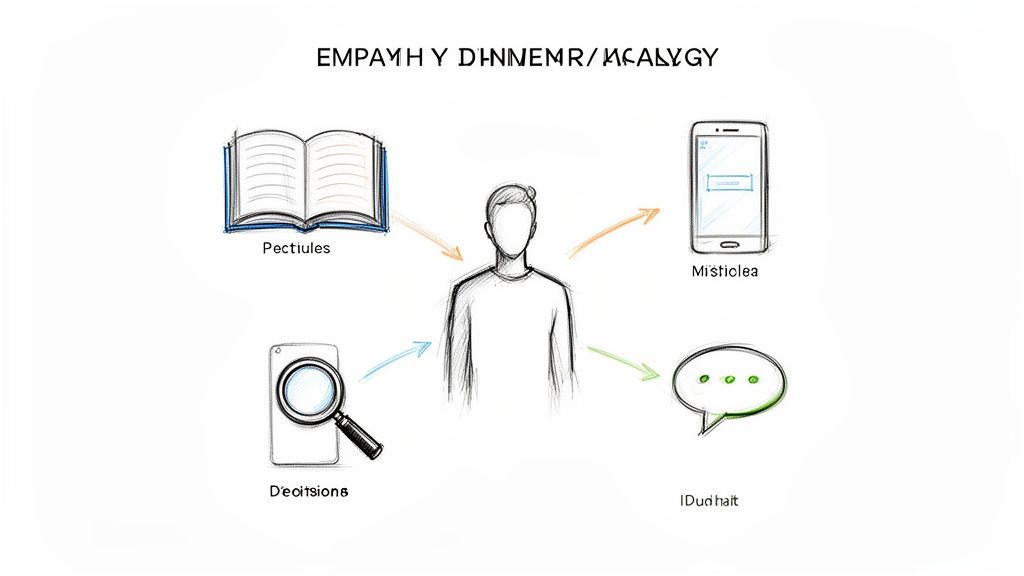
Practical Recommendation: Try creating empathy maps for your main user segments. It’s a simple visualisation that forces you to think about what a user says, thinks, does, and feels. This is a fantastic way to push past surface-level assumptions and build real empathy that the whole team can share.
2. Involve Users Throughout the Process
Here’s a common mistake: treating users like they’re only needed twice—once for initial interviews and again at the very end for a final sign-off.
That’s not user-centred design. Real UCD brings users into the fold as active partners throughout the entire journey. They shouldn't be spectators.
This means showing them rough sketches, getting their feedback on clunky wireframes, and letting them play with early interactive prototypes. This constant contact is your reality check. It stops the team from drifting off course, guided by internal opinions and unproven assumptions. It makes sure the product is shaped by real needs, not just what’s said in a meeting room.
Practical Recommendation: Set a team goal to get user feedback on designs at least once per sprint. This forces a rhythm of continuous validation. Using a tool like Uxia allows you to do this without slowing down development, getting feedback on a wireframe in the morning and iterating on it by the afternoon.
3. Drive Decisions with User Evaluation
Every single design choice needs to be backed by evidence from real users. Your team’s opinions are important, but they aren't proof. The layout of a page, the icon for a button, the words you use in a menu—it all needs to be validated.
This principle demands a commitment to testing. You form a hypothesis about your design ("We think this new checkout flow is clearer"), and then you see what happens when real people try to use it. Can they find what they need? Does the language make sense to them? The answers you get should directly guide your next move.
This is where modern tools completely change the game. Instead of waiting days or weeks to find people for a traditional usability test, platforms like Uxia let you get feedback from synthetic users in minutes. Suddenly, continuous evaluation isn't just a nice idea—it becomes a practical part of every single sprint.
4. Embrace an Iterative Process
Finally, user-centred design is never a one-and-done deal. It’s a loop: you build something, you test it, you learn from what happened, and you make it better. Your first design is never the final one. It’s just the start of a conversation with your users.
Every test gives you new insights that feed straight back into the next version. This cycle of proposing, building, and testing is what allows a product to truly evolve. It requires a certain mindset—one that welcomes feedback, values learning over being right, and accepts that the work is never really "finished."
Build: Create a prototype or feature based on what you’ve learned from users.
Test: Put it in front of users to see what works and, more importantly, what doesn’t.
Learn: Dig into the feedback to find the friction points and aha-moments.
Refine: Use those learnings to improve the design, and then start the cycle all over again.
Navigating the User-Centred Design Process
A great product doesn't happen by accident. It’s born from a structured, repeatable process that keeps the user at its heart from the first napkin sketch to the final launch.
The user-centred design process isn't a straight line. Think of it as a continuous loop—a cycle of learning and tweaking that ensures your team stays grounded in reality.
For product teams, this process is the roadmap. It guides you through the essential stages of discovery, definition, design, and validation. Each phase builds on the last, turning vague ideas into concrete, user-approved solutions. It's like a journey where you constantly check your map (user feedback) to make sure you're still heading in the right direction.
The following diagram illustrates the core flow, breaking it down into its fundamental actions.
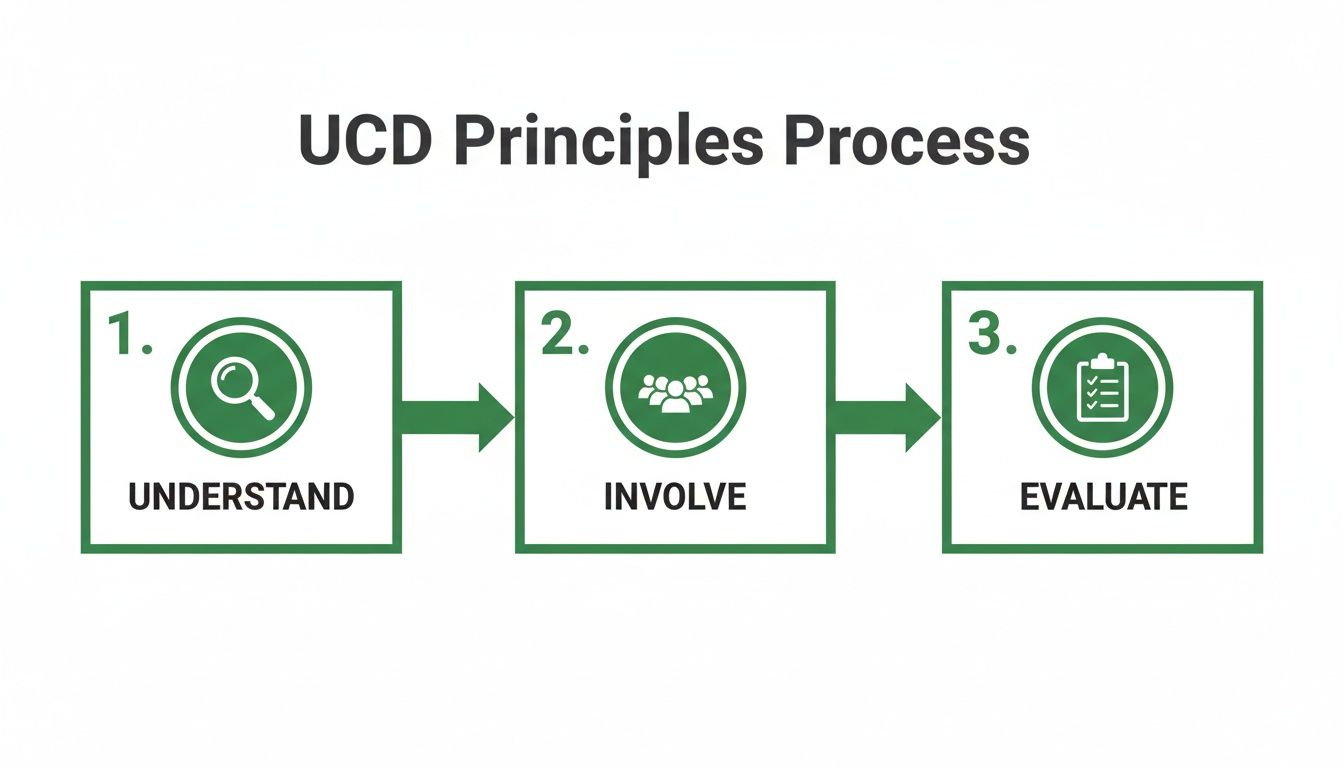
As you can see, it always starts with understanding, moves to active involvement, and relies on constant evaluation to drive progress. It’s a simple but powerful model for building things people actually want to use.
Phase 1: Understanding User Needs
Before you can solve a problem, you have to really understand it from the user's point of view. This first phase is all about deep discovery and building empathy. The goal is simple: step into your users' shoes and see the world through their eyes.
You're not looking for solutions yet. You're just gathering raw, unfiltered information. This foundational work stops you from building a perfect solution to the wrong problem.
Key activities in this phase include:
User Interviews: Direct conversations to uncover motivations, pain points, and daily routines.
Surveys: Collecting quantitative and qualitative data from a larger user base to spot broad patterns.
Contextual Inquiry: Watching users in their natural environment to see how they work and what challenges they actually face.
Practical Recommendation: Record user interviews (with permission!) and use automated transcription services to quickly find key quotes and pain points. This makes synthesizing research much faster.
The main takeaway here is a rich collection of user insights that will shape every single decision that follows.
Phase 2: Specifying User Requirements
Once you have a mountain of raw data, the next job is to make sense of it. This phase is about translating your research findings into clear, actionable requirements that the entire team can get behind. You’re moving from "what users said" to "what this means for our product."
This is where you synthesise those insights into artefacts that give your user a face and a story. These tools make it much easier for designers and developers to remember who they're building for.
Practical Recommendation: Create detailed personas and journey maps, and then print them out. Post them on a wall where the entire team can see them every day. This simple act keeps the user top-of-mind during daily stand-ups and technical discussions.
Common deliverables include:
User Personas: Fictional characters based on your research that represent your key user types.
Customer Journey Maps: Visualisations of the user's experience as they interact with your product to achieve a specific goal.
Phase 3: Designing and Prototyping
With a clear picture of your users and their needs, it’s finally time to start crafting solutions. This is where ideas start to take physical shape, moving from abstract concepts to tangible, interactive designs.
The key here is to start rough with low-fidelity concepts and progressively add detail as you get feedback. This approach saves a ton of time and stops the team from getting too attached to one idea before it's been properly validated. You just need to create enough of a prototype to test your core assumptions.
This iterative process often moves through:
Sketches and Wireframes: Basic blueprints that map out the structure and layout.
Interactive Prototypes: Clickable mockups that simulate the user experience without a single line of code.
Practical Recommendation: Don't wait for a perfect prototype. Test your black-and-white wireframes. Uploading even a rough design to a platform like Uxia can uncover fundamental navigation and layout issues long before you've invested time in visual design.
Phase 4: Evaluating and Testing
The final—and arguably most crucial—phase is evaluation. This is where you put your designs to the test with real or simulated users to see if your solution actually works.
The insights you gather here feed directly back into the start of the cycle, fuelling more research and refinement. This is the engine of iteration.
Traditionally, this has been the slowest part of the process, often bottlenecked by recruiting and scheduling participants. This is where a serious commitment to user-centred design really pays off. In Spain, for example, the user experience market is projected to grow at 14.6% annually, hitting USD 153.78 million, as companies invest heavily in better digital experiences.
Platforms like Uxia accelerate this stage dramatically. By using synthetic users, you can get detailed feedback on your prototypes in minutes, not weeks. This allows your team to test, learn, and iterate at a much faster pace, making the entire user-centred design process more efficient and effective.
The UCD Toolbox: Key Methods and What They Produce
Knowing the map of the user centred design process is a great start, but you also need the right tools to navigate it. Each phase of the UCD journey relies on specific methods to uncover insights, define the path forward, create solutions, and prove they actually work. These are the practical, hands-on techniques that turn abstract ideas into real-world results.
Think of it like a well-stocked toolbox. You wouldn't use a hammer to saw wood, right? In the same way, you wouldn't run a survey to understand deep, unspoken behaviours. Picking the right method for the job is everything—it’s what delivers the clear, actionable insights your team needs to build with confidence.
Let's break down the essential methods and the tangible deliverables you'll get from each phase.
Research Methods: Understanding Your Users
The research phase is all about pure discovery. You’re gathering the raw materials—the facts, behaviours, and frustrations—that will shape every decision you make down the line.
Contextual Inquiries: This is about getting out of the office and observing users in their natural habitat. You watch them work, struggle, and find clever workarounds. It’s incredibly powerful because it reveals what people do, not just what they say they do. You’ll walk away with detailed observation notes and a goldmine of direct user quotes.
Stakeholder Interviews: These are structured chats with the people inside your company who know your customers best—think support agents, salespeople, and account managers. They offer a unique lens on business goals and known customer pain points. The result is a clear summary of business constraints and hidden opportunities.
Practical Recommendation: When you're digging through user interviews or test sessions, tools like automated transcription services can be a massive time-saver, letting you focus on the insights instead of the busywork.
Specification Methods: Defining the Requirements
Once the research is in, you need to make sense of it. This phase is all about synthesis—turning raw data into clear, shared documents that guide the entire team.
Practical Recommendation: These deliverables aren't just paperwork; they're essential communication tools. Build them collaboratively with stakeholders from different departments to ensure everyone feels ownership and is aligned on solving the same problem for the same person.
Here are the key methods for this stage:
Personas: These are rich, realistic profiles of your key user types, built entirely from your research data. A good persona has a name, a face, and a story, outlining their goals, motivations, and frustrations. It puts a human face on the data.
Customer Journey Maps: This technique visually maps out every single interaction a user has with your product or service as they try to complete a goal. The deliverable is a powerful diagram that highlights their actions, thoughts, and emotions at each step, immediately showing you where things are going right—and where they’re going wrong.
Design Methods: Creating the Solution
With a crystal-clear picture of who you're designing for and what they need, you can finally start building. This phase is about generating and visualising ideas, starting rough and gradually adding detail.
Wireframing: Think of this as creating a basic, black-and-white blueprint for your product. Wireframes focus purely on structure, layout, and functionality—not on colours or fonts. The deliverable is a set of simple layouts that define where everything goes.
Prototyping: Prototypes are interactive mockups that bring your ideas to life. They let users actually click through flows and experience the product before a single line of code is written. They can be as simple as sketches on paper or as polished as high-fidelity digital simulations from tools like Figma. The goal is to produce a clickable prototype that’s ready for testing.
Evaluation Methods: Validating Your Designs
This is where the rubber meets the road. The evaluation phase is all about testing your assumptions against reality to see if your design actually works for real people. It’s the critical feedback loop in any user centred design process that prevents you from shipping expensive mistakes.
Common evaluation methods include:
Usability Testing: This classic method involves watching real users try to complete specific tasks with your prototype. The output is a usability test report that summarises key findings, success rates, and impactful user quotes.
Heuristic Evaluation: Here, UX experts review your interface against a checklist of established usability principles (known as heuristics). You get back a detailed report that flags potential usability issues and offers clear recommendations for improvement.
While these traditional methods are incredibly valuable, they can also be slow and expensive. This is where modern tools can give you a serious edge. Platforms like Uxia provide a rapid, scalable way to test designs using synthetic users, delivering actionable insights in minutes, not weeks. This lets your team evaluate and iterate constantly, without the logistical headaches of traditional user recruitment.
Key UCD Methods and Deliverables
To tie it all together, here’s a quick summary of how each phase connects to specific methods and the tangible outputs you can expect.
UCD Phase | Common Methods | Primary Deliverable |
|---|---|---|
Research | Contextual Inquiries, User Interviews, Surveys | Research Findings Report, User Quotes, Raw Data |
Specification | Personas, Customer Journey Maps, Empathy Maps | User Personas, Journey Map Diagrams |
Design | Sketching, Wireframing, Prototyping | Wireframes, Interactive Prototypes, UI Designs |
Evaluation | Usability Testing, Heuristic Evaluation, A/B Testing | Usability Test Report, Expert Review Findings |
This table acts as a handy cheat sheet, but remember the process is iterative. You’ll often find yourself looping back to an earlier phase as you learn more, and that’s a sign that you’re doing it right.
How AI Is Accelerating the UCD Process
The user-centred design process is incredibly powerful, but it has a well-known secret weakness: the evaluation phase. While absolutely essential for gathering deep insights, traditional user testing often becomes the biggest bottleneck in the entire development cycle. It can grind a fast-moving sprint to a frustrating crawl.
Think about the real-world logistics. First, you have to find participants who actually match your user profile. Then comes the scheduling nightmare of coordinating times, followed by the testing sessions themselves. Finally, you’re left with hours of video to analyse, trying to pull out actionable patterns.
This whole dance can easily take weeks, creating major delays and friction. For agile teams trying to build, measure, and learn quickly, this slow pace is a huge problem.
A Modern Solution for an Age-Old Problem
This is where AI-powered synthetic user testing enters the picture. Instead of relying on slow and costly human recruitment, these platforms use AI to simulate how real users would interact with your designs, giving you rich, actionable feedback almost instantly.
Platforms like Uxia are at the forefront of this shift. You can upload a design, define your user persona, and within minutes, get a detailed report packed with insights. This isn't just about speed; it's about making continuous validation a practical reality for any team.
The feedback goes far beyond a simple thumbs-up or thumbs-down. It typically includes:
Prioritised Usability Issues: A clear breakdown of where users are likely to get stuck or confused.
Visual Heatmaps: A picture of where users will likely look and click, instantly revealing points of friction.
Actionable Recommendations: Concrete suggestions for improving navigation, copy, and the overall user flow.
The Benefits of Testing at Scale
By getting rid of the logistical hurdles of old-school testing, AI-driven platforms make it possible to practice user-centred design at a scale and speed that was previously unimaginable. The advantages for product teams are immediate and substantial.
Practical Recommendation: The real win here is the ability to run tests continuously throughout the design process, not just as a final step. This means you can validate everything from a rough wireframe to a high-fidelity prototype using a platform like Uxia, catching problems long before they become expensive to fix.
This shift enables a truly iterative workflow, turning testing from a special event into a daily habit. Better yet, by using AI, teams can dramatically reduce the unconscious bias that sometimes creeps in from using the same small pool of professional testers over and over. You can dive deeper into the differences between synthetic users vs human users in our dedicated article.
Making UCD a Reality for Every Team
The integration of AI isn't just another trend; it's a strategic move that aligns with broader national innovation goals. Spain's national artificial intelligence strategy, for example, has committed EUR 50 million, with initiatives like the Spain Living Lab receiving EUR 43.9 million to build an open innovation ecosystem. This proves a clear understanding that great user experience must be at the foundation of AI development.
For modern product teams, tools like Uxia are becoming essential. They eliminate recruitment delays, cut down on bias, and empower designers and product managers to get the answers they need, right when they need them. This acceleration of the feedback loop makes the entire user-centred design process more efficient, effective, and accessible for organisations of any size.
Common UCD Mistakes and How to Sidestep Them
Even teams with the best intentions can trip up when trying to put user-centred design into practice. It’s one thing to know the theory; it’s another to avoid the common traps that send you right back to building products based on guesswork.
These mistakes aren’t usually catastrophic on their own. Instead, they’re silent killers of efficiency, creating friction and waste that undermine the very goals you’re trying to hit. Knowing what these pitfalls look like is the first step. Once you learn to spot them, you can steer your team toward a design process that actually works.
Confusing What Users Say with What They Do
This is a classic. You ask users what they want, and they give you an answer. The problem is, it’s often the wrong answer. The old (and likely made-up) Henry Ford quote comes to mind: if he’d asked people what they wanted, they’d have said a "faster horse."
Users are experts on their problems, not on innovative solutions. Asking them "What features do you want?" is a recipe for incremental, boring ideas. Your job isn't to take orders; it's to be a detective. Dig into their goals, their frustrations, and the "why" behind their actions.
Practical Recommendation: Instead of asking users for solutions, ask them to show you their current workflow. Watching them struggle with an existing tool or process will reveal unspoken needs far more effectively than asking them what they want.
Watch how they work. Listen to what they complain about. That’s where the real opportunities are hiding.
Treating User Research as a Final Exam
Another all-too-common error is saving user research for the very end. A team will spend months polishing a beautiful, high-fidelity prototype, finally put it in front of users, and then watch in horror as they discover they solved the wrong problem entirely. It’s an expensive, soul-crushing way to build products.
Real user-centred design pulls users in from day one. Research isn’t a box you tick before launch; it’s the bedrock of your entire strategy. It tells you what to build before you’ve written a single line of code or designed a single screen. Feedback isn't a one-time event; it's a constant loop.
Believing UCD Is Just the UX Team’s Job
User-centricity dies the second it gets siloed. If it’s just "the UX team's thing," the insights they uncover will never make it into the final product. You’ll have engineers overriding key design decisions because they lack user context, or marketing teams promoting features that don't solve a real-world problem.
For this to work, everyone—from the CEO to the junior developer—needs to be obsessed with the user. It has to be a shared company-wide mindset. When everyone is aligned on who the customer is and what they’re trying to achieve, every decision naturally starts to bend in the user’s favour.
Practical Recommendation: Invite engineers and product managers to observe user testing sessions (even recordings). Hearing a user's frustration firsthand is far more powerful than reading about it in a report and builds company-wide empathy.
Getting Too Attached to Your First Idea
We’ve all been there. You work hard on a concept, and you fall in love with it. But that attachment makes you defensive and resistant to the very feedback you need to make it better.
The fix? Test early and test often, especially when your ideas are just rough sketches. When you haven't invested weeks of work into a low-fidelity wireframe, feedback feels like helpful collaboration, not harsh criticism. This is where modern tooling gives you a massive advantage. Instead of waiting days to find a few users, platforms like Uxia let you validate concepts in minutes against a whole panel of AI-generated personas. This kind of rapid, scalable feedback loop kills attachment and lets the best ideas win, not just the first ones.
A Few Common Questions About UCD
As teams start getting serious about user-centred design, a few questions tend to pop up again and again. Getting clear, practical answers is what turns theory into confident action. Here are some of the most common ones we hear.
What Is the Difference Between User-Centred and Human-Centred Design?
You’ll often hear these two terms used interchangeably, but there’s a subtle and important difference.
Think of Human-Centred Design (HCD) as the big-picture philosophy. It’s about considering the needs of all humans who might be touched by a system, even indirectly.
User-Centred Design (UCD) is a much more focused application of that philosophy. It zooms right in on the specific person who will be the direct end-user of a product. While they both spring from the same well of empathy and iteration, UCD gives product teams a sharper lens for building specific tools for specific people.
How Can Small Teams with Limited Budgets Implement UCD?
You don’t need a massive research budget or a dedicated lab to be user-centred. Not at all. In fact, some of the most effective methods are lean, fast, and perfect for smaller teams.
Practical, low-cost UCD is totally achievable:
Lean Personas: Forget those exhaustive, multi-page documents. Create simple, one-page personas based on stakeholder interviews and whatever data you already have.
Guerilla Usability Testing: Seriously, just grab five minutes with someone at a coffee shop or a colleague from another department. Quick, informal feedback is worlds better than no feedback at all.
Cost-Effective Tooling: Modern platforms make sophisticated methods accessible to everyone. For instance, Uxia brings rapid usability testing into any team's workflow, giving you insights from synthetic users without the high cost and long waits of traditional recruitment. It completely democratises a key part of the UCD process.
How Do We Measure the ROI of User-Centred Design?
UCD isn’t just about making things look nice; it's a direct investment in the health of the business. Framing it this way is absolutely key to getting buy-in from the rest of the organisation. The return on investment (ROI) shows up in clear, measurable business metrics.
Practical Recommendation: The core value of user-centred design is risk reduction. Frame it this way to stakeholders. Every dollar you invest in understanding your user is a dollar you save by not building the wrong product.
To really track its impact, you need to connect the dots between user behaviour and business outcomes. Focus on metrics like these:
Conversion Rates: A clearer, more intuitive journey directly translates into more sign-ups, sales, or whatever goal you’re aiming for.
User Satisfaction Scores: Keep an eye on metrics like CSAT (Customer Satisfaction) and NPS (Net Promoter Score) to see how sentiment changes over time.
Support Ticket Reduction: When a product is easier to use, fewer people get confused. That means fewer support tickets, which directly lowers your operational costs.
Ready to accelerate your user-centred design process and get actionable insights in minutes? Uxia replaces slow, costly user testing with AI-powered synthetic users, helping you build products your customers will love, faster. Start testing with Uxia today.