9 Key Lessons from Figma Config 2026 for Product Teams
Conferences create a familiar failure mode. Teams leave with new ideas, a backlog full of AI experiments, and no clear operating plan for Monday.
Figma Config 2026 matters because Figma pulled code, motion, shaders, workflow generation, and agent-based assistance into the same working environment, with broad beta access and free AI credits during the beta period, according to the official Config San Francisco event page. For product teams, that shortens the distance between exploration and production intent inside a normal sprint.
The practical consequence is straightforward. If designers can produce more variants, more states, and more realistic prototypes in the same week, teams need a faster way to decide what deserves engineering time. Synthetic testing tools such as Uxia solve that operational problem by giving teams a first validation pass before they commit to a direction.
That is the lens for this article. It is not a recap of keynote moments. It is a post-conference action plan for design, product, and research teams that want to turn Config 2026 themes into working habits right away, especially by adding AI-powered synthetic testing to design sprints, validation loops, copy reviews, accessibility checks, and workflow decisions.
The nine takeaways that follow focus on process changes that reduce rework, speed up validation, and help teams ship with more evidence and less opinion.
1. Integrate AI-Powered Testing into Your Design Sprint Workflow
AI-generated design speed is already outpacing how many teams validate decisions. That gap creates waste fast. Config 2026 made it easier to produce variants, motion, and richer prototypes inside the design workflow, so the bottleneck has shifted to evaluation.
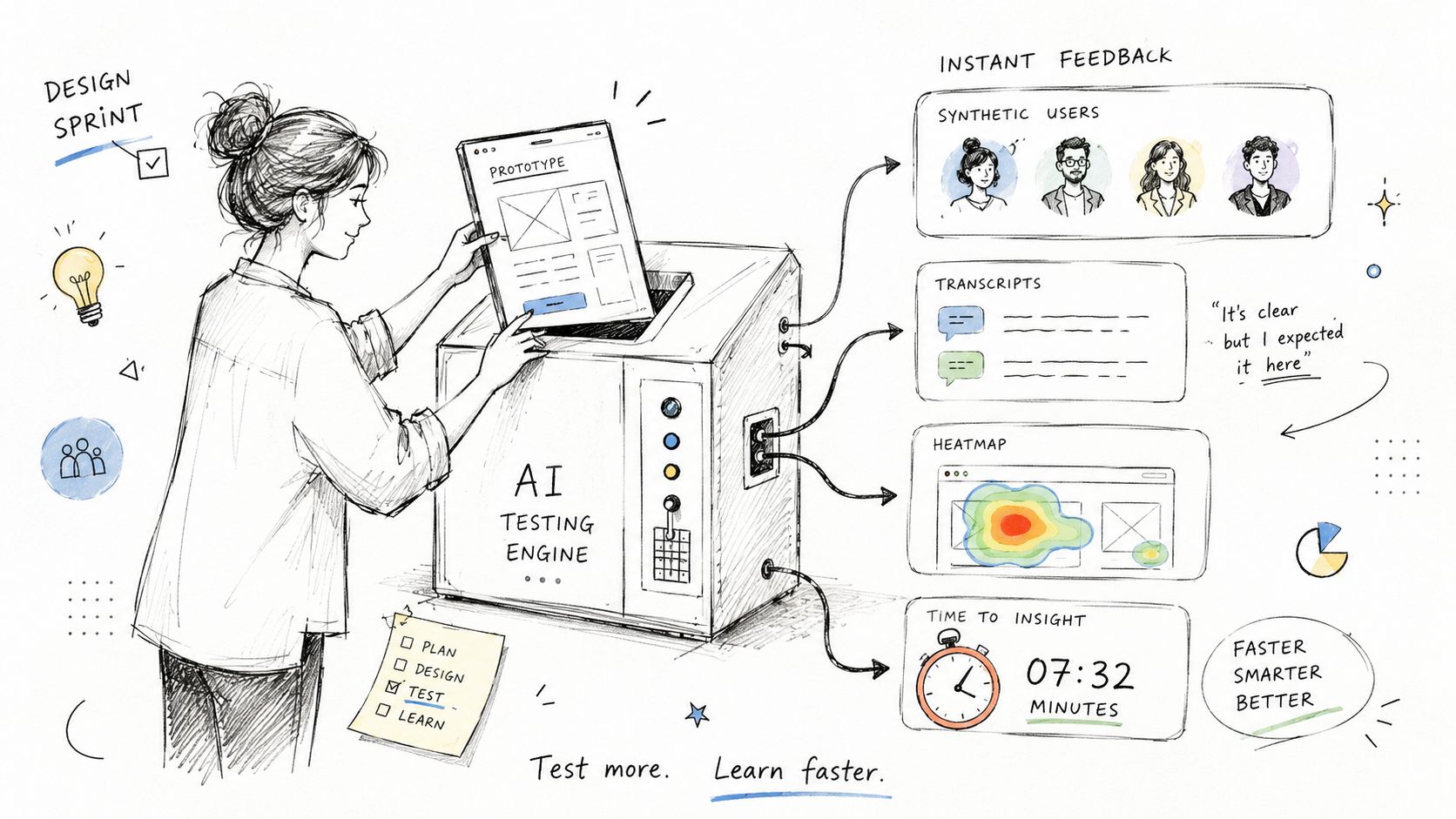
The practical response is to put synthetic testing inside the sprint, not at the end of it. Once a wireframe, prototype, or copy revision is usable, run a first-pass test in Uxia and use the results to cut weak options before review. This is especially effective when a team is choosing between multiple onboarding paths, pricing pages, navigation models, or checkout flows.
What to change this sprint
Run AI testing as soon as a meaningful change lands. Do not wait for sprint review. Upload the latest prototype to Uxia, assign a clear mission such as “choose the right pricing plan” or “finish account setup,” and use that evidence to reduce the number of directions the team debates live.
As noted earlier, Figma expanded the amount of work teams can generate inside a normal design cycle. That changes the economics of validation. If a designer can create three credible directions in the time it used to take to build one, the team needs a faster filter before product, design, and engineering spend a meeting arguing from preference.
Use a simple operating rule.
Practical rule: Use synthetic testing as the first filter. Use human research on the directions that still look promising after that pass.
This works well in a sprint because the outputs are specific. Uxia can show where synthetic users hesitate, what they misunderstand, which path they choose first, and where they abandon the task. That gives designers something concrete to revise before handoff instead of vague feedback like “this feels confusing.”
A workable pattern looks like this:
Define one mission per test: Ask one task-based question, such as whether users can find billing settings or understand the primary CTA.
Choose the right persona mix: Test with audiences that reflect your actual buyer, user, or subscriber, not a generic public sample.
Limit revisions to blockers: Fix the issues that stop completion or create clear misunderstanding. Leave minor polish for later.
Share the evidence across functions: Transcripts, summaries, and behavior patterns help PMs and stakeholders review the same signals instead of debating opinions.
There is a trade-off. Synthetic testing will not replace moderated interviews, strategic discovery, or deep research on motivations. It does handle the faster question that shows up every sprint: “Which version is easier to understand and complete right now?” For product teams trying to turn Config 2026 ideas into working habits this week, that is the change that reduces rework first.
2. Adopt AI-Assisted Design Systems That Evolve with Your Product
Static design systems are losing value fast. Figma Config 2026 pushed a very different model. Design systems now need to support motion, code-aware implementation, reusable workflows, and AI-assisted generation inside the same working environment.
That matters because system quality no longer lives only in tokens, component names, and documentation hygiene. It lives in whether components produce predictable outcomes when real users interact with them. Teams that keep updating visual libraries without validating behavior usually end up scaling inconsistency faster.
What a living system looks like
At Config, Figma positioned these updates around “new materials to express anything you can imagine” and “new tools to shape these materials,” including code, motion, shaders, generative plugins, and Weave tools directly on the canvas, as CEO Dylan Field described in the official Config keynote recap video. That's a strong signal that component libraries have to support more than static states.
For a product team, the practical response is to test core system elements continuously. Buttons, forms, modals, alerts, empty states, and navigation patterns should go through Uxia before they're promoted as standards. If a component creates hesitation in one feature, rolling it into the whole product multiplies the problem.
A useful system review cadence is quarterly. In that review, teams should compare current components against recent product flows, identify where teams have created local overrides, and then test the most reused patterns with synthetic users.
The best design systems don't just enforce consistency. They earn it by making the easiest option also the clearest one for users.
Three recommendations work well in practice:
Start with high-frequency components: Form fields, buttons, navigation, and dialog patterns create the most downstream impact.
Test across personas: The same component can feel clear to experienced users and opaque to new ones.
Document behavioral evidence: Put validation notes alongside component guidance so teams know not only what to use, but why.
What doesn't work is treating AI-generated variants as system-ready by default. Generation is easy. Governance is still work.
3. Leverage Synthetic User Research to Reduce Bias and Speed Up Validation
Traditional user research still matters, but it's often too slow for the volume of decisions teams now make inside Figma. Config 2026 reinforced a broader shift toward more embedded, more frequent validation. Synthetic user research is useful here because it gives teams a wider first read on behavior before they invest in recruiting, scheduling, and moderated sessions.
The practical advantage isn't that synthetic users are “better” than humans. It's that they help teams screen more concepts, catch more obvious friction, and approach human research with better questions.
Where synthetic research helps most
This is especially effective in early and mid-fidelity work. A startup can test onboarding logic before code is written. A B2B team can compare information architecture options. A UX researcher can identify where confusion clusters before deciding what to probe with real participants.
For teams new to the method, this practical guide to synthetic users for faster UX validation is a useful starting point. The core lesson is to use synthetic testing for breadth and human research for depth.
That division of labor keeps teams honest. Synthetic testing is great at revealing patterns such as unclear labels, missing affordances, weak trust signals, or confusing task order. It's less suitable when you need nuanced emotional context, longitudinal behavior, or highly sensitive subject matter.
A few scenarios where Uxia is especially useful:
Startups: Validate messaging and flow clarity before spending scarce engineering time.
Scaleups: Compare multiple design branches without slowing the release cycle.
Enterprise teams: Screen designs across segments and locales before deeper studies.
What doesn't work is asking broad, abstract questions. “Do users like this?” tends to produce noise. “Can they complete the refund request?” produces something the team can act on.
4. Test Early and Often. Make Validation a Daily Practice, Not a Gate
A lot of conference takeaways sound strategic but die in the calendar. This one shouldn't. If validation only happens at formal checkpoints, it becomes a compliance ritual. If it happens inside daily work, it becomes part of product quality.
Figma Config 2026 made that shift easier because more work now happens in the same place. Motion is in the canvas. Agent support is in the canvas. Workflow generation is in the canvas. The practical implication is clear. Teams can move from “prepare for a big review” to “test the latest version today.”
Build a rhythm that people will actually follow
The best teams make testing lightweight enough that nobody needs permission. A designer finishes a prototype revision in the morning, runs a Uxia test before lunch, reviews the findings with a PM, and updates the next iteration before standup the next day. That rhythm compounds.
In this context, process discipline matters more than tool enthusiasm. Teams should agree on a small set of recurring moments when validation happens automatically:
After major flow changes: Don't wait for visual polish.
Before sprint review: Bring evidence, not just rationale.
Before handoff of critical journeys: Catch confusion before engineering starts building edge cases around it.
After copy revisions: Messaging changes alter behavior more often than teams expect.
One useful operational rule is simple. If it takes too long to set up a test, people stop testing. Uxia helps because PMs, designers, and researchers can all run checks without turning every request into a research ticket.
There's a trade-off here too. Daily validation can create false urgency if teams react to every signal. The fix is to look for repeated patterns, not isolated reactions. Use frequent tests to sharpen direction, not to thrash the roadmap.
5. Use Qualitative Feedback from Synthetic Users to Inform Copy and Messaging
One of the most underrated lessons from Figma Config 2026 is that richer interfaces create richer copy risk. Once teams add motion, AI-generated interactions, and more dynamic states, the words around those interactions matter more, not less.
Buttons, helper text, headings, onboarding explanations, trust language, and error messages still determine whether people understand what the interface is asking them to do. A polished prototype with weak wording still fails.
Listen for the language users use back
Uxia is especially useful here because synthetic testers can surface think-aloud style reasoning and transcript patterns. Those transcripts often reveal problems that visual review misses. People hesitate at a promise that sounds too vague. They misread “secure” as “locked.” They don't trust a request for data because the explanation arrives too late.
That kind of feedback is more actionable than internal opinion debates about tone. Teams can compare several versions of a headline or CTA, see where confusion appears repeatedly, and refine language based on actual interpretation.
A practical workflow looks like this:
Write multiple options on purpose: Don't test one headline and call it research.
Set comprehension-based missions: Ask whether users understand the next step or trust the promise being made.
Group transcript themes: Look for repeated misunderstandings, not isolated comments.
Store winners centrally: Strong copy patterns should become reusable product standards.
Copy review should answer one question first. Did users understand what would happen next?
What doesn't work is treating copy as surface polish at the end of design. The more configurable and AI-assisted products become, the more teams need language that removes ambiguity fast. That's true in onboarding, pricing, permissions, security messaging, and every place where trust can drop.
6. Implement Accessibility Validation as a Continuous Testing Practice
Many teams still handle accessibility too late. They run automated checks near launch, fix obvious issues, and hope the experience is inclusive enough. Figma Config 2026 reinforced a more integrated view of product making, and accessibility should follow the same logic. It belongs inside normal design and validation cycles.
Automated accessibility tools catch important technical problems. They don't always reveal whether an experience is understandable, navigable, or forgiving for people with different needs. That's where synthetic testing adds practical value.
Test accessibility as behavior, not just compliance
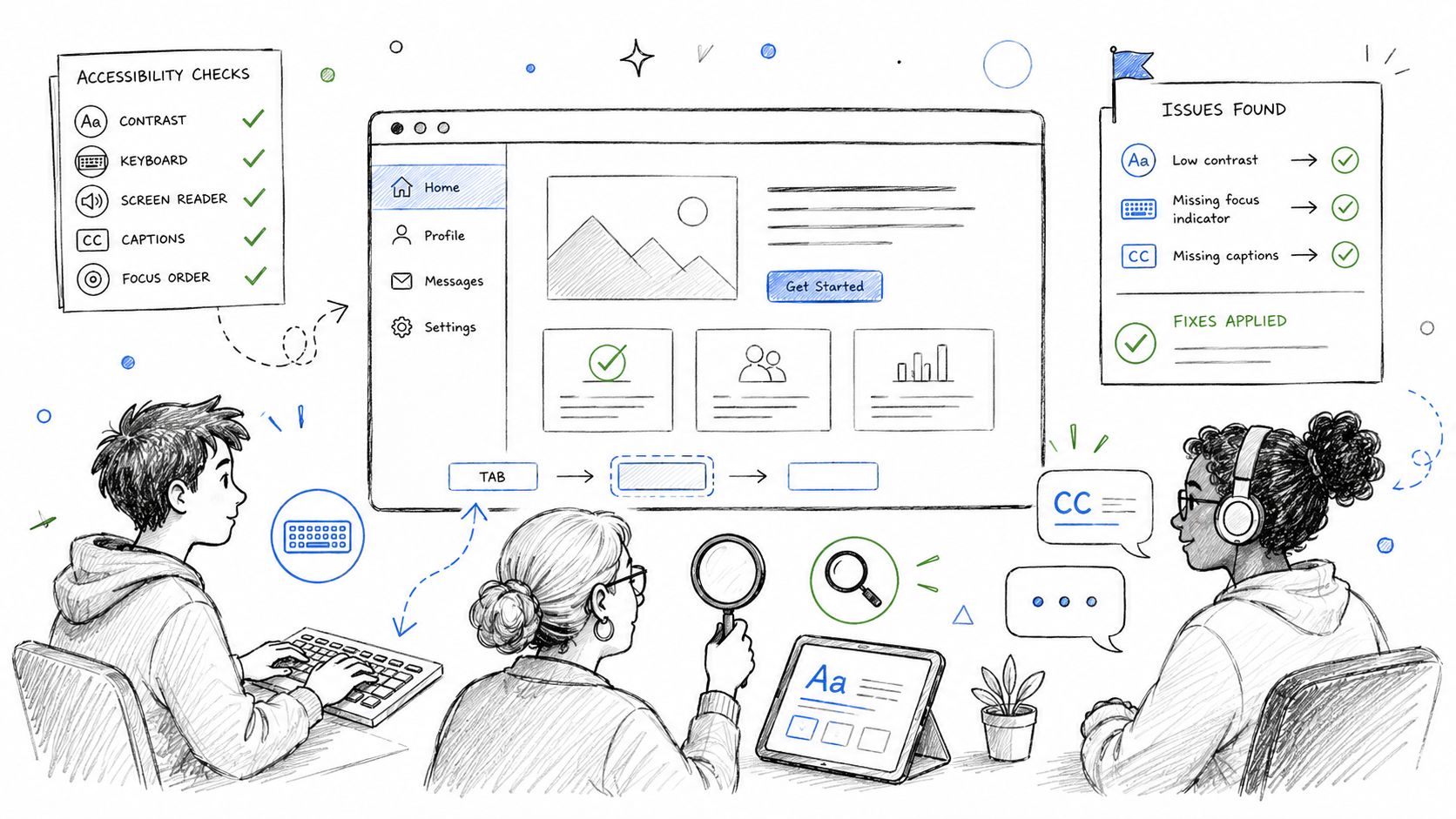
Teams should use Uxia to evaluate flows from the perspective of different accessibility-related user profiles. That includes low-vision navigation, keyboard-only interaction, cognitive load in multi-step tasks, caption usefulness, and whether color-independent cues are present when status matters.
For teams that want a broader framework, this guide to using an accessibility web checker in 2026 is a strong companion to synthetic usability testing. The important point is that checkers and user-centered validation solve different problems.
A good working model is to combine them:
Use automated checkers for technical issues: Contrast, landmarks, labels, and structural violations.
Use Uxia for interaction-level friction: Whether users can complete tasks clearly and confidently.
Record findings in the design system: Accessibility should inform reusable patterns, not live only in tickets.
Bring in real users periodically: Synthetic validation improves coverage, but lived experience still matters.
What doesn't work is treating accessibility as a legal or QA concern only. Teams that make it a design input produce cleaner flows for everyone, not just for users with specific needs.
7. Validate Product Workflows and User Journeys Before Heavy Engineering Investment
The fastest way to waste an engineering sprint is to build the wrong flow in high fidelity.
Figma Config 2026 reinforced a shift product teams should act on now. Prototypes are getting closer to production behavior, which means teams can validate decision paths, handoffs, and failure states before engineers commit to architecture and edge-case handling. That changes the economics of product discovery. A weak workflow should fail in prototype, not in a release candidate.
This matters most in flows where one mistake creates downstream confusion. Onboarding, checkout, identity verification, approval chains, billing changes, and account recovery all fit that pattern. If users hesitate early, later steps rarely recover the experience.
Prototype the journey, then test the sequence
Uxia is useful here because it evaluates task completion across a full journey, not just reactions to a single screen. Upload an interactive prototype, assign a mission such as submitting a refund request or configuring team permissions, and review where users pause, backtrack, or misread the next action. Those are workflow problems, not visual polish problems.
Teams that have not mapped those paths clearly should start with a user flow diagram for complex product journeys. Journey testing works better when the team agrees on the intended route, the alternate branches, and the points where users are likely to abandon or ask for help.
The practical trade-off is straightforward. As prototypes become more realistic and easier to connect to development workflows, it also becomes easier to carry bad product logic further into delivery. I have seen teams save weeks by testing two different approval sequences before writing backend rules. I have also seen the opposite. A polished prototype created false confidence, engineering built around it, and the team later learned users did not understand who was responsible for the next step.
Two practices consistently reduce that risk:
Test competing flow structures side by side: Compare shorter paths, guided paths, and more explicit paths before choosing the one engineering will support.
Bring engineering into the review early: Confusion in a prototype often points to implementation complexity, support burden, or permissions logic that should be simplified before buildout.
Screen-level feedback is not enough here. The expensive failures usually show up in transitions, dependencies between steps, unclear status changes, and recovery paths when something goes wrong. That is exactly the work to validate before heavy engineering investment.
8. Build a Research Operations Practice Centered on Speed and Accessibility for All Team Members
High-performing teams don't just “do research.” They build a system that makes research easy to start, easy to repeat, and easy to learn from. Figma Config 2026 pointed toward broader creative participation through generative plugins, Weave workflows, and a more capable agent. Research operations should evolve the same way.
In practice, that means validation can't stay trapped with one centralized function. Designers, PMs, and researchers all need access to a repeatable process.
What lightweight ResOps actually looks like
Figma announced that Weave tools in Figma Design are rolling out to Professional plans and above with Full seats, that generative plugins are launching, and that the Figma agent is available to Full seats in all files and Dev or Collab seats in Draft files on Professional, Organization, and Enterprise plans with AI enabled, as outlined in Figma's Config 2026 help center roundup. The common thread is distribution. More team members can do more work directly.
Research operations should mirror that pattern with Uxia. The practical stack is simple: shared mission templates, common audience definitions, a central workspace for reports, and a decision rule for when findings trigger change. Without those basics, testing gets democratized in the worst way. Everyone runs tests differently, and nobody trusts the outputs.
A resilient setup usually includes:
A small template library: Onboarding, checkout, navigation discovery, feature comprehension, and accessibility checks.
A shared insight repository: Notion or Confluence works fine if teams update it.
Regular review cadence: Weekly or bi-weekly sessions keep learnings from disappearing into private files.
Role clarity: Designers can run exploratory tests, researchers can refine rigor, PMs can connect findings to priorities.
Good ResOps removes friction from learning. It doesn't add ceremony to it.
What doesn't work is overengineering the process. Teams need enough structure to compare results, not so much structure that nobody runs tests.
9. Measure Design Quality Through User Outcome Metrics, Not Just Aesthetic Preferences
The strongest teams at Figma Config 2026 weren't talking only about expression. They were talking about output that behaves well. That's the standard product teams should adopt too. Not “which version looks more modern,” but “which version helps users complete the task with less confusion.”
AI tools generate polished options quickly. Once every direction looks decent, subjective design debate gets even noisier. Outcome metrics cut through that.
Use metrics that connect to real user success
At Config 2026, Figma Motion entered open beta on all plans and added scroll-based animation triggers plus responsive math variables like calc and clamp, with rollout beginning June 24, 2026, according to Figma's Motion announcement video. That means teams can build more advanced interactive behavior directly in design files. It also means more chances to overcomplicate the experience.
The answer isn't to avoid richer interaction. It's to measure whether it helps. In Uxia, teams can compare design versions based on task completion, points of hesitation, transcript confusion, and journey success. Those are much stronger decision inputs than comments like “this one feels cleaner.”
Useful evaluation metrics often include:
Task success: Can users finish the primary action?
Navigation clarity: Do they know where to go next?
Error friction: Where do they stall or misinterpret the interface?
Message comprehension: Do they understand what the interface is promising or requiring?
This doesn't mean aesthetic quality stops mattering. It means aesthetics should support outcomes, not replace them as the decision standard.
The practical mistake to avoid is collecting metrics with no action threshold. Teams should decide in advance what level of confusion or failure triggers redesign, iteration, or escalation to human research.
Figma Config 2026: 9-Point Comparison of AI-Driven Design & Validation
Item | Implementation complexity 🔄 | Resource requirements ⚡ | Expected outcomes 📊 | Ideal use cases ⭐ | Key advantages 💡 |
|---|---|---|---|---|---|
Integrate AI-Powered Testing into Your Design Sprint Workflow | Moderate, integrate with design tools and define missions | Low–Medium, platform access, designer time, initial training | Faster validation (minutes), higher iteration velocity | Design sprints, prototype A/B, early decision filtering | Eliminates recruitment delays; scales tests across variations |
Adopt AI-Assisted Design Systems That Evolve with Your Product | High, governance, automation, and version control needed | Medium–High, tooling, data pipelines, DS ownership | Components adapt to real behavior; reduced inconsistencies | Large products, centralized design systems, scale-ups | Reduces design debt; auto-generates validated variants |
Leverage Synthetic User Research to Reduce Bias and Speed Up Validation | Moderate, define personas and test missions precisely | Low, no recruiters, platform credits; needs prompt expertise | Scalable samples, reduced recruiter bias, cost savings | Startups, budget-limited teams, demographic breadth testing | Scales to hundreds of testers; rapid, diverse insights |
Test Early and Often: Make Validation a Daily Practice, Not a Gate | Low–Moderate, mainly cultural change and lightweight process | Low, fast setup, frequent runs, basic governance | Catches issues early, continuous improvement, faster time-to-market | Fast-iteration teams, sprint-based workflows, startups | Prevents late rework; makes testing habitual and fast |
Use Qualitative Feedback from Synthetic Users to Inform Copy and Messaging | Low, create copy variants and focused missions | Low, platform use and transcript review time | Clearer messaging, improved conversion, stakeholder-ready quotes | Landing pages, onboarding, CTAs, messaging experiments | Rich think-aloud transcripts; demographic-specific language cues |
Implement Accessibility Validation as a Continuous Testing Practice | Moderate, define accessibility personas and scenarios | Medium, accessibility profiles, expert interpretation | Early accessibility fixes, regulatory evidence, inclusive UX | Regulated industries, inclusive design, accessibility compliance | Tests assistive-tech usability; finds issues automated checkers miss |
Validate Product Workflows and User Journeys Before Heavy Engineering Investment | Moderate–High, realistic multi-step prototypes required | Medium, prototype fidelity, participant runs, analysis time | Reduced engineering rework, validated flows, better scoping | Complex workflows, onboarding, multi-step features | Saves engineering time; identifies drop-offs pre-build |
Build a Research Operations Practice Centered on Speed and Accessibility for All Team Members | High, org change, processes, templates, governance | Medium–High, ResOps lead, training, tooling, shared workspace | Democratized testing, faster cross-functional validation, knowledge reuse | Scaling orgs, enterprises, teams democratizing research | Removes gatekeeping; empowers designers/PMs/engineers to test |
Measure Design Quality Through User Outcome Metrics, Not Just Aesthetic Preferences | Moderate, define metrics, baselines, and instrumentation | Medium, analytics setup, dashboards, metric governance | Objective decisions, measurable ROI, stakeholder alignment | CRO, product teams tracking impact, leadership reporting | Data-driven choices; tracks improvement and ties to business goals |
From Inspiration to Implementation Your Next Steps
Figma Config 2026 changed the execution standard for product teams. The bottleneck is no longer producing concepts. The bottleneck is proving, quickly and repeatedly, which concepts deserve to survive contact with users.
That shift matters because Figma is pulling design, prototyping, motion, code-adjacent workflows, and AI assistance closer together in one environment. Teams can now create more options earlier in the sprint. That only improves product quality if validation speeds up at the same rate. Otherwise, teams ship more untested decisions, push more ambiguity into engineering, and spend more time cleaning up avoidable mistakes after handoff.
Uxia fits the practical gap between faster creation and better decisions. Teams can run synthetic testing on onboarding flows, checkout paths, empty states, component behavior, accessibility scenarios, and copy variants while the work is still cheap to change. That shortens the path from draft to evidence. It also changes the design sprint itself. Instead of waiting for a formal research window or a late-stage usability check, product teams can make validation part of daily delivery.
Start with one repeated failure point.
If feedback usually arrives after design review, add synthetic user tests to sprint reviews. If engineering keeps finding workflow problems during implementation, test key journeys before handoff. If your design system spreads component changes across multiple squads, validate reused patterns before they become defaults. If research capacity is the constraint, set up test templates so PMs and designers can run structured studies without lowering the bar for evidence.
There are real limits, and teams should treat them seriously. Synthetic testing is strong for directional validation, workflow comparison, copy comprehension, and early accessibility checks. It is weaker for emotionally sensitive decisions, high-stakes trust questions, and research that depends on lived experience over time. The right operating model is not AI instead of research. It is AI for frequency, human research for depth, and clear rules for when each method applies.
The same caution applies to newer code-adjacent features coming out of Config. Pushing work closer to production can reduce translation loss, but it does not remove the need for engineering governance, naming standards, version control discipline, or architecture review. Figma's Config 2026 recap makes the direction clear. Teams still need to test those workflows inside their own delivery pipeline before treating them as standard practice.
The best next step is operational, not inspirational. Choose one behavior change this week and make it part of the process: require behavioral validation for high-impact design system updates, run synthetic testing before engineering commits to a complex flow, or review user outcome signals alongside design critiques. Teams that do this will get more than faster output. They will get tighter feedback loops, less rework, and better product decisions.
If your team wants to apply the best lessons from Figma Config 2026 immediately, Uxia is a practical place to start. You can upload prototypes, define missions and audiences, and get synthetic user feedback fast enough to shape the next iteration, not just explain the last one. For product designers, PMs, UX researchers, startups, agencies, and enterprise teams, that means less waiting, less guesswork, and better decisions grounded in how users interact with, interpret, and complete your product flows.