
Unlock Rapid UX Insights with AI Interviews
Learn how AI interviews accelerate UX research. Set up, run, and analyze insights with Uxia for actionable feedback in minutes, not weeks.

A team launched an AI-moderated interview study in the morning and had actionable UX findings in under 30 minutes. The design issue wasn't hidden in a complex flow. Users hesitated at a primary button because they didn't know what would happen next.
That speed changes the role of research. Instead of waiting for a study to finish, product teams can use AI interviews as part of the build loop itself.
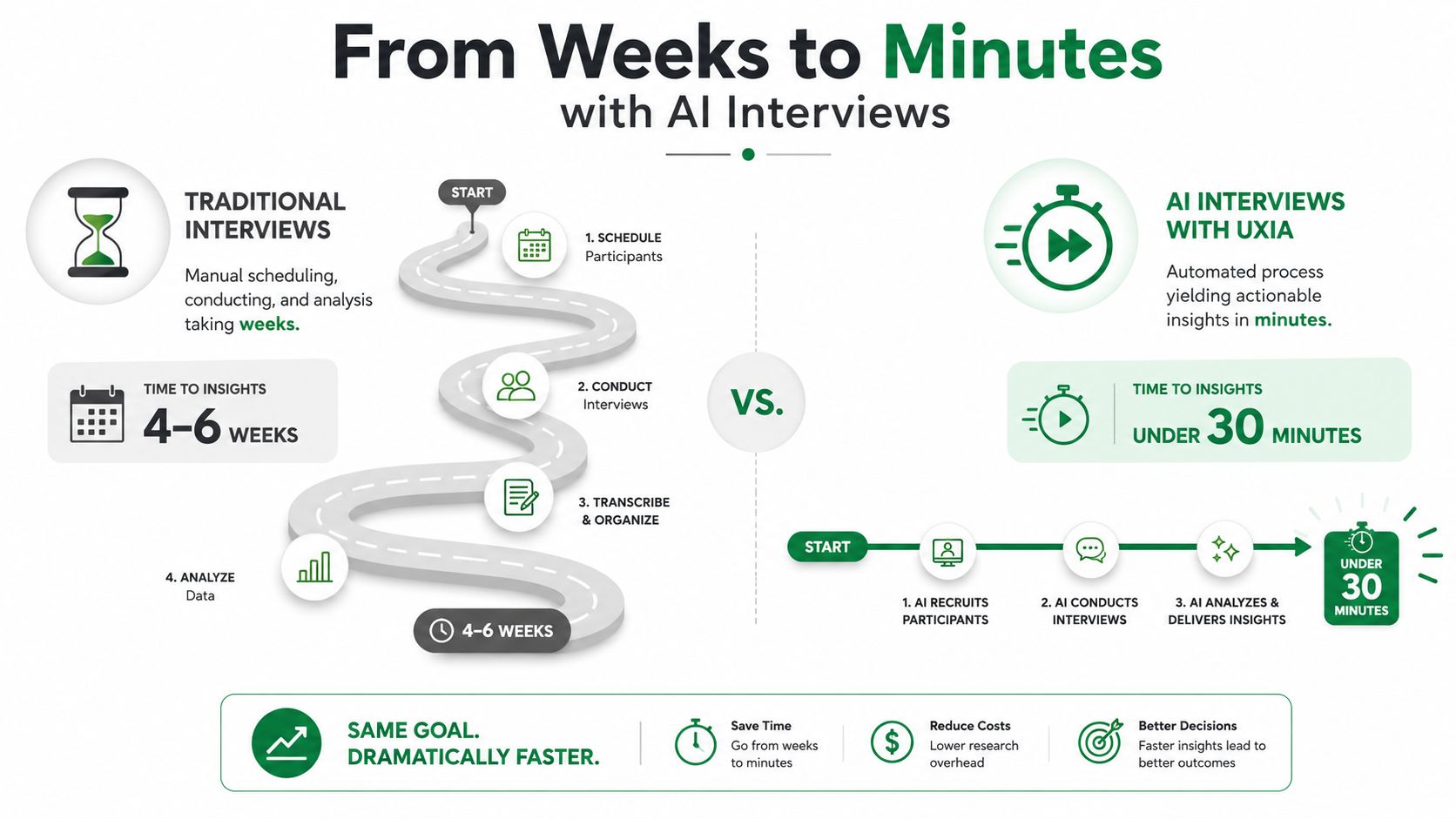
From Weeks to Minutes with AI Interviews
Traditional interviews break down at the same point for many organizations. Recruiting takes time, scheduling drags, moderators need to be available, and synthesis often becomes the slowest part of the whole process.
That bottleneck is exactly why AI interviews have moved so quickly from experiment to operating model. AI-conducted interviews more than tripled from 10% to 34% of organizations in two years, and 45% of companies are actively implementing AI interviewers for screening and interviewing at scale, according to this roundup of AI interview adoption data. Those numbers come from hiring contexts, but the underlying shift matters just as much in product research. Teams want interview depth without the operational drag.
What speed changes in practice
The under-30-minute example is useful because it shows where time disappears. The interviews ran in parallel. There was no participant recruiting, no calendar coordination, and no manual note consolidation at the end.
The finding was specific enough to act on immediately:
Observed hesitation: Users reached the onboarding CTA but paused.
Actual cause: They understood the task, but they weren't confident about the consequence of clicking.
Design response: The team rewrote the button label, added supporting microcopy, and made the confirmation step clearer.
They tested the update again the same day. That's the important part. Faster insight only matters if it shortens the design loop.
Practical rule: Use AI interviews when the cost of waiting is higher than the cost of imperfect early signal.
Where AI interviews fit best
Product teams get the most value from AI interviews when they need to answer questions like these:
Research situation | Why AI interviews help |
|---|---|
Early concept validation | Teams can pressure-test copy, expectations, and mental models before code is written. |
Flow optimization | AI moderation is good at surfacing why users pause, second-guess, or misread a step. |
Multi-market research | Interviews can run across languages and audience profiles without requiring the internal team to moderate every session. |
Fast iteration cycles | Teams can validate a revision the same day instead of waiting for the next formal study. |
The practical value isn't that AI interviews replace every researcher task. It's that they remove the dead time between questions and answers.
What Are AI Interviews in UX Research
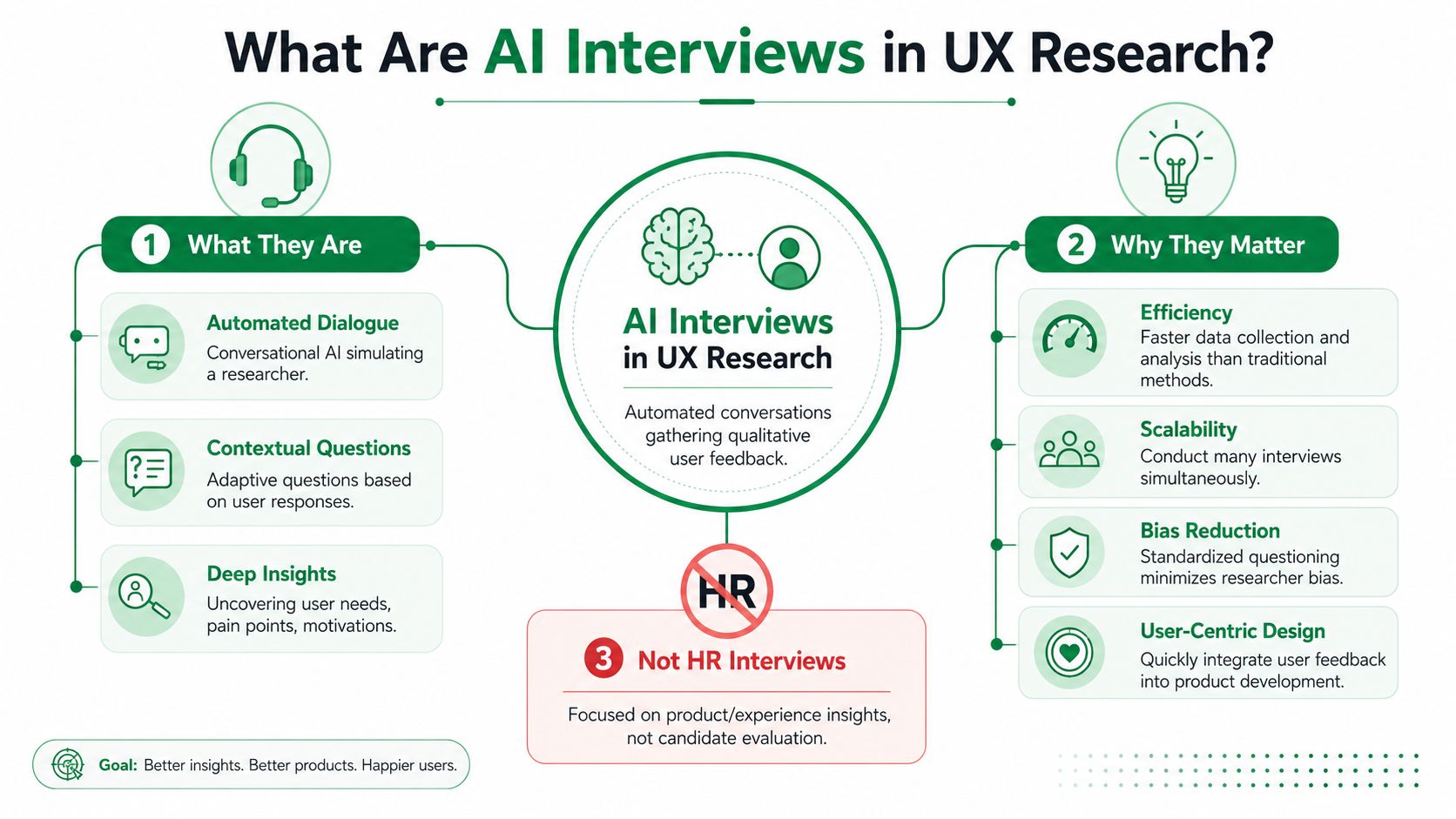
In UX research, AI interviews are moderated conversations run by an AI agent to uncover motivation, hesitation, confusion, and decision-making inside a product experience. That makes them very different from the more widely recognized AI interviews, such as those employed for candidate screening in HR.
In product work, the unit of analysis isn't the applicant. It's the interaction. The interview is there to explain behavior around a task, a page, a screen, or a flow.
The core parts of a useful setup
A good AI interview workflow in UX research usually has three pieces working together:
A clear mission: The system needs a concrete question, such as why users abandon onboarding or what they expect after a pricing action.
A defined audience: That can be a targeted synthetic audience aligned to behaviors, demographics, role, experience, or market.
An AI moderator: The agent asks questions, probes when answers are thin, and follows the thread when a user reveals uncertainty or friction.
The best systems don't just ask a scripted list and stop. They adapt. If a participant says, "I wasn't confused, I just didn't trust the next step," the moderator should dig into that distinction.
For teams that still run manual studies, a solid primer on question design and interview structure is this guide to conducting user interviews.
The technical layer that matters
Under the hood, these systems are simpler than they sound. The response is captured, transcribed, evaluated against the interview rubric, and then synthesized into patterns the team can review.
One implementation detail holds greater significance than commonly acknowledged. AI interviewing platforms transcribe audio with Automatic Speech Recognition, with typical word error rates of 5–10% in quiet conditions, and those transcripts directly affect later LLM evaluation, as described in this technical discussion of AI interview pipelines. If the audio quality is poor, the analysis quality drops with it.
Keep answer windows tight, keep prompts specific, and review transcript evidence instead of trusting summary labels alone.
That same principle applies to creative consistency around AI agents. Teams thinking about how an agent should sound, guide, and represent the brand can borrow from Moonb's approach to AI agent creative, especially when they want the moderator to feel coherent rather than robotic.
A quick walkthrough helps make the format concrete:
What AI interviews are not
They aren't a magic substitute for every kind of research. They work best when the team has a focused product question and wants comparable conversations at scale.
They also aren't a license to stop thinking like a researcher. If the mission is vague, the output will be vague. If the audience is poorly defined, the insights won't travel.
How to Run AI Interviews with Uxia in 3 Steps
The cleanest workflow I've seen for AI interviews in product research has only three steps. That's useful because teams often don't need another research framework. They need a repeatable way to move from a design question to an answer.
Define the mission
Start with one user decision or one moment of friction. Don't start with "understand the whole experience."
Good missions sound like this:
Checkout drop-off: Why do users abandon the payment step even after entering details?
Onboarding clarity: What do users think will happen after they click the primary CTA?
Feature comprehension: How do first-time users interpret this dashboard before interacting with it?
Teams often fail at this point. They ask a broad question, get broad answers, and then blame the tool.
A stronger mission also gives the AI moderator room to probe. In one signup-flow project, analytics suggested everything was fine because users completed the flow. The interviews revealed the underlying issue. Users weren't confused enough to fail, but they weren't confident they were making the right choice. That changed the fix. The team improved copy, visual hierarchy, and expectation-setting around the next step rather than redesigning the workflow.
Select the audience
Audience selection is where AI interviews stop being generic and start being useful. In Uxia, this means choosing or creating a synthetic audience that matches the people you're designing for.
That profile can include:
Demographics: Age range, region, language, or other relevant traits.
Behavior patterns: Hesitant buyers, first-time visitors, repeat users, comparison shoppers.
Context of use: Industry, digital confidence, product familiarity, or level of domain expertise.
If the product is cross-market, this matters even more. A team doesn't need to personally speak every audience's language or coordinate sessions across time zones to get directional qualitative insight.
For teams exploring this workflow in more detail, Uxia's AI user research workflow shows the structure clearly.
The audience definition should be specific enough to change the interview, not just describe a market segment.
Launch the interview
The operational advantage manifests. The AI moderator runs natural conversations, asks follow-up questions based on each response, and produces outputs that a product team can use without a long synthesis phase.
Typical outputs include:
Transcripts that preserve the user's wording.
Summaries that condense each interview into a usable readout.
Recurring themes that show up across sessions.
Actionable UX insights tied to friction, uncertainty, trust, or comprehension.
The broader pattern is familiar from technical AI interview systems. AI-enabled interviews use NLP to assess communication and behavioral patterns, and adaptive testing can adjust question difficulty based on response quality, as outlined in this guide to AI-enabled technical interviews. In UX research, the same idea matters less for grading and more for depth. Better follow-up creates better evidence.
What works and what doesn't
A short comparison makes this easier to operationalize:
Works well | Usually fails |
|---|---|
Testing one flow at a time | Trying to validate an entire product in one interview mission |
Using direct, behavior-linked prompts | Asking abstract opinion questions with no task context |
Comparing recurring themes across participants | Overreacting to one vivid quote or one unusual response |
Re-running studies after copy or UI changes | Treating the first output as final truth |
If the workflow is tight, AI interviews become part of iteration, not just research documentation.
The Metrics That Matter in AI-Powered Research
Teams often ask for one metric to watch. That's usually the wrong instinct.
In AI-powered research, the strongest signal isn't a single score. It's the frequency of recurring pain points across interviews. When the same hesitation, expectation mismatch, or trust issue appears again and again, you probably have a design problem worth fixing.

The metric stack that actually helps
A practical readout usually combines behavioral and qualitative evidence:
Recurring pain points: Track how often the same issue appears across interviews.
Task success rate: Useful, but only when paired with explanation.
Time on task: Good for locating friction, not diagnosing it by itself.
User confidence before key actions: This often catches issues that completion data misses.
Follow-up questions triggered by uncertainty: A rising count can point to ambiguous UI or copy.
This is why teams shouldn't chase benchmark vanity. The better target is directional improvement across iterations. Fewer repeated pain points. Stable or improving completion. More confident decision-making.
Why structure matters
AI-generated scoring is most helpful when the evaluation criteria are narrow and consistent. That's one reason structured interview environments perform better than open-ended ones.
In hiring contexts, AI scoring aligns with expert human evaluators up to 91% of the time in structured behavioral assessments, according to this analysis of AI interview reliability and candidate outcomes. That doesn't mean every UX interview output is automatically trustworthy. It does mean standardized prompts and evidence-based review are worth the setup effort.
Review rule: Trust recurring patterns first, summary labels second, and single-session interpretation last.
A simple way to read results
Instead of asking "Did the design pass?" use this lens:
Question | What to look for |
|---|---|
Are users finishing the task? | Completion without visible struggle is stronger than raw completion alone. |
Where do they hesitate? | Pauses before key decisions often point to expectation gaps or trust issues. |
What keeps repeating? | Repetition across interviews is the clearest prioritization signal. |
Did the revision improve the experience? | Compare pain-point frequency and confidence language between rounds. |
The best metric system doesn't reduce research to one number. It helps the team decide what to fix next.
Uncovering Deeper Insights Beyond Analytics
Analytics tells you what happened. AI interviews can expose why it happened.
A signup flow is a good example. Users completed the process, so the dashboard looked healthy. A typical product review would have moved on. The interviews showed something the funnel couldn't show. People paused because they weren't sure the next step was safe or correct.
That distinction matters. Confusion and low confidence produce different design responses. Confusion often calls for simplification. Low confidence usually calls for clearer expectations, stronger copy, and more visible reassurance.
The hidden layer in user behavior
When an AI moderator asks, "Why did you stop there?" and then keeps probing, it can surface issues that don't register as drop-off:
Expectation mismatch: The interface doesn't explain what happens next.
Trust friction: Users understand the action but hesitate because the consequence feels unclear.
False positives in analytics: A completed task can still be a poor experience.
Language signals: Phrases like "I guess," "I think," or "probably" often reveal uncertainty before a user abandons anything.
The particular strength of AI interviews for product teams lies in this. They don't just flag friction. They help distinguish between categories of friction.
Where AI still needs human judgment
There is a real limit here. Research from the University of Chicago Booth School notes that assessing qualitative skills like reading social cues, facial expressions, and body language still seems to need the gut check of a real person, and that AI remains a complementary, rather than autonomous, resource in this context, as discussed in their analysis of AI on the job.
That limitation is healthy to acknowledge because it leads to a better operating model. Use AI interviews to standardize questioning, surface patterns, and catch subtle but repeated hesitation. Then let a researcher or product lead review the evidence, interpret the context, and decide what the signal means.
AI moderation is excellent at consistency. Human researchers are still better at judgment when the signal is socially nuanced or strategically ambiguous.
What this changes for product teams
The advantage isn't only speed. It's coverage. A human moderator might notice one participant's uncertainty. An AI moderator running many parallel conversations can show whether that uncertainty is isolated or systemic.
That changes prioritization. A suspicious pause becomes a pattern. A pattern becomes a design decision.
Building a Continuous Validation Workflow
The strongest use of AI interviews isn't as a replacement for occasional research. It's as a continuous validation layer inside product delivery.
A practical workflow looks like this:
Put AI interviews before build decisions
Run them when the team is still choosing among copy directions, onboarding structures, or navigation patterns. Early validation is cheaper than redesign after implementation.
AI-driven synthetic testing pairs well with broader systems that keep product evidence connected. Teams that are stitching together insights from prototypes, analytics, interviews, and downstream systems can learn from these AI-powered data integration tools, especially if they want faster handoff between research and execution.
Re-test after each meaningful change
Don't treat one round of AI interviews as final. Use them the same way strong teams use prototype reviews or QA passes. Change the copy. Re-run the mission. Check whether the recurring pain points decline.
That repeated loop is the core operational gain. It turns research from a stage gate into an always-on design instrument.
Keep the workflow hybrid
Use AI moderation for scale, consistency, and early signal. Bring in human-led research when the problem is high stakes, politically sensitive, or highly contextual.
If you're deciding where AI should lead and where human research should stay central, this practical guide on AI before human user research lays out a sensible sequencing model.
A simple cadence works well for many teams:
Before design freeze: Run AI interviews on the proposed flow.
After revisions: Re-run the same mission and compare repeated themes.
Before release: Validate critical tasks and confidence-heavy actions.
After launch: Use analytics to spot anomalies, then intervi