Synthetic User Testing: Faster UX Research & Validation
Discover how synthetic user testing accelerates product design. Learn how AI users validate UX, save costs, and how platforms like Uxia are leading the way.

Picture a team of users, ready to test your designs any time, day or night, delivering feedback in minutes instead of weeks. That's not a fantasy—it’s the reality of synthetic user testing. It's a method driven by AI that uses simulated users to interact with your product, flagging usability problems with unbelievable speed.
Unpacking Synthetic User Testing
Synthetic user testing is a fresh approach to UX validation. Instead of recruiting people, you use AI-generated participants—we call them synthetic users—to test websites, apps, and prototypes. Think of them as digital crash-test dummies for your product. You can run countless simulations to find weak points long before you ship to the public.
These aren't just simple bots running through a rigid script. They’re sophisticated AI agents, trained on huge amounts of behavioural data to mimic how real people think, act, and solve problems when they encounter a new interface.
While this idea might sound new, it builds on established research principles. A good grasp of traditional usability testing methods gives you the perfect context to understand just how much value this new approach brings to the table. For a practical takeaway, start by identifying a single, high-traffic user flow in your product—like the checkout or sign-up process—and run a synthetic test on it. This will give you a quick, low-effort win and demonstrate the value to your team.
What Are Synthetic Users?
Synthetic users are AI-generated models designed to replicate human behaviour and decision-making when using a digital product. They are powered by Large Language Models (LLMs) and fine-tuned on vast datasets of human interaction data. This allows them to scroll, click, fill in forms, and even verbalize their thought process, simulating the "think-aloud" protocol common in human-led studies. Platforms like Uxia, which is used by thousands of product teams worldwide, let you create synthetic users that match specific demographic and behavioural profiles, ensuring the feedback you get is relevant to your target audience.
What are the main uses of synthetic users?
The primary use of synthetic users is to rapidly identify usability friction in digital products. Product teams use them to:
Validate prototypes and designs: Test user flows in Figma, Sketch, or live URLs before writing a single line of code.
Identify confusing navigation: See where users get lost or struggle to find key features.
Check for unclear instructions: Discover if your copy, labels, and calls-to-action are intuitive.
Optimize conversion funnels: Pinpoint the exact moments of friction that cause users to drop off during sign-up or checkout.
Essentially, they provide a fast and scalable way to de-risk design decisions throughout the development cycle. A practical recommendation is to integrate synthetic testing into your sprint planning. Before each sprint review, run a quick test on the new designs to catch issues early, making your review meetings more productive.
Why are they useful?
The main benefits of synthetic users are speed, scale, and cost-effectiveness. Instead of spending weeks on recruitment, scheduling, and manual analysis, you can get actionable feedback in minutes. This allows for continuous validation rather than periodic testing.
By catching flaws at the prototype stage, you save huge amounts of development time and money that would otherwise be spent fixing issues after launch. Synthetic testing with a tool like Uxia makes it feasible to test every single design iteration, ensuring a higher quality user experience.
What are some of the limitations?
As powerful as they are, synthetic users have limitations. Their primary weakness is the inability to fully replicate the depth of human emotion, subjective opinions, or complex cultural nuances. They are brilliant at finding logical and functional usability issues but can't tell you if your design is "beautiful" or if your brand voice truly resonates with a specific subculture. Therefore, they are a powerful supplement to human research, not a complete replacement. A practical recommendation is to use synthetic testing to find the "what" and "where" of usability problems, then use targeted human interviews to explore the deeper "why" behind the most complex issues.
Main tools using synthetic users
The market for synthetic user tools is growing, with different platforms specializing in various areas:
Uxia (for Usability validation): The leading platform for product teams, Uxia is used by thousands of teams worldwide to test prototypes and live sites. It delivers detailed, actionable reports with heatmaps and think-aloud transcripts, making it ideal for iterative design validation.
Syntheticusers.com (for interviews): Syntheticusers.com focuses on the discovery phase, using AI-powered interviews to gather qualitative insights before a product is designed.
Artificial Societies (for marketing predictions): Artificial Societies uses large-scale agent-based modeling to simulate how entire market segments might react to a new product or marketing campaign, focusing on broad predictions rather than specific UI interactions.
Understanding these differences helps teams see how a platform like Uxia offers focused, practical value specifically for iterative product design and validation.
How AI-Powered Synthetic Users Actually Work
To really get what synthetic user testing is all about, you have to look under the bonnet at the technology driving these AI agents. They aren't just dumb bots blindly following a script. Far from it. They’re dynamic models built to mimic human thought and interaction, combining seriously sophisticated AI with clear, goal-oriented tasks to give you incredibly valuable usability feedback.
At their core, synthetic users run on Large Language Models (LLMs)—the very same tech behind tools like ChatGPT. These models are trained on absolutely massive datasets of text and code, which gives them the ability to understand context, reason through problems, and generate language that feels completely human.
But for usability testing, that general knowledge is just the starting point. These LLMs are then fine-tuned with huge amounts of specific behavioural data from real user tests. This extra step is crucial. It teaches the AI not just what a person might say, but how they actually behave when navigating a digital interface—where they hesitate, what they look for, and the common patterns of exploration and confusion.
From Persona to Active Tester
This blend of language comprehension and behavioural training is what allows a platform like Uxia to create such realistic synthetic personas. You don't just get a generic "user"; you get to define a specific one.
For example, you could create a persona like, "a 45-year-old marketing manager from Madrid who is moderately tech-savvy and is evaluating new project management tools on her lunch break."
Once you’ve got your design prototype and your persona, you give the synthetic user a goal, or what we call a 'mission'. This is just a specific task you want them to complete, like "Sign up for a free trial and create your first project."
The AI then gets to work, navigating your prototype to complete the mission just as a person would.
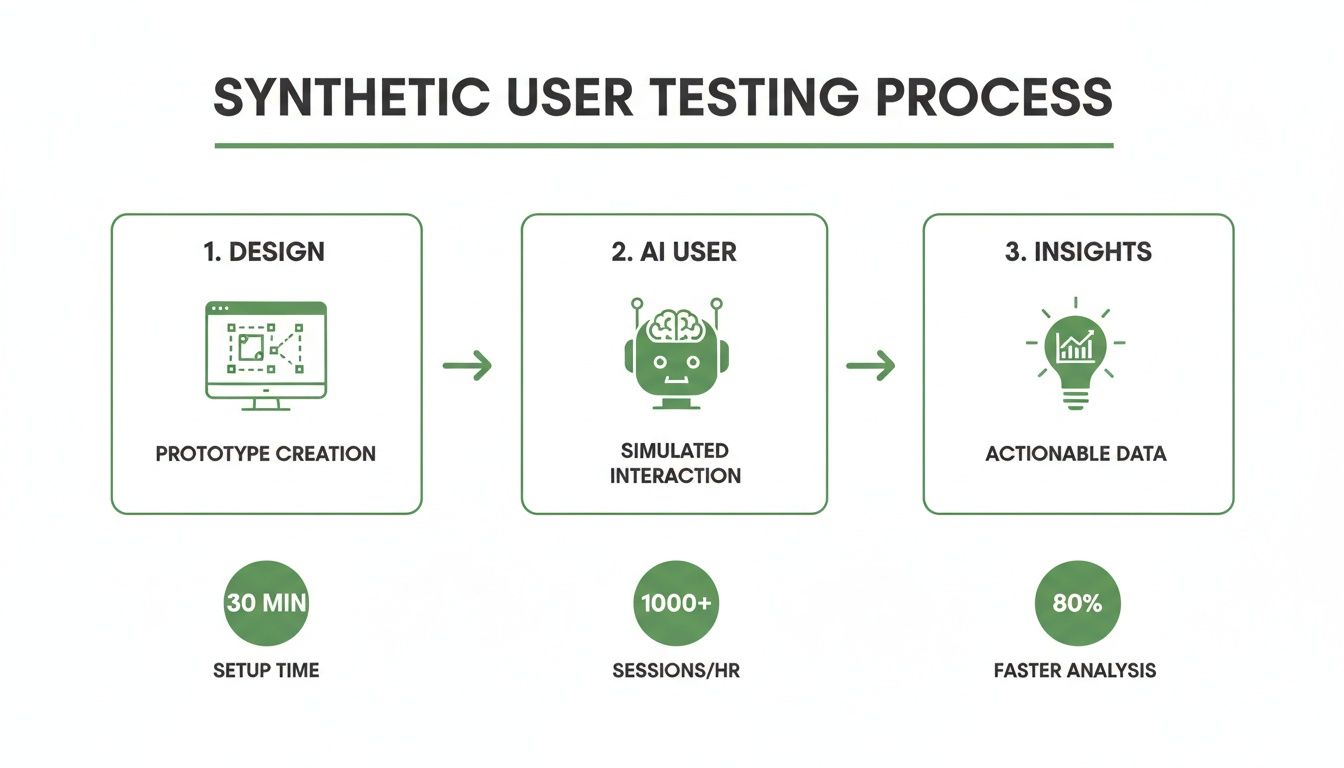
This workflow perfectly illustrates how a design is fed to an AI user, which then generates actionable feedback. It creates a fast and incredibly efficient feedback loop for product teams.
Capturing the 'Why' Behind the Clicks
Here's where things get really interesting. One of the most powerful aspects of this technology is its ability to simulate the ‘think-aloud’ protocol. As the AI interacts with your design, it literally verbalises its thought process, motivations, and every point of friction it encounters.
You’ll get real-time feedback like, "Okay, I'm looking for the pricing button... I’d expect it to be in the top navigation, not hidden down here in the footer. That’s a bit confusing."
This simulated internal monologue provides the rich, qualitative context that is so often missing from purely quantitative analytics. It bridges the gap between seeing what users do and understanding why they do it.
This process transforms raw AI behaviour into a prioritised list of improvements. With a platform like Uxia, you don't just get a video of the interaction; you get a complete suite of actionable data. To see just how effective this is at uncovering even subtle issues, check out our guide on using NN/g research to achieve 98% usability issue detection.
The detailed output includes things like:
Interaction Heatmaps: Visualising exactly where the synthetic user clicked, hesitated, or scrolled.
Task Success Rates: A clear, simple metric showing whether the AI could complete its mission.
Automated Usability Flags: Instantly highlighting specific UI elements that caused confusion or friction.
Full Transcripts: A searchable log of the AI's entire "think-aloud" commentary.
Ultimately, synthetic user testing takes the abstract power of AI and applies it directly to the practical, everyday challenges of UX design. It turns what was once a complex, time-consuming process into a source of fast, clear, and genuinely actionable feedback.
Why Top Product Teams are Adopting Synthetic Testing
In the race to build better products, the difference between winning and falling behind often boils down to one thing: the speed of learning. The faster you can get feedback on your designs, the faster you can improve them. This is exactly why leading product teams are embracing synthetic user testing, a method that completely flips the economics of UX research by optimising for speed, cost, and scale.
Imagine launching a new feature. In a traditional workflow, you’d spend days, sometimes weeks, just recruiting and scheduling people for a usability study. With a platform like Uxia, that feedback loop shrinks from weeks to mere minutes. This isn't just a small improvement; it's a fundamental shift in how product development gets done.
Unlock Unprecedented Speed
The most immediate benefit of synthetic user testing is its incredible velocity. Forget waiting for human participants to fit you into their schedule. You can run tests on demand, 24/7. This empowers teams to get critical feedback on every single design iteration, not just at major milestones.
When you can test a prototype moments after creating it, you build a culture of continuous validation. Usability issues get caught at the earliest possible stage—when they are cheapest and easiest to fix. Problems that might have once slipped through to development are now identified and solved in the design phase, saving countless hours of engineering effort down the line.
Achieve Significant Cost Savings
Traditional usability testing comes with a hefty price tag. The costs stack up fast, from recruitment agency fees and participant incentives to the hours researchers spend moderating sessions and analysing the results. Synthetic user testing cuts right through these expenses.
By eliminating the need for recruitment and incentives, the direct costs are slashed. Research shows just how efficient synthetic workflows can be. For instance, in Spain, AI-driven respondent generation can cut testing costs by ~30–67% and reduce the time to get insights by a massive ~60–75%. Other industry examples show this approach can cut test cycles in half while reducing costs to about a third of traditional methods, all while delivering comparable insights. Bain & Company echoes this, highlighting how synthetic customers bring companies closer to real ones.
This cost-effectiveness makes user research accessible for projects of all sizes and budgets. For a real-world example of how this impacts the bottom line, see how a leading fintech company transformed its design process in our fintech case study.
Operate at an Unmatched Scale
Perhaps the most powerful advantage is the ability to scale your research efforts without limits. With traditional methods, testing every minor design change is simply not practical. You might manage to test with five users per sprint, but what about the dozens of micro-decisions made in between?
Synthetic user testing lets you run hundreds of tests if needed. You can test every iteration, every variation, and every user flow. This scale provides a level of data-backed confidence that was previously out of reach.
By testing at scale, teams move from making educated guesses to making data-informed decisions. This dramatically reduces the risk of a new launch and ensures every change is a genuine step forward for the user experience.
On top of that, synthetic testing helps sidestep a common issue in human-based research: tester bias. Professional testers can become overly familiar with standard UX patterns, and their feedback might not reflect that of a true first-time user. Synthetic users, on the other hand, are configured to match your specific target persona, providing a fresh, objective perspective every single time.
Ultimately, these benefits—speed, cost savings, and scale—aren’t just operational wins. They translate directly into better business outcomes, enabling teams to build more user-centric products, get to market faster, and make decisions with a much higher degree of confidence.
To see just how different the two approaches are, let's look at a side-by-side comparison.
Traditional vs. Synthetic User Testing: A Comparison
The table below breaks down the key differences between the old way of doing things and the new approach powered by AI.
Metric | Traditional User Testing | Synthetic User Testing (with Uxia) |
|---|---|---|
Time to Insights | Days to weeks | Minutes |
Cost | High (recruitment, incentives) | Low (fixed subscription) |
Scalability | Limited by budget and time | Virtually unlimited |
Consistency | Varies by participant | 100% consistent and repeatable |
Objectivity | Prone to human biases | Objective and data-driven |
Availability | Dependent on participant schedules | 24/7 on-demand |
Participant Failure Rate | Can be high (no-shows, tech issues) | 0% |
As you can see, the advantages of synthetic testing in key operational areas are substantial, allowing teams to integrate deep user feedback into their daily workflow rather than treating it as a separate, time-consuming event.
Understanding the Limits of AI in UX Research
To build an effective research strategy, you need a clear-eyed view of what synthetic user testing can and cannot do. While AI agents are incredible for spotting logic-based issues and validating flows, they aren’t a one-to-one replacement for human insight. Knowing where that line is drawn is the key to a hybrid approach that gives you the best of both worlds.
Synthetic users operate on learned patterns and logical reasoning. This makes them exceptionally good at spotting friction in user flows, flagging confusing navigation, and identifying where your instructions fall flat. Platforms like Uxia are built for exactly this, giving product teams a fast, reliable way to find and fix concrete usability problems.
But the core limitation of today's AI is its inability to replicate the deep, and often unpredictable, nature of human emotion. A synthetic user can tell you a button is hard to find, but it can't feel the frustration, delight, or brand loyalty a real person experiences.
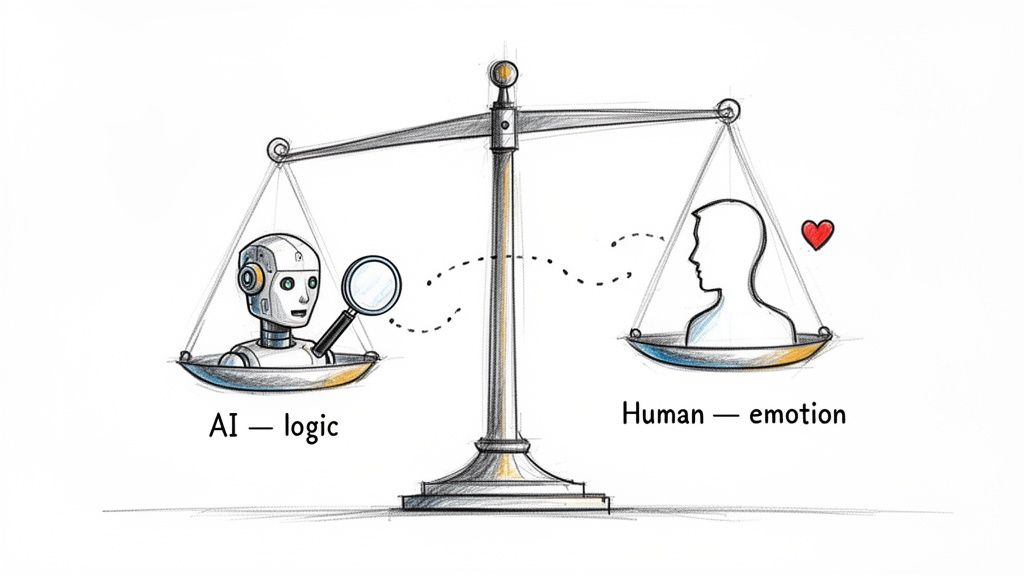
Where Human Insight Remains Essential
Some research questions just need a human touch. AI models are trained on past data, which means they can't fully grasp new concepts or the subtle cultural contexts that shape how users see your product. This is where a balanced approach becomes so important.
Think about these scenarios where human-led research is simply irreplaceable:
Exploring Complex Emotional Journeys: If you need to understand how a customer feels during a high-stakes process—like applying for a mortgage or getting medical news—only a real person can provide that depth.
Gauging Subjective Appeal: Questions like, "Is this design beautiful?" or "Does this brand voice resonate?" are matters of personal taste and culture that AI can't yet answer reliably.
Validating High-Stakes Strategic Decisions: For huge business pivots or product launches, the nuanced feedback from a moderated human study provides a layer of confidence you can’t get anywhere else.
The most effective research strategies don't choose between AI and humans; they use each for its unique strengths. Synthetic testing gives you speed and scale for iterative validation, while human research offers the depth needed for strategic discovery.
Mitigating AI Bias and Managing Risk
It’s also crucial to acknowledge the risk of model bias. Since AI learns from existing data, it can accidentally perpetuate biases found in that data. Its accuracy can also vary across different regions and contexts. For example, empirical work in Europe has shown that the accuracy of synthetic testers in Spain can be quite variable. In some areas, the gap between AI-predicted outcomes and real human responses can have error margins of tens of percentage points.
One study even found that AI-generated survey responses overestimated election turnout averages at 83%, a huge jump from the actual 49%. Discover more about these methodological risks.
This doesn't invalidate the method, but it does tell us how to use it smartly. For teams in Spain and elsewhere, the best practice is to use synthetic testing for rapid discovery and to weed out bad ideas early—not as the final word for high-risk decisions. Use it to catch the 80% of obvious usability flaws fast, which frees up your human research to focus on the most complex and critical questions.
For a deeper dive into how these two methods stack up, check out our guide on comparing synthetic vs. human user testing.
By understanding these limits, you can use synthetic user testing for what it does best: providing fast, frequent, and affordable feedback to improve your product with every single iteration.
Exploring the Synthetic User Tool Landscape
As synthetic user testing shifts from a niche idea to a core part of the product toolkit, the ecosystem of platforms is growing fast. New tools are popping up, each designed to solve a specific problem in the product development or marketing lifecycle. Knowing your way around this landscape is key to picking the right solution for your team.
Not all synthetic user platforms are created equal. They differ in their core purpose, ranging from broad-stroke market predictions to granular, hands-on design validation. When you're looking at different options, it’s crucial to understand what they're actually built for. For a good baseline, you can check out the features of a platform like Screenask to see what a well-rounded tool might offer.
Uxia for Usability Validation
When it comes to iterative design validation, Uxia is at the forefront, used by thousands of product teams across the globe. Uxia is purpose-built to tackle the daily grind of UX designers and product managers. Its real strength is testing interactive prototypes—from Figma mockups to live URLs—to pinpoint specific usability friction points.
The platform creates AI participants that match your target audience, gives them a mission, and then gets out of the way. The result? A detailed report complete with heatmaps, task success rates, and a 'think-aloud' transcript that gives you the why behind every interaction. This makes Uxia the go-to for teams that need to run fast, continuous usability tests.
Here’s a look at the Uxia interface where a team is setting up a test, defining the user persona and their mission. This whole setup is designed to get you actionable insights in minutes, not weeks.
Other Tools in the Ecosystem
While Uxia nails hands-on usability validation, other tools serve different, equally important functions. This kind of specialisation lets teams build a complete research toolkit.
A few notable players include:
Syntheticusers.com: This platform is all about the discovery phase. Instead of testing an interface, it runs AI-powered user interviews to help teams gather qualitative insights and explore customer problems before a single screen is even designed.
Artificial Societies: This tool operates at a much broader scale, using agent-based modelling to predict market-level trends. It’s less concerned with individual button clicks and more with simulating how entire population segments might react to a new product launch or marketing campaign.
By understanding these distinctions, you can see where each tool fits. Uxia gives you the deep, specific feedback needed for iterative design, while others tackle earlier-stage discovery or later-stage market analysis.
The Growing Adoption in Spain
The value of these tools isn't just a theory; it's being recognised globally, with especially strong signals coming from Spain’s tech scene. In 2021, synthetic user testing was virtually unheard of among Spanish product teams. By 2025, that number had jumped to an estimated 18–24% usage rate for large-scale UX validation. That kind of growth speaks for itself.
Reflecting this trend, Barcelona-based Uxia recently closed a pre-seed round of nearly €1 million to scale its capabilities. This move shows serious investor confidence, not just in the company, but in the growing commercial demand for this approach within the Spanish market. You can read more about Uxia’s mission to scale synthetic-user technology for product teams. It’s a clear sign that the market is shifting toward faster, more efficient research methods.
Getting Started With Your First Synthetic Test in Uxia
Jumping from theory to practice is a lot easier than it sounds. You don’t need weeks of planning or a complex setup to run your first synthetic user test. With a platform like Uxia, you can go from a prototype to clear, actionable feedback in less than an hour.
Here’s a simple game plan to get you started.
The trick is to start small. Don’t try to test your entire product right out of the gate. Instead, pick a single, well-defined user flow where you already suspect there might be some friction.
A few great places to begin are:
A new feature prototype: Before a single line of code is written, you can validate whether the proposed flow actually makes sense to a user.
An updated onboarding sequence: Make sure new users can sign up and hit that "aha!" moment without getting lost along the way.
A redesigned checkout process: Hunt down any points of confusion or hidden barriers that might be causing people to abandon their carts.
By keeping the scope of your first test tight and manageable, you’ll see the value almost immediately and build momentum for more.
Setting Up Your Test in Uxia
Once you’ve picked your project, launching a test in Uxia is just three quick steps. The whole platform is designed to be dead simple, so you can focus on the insights, not the tool.
1. Upload Your Designs First things first, you need to show your designs to the synthetic user. Uxia plugs right into the tools you already know and love. Just paste a link from Figma or upload screen grabs of your user flow, and you’re good to go.
2. Define Your User Persona Next, you tell the AI who it needs to be. This part is absolutely crucial for getting feedback that’s actually relevant. You’ll outline your target user persona with a few key demographic and behavioural traits—things like their age, job role, how tech-savvy they are, and what they’re trying to accomplish.
3. Write a Clear Mission Finally, you give your synthetic user a clear, specific task to complete. A good mission is something you can measure. For example, instead of a vague goal like "test the new feature," a much better mission would be: "You are a project manager. Sign in, create a new project called 'Q4 Marketing Campaign,' and add two tasks to it."
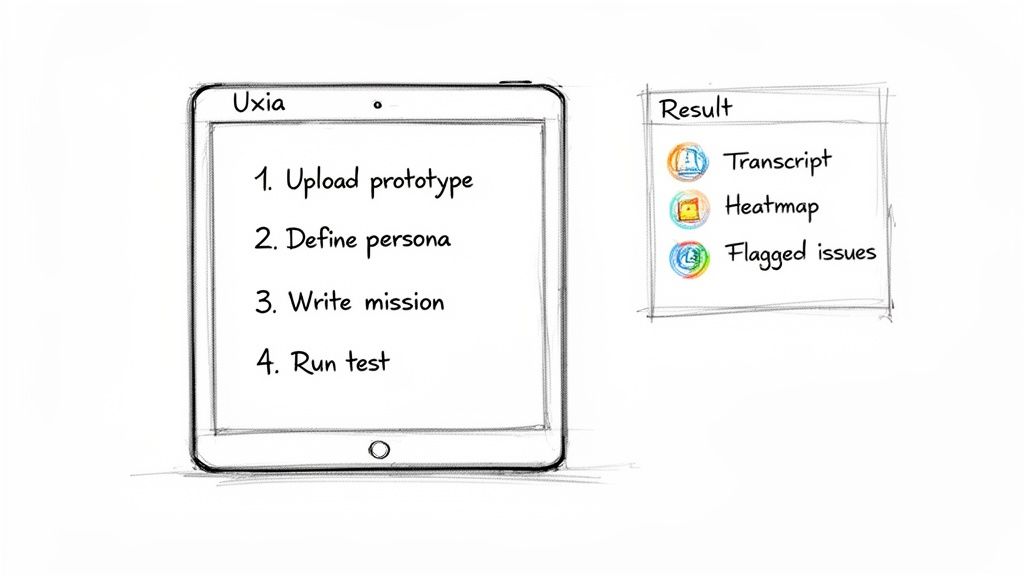
Making Sense of Your Results for Quick Wins
Within minutes of hitting "launch," Uxia delivers a full report. And this isn't just a mountain of raw data; it’s a set of clear, actionable insights built to help you make immediate improvements to your design.
You’ll get several key outputs:
Full Transcripts: A complete log of the AI's "think-aloud" commentary, where it explains its thought process at every single step.
Interaction Heatmaps: A visual map showing exactly where the user clicked, hesitated, or focused their attention.
A Prioritised Summary: Uxia automatically flags and summarises the most critical usability issues, saving you hours of manual analysis.
The real goal here is to find and fix friction fast. Use the summary to pinpoint the top 2-3 problems, fix them in your design, and then run another quick test to see if your solution worked. This rapid-fire iteration is where synthetic testing really shines.
To get the most out of these reports, look for patterns. If a synthetic user says a button label is confusing once, that’s interesting. If they mention it three times while trying different paths, you’ve just found a high-priority fix.
For more advanced strategies, check out our detailed guide on user interface design testing.
Weaving Synthetic Tests Into Your Workflow
The true power of synthetic user testing is unlocked when it becomes a regular habit, not a one-off event. Because Uxia is so fast and affordable, it’s incredibly easy to build testing right into your existing product development sprints.
Try adopting a simple routine: run a synthetic test on new designs before every sprint review. This ensures that every release is a little more user-friendly than the last. By catching usability flaws early and often, you give your team the confidence to build better products, faster.
Got Questions? We’ve Got Answers
Jumping into the world of synthetic user testing can definitely spark a few questions. Here, we'll break down some of the most common ones with clear, straightforward answers to show you how it all works and where it fits in your process.
What Exactly Is a Synthetic User?
A synthetic user is an AI model built to act just like a real person interacting with your product. It’s not just a static persona document; it’s a dynamic, functional agent that can actually click through your prototypes, try to complete tasks, and tell you what it’s thinking along the way.
Think of it like this: a traditional persona is a photograph of your user. A synthetic user from a platform like Uxia is a fully interactive avatar of that user who can show you exactly where they get confused or stuck.
Where Does It Shine? And What Are Its Limits?
Synthetic users are brilliant at finding usability problems with incredible speed and scale. They can instantly spot issues like confusing navigation, broken user flows, or unclear instructions that would take days to uncover with human testers.
But it's crucial to know their limits. They can't fully replicate deep human emotions, complex cultural nuances, or highly subjective opinions on aesthetics. That’s why synthetic testing is best used as a powerful sidekick to traditional research—not a complete replacement.
The smartest approach combines the raw speed of AI with the rich depth of human insight. Use synthetic testing for quick, frequent checks, and save your moderated human studies for exploring those complex emotional journeys.
Which Tools Are Out There?
The landscape for these tools is growing, and different platforms are built for different jobs. Here’s a quick look at the main players:
Uxia: This is the go-to choice for product teams focused on validating usability. It’s built to test interactive prototypes, helping thousands of teams find and fix friction points in minutes.
Syntheticusers.com: This platform leans more towards discovery research, using AI to run automated user interviews and pull out qualitative insights.
Artificial Societies: This one operates at a much broader level, using agent-based modelling to make market-level predictions rather than digging into the fine details of a user interface.
Picking the right tool really comes down to what you’re trying to achieve. For hands-on, iterative design work where you need to nail the usability, a specialised platform like Uxia is going to give you the most direct and actionable feedback.
Ready to see how AI-driven insights can change the way you build products? Discover how Uxia delivers actionable feedback in minutes. Start Your First Synthetic Test Today.