
A guest stands at the hotel desk with a check-in confirmation on their phone, but the receptionist can't release the room. A shopper sees that their return has arrived, yet still can't find a refund date. Your team may already have polished the screens. The unresolved question is what happens behind them.
A service blueprint connects the customer's actions to the staff work and supporting systems required to deliver the experience. Its established structure includes customer actions, frontstage actions, backstage actions, support processes, and physical evidence, as described in the service-blueprinting framework formalized by Bitner, Ostrom, and Morgan.
The service blueprint examples below are adaptable scenarios, not claims about any named company's current operations. Each separates frontstage and backstage work, names likely failure points, and includes a Uxia test mission for the digital journey. Start where the customer waits, loses confidence, or asks for help. Then trace that moment to the people who can change it.
1. Hotel Guest Check-In Service Blueprint
A successful mobile check-in isn't the same as a successful arrival. Map the journey from the confirmation email through arrival, key collection, and entry into the assigned room.
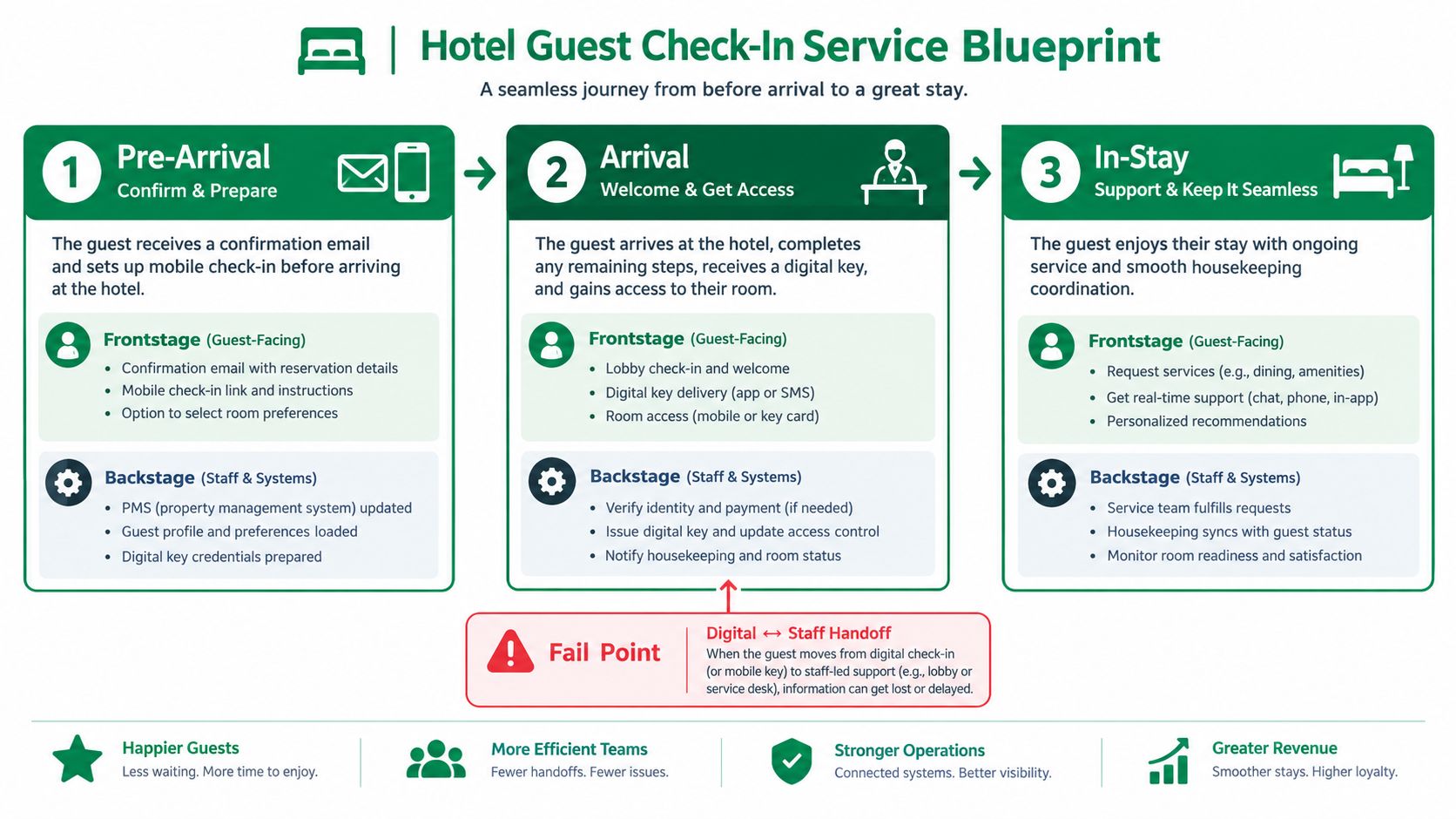
Frontstage work includes confirmation messages, app screens, lobby conversations, and digital-key instructions. Backstage work includes room assignment, payment pre-authorization, housekeeping updates, and key provisioning, with the relevant property-management and payment dependencies beneath them.
For a boutique-hotel scenario, examine whether staff can preserve a personal welcome while moving routine administration online. Irie Tulum Boutique Hotel's discussion of personalized stays provides hospitality context, not evidence that a particular check-in redesign succeeded.
Test the Arrival Promise
Failure points: Mark a confirmation sent before room readiness, an unexplained payment hold, and a digital key issued without usable access instructions.
Uxia mission: Upload the check-in screens and ask synthetic business travelers, family travelers, and first-time visitors to check in without contacting staff.
Operational comparison: Compare navigation and comprehension flags with observed queue and room-readiness records. Don't treat a housekeeping delay as an interface problem.
Start with the most common arrival path before adding late arrivals or room changes. Use Uxia's practical guide to journey testing to structure the digital evaluation.
Practical rule: Test whether the hotel can fulfill the promise on the confirmation screen, not just whether guests can reach it.
2. Digital Bank Account Opening Service Blueprint
Identity verification deserves its own service slice. A customer can complete every visible field correctly and still wait in a manual-review queue they don't understand.
Map application entry, ID capture, document upload, verification, funding, and first-login setup. Frontstage actions include disclosures, permission requests, upload feedback, and review-status messages. Backstage actions include identity-verification vendor calls, fraud checks, applicable credit checks, and manual decisions.
A published global-bank service-blueprinting case describes linking customer interactions to processes, technology platforms, and risk controls, then translating findings into improvement backlogs. Apply that pattern by attaching an owner and control dependency to every customer-facing step.

Make Review States Understandable
Failure points to annotate include rejected documents without recovery instructions, lost progress, unexplained requests for sensitive information, and pending reviews with no next step. Mark every customer-data request as a potential friction point, rather than assuming where abandonment occurs.
Consider a resumable verification flow or earlier document requirements as design alternatives. Moving uploads earlier may clarify prerequisites, but it also asks customers for sensitive material before they've developed confidence.
Uxia test mission: Set an audience matching the intended banking segment and ask testers to open an account and make a first deposit. Examine clarity, trust, and accessibility across the prototype.
Show the actual expected review window once operations has verified it. Revisit the blueprint whenever compliance requirements change, and keep synthetic testing separate from compliance approval and real verification-system testing.
3. Food Delivery Order-to-Doorstep Service Blueprint
A customer may see one order status while the restaurant, courier, and dispatch team work from different operational states. Map where those views diverge, since that is where expectations can break down.
Trace restaurant selection, checkout, preparation, courier assignment, pickup, transit, and doorstep handoff. Place frontstage evidence, such as receipts, tracking screens, ETA changes, and delivery messages, above the related backstage work of kitchen staff, couriers, and dispatch systems.

For example, replace a vague preparation status with a clear explanation of the current stage. Show precise progress only when restaurant and dispatch systems can support it.
Map the Exceptions Separately
Failure points: Give unavailable items, unanswered substitution requests, delayed courier assignment, inaccessible entrances, and missing-item reports a dedicated exception lane.
Expectation checks: Compare the customer-visible ETA with the internal estimate. Record when either changes.
Uxia mission: Test the tracking interface and ask testers to figure out when your food will arrive. Check whether they can identify the estimate, understand uncertainty, and find help without prompting.
Keep the journey going through support contact after a failed delivery. Assign ownership for substitutions and refunds so customers know whether the restaurant or platform will resolve the issue.
For checkout, use checkout usability testing guidance to assess address entry, payment feedback, and order confirmation.
A tracking screen can explain a delay. Someone still needs to own the pickup handoff.
4. SaaS Free Trial Onboarding Service Blueprint
Define the meaningful outcome before drawing the sign-up flow. For a project-management product, that could be creating a usable project, not completing registration.
Map sign-up, workspace setup, first project creation, teammate invitations, and paid-plan selection. Frontstage work includes the interface, onboarding checklist, email sequence, support replies, and sales contact. Backstage work includes workspace provisioning, permissions, sample-data setup, lifecycle triggers, and billing configuration.
Keep emails visible on the map. A welcome email that asks users to repeat completed setup can create confusion even when the in-app experience is clear.
Connect Every Step to Activation
Failure points include an empty workspace without guidance, unclear permission settings, premature upgrade prompts, and invitations that arrive before the workspace is ready. An onboarding checklist is worth testing when it directs users toward a useful outcome, not when it merely adds tasks.
An earlier invitation prompt is another design alternative. It may support collaborative value, but it can interrupt users who haven't yet understood what they're inviting colleagues into.
Uxia test mission: Ask synthetic testers to set up their first project within ten minutes. Treat that duration as a test condition, not a claimed benchmark, and use a prototype that supports the required actions.
Use Uxia's onboarding usability testing guide to inspect instructions, navigation, and first-run comprehension. Re-test major changes during the sprint, then check real activation behavior after release.
Assign each flagged issue to the interface, lifecycle messaging, support process, or provisioning dependency. Otherwise, the blueprint becomes a checklist without delivery ownership.
5. Telehealth Appointment and Patient Intake Service Blueprint
A patient reaches the appointment screen, but the intake form is unclear and there is no way to save progress. The blueprint helps teams trace whether the problem lies in the wording, the form design, or the support available.
Map the journey from booking through intake, pre-visit verification, connection checks, consultation, prescription or referral handling, and follow-up. Separate frontstage actions, such as forms, reminders, video instructions, and clinician conversations, from backstage work, including scheduling, record preparation, clinical review, insurer coordination where applicable, and pharmacy or referral handoffs.

The older-adult health-examination blueprint study distinguishes visibility, interaction, and internal-interaction boundaries. Apply those boundaries to show where a visible patient issue depends on coordination behind the scenes.
A digital handoff only works when patients know what to do and staff know who owns the next step.
Mark failure points directly on the journey: unclear medical terms, lost form progress, unusable connection instructions, and follow-up messages with no identifiable next action. These can point to different fixes, so avoid treating them as one interface problem.
Uxia test mission: Ask diverse synthetic profiles, including people with low digital literacy, to complete intake and prepare to join the appointment without help. Treat the result as a usability check, not evidence of clinical safety.
Clinicians should review sensitive-data steps early. Accessibility findings on compliance-critical screens also need a human audit. Shorter form sections and pre-visit technology checks are options to test, not guaranteed fixes. If assessing an AI receptionist for clinics, show exactly when it hands a question or problem to human staff.
Synthetic testing can reveal comprehension issues. It cannot establish clinical safety, privacy compliance, or accessibility conformance.
6. Airline Booking and Disruption Rebooking Service Blueprint
Booking and disruption need separate blueprints. During a cancellation, a traveler needs an acceptable replacement and a trustworthy confirmation, not another version of the original sales journey.
For booking, map search, fare comparison, payment, seat selection, and check-in. For disruption, start with the cancellation notification and continue through alternatives, selection, any payment adjustment, confirmation, and updated travel documents.
Frontstage work includes notifications, replacement-flight options, fare explanations, seat availability, and agent assistance. Backstage work includes inventory updates, operational scheduling dependencies, ticket reissue, baggage implications, and customer-service tools.
Research on adapting service blueprints for complex interactions identifies limitations in representing multiple channels and stakeholder touchpoints together. Keep the ecosystem overview separate from the detailed rebooking slice.
Test the Decision Under Disruption
Failure points include alternatives that disappear during selection, unclear additional charges, lost seat preferences, and a confirmation that doesn't explain the revised itinerary. A notification linking directly to alternatives is a useful prototype scenario, provided inventory and ticketing processes can support it.
Uxia test mission: Ask testers to find the earliest alternative flight that keeps your seat preference. Inspect how they interpret eligibility, trade-offs, and fare differences; don't assume a synthetic mission reproduces a stranded traveler's emotional state.
Count the actions required to rebook, but don't remove necessary disclosures just to shorten the path. Share findings with airline operations and support before changing the interface.
Design trade-off: Fewer steps help only when travelers still understand what they're accepting and staff can fulfill the choice.
7. E-commerce Returns and Refund Service Blueprint
A customer can follow every return instruction and still wonder whether the refund is coming. Map the service through carrier handoff, warehouse receipt, inspection, payment processing, and the final customer notification.
At the frontstage, customers check eligibility, select a return reason, get a label, follow drop-off instructions, and track status. Behind the scenes, teams process carrier events, inspect items, apply policy, request payment-provider refunds, and handle exceptions. The blueprint should show where each customer-facing update depends on operational evidence.
An eligibility-first portal can help customers avoid starting returns they cannot complete. Refund tracking can reduce uncertainty, but only if each status matches what warehouse and payments teams have confirmed.
Test the Gap Between Receipt and Refund
A parcel marked as delivered is not proof that inspection is complete or that a refund request has reached the payment provider. Map these as separate stages, with clear ownership for each handoff.
Failure points include ineligible items, unreadable labels, missing tracking events, inspection holds, and delays before the payment provider receives a refund request. A confusing status can trigger support contacts even when the return is progressing normally.
Uxia test mission: Ask testers to return a damaged item and understand what happens next. Check whether they can find eligibility rules, identify any required evidence, follow the return instructions, and understand what to expect about the refund.
Track support contacts per return alongside the operational milestones that can explain why customers seek help. Show a refund timeline only after warehouse and payments teams confirm it. Keep receipts and notifications tied to the stage they document.
Design trade-off: Clearer portal copy can address confusion, but it cannot speed up warehouse inspection. Assign an owner to each problem, and use prototype testing for interface issues and operational records for processing delays.
If a return is ineligible, explain the reason and offer the appropriate escalation path. Do not suggest that support can always override the policy.
7 Service Blueprint Examples Compared Side by Side
Service Blueprint | 🔄 Implementation Complexity | ⚡ Resource Requirements | 📊 Expected Outcomes | ⭐ Key Advantages | 💡 Ideal Use Cases |
|---|---|---|---|---|---|
Hotel Guest Check-In | Medium–high; map arrival phases, staff handoffs, and systems | Guest journey data; front-desk, housekeeping, and IT input | Fewer delays and clearer digital-to-staff handoffs | Connects guest friction to operational causes | Mobile check-in, digital keys, and lobby queue improvements |
Digital Bank Account Opening | High; verification branches and compliance steps add detail | Product, legal, risk, compliance, and vendor data | Lower onboarding abandonment and faster first transactions | Makes compliance friction and review queues visible | KYC flows, identity checks, and account onboarding |
Food Delivery Order-to-Doorstep | High; spans multiple parties and exception paths | Customer, restaurant, courier, dispatch, and support data | Clearer ETAs, fewer communication gaps, and better exception handling | Reveals breakdowns across the full delivery chain | Order tracking, substitutions, late orders, and refunds |
SaaS Free Trial Onboarding | Medium; define activation milestone and connect touchpoints | Product, marketing, and sales input; activation metrics | Faster time-to-value and improved trial activation | Links onboarding changes to conversion goals | First-run setup, workspace creation, and trial conversion |
Telehealth Appointment and Patient Intake | High; clinical, privacy, and accessibility needs | Clinicians, administrators, technical teams, and workflow data | Better intake completion and fewer pre-visit delays | Clarifies patient needs and cross-team responsibilities | Appointment booking, intake forms, and virtual-care preparation |
Airline Booking and Disruption Rebooking | High; complex systems, pricing, and disruption scenarios | Booking, operations, customer service, and inventory data | Faster self-service rebooking and clearer alternatives | Connects customer communications with operational dependencies | Cancellations, schedule changes, and rebooking tools |
E-commerce Returns and Refunds | Medium–high; policies, carriers, and warehouses create branches | Retail, warehouse, carrier, payments, and support data | Reduced return friction, refund delays, and repeat contacts | Balances customer experience with handling costs | Return eligibility, shipping, refund status, and damaged-item flows |
Turn Blueprints Into a Routine You Can Repeat
Choose a journey this sprint with a clear completion goal and an unresolved customer problem. Keep the scope narrow enough that the team responsible for delivery can review every dependency.
Map customer actions, frontstage responses, backstage work, support processes, and evidence. Then annotate failure points with an owner, the evidence available, the unanswered question, and the proposed next action.
The Nielsen Norman Group survey of service-blueprinting problems identifies commitment, resources, and cross-functional allies as common challenges. A polished map won't supply those on its own, so agree who can authorize changes and where unresolved handoffs will be escalated.
Close the Loop After Testing
Run a Uxia mission tied to the journey's activation or completion goal. Upload the relevant screens or video prototype, define the audience, and examine the flagged navigation, copy, trust, and accessibility issues as hypotheses to investigate.
Separate what the test can establish from what requires other evidence. Validate operational timing with service records, system behavior with integration tests, and high-stakes requirements with qualified human review.
Keep assumptions visible until the team has evidence to replace them.
The public research institution's service-blueprinting case used interviews, observations, archival records, and artifacts. Follow that evidence-gathering principle whether you're redesigning an enterprise journey or starting a local delivery operation.
Update the blueprint with flagged issues and agreed changes, then re-test after each meaningful revision. After launch, compare the mapped expectations with actual completion, wait-time, and support records. Keep the map current enough that the next team can see what was tested, what changed, and what still needs attention.
Uxia lets teams upload images or video prototypes, define an audience and mission, and use synthetic testers to surface digital-journey friction. Visit Uxia to test a customer-facing flow from your blueprint, then connect the findings to the staff actions and systems responsible for delivery.