MCP for UX Research: AI-Powered Insights in 2026
Discover MCP for UX research. A practical 2026 guide on how AI leverages Model Context Protocol for real-time insights & optimized workflows.

Most advice about MCP starts in the wrong place. It starts with the protocol.
UX teams don't buy protocols. They buy time back. They buy fewer copy-paste steps, less manual synthesis, and a cleaner path from raw research to product decisions. If MCP for UX research matters, it matters because it changes real workflows that are slow today.
The useful question isn't "What is MCP?" The useful question is whether MCP helps a stretched product team get from interviews, tests, transcripts, notes, and findings to a credible decision faster, with less friction and without creating a mess of brittle integrations.
Is MCP Just More AI Hype for UX Researchers
Skepticism is healthy here. UX researchers have seen enough AI launches to know that a new layer of infrastructure can sound important while doing very little for day-to-day work.
That skepticism is also happening at the same time teams are under pressure. Independent reporting notes that 21% of companies laid off researchers in 2025, and some teams are operating with a single researcher, which explains why automation gets attention so quickly in synthesis and reporting (independent UX research reporting). The same reporting also points out a real gap: there still isn't much evidence comparing MCP-based workflows with simpler alternatives for common research tasks.
The hype problem is real
A lot of current MCP content is written for developers. It explains servers, hosts, connectors, and tool orchestration. That's useful background, but it misses what product teams care about.
Researchers usually want answers to narrower questions:
Can this reduce synthesis time: Not in theory, but in the studies and repositories we already have.
Can this preserve context: So the assistant sees transcripts, tags, prior findings, and participant details together.
Can this avoid one-off setup debt: So every new tool doesn't require another fragile integration.
Can this improve judgment: Not replace it, but make pattern finding and evidence retrieval easier.
If the answer to those questions is no, MCP is just another technical abstraction.
The strongest case for MCP isn't that it's novel. It's that it can remove the handoff friction between where research lives and where decisions get made.
There's also a communication problem. Some teams use AI outputs in reports, stakeholder summaries, or draft deliverables, then spend extra time cleaning the prose so it doesn't sound synthetic. For that narrow task, tools like Humanize AI Text can be useful as a polishing layer when you want machine-generated wording to read more naturally.
Where it becomes practical
MCP becomes interesting when your research stack is fragmented. Notes live in one place. Session transcripts live somewhere else. Product feedback sits in tickets. Analytics dashboards exist, but researchers don't want to manually reconcile them with qualitative evidence every time a PM asks a question.
That's where the conversation gets practical. If you're already mixing interviews, repository work, and faster validation methods, a hybrid operating model matters more than any single tool category. This is also why a lot of teams are moving toward hybrid UX research workflows instead of treating moderated studies, repositories, and AI support as separate worlds.
What Is the Model Context Protocol
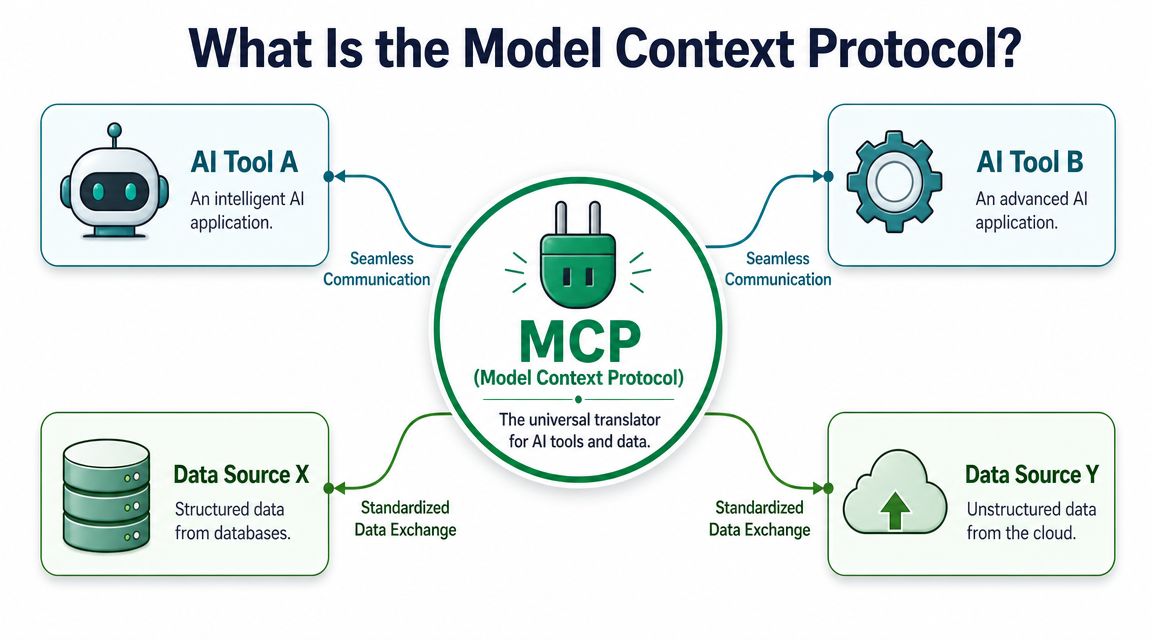
MCP is easiest to understand as a standard way for AI systems to connect to external tools and data. Think of it as a universal translator for software tools that an AI assistant can use during a conversation.
Instead of hard-coding a custom integration every time you want an assistant to access a repository, analytics source, or documentation system, MCP gives the assistant a common method to discover what tools exist and what those tools can do.
The technical definition that actually matters
Technically, MCP is a stateful JSON-RPC 2.0 client-server protocol that allows an MCP host to mount external MCP servers and dynamically discover resources, tools, and prompts (technical MCP overview).
For a non-developer, the important part is not "JSON-RPC 2.0." The important part is stateful and dynamic discovery.
Stateful means the assistant can maintain context across a working session instead of treating every action like an isolated API call.
Dynamic discovery means the assistant can find what a server exposes, then use those tools without someone manually wiring a separate integration for each action.
How this differs from a basic API connection
A normal API integration is usually narrow. A developer decides ahead of time which endpoints matter, writes the connection, and maps the behavior. That works, but it often creates rigid workflows.
MCP changes the interaction model:
The assistant can inspect available tools: It doesn't have to rely on one fixed action path.
The connection is conversational: The user asks a research question, and the assistant can choose the right connected capability.
The system can expose live resources: Not just a static export or manually pasted context.
The same protocol can support different tools: Which lowers integration sprawl over time.
Practical rule: If an AI workflow still depends on people exporting CSVs, pasting notes into chat, and re-explaining project context every time, the workflow hasn't really improved. It's just changed interfaces.
Why UX teams should care
For UX research, this matters because research is rarely one document. It is a web of studies, sessions, clips, transcripts, coded notes, tags, highlights, and prior conclusions.
When an assistant can access that environment through a standard protocol, the unit of work changes. Instead of asking the researcher to assemble context manually, the system can retrieve the relevant context during the interaction.
That doesn't make the assistant a researcher. It makes it a better operating layer around research work.
How MCP Transforms UX Research Synthesis
The biggest value of MCP for UX research isn't interview transcription or survey drafting. It's synthesis across existing research.
Many organizations already have more insight than they can use. The problem is retrieval and recombination. A finding from a checkout study sits in one report. A related onboarding complaint appears in support tickets. A usability issue surfaced again in a later prototype test, but no one has linked those pieces together yet.
The old workflow is slow for structural reasons
Traditional synthesis breaks because the evidence is scattered and the retrieval work is manual. Researchers export notes, reopen old decks, search transcript libraries, compare tagging schemes, then rebuild context for each stakeholder request.
When an AI assistant has real-time, permission-aware access to a research library, it can query studies, sessions, transcripts, highlights, insights, and participant data within existing access controls. That makes cross-study synthesis possible in a way that was previously impractical (research library access for UX workflows).
That is the operational shift. Not better prompting. Better access.
Research synthesis workflow comparison
Stage | Traditional Workflow | MCP-Enabled Workflow (e.g. with Uxia) |
|---|---|---|
Finding relevant studies | Search folders, docs, decks, and repository tags manually | Ask the assistant to retrieve studies related to a problem or flow |
Pulling evidence | Copy snippets from transcripts and notes into a new doc | Query live transcripts, highlights, and insights directly |
Cross-study comparison | Manually reconcile naming, dates, and report structures | Use the connected system to surface recurring themes across studies |
Stakeholder questions | Re-open old files and rebuild context from scratch | Ask follow-up questions in the same working thread |
Access control | Share exports or duplicate artifacts for review | Respect existing permissions inside the connected library |
What changes in practice
A product manager asks, "Where do users struggle in onboarding?"
Without connected context, that question triggers a mini research project. Someone has to find the right studies, read enough of each one to refresh the context, then write a summary.
With MCP-enabled access, the question becomes a query against a living body of research. The assistant can look across sessions, studies, and saved insights, then return a draft pattern set for the researcher to verify.
That doesn't eliminate review. It removes the drudge work that usually comes before review.
Good synthesis still depends on judgment. MCP just gives that judgment faster access to the evidence.
What works best
MCP is strongest in synthesis tasks that involve retrieval across existing materials:
Recurring friction analysis: Pull repeated complaints about navigation, trust, or confusing copy across multiple studies.
Evidence backfill: Find the clips, transcripts, or notes behind a stakeholder claim.
Historical comparison: Check whether a current usability problem also appeared in earlier rounds.
Insight packaging: Assemble a working summary before the researcher edits it into a final deliverable.
What it doesn't do well on its own is resolve ambiguity in messy evidence. If the studies conflict, if tagging is inconsistent, or if the underlying repository is poorly maintained, the protocol won't fix that. It will just surface the disorder faster.
Practical MCP Workflows for Product Teams
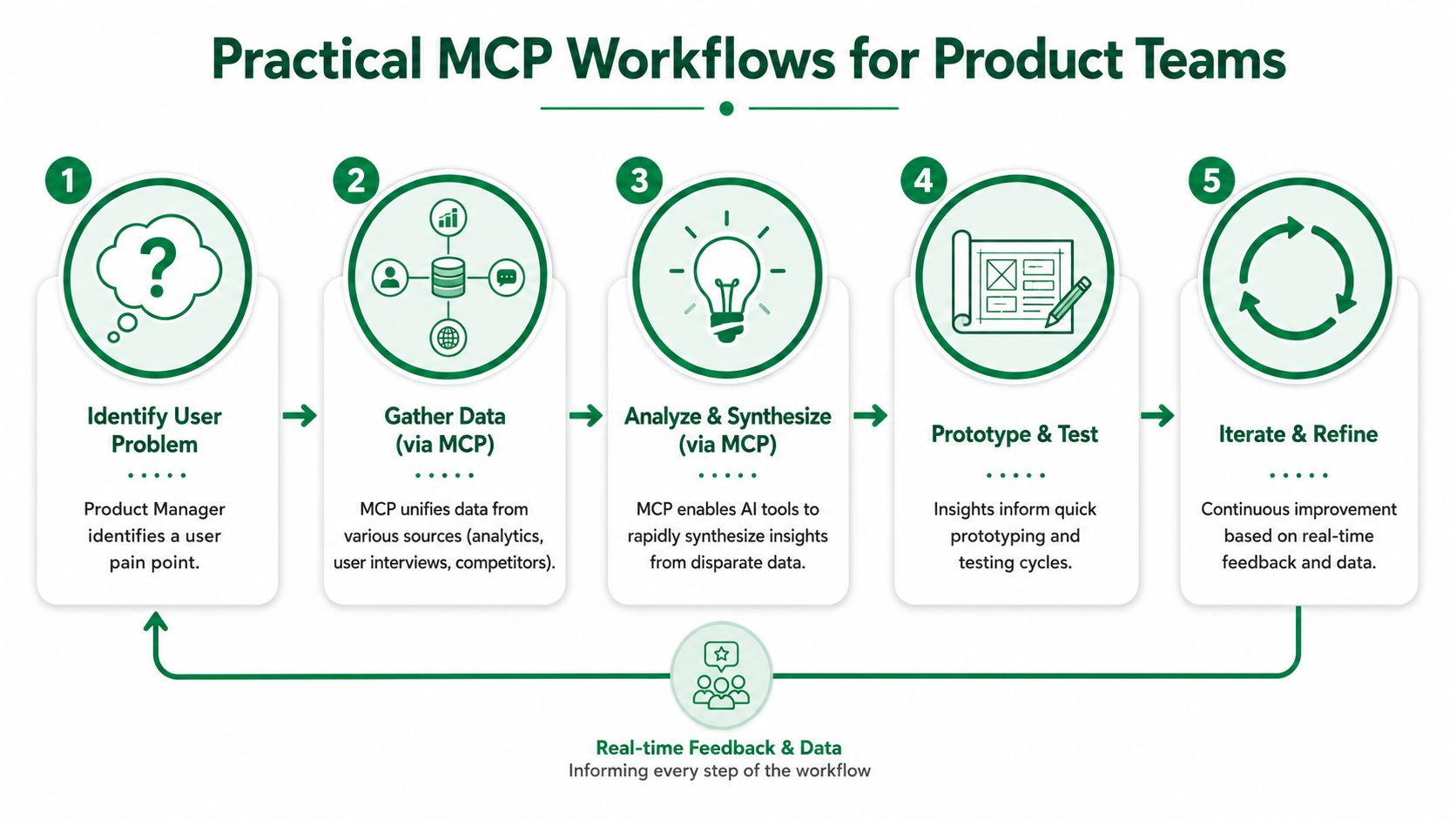
The best way to judge MCP for UX research is by workflow, not by architecture diagrams. Below are the cases where it starts to earn its place in a product team.
Workflow one, answering recurring product questions
A PM wants to know whether the new dashboard is confusing or just unfamiliar. In many teams, that question gets answered from memory. Someone recalls a few quotes from recent sessions, another person remembers a support trend, and the team forms a loose consensus.
An MCP-connected workflow is better because the assistant can work against the evidence base, not team memory.
A useful prompt in practice looks more like this:
Review recent dashboard-related research artifacts and pull the most common moments of confusion, grouped by navigation, comprehension, and trust. Include the evidence trail so I can inspect it.
That framing matters. It asks for grouping, not just summary. It also demands an evidence trail.
The result is usually a faster first draft of synthesis, with source material close at hand for verification.
Workflow two, carrying learning from one study into the next
Research often breaks between projects. A team finishes a study, presents the findings, then starts the next round as if the prior work were only loosely connected.
MCP helps when you want continuity.
A researcher can ask the system to draft a plan for a mobile checkout test based on prior evidence from web checkout studies, or to identify hypotheses worth retesting because they appeared repeatedly but were never resolved. The key advantage is context continuity. The assistant can work with prior findings rather than with a blank page and a prompt.
This becomes more useful when product teams are already running rapid validation cycles and want to connect lighter-weight feedback loops to the repository of earlier work. That's especially relevant if you're blending repository synthesis with AI-led validation methods like synthetic user testing workflows.
A short demo helps make that operating model more concrete:
Workflow three, turning raw evidence into stakeholder-ready drafts
Another practical use case is report preparation. Not final reporting. Draft preparation.
The assistant can collect patterns related to a feature area, draft a preliminary structure for the readout, and cluster supporting evidence under likely themes. That saves time where researchers often lose it, which is not in interpretation itself but in assembly.
Here is where teams should be disciplined.
Ask for retrieval before recommendation: First gather findings, then ask the model to suggest implications.
Separate evidence from interpretation: Keep "what users said or did" distinct from "what we think it means."
Require citation back to artifacts: If the assistant can't point back to transcripts, highlights, or notes, treat the answer as brainstorming.
Use it for first drafts: Final claims still need a human owner.
What doesn't work well
Not every workflow improves with MCP.
It is usually a poor fit when:
The task is tiny: A direct integration or simple export may be enough.
The repository is chaotic: Badly labeled studies and inconsistent metadata will reduce output quality.
The team wants definitive answers from weak evidence: MCP can accelerate retrieval, but it can't make thin data solid.
The step requires nuanced facilitation: Moderation, participant probing, and sensitive interpretation still need a human lead.
The right mental model is not "AI research in a box." It's "connected research operations."
Evaluating the Benefits and Limitations
MCP deserves more than a trend-driven yes or no. For UX teams, the useful question is narrower: does it remove real research friction, or does it add another layer to maintain?
The answer depends less on the protocol itself and more on the workflow around it. Teams get value when research evidence already exists, access rules are clear, and the assistant needs to retrieve and organize context across a known set of studies. Teams get very little when the repository is messy, the question is vague, or the evidence base is thin.
Where the benefits are real
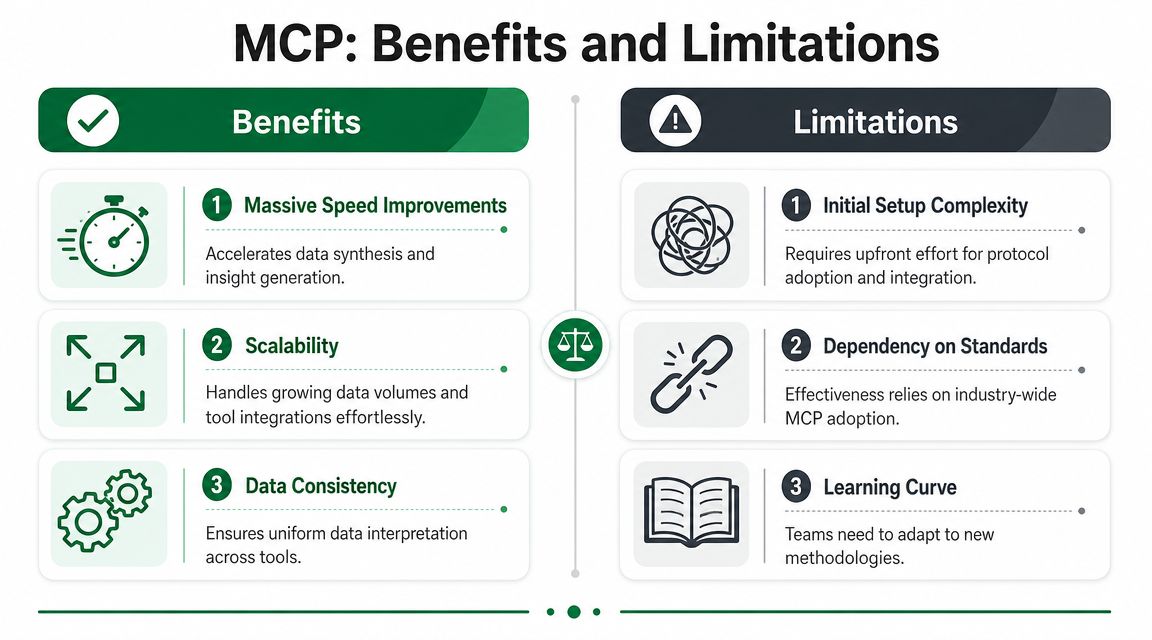
The biggest gain is speed with context intact.
Without MCP, assistants often work from fragments: a pasted quote, a single transcript, a CSV export someone prepared for one meeting. That is why so many AI research demos look impressive and then fail in daily use. The model never had enough grounded material to do serious synthesis in the first place.
MCP improves that by giving the model a standard way to reach the systems where research already lives. For product teams using AI user research workflows in Uxia, that means less manual handoff between repository, analysis tool, and stakeholder request. The practical result is faster retrieval, fewer repeated exports, and better continuity from raw evidence to draft insight.
Composability also matters. A stable protocol reduces the need to build a one-off integration every time a team wants an assistant to query studies, pull tagged clips, or assemble evidence for a product review. That lowers setup cost, especially for research operations teams supporting several product areas.
Governance is another real advantage. Research teams already work with permissions, sensitive interviews, and restricted customer data. MCP fits that model better than copy-paste workflows because access can stay tied to the systems of record instead of being recreated ad hoc inside prompts and files.
Where teams get burned
The protocol standard does not guarantee good tools.
In an analysis of 856 MCP tool descriptions, researchers found that 97.1% contained at least one smell, and 56% failed to state their purpose clearly. They also found that clearer descriptions improved task success by a median 5.85 percentage points and partial goal completion by 15.12%, while increasing execution steps by 67.46% and reducing performance in 16.67% of cases (MCP tool quality research).
That trade-off matters in UX research. A connected assistant is only as useful as the tools it selects and the structure of the repository behind them. If the tool names are vague, the schemas are inconsistent, or the study metadata is weak, the model will retrieve the wrong things with high confidence.
Three failure modes show up often in practice.
Teams overestimate what connection solves: MCP improves access. It does not fix poor study design, weak tagging, or ambiguous research questions.
Tool sprawl creates noise: More connectors can increase failed tool selection and unnecessary steps, especially when overlapping tools expose similar functions.
Output quality looks better than evidence quality: Fast synthesis can make shaky findings sound settled.
A realistic scorecard
MCP is worth serious attention when researchers repeatedly lose time rebuilding context across existing studies. It is much less useful when the underlying problem is repository disorder, unclear ownership, or lack of evidence.
That is the practical standard I use. If a team can point to a recurring retrieval or synthesis bottleneck, MCP can improve the workflow. If the team is still trying to fix fundamentals, MCP will expose those weaknesses faster, not hide them.
How to Implement an MCP-Driven Research Strategy
Start small, or expect a slow and expensive rollout.
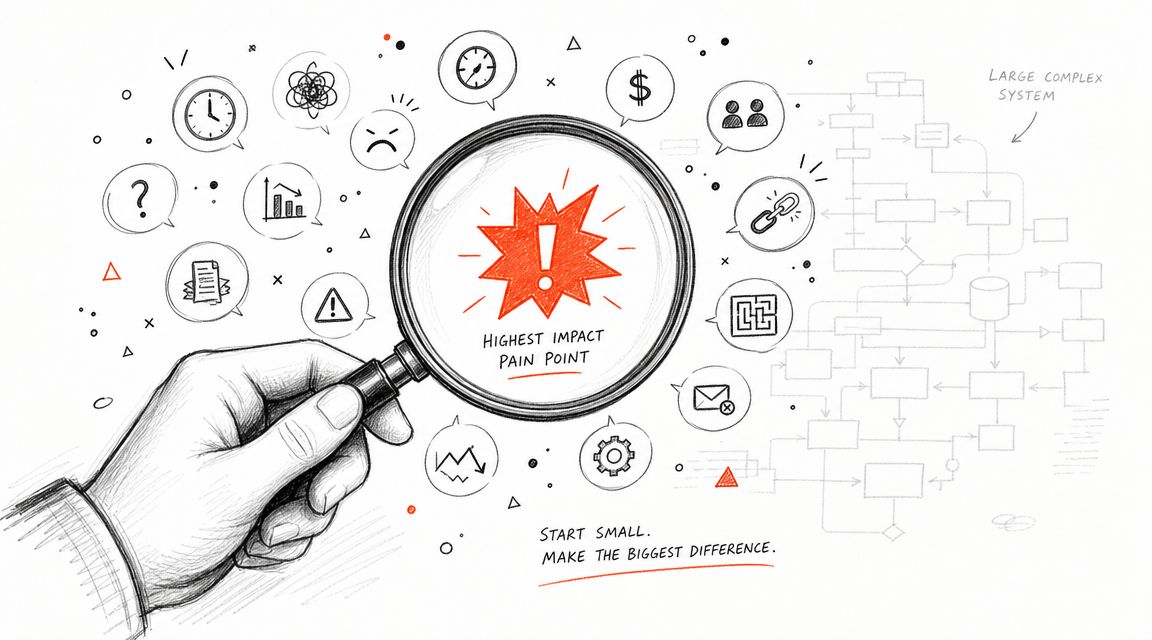
MCP has moved past the novelty stage. As noted earlier, adoption is broad enough that product and research teams can treat it as a credible infrastructure choice. The key question is narrower and more useful: will it remove a specific research bottleneck for your team this quarter?
That framing matters because broad MCP rollouts usually fail for ordinary reasons. Repositories are inconsistent. Permissions are unclear. Study metadata is thin. Teams connect several tools before they define the first workflow they want to improve. The result is more system complexity, not faster research.
The right starting point for many UX teams is cross-study synthesis.
Researchers lose time in the same places over and over: locating the right studies, pulling supporting evidence, checking whether a finding still holds, and rebuilding context for stakeholders who ask the same product questions every month. If MCP is going to earn its keep, it should reduce that repeated work first.
A practical implementation sequence looks like this:
Audit one recurring workflow
Find the task where researchers still export notes, copy excerpts into docs, or manually stitch together past evidence. Focus on a workflow that happens often enough to measure.Pick a repository-centered use case
Strong first candidates include friction analysis across studies, evidence retrieval for roadmap decisions, or first-draft synthesis for a readout.Assess the product, not just MCP support
A connector alone is not enough. Check for permission-aware retrieval, usable artifact structure, clear study metadata, and outputs that cite the underlying evidence.Define review rules before launch
Decide what the assistant can draft, what requires researcher approval, and how every claim should map back to source material.Measure workflow outcomes
Track whether the team finds evidence faster, preserves more context, and spends less time repeating synthesis work. Do not measure success by the number of integrations connected.
Good implementation also depends on restraint. One well-scoped workflow with clean evidence trails is better than ten partially connected tools that return inconsistent results. I have seen teams get better results from a single repository integration with strong metadata than from a wider setup with weak naming and overlapping sources.
What should the setup provide?
Connected context: Studies, transcripts, notes, tags, and findings should be available in the same working environment.
Clear permissions: The assistant should respect the same access controls as the humans using it.
Traceable outputs: Researchers need to inspect where each claim came from.
Fast iteration: The system should support ongoing product questions, not just polished final reports.
If you are evaluating vendors, prioritize products built for AI user research workflows rather than tools that bolt an assistant onto a fragmented repository after the fact.
Uxia brings this model into practical product work. Teams can use Uxia to run AI-powered UX research faster, validate flows with synthetic users, and shorten the path from raw interaction data to usable insight. If your team needs to scale research without adding more manual synthesis overhead, Uxia is a strong place to start.