Best Research Repositories: From Storage to Action
Finding the best research repositories isn't about storage. Compare Dovetail, Notion, and Uxia to see which tools turn insights into product decisions fastest.

Teams typically don't have a research shortage. Their problem is retrieval.
A product decision comes up in planning. Someone asks where the checkout confusion showed up, or whether users already struggled with that onboarding step, or if the label change was tested before. Everyone remembers the study. Nobody can find the proof fast enough to use it. The transcript is in one folder, the clip is in Slack, the summary is in Notion, and the raw notes are sitting in somebody's desktop export.
That's why most discussions of the best research repositories miss the point. The job isn't to build a nicer archive. The job is to reduce the time between insight and action.
The Research Graveyard Problem
Monday planning starts in a familiar way. A PM asks whether the checkout confusion showed up in the last round of testing. The team knows it did. Ten minutes later, nobody has the clip, the task wording, or the summary that would let the group make a call with confidence.
That is the graveyard problem. Research exists, but it cannot do its job when the decision is live.
Teams rarely fail because they did not store enough files. They fail because storage does not preserve meaning. An interview transcript without the prototype version, the study goal, and the recommendation tied to it is just another document. A repository that behaves like a filing cabinet gives the appearance of rigor while forcing the team to reconstruct the story every time a priority changes.
At a previous fintech company, we had a disciplined process on paper. Research ops kept folders clean. Designers linked reports. PMs saved recordings. Then a roadmap tradeoff came up around KYC onboarding, and we needed proof fast. We spent the afternoon digging through Drive, Slack, and old decks to confirm an issue we had already observed twice. The cost was not just wasted time. It was a slower decision and less trust that research could keep up with product.
Research that cannot support a decision on demand is archived work, not operating input.
Classic repository setups break at a predictable moment. A PM needs evidence for a roadmap tradeoff, a designer wants to know whether a pattern already failed in testing, or a leader asks what changed after the last round of interviews. The files are technically there. The synthesis is not.
The failure points are usually mundane:
Artifacts live in different systems. Notes sit in Notion, recordings in Drive, comments in Figma, and follow-up decisions in Slack.
Context gets stripped away. A quote without the task, participant type, or prototype state is weak evidence.
Reuse depends on specialist memory. If the researcher who ran the study has to explain where everything lives, the system does not scale.
Action is disconnected from evidence. Findings get documented, but product changes and decision logs never loop back.
This is the same governance problem other teams hit with operational data. The benefits of master data management come from creating a trusted structure around messy inputs, not from dumping more records into one place. Research has the same issue. Without structure, centralization just creates a bigger attic.
AI speeds up collection, and that helps. More teams can now generate transcripts, tags, and summaries from every session with tools built for AI user research workflows. But faster capture also creates a bigger mess if nobody turns those artifacts into reusable insight.
Bottleneck is synthesis under time pressure. Product teams do not need the best digital cabinet. They need the shortest path from prototype to decision. That is why "repository" is often the wrong frame. Storage matters, but the job is to connect evidence, identify patterns, and make the next move obvious.
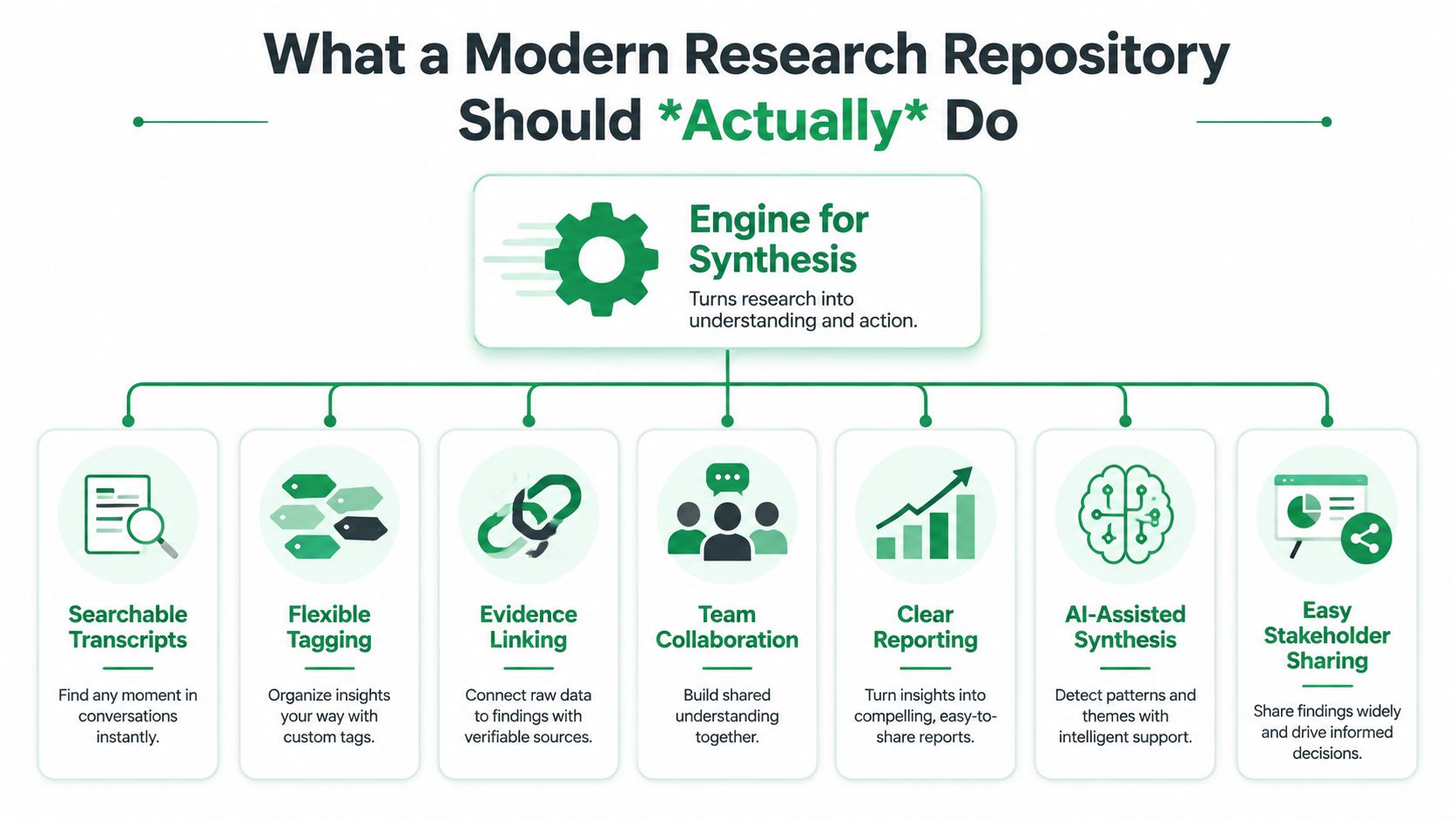
What a Modern Repository Should Actually Do
A useful repository shortens the distance between a research session and a product decision.
That standard rules out a lot of tools people call repositories. Shared drives, note docs, and tagged transcript libraries can store evidence. They do not necessarily help a PM decide whether to change the onboarding flow this sprint, or help a designer understand whether the last usability issue was a one-off or a recurring pattern. Storage is part of the job. It is not the job.
Centralize the full evidence trail
Teams need one place for the inputs, the interpretation, and the decision that followed.
That includes more than polished readouts:
Raw study material such as transcripts, recordings, notes, and clips
Execution context including task prompts, prototype links, screeners, participant type, and study goals
Observed outcomes like task failures, hesitation points, screenshots, issue summaries, and recommendations
Decision records such as reports, briefs, and logs showing what changed after the study
The point of centralization is consistency. The same logic behind the benefits of master data management applies here. A bigger pile of research files does not improve decisions unless the evidence is structured in a way the rest of the team can trust and reuse.
Make evidence searchable in the language product teams use
Search fails when the system mirrors file storage instead of decision-making.
Product teams do not remember research by folder name. They remember it by problem, screen, behavior, and user type. They search for "users missed the pricing explanation" or "why did first-time admins fail setup?" Good repository systems support that behavior with searchable metadata, issue summaries, task outcomes, and plain-language findings. If search only works for the researcher who created the study, the repository does not scale.
Support synthesis, not just collection
This is the line many tools still miss.
A modern system should help teams connect repeated observations across studies, tie evidence to a usability issue, and show how confident they should be in the recommendation. That is why teams exploring AI user research workflows for synthesis and faster analysis are not just trying to automate note-taking. They are trying to reduce the manual work between capture and action.
A simple test helps here. If the researcher still has to export everything into slides, spreadsheets, or a separate doc to identify the pattern, the tool is serving as storage first and synthesis second.
Help the team answer the questions that drive prioritization
A repository earns its keep when it helps the team answer four questions quickly:
What happened?
How often did it happen?
How confident are we that it matters?
What should we change next?
That is the shift from repository as archive to repository as operating system for product learning. Teams do not need a prettier filing cabinet. They need a system that turns messy evidence into clear issues, clear issues into decisions, and decisions into shipped improvements.
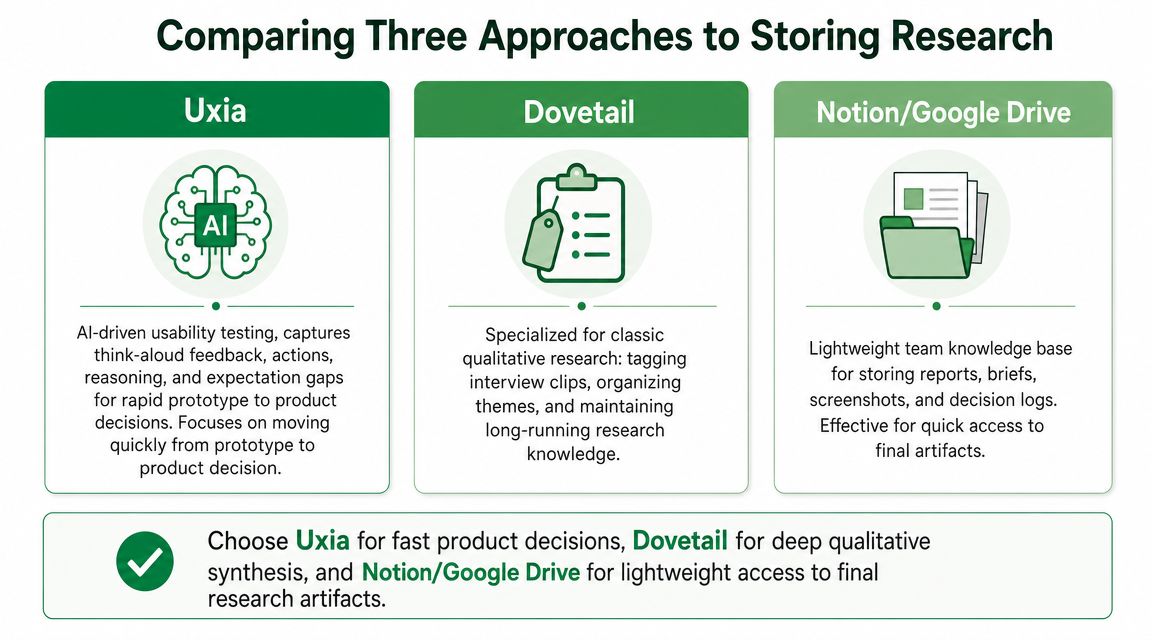
Comparing Three Approaches to Storing Research
Not every team needs the same kind of repository. That's why generic “best research repositories” lists aren't very helpful. The right choice depends on whether your bottleneck is long-term qualitative knowledge, lightweight documentation, or rapid usability analysis.
Here's the practical comparison.
Criterion | Dovetail | Notion / Google Drive | Uxia |
|---|---|---|---|
Primary strength | Deep qualitative analysis | Lightweight documentation and sharing | Structured usability insights |
Best for | Ongoing interview and research ops work | Reports, briefs, screenshots, decision logs | Prototype testing and fast product decisions |
Common artifacts | Transcripts, clips, themes, notes | Docs, folders, decks, screenshots | Task outcomes, transcripts, issue summaries, prototype-linked findings |
Searchability | Strong for tagged research data | Good for docs, weaker for raw evidence retrieval | Strong when findings are already structured around usability issues |
Synthesis support | Strong with manual research workflows | Limited, mostly manual | Strong when the goal is rapid insight generation |
Stakeholder usability | Good once the repository is maintained well | Familiar to most teams | Best when stakeholders need clear issue summaries fast |
Main trade-off | Powerful, but requires disciplined tagging and upkeep | Easy to start, easy to outgrow | Best fit when testing and synthesis speed matter most |
Dovetail works when research is continuous and qualitative
Dovetail is strongest when a research team is running ongoing qualitative work and needs a proper system for tagging clips, organizing themes, and keeping a long-running evidence base searchable.
It handles the middle of the workflow well. You've already gathered interviews or usability sessions. Now you need structure. Teams can keep transcripts, video clips, notes, and themes in one place and build a durable research memory over time.
What doesn't work as well is pretending that Dovetail removes the labor of synthesis. It improves that work. It doesn't eliminate it. Somebody still needs to code, cluster, review, and interpret.
Notion or Google Drive works when simplicity matters more than rigor
A lot of teams should admit this upfront: they don't need a specialized repository yet. They need a place where reports, screenshots, briefs, and decision logs are easy to find.
That's where Notion or Google Drive is perfectly reasonable. They're familiar. They're flexible. They're fast to roll out. If the team mostly needs to share final outputs and keep a basic research trail visible, they do the job.
But they break down when you need evidence-level retrieval. They aren't built for deep transcript analysis, issue clustering, or solid linking between raw observations and synthesized findings.
If your team keeps asking a researcher to “pull the clip” or “recheck the transcript,” a docs-first repository is probably already underpowered.
Uxia fits a different job entirely
Uxia is most useful when the question isn't “Where should we store this study?” but “How do we get from prototype to decision faster?”
That distinction matters. In usability work, teams often care less about building a giant archive and more about getting structured feedback on where users hesitate, misread labels, click the wrong thing, or expect a different next step. In that context, the repository value comes from how findings are produced and organized, not just where files end up.
What each approach stores best
This is the practical breakdown by artifact type:
Dovetail handles interview transcripts, tagged video clips, notes, and cross-study themes well.
Notion or Google Drive handles reports, screenshots, research briefs, workshop outputs, and decision logs well.
Uxia is strongest when the artifacts themselves are tied to usability execution, such as task outcomes, tester feedback, issue summaries, reasoning traces, prototype links, and synthesized reports.
My recommendation by team maturity
Choose based on your real bottleneck, not your aspiration.
Pick Dovetail if you have a research practice that already generates substantial qualitative data and can maintain a rigorous repository.
Pick Notion or Google Drive if you need a lightweight shared memory and your artifacts are mostly polished outputs.
Pick Uxia if your priority is turning usability tests into product changes quickly, especially during active design cycles.
The best research repositories are the ones that reduce decision latency. That usually matters more than feature lists.
The True ROI Is Synthesis Not Search
A PM has 30 minutes before a design review. The team has five session recordings, two transcripts, a pile of notes, and a repository full of old studies. Search can pull up the files. It still does not answer the question the room cares about. What broke, how often, and what should change first?
That is why "repository" is often the wrong frame. Storage matters, but storage is not the job. The job is turning evidence into a decision while the work is still in motion.
Manual synthesis is where research slows down. Teams watch recordings, read transcripts, compare observations across participants, write summaries, and argue about whether a pattern is real or just loud. A search bar helps retrieval. It does not reduce the interpretation work that sits between raw evidence and a product call.
For benchmark studies, even good storage only gets you part of the way. Nielsen Norman Group points out that reliable benchmarking depends on preserving the study setup and participant-level results, not just topline outputs. Teams need the screener, tasks, metrics, and raw data if they want to compare iterations with any confidence (NN/g on benchmark repositories).
Why search hits a ceiling
As repositories get richer, analysis gets heavier.
More transcripts, more clips, more notes, and more tags can improve recall. They can also create a bigger pile for someone to sort through under deadline. Better metadata helps a team find relevant evidence faster, but it does not produce a usable point of view on its own.
That distinction matters in product work. A repository can store the ingredients of an answer. It rarely gives a PM, designer, or founder the answer in a form they can prioritize.
Where the ROI shows up
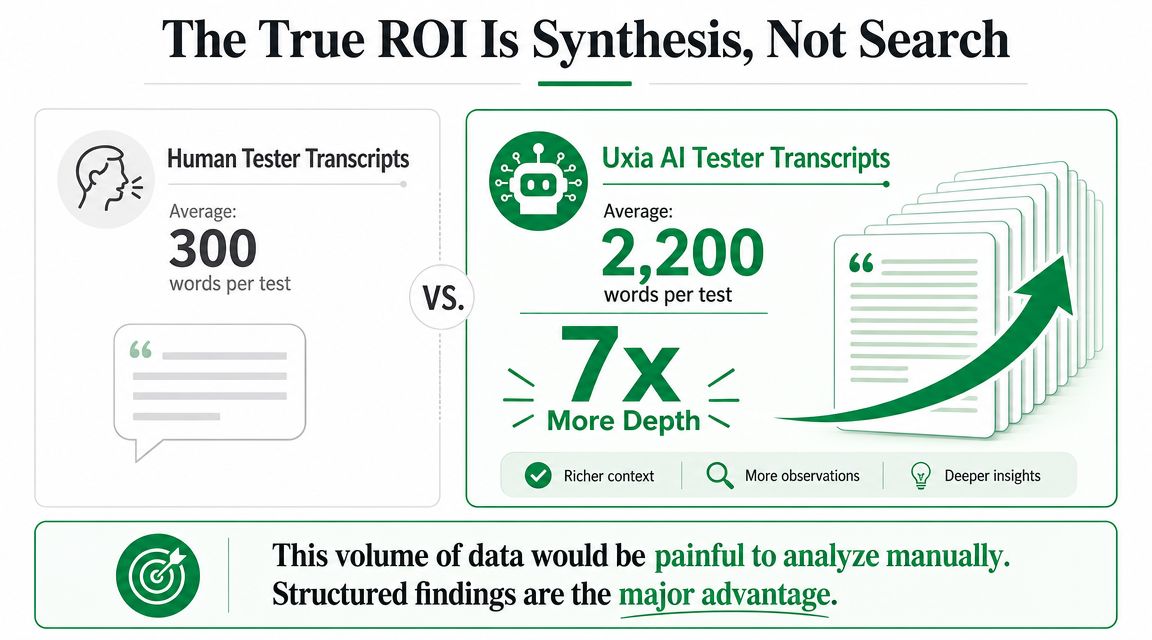
The highest-ROI capability is structured synthesis into actionable findings.
In the GVB Amsterdam comparison referenced in the author brief, the useful takeaway is not the exact time saved or transcript length. Those figures came from internal Uxia materials and were not published in an external source, so they should be treated as directional rather than audited proof. The stronger point is operational. The workflow produced issue summaries, reasoning, and evidence in a format that a product team could review quickly, instead of forcing someone to assemble that package by hand from raw artifacts.
That is the standard. More evidence only helps if the system turns it into a clear problem statement, supporting proof, and a next step.
Teams working with AI-generated research output run into this fast. A good UX research report template for AI insights matters because volume is cheap now. Prioritization is not.
More evidence is not better by default. Better-structured evidence is.
My practical standard
If two tools both offer search, tags, and exports, I look at one thing first. Which one gets the team from prototype to decision faster?
That is where the return shows up. Not in cleaner storage. In less synthesis drag, fewer stalled debates, and faster product changes.
How Structured Insights Drive Action A Case Study
The GVB Amsterdam public transport app comparison is useful because it shows the difference between collecting feedback and operationalizing it.
In a traditional workflow, a team runs human usability sessions and ends up with recordings, transcripts, notes, task outcomes, and maybe a summary deck. That material can absolutely produce strong decisions. But somebody has to do the assembly work first.
Here's an example of the kind of structured interface that makes that easier to act on.

What changed in the workflow
The team reviewed transcripts, recordings, and task outcomes from the human testing platform, then compared that material with the insights and transcripts generated by Uxia.
The key difference wasn't that one side had “data” and the other didn't. Both did. The difference was output format.
With a traditional setup, the repository holds the components of an answer. With structured usability synthesis, the system gets much closer to the answer itself by surfacing issue summaries, reasoning, expectation gaps, and likely friction points in a format the team can discuss immediately.
Why this is easier to act on
A PM doesn't need every raw artifact upfront. A PM needs a clear issue statement, evidence attached to it, and enough context to decide whether it belongs in the next sprint.
A designer needs to know where users hesitated, what they expected to happen, and which part of the interface triggered the confusion. Structured findings are better at delivering that than folders are.
This is also why a well-documented case study matters more than a generic feature page. The Cyberclick and Uxia case study shows the kind of stakeholder-facing output teams need. Not just logs. Decisions.
The fastest route from research to roadmap is a finding that already includes context, evidence, and recommended direction.
What to look for in this kind of workflow
In practical terms, structured research workflows make it easier to move from test execution to product action when they surface:
Task-level outcomes that show where the flow broke down
Reasoning traces that explain why the tester made a choice
Expectation gaps that reveal mismatches between interface intent and user interpretation
Issue summaries that can be reviewed by PMs and designers without replaying every session
Evidence links back to transcripts, screenshots, or recordings for validation
That doesn't eliminate the role of human judgment. It makes judgment faster and better grounded.
A Practical Checklist for Choosing Your Repository
The best research repositories aren't the ones with the longest feature list. They're the ones your team uses when a decision is on the line.
If you're evaluating options, use this checklist.
Start with the decision workflow
Ask the boring question first. When a roadmap or design decision comes up, can this repository help the team answer it quickly?
If the answer depends on a specialist digging through exports, tags, and folders, the system may be well organized but still too slow.
Check for these capabilities
Searchable transcripts. Spoken feedback should be indexed so teams can find issues without rewatching sessions.
Flexible tagging. Researchers need to create and revise taxonomies as patterns evolve.
Evidence linking. Findings should connect directly to transcript passages, screenshots, clips, or task outcomes.
Team collaboration. PMs, designers, and researchers should be able to review and discuss findings in context.
Clear reporting. Stakeholders need concise outputs they can use in planning, prioritization, and review meetings.
AI-assisted synthesis. The tool should help surface patterns, not just store raw material.
Easy sharing. If sharing findings is clumsy, research visibility drops fast.
Watch for the failure modes
A repository is probably the wrong fit if any of these are true:
The system stores files well but doesn't support synthesis
Only the researcher knows how to retrieve the relevant evidence
The team still rebuilds the same summary manually for every stakeholder audience
Raw artifacts are separated from study context
Insights can't be tied cleanly to product changes
Use this final test
Ask one hard question before you buy or expand anything:
When we finish a study, does this tool help us answer what we learned, how confident we are, and what to change next?
If it doesn't, you're not choosing among the best research repositories. You're choosing among better filing cabinets.
Saving research is necessary. It isn't the point. The point is turning evidence into product decisions while the team can still act on it.
If your team is tired of research piling up faster than it gets used, Uxia is worth a look. It's built for teams that need to move from prototype testing to structured, actionable usability insights quickly, not just store another batch of transcripts and notes.