AI Agent for Interviews: A Practical UX Research Guide
Learn how to use an AI agent for interviews to get user insights 90% faster. This practical guide covers setup, prompts, and real examples from Uxia.

Often, teams don't have a research problem. They have a research latency problem.
A product question appears on Monday, the sprint decision happens on Thursday, and the user interviews land next week if recruiting, scheduling, moderation, and synthesis all go well. That timing mismatch is why an AI agent for interviews matters right now. Not as a novelty, and not as a replacement for good research judgment, but as a way to get structured qualitative signal at product speed.
That shift is already visible outside UX. In a landmark field experiment with more than 70,000 real job applicants, candidates interviewed by an AI voice agent were 12% more likely to receive a job offer, with offer rates rising from 8.70% to 9.73%. They were also 18% more likely to start the job, and 17% more likely to remain employed for at least 30 days. The researchers found that the AI agent spoke less, listened more, and collected information more consistently than human interviewers, which improved matching quality and reduced bias in early screening (University of Chicago hiring experiment summary).
That isn't a direct UX research benchmark. But it does challenge a lazy assumption that humans always collect better interview data by default. In practice, consistency, coverage, and fatigue-free probing matter a lot. Product teams feel that same tension every time they try to scale discovery across markets, languages, and release cycles.
The End of Waiting Weeks for User Insights
Weeks is too slow for product validation.
By the time a conventional interview study is recruited, scheduled, moderated, and synthesized, the team has often already shipped the workaround, debated the wrong problem, or missed the release window entirely. That lag is acceptable for large foundational studies. It is expensive for day-to-day UX decisions like checking whether a new onboarding step is clear, whether pricing copy creates hesitation, or whether a revised flow improves confidence.
AI-moderated interviews compress that cycle from a calendar problem into a workflow decision. In Uxia, teams can launch a mission, collect interviews in parallel, and review transcripts and summaries the same day. The value is speed with structure, not speed alone.
Where the time usually goes
Traditional moderated research slows down in predictable places:
Recruitment overhead. Someone still has to source, screen, and confirm the right participants.
Scheduling friction. Calendars, time zones, and no-shows stretch a two-day task into a two-week one.
Moderator capacity. A researcher can only run a limited number of high-quality sessions per day.
Synthesis backlog. Transcripts, clips, notes, and tagging often wait behind other project work.
An AI interview agent removes several of those bottlenecks at once. It can run many interviews in parallel, keep the questioning consistent across participants, and produce usable outputs immediately after each session. That matters most in validation work, where the team is trying to answer a focused product question quickly.
The trade-off is straightforward. AI moderation is strongest when the study has a clear objective, a defined audience, and a decision tied to the output. It is less useful for politically sensitive conversations, highly relational interviews, or exploratory work where the moderator needs to reshape the discussion in real time.
Why this matters for product teams
The practical gain is not “research, but faster.” The practical gain is that researchers spend less time coordinating sessions and more time defining the mission, checking evidence quality, and advising the team on what to change.
That shift changes what a product team can ask in a single week.
Research need | Best use of AI interviews |
|---|---|
Flow validation | Identify where users hesitate, lose confidence, or misread the next step |
Market comparison | Run the same interview mission across segments or geographies without manual scheduling |
Iteration loops | Test a concept, revise it, and rerun interviews within the same working day |
I would treat this as a throughput tool, not a blanket replacement for human-led research. Use it for recurring UX questions where consistency and speed matter more than live improvisation. Keep human moderators on the work that depends on trust, nuance, or strategic reframing.
For teams deciding where AI interviews fit, the useful comparison is not only human versus AI. It is also synthetic users vs. human users in product research. AI-moderated interviews with real participants sit in a very different part of the stack. They help product teams get direct user signal fast enough to influence the next decision, not just document the last one.
How AI Agents Go Beyond a Simple Chatbot
A lot of teams hear “AI interviews” and picture a scripted bot asking canned questions. That model isn't very useful. It collects surface-level answers and misses the reason behind user behavior.
A stronger AI agent for interviews behaves more like a moderator with a clear brief. It follows the user, not just the script.

What makes an interview agent different
AI-moderated interviews are live, adaptive one-on-one qualitative conversations run by conversational AI rather than a human moderator. The strongest systems use structured laddering to probe 5 to 7 levels deep and surface emotional and identity-driven reasoning behind decisions (structured laddering in AI-moderated interviews).
That depth is the key difference.
A simple chatbot tends to do this:
Ask a predefined question
Wait for a response
Route the user down a fixed branch
Stop when it gets a plausible answer
A capable interview agent does something closer to this:
It detects a meaningful moment, such as hesitation, confusion, or contradiction.
It asks a follow-up tied to that moment rather than the original prompt.
It keeps drilling until it understands expectation, emotion, and decision logic.
It packages the result so the team can act on it.
The easiest way to think about it
A chatbot is a form. An interview agent is a moderator.
That distinction matters when users do something messy and human, which they always do. They click while uncertain. They say they understand while pausing. They complete a task successfully but still feel distrust, risk, or ambiguity. If the system only records the final answer, the team misses the underlying usability problem.
Good interview agents don't just collect what users say. They investigate why they said it, why they paused, and what they expected instead.
What this changes in practice
For product teams already comparing synthetic users and human users, the useful question isn't whether AI feels human. It's whether the agent can capture the specific signals needed for the decision in front of you.
Use this quick filter:
If you need to learn... | A simple bot is enough | An AI interview agent is better |
|---|---|---|
Task completion | Sometimes | Usually |
Reason for hesitation | Rarely | Yes |
Expectation mismatch | Rarely | Yes |
Emotion or confidence | Weakly | Better |
Open exploration of edge cases | No | Sometimes, with guardrails |
That last row matters. AI agents are strong when the mission is focused and the objective is clear. They're weaker when the conversation requires broad reframing, improvisation, or the kind of intuition a senior researcher uses in a messy exploratory interview.
Setting Up Your First AI-Moderated Mission in Uxia
Your first AI-moderated mission should answer a product question your team is already blocked on. The fastest win usually comes from a high-traffic flow with visible friction and a clear business consequence. Onboarding is a strong starting point because it concentrates confusion, expectation gaps, and early trust signals in a short sequence.

Uxia teams often use AI-moderated missions on onboarding and activation flows because they are easy to benchmark against existing analytics, support tickets, and past usability research. That makes the first run easier to validate. If the interview output contradicts what your funnel data shows, the problem is usually in the mission setup, not the product.
Start with the decision
Screen-by-screen research plans produce weak missions. A better setup starts with the decision the team needs to make this sprint or this quarter.
Good mission framing sounds like this:
Confidence-focused: Find out why new users hesitate before the primary onboarding action.
Comprehension-focused: Learn what users expect to happen after they click continue.
Drop-off-focused: Identify where the flow stops matching user expectations.
Trust-focused: Examine which copy, permissions, or setup steps create caution early in the experience.
That level of specificity improves moderation quality and makes review faster later. The agent has a job to do, and the product team has a clear standard for judging whether the run was useful.
Define the synthetic audience with enough context to matter
Audience setup does more work than many teams expect. If the participant definition is vague, the interviews sound generic. If the context is realistic, the answers get more specific, especially around trade-offs, concerns, and moments of uncertainty.
For a first mission, define four things:
Role
New customer, evaluator, admin, buyer, or another role tied directly to the flow.Trigger
What brought them here right now. A recommendation, a work task, a problem they need to solve, or a comparison with another tool.Goal
What success looks like from their perspective, not the product team's perspective.Relevant variation
Market, product familiarity, urgency, trust sensitivity, language comfort, or technical confidence.
I would keep the first audience tight. Product teams get cleaner signals from one realistic segment than from trying to simulate every possible user on day one.
Configure the mission for comparison, not just volume
A pile of transcripts is not a research output. Set the mission up so patterns are easy to compare across interviews.
Use a structure like this:
Setup choice | Why it helps |
|---|---|
One flow only | Keeps findings tied to a real product decision |
One primary objective | Prevents the agent from collecting broad but shallow feedback |
Consistent task framing | Makes hesitation and expectation gaps easier to compare |
Limited audience variables | Shows whether friction is universal or segment-specific |
Think-aloud instruction | Captures reasoning, not just task completion |
This is also the point to decide what "good enough" looks like. If the mission is meant to validate a redesign, compare findings against your last moderated study or your existing usability test script examples for 2026. If the mission is meant to generate hypotheses, review for recurring friction patterns instead of treating every quote as a finding.
Give the agent room to probe
The strongest Uxia missions are structured, but not over-scripted. The prompt should define the objective, the participant context, the task, and the follow-up behaviors you want from the moderator.
For example, tell the agent to probe when a participant pauses, changes their mind, sounds uncertain, or makes an incorrect assumption about the next step. That instruction matters more than adding ten extra questions.
Teams that already write prompts for creative or generative systems will recognize the pattern. The setup discipline is similar to the one described in the Seedance prompts guide, where better outcomes come from clear goals, constraints, and response behavior rather than longer instructions.
Review evidence before summaries
After the run, start with the raw moments that affect product decisions. Look at hesitation, misread labels, incorrect predictions, trust concerns, and repeated points of confusion. Then review the clustered themes.
That order prevents a common failure mode. Teams skim the synthesis, agree with the summary, and miss the evidence that would tell them whether the issue is copy, interaction design, or the broader mental model behind the flow.
A first AI-moderated mission works best when it helps the team make one decision with more confidence. That is the bar. Not novelty. Not transcript volume. A better product call, made faster.
Crafting Prompts for Authentic Think-Aloud Feedback
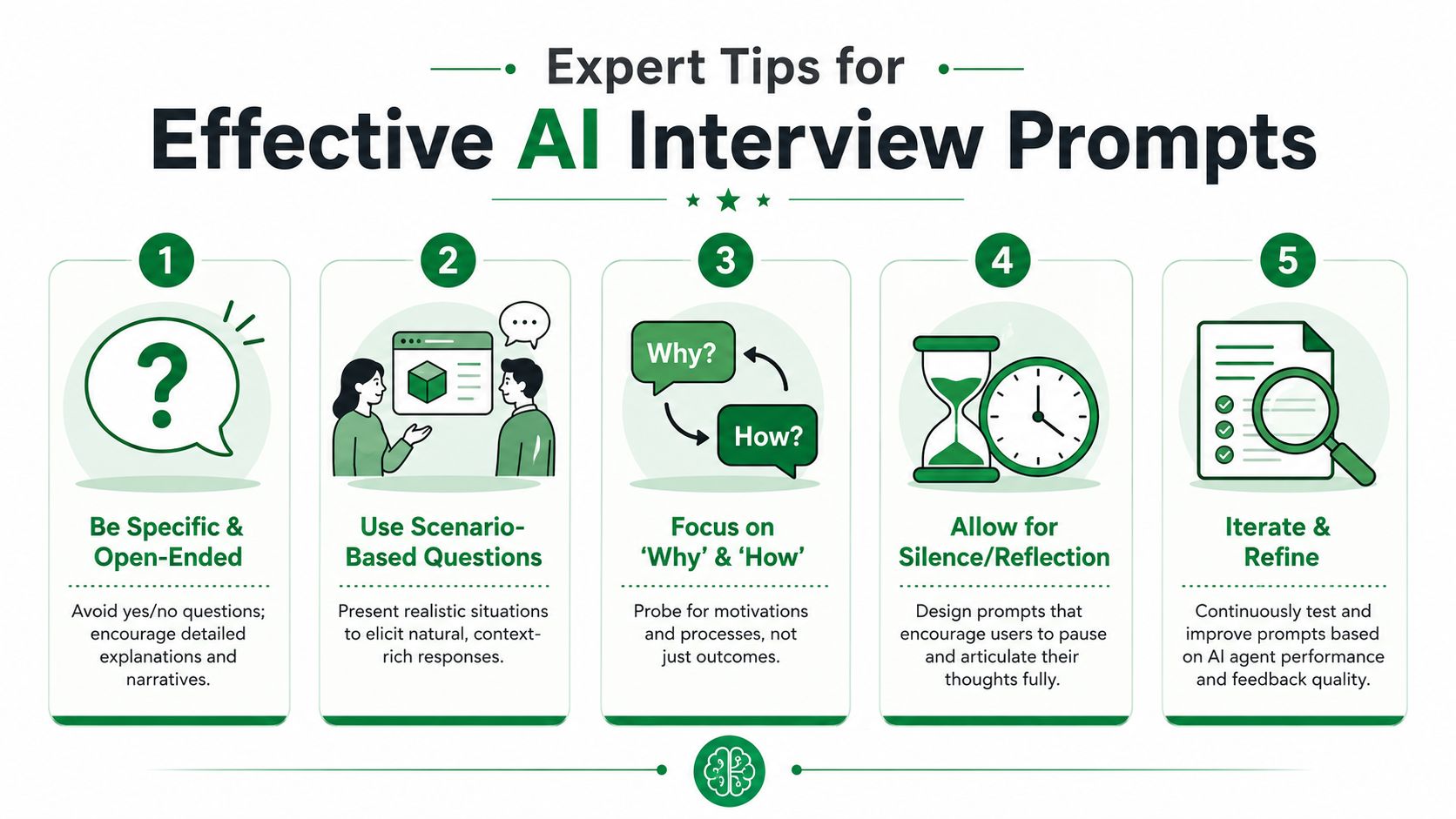
The quality of an AI-moderated interview is set before the first participant joins. In product research, the prompt is the study design. If the setup is vague, the agent scales vague interviews. If the setup is precise, the agent surfaces usable evidence at a pace manual moderation alone typically cannot match.
In practice, the best results come from giving the agent a research job, not a scripted questionnaire. Our experience at Uxia is that objective-led missions produce more natural follow-up and better think-aloud data because the moderator can react to what the participant says instead of forcing the next prewritten question.
Stop writing scripts that flatten behavior
A fixed script sounds safe. It also strips out the moments product teams care about most: hesitation, wrong expectations, reversals, and uncertainty.
Here is the difference.
Weak prompt setup | Strong prompt setup |
|---|---|
Ask Q1, then Q2, then Q3 in order | Learn why users hesitate during onboarding |
Ask if the button label is clear | Probe what users expect to happen after clicking |
Finish all questions regardless of behavior | Follow moments of confusion, uncertainty, or contradiction |
The stronger version tells the AI moderator what to learn. That gives it room to ask the extra question that exposes a flawed mental model, which is often the point of the study.
Write prompts for evidence, not coverage
Product teams often overvalue coverage. They want to make sure every participant gets every question. That makes sense in a survey. It is a weaker approach for moderated usability interviews, where the signal usually sits inside an unexpected pause or a mistaken assumption.
Prompts that produce better think-aloud feedback usually do five things:
State the decision the team needs to make
Example: understand why new users hesitate before confirming a setup step.Tell the moderator what to probe
Instruct the agent to follow pauses, backtracking, uncertainty, incorrect predictions, and contradictions.Ask for expectations before actions
“What do you think will happen if you click that?” is often more diagnostic than “What are you doing now?”Define participant context clearly
New users, cautious buyers, and returning power users interpret the same interface differently. The prompt should reflect that.Protect natural phrasing
Set guardrails, but leave room for plain language so participants respond to a conversation, not a script.
The same prompt discipline shows up in adjacent AI workflows. The Seedance prompts guide makes the same point from a different angle: clearer objectives, context, and response rules lead to more usable outputs.
A prompt structure that works in UX research
This format works well for AI-moderated product interviews because it mirrors how experienced researchers frame a live session.
Research objective
Understand why first-time users hesitate during the onboarding confirmation step.Participant context
Interview users who are new to the product, cautious about irreversible changes, and still deciding whether the product feels safe to try.Moderation behavior
Ask follow-up questions when the participant pauses, changes direction, expresses doubt, or reveals a wrong expectation.Think-aloud instruction
Prompt the participant to explain what they expect to happen before each major action.Output focus
Capture recurring expectation mismatches, confidence barriers, and points where the interface creates uncertainty.
Teams that need help translating research goals into missions can borrow patterns from these usability test script examples for 2026. The useful part is not the script itself. It is the way the objective, task, and probe logic line up.
Common prompt failures
A few mistakes show up repeatedly in AI interview setups for product validation:
Too many objectives in one mission
If the team is testing onboarding clarity, pricing trust, and feature discoverability at the same time, the findings get muddy fast.Questions that ask for opinions before behavior
“Did you like this?” produces thinner evidence than “What did you expect this button to do?”Missing instructions for follow-up
If the prompt does not tell the moderator what to probe, it will stay shallow at the exact moments that deserve attention.No participant framing
Without context, responses flatten and the trade-offs become less believable.No pilot run
A short test with a handful of sessions usually reveals whether the prompt is producing explanation or just transcript volume.
This work is research design, not prompt tinkering. Teams that treat it that way get interviews that are faster to run, easier to review, and more useful for product decisions.
Uncovering Insights Human Moderators Might Miss
The most interesting value of an AI interview agent isn't speed. It's consistency.
Human moderators are excellent at building rapport and reframing on the fly. They're also selective. They notice some cues, miss others, and sometimes move on because the participant completed the task and the session needs to stay on schedule. AI doesn't have the same fatigue pattern.
One of the clearest examples from Uxia's own work came from onboarding research. The surprising insight wasn't that users were getting stuck on the interface. It was that they were struggling with confidence. The AI moderator repeatedly asked participants why they paused, and that surfaced a widespread concern that previous human-led interviews had missed (Uxia on confidence-related hesitation in onboarding).
What the users were actually telling the team
Participants often completed the task.
That's exactly why the issue had stayed hidden. In a traditional session, successful completion can pull attention away from emotional friction. But the AI moderator kept probing the pauses. Users explained they weren't sure whether clicking the primary button would immediately commit an important action or whether they would still have a chance to review their choices.
That's a different kind of problem than “the interface is confusing.”
It's a confidence gap, not a navigation gap.
Why human-led sessions missed it
This kind of miss is common in usability work. A participant gets through the flow, the moderator notes a brief hesitation, and the session continues. If that hesitation isn't explored thoroughly every time, the pattern stays anecdotal.
AI changes that by doing the same follow-up work at scale.
It asks why the pause happened.
It asks what the user expected instead.
It does it again for the next participant.
Then it makes the pattern visible.
What to watch for: If users succeed but sound uncertain, don't log the task as “fine” and move on. Probe the uncertainty. That's often where trust and conversion problems begin.
How the team acted on the finding
The response wasn't a full redesign. It was more precise.
The team clarified explanatory copy and improved the visual hierarchy around the confirmation step. That kind of change often matters more than another round of visual polish, because it addresses the user's mental model rather than just the screen layout.
A useful lesson for product teams is that AI interviews often reveal interpretation problems hiding inside apparently successful tasks. Users may finish the flow while still feeling risk, doubt, or loss of control.
Here's a practical way to classify those moments:
User behavior | What it may look like | What it often means |
|---|---|---|
Pause before clicking | Silence, hesitation, re-reading | Fear of irreversible action |
Successful completion with weak confidence | “I think this is right” | Unclear system status |
Unexpected backtracking | Revisiting prior steps | Lack of trust in the next action |
Verbal uncertainty despite progress | “Maybe”, “probably”, “I guess” | Mismatch between expectation and design |
Where AI is especially good
AI moderation tends to outperform human moderation on repeatable micro-probing. It doesn't get bored of asking “why did you pause there?” for the twelfth time. That matters when the team needs to know whether a concern is isolated or widespread.
That doesn't mean the agent understands every human nuance perfectly. It means it can reveal patterns that only become obvious through consistent follow-up across many parallel conversations. For product validation, that's often enough to change the roadmap.
Integrating AI Interviews into Your Product Workflow
The smartest way to use AI interviewers is as part of a mixed research system. Not as a blanket replacement for human research, and not as a side experiment disconnected from delivery.
Industry experts recommend using AI interviewers as a complement to human moderation rather than a replacement. They work well for structured feedback at scale, but can struggle to adapt in real time to the subtle cues needed for some in-depth interviews (Nielsen Norman Group on AI interviewers).
Where AI interviews belong
Use AI-moderated interviews for recurring product questions that benefit from consistency and speed:
Pre-release validation for onboarding, checkout, settings, and account flows
Post-launch feedback collection when you need fast signal on a known issue area
Cross-market checks when language and scheduling would slow human moderation
Concept comparison where the same mission needs to run across multiple variants
Keep human moderation for work that depends on reframing, emotional nuance, or deeper contextual interpretation:
Generative discovery
Sensitive domain research
Complex B2B workflows with layered stakeholder dynamics
Interviews where negotiation, status, or organizational politics shape the answer
A workable operating model
The teams that integrate this well usually build a repeatable cadence.
Product stage | Best interview mode |
|---|---|
Early exploration | Human-led interviews |
Flow validation | AI-moderated interviews |
Iteration testing | AI first, then human follow-up if needed |
Ongoing release QA for UX | AI-moderated interviews with structured missions |
That combination offers researchers an advantage. Instead of moderating every single session themselves, they can focus on study design, interpretation, and the moments where human judgment adds the most value.
The workflow detail teams forget
Integration matters as much as insight quality. If interview output stays trapped in one tool, adoption fades.
That's why operational teams should connect interview workflows to the rest of their stack, including design, product, and collaboration systems. Uxia supports that kind of handoff through its integration options, which makes it easier to move findings into the places where decisions happen.
AI interviews work best when they become part of sprint rhythm, not a separate research event that someone has to champion from scratch every time.
The practical takeaway is simple. Use AI where consistency, scale, and speed offer the greatest advantage. Use humans where nuance, reframing, and trust-building still matter more than throughput. Teams that split the work that way learn faster without flattening the craft of research.
If your team wants to validate flows, compare markets, or run structured UX interviews without waiting on recruitment and scheduling, Uxia gives you a practical way to do it. Its AI-moderated interview feature helps product teams run parallel interviews, uncover hesitation and expectation gaps, and turn those conversations into actionable findings fast.