
Rapid testing is a UX approach that returns actionable signal in hours or days, not weeks, and the benchmark is the percentage of real usability issues caught per dollar per day. On the evidence side, rapid antigen testing is a speed-to-decision system, not a certainty machine, with pooled sensitivity at 75% and specificity at 99% in a 2023 rapid review of 93 studies, 36 tests, and 104,961 participants (review data).
That trade-off is the whole point. If your team needs a decision this sprint, you do not need a perfect study, you need a test design that catches enough real friction to move the product forward without fooling you into confidence.
What Rapid Testing Actually Means in UX
Rapid testing means any UX research method built to produce actionable usability signal fast enough to influence a live product decision. In practice, that means hours or days, not a long research cycle, and it means accepting some loss in depth, sample richness, or observation detail in exchange for speed. The useful question is not, “How fast can we test?” It's, “How much of the problem space can we cover before we ship?”
Speed is the feature, not the whole product
The diagnostic-testing parallel is obvious. A fast test is valuable because it gets people to the next decision sooner, but the result only matters if the team understands its limits. In UX, that means using rapid tests for direction, friction detection, copy checks, prototype sanity checks, and flow validation, not for pretending you have finished evidence on a high-stakes product decision.

A team that treats rapid testing like a lighter-weight version of “real research” gets sloppy. A team that treats it like a speed-to-decision operating system gets useful answers fast, then routes the risky parts into deeper validation later.
Practical rule: If the design decision is reversible, test it rapidly. If the decision is sticky, expensive, or politically sensitive, use rapid testing only as a first pass.
Rapid Testing Versus Traditional User Research
Rapid testing and traditional research are not rivals. They sit on different parts of the same decision map. Rapid testing wins when the team needs a clean read before the sprint ends. Traditional research wins when the team needs confidence, depth, and evidence strong enough to justify bigger bets.
Criterion | Rapid Testing | Traditional Research |
|---|---|---|
Time-to-insight | Hours or days | Days to weeks or longer |
Sample size | Small, focused, decision-driven | Larger or more deliberate |
Depth of qualitative signal | Narrower, faster | Richer, more contextual |
Cost per finding | Lower when the framing is good | Higher, but deeper and more durable |
High-stakes confidence | Useful as a first pass | Better for irreversible decisions |
Use the decision, not the method, to choose
If a flow is easy to change, rapid testing is the right move. If the work affects pricing, legal risk, medical outcomes, or a core experience that won't be easy to unwind, don't stop at rapid feedback. Use rapid testing to de-risk the obvious problems, then confirm the hardest calls with moderated sessions, longitudinal work, or larger-sample validation.
WHO's antigen guidance makes the same point in a clinical setting, because rapid tests can support immediate action while still needing confirmation rules and operating context (WHO implementation guidance). That is the mental model product teams need too. Fast evidence is not fake evidence, but it is not final evidence either.
The hybrid middle is where mature teams live
Most strong teams do not choose one method and marry it forever. They use rapid testing to catch obvious failures early, then reserve heavier research for the moments that matter. That sequencing keeps the team moving without confusing speed for certainty.
For a straightforward walkthrough of field execution, how to conduct usability testing is a practical reference worth keeping nearby when you set up your own sessions.
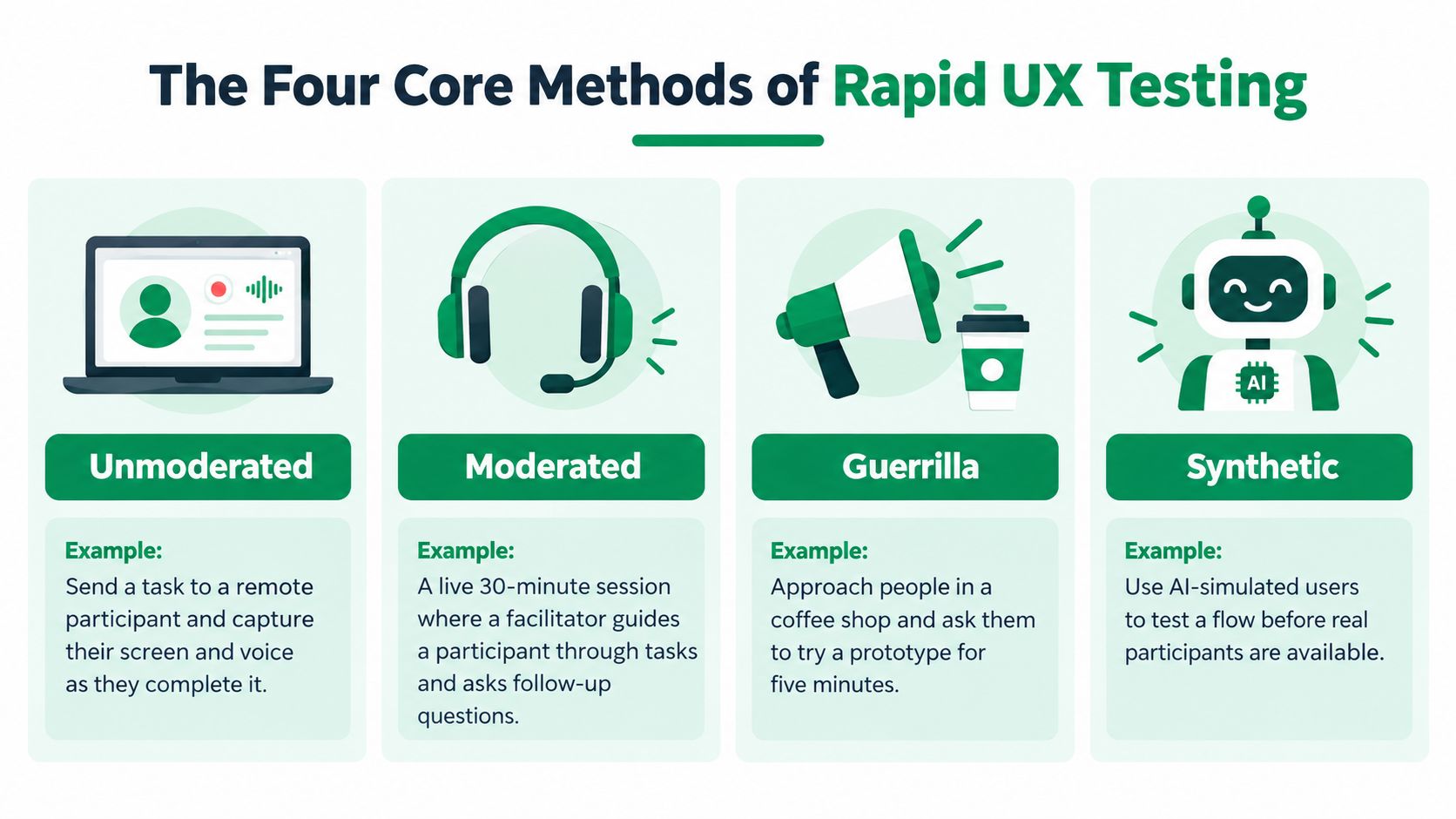
The Four Core Methods of Rapid UX Testing
Unmoderated tests
Unmoderated testing is the cleanest sprint tool. You give a participant a task, let them work through the flow on their own, and capture clicks, timing, and behavior without a live facilitator. It is best for quick task validation, first-pass prototype checks, and finding obvious friction in a flow that should already make sense.
A realistic example is asking a participant to sign up, find a pricing page, and try to start a trial on a prototype. The metric that proves it worked is simple, task success. If people cannot finish the task without getting stuck, the design is not ready.
Moderated tests
Moderated testing is for when the product team needs context, not just behavior. A live facilitator can compress a 60-minute interview into a 15-minute focused session by staying on one task and asking sharp follow-ups. It is best for ambiguous flows, trust issues, and moments where you need to hear why someone hesitated.
A typical example is a new checkout screen where the team thinks the pricing copy is confusing. The key metric is time-on-task, but the value comes from hearing where the participant slowed down and what they expected to happen next.
Guerrilla tests
Guerrilla testing is scrappy by design. You recruit a few people in a café, hallway, or common area and ask them to try a paper prototype or low-fidelity design. It is best for early concepts, labels, navigation ideas, and conversations that need fast human reaction before the design is polished.
A useful example is testing three homepage variants on a paper mock with five people near the office. The proof is whether they can interpret the layout without hand-holding. If they cannot, the concept needs work before the team burns time polishing it.
Synthetic testers
Synthetic testing uses AI-driven personas to run structured missions against a prototype and surface patterns automatically. It is best for early friction detection, copy review, accessibility checks, and repeated validation while the product is still moving. Uxia applies this approach by generating AI participants aligned to demographic and behavioral profiles, running unmoderated missions, and summarizing the output with reports, metrics, and heatmaps.
That makes synthetic testers useful before the human sessions start, not after. A team can use synthetic users versus human users as a decision lens, then use Uxia for directional checks, and leave higher-stakes emotional or trust-heavy work for moderated human sessions. The metric that matters here is whether the synthetic run surfaces the right friction classes early enough to change the design.
Clear rule: If you need behavior, use unmoderated or synthetic. If you need explanation, use moderated. If you need scrappy early reactions, use guerrilla.
Artifacts and Metrics That Make a Rapid Test Useful
A rapid test is useless if it leaves the team with vague opinions and no next step. Every run should produce four artifacts: a mission script, a recorded session or transcript, a heatmap or click map, and a one-page insight summary with prioritized issues. If one of those is missing, the test probably wasn't framed tightly enough.
Set the success criteria before the first participant
The metrics that matter are the ones tied to a decision. Track task success rate, time-on-task, and a severity-weighted issue count. That combination tells you whether people can complete the job, how hard it feels, and which problems deserve immediate work.
The mistake is arguing about findings after the fact because nobody defined the threshold in advance. Don't do that. Write the pass/fail line before the session starts, and make the team agree on what counts as a blocker, what counts as a nuisance, and what gets ignored for now.
Use a brief that forces clarity
A good rapid-test brief is short and blunt:
Decision: What must change, ship, or be rejected after this test?
Audience: Which users are you trying to understand?
Mission: What exact task should they attempt?
Success criteria: What does a pass look like?
Prototype state: What is realistic enough to test, and what is still smoke and mirrors?
Escalation rule: If the result is negative, what gets repeated or confirmed?
For metric selection, a compact reference like usability testing metrics is useful when your team needs to tighten the brief and avoid vanity tracking. The point is not to measure everything. The point is to measure the few things that change what you do next.
Common Pitfalls When Teams Try to Scale Rapid Testing

Teams usually fail at rapid testing in the same five ways. They test without a decision, they treat every comment like a defect, they recruit a narrow slice of users, they skip the debrief, and they chase volume instead of signal. The pattern is predictable because rapid testing makes bad framing cheap to repeat.
The five failure modes
No clear decision in mind. Symptom, the team gets a pile of observations and nothing changes. Cost, the test becomes theater. Fix, define one decision per test.
Treating every finding as a bug. Symptom, preferences get promoted to product issues. Cost, the backlog fills with noise. Fix, prioritize findings by impact.
Ignoring sample diversity. Symptom, one type of participant dominates the read. Cost, the team overfits to a narrow audience. Fix, recruit a varied participant mix.
Skipping the debrief. Symptom, everyone leaves with their own interpretation. Cost, alignment breaks the moment the meeting ends. Fix, always hold a 15-minute debrief.
Chasing volume over quality. Symptom, the team boasts about test count but learns little. Cost, speed masks shallow insight. Fix, focus on learning depth, not test count.
WHO's malaria guidance is a useful reminder that performance shifts with sample handling, timing, and operating conditions, not just with the label on the test kit (WHO malaria diagnostic standards). UX behaves the same way. Persona fit, task wording, and prototype fidelity can change what you think you saw.
More tests do not fix a bad question. They just produce more answers to the wrong question.
Where Synthetic Testers Like Uxia Fit in the Rapid Stack
Synthetic testers belong in the fast-evidence layer, not as a replacement for human research. Use them to catch friction early, test variants continuously, and clear obvious issues before you spend time scheduling people. Uxia does that by generating AI participants, running missions against prototypes, and turning the output into visual reports with transcripts, heatmaps, and prioritized issues.
Put synthetic testing upstream of human sessions
A smart team uses synthetic testers for direction checks, copy review, navigation sanity checks, and accessibility sweeps while the product is still moving. That lets designers fix the dumb mistakes before moderated sessions begin. Then the human research can focus on emotional response, trust, edge cases, and decisions that really need lived experience.
The coverage argument matters here. Uxia applies the Nielsen Norman model Problems found = N × (1 − (1 − L)ⁿ) to synthetic testers, and with 10 synthetic testers the model yields roughly 97% to 98% issue detection on that curve (Uxia model note). That is not a substitute for human judgment, but it is enough to make sprint loops much tighter.
Use the right layer for the right risk
If the flow is low-risk and the question is, “Is this broken or confusing?”, synthetic testing belongs at the front of the line. If the question is, “Will users trust this with money, health, identity, or a major life decision?”, keep moderated human sessions in the mix. The strongest workflow is layered, not ideological.
The practical reason is simple. Synthetic testers are fast and consistent, but humans still catch context, emotion, and social nuance better. Uxia fits best when your team wants continuous validation without recruiting and scheduling every time the design changes.
Best Practices, Templates, and a 60-Minute Test Plan
Start with a pre-test checklist and don't skip any item: decision, audience, mission, success metrics, and prototype state. Write the mission in the participant's language, not your internal jargon. Set severity thresholds before the first session, and run at least one synthetic pre-pass before human sessions so the team doesn't waste time on obvious friction.
For a practical setup template, usability test plan template is a useful starting point when you need structure fast. Use it to force the team to name the decision, the audience, and the escalation rule before anyone starts watching sessions.
A 60-minute sprint plan
Minutes 0 to 15: Align on the decision, the prototype, and the success threshold.
Minutes 15 to 30: Run the first participant or synthetic pre-pass.
Minutes 30 to 45: Run the second pass, watch for repeat friction, and note severity.
Minutes 45 to 60: Debrief, assign fixes, and write the one-page summary.
Close every cycle with a confirmation rule. If the result is ambiguous or high-risk, repeat the test, change the audience, or move to a deeper method instead of pretending the first pass settled it.
Four questions teams always ask
When should you skip rapid testing? When the decision is irreversible, politically sensitive, or high-consequence enough that a fast read would be misleading.
How many participants is enough? Enough to expose the issue you're deciding on. If the team can already name the problem, stop early and move to the fix.
Can you mix methods in the same sprint? Yes. That's often the right call.
How do you defend this to stakeholders who want deeper studies? Tell them rapid testing is the front end of the research stack, not the whole stack.
Uxia gives product teams a fast way to run synthetic UX tests, catch friction early, and turn prototype feedback into clear next steps without waiting on recruiting. If you want a tighter sprint loop and a cleaner confirmation rule, visit Uxia and see how synthetic testers can fit into your research cadence.