
Voice of the Customer Template: Create Yours Now
Create an actionable voice of the customer template. Our guide covers components, customization & using AI to turn feedback into powerful insights.
Your team probably already has customer feedback. It's in support tickets, survey exports, Slack threads, call notes, sales objections, usability sessions, and product analytics. The problem isn't collection. The problem is that this mess rarely gets turned into a repeatable decision system.
That's why a voice of the customer template matters. Not as a static document. As an operating model. A good template gives every piece of feedback context, makes patterns visible, and helps teams decide what to fix now, what to monitor, and what to ignore.
The difference between a useful VoC system and a noisy one usually comes down to one thing. Speed. Traditional VoC programs often move too slowly for product teams working in weekly or biweekly cycles. By the time someone recruits users, runs sessions, transcribes notes, codes themes, and presents findings, the sprint has moved on.
Why Your Customer Feedback Needs a Better System
Teams often don't suffer from a feedback shortage. They suffer from fragmentation.
Support hears complaints that product never sees. Sales logs objections in a CRM field nobody reviews. Researchers keep interview notes in a deck. Product managers scan NPS comments when they have time. Designers pull a few quotes into a Figma file. Every source contains signal, but without a shared structure, the signal stays buried.
Feedback without structure becomes opinion
When feedback lives in separate tools, teams start making predictable mistakes:
They overweight the loudest channel. A few angry tickets can distort roadmaps.
They confuse anecdote with pattern. One memorable quote starts standing in for a segment.
They lose source context. Nobody remembers whether a complaint came from a new user, a power user, or a prospect.
They delay action. The team knows something is wrong, but nobody has translated it into a clear fix.
That's where a voice of the customer template earns its keep. It creates a standard way to log what happened, who experienced it, where it showed up, what it likely means, and what should happen next.
Practical rule: If a piece of customer feedback can't be tied to a user type, a task, and a product area, it's too vague to drive product action.
Traditional guidance often focuses on what to collect, but not how fast teams can move from capture to action. Existing VoC guidance rarely addresses execution speed, even though traditional programs often take weeks because they depend on recruiting, scheduling, and manual analysis. That gap is a real problem for teams working in 1 to 2 week sprint cycles (Conveo on VoC execution speed).
A template is a workflow, not a form
The best way to think about a voice of the customer template is as a decision layer sitting on top of your inputs. It takes raw comments and turns them into comparable units.
A practical system usually does three things well:
Normalizes different sources so a survey comment, usability transcript, and support complaint can be reviewed side by side.
Preserves evidence so nobody has to trust a summary without seeing the underlying behavior or wording.
Forces next-step ownership so insights become tasks, not slideware.
If you want examples of how teams surface real customer language in public-facing ways, it's useful to see how brands use customer voice. That's different from a VoC operating system, but it shows how powerful direct customer language becomes once it's organized.
For a closer look at the broader discipline, Uxia's own guide on voice of the customer practice is a useful companion to the template work.
The Core Components of an Actionable VoC Template
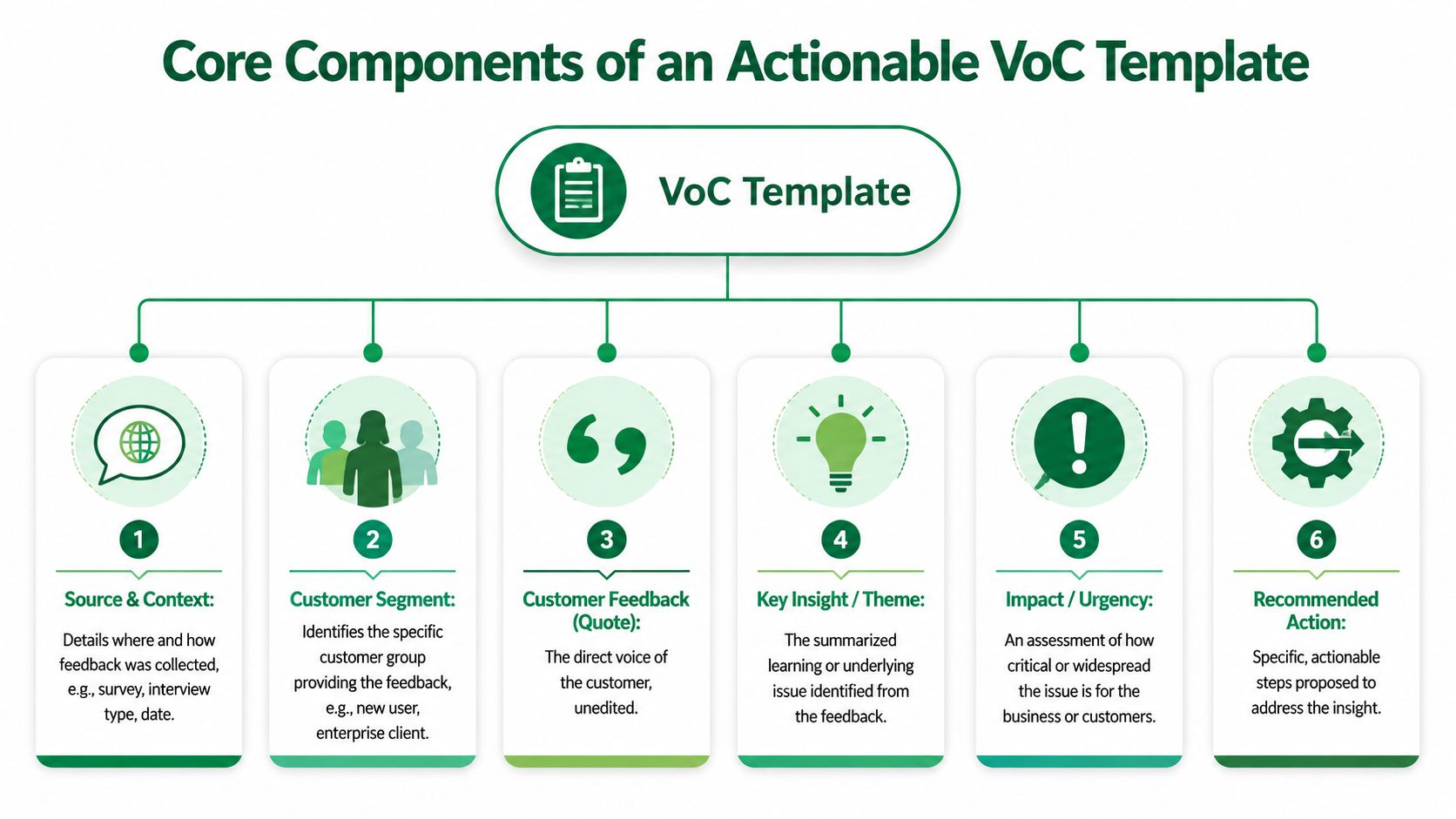
A useful voice of the customer template answers a small set of questions clearly. What were we trying to learn? Who did the feedback come from? What exactly happened? How serious is it? What should we do next?
If your template can't answer those questions quickly, it won't help a product team in a real sprint.
Start with context, not quotes
A lot of weak VoC documents open with a pile of comments. That creates ambiguity immediately. Feedback without context forces everyone in the room to interpret it differently.
The better approach is to log setup fields first:
Test objective. What decision were you trying to inform?
Mission or task. What did the user try to do?
Artifact tested. Which screen, prototype, flow, or feature was involved?
Audience definition. Who is this user, and what makes them relevant?
Source and date. Where did this signal come from, and when?
Those fields sound administrative, but they're what make evidence reusable. Without them, every conversation starts from scratch.
Capture outputs that can drive decisions
Once the context is clear, the template needs output fields that move from observation to action:
Key friction points. What blocked progress or created doubt?
Recurring themes. What pattern does this instance belong to?
Supporting transcript excerpt. What exact language shows the problem?
Behavioral evidence. What did the person do, not just say?
Severity or impact. Is this minor friction or a conversion blocker?
Recommended action. What specific change should a team make?
One field is especially important in UX and prototype testing: prototype artifact vs real UX issue. That distinction prevents teams from overreacting to limitations in an unfinished prototype while still catching problems that will persist in production.
Separate “the prototype didn't fully simulate the interaction” from “the user didn't understand the flow.” Those are not the same problem, and they shouldn't get the same fix.
This structure is aligned with how strong research systems work in practice. Inputs define the scenario. Outputs connect evidence to action.
Why this structure has held up over time
VoC isn't a trendy framework. It has deep roots in product and quality work. The methodology gained broad recognition through QFD, and one reason it lasted is that it forced teams to translate customer input into design priorities. The historical proof point still matters. Ford used VoC tables and reported a 30 to 50% reduction in design errors and a 40% reduction in development time on new vehicle models (ASQ on VoC and QFD history).
That result didn't come from collecting more quotes. It came from structured translation.
A modern voice of the customer template should do the same thing. It should reduce interpretation overhead and make the next decision easier than the last one.
Building Your Foundational VoC Spreadsheet Template
You don't need a specialized platform to start. A spreadsheet works well if the structure is clean and each row represents one atomic insight, not an entire interview or one giant summary paragraph.
That matters because teams need to sort, filter, assign, and revisit feedback. Long narrative notes are useful for synthesis, but they're weak as an operational database.
Use one row per insight
A common mistake is making one row equal one participant or one customer conversation. That creates bulky records and hides patterns. Instead, make one row equal one distinct friction point, quote, or insight.
That gives you a workable database across surveys, calls, usability studies, support logs, and forums. It also helps avoid the aggregation problem many teams run into when trying to compare structurally different sources. Enterprises often capture feedback across surveys, support tickets, forums, and social channels, but many templates don't normalize those inputs well. That creates a risk of researcher bias and false consensus from naive aggregation (Sprinklr on fragmented VoC inputs).
Recommended fields for the first version
Keep the structure stable. Add optional columns later if needed.
Insight ID. A unique reference for tracking.
Date. When the signal was captured.
Source. Survey, interview, support ticket, usability test, review, community post.
Audience Segment. New user, admin, buyer, enterprise user, power user, and so on.
Mission or Task. The thing the user tried to complete.
Observed Friction Point. The concrete issue.
Insight Theme or Category. Usability, copy, trust, navigation, pricing, onboarding.
Supporting Quote or Transcript. The direct wording.
Behavioral Evidence. Session note, heatmap link, click path, timestamp.
Severity. A simple 1 to 5 scale works well.
Impacted Metric. Conversion, activation, completion, trust, support volume.
Recommended Action. The proposed design, content, or product change.
Owner. Who needs to act on it.
Status. New, reviewing, planned, shipped, dismissed.
For teams that already run lots of internal readouts, it's also worth tightening how you document discussion around findings. If your meetings tend to produce scattered action items, meowtxt's guide to organized meeting notes is a practical companion to the spreadsheet itself.
Actionable VoC template structure
Insight ID | Date | Source | Audience Segment | Mission/Task | Observed Friction Point | Insight Theme/Category | Supporting Quote/Transcript | Behavioral Evidence (e.g., Heatmap link) | Severity (1-5) | Impacted Metric (e.g., Conversion) | Recommended Action | Owner | Status |
|---|---|---|---|---|---|---|---|---|---|---|---|---|---|
VOC-001 | 2026-05-01 | Usability test | New user | Complete checkout | Unsure what invoice option means | Copy clarity | “I'm not sure what happens if I select this.” | Session timestamp or heatmap link | 4 | Checkout completion | Rewrite label and add helper text | Design | New |
VOC-002 | 2026-05-01 | Support ticket | Existing customer | Change billing details | Can't find edit path | Navigation | “I looked everywhere for billing settings.” | Ticket URL or transcript ref | 3 | Support volume | Expose billing entry point in account nav | Product | Reviewing |
Keep the scoring simple
Don't overengineer your first pass. Severity should help teams triage, not create false precision.
A good lightweight rule:
Severity 1 to 2 for mild friction or edge cases.
Severity 3 for repeat confusion that slows progress.
Severity 4 to 5 for blockers, trust issues, or high-stakes task failure.
The spreadsheet isn't the final story. It's the system of record that lets the story stay honest.
Gathering and Mapping Data to Your Template
A template only works if populating it is realistic. If data entry takes longer than the sprint, the system dies.
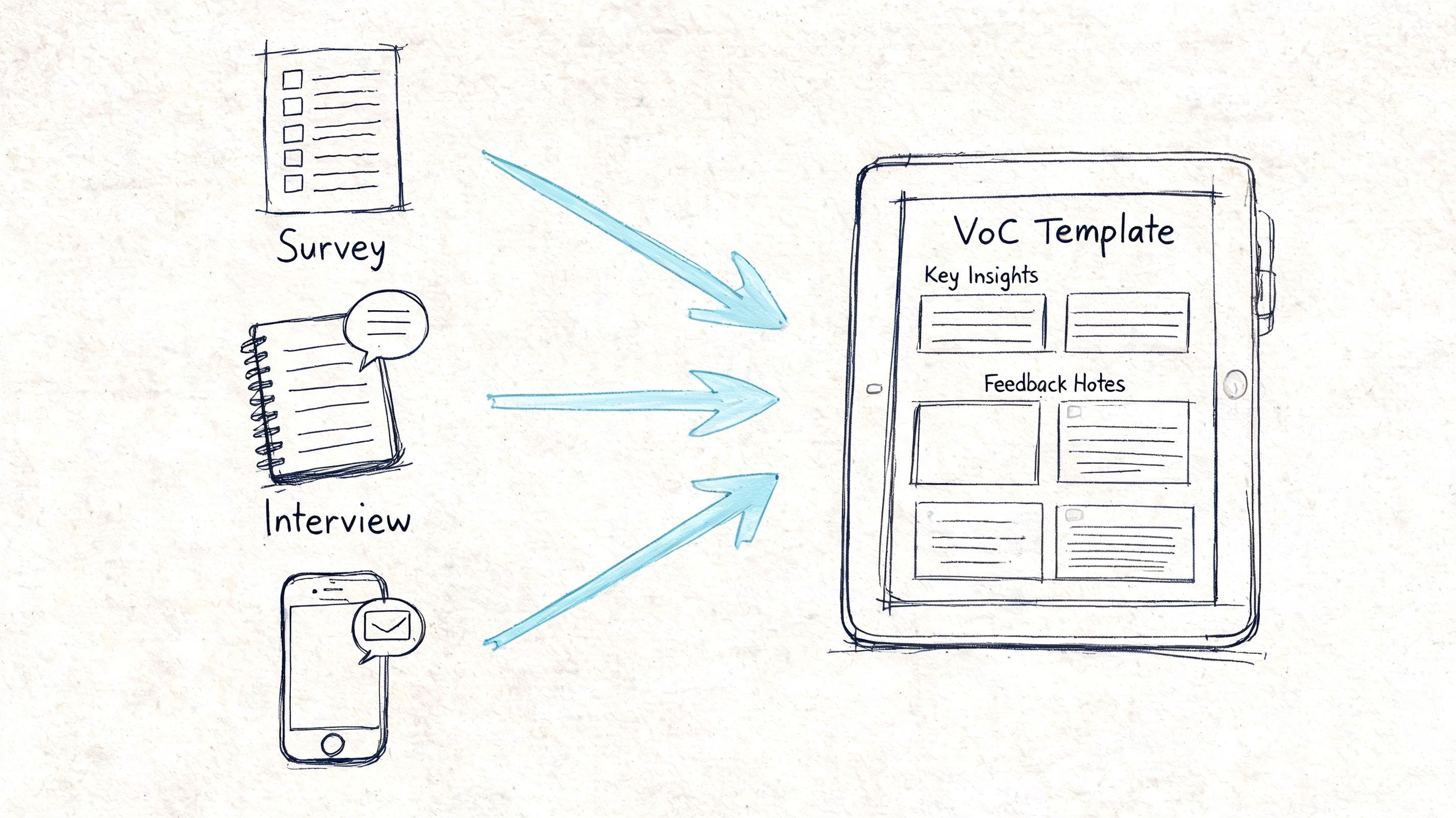
That's why the collection method matters as much as the columns. Surveys, interviews, support transcripts, and behavioral analytics all contribute different kinds of signal. The practical challenge is turning those inputs into standardized entries fast enough for product work.
What each source is good at
Different channels answer different questions.
Surveys are useful when you need broad directional input and lightweight sentiment.
Support tickets reveal recurring operational pain and failure states.
Interviews give depth, language, and motivation.
Behavioral evidence shows where people hesitate, backtrack, or abandon.
Prototype or usability testing is strongest when you need to understand interaction-level friction before release.
The weakness often isn't source variety. It's slow synthesis. Somebody still has to read, cluster, summarize, and rewrite everything into a usable format.
Map each input directly into a field
The easiest way to avoid manual overhead is to map each collection method to template fields from the start.
For example:
Open-text survey responses map to supporting quote, theme, and audience segment.
Interview notes or transcripts map to friction point, transcript excerpt, and recommended action.
Session recordings or heatmaps map to behavioral evidence and severity.
Support cases map to source, task, recurring theme, and owner.
This is where modern AI-assisted UX workflows change the operating model. Instead of waiting for real-world response rates that may never produce a representative signal, teams can use synthetic testing outputs to generate structured evidence immediately. VoC analysis benchmarks note that response rates below 40% can introduce 20 to 30% inaccuracy from sampling bias, while platforms using synthetic users can reach 100% participation and avoid the recruitment bottleneck altogether (Formbricks on VoC template benchmarks).
That's especially relevant when you're trying to combine qualitative and quantitative evidence in one stream. Uxia's own perspective on qualitative and quantitative research working together fits this model well. The strongest VoC systems don't treat transcripts and behavior as separate worlds.
The fastest template is the one your collection method can populate automatically, or close to automatically.
A practical mapping workflow
If you want a repeatable process, use this sequence:
Collect raw evidence from the source closest to the task you're studying.
Split compound feedback into single insights before logging it.
Tag each entry once with one main theme and one main task.
Attach proof by storing transcript fragments, timestamps, or visual evidence.
Assign an owner immediately so the entry doesn't become research backlog.
Many teams gain speed through this. Not by collecting less. By reducing the translation work between raw customer voice and product action.
Customizing Your Template for Different Teams
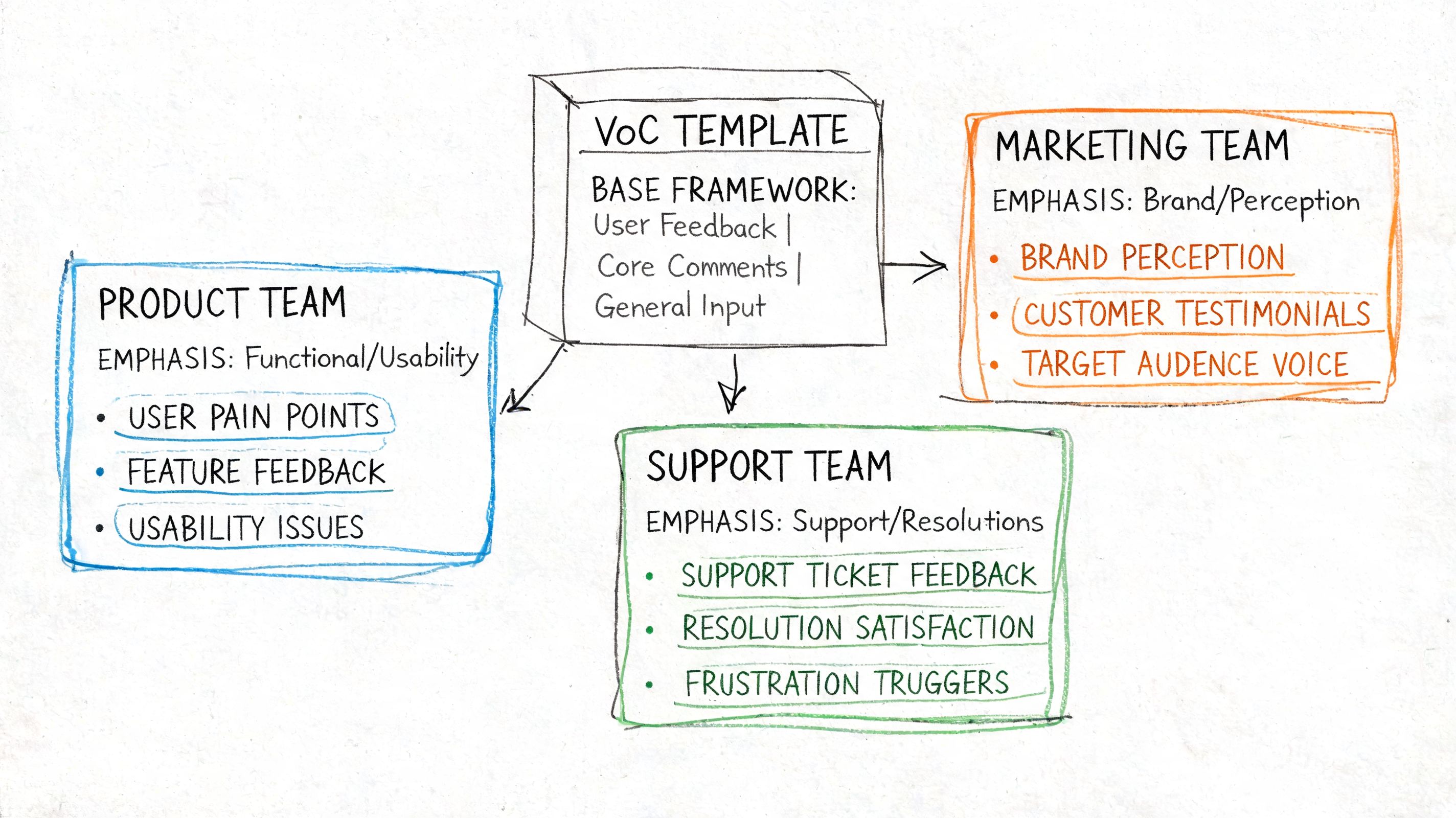
The structure of a strong voice of the customer template shouldn't change much. The emphasis should.
Design teams, growth teams, and enterprise product teams don't need different templates as much as they need different defaults. If you keep rebuilding the whole system for every function, you create inconsistency. If you keep the structure fixed and adjust the fields you highlight, the template stays comparable across the organization.
Early-stage product teams
Early-stage teams need to answer basic comprehension questions quickly. Does the concept make sense? Do users know what to do next? Is the value proposition visible in the flow?
For that environment, the most important fields are usually:
Mission clarity
Comprehension issue
First-point confusion
Prototype artifact vs real issue
Recommended next design change
These teams benefit from shorter entries and tighter links between the task and the confusion point. Long thematic coding is often less useful than concrete evidence tied to a screen or step.
Growth and conversion teams
Growth teams care about moments where hesitation costs money or adoption. Their template should still include the same base fields, but they should foreground:
Impacted metric
Severity
Repeated blocker
Trust signal
Action type, such as copy, flow, layout, or pricing communication
Many VoC programs often drift into score obsession. They track numeric satisfaction or loyalty but fail to preserve the underlying reasons. Advanced VoC programs use multi-channel capture to reduce sampling bias and AI-powered clustering to identify themes, but 60% of programs fail when they don't blend quantitative scores with qualitative “why” data (Delve on advanced VoC programs). A strong template prevents that by making evidence mandatory, not optional.
Enterprise and niche workflows
Enterprise products create a different problem. The friction often isn't generic UX. It's domain mismatch. Terminology, permissions, workflow assumptions, and industry-specific behavior all shape whether feedback is useful.
That's why audience fields need more depth in these settings. Instead of relying on basic demographics, expand the audience definition to include role, experience level, domain familiarity, workflow frequency, language, and any custom persona enrichment. If your team works with specialized users, a broad persona label won't be enough. Uxia's thinking on user persona templates is especially relevant here because better audience realism produces better interpretation.
A feedback entry from a first-time evaluator and one from a domain expert shouldn't carry the same meaning, even if they mention the same screen.
Keep the template stable and change the lens
A practical rule is to keep the database schema constant but vary three things by team:
Team type | What they look at first | What they can de-emphasize |
|---|---|---|
Early-stage design | Mission clarity, confusion, comprehension | Detailed business metric mapping |
Growth/product | Severity, repeated blockers, impacted metric | Deep persona enrichment unless segment-specific |
Enterprise product | Role context, domain familiarity, workflow fit | Generic demographic fields |
That keeps your VoC system coherent across teams without flattening the realities of different product work.
From Insights to Action How to Prioritize and Apply Findings
Most VoC systems break at the last step. Teams collect feedback, summarize themes, and stop. The work only becomes valuable when someone can turn a finding into a concrete product decision.
A simple prioritization flow works better than a fancy framework.
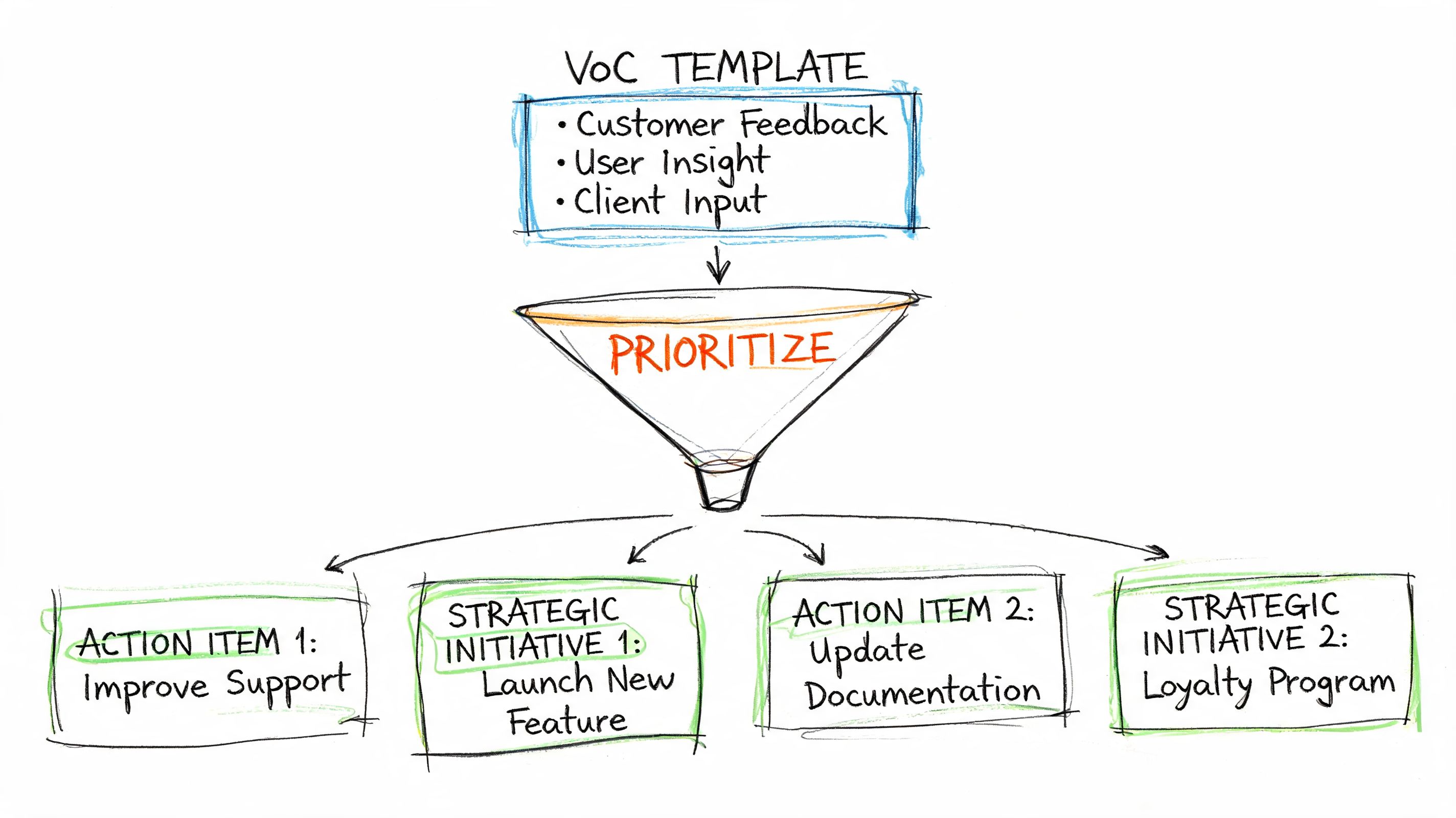
Turn one comment into one work item
Take a representative feedback snippet like this:
“I'm not sure what happens if I select ‘Put invoice in my name' here, so I'd probably stop before paying.”
That isn't the insight yet. It's evidence.
The logged entry might look like this:
Observed friction point: invoicing option creates uncertainty at checkout
Theme: copy clarity and trust
Task: complete payment
Behavioral evidence: hesitation before final step, likely abandonment risk
Severity: high enough to review quickly because it appears near a critical moment
Recommended action: rewrite the option label, add concise helper text, and test whether users understand the consequence without extra explanation
That's the difference between “customers are confused” and a usable ticket.
Prioritize by frequency and consequence
You don't need complicated math to decide what to fix first. In practice, teams can sort by two questions:
How often does this show up across entries?
What happens if we ignore it?
That gives you a workable matrix:
Frequent and costly. Fix now.
Frequent but low consequence. Batch into quality improvements.
Rare but severe. Escalate if it affects trust, accessibility, or completion.
Rare and low consequence. Monitor.
Here's a short walkthrough that shows how many teams think about making those calls:
Close the loop inside the template
A template becomes operational when every insight has three final fields completed:
Owner
Status
Follow-up evidence
If the team ships a copy change, record it. If engineering rejects the recommendation because the issue was a prototype limitation, record that too. If a later round shows the problem is gone, link the new evidence back to the original entry.
That's how the voice of the customer template stops being a research artifact and becomes a product memory system.
If your team wants VoC inputs at the pace of real product work, Uxia is built for that reality. You can upload prototypes, define the mission and audience, and get structured outputs such as transcripts, interaction evidence, summaries, and prioritized friction points in minutes. That makes it much easier to populate a voice of the customer template without waiting on recruitment, manual synthesis, or slow research cycles.