

A familiar product moment goes like this. The team has tightened the flow, polished the copy, reviewed analytics, and still nobody feels fully confident that users will move through the experience the way you expect.
That uncertainty is why teams run a UX audit. It's also why more teams are exploring a UX audit with AI testers. The promise is useful: fast, repeatable feedback on a website, app, prototype, or funnel before you spend more time on development or research. But the method only works when you use it with clear guardrails, realistic tasks, and human judgment where it matters.
From Uxia's point of view, AI tester audits are most valuable when they become part of ongoing design validation. Not a one-off report. Not a replacement for every research method. A practical way to catch usability friction early, compare flows quickly, and focus human research on the questions that require real users.
The Problem with Traditional UX Audits
Traditional UX audits still matter. They are built from a mix of analytics, heatmaps, session recordings, and unmoderated usability testing, because that toolkit remains the practical foundation of audit work according to this UX audit methods guide. That same guidance also notes that five to eight participants are often enough to surface many significant usability issues in a focused qualitative test.
The problem isn't that the process is wrong. The problem is that it's often slow, fragmented, and heavily dependent on who is doing the review.
Where traditional audits get stuck
A manual expert audit can be sharp, but it's still an expert interpretation. Two experienced reviewers may agree on the major issues and disagree on the priority, the root cause, or the fix.
Behavior data helps, but it has limits too:
Analytics show drop-off: You can see where users exit, but not always what made them hesitate.
Session recordings show behavior: You can watch struggle, but reviewing enough sessions takes time.
Heatmaps show attention patterns: They rarely explain confidence, confusion, or intent on their own.
Human testing adds depth: Recruiting, scheduling, and analysis can stretch beyond the pace of a sprint.
That's why product and design teams often end up choosing between speed and rigor. They either ship with partial confidence or wait for deeper research that arrives after key design decisions are already expensive to change.
Practical rule: If your audit process only works for milestone projects, it's too heavy for modern product teams.
Why generic AI isn't enough
Some teams try to shortcut the problem by pasting screens into a general-purpose model and asking for a UX review. That sounds efficient, but the evidence is a warning, not an endorsement.
Baymard Institute's 2024 test of ChatGPT-4 on 12 webpages found an 80.1% false-positive rate, a 19.9% accuracy rate, and only 14.1% discovery of total UX issues compared with a human UX professional's verified findings, based on Baymard's documented evaluation. In practice, that means open-ended AI commentary can create more noise than signal when used as an independent auditor.
Teams need to be careful. An AI UX audit isn't automatically useful just because it's fast. The quality of the testing setup matters more than the novelty of the tool.
For teams thinking about process maturity, this broader discussion of scaling apps through UX audits is a helpful reference point. The underlying idea is simple: audits need to support product decisions, not just produce observations.
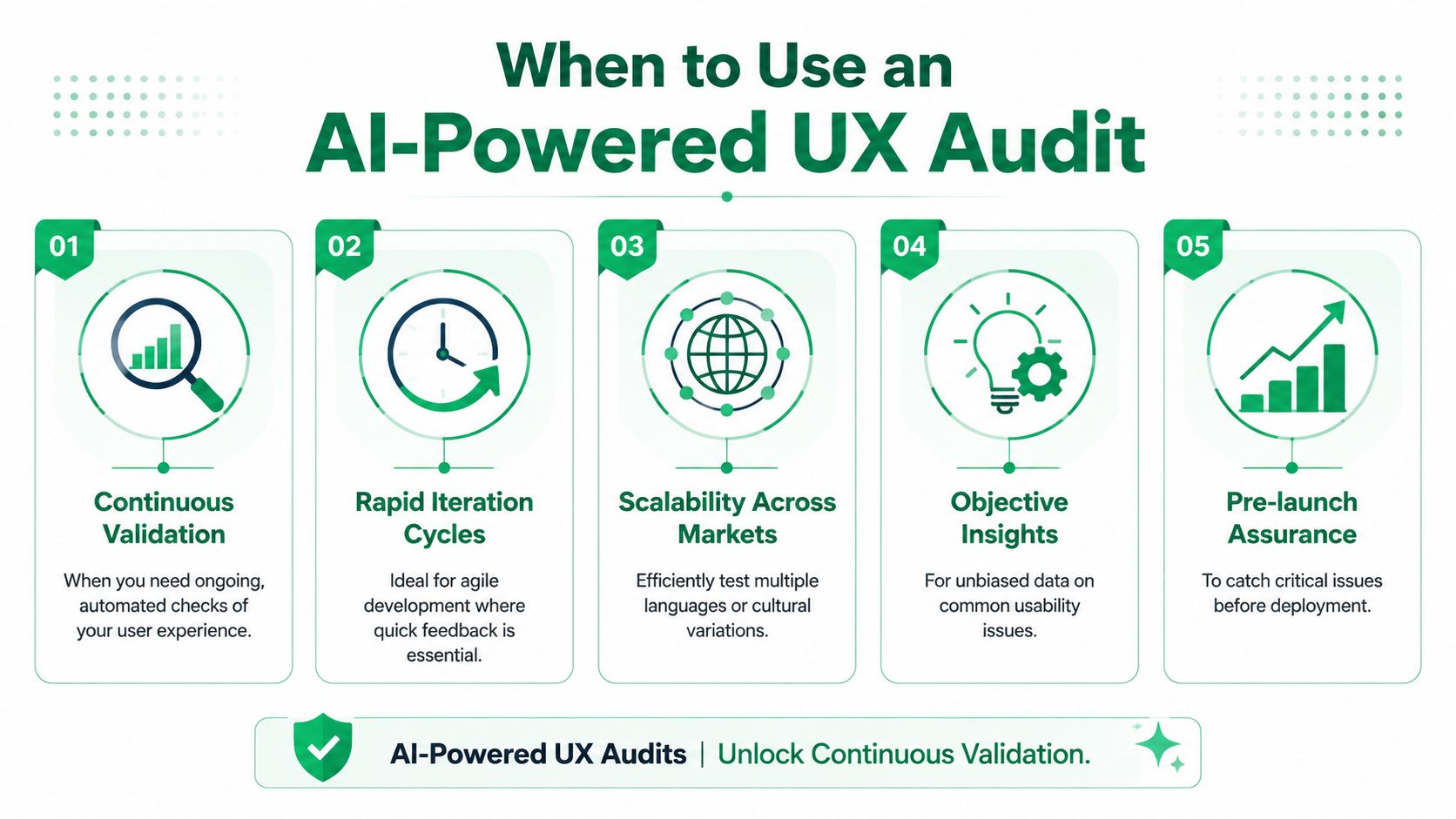
When to Use an AI-Powered UX Audit
An AI-powered audit is most useful when your team needs fast directional feedback on a specific journey. Not broad speculation. Not abstract design critique. A targeted pass through a real task.
Before launch and during redesigns
Pre-launch is one of the strongest use cases. Teams often know the flow too well by this point. Internal reviews start missing navigation gaps, overloaded screens, weak hierarchy, and copy that feels obvious only because the team has read it many times.
Redesigns create a similar problem. New structure introduces fresh friction, even when the visual design is stronger. An AI tester audit helps pressure-test whether the redesigned flow is easier to move through or just newer.
Before human testing and when comparing variants
AI testers are also useful before you send a prototype into human research. They can surface obvious blockers first, which makes later usability sessions more valuable. Instead of paying people to point out a broken path or unclear CTA, you can use human time on motivation, trust, and decision-making.
A few practical moments where this works well:
Prototype checks: Test Figma flows before they turn into engineering work.
Variant comparison: Run the same mission against two layouts, two onboarding paths, or two checkout structures.
Funnel review: Examine signup, demo booking, checkout, upgrade, or account creation steps.
Early accessibility and usability screening: Catch structural issues, weak labels, and friction in task flow before formal review.
AI testers are strongest when the team already has a concrete question: Can users find it, understand it, and complete it?
Where they fit in continuous validation
This is also where AI user testing changes the operating model. Instead of treating a UX audit as a one-time project, teams can run smaller validation loops throughout design and delivery.
That matters because a full audit is still broader than one method. Independent guidance on UX audits frames the work as a combination of behavioral data, usability testing, accessibility review, and stakeholder alignment in Maze's overview of UX audit practice. In other words, AI-only review is incomplete when the decision depends on emotional response, business risk, or edge-case behavior.
Use synthetic user testing when you need speed, repetition, and early friction discovery. Escalate to human research when the decision needs trust, nuance, or proof.
Your Step-by-Step Guide to a UX Audit with AI Testers
A good UX audit with AI testers follows a disciplined workflow. The goal is not to “ask the AI what it thinks.” The goal is to set up a realistic mission, observe where the flow breaks down, and turn that into design decisions.
A practical audit workflow typically includes defining goals, collecting relevant data, running the usability evaluation, analyzing findings, and producing a recommendation report. More mature workflows also cluster issues by theme and severity and attach evidence like screen links and transcripts, as described in this UX audit workflow reference.

Start with one decision, not a vague review
The cleanest audits begin with a narrow goal. “Audit the website” is too broad. “Find why trial signup feels heavier after the pricing page” is much more useful.
Choose one of these as your anchor:
Conversion goal: Improve demo booking, checkout completion, or signup.
Usability goal: Find where users get lost, hesitate, or misread the interface.
Comparison goal: Decide which of two flows is easier to complete.
Pre-research goal: Remove obvious issues before human testing starts.
Then define the audience. With a clear audience, synthetic testers become more than a generic reviewer. You want the test participant to reflect the target segment, not an abstract average user.
That's the practical role of platforms like Uxia's AI user test workflow: selecting an audience profile, assigning a mission, and reviewing task-level friction instead of relying on free-form AI opinions.
Choose the flow and write realistic tasks
Test a focused journey. A home page plus seven unrelated pages usually produces scattered commentary. A real flow produces usable findings.
Good audit tasks sound like user intent, not like instructions from the design team. These are strong examples:
Find the pricing plan that best fits a small design team.
Book a demo without using the main navigation.
Compare two products and decide which one you would buy.
Complete the checkout flow using a discount code.
Create an account and explain where you feel unsure.
Find the information you need to decide whether this tool integrates with your workflow.
Weak tasks usually contain the answer. “Click pricing, choose the middle plan, then proceed to checkout” only tests whether the path exists. It doesn't test whether the interface supports the user's reasoning.
The best missions create a real decision. They don't just describe a route.
Run the test and review the evidence
Once the task is live, review more than the summary. The value is often in the transcript, hesitation points, repeated dead ends, and the language the tester uses while thinking through the task.
If you want a useful primer on how AI assistants process instructions and generate outputs, SpeakNotes' explanation of AI assistants is a practical read. It helps teams understand why prompt quality, context, and task framing shape the result.
A quick internal review should answer:
Where did the tester pause or backtrack?
Which labels or interface elements created doubt?
Was the problem structural, copy-related, or trust-related?
Did multiple testers hit the same friction point for different reasons?
Here's a look at how this kind of testing can be run in practice:
Prioritize fixes and retest
Not every issue deserves immediate action. Prioritize using two filters:
Issue type | What to ask |
|---|---|
High severity friction | Does this block or derail task completion? |
Business-critical friction | Does this affect a core funnel, trust moment, or qualification step? |
Moderate friction | Does it slow users down, create uncertainty, or increase comparison effort? |
Low priority noise | Is it cosmetic feedback with little effect on outcome? |
After changes, rerun the same mission. This closes the loop. AI tester audits are especially valuable here because they support repeat testing without rebuilding the entire research plan each time.
AI vs Human vs Manual Audits A Balanced View
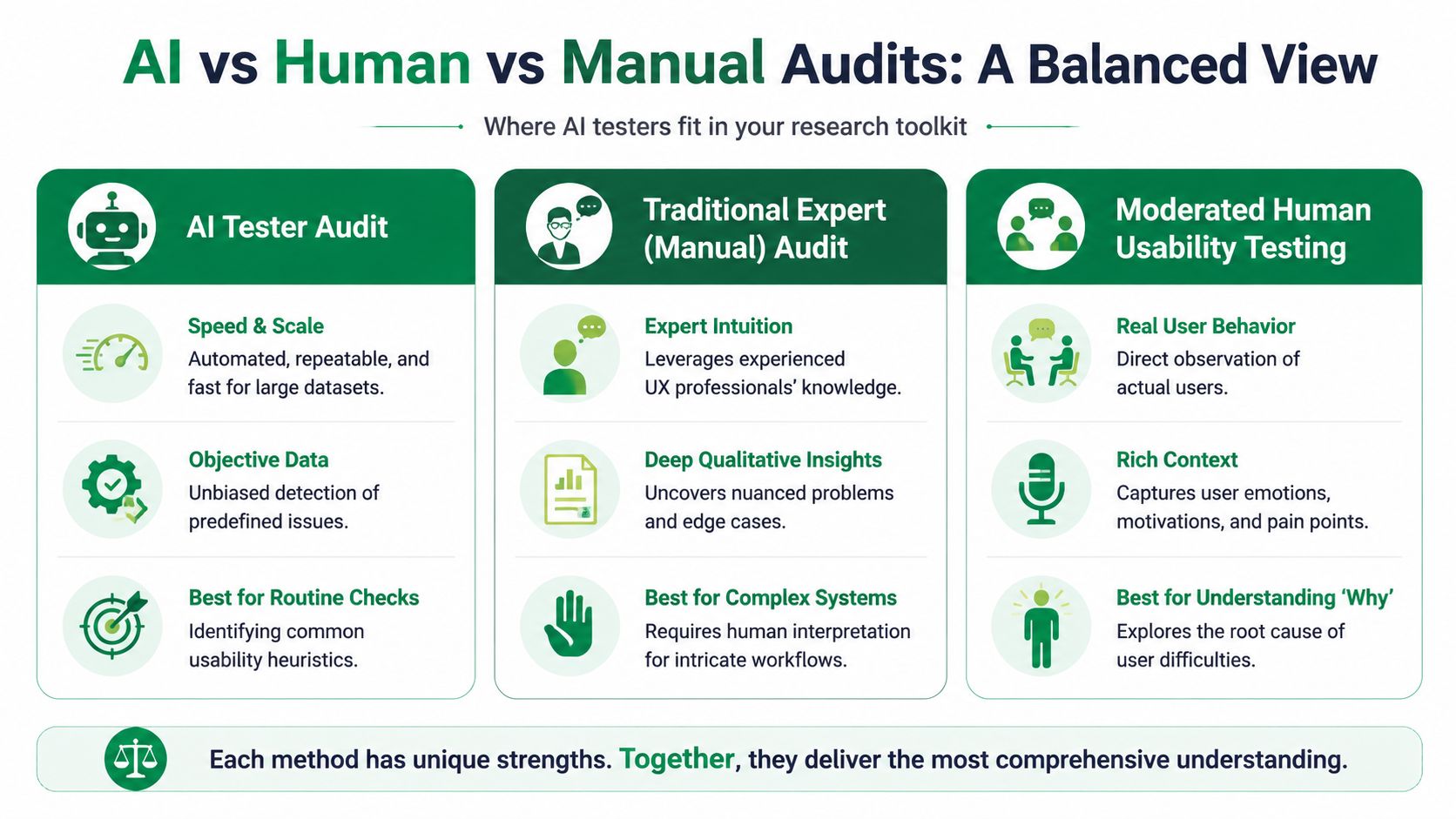
The best research teams don't ask which method wins. They ask which method answers the current question with enough confidence.
What each method does well
A manual UX audit is strongest when you need expert interpretation across heuristics, information architecture, copy, and interaction quality. An experienced reviewer can connect issues that automation may treat as separate.
Human usability testing remains the strongest method for understanding intent, emotion, confidence, and the practical context around behavior. It's where you learn why users mistrust a claim, misinterpret a workflow, or avoid a decision.
An AI tester audit is strongest when speed and repetition matter. It works well for early-stage product design validation, repeated checks on prototypes, and structured reviews of conversion paths.
The trade-offs in practice
This is the useful comparison:
Use manual audits when the product is complex, the workflow is specialized, or you need a senior expert's synthesis.
Use human testing when the decision depends on trust, emotional reaction, or real-world constraints.
Use AI UX audits when you need fast usability testing with AI across iterations, variants, or early-stage flows.
A balanced workflow often stacks these methods rather than choosing one. Teams might run an AI tester pass on a prototype, follow with a manual review on the highest-risk screens, then use human sessions to validate the final design direction.
If the design question is "where are users likely to struggle?", AI testers are useful. If the question is "should we trust this insight enough to make a high-risk decision?", bring in humans.
Where synthetic testing should stop
The key boundary is validity. AI testers can expose structural problems and copy ambiguity, but they're weaker at proving business impact, emotional response, and edge-case behavior. Full audits often need triangulation with real-user evidence, especially for sensitive or high-stakes journeys, according to Maze's guidance on audit completeness and synthetic tester limits.
That boundary matters most in areas like healthcare, finance, account recovery, identity checks, and regulated onboarding. In those flows, “good enough for early feedback” is not the same as “reliable enough for product decisions.”
Your UX Audit Checklist for AI-Powered Testing
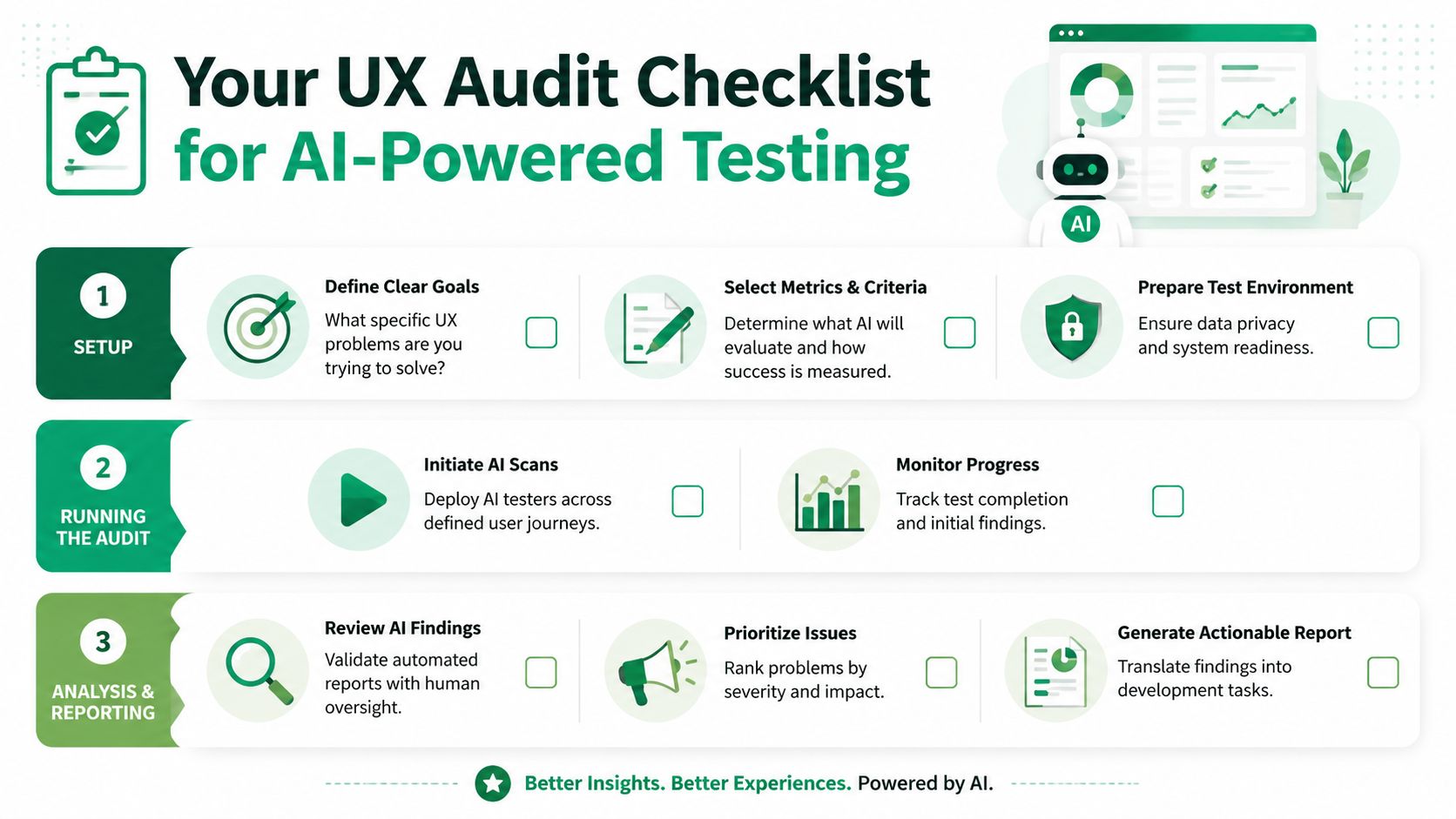
A reliable audit needs more than a test run. It needs a repeatable setup, clean tasks, and a review standard your team can use every time.
Before you run the audit
Use this as a pre-flight check:
Define one core objective: Pick a single question the audit should answer.
Choose the right persona: Match the tester to the intended audience segment.
Limit the scope: Focus on one journey or tightly connected set of screens.
Write task-based missions: Use realistic goals, not guided click paths.
Set review criteria: Decide how you'll judge friction, confusion, and task success before reading the output.
A lot of poor AI user testing comes from muddy setup. If the task is vague, the output gets vague. If the audience is wrong, the feedback won't reflect user context you care about.
While the audit is running
Once the mission is active, watch for signal quality:
Check for repeated blockers: One-off comments matter less than recurring friction.
Review transcript language: Look for uncertainty, second-guessing, and false assumptions.
Separate symptoms from causes: “I'm not sure what happens next” may come from weak labels, weak hierarchy, or missing reassurance.
Compare with existing evidence: Cross-check major findings against analytics, recordings, support tickets, or previous research.
Field note: Strong AI findings usually describe a user struggle in context. Weak findings sound like generic design advice.
After the audit
The final step is operational, not diagnostic:
Prioritize by severity and business impact: Fix the issues that hurt critical journeys first.
Create implementation-ready tickets: Write the problem, affected screen, likely cause, and proposed direction.
Retest the updated flow: Use the same mission to see whether the friction was resolved.
Document patterns over time: Repeated problems across releases often point to system-level design issues, not isolated screens.
For evaluating AI quality itself, Jakob Nielsen recommends benchmarking against a gold standard built from at least 10 human UX experts plus at least 20 user test participants, and scoring AI on finding validity, severity-prioritization accuracy, recommendation actionability, and false-positive rate in his framework for AI UX benchmarking. That benchmark is useful even if you're not running formal validation. It reminds teams to judge AI on quality, not output volume.
From Periodic Audits to Continuous Validation
The most useful shift isn't faster reporting. It's moving from occasional audits to continuous validation.
That changes how teams work. Instead of waiting for a redesign milestone, they can test a Figma flow before handoff, review a new onboarding step before release, and revisit a weak funnel after each iteration. Feedback becomes part of the sprint, not a separate event that arrives too late.
What changes in the team workflow
When AI testers are integrated well, teams stop treating usability review as a special project. Product managers use it to reduce launch risk. Designers use it to compare directions before polishing details. CRO teams use it to inspect friction in high-intent journeys. Researchers use it to clear obvious issues before deeper human studies.
That operating model is especially useful when you're testing live pages, prototypes, and design updates continuously. This broader perspective on synthetic users as a practical guide to faster UX validation captures the shift well.
What stays the same
The core principle doesn't change. Good UX still depends on evidence, interpretation, and clear prioritization.
A UX audit with AI testers works best when you use it as an early warning system for UX friction points, not as a final authority on every product decision. For many teams, that's enough to make it indispensable. It helps catch problems earlier, reduce wasted research cycles, and bring more discipline to product design validation.
If your team wants to validate UX/UI flows earlier and more often, Uxia provides AI-generated testers that can run through prototypes, websites, and funnels, simulate target audiences, and surface actionable friction points, reasoning patterns, and task-level issues without waiting on a traditional research cycle.