Prototyping and Testing: A Practical Guide for 2026
Master prototyping and testing with this guide. Learn workflows, metrics, and how to use AI tools like Uxia for faster, continuous validation.
The most common advice on prototyping and testing is also one of the most expensive: wait until the prototype is polished, then put it in front of users.
That sounds responsible. It usually isn't.
Teams that delay testing turn research into a gate instead of a loop. They spend days refining screens, wiring interactions, and aligning internal stakeholders, only to learn that the task framing was wrong, the labels were unclear, or the audience they designed for wasn't the correct audience they need to win. By then, the design discussion is heavier, the code may already be in motion, and everyone is more attached to the solution than they should be.
Modern product teams work differently. They treat prototyping and testing as one continuous practice. The prototype is not the finish line for research. It is the vehicle for learning. That shift matters even more now, because AI-powered workflows make it practical to validate ideas continuously instead of batching feedback into occasional, high-stakes studies.
Why Most Teams Test Prototypes Too Late
Late testing usually happens for organizational reasons, not methodological ones. Designers want something realistic enough to evaluate. Product managers want stakeholders to react to a concrete flow. Engineers want fewer moving targets. The result is predictable. Testing gets pushed downstream.
That creates a false sense of efficiency. You save time upfront by skipping early validation, then pay for it later in redesign, rework, and awkward launch decisions.
A useful reminder comes from 42T's breakdown of defect costs across the lifecycle. Fixing a defect in requirements costs about $1,000, rising to $10,000 in design, $100,000 during coding, and up to $1 million or more post-release. That isn't a UX talking point. It's a planning and budget problem.
What teams get wrong
Many teams still frame prototyping and testing like this:
Design first: create the flow, polish the screens, align internally.
Test later: recruit participants once the prototype feels finished.
Decide once: treat the study as a milestone instead of an input to the next iteration.
That model worked when research operations were slow, expensive, and hard to repeat. It doesn't hold up when product cycles are tighter and design debt compounds fast.
Practical rule: If a team says a prototype isn't ready for testing yet, the real question is usually whether the team has defined the task and audience clearly enough.
What works better
The better pattern is simpler:
State the mission the user should complete
Choose the lightest artifact that can test that mission
Run feedback quickly
Change the design
Run the next test before the previous round is forgotten
This changes the role of prototypes. They stop being presentation assets and start becoming risk-reduction tools. It also makes testing less political. You're no longer asking a team to pause for a formal research event. You're asking them to validate one assumption before they invest further.
Teams that adopt this mindset tend to uncover mistakes earlier, when fixing them is still cheap and emotionally easy. That's the core reason to modernize prototyping and testing. Speed matters, but cost, confidence, and decision quality matter more.
Understanding Prototype Fidelity and Purpose
Prototype fidelity gets overcomplicated. A simple way to think about it is architecture.
A rough sketch on paper helps you discuss layout and intent. A clickable wireframe helps you test how someone moves through rooms. A finished model home helps you inspect details and see whether the build behaves as expected. Product prototypes work the same way. Fidelity is not about sophistication for its own sake. It's about choosing the smallest, fastest artifact that can answer the question in front of you.
Choosing the right prototype fidelity
Fidelity Level | Common Formats | Primary Goal |
|---|---|---|
Low | Paper sketches, whiteboard flows, rough wireframes, screen sequences | Explore problem framing, concepts, task logic, and information structure |
Medium | Clickable wireframes, annotated Figma flows, linked screens with basic interactions | Test navigation, labels, flow comprehension, and task path |
High | Detailed interactive prototypes, coded prototypes, near-real product experiences | Validate usability details, edge cases, interaction quality, and implementation readiness |
The mistake isn't using high fidelity. The mistake is using it too early for the wrong question. If you're still unsure what problem matters most, a polished prototype can narrow feedback too soon. People react to visual detail, microcopy, and interface finish, even when the bigger issue is whether the workflow should exist at all.
Research on early-stage design points to a gap here. Teams often test refined solutions when they should be using prototypes to explore the problem itself and build stronger understanding first, as discussed in this research on prototyping for problem exploration.
Verification and validation are different jobs
Another distinction is more critical than often recognized. Verification asks whether the product works as specified. Validation asks whether it solves the right user problem.
The Stanford Biodesign guide puts this clearly in practice through the difference between functional and user-centered measures. In a health tech wearable example, verification might test heart rate accuracy at ±5% deviation, while validation checks whether users wear it consistently, with a target of more than 80% daily wear compliance over a 7-day field trial in Stanford Biodesign's prototyping guidance.
For digital product teams, that distinction shows up everywhere:
Verification questions: Does the form submit? Does the onboarding branch correctly? Does the payment flow return the expected state?
Validation questions: Do users understand what to do? Does the flow feel trustworthy? Does the product fit the job they came to complete?
A prototype can pass verification and still fail validation. Teams launch those mistakes every week.
A practical selection rule
Use low fidelity when you're still shaping the problem. Use medium fidelity when you need to test a path. Use high fidelity when detail affects the outcome.
If the debate in the room is about concept, don't build polish. If the debate is about interaction, don't rely on sketches. Good prototyping and testing is less about craftsmanship than judgment.
A Modern Prototyping and Testing Workflow
The strongest testing cycles start before anyone worries about polish.
Define the mission first. Define the audience second. Only then choose the artifact. That order sounds minor, but it changes the quality of the insight. If the task is unrealistic, or the participants don't reflect the intended user group, the test produces commentary instead of evidence.
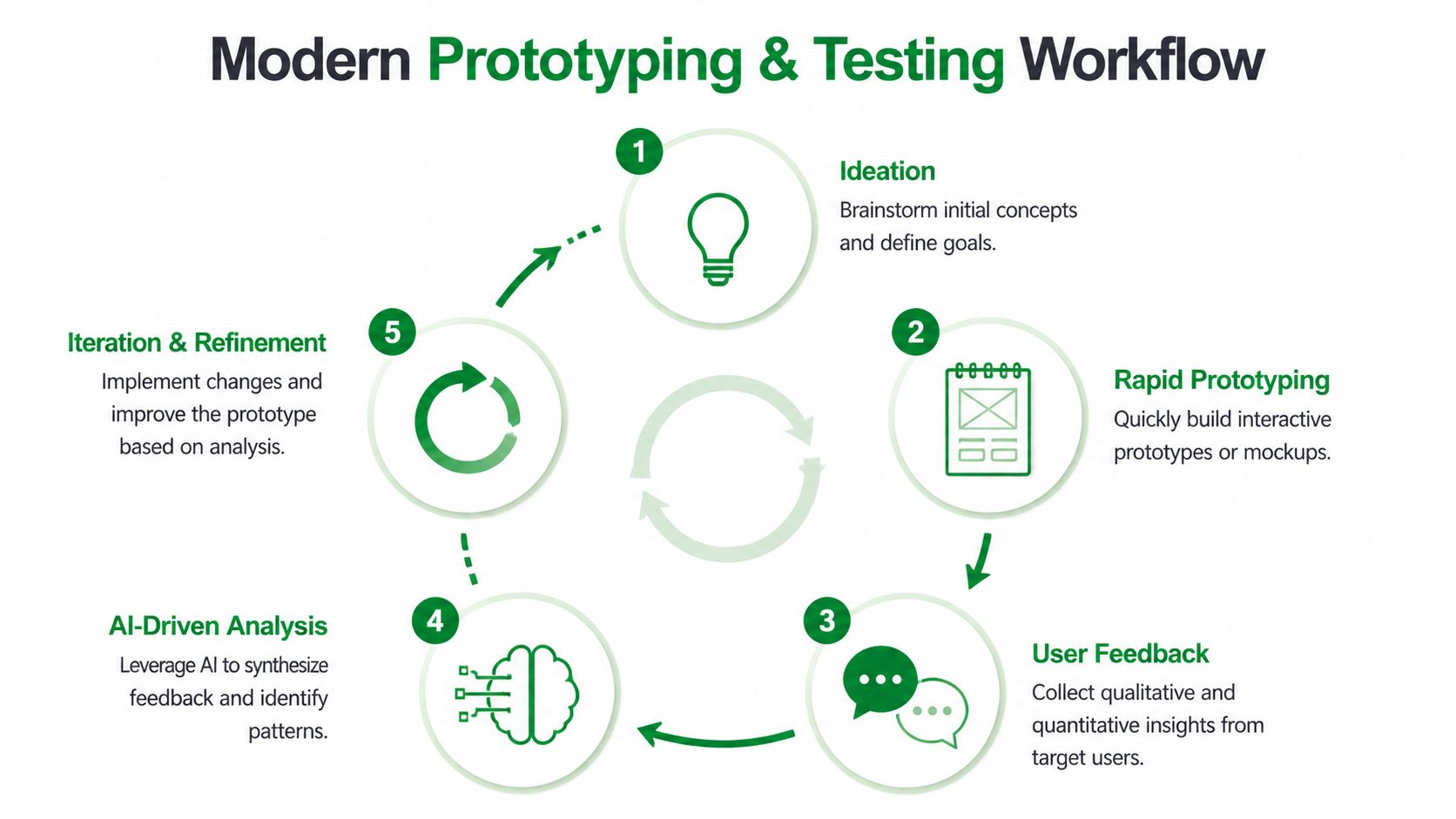
This workflow is easier to understand visually:
Start with the mission, not the screen
A strong mission is concrete. It gives the participant a realistic objective and enough context to behave naturally. Weak missions create vague reactions like "looks clean" or "a little confusing." Strong missions reveal whether the design supports the intended outcome.
Examples of useful missions:
Transactional flow: Buy a transport ticket for your trip today.
SaaS setup: Create a workspace and invite one teammate.
Support journey: Find out whether your plan covers a specific issue.
Audience definition matters just as much. A checkout flow tested with generic users can look fine and still fail with the people who actually buy, approve, or hesitate in that category.
For teams building conversational experiences alongside interfaces, the same discipline applies. The task framing used in prototype tests also improves how teams map journeys for steps to create AI support bots, because both depend on realistic user intent rather than internal feature lists.
Run the loop in five moves
After the mission and audience are set, the rest should be lightweight:
Pick the artifact
Use a Figma prototype, uploaded screens, or a live URL. Don't overbuild if a simpler asset can answer the question.Choose the testing mode
Moderated sessions still help for deep exploration. Unmoderated studies work well for task-based checks. AI-assisted workflows are useful when speed and repeatability matter most.Instrument the learning goal
Decide what success means before running the test. A scenario template helps teams avoid vague prompts and inconsistent tasks. This usability testing scenario template guide is a good reference for structuring realistic tasks.Review both path and commentary
Don't only ask whether users completed the task. Inspect where they paused, what they misunderstood, and what they expected next.Translate findings into design changes immediately
If synthesis waits until the end of the sprint, momentum is gone. Make decisions while the evidence is fresh.
A short walkthrough can help teams picture how this kind of loop operates in practice:
What changes in modern practice
Traditional testing made each round feel expensive. Recruiting, scheduling, moderation, and synthesis pushed teams toward infrequent studies. That encouraged over-preparation.
Modern workflows favor smaller, faster cycles. You test narrower questions, more often, with less ceremony. That doesn't lower quality. It usually improves it, because teams stop waiting for the mythical "finished prototype" and start learning while change is still cheap.
Key Metrics That Drive Iteration Decisions
A prototype doesn't need applause. It needs decision signals.
The three signals that matter most in practice are task completion, hesitation or misunderstanding, and the severity of recurring issues. Those tell you whether the team should move forward, refine details, or rethink the flow.
Start with completion and efficiency
Some metrics provide a useful baseline for design validation. Optimal Workshop's guidance on analyzing prototype tests notes task success rates averaging 78%, time on task under 90 seconds for optimal designs, and misclick rates below 2%.
Those numbers aren't universal pass-fail rules. They are benchmarks that help teams avoid hand-wavy interpretation.
A practical way to read them:
Signal | What it usually means |
|---|---|
Low completion | The flow is broken, unclear, or mismatched to the task |
High completion, slow path | The design is usable but inefficient or mentally heavy |
Good completion, high misclicks | Labels, hierarchy, or interaction targets need refinement |
If users can't complete the mission cleanly, the prototype needs another round. If they complete it but wander, backtrack, or second-guess labels, that's usually a refinement issue rather than a structural failure.
Hesitation matters more than many dashboards show
Quantitative metrics tell you what happened. Hesitation helps explain why.
Watch for moments when users pause, reread copy, hover between choices, or verbally reveal uncertainty. Those moments often surface trust gaps, unclear hierarchy, and naming problems before failure rates fully expose them. They also explain why a "technically successful" flow still underperforms in the actual product.
When the same hesitation appears across multiple testers, treat it as design evidence, not a quirky comment.
Structured analysis helps here. Instead of collecting generic feedback, teams need issue descriptions tied to behavior, location, and severity. That's also why broader usability scoring can be useful when interpreted alongside task data. If you're using attitudinal measures, this guide to the System Usability Score and its alternatives is a practical starting point.
Judge severity, not just frequency
Not every issue deserves equal attention. A recurring nuisance and a recurring blocker are not the same problem.
Use a simple filter:
Blockers: Users can't complete the task or make a critical error.
Slowdowns: Users complete the task, but only after confusion or unnecessary effort.
Polish issues: Users notice friction, but it doesn't meaningfully alter the outcome.
That distinction keeps iteration disciplined. Otherwise teams burn time polishing surfaces while deeper task failures remain unresolved.
Common Testing Pitfalls and How to Avoid Them
One of the clearest examples of why rapid testing matters comes from a public transport ticket-purchase comparison for Amsterdam. In that test, AI-based review surfaced friction that many teams would miss until much later: small tap targets on quantity controls, ambiguous onboarding copy, confusion around the invoicing option, and even a missing post-payment confirmation screen in the prototype.
That mix is familiar. Some issues are genuine UX flaws. Others are prototype artefacts. Good testing helps separate the two before a team overreacts or, worse, ships the wrong lesson.
Pitfall one: Testing the solution before the problem
Many teams prototype a chosen direction, then use testing to confirm it. That narrows the value of the exercise.
Early prototyping works better when it explores assumptions about the problem space. If you haven't validated the user need, validating the interface is premature. The result is polished uncertainty.
What to do instead:
Test the job first: Ask whether users even want or expect the outcome the flow supports.
Use rougher artifacts earlier: Low-detail screens invite broader feedback.
Bring in knowledgeable stakeholders early: Their upstream input often sharpens later rounds.
Pitfall two: Asking questions that lead the answer
A surprising number of sessions get contaminated by the script. Questions like "Was this checkout easy?" or "Did this copy make sense?" push participants toward evaluation instead of behavior.
Better prompts sound like tasks, not reviews.
Try "You need to buy the right ticket for this trip" instead of "Tell me whether this ticket flow is intuitive."
That small shift creates more honest behavior. Users reveal what they understand through action, not by politely summarizing your interface.
Pitfall three: Using the wrong audience
A clean test with the wrong people is still misleading. Generic participants may miss domain-specific concerns, trust signals, and contextual constraints that matter in the actual market.
Tools and process are critical. In practice, a platform like Uxia changes the setup because teams can define a mission and audience before selecting a Figma prototype, uploaded screens, or a live URL. That framing keeps feedback tied to a realistic user objective rather than generic reactions.
Pitfall four: Treating every issue as equal
The Amsterdam example is useful because it shows different classes of failure in one flow. Small tap targets hurt interaction. Ambiguous copy hurts comprehension. Missing confirmation affects trust and completion confidence.
Don't roll those into one bucket. Sort them by outcome:
Trust issues: unclear invoicing, missing confirmation
Interaction issues: small controls, awkward targets
Comprehension issues: copy that users interpret in multiple ways
Teams that classify issues this way fix the product faster. Teams that pile everything into a generic findings list usually create noise.
The Shift to Continuous Validation with AI
The most important change in prototyping and testing isn't that teams can run studies faster. It's that testing no longer needs to be a separate event.
AI changes the rhythm of product work. Instead of waiting until a prototype feels polished enough to justify recruitment and scheduling, teams can validate assumptions continuously. That changes how they scope design work, how often they gather evidence, and how confidently they decide.
What AI adds beyond speed
The practical shift is visible in projected workflows. Visily's write-up on prototype testing trends says 2026 trends show AI simulation predicting 70% to 90% of human-identified issues upfront, while enabling micro-iterations that cut development waste by 25% to 50%. The same guidance pairs that with task completion targets above 85% and SUS scores above 68 for a fuller evaluation model.
Those projections matter because they describe a different operating model, not just a faster one. Teams can test more often, at more stages, against more scenarios. They don't have to reserve validation for milestone moments.
This is also why broader AI operations thinking matters. If you're redesigning how product teams validate work continuously, it helps to understand the adjacent automation patterns behind a rapid AI strategy for automation, especially when research, support, and product workflows start to overlap.
Why continuous validation changes decisions
Continuous validation makes teams less attached to any one prototype. That's healthy. Every round becomes smaller, cheaper, and easier to repeat.
It also broadens what can be tested. Teams can evaluate static screens, clickable prototypes, and live experiences without turning every study into a custom project. That removes one of the biggest old bottlenecks: the feeling that research has to be "worth the setup."
For teams exploring this shift in depth, this guide to synthetic user testing with AI-driven workflows gives a practical view of how AI-supported testing fits into modern UX operations.
The trade-off to manage
AI doesn't remove judgment. It compresses the path to evidence.
Teams still need to define realistic missions, choose the right audience, and separate meaningful patterns from novelty. But once that discipline is in place, validation becomes continuous instead of occasional. That's a structural advantage. Design no longer waits for research windows. Research becomes part of the design motion itself.
Your First Continuous Testing Plan
Teams don't need a full research transformation to improve prototyping and testing. They need one disciplined loop they can repeat next week.
Start small. Pick one user flow that matters. Use one realistic task. Decide what evidence will tell you whether to iterate or proceed.
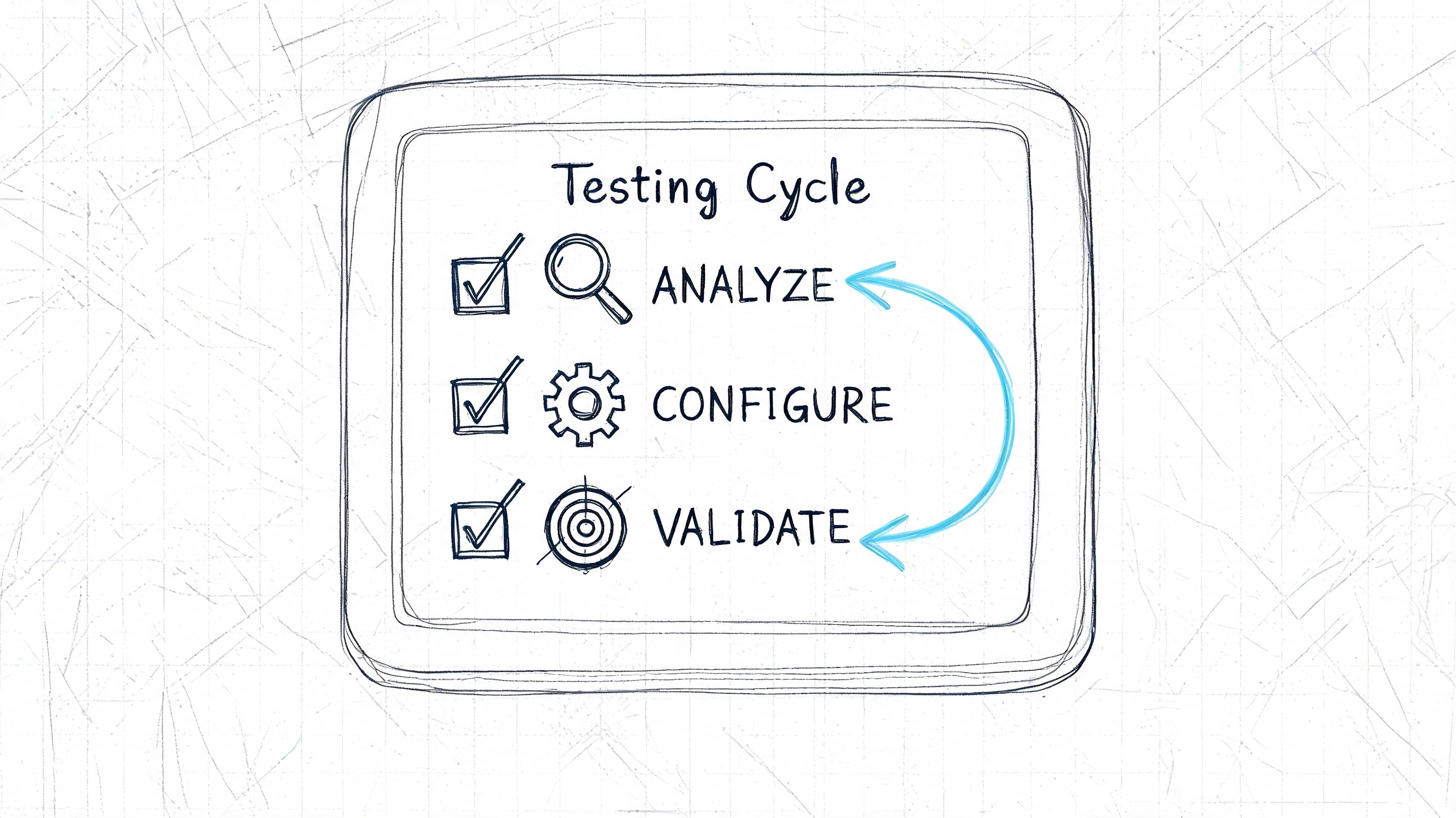
A workable first pass
Use this checklist:
Write one mission
Keep it specific and outcome-based. "Find the right plan and start checkout" is better than "Explore the pricing page."Name the intended audience
Avoid "general users." Specify who should succeed in this flow and why their context matters.Choose the lightest prototype that can answer the question
If you're testing structure, use low or medium fidelity. If trust, interaction detail, or copy precision matters, use higher fidelity.Pick one primary metric and one diagnostic lens
Task completion is the clearest primary metric for most flows. Pair it with hesitation, misunderstanding, or issue severity to understand what to fix.Review findings immediately after the run
Don't let evidence sit in a doc waiting for a perfect readout. Translate it into design changes while the pattern is obvious.Schedule the next round before the current round is fully closed
This is the habit that creates continuity. Testing becomes part of delivery instead of a side project.
What not to overcomplicate
You don't need a large research plan to start. You don't need every stakeholder in the room. You don't need a polished prototype every time.
The first win is consistency. A modest test run every iteration is more useful than an elaborate study that happens too late.
The teams that improve fastest aren't always the ones with the biggest research budget. They're the ones that make validation routine. Once that happens, prototyping and testing stops feeling like extra work and starts functioning as how the team designs.
If you want to make that loop faster, Uxia is built for running mission-based UX tests with AI-generated participants against designs, prototypes, and live products, so teams can move from occasional studies to continuous validation without the usual recruiting and scheduling overhead.