Discovery Insights Test: Uncover Deep User Needs
Run a discovery insights test to uncover deep user needs before you build. This guide covers setup, analysis, & using AI tools like Uxia for faster results.
You have a promising idea, a rough backlog, and a team asking the same hard questions. Who is this for, what problem matters enough to solve, and what should the product do first?
That’s the moment for a discovery insights test.
A good discovery test helps you learn before you commit. It gives you evidence about needs, habits, objections, and trust triggers while the product is still flexible. That matters because a 2025 Standish Group report found that features built without prior user needs discovery are 3x more likely to be removed or completely redesigned within 12 months.
Teams often wait too long. They prototype first, test flows second, and only later realize they built a clean interface around the wrong assumption. Discovery works in the opposite direction. It starts in the problem space, where ambiguity is still cheap.
From Idea Ambiguity to Actionable Insight
Monday morning, the team is aligned on a promising feature. By Friday, alignment starts to crack. The founder keeps pushing speed, design is focused on clarity, and product wants a tighter scope. Then five user conversations show the actual blocker. People do not trust the outcome, or they cannot justify switching from the workaround they already have.
That is the gap a discovery insights test closes.
Early discovery should examine decision context before anyone invests in polished flows or detailed requirements. I use discovery testing when a team has energy and direction, but the underlying problem definition is still loose. The goal is simple. Replace internal confidence with evidence about what drives behavior.
What early discovery protects you from
Skipping this step creates costs that show up later, usually in familiar forms:
Rework after launch: The feature works as designed, but adoption stalls because the need was weaker than expected.
Misplaced polish: Teams refine copy, layouts, and edge cases before confirming that users care enough to change behavior.
Shallow framing: Research starts with interface questions and misses the reasons someone would choose, delay, or reject the product.
As noted earlier, features built before user needs discovery are far more likely to be removed or heavily redesigned. This finding captures a familiar pattern. Teams commit to a solution before they understand the trigger, the constraint, or the existing substitute. The result is product strategy debt and a slower path to traction.
Practical rule: If you cannot describe the user’s current workaround, you are not ready to validate a final solution.
Modern AI platforms such as Uxia change the economics of discovery. Traditional research often means waiting on recruiting, scheduling interviews, moderating sessions, then spending days tagging notes and aligning stakeholders. Uxia compresses that cycle. A team can test early problem statements, compare reactions across segments, and review synthesized patterns in minutes.
Speed alone is not the point. Faster cycles let teams test more than one framing before the roadmap hardens. They also reduce a common source of bias: falling in love with the first explanation that sounds plausible. A strong discovery insights test will not hand over a finished roadmap, but it will narrow uncertainty fast enough to make the next product decision clear.
What Exactly Is a Discovery Insights Test
A discovery insights test is problem-space research. It asks what users are trying to achieve, what gets in their way, what they already do instead, and what would make them trust a better option.
That’s different from usability testing, which checks whether people can use a specific interface or flow.
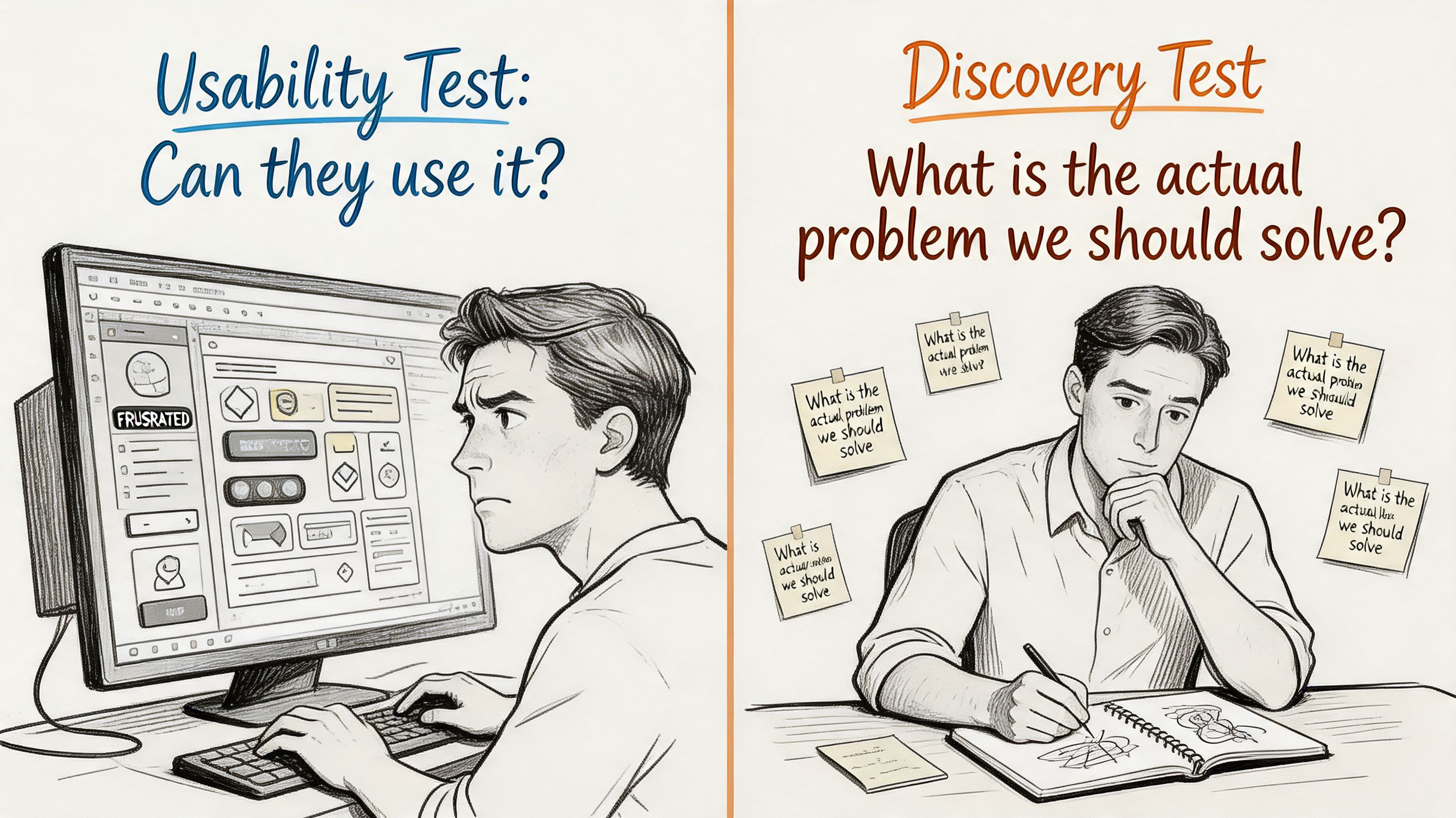
Discovery maps the terrain
The easiest way to separate the two is this:
Discovery testing is the explorer mapping unknown land before anyone builds.
Usability testing is the engineer checking whether the bridge design holds.
Both matter. They answer different questions.
Discovery asks:
What job is the user trying to get done
What triggers the need
What alternatives already exist
What doubts, anxieties, or constraints shape the decision
Usability asks:
Can users complete the flow
Where do they hesitate or fail
What labels, interactions, or layouts confuse them
What design changes improve completion
A lot of teams blur these together. They put a rough prototype in front of participants and ask open-ended questions, then assume they’ve done discovery. Usually they’ve done a diluted version of both and a strong version of neither.
The timing matters more than teams think
A discovery insights test belongs earlier. You run it before the scope hardens, before the team anchors on one solution, and ideally before the roadmap turns assumptions into delivery commitments.
That early investment pays off. A 2026 Forrester Research study reported that product teams dedicating at least 15% of research time to open-ended discovery testing before prototyping saw a 40% reduction in late-stage pivots and redesigns.
That result makes sense in practice. Open-ended discovery exposes false assumptions while the cost of change is still low.
This short clip is useful if your team still treats discovery as optional overhead rather than core product work.
What a discovery test looks like in practice
A real discovery insights test usually doesn’t start with “Click here” or “Complete checkout.”
It starts with a realistic situation, such as:
You need to verify a claim before sharing it with your team
You’re trying to compare options under time pressure
You want to solve a recurring problem but don’t trust the current tools
That framing gets people to reveal motivations and trade-offs, not just interface reactions.
Users rarely struggle only with interface friction. They struggle with uncertainty, effort, trust, and competing priorities.
That’s why discovery research often produces more strategic value than a clean usability run. It tells you what should exist, not just whether the current draft is usable.
How to Design Your First Discovery Test
The first discovery test should be simple, realistic, and tightly scoped around the problem. Don’t try to answer everything in one run. You’re trying to surface patterns strong enough to shape the next decision.
The cleanest setup has three parts: audience, scenario, and questions.
Start with the audience, not the feature
Teams often begin with the feature idea. That’s backwards.
Start by defining who should experience the problem most sharply. On Uxia, the strongest setups usually combine demographic filters, behavioral traits, and enrichment from previous research where it exists. That creates a more credible audience than a broad label like “professionals” or “online shoppers.”
A vague audience gives you vague output. A precise audience gives you useful tension.
For example, instead of “people interested in health information,” define something closer to:
Adults who regularly verify health claims before acting on them
People who compare multiple sources before trusting a recommendation
Users with low tolerance for unsupported summaries
That kind of setup changes what the test reveals. You get richer objections, more realistic standards, and sharper expectations.
Write a scenario that creates context
A discovery insights test should place the participant in a believable situation. Don’t tell them to inspect a feature in isolation. Give them a problem to solve.
A strong first mission often looks like this:
You are evaluating a new way to solve [problem]. Walk through how you currently handle this situation, what frustrates you, what alternatives you use, and what would make you trust a better solution.
That prompt works because it opens several doors at once. It surfaces current behavior, pain points, substitutes, and decision triggers without leading users toward your preferred answer.
Here’s a practical setup you can reuse.
Example discovery mission template on Uxia
Component | Example Setup |
|---|---|
Audience | People who frequently evaluate claims, compare options, or make cautious decisions in high-trust contexts |
Mission | You are exploring a new way to solve a recurring verification problem. Describe how you handle this today and what makes the process frustrating |
Context | You need an answer you can rely on, not just a fast summary |
Question 1 | How do you currently solve this problem |
Question 2 | What frustrates you about current options |
Question 3 | What would make a better solution feel credible |
Question 4 | What would make you hesitate to rely on this product, even if the answer looked useful |
Output to watch | Repeated objections, trust signals, vocabulary, emotional friction, and unexpected follow-up needs |
If your team needs a stronger interviewing foundation before writing these prompts, Uxia’s piece on how to conduct user interviews is a useful companion.
Ask questions that expose hesitation
Discovery questions should pull on uncertainty, not just preference.
Weak questions sound like this:
Do you like this idea
Would you use this
Does this seem helpful
Those questions invite polite, shallow answers. They don’t reveal what blocks adoption.
Stronger questions sound like this:
How do you handle this today
What part of that process feels most frustrating
What would make you switch from your current workaround
What would make you hesitate to rely on this product, even if the core answer or recommendation looked useful
What would you want to inspect before trusting the result
That fourth question is especially valuable. It often reveals trust gaps that task-based testing misses.
In one discovery exercise around a health-claim verification flow, participants didn’t stop at “is the answer clear?” They pushed on evidence. They wanted source dates, study types, sample sizes, original links, visible evidence counts, and a clearer explanation of how the verdict was formed. The barrier wasn’t only comprehension. It was whether the product gave them a believable path from conclusion to proof.
Keep the test small enough to learn fast
The first discovery run shouldn’t become a giant research program. If you pile on too many questions, too many user types, or too many scenarios, synthesis gets muddy.
A better pattern is:
One audience
One believable context
A small set of open-ended questions
One clear learning goal
Field note: If the team can’t state the decision this test should inform, the mission is still too broad.
That discipline matters. Discovery is most useful when it sharpens the next move, not when it generates a pile of interesting but disconnected observations.
Analyzing Results to Find the Signal in the Noise
Discovery analysis is where many teams lose the plot.
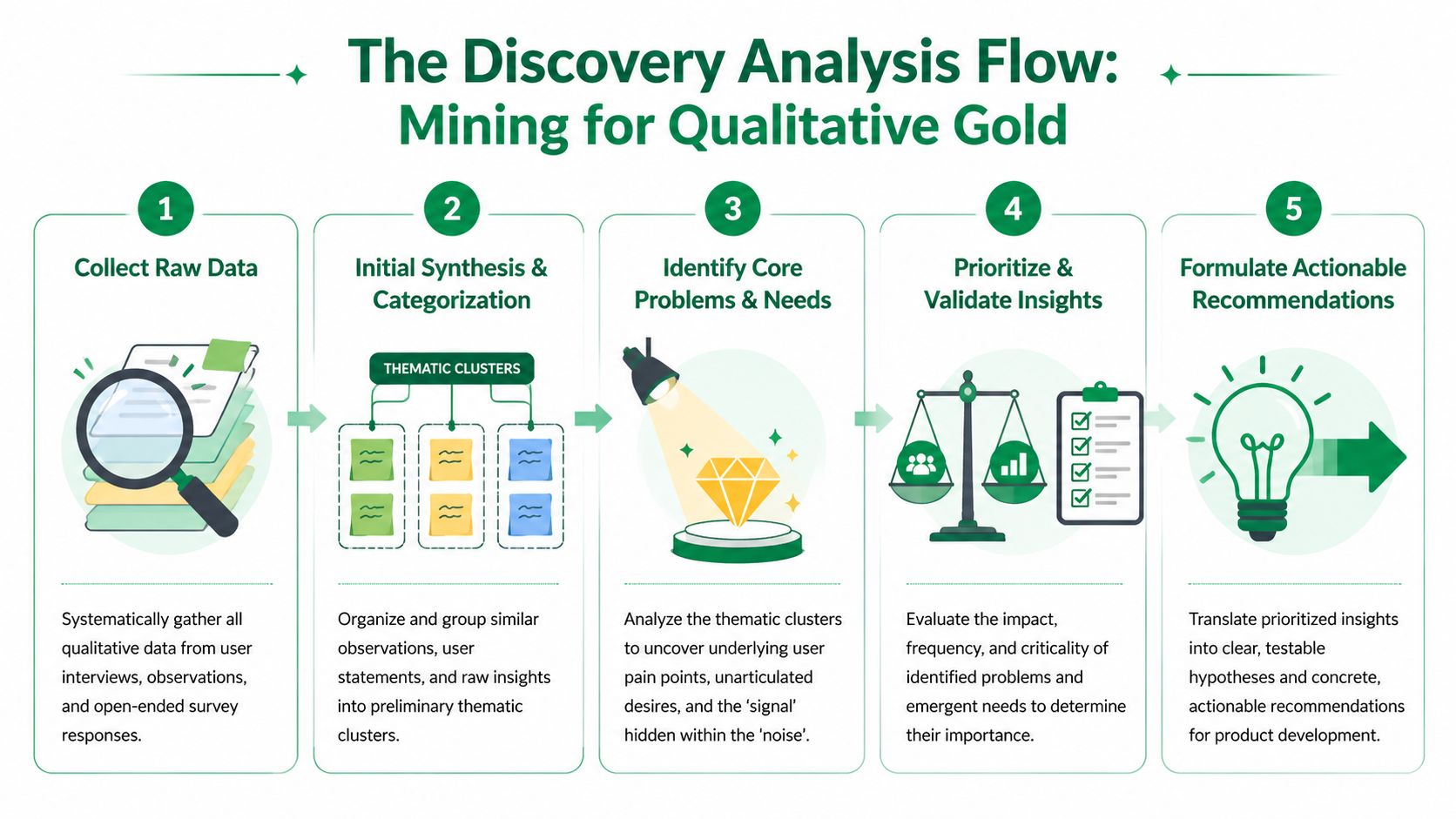
They collect rich material, then default to easy metrics because those feel cleaner. Clicks, completion, and drop-offs have value, but early discovery lives or dies on interpretation. You need to understand why people reacted the way they did.
A 2025 UX Planet survey of 500 product managers found that insights from the reasons behind choices in qualitative transcripts were rated as twice as valuable for informing product roadmaps as quantitative usability metrics alone. That matches what good teams already know. Direction comes from explanation, not just counts.
What to prioritize first
In a discovery insights test, start with repeated patterns in language and reasoning.
Look for:
Recurring needs: Problems users describe in similar terms, even when phrased differently
Expectation gaps: Moments where they expected one thing and found another
Trust triggers: Specific evidence, explanations, or cues they need before relying on the product
Hesitation points: Places where interest drops because confidence drops
Unprompted follow-ups: Questions users raise on their own, which often signal hidden requirements
These signals are stronger than raw performance at this stage. If someone completes a path but doesn’t trust the output, the product still has a serious problem.
Use different artifacts for different jobs
Platforms like Uxia produce several layers of evidence. Don’t treat them as interchangeable.
Transcripts carry the strategic weight. They show actions, out-loud reasoning, expectations, and moments where users reinterpret the product in their own words.
Heatmaps and interaction traces support the story. They help confirm where attention pooled, where friction surfaced, and whether hesitation aligned with specific screens or elements.
Auto-summaries are useful for speed, but they shouldn’t replace direct review. They help you cluster patterns faster, then verify them against transcript detail.
A practical way to approach this:
Artifact | Best use in discovery |
|---|---|
Transcript | Understand motives, objections, and trust logic |
Heatmap | Spot attention concentration and ignored areas |
Misclicks and attempts | Support signs of confusion, not final truth |
Summary patterns | Accelerate clustering before manual review |
If your team needs a rigorous method for turning raw notes into themes, BuildForm's guide on data analysis is a solid reference. It’s especially useful when researchers need a repeatable synthesis process rather than ad hoc tagging.
Turn observations into decision-ready insights
Raw findings become useful only when they can guide product choices.
I use a simple filter:
Is the issue repeated
Does it affect trust, adoption, or understanding
Can the team respond with a clear product move
Does it change what we should build, message, or test next
That process sounds basic, but it prevents common failure modes. Teams either overreact to isolated comments or bury major signals inside a long readout.
For ongoing practice, Uxia’s article on data-driven design is a helpful reminder that evidence has to change decisions, not just decorate presentations.
Good discovery analysis doesn’t produce a transcript library. It produces a ranked list of needs, objections, and hypotheses the team can act on.
A useful synthesis output often includes three buckets:
Validated needs the product should clearly support
Critical objections that will block trust or adoption
Open questions that deserve a follow-up test
That’s the point where discovery stops being “research” in the abstract and starts becoming product direction.
Uncovering Emergent Needs with AI-Powered Testing
The most valuable discovery findings are often the ones nobody put in the brief.
Those are emergent needs. They appear when users interact with a scenario sufficiently to reveal expectations the team didn’t anticipate. Traditional surveys rarely surface them because the questions are too generic. Narrow task tests often miss them because the mission is too constrained.
AI-powered testing works best when it gives participants context, stakes, and room to reason.
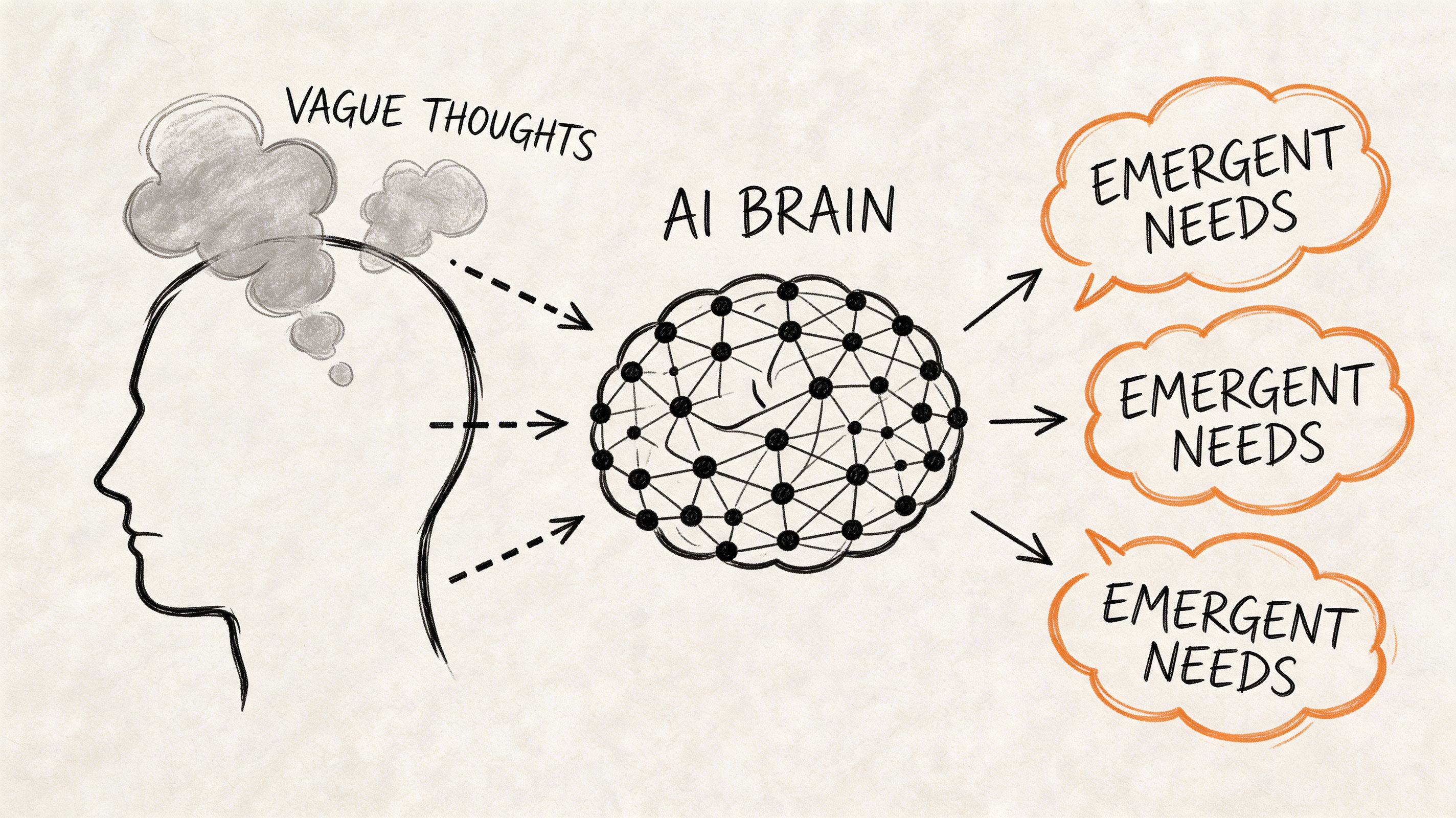
Context reveals what direct questions miss
Internal Uxia data from over 10,000 synthetic tests shows that contextual scenarios rather than direct questions surface 65% more emergent needs. That matters because early-stage product decisions depend on what users reveal when they’re solving a realistic problem, not when they’re answering abstract prompts.
A generic question like “What features do you want?” tends to produce familiar answers.
A contextual mission like “You need to verify whether this claim is reliable before sharing it with someone who may act on it” produces something more useful. It reveals standards, doubts, and trust thresholds.
A practical example of evidence trust
One of the clearest patterns I’ve seen in discovery work is that users often demand more transparency than product teams expect.
In the health-claim verification example, participants didn’t just want the verdict to be understandable. They wanted to inspect the machinery behind it. They asked for source dates, study types, sample sizes, original links, visible evidence counts, and clearer reasoning behind the verdict.
That shifted the product question. The team wasn’t only designing for comprehension. They were designing for evidence trust.
That distinction matters. If you frame the issue as “people don’t understand the answer,” you tweak copy. If you frame it as “people need to verify the answer’s credibility,” you design a fuller trust layer across the experience.
Why AI discovery is useful in early product work
The practical advantage isn’t just speed. It’s iteration quality.
AI-powered testing lets teams run multiple discovery missions quickly, compare audiences, tighten scenarios, and probe adjacent questions without waiting on traditional research logistics. That makes it easier to explore uncertainty while the product is still malleable.
It also helps teams avoid one common trap in human panels. Professional testers sometimes adapt too quickly to test patterns and research cues. Contextual synthetic testing can reduce some of that distortion by focusing attention on the mission and the audience logic rather than on “performing” for the study.
For teams exploring adjacent use cases beyond product validation, Halo AI’s perspective on uncovering customer churn risks is worth reading because it shows how AI-led insight generation can expose hidden drivers before they become visible in lagging metrics.
If you want a practical walkthrough of faster qualitative setup, Uxia’s guide to getting insights fast with synthetic user interviews connects well with this approach.
The best discovery tests don’t confirm your roadmap. They reveal the requirement you forgot to ask about.
That’s where AI-powered discovery earns its place. It doesn’t replace judgment. It gives judgment better raw material sooner.
Common Pitfalls and Essential Best Practices
Most discovery failures aren’t caused by bad tools. They come from bad framing.
Teams ask leading questions, test polished solutions before understanding the problem, or fixate on performance metrics that say little about motivation. Those mistakes create a false sense of certainty. The research looks organized, but it doesn’t answer the strategic question.
Pitfalls that weaken a discovery insights test
Leading the participant: Questions that subtly ask for validation instead of truth
Testing the interface too early: A prototype can anchor feedback around layout when the underlying issue is unmet need
Mistaking metrics for meaning: Completion and clicks can’t explain hesitation on their own
Using generic scenarios: Abstract prompts produce abstract insights
Overloading one study: Too many audiences or goals make synthesis soft
Practices that consistently work
The strongest teams do a few things differently:
They test context, not just screens: They place users in a realistic situation with a believable goal
They chase the why: They prioritize reasoning, objections, and trust logic over surface reactions
They keep early rounds tight: One audience, one problem frame, one decision to inform
They run discovery continuously: Short cycles beat one oversized study every quarter
For teams operationalizing this kind of workflow, Donely’s take on managing AI-powered UX research is useful because it focuses on how research systems support ongoing product decisions rather than one-off reports.
The shift is simple but important. Don’t treat discovery as a stage gate before “real work” begins. It is the work that keeps the team from building the wrong thing with confidence.
If you want to run a discovery insights test without waiting on recruiting, scheduling, and manual synthesis, Uxia gives product teams a fast way to test realistic scenarios with synthetic users, review transcripts and behavioral signals, and turn ambiguity into actionable product direction.