
A critical user journey is the path to a high-value outcome, and it needs measurable checkpoints, not just approved screens: 17% of online shoppers have abandoned an order solely because checkout was too difficult. Define success, locate the indispensable steps, and test whether people can complete them under realistic conditions.
You've probably already reviewed the screens, resolved the comments, and shipped the flow. Now someone's asking why users aren't finishing, and your team has a funnel chart but no convincing explanation. That's where journey-level work becomes useful.
The Flow That Looked Fine Until Launch
Consider a familiar release scenario. The checkout prototype looks coherent, the buttons are prominent, and everyone can follow the happy path during design review. After launch, customers reach the delivery form but don't reliably finish their orders.
This is an illustrative scenario, not a reported customer result. The design team proposes clearer labels, engineering checks for failed requests, and product asks whether the payment screen needs another redesign. Each response sounds reasonable, but nobody has established where the user's task actually breaks.
Review the handoffs, not just the screens
A shopper might understand the delivery form perfectly but discover an unexpected cost immediately afterward. Another might correct an address and lose information they already entered. Neither problem becomes obvious when reviewers inspect polished screens in isolation.
The commercial stakes aren't theoretical. Baymard's usability statistics report that 17% of online shoppers recently abandoned an order solely because checkout was too difficult. Treat that as evidence that interaction complexity deserves investigation, not proof that complexity explains your own abandonment.
Practical rule: Don't approve a critical flow because every screen looks finished. Approve it when the intended task has been tested across the transitions between screens.
For the illustrative checkout, I'd ask the team to reconstruct an attempted purchase from arrival through confirmation. Include the correction path, the return from authentication, and the moment someone decides whether the total is acceptable. Then connect each observed breakdown to an owner.
A useful critical journey must satisfy these requirements:
Outcome accountability: Someone can say precisely what successful completion means.
Context resilience: The path remains usable when customers switch devices, make mistakes, or resume an interrupted session.
Repeatable evaluation: The team can test the same mission after changing the design.
Don't start by redrawing the interface. Start by finding the smallest failure that prevents the intended outcome.
What a Critical User Journey Actually Is
A critical user journey is a bounded sequence of actions through which someone achieves an outcome whose failure materially threatens product value. Completing a purchase qualifies. So can recovering access, submitting an application, or finding information needed to make a consequential decision.
The adjective critical needs a reason. A frequently visited feature isn't automatically critical, and an infrequently used recovery flow may be essential when someone needs it. Ask what the user loses when the journey fails, then connect that loss to revenue, retention, trust, or compliance.
Critical User Journey vs Adjacent Concepts
Concept | Primary Job | Scope | Best Used For |
|---|---|---|---|
Critical user journey | Protect a consequential outcome | Defined start through verified success | Prioritizing testing and product fixes |
User flow | Describe actions and interface branches | A task's interaction sequence | Designing navigation and behavior |
Customer journey | Understand the broader experience | Across channels and touchpoints | Coordinating the overall service |
Persona | Represent relevant audience characteristics | A user profile | Making recruitment and design assumptions explicit |
Jobs to be done | Explain the progress someone seeks | Motivation and circumstances | Understanding why a solution matters |
These are working distinctions, not competing deliverables. A persona describes whose circumstances matter; a user flow describes possible actions; the critical journey establishes which outcome the team must protect.
If your team needs background on the broader mapping artifact, Figr's journey mapping explained is a useful companion. Keep that broader view, but don't mistake a full experience map for an operational test specification.
Write the journey definition as a sentence: When this audience encounters this situation, they must be able to achieve this outcome. Then specify the start condition, completion evidence, and unacceptable failure.
For account recovery, arriving at a reset form isn't success. Regaining access is. That distinction prevents teams from celebrating activity that never delivers the user's intended result.
Breaking the Journey Into Checkpoints That Matter
An end-to-end conversion rate tells you whether people finished. It doesn't identify which indispensable action they couldn't complete. Break the journey into checkpoints that correspond to user progress, not your page inventory.
Baymard's checkout research reports that about 70% of ecommerce users abandon after adding items to their cart, and that checkout design or flow can itself be the sole reason for abandonment. That doesn't make every abandoned cart a usability failure. It makes diagnosis necessary.

Write rules that another researcher can apply
Use the diagram as an overview, then decompose its broad stages into essential subtasks. Nielsen's usability-metrics guidance recommends identifying important tasks and recursively breaking them into constituent subtasks.
For a checkout-inspired journey, a checkpoint sheet might contain:
Checkpoint | Success rule | Permissible alternative | Failure severity |
|---|---|---|---|
Discover | Find an eligible product | Search or browse | Blocks entry |
Compare | Understand relevant differences | Comparison view or product details | Risks unsuitable selection |
Decide | Understand the purchase commitment | Edit the cart before proceeding | Risks an uninformed decision |
Authenticate | Continue with valid access | Guest route where offered | Blocks continuation |
Submit | Send valid order information | Correct invalid fields | Blocks purchase |
Recover | Resolve an error without losing necessary work | Retry or change method | Can prevent completion |
Attach task success, time on task, and error or abandonment frequency to each checkpoint. Pair those measures with observations explaining what happened, including misunderstood copy, repeated corrections, or uncertainty about consequences.
Don't reward speed automatically. Nielsen's guidance cautions that shorter task time can reflect omitted work or greater stress rather than better productivity.
The checkpoint record should also name its owner and evidence location. Otherwise, the team has described a problem without creating a reliable way to resolve it.
Mapping Methods Worth the Effort
Choose the mapping method according to the decision you need to make. Don't run an expansive workshop when the immediate question is why customers can't recover from a failed payment.
The diagram below provides a broad view of mapping activities. Your working artifact should be smaller and tied to the release decision.

Method | Required input | Useful artifact | Relative effort and limitation |
|---|---|---|---|
Empathy-style journey map | Interviews and contextual observations | Expectations, concerns, and touchpoints | Research-heavy; weak when emotions are guessed |
Data-driven funnel map | Defined events and analytics | Progression and abandonment by stage | Light with sound instrumentation; doesn't explain intent |
Task-analysis breakdown | A realistic mission and product access | Subtasks, branches, and success rules | Focused effort; can miss circumstances outside the interface |
Lightweight service blueprint | Frontstage and backstage owners | User actions connected to operational dependencies | Coordination-heavy; useful when handoffs cause failures |
Default to a funnel and a checkpoint sheet
For most product teams, I'd combine an analytics-grounded funnel with a task-grounded checkpoint sheet. Add interview evidence where intent is unclear and service dependencies where customers must wait for another person or system.
ECORN's journey mapping strategies for eCommerce can help teams explore retail mapping approaches. For interface-level branches, use a user flow diagram rather than crowding every interaction into the broader map.
Keep the working session bounded. Arrive with the mission, available evidence, and known branches; leave with unresolved questions and named owners.
A map earns its place when someone uses it to choose a test, investigate a failure, or verify a fix.
Store the artifact alongside the team's delivery work. If updating it requires rebuilding a presentation, simplify it.
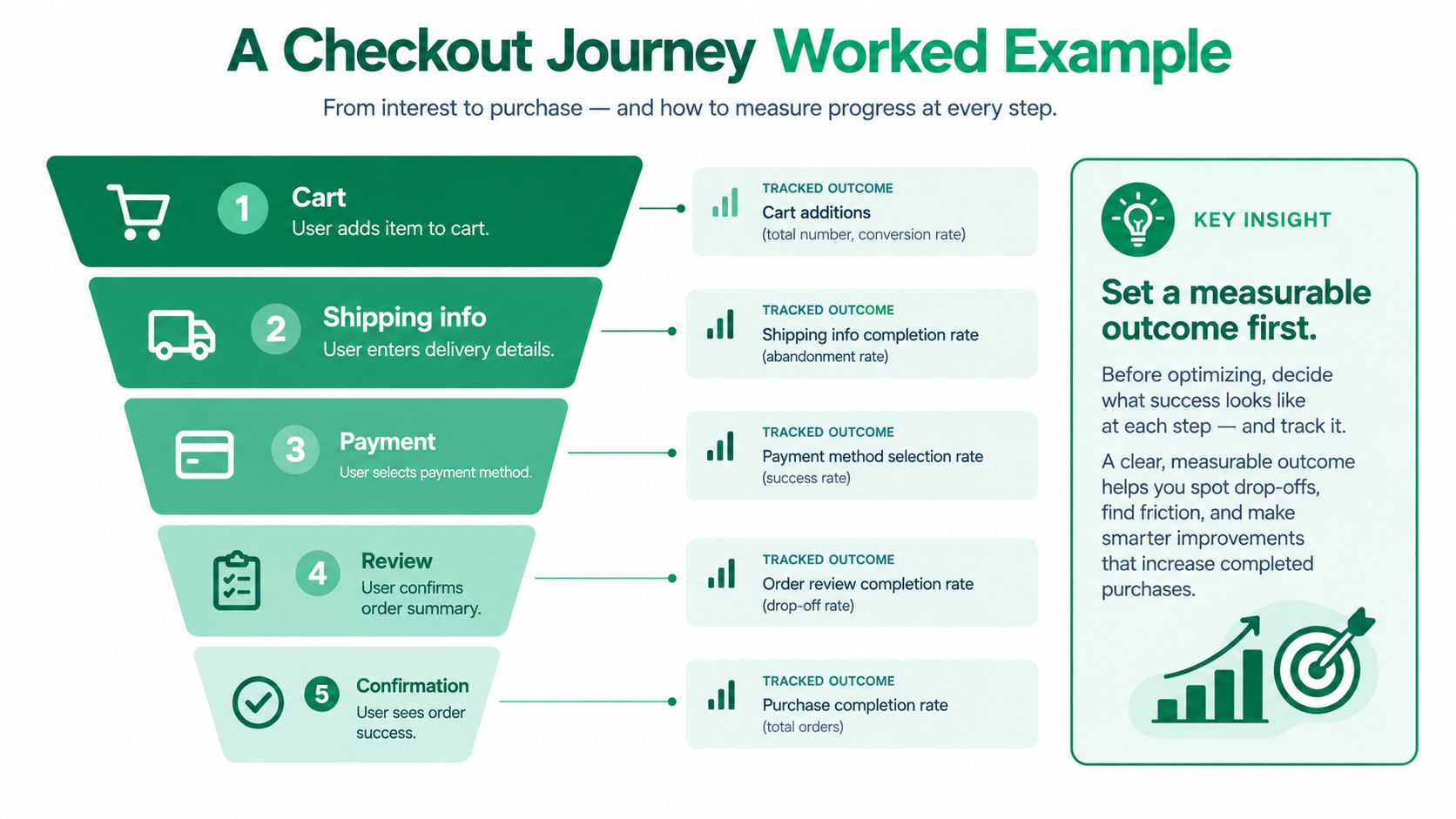
A Checkout Journey Worked Example
Take a hypothetical store selling physical products. The mission is to buy a selected item, choose delivery, pay, and verify that the order was accepted. The measurable outcome is confirmed purchase, not reaching payment or clicking the final button.
Use existing abandonment data to choose where to investigate, but don't convert an industry average into your store's diagnosis. Your job is to produce testable explanations.
Turn suspected friction into hypotheses
Stage | Evidence to capture | Hypothesis to test |
|---|---|---|
Cart | Understanding of items and costs | Customers can't predict the payable total |
Shipping | Corrections and field errors | Address instructions don't explain acceptable input |
Payment | Method selection and recovery | Customers don't understand how to recover from rejection |
Review | Recognition of commitments | Delivery and payment details are hard to verify |
Confirmation | Understanding of order status | Customers can't tell whether submission succeeded |
These are hypotheses, not findings. Don't put them in a prioritized issue list until a test or production evidence supports them.
Run an unmoderated task without teaching participants the interface. Specify the purchase goal and relevant constraints, then observe where they stop, backtrack, misinterpret instructions, or seek reassurance. Use a checkout usability testing plan to keep the task and evaluation criteria consistent.
Suppose a transcript shows hesitation at delivery selection. Inspect the interaction before prescribing a fix: the participant might misunderstand the delivery date, reject the cost, or just be comparing options. Those explanations require different responses.
Prioritize the supported failure
Record each issue as checkpoint, observed behavior, consequence, supporting evidence, proposed change, and validation method. A blocked submission takes priority over a cosmetic inconsistency; an ambiguous charge deserves attention even when participants continue.
Baymard's analysis of solvable checkout issues estimates that better checkout design could produce an average 35.26% conversion-rate increase for large ecommerce sites. That's an estimate of opportunity, not a promised result for this hypothetical store.
After changing the design, repeat the mission. Confirm that the targeted problem is resolved, then use production analytics and controlled experiments to establish whether actual purchasing behavior improved.
Where Completion Rates Lie to You
A successful submission can conceal an unacceptable experience. Someone may finish despite misunderstanding consent, repeatedly correcting errors, or relying on assistance that your test didn't record.
Use the following illustration as a reminder to inspect a headline metric, not as a benchmark.

Segment journey results by audience, device, entry point, and prior familiarity. Then examine disability, language, culture, age, and connectivity where those circumstances affect the task. Compare errors and recovery effort as well as completion.
Find the points where paths diverge
Authentication, consent, language switching, and error recovery deserve explicit attention. A person navigating with assistive technology may encounter a different sequence of controls from someone using a pointer. Don't assume the visually obvious route describes everyone's journey.
Industry accessibility reporting cited over 1,100 barriers across 150-plus projects, including 503 information-and-relationships issues under WCAG 1.3.1 and 314 name/role/value issues under WCAG 4.1.2, in User Vision's digital-experience priorities. Use those categories to sharpen investigation, not to predict your product's defect distribution.
Inspect structure: Check whether relationships and instructions remain understandable beyond visual placement.
Test controls: Verify that names, roles, states, and error feedback are available through the implemented interface.
Report disparities: Identify which audience encountered which failure, rather than burying it in an aggregate score.
WCAG 2.2 defines Level AA conformance as satisfying all Level A and Level AA criteria. It also requires repeated navigation to retain the same relative order unless the user initiates a change.
Evidence standard: Completion is necessary, but it doesn't establish accessibility, comprehension, or informed agreement.
Maintain a usability testing metrics record that preserves these distinctions. Persona-based screening can raise questions about inclusion; it can't establish that people with those lived experiences can complete the implemented journey.
Validating the Journey With Synthetic and Human Testing
Use synthetic testing to screen known interaction patterns quickly. Use human research when the decision depends on lived experience, unfamiliar behavior, physical conditions, or consequential judgment. These methods answer overlapping questions, but they don't provide interchangeable evidence.
Uxia is one option for the screening pass: teams upload images or video prototypes, define a mission and audience, and review synthetic participants' think-aloud transcripts, friction flags, heatmaps, and prioritized reports. Combine that output with observed human sessions, implementation checks, and production evidence according to the question you're answering.
Don't confuse discovery models with validation
A commonly repeated extrapolation from the Nielsen-Landauer discovery model suggests that around 10 synthetic participants could surface roughly 97 to 98% of issues in a single journey, drawing on the model summarized in Goodface's usability statistics. Treat that as a model-based projection, not an established synthetic-testing coverage guarantee. It doesn't demonstrate that simulated participants reproduce human problem discovery.
That distinction matters most when your journey is novel. Craig Sullivan's analysis of synthetic users discusses limitations involving novelty and embodied context. Simulated hesitation isn't evidence of how someone behaves while frightened, interrupted, physically constrained, or uncertain about a consequential decision.
Set escalation rules before testing
Checkpoint conditions | Appropriate screening | Required escalation |
|---|---|---|
Familiar pattern, reversible action, limited consequence | Synthetic review of wording, hierarchy, and navigation | Human checks where findings remain uncertain |
New interaction or unfamiliar decision | Synthetic exploration of possible friction | Observe representative people attempting the task |
Financial, healthcare, safety, or crisis consequences | Preliminary issue screening only | Human validation and relevant specialist review |
Keyboard or assistive-technology dependency | Prototype review for obvious concerns | Test the implementation with appropriate technology and users |
Emotionally sensitive or interruption-heavy context | Identify assumptions and alternative paths | Context-sensitive human research |
Apply this rubric per checkpoint, not just per product. A familiar account-details form and a consequential consent decision can sit inside the same onboarding journey.
Record the evidence type beside every finding. A synthetic observation, a human usability failure, and a production abandonment event should never appear as equivalent entries without explanation.
A Simple Prioritization Playbook You Can Run This Week
Track verified journey completion above the other journey metrics. Define the denominator, success rule, and audience before collecting results, then use the checkpoint evidence to explain changes. Do not let a dashboard owner redefine completion when the design changes.
Across 1,189 tasks from 115 usability studies, average completion was roughly 78%, with 78 to 80% described as a common acceptable-versus-needs-improvement dividing line in the Koji usability-metrics guide. That same guidance warns against universal targets because task difficulty matters. Your own comparable baseline is more useful than adopting an industry figure as a release gate.
Put the work in the sprint
Name the accountable lead: Product owns the outcome and prioritization; design maintains the checkpoint specification.
Assign evidence owners: Research owns task quality and validation decisions; engineering owns event reliability and implementation checks.
Map the current path: Link each indispensable checkpoint to its success rule, evidence, and known alternatives.
Run the screening pass: Preserve the mission and audience assumptions so the next iteration remains comparable.
Fix a narrow set of blockers: Select supported issues rather than bundling an unrelated redesign into the experiment.
Escalate remaining risk: Schedule human validation wherever the testing rubric requires it.
Review checkpoint health whenever a release changes the journey, and revisit the evidence during sprint planning. Keep design findings and production incidents connected to the same journey record.
Rank failures by consequence and reach
Prioritize according to affected users, failure severity, and remediability. A broadly encountered blocker deserves immediate attention, but a lower-volume failure can still outrank it when the potential harm is serious. Easy fixes shouldn't automatically displace consequential ones.
Close an issue only when the relevant evidence supports closure. Prototype retesting can verify clearer instructions; it can't prove that a deployed payment integration works.
The habit is straightforward: preserve the mission, inspect the failed checkpoint, make a focused change, and verify the outcome with evidence suited to the risk.
Uxia offers synthetic mission-based testing with transcripts, heatmaps, and prioritized findings for evaluating critical user journeys before implementation. Visit Uxia to screen your next flow, identify checkpoint-level friction, and build a focused list of questions for human validation.