Software Testing Plan: Prevent Bugs & Boost UX
Software testing plan - Craft a comprehensive software testing plan to prevent bugs & poor UX. This step-by-step guide for product teams covers strategy, metric

You’re usually not starting from a blank slate.
You’re starting with a launch date already in the calendar, a feature set that grew over two sprints, a staging build that mostly works, and a team using the word “testing” to mean five different things. Engineering means regression. Design means usability. Marketing means the demo flow can’t break. Leadership means no surprises after launch.
That’s why a software testing plan matters. Not as paperwork. As a working agreement on what quality means before release pressure turns every conversation into opinion versus opinion.
Why Your Team Needs More Than a QA Checklist
Friday afternoon, the build is green, the regression checklist is complete, and everyone wants to call the release done. Then the first round of customer feedback lands. Users are getting through the flow, but they hesitate at the pricing step, miss the primary action, and abandon before the moment that matters to the business.
That happens because a QA checklist answers a narrow question. Does the product work as specified? A release decision needs a broader one. Will real users understand it, trust it, and finish the job without friction?
For product teams, that gap is expensive. A feature can be technically correct and still fail in the market. Copy can be clear to the team and confusing to a first-time user. A journey can pass regression and still create drop-off because the sequence feels awkward or the feedback is weak.
A testing plan gives the team a shared standard before opinions start competing with each other. It sets expectations for what gets tested, which risks deserve time, who makes the call on open issues, and what evidence is good enough to ship. If you need a starting point for defining boundaries, scope statement templates help teams get specific fast.
I tell new PMs to treat the plan as a product tool, not a QA artifact. The point is not more documentation. The point is fewer bad surprises, clearer trade-offs, and better release calls.
It should answer four practical questions:
What does quality mean for this release? Include task completion, clarity, confidence, and usability, not just defect counts.
Where is the primary risk? Focus on critical journeys, new interactions, messy edge cases, and moments where user trust is easy to lose.
Who is responsible for what? Product, design, engineering, and QA need clear ownership so issues do not sit in a grey area.
How will the team decide to ship? Use agreed criteria and observed evidence, including synthetic UX testing, instead of the loudest opinion in the room.
The stronger teams I have worked with do not wait until the end to check whether the experience feels right. They use AI-powered synthetic testing early, especially on high-stakes flows such as onboarding, checkout, and recovery paths. Tools like Uxia make that practical. They simulate user behavior against real journeys, surface friction before launch, and give product and design teams something better than gut feel.
That changes the role of testing. It stops being a final gate run by QA alone and becomes an ongoing way to validate whether the product works for users in context.
A checklist still has value. It catches obvious breakages. It does not tell you whether the release is ready.
Defining Your Testing Scope and Objectives
Most weak test plans fail before testing begins. The scope is vague, the objectives are generic, and nobody has agreed on what’s out of bounds.
That’s how teams end up trying to test everything equally. They can’t, so they test randomly.
Start with business outcomes, not feature lists
Traditional scope definitions often begin with modules. Account settings. Checkout. Search. Notifications.
That’s understandable, but product teams should start one layer higher. Ask which user outcomes the release is supposed to improve. If the release exists to reduce onboarding friction, then your software testing plan should prioritise onboarding clarity, not just endpoint correctness.
A useful objective sounds like this:
Weak objective: Test the signup flow
Better objective: Validate that new users can complete signup, understand the next step, and recover from common mistakes
Best objective: Prioritise the new onboarding journey because it is the highest-risk change affecting activation and first-use confidence
That framing changes the work. It pushes the team to test comprehension, navigation, trust, and friction, not just pass/fail mechanics.
Define in-scope and out-of-scope explicitly
A lot of PMs skip this because it feels obvious. It never is.
Write down:
Area | What to include |
|---|---|
In scope | New features, changed flows, known regression hotspots, key platforms, critical user journeys |
Out of scope | Unchanged legacy areas, deferred integrations, unsupported browsers or devices, lower-priority admin paths |
Conditional scope | Items tested only if code lands by a set date or environment dependencies are stable |
If you need a starting format, these scope statement templates are useful because they force precision on boundaries, assumptions, and deliverables.
Compare old testing habits with a product-led approach
Here’s the trade-off I’d make every time.
| Approach | What it looks like | What goes wrong | |---|---| | Traditional feature-by-feature testing | Teams check every ticket one by one | Coverage looks tidy, but user journeys break across hand-offs | | Late human usability testing | Research happens near the end | Good feedback arrives when change is expensive | | Product-led scope definition | Team prioritises critical journeys and riskiest moments first | Requires sharper prioritisation, but results are more useful | | Continuous synthetic UX validation | User flows are evaluated repeatedly during design and build | Needs planning upfront, but catches confusion before release |
The key is to scope around risk, user importance, and change impact.
Anchor testing to target users
A software testing plan for product teams should identify who the product is for in this release. Not in brand-deck language, but in behavioural terms.
Specify:
Primary audience: The user segment most affected by the release
Context of use: Mobile in a hurry, desktop during work, first-time user, returning customer
Critical intent: Sign up, compare options, complete purchase, submit request
Likely friction points: Confusing copy, overloaded forms, missing reassurance, weak hierarchy
Test the journey the user is on, not the one the team assumes they’re on.
When scope and objectives are written this way, your plan becomes much easier to execute. The team knows where to spend effort, where to be selective, and which user moments deserve deeper validation.
Crafting a Modern Test Strategy
A modern strategy isn’t “automate everything”. That’s the fastest route to a bloated suite nobody trusts.
Your job is to decide which testing method answers which question.
Match the method to the risk
Use this simple lens:
Question | Best-fit testing type |
|---|---|
Does the code behave correctly in isolation? | Unit testing |
Do systems work together correctly? | Integration testing |
Did this release break existing behaviour? | Regression testing |
Can users complete a realistic flow end to end? | End-to-end functional testing |
Do users understand the interface and trust it enough to continue? | UX validation, exploratory testing, synthetic user testing |
Can people with different needs use it effectively? | Accessibility testing |
A common mistake is treating all of these as interchangeable. They aren’t.
Automated regression is excellent for repeatability. It is not good at telling you whether a user understands a pricing table, trusts a consent screen, or notices the next action. Human exploratory testing is great for nuance, but it’s slower and harder to run continuously.
A strong software testing plan blends methods instead of arguing over one winner.
Why so many automation efforts underperform
Automation is valuable, but only when the business can use it.
Only 27% of test automation projects succeed globally. Teams that choose business-accessible tools, add domain intelligence, and create cross-functional ownership avoid many of the problems behind the 73% that fail (Virtuoso).
That stat lines up with what many product teams learn the hard way. Automation fails when it becomes a QA island.
Common failure patterns include:
Tooling only engineers can operate: Product and design can’t inspect or influence quality decisions.
Over-automation of low-value checks: Teams invest in brittle scripts while major UX issues remain invisible.
No ownership outside QA: Bugs are “someone else’s problem” until release week.
Maintenance debt: The suite becomes expensive to update, so people stop trusting failures and stop fixing them.
If you want a good external reference point, these software testing best practices are a useful complement to your internal standards.
Build a balanced testing portfolio
A practical strategy usually looks like this:
Fast checks close to the code
Developers should own unit and integration coverage for business logic, state handling, and service interactions.
These tests are cheap to run and excellent at catching regressions early.
Reliable regression at the workflow level
Automate the handful of journeys that must never break. Login. Checkout. Core account actions. Permissions. Payment confirmation.
Keep the suite lean. If a scripted test doesn’t protect a meaningful business risk, it probably shouldn’t exist.
Exploratory work where behaviour is messy
Use exploratory testing where requirements are incomplete, UI states are changing quickly, or edge cases depend on human judgement.
Support-heavy problems often surface first in this area.
Ongoing UX validation, not a final usability event
Many plans still lag behind in this area. Product teams need a way to test comprehension, friction, and user confidence continuously, not only after engineering has committed to a build.
That means writing UX validation into the strategy itself. Define which flows need behaviour-based review, what signals matter, and when that feedback must arrive to influence decisions.
A modern test strategy treats user confusion as a defect class, even when no code is technically broken.
Make success operational, not abstract
A strategy is only useful if it changes daily behaviour.
Document:
Which tests run on every build
Which flows need manual or exploratory review
Which UX-critical journeys require behavioural validation
Who reviews findings and decides priority
How defects differ from usability issues, and where each gets logged
That last point matters. A software testing plan that lumps broken API responses and unclear form labels into one bucket usually produces poor prioritisation.
Functionality, reliability, accessibility, and usability need one strategy. They don’t need one generic treatment.
Setting Clear Entry Exit and Success Criteria
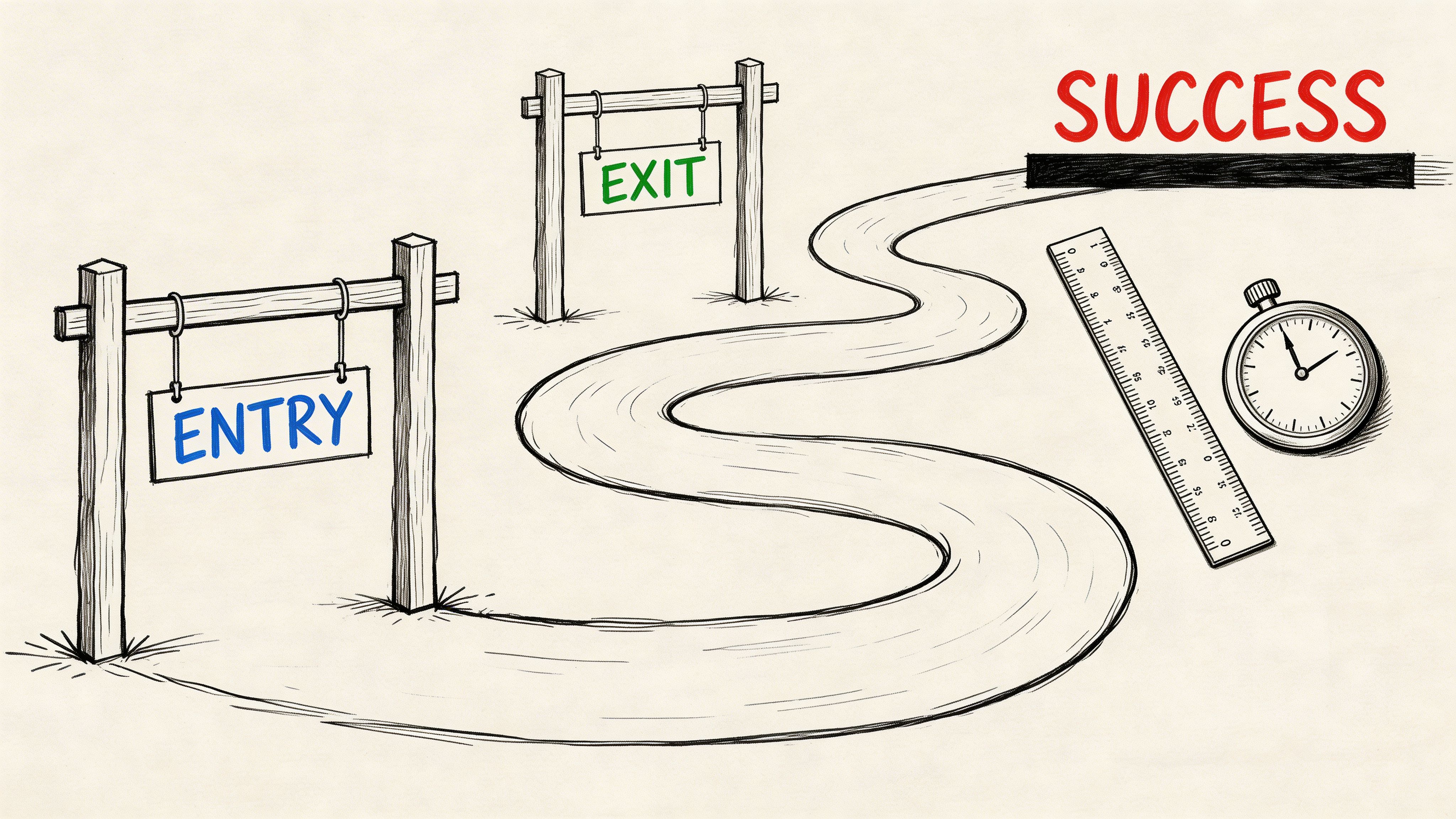
Release debates usually drag on because the team never agreed on the gates.
One person says the feature is ready because the ticket is done. Another says it isn’t ready because there are open bugs. Design says users still hesitate in the core flow. Leadership asks for “one more round”. Everyone is speaking, and nobody is using the same criteria.
Entry criteria stop premature testing
Entry criteria define the minimum conditions required to begin meaningful testing.
Use them to protect focus. Testing too early on an unstable build wastes time and creates noise.
Typical entry criteria include:
Stable build available: The environment is deployable and accessible.
Requirements are clear enough: The team knows expected behaviour and key edge cases.
Dependencies are ready: APIs, integrations, content, and feature flags are available.
Core test assets exist: Test cases, exploratory charters, or UX missions are prepared.
Ownership is assigned: People know who executes, triages, and signs off.
If even two of these are missing, test execution turns into environment support.
Exit criteria stop endless cycling
Exit criteria define what must be true before a release moves forward. Such discipline pays off. Poor testing and QA are direct causes of 29% of all software project failures, and strong planning with clear metrics and risk identification helps teams mitigate the 52.7% of projects that overrun budget (Beta Breakers).
The point isn’t to create arbitrary gates. It’s to create shared gates.
A sensible exit set might include:
Criteria type | Example |
|---|---|
Functional | Critical flows complete without blocking defects |
Regression | Required automated checks have run and failures are triaged |
UX | Key usability issues on the primary journey are reviewed and either fixed or explicitly accepted |
Accessibility | Major accessibility blockers are resolved or logged with owner and timeline |
Operational | Reporting is complete and stakeholders have reviewed release risk |
Success criteria should include leading indicators
Pass rate matters, but it’s not enough.
A product-led software testing plan also looks at signals that predict whether users will struggle after launch. Time to complete key tasks. Repeated hesitation points. Error recovery behaviour. Navigation confusion. Pattern-level friction across the same screen or step.
This highlights the difference between lagging and leading quality signals. For a useful product perspective, see https://www.uxia.app/blog/lagging-vs-leading-indicators.
Don’t ask only “Did the build pass?” Ask “What evidence says users won’t get stuck?”
Write your criteria in plain language
Avoid vague phrases like “acceptable quality” or “sufficient coverage”.
Use wording your team can act on:
Testing starts only when the build is stable enough for uninterrupted execution.
The release cannot proceed with unresolved blockers in the primary user journey.
UX issues in onboarding, checkout, or other critical flows require explicit review by product and design.
Any accepted risk must have an owner, rationale, and follow-up date.
That level of clarity removes drama from release decisions. It also gives a new PM something priceless. A way to say no without making it personal.
Structuring Your Software Test Plan Document
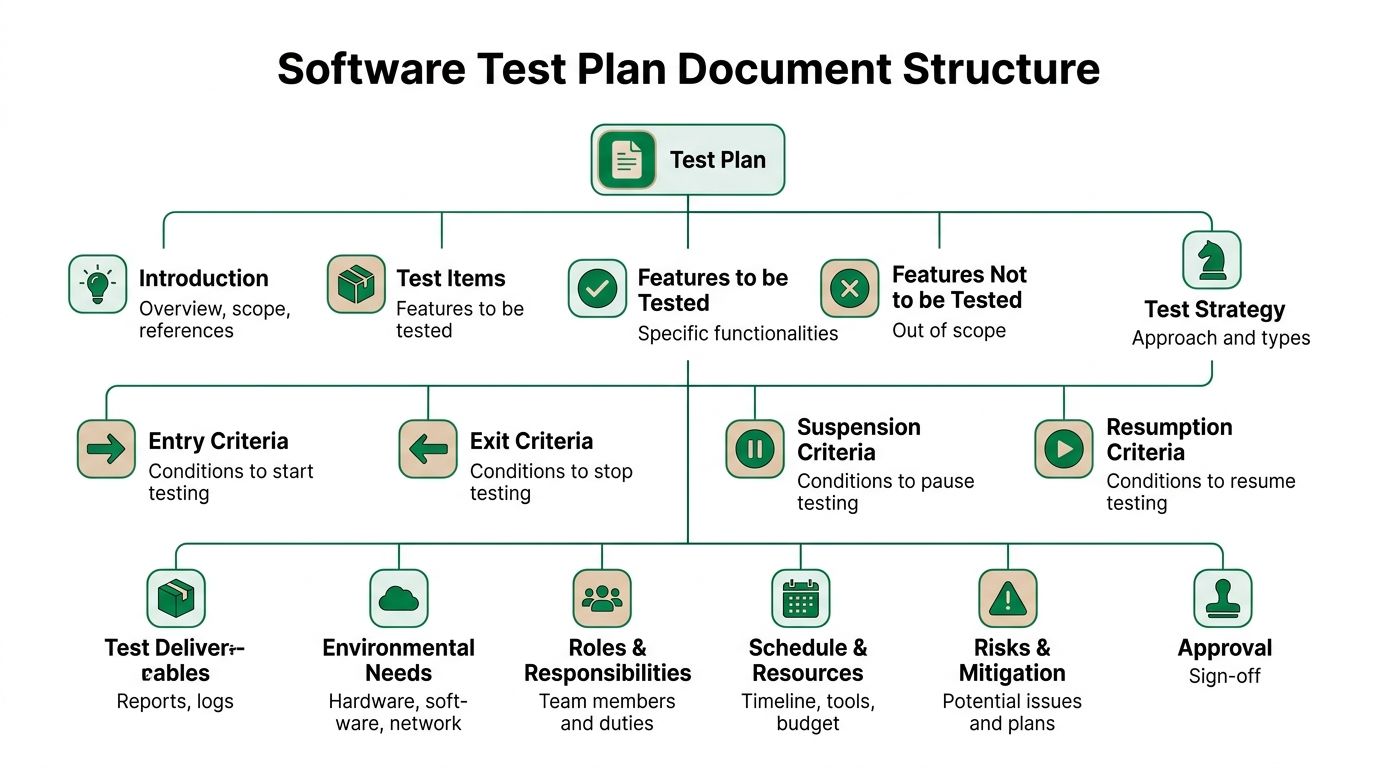
A PM opens the test plan the night before release and cannot answer three basic questions. What are we testing? Which user journeys matter most? Who is making the call if known issues remain? That plan is already failing the team.
A good test plan document should let a product manager, designer, engineer, and QA lead get aligned in one read. If it takes twenty minutes to find the core decisions, it is too bloated. If it skips ownership, scope, or risk, it is too thin.
Use a proven structure, then adapt it to how product teams work
Classic test plan standards got the document shape right. Scope, approach, criteria, deliverables, risks, and approvals still belong in the plan, as noted earlier in the article’s history reference. The mistake is copying that structure too closely and turning it into ceremony.
For product teams, the document should live where work already happens. Notion, Confluence, Jira, TestRail, or a shared release doc all work. The format matters less than one thing. People can scan it fast and act on it.
If your team is adding AI-led UX validation, the document should also make space for that from the start, not hide it under “other testing.” A plan that treats synthetic testing as a first-class method catches confusion, hesitation, and trust issues earlier. For a practical model, see this guide to synthetic user testing.
A practical outline you can copy
Software test plan outline
Introduction Release name, owner, date, and short business context
Test items Features, user journeys, integrations, platforms, or systems under review
Features to be tested New functionality, changed behaviour, regression hotspots, UX-sensitive screens
Features not to be tested Explicit exclusions so scope does not expand without notice
Test approach Unit, integration, regression, exploratory, accessibility, synthetic UX testing, and manual review methods
Entry and exit criteria Conditions for starting, pausing, resuming, and completing testing
Pass and fail criteria How defects, usability issues, accessibility gaps, and accepted risks are judged
Deliverables Test cases, session notes, defect reports, UX findings, summaries, release recommendation
Environment needs Devices, browsers, builds, accounts, anonymised data, integrations, feature flags
Roles and responsibilities Who owns execution, triage, design review, product sign-off, and release recommendation
Schedule Milestones for setup, execution, analysis, fixes, retest, and final review
Risks and contingencies Likely blockers, fallback plans, and escalation path
Approval Who signs off and what evidence they need
That outline is sufficient for many teams. The value comes from how clearly each section reflects real product risk.
Add the sections generic QA templates usually miss
A test plan written only for QA leaves product blind to user impact. Add a few sections that make release risk visible in product terms.
Critical user journeys
Name the flows that drive activation, revenue, retention, or support volume. Onboarding, checkout, account recovery, plan selection, and form completion usually belong here.
These flows deserve more than pass or fail status. They need evidence that users can complete them without confusion.
UX assumptions being tested
Write down the beliefs behind the design. Users will notice the primary action. Pricing language is clear. Error states tell people how to recover. The next step feels obvious on mobile.
This changes the conversation. Product and design are no longer reacting to bugs alone. They are validating whether the experience works as intended.
Accepted risk log
Every release has trade-offs. The team may ship with a low-severity layout issue, a known analytics gap, or a browser-specific defect outside the main audience.
Put those decisions in the document with owner, rationale, and follow-up date. Memory is unreliable under release pressure. Written risk decisions prevent the same argument from resurfacing a week later.
Include evidence, not just test activity
Many test plans list cases and environments but fail to show what was learned. That creates noise instead of clarity.
A stronger document includes outputs such as:
Exploratory session notes: what broke, what felt awkward, what needs retest
Behavioural findings: hesitation points, repeated errors, confusing copy, dead-end moments
Visual evidence: screen recordings, screenshots, annotated UI problems
Synthetic testing findings: where AI-generated users struggled, dropped context, or misread the interface
Stakeholder summary: a short release-readiness view with clear risk callouts
I usually push PMs to ask one simple question while reviewing the doc. Can an executive, designer, or engineer understand release risk without reading fifty Jira tickets? If the answer is no, the document still needs work.
The best test plan document is not the longest one. It is the one that helps the team make faster, better release decisions under pressure.
Integrating AI Synthetic Testing Into Your Plan
This is the part many software testing plans still bolt on too late.
Teams plan for unit tests, API checks, and regression scripts. Then, if there’s time, they try to schedule some user testing. In practice, there usually isn’t enough time, enough participants, or enough room left in the sprint to act on what they learn.
That’s a planning problem, not a research problem.
For ES region scaleups, UX validation is a primary bottleneck, causing 3-5 days of sprint delay because teams have to recruit human testers. The same source notes that 72% of app failures originate in user experience issues, which is why AI-driven synthetic testing deserves a defined place in the plan, not an afterthought (TSG Training).
Write synthetic testing into the plan as a formal method
Treat AI synthetic testing like any other testing stream. Give it a purpose, owner, inputs, timing, and deliverables.
Document:
What it will validate: Comprehension, navigation, trust, accessibility cues, task completion
Which assets it uses: Live product, prototype, image sequence, or video walkthrough
When it runs: Before build, during design iteration, before release, after significant copy or flow changes
Who reviews output: Usually product, design, and sometimes engineering for implementation impact
If you’re new to the method, this guide to https://www.uxia.app/blog/a-complete-guide-to-synthetic-user-testing is a useful operational reference.
Define a clear mission
Synthetic testing only works when the mission is specific.
Bad mission: “Review this onboarding flow.”
Better mission: “You’re a first-time user trying to create an account and understand whether this product is safe to use for work. Complete signup and explain anything that feels unclear or untrustworthy.”
Good missions include:
User intent
What is the participant trying to achieve?
Context
Why are they here, and what pressure or expectations do they bring?
Completion rule
What counts as success or abandonment?
Observation prompts
What should the system pay attention to, such as confusion, hesitation, trust, or missed calls to action?
Choose audience profiles deliberately
The output is only useful if the participant profile maps to the decision you’re making.
For each mission, define:
Planning field | Example |
|---|---|
User type | First-time visitor, returning customer, admin, evaluator |
Behavioural stance | Cautious, comparison-driven, time-pressed, detail-oriented |
Relevant traits | Mobile-heavy, low familiarity, accessibility needs, high trust sensitivity |
Journey focus | Onboarding, pricing review, form completion, checkout |
Product teams often sharpen insight here faster than with broad, generic testing.
Specify deliverables in advance
Don’t just say “run AI testing”.
Name the outputs that must come back into the sprint:
Heatmaps: Where attention clusters or drops
Task success observations: Whether users complete the intended journey cleanly
Issue summaries: Navigation, copy, trust, accessibility, and interaction problems
Transcripts or think-aloud logs: Why users hesitated or changed direction
Prioritised recommendations: What should change now versus later
Synthetic testing works best when it feeds product decisions within the same sprint, not as a report that sits in a folder.
Put it at the right point in the cadence
The strongest pattern is to run it before expensive implementation decisions harden.
Use it:
after key design changes
before sign-off on important journeys
after bug fixes that alter flow logic
whenever a team debates whether a UX problem is “real enough” to act on
That last point matters. Synthetic testing can settle arguments quickly because it brings behavioural evidence into the room.
When you operationalise it this way, UX validation stops being a rare event. It becomes part of the system.
Managing Execution Schedules and Reporting
A plan that nobody can execute is just neat documentation.
Execution depends on three things. Clear ownership, realistic timing, and reporting that drives decisions instead of clutter.
Assign roles with no overlap confusion
Teams don’t need more people in testing meetings. They need cleaner accountability.
A workable split often looks like this:
Product manager: Owns scope, risk calls, release trade-offs, and final prioritisation
Designer or UX researcher: Owns usability questions, task framing, and review of behavioural findings
Engineer or engineering lead: Owns unit and integration coverage, fix timelines, and technical triage support
QA or test lead: Owns execution coordination, regression confidence, defect logging, and evidence gathering
Stakeholder approver: Reviews release risk at the right level, not every individual defect
Where teams go wrong is shared ownership without named decision-makers. “The team owns quality” is true in principle and useless in practice unless someone still owns each decision.
Schedule testing as part of delivery, not after delivery
A realistic software testing plan should map onto sprint reality.
Use a cadence like this:
Sprint moment | Testing activity |
|---|---|
Early sprint | Confirm scope, risks, environments, and mission definitions |
Mid sprint | Run code-level checks, integration work, exploratory sessions on early builds |
Before code freeze or release review | Execute regression, UX validation, accessibility review, and triage |
Final stretch | Retest fixes, document accepted risk, prepare release summary |
Don’t schedule all testing at the end and call it efficiency. That converts uncertainty into deadline pressure.
Keep explicit buffer for retesting. Bugs rarely arrive in a neat batch, and UX issues often trigger copy, layout, or flow adjustments that need another pass.
Report for the audience in front of you
Engineers need reproducible detail. Leaders need decision-ready summaries. Product and design need issue patterns.
One report format won’t serve all three.
Use layered reporting:
For engineers
Log the issue, environment, steps, severity, expected behaviour, actual behaviour, and evidence.
Keep it concise and reproducible.
For product and design
Group findings by user journey and friction type. Navigation confusion. Missing feedback. Trust concerns. Accessibility barriers. In these cases, pattern recognition matters more than ticket count.
For leadership
Summarise release readiness in plain language. What is stable, what remains risky, what was deferred, and what the recommendation is.
If you’re reporting UX findings visually, a consolidated reporting workflow like https://www.uxia.app/reports shows the kind of stakeholder-friendly output many teams should aim for.
The best test report answers one question fast. Can we ship this with confidence, and if not, why not?
Use reporting to improve the next plan
The final step is often skipped.
After release, review:
which issues escaped
which criteria were too weak
where the schedule got compressed
whether the team over-tested low-risk areas
whether important UX signals arrived too late
That’s how your software testing plan improves from one release to the next. Not by becoming longer, but by becoming sharper.
A mature team doesn’t chase the fantasy of perfect coverage. It builds a repeatable system for making better release decisions, earlier, with better evidence.
If your team needs faster UX validation inside a modern software testing plan, Uxia is built for that workflow. You can test prototypes or live flows with synthetic users, define missions and audience profiles, and get heatmaps, transcripts, and prioritised usability findings without waiting on recruitment or scheduling. It’s a practical way to bring continuous UX evidence into product delivery instead of treating usability as a last-minute checkpoint.